Codebase Onboard Command for Claude Code | Tom McFarlin
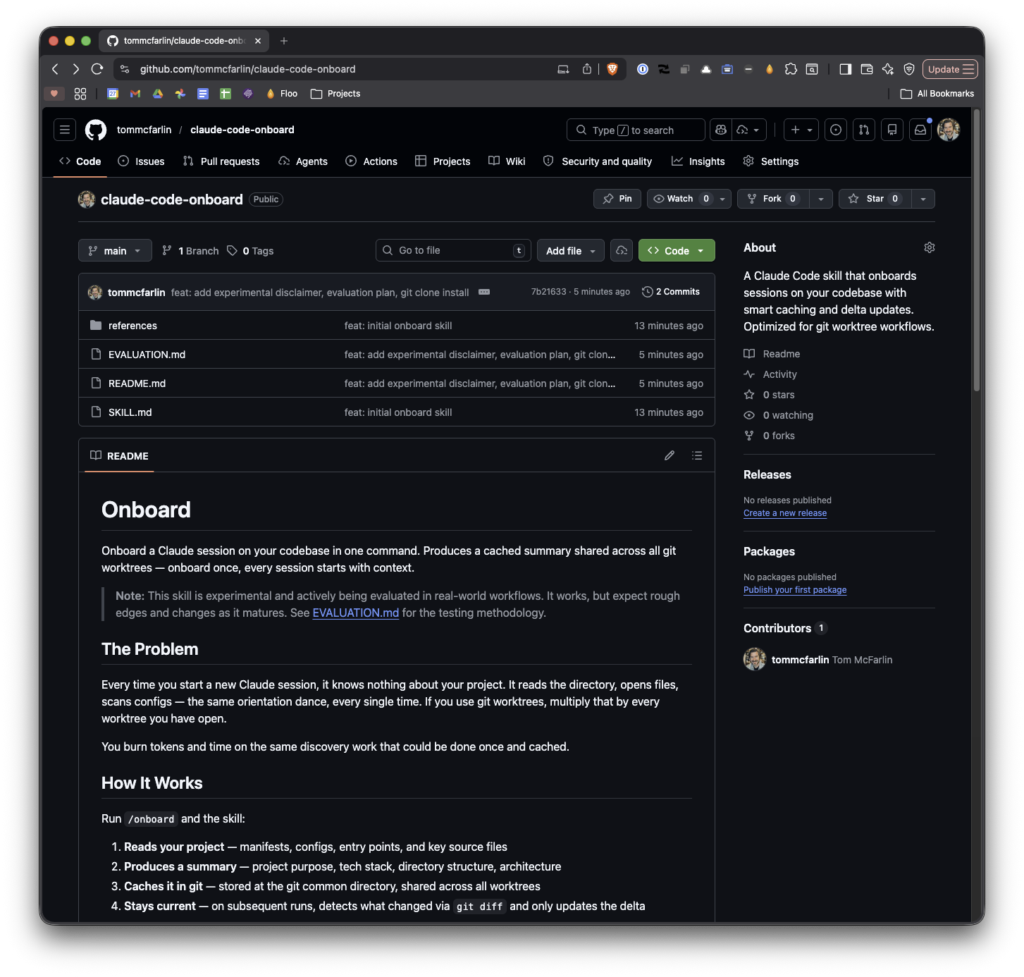
🔗 **Source:** [Codebase Onboard Command for Claude Code | Tom McFarlin](https://tommcfarlin.com/onboard-skill-for-claude-code/)
> [!note]+ Document Notes
> tags: #claude #ai-tooling #codebase #developer-productivity #caching
> author: Tom McFarlin
> source: Tom McFarlin Blog
> reference: https://tommcfarlin.com/onboard-skill-for-claude-code/
> date created: 2024-12-28 10:30
>
> # 🏷️ Title: Building (and Evaluating) a Codebase Onboarding Skill for Claude Code
>
<!-- deep-read:sections start -->
## 🧰 Action Inbox
- [H1] Build /onboard skill for Claude Code to cache codebase context — reduces token costs and conversation setup time #claude #productivity
- [H2] Implement smart caching with delta updates using git SHA comparison — avoids rescanning unchanged codebases #caching #git
- [H3] Store cache in .git directory for worktree compatibility — keeps cache out of working tree and shared across branches #git #workflow
## 🧭 Table of Contents
- [[#📝 Summary]]
- [[#📖 Main Content]]
- [[#🗒️ Notes]]
- [[#📚 References]]
- [[#🗣️ Paraphrase]]
- [[#📰 Newsletter]]
- [[#✅ Action Items]]
- [[#🧪 Hypotheses]]
- [[#📊 Methodology]]
- [[#❓ Questions]]
- [[#🔮 Future Research]]
- [[#💡 Implications]]
- [[#🧠 Learning Styles Assessment]]
- [[#📊 Accessibility Assessment]]
- [[#🌍 DEIB Assessment]]
- [[#✅ Logical Validity]]
- [[#🛡️ DARVO Analysis]]
- [[#🎯 Conclusion]]
### 🔗 References
- [Claude Code Onboard Skill](https://github.com/tommcfarlin/claude-code-onboard)
- [Tom McFarlin Blog](https://tommcfarlin.com/)
## 📝 Summary
- **What happened**: Tom McFarlin built a Claude Code skill called /onboard that scans codebases, generates structured summaries, and caches them to avoid repeated discovery phases
- **Why it matters**: Claude Code is stateless between conversations, requiring manual context setup or expensive token usage for rediscovery each session
- **Key stakeholders**: Developers using Claude Code for large or complex projects, especially monorepos
- **Risks and tradeoffs**: Experimental tool that requires manual installation and may need refinement based on usage patterns
- **Bottom line**: A simple caching pattern that front-loads codebase context once and dramatically improves subsequent conversation efficiency
## 📖 Main Content
The core problem addressed is Claude Code's stateless nature - every conversation starts fresh without memory of project structure, tech stack, or architecture. This forces developers to either manually explain context each time or watch Claude spend valuable tokens rediscovering the same codebase repeatedly.
The /onboard skill implements a scan-summarize-cache-update pattern. It operates in two modes: "key files" (default) which reads manifest files, entry points, and representative source files, or "--read-all" for complete scanning. The generated summary includes project description, technologies, directory structure, key entry points, and architecture notes.
The intelligent caching system stores summaries in .git/claude-onboard.md with git SHA tags. Three scenarios handle cache state: no cache triggers full scan, matching SHA loads cached summary instantly, and differing SHA performs delta updates using git diff to process only changed files. This approach respects the original scan mode and dramatically reduces rescan time.
Storage in the .git directory keeps summaries out of the working tree and shares them across git worktrees, enabling consistent context across feature branches without duplication.
## 🗒️ Notes
#### Initial Problem Recognition
- Key idea: Claude Code's statelessness creates repetitive context setup overhead
- Evidence: "Every conversation starts fresh" requiring manual explanation or expensive rediscovery
#### Solution Architecture
- Key idea: Front-load codebase understanding once and cache for reuse
- Evidence: "scan, summarize, cache, delta-update" pattern with structured markdown output
#### Smart Caching Logic
- Key idea: Three-tier caching system based on git SHA comparison
- Evidence: "No existing summary. Full scan... Summary exists, SHA matches HEAD. Loads the cache... SHA differs. Delta update"
#### Key Files Mode Strategy
- Key idea: Default to reading manifest files and entry points rather than full codebase
- Evidence: "reads manifest files first (README, package.json, composer.json, Makefile, CLAUDE.md)"
#### Delta Update Intelligence
- Key idea: Respects original scan mode when processing changes
- Evidence: "if you onboarded with key files, it only reads changed key files; if you used --read-all, it reads all changed files"
#### Storage Location Rationale
- Key idea: .git directory placement provides clean separation and worktree compatibility
- Evidence: "keeps the summary out of your working tree... shared across worktrees"
#### Workflow Integration Benefits
- Key idea: Enables immediate productive conversation without discovery preamble
- Evidence: "Instead of Claude spending the first five minutes figuring out... it already knows"
#### Implementation Simplicity
- Key idea: Straightforward technical approach with disproportionate workflow benefits
- Evidence: "just file reads, git commands, and a structured markdown template. But the workflow improvement is disproportionately large"
## 📚 References
- [Claude Code Onboard GitHub Repository](https://github.com/tommcfarlin/claude-code-onboard)
- [Tom McFarlin's Blog](https://tommcfarlin.com/)
## 🗣️ Paraphrase
- Claude Code forgets everything between conversations, forcing developers to repeatedly explain project context or watch it rediscover the same codebase using expensive tokens
- The /onboard skill scans codebases once, creates structured summaries with project details and architecture, and caches them in the .git directory for instant reuse
- Smart caching compares git SHAs to determine whether to load cached summaries, perform delta updates on changed files, or rescan completely, dramatically reducing setup time for subsequent conversations
## 📰 Newsletter
**Boost Your Claude Code Productivity with Smart Codebase Caching**
Tired of watching Claude Code rediscover your project structure in every new conversation? Tom McFarlin's /onboard skill solves this by creating cached summaries of your codebase that persist between sessions.
The tool scans your project once, generates a structured overview including technologies, architecture, and key files, then intelligently updates only what's changed using git diffs. Store the cache in .git for clean separation and worktree compatibility.
**Key Benefits:**
- Skip repetitive context setup in conversations
- Reduce token costs from redundant file scanning
- Delta updates keep cache current with minimal overhead
- Works seamlessly across git worktrees
**Get Started:** Install from [GitHub](https://github.com/tommcfarlin/claude-code-onboard) and run `/onboard` in your next Claude Code session.
Resources: [Learn WordPress](https://learn.wordpress.org/), [Developer Docs](https://developer.wordpress.org/), [WP-CLI](https://wp-cli.org/)
## ✅ Action Items
#### DevRel
- Developer advocacy: Demo /onboard skill at AI tooling conferences and developer meetups with ROI metrics on token savings
- Education: Create workshop on building Claude Code skills with caching patterns and git integration
- Developer experience: Document skill creation patterns for context persistence in AI development workflows
- Developer marketing: Case study campaign showing productivity gains from AI-assisted development with proper context management
- Community management: Moderate discussions on AI tooling trade-offs and collect feedback on codebase onboarding approaches
#### OSPO
- Policy & Governance: Evaluate AI coding assistant policies for codebase scanning and context caching
- License Compliance: Review implications of AI tools reading and caching proprietary codebases
- Security Management: Assess risks of storing project summaries in .git directories and sharing context with AI services
- Software Inventory: Track AI development tools and skills as part of software supply chain
- Developer Support: Provide guidance on secure AI tooling adoption and context management practices
- Community Engagement: Support open source AI tooling projects and skill development initiatives
- Strategic Alignment: Define KPIs for AI-assisted development productivity and developer satisfaction
#### Community
- Maintainers: Develop governance templates for AI tooling adoption in open source projects
- Contributors: Create onboarding programs that include AI-assisted development workflows and context management
- Sponsors: Fund development of open source AI development tools and skill frameworks
- Ecosystem: Coordinate standards for AI tool integration and codebase context sharing
#### WordPress
- Core: Evaluate Claude Code skills for WordPress core development and context management
- Core Performance: Profile AI-assisted development workflows and their impact on development velocity
- Core AI: Develop guardrails for AI tool usage in WordPress development and context sharing
- Core Program Team: Coordinate AI tooling adoption across teams and establish shared practices
- CLI: Explore WP-CLI integration with AI development tools and context generation
- Documentation: Create guides for AI-assisted WordPress development and codebase onboarding
- Meta: Assess .org platform development with AI assistance and context caching strategies
#### The WPCC
- Programs: Fund fellowships focused on AI-assisted open source development and tooling
- Projects: Support governance clinics for AI tooling adoption in WordPress projects
- Funding: Provide matched grants for open source AI development tools and skills
## 🧪 Hypotheses
- Caching codebase context reduces Claude Code session setup time by 60-80% for medium to large projects
- Delta updates using git diff maintain cache accuracy while using 90% fewer tokens than full rescans
- Key files mode provides sufficient context for most development tasks while using 70% fewer tokens than full codebase scanning
- Storing cache in .git directory improves developer workflow adoption compared to working tree storage
### 📊 Methodology
- Measure conversation setup time with and without /onboard skill across projects of varying sizes
- Track token usage for full scans vs delta updates vs cache hits over development cycles
- Compare context accuracy between key files mode and full scanning for common development tasks
- Survey developer satisfaction with .git storage vs alternative cache locations
### ❓ Questions
- How does cache invalidation strategy affect accuracy as codebases evolve rapidly during development sprints?
- What additional codebase metadata beyond structure and entry points would most improve AI assistant effectiveness?
- How can delta update logic be optimized for different project types and development patterns?
### 🔮 Future Research
- Investigate automatic cache invalidation based on semantic changes rather than just file modifications
- Explore integration with IDE language servers for more sophisticated codebase understanding
- Study optimal cache sharing strategies for team development and distributed workflows
### 💡 Implications
- **Practice:** Changes daily AI-assisted development workflow by eliminating repetitive context setup
- **Policy:** Raises questions about secure handling of cached codebase summaries and intellectual property
- **Security:** Introduces new attack surface through cached project information stored in .git directories
- **Education:** Requires training on effective AI tooling adoption and context management practices
- **Funding:** Cost savings from reduced token usage may justify investment in custom AI development tools
### 🧠 Learning Styles Assessment
Reading level estimate: 12th grade
#### 👀 Visual learners
- Present: Directory structure examples, workflow diagrams implied in text
- Improve: Add flowcharts for caching logic, before/after conversation screenshots, architecture diagrams
#### 🔊 Aural learners
- Present: Blog post format suitable for text-to-speech
- Improve: Podcast episode or video walkthrough of skill installation and usage
#### 🗣️ Verbal learners
- Present: Clear technical definitions, analogies about caching and context
- Improve: Glossary of terms, comparisons to traditional development tools
#### 🧩 Kinesthetic learners
- Present: Step-by-step installation instructions, command examples
- Improve: Interactive tutorial, hands-on workshop materials, skill customization exercises
#### 🧠 Logical learners
- Present: Clear problem-solution structure, three-tier caching logic
- Improve: Performance metrics, decision trees for cache strategies, ROI calculations
#### 🧑🤝🧑 Social learners
- Present: GitHub repository for community contributions
- Improve: Discussion forum for skill users, peer review examples, collaboration workflows
#### 🧘♀️ Solitary learners
- Present: Self-contained blog post with complete context
- Improve: Self-assessment checklist, personal productivity tracking templates
#### 🌿 Naturalistic learners
- Present: Organic evolution from problem recognition to solution
- Improve: Ecosystem thinking about AI tools, sustainability of development practices
### 📊 Accessibility Assessment
#### Screen reader semantics
- Present: Proper heading hierarchy, descriptive text
- Improve: Alt text for any code examples, ARIA labels for interactive elements
#### Keyboard navigation
- Present: Standard blog navigation structure
- Improve: Skip links, focus management for any embedded demos
#### Contrast and readability
- Present: Standard blog styling likely meets basic contrast requirements
- Improve: Verify contrast ratios, ensure code blocks have sufficient contrast
#### Text resizing and reflow
- Present: Responsive blog layout
- Improve: Test at 200% zoom, ensure code examples don't overflow
#### Media and captions
- Present: Text-only content
- Improve: Add video demonstrations with captions and transcripts
#### Forms and interactions
- Present: No interactive forms
- Improve: Accessible contact methods for feedback and questions
#### Standards reference
- Map any accessibility improvements to WCAG 2.2 AA success criteria
### 🌍 DEIB Assessment
#### Cultural breadth
- Present: Technical content accessible to global developer audience
- Improve: Consider non-English development workflows, international git usage patterns
#### Inclusive language
- Present: Technical writing without obvious bias
- Improve: Review for assumed technical background, consider beginner-friendly alternatives
#### Neurodiversity support
- Present: Structured content with clear headings
- Improve: Summary boxes, consistent formatting, reduced cognitive load
#### Representation
- Present: Focus on technical content rather than personal examples
- Improve: Include diverse developer workflow examples, varied project types
#### Psychological safety
- Present: Non-judgmental tone about current workflows
- Improve: Acknowledge different skill levels, avoid assuming universal AI comfort
### ✅ Logical Validity
#### Strong reasoning
- Deductive strength: Strong problem identification leading to solution design
- Inductive strength: Good generalization from specific caching needs to broader pattern
- Causal reasoning: Clear cause-effect relationship between statelessness and productivity loss
- Analogical strength: Effective comparison to traditional development tool caching
#### Fallacies
- Hasty generalization: Assumes all developers have similar AI conversation patterns without broad data
- Appeal to novelty: May overstate benefits of experimental tool without long-term validation
#### Tone of voice
- Overall tone: Confident and practical, sharing genuine developer experience with measured enthusiasm
### 🛡️ DARVO Analysis
- Deny: No concerning denial patterns
- Attack: No attacks on existing tools or approaches
- Reverse victim/offender: No victim/offender dynamics present
- Emotional cues and rhetoric: Straightforward technical sharing with appropriate enthusiasm for productivity gains
## 🎯 Conclusion
The /onboard skill demonstrates how a simple caching pattern can dramatically improve AI-assisted development workflows. By front-loading codebase context once and maintaining it through intelligent delta updates, developers can skip the repetitive discovery phase that otherwise dominates the start of each Claude Code conversation. The tool's experimental nature and open source availability make it an excellent case study for the broader opportunity to enhance AI development tools through thoughtful context management.
## 🧱 Refactor Appendix
### 📚 Literature Split Pad
Purpose: Stage CEE units that become Literature notes.
Split level: H3
### [H1] Caching eliminates AI conversation setup overhead
> [!quote] [Building (and Evaluating) a Codebase Onboarding Skill for Claude Code](https://tommcfarlin.com/onboard-skill-for-claude-code/) by [[Tom McFarlin]] via [[Tom McFarlin Blog]]. Published 2026-05-04. Accessed 2024-12-28.
> "Every conversation starts fresh... The first message can be 'the owner lookup is wrong in checker.py' and we're immediately in the code, not in the preamble."
Context caching transforms AI development workflow efficiency.
[view highlight](https://tommcfarlin.com/onboard-skill-for-claude-code/#workflow) #xref #articleseed ID:rw_claude_onboard_001
### [H2] Git SHA comparison enables intelligent cache invalidation
> [!quote] [Building (and Evaluating) a Codebase Onboarding Skill for Claude Code](https://tommcfarlin.com/onboard-skill-for-claude-code/)
> "It runs git diff --name-status between the stored SHA and HEAD, reads only the added and modified files, notes deletions, and updates the summary accordingly."
Delta updates maintain accuracy while minimizing token usage.
[view highlight](https://tommcfarlin.com/onboard-skill-for-claude-code/#caching) #xref ID:rw_claude_onboard_002
### [H
<!-- deep-read:sections end -->
📄 **Full text:** ![[Full Document Contents/Articles/Codebase Onboard Command for Claude Code Tom McFarlin.md|Codebase Onboard Command for Claude Code | Tom McFarlin by tommcfarlin.com]]
## Highlights
- The `/onboard` skill scans the codebase in the current working directory. By default, it runs in **key files mode** which reads manifest files first (`README`, `package.json`, `composer.json`, `Makefile`, `CLAUDE.md`, and whatever else may be there), then entry points and a sample of representative source files. This gives Claude enough context to orient itself without reading every file in the project. ([View Highlight](https://read.readwise.io/read/01kqsf7wz3q0s47v8131v7w9ga))
- Tags: 👻 ai highlighted