GitHub Copilot Chat in Visual Studio 2022
[[3. Resources/Readwise/Full Document Contents/Articles/GitHub Copilot Chat in Visual Studio 2022|Full Document Contents]]
## Document Notes
Abstract:
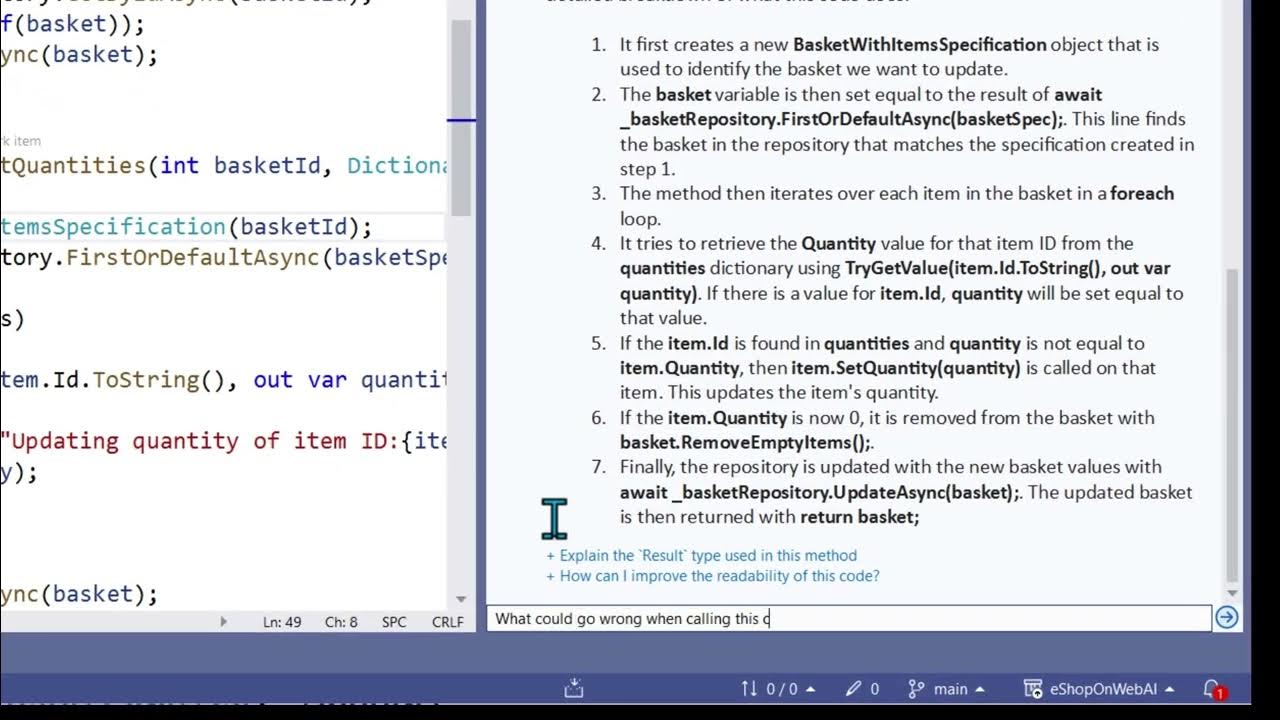
This article discusses GitHub Copilot, a new conversational AI assistance feature in Visual Studio 2022. It offers insights, analysis, and explanations about code and can even suggest fixes. It allows users to ask questions in natural language and uses the code context to come up with intelligent answers. Visual Studio helps to gather the right context and form the right questions to get the best answers.
Bullet List:
• GitHub Copilot:
o New conversational AI assistance feature in Visual Studio 2022
o Insights, analysis, and explanations about code
o Suggest fixes
• Questions:
o Ask questions in natural language
o Uses code context to come up with intelligent answers
• Visual Studio:
o Gathers the right context
o Forms the right questions to get the best answers
Paraphrased Paragraphs:
GitHub Copilot is a revolutionary AI support feature in Visual Studio 2022. It provides users with an understanding of their code, such as details and explanations. In certain cases, it can even propose solutions. It's easy to ask Copilot questions using everyday language right in the code. The context of the code is taken into consideration to generate insightful analysis and recommendations. Visual Studio assists in collecting the right context and posing accurate questions to get the ideal responses.
1. What additional features does Copilot have compared to other AI assistance tools?
2. How does Copilot use the code context to provide more intelligent analysis and suggestions?
3. How does Copilot guide users through debugging and other technical processes?
GitHub Copilot is a new and powerful conversational AI assistant in Visual Studio which provides insights into code, analysis, explanation, and even fixes. It can be asked questions in natural language, and it will provide intelligent analysis and suggestions based on the code context. It can also provide a natural language explanation and sample calling code to help understand usage. Copilot can also provide a list of possible issues and even offer code to fix them. In the near future, Copilot will be able to provide hints, explanations of stack traces and exceptions, and propose fixes while debugging.
> [!note]+ Document Notes
> Abstract:
> This article discusses GitHub Copilot, a new conversational AI assistance feature in Visual Studio 2022. It offers insights, analysis, and explanations about code and can even suggest fixes. It allows users to ask questions in natural language and uses the code context to come up with intelligent answers. Visual Studio helps to gather the right context and form the right questions to get the best answers.
>
> Bullet List:
> • GitHub Copilot:
> o New conversational AI assistance feature in Visual Studio 2022
> o Insights, analysis, and explanations about code
> o Suggest fixes
> • Questions:
> o Ask questions in natural language
> o Uses code context to come up with intelligent answers
> • Visual Studio:
> o Gathers the right context
> o Forms the right questions to get the best answers
>
> Paraphrased Paragraphs:
> GitHub Copilot is a revolutionary AI support feature in Visual Studio 2022. It provides users with an understanding of their code, such as details and explanations. In certain cases, it can even propose solutions. It's easy to ask Copilot questions using everyday language right in the code. The context of the code is taken into consideration to generate insightful analysis and recommendations. Visual Studio assists in collecting the right context and posing accurate questions to get the ideal responses.
>
> 1. What additional features does Copilot have compared to other AI assistance tools?
> 2. How does Copilot use the code context to provide more intelligent analysis and suggestions?
> 3. How does Copilot guide users through debugging and other technical processes?
>
> GitHub Copilot is a new and powerful conversational AI assistant in Visual Studio which provides insights into code, analysis, explanation, and even fixes. It can be asked questions in natural language, and it will provide intelligent analysis and suggestions based on the code context. It can also provide a natural language explanation and sample calling code to help understand usage. Copilot can also provide a list of possible issues and even offer code to fix them. In the near future, Copilot will be able to provide hints, explanations of stack traces and exceptions, and propose fixes while debugging.
## Highlights
- GitHub Copilot gives you new and powerfulconversational AI assistance in Visual Studio going beyond completion.It gives you insights into your code, such as analysis and explanation.And even fixes, in some cases,based on what we know about what you're doing at the time.I can easily ask Copilot questions in my natural language,right in line, in my code.It'll use the code context to come up with intelligent analysis and suggestions.VS helps gather the right context and form a good question to get great answers. ([View Highlight](https://read.readwise.io/read/01gw86884t9y5vz5c7vhb0e0vk))
- Note: 1. How can I access the Copilot chat window in Visual Studio 2022?
2. Does Copilot have the capability to identify and fix more complex issues?
3. What other features will be added to Copilot in the near future?