How Penpot Makes Design and Developer Collaboration Seamless
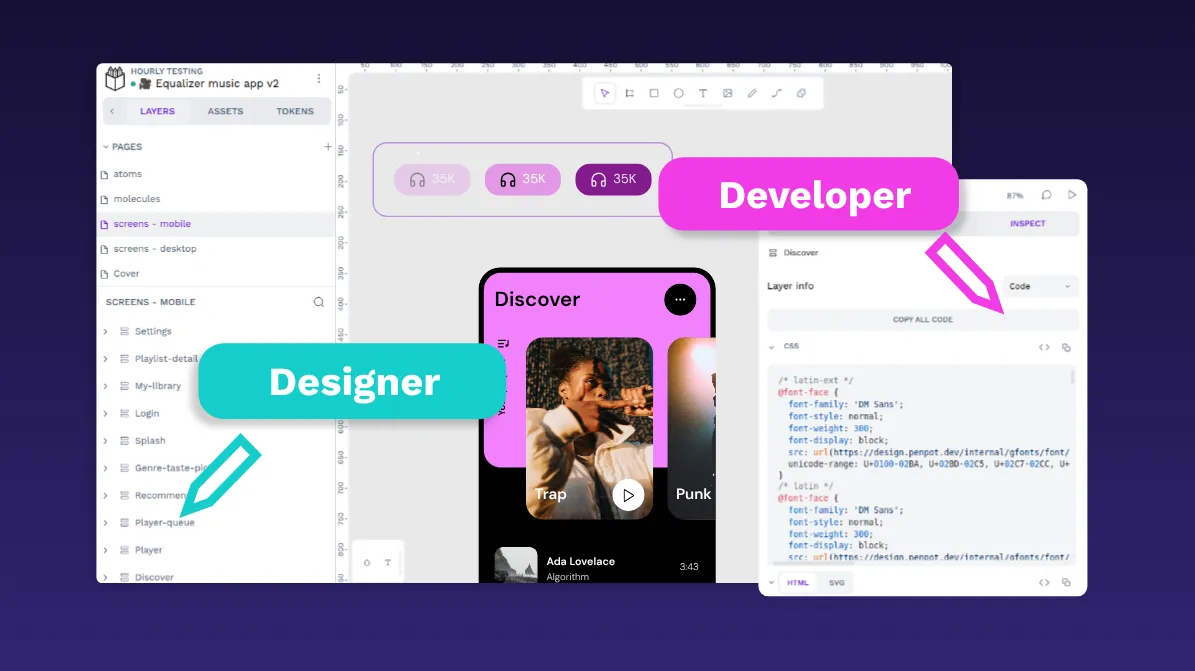
🔗 **Source:** [How Penpot Makes Design and Developer Collaboration Seamless](https://penpot.app/blog/how-penpot-eliminates-developer-handoffs/)
> [!note]+ Document Notes
> tags: #design-systems #developer-experience #design-tokens #css-workflow #open-source
> author: Laura Kalbag
> source: Penpot Blog
> reference: https://penpot.app/blog/how-penpot-eliminates-developer-handoffs/
> date created: 2025-01-13 09:15
>
> # 🏷️ Title: How Penpot makes design and developer collaboration seamless
>
<!-- deep-read:sections start -->
## 🧰 Action Inbox
- [H1] Evaluate Penpot for current design system — CSS-based workflow #design-systems
- [H2] Set up design token naming conventions — shared vocabulary #design-tokens
- [H3] Create developer access to design files — inspect panel workflow #developer-experience
## 🧭 Table of Contents
- [[#📝 Summary]]
- [[#📖 Main Content]]
- [[#🗒️ Notes]]
- [[#📚 References]]
- [[#🗣️ Paraphrase]]
- [[#📰 Newsletter]]
- [[#✅ Action Items]]
- [[#🧪 Hypotheses]]
- [[#📊 Methodology]]
- [[#❓ Questions]]
- [[#🔮 Future Research]]
- [[#💡 Implications]]
- [[#🧠 Learning Styles Assessment]]
- [[#📊 Accessibility Assessment]]
- [[#🌍 DEIB Assessment]]
- [[#✅ Logical Validity]]
- [[#🛡️ DARVO Analysis]]
- [[#🎯 Conclusion]]
### 🔗 References
- [Penpot Platform](https://penpot.app)
- [Style Dictionary](https://amzn.github.io/style-dictionary/)
- [W3C Design Tokens Community Group](https://www.w3.org/community/design-tokens/)
## 📝 Summary
- What happened: Penpot positions itself as a design tool that eliminates traditional design-to-development handoff friction
- Why it matters: Traditional design tools create translation layers that slow development and introduce inconsistencies
- Key stakeholders: Design teams, frontend developers, design system maintainers
- Risks and tradeoffs: Learning curve for CSS-based design concepts, potential overhead in token setup
- Bottom line: Penpot uses web standards (HTML/CSS/SVG) natively to create direct alignment between design intent and code implementation
## 📖 Main Content
Penpot addresses a common pain point in product development: the disconnect between design files and implementable code. Traditional design tools often require developers to reverse-engineer layouts from abstract specifications, leading to delays and inconsistencies.
The platform takes a web-standards approach, building designs directly with HTML, CSS, and SVG rather than proprietary formats. This means developers can inspect designs and see actual CSS Grid, Flexbox, and other web-native properties instead of approximations.
Key technical features include design token support with W3C DTCG format export, comprehensive inspect panels showing CSS properties, and integration capabilities through APIs and webhooks. The tool supports self-hosting for enterprise teams requiring infrastructure control.
The article argues this approach creates shared vocabulary between designers and developers, reduces interpretation errors, and enables faster implementation cycles. However, it requires some learning investment for designers unfamiliar with CSS concepts.
## 🗒️ Notes
#### [H1] Traditional handoff creates translation friction
- Key idea: Developers receive abstract design specs that don't map to real code structures
- Evidence: "developers receive abstract design specs that don't quite map to real code and spend hours trying to reverse-engineer layouts, spacing, and interactions"
#### [H2] Penpot provides direct CSS inspection
- Key idea: Developers can see actual CSS Grid, Flexbox, and other properties behind designs
- Evidence: "they can click into a design and immediately see the CSS, Grid, or Flexbox rules that match how they'll actually build it"
#### [H1] Design tokens create semantic naming bridges
- Key idea: Tokens connect design concepts to technical implementation through shared vocabulary
- Evidence: "colors don't have to stay as raw hex values. By creating tokens, teams can tie a button color to a semantic name like color.background.brand"
#### [H2] W3C DTCG format enables tool integration
- Key idea: Standard token format allows integration with build pipelines and transformation tools
- Evidence: "Penpot supports exporting tokens as JSON in the W3C DTCG format, which can then be transformed into CSS variables, SCSS, or other platform-specific formats"
#### [H2] Token sets enable systematic theming
- Key idea: Multiple token sets allow complete theme swapping without code changes
- Evidence: "teams create token sets that swap out entirely. SaaS platforms can use this for client-specific branding where each client gets their own token set without touching implementation code"
#### [H1] Inspect panel eliminates measurement guesswork
- Key idea: Direct access to spacing, properties, and markup reduces developer interpretation
- Evidence: "The inspect panel provides measurements, spacing relationships, and style properties with direct copy functionality"
#### [H3] View-only mode enables safe developer exploration
- Key idea: Developers can examine designs without accidentally modifying them
- Evidence: "The interface includes a view-only mode so developers can explore design files without accidentally modifying them"
#### [H2] Open formats support workflow integration
- Key idea: SVG and JSON exports integrate with existing development toolchains
- Evidence: "Teams can use Penpot's plugins API and webhooks to connect with other tools, parse exported tokens with custom scripts, or integrate design outputs into build pipelines"
#### [H1] Shared CSS vocabulary improves communication
- Key idea: Common technical language reduces translation overhead between teams
- Evidence: "When both teams work with CSS concepts like flex-wrap, grid-area, or align-items, communication becomes more precise"
#### [H2] CSS learning curve requires collaboration investment
- Key idea: Designers need some CSS familiarity but developers can provide guidance
- Evidence: "Developers can quickly explain how properties like flex-wrap or align-items behave, and designers can apply that knowledge visually in Penpot"
#### [H3] File organization supports implementation status
- Key idea: Clear project structure helps developers identify ready-to-implement designs
- Evidence: "you can organize files into projects (e.g., exploration, in-progress, production) and use page names or labels to indicate status"
#### [H2] Direct file access reduces specification overhead
- Key idea: Developers working directly with design files gets more accurate information
- Evidence: "The inspect panel contains more accurate information than static specifications"
## 📚 References
- [Penpot Design Tool](https://penpot.app)
- [Style Dictionary Token Transformation](https://amzn.github.io/style-dictionary/)
- [W3C Design Tokens Community Group Format](https://www.w3.org/community/design-tokens/)
- [Tailwind HTML Plugin](https://penpot.app/plugins)
## 🗣️ Paraphrase
- Penpot eliminates design-to-development friction by using web standards (HTML/CSS/SVG) as the native design language instead of requiring translation layers
- Design tokens with semantic names create shared vocabulary between designers and developers, enabling systematic theming and cleaner code integration
- The inspect panel gives developers direct access to CSS properties, measurements, and exportable assets, reducing guesswork and interpretation errors
## 📰 Newsletter
**Streamline Your Design-to-Code Workflow with Web Standards**
Traditional design handoffs often feel like a game of telephone—designers create mockups, developers try to interpret them, and the final result rarely matches the original vision. Penpot takes a different approach by using HTML, CSS, and SVG as native design languages.
Key benefits for WordPress teams:
- **Direct CSS output**: See actual Flexbox and Grid properties instead of abstract specs
- **Design tokens**: Export semantic naming (color.brand.primary) that maps to CSS custom properties
- **Open formats**: Integrate with existing build processes and version control
This approach is particularly valuable for WordPress theme development, where design systems need to translate cleanly into PHP templates and CSS frameworks.
**Try it out**: Penpot offers free accounts and self-hosting options for teams needing infrastructure control.
Resources: [Penpot Platform](https://penpot.app), [Design Tokens Spec](https://www.w3.org/community/design-tokens/), [WordPress Design Handbook](https://make.wordpress.org/design/handbook/)
## ✅ Action Items
#### DevRel
- Developer advocacy: Demo Penpot integration with popular frontend frameworks, measure adoption metrics
- Education: Create workshops on design token workflows, CSS Grid/Flexbox for designers
- Developer experience: Document API integration patterns, provide starter templates
- Developer marketing: Case studies on reduced handoff time, design system ROI
- Community management: Foster design-dev collaboration discussions, collect workflow feedback
#### WordPress
- Design: Evaluate Penpot for WordPress.org design system, test theme development workflows
- Documentation: Create guides for design token integration with WordPress themes
- Community: Workshop templates for design-dev collaboration at WordCamps
- Training: Curriculum on modern CSS in WordPress theme development
- Themes: Review queue efficiency improvements through better design specifications
## 🧪 Hypotheses
- Design tools using web standards reduce implementation time compared to proprietary design formats
- Shared CSS vocabulary between designers and developers decreases revision cycles and miscommunication
- Design token workflows improve design system consistency and maintenance efficiency
- Direct design file access reduces specification documentation overhead
### 📊 Methodology
- A/B test implementation time: Penpot designs vs traditional tool handoffs
- Survey design-dev teams on communication quality before/after shared vocabulary training
- Measure design system consistency: token-based vs manual implementation approaches
- Track documentation time: inspect panel access vs written specification creation
### ❓ Questions
- How does CSS learning curve for designers compare to developer handoff translation overhead?
- What integration patterns work best for design tokens in existing WordPress theme workflows?
- How do self-hosted Penpot instances perform compared to SaaS alternatives for large teams?
### 🔮 Future Research
- Performance impact of design token transformation in build pipelines
- Accessibility implications of CSS-first design tool workflows
- Enterprise adoption patterns for self-hosted design infrastructure
### 💡 Implications
- Practice: Design teams may need CSS training investment, development teams gain direct design access
- Policy: Design tool selection criteria should include web standards compatibility and data portability
- Security: Self-hosted options provide data control but require infrastructure management
- Education: Design curricula should incorporate web standards alongside visual design principles
- Funding: ROI calculations should include reduced handoff time and improved design-dev collaboration
### 🧠 Learning Styles Assessment
Reading level estimate: 12th grade
#### 👀 Visual learners
- Present: Screenshots of inspect panel, design token examples, grid layout visuals
- Improve: Architecture diagrams showing token transformation pipelines, workflow flowcharts
#### 🔊 Aural learners
- Present: Embedded video demo of design token workflow
- Improve: 5-minute audio summary, podcast-style case study interviews
#### 🗣️ Verbal learners
- Present: Clear definitions of design tokens, CSS terminology, technical concepts
- Improve: Analogy-driven explanations, story-based implementation examples
#### 🧩 Kinesthetic learners
- Present: Step-by-step token setup guide, hands-on inspect panel exploration
- Improve: Interactive sandbox environment, checklist-driven evaluation process
#### 🧠 Logical learners
- Present: Clear workflow comparisons, systematic feature breakdown
- Improve: Decision matrices for tool selection, ROI calculation frameworks
#### 🧑🤝🧑 Social learners
- Present: Collaboration tips, team workflow recommendations
- Improve: Discussion prompts for design-dev team meetings, peer review templates
#### 🧘♀️ Solitary learners
- Present: Individual evaluation tips, self-paced exploration guidance
- Improve: Reflection questions on current workflow pain points, personal skill assessment
#### 🌿 Naturalistic learners
- Present: Workflow ecosystem thinking, tool integration patterns
- Improve: Systems thinking about design-dev collaboration, sustainability considerations
### 📊 Accessibility Assessment
#### Screen reader semantics
- Present: Good heading structure, descriptive link text
- Improve: Alt text for design screenshots, ARIA labels for interactive elements
#### Keyboard navigation
- Present: Standard web navigation patterns
- Improve: Skip links to content sections, visible focus indicators
#### Contrast and readability
- Present: Good text contrast, readable font sizes
- Improve: Check code snippet contrast, ensure adequate line height
#### Text resizing and reflow
- Present: Responsive design, mobile-friendly layout
- Improve: Test at 200% zoom, ensure no horizontal scrolling
#### Media and captions
- Present: Video has controls, appears to have captions
- Improve: Verify caption quality, provide transcript download
#### Forms and interactions
- Present: Standard web form patterns
- Improve: Clear error messaging, appropriate input labels
#### Standards reference
- Meets WCAG 2.2 AA standards for most criteria, minor improvements needed for media accessibility
### 🌍 DEIB Assessment
#### Cultural breadth
- Present: Focus on universal development practices, technology-agnostic approach
- Improve: Examples from different regional development contexts, multilingual design token examples
#### Inclusive language
- Present: Gender-neutral technical language, defined jargon
- Improve: Plain-language summary of technical concepts, avoid industry idioms
#### Neurodiversity support
- Present: Well-structured content, consistent formatting, clear headings
- Improve: More frequent subheadings, visual break-up of long paragraphs
#### Representation
- Present: Focus on technical practices rather than individual identities
- Improve: Case studies from diverse team contexts, varied company examples
#### Psychological safety
- Present: Non-judgmental tone about current workflows, supportive framing
- Improve: Acknowledge different skill levels, provide multiple learning paths
### ✅ Logical Validity
#### Strong reasoning
- Deductive strength: Logical progression from problem (handoff friction) to solution (web standards)
- Inductive strength: Good use of specific examples to support general claims about workflow benefits
- Causal reasoning: Clear cause-effect relationships between shared vocabulary and improved communication
- Analogical strength: Effective comparison between traditional vs web-standards-based design approaches
#### Fallacies
- Appeal to novelty: Implies newer web-standards approach is inherently better without fully comparing tradeoffs
- False dichotomy: Presents traditional vs Penpot as binary choice, doesn't acknowledge hybrid approaches
#### Tone of voice
- Professional and informative with slight promotional bias toward Penpot's approach, generally balanced in presenting challenges alongside benefits
### 🛡️ DARVO Analysis
- Deny: No denial patterns present
- Attack: No attacks on accusers present
- Reverse victim/offender: No victim/offender dynamics present
- Emotional cues and rhetoric: Positive, solution-focused tone without manipulative elements
## 🎯 Conclusion
- Penpot addresses real design-to-development workflow friction through web standards integration and design token support
- Success requires investment in shared vocabulary development and tool familiarity for both design and development teams
- The approach offers particular value for teams building web products where CSS-first design thinking aligns with implementation reality
## 🧱 Refactor Appendix
### 📚 Literature Split Pad
Purpose: Stage CEE units that become Literature notes.
Split level: H3
### [H1] Web standards eliminate design translation layers
> [!quote] [How Penpot makes design and developer collaboration seamless](https://penpot.app/blog/how-penpot-eliminates-developer-handoffs/) by [[Laura Kalbag]] via [[Penpot Blog]]. Published 2026-03-03. Accessed 2025-01-13.
> "Penpot bridges the design-development gap by eliminating the translation layer that creates friction in traditional workflows."
Foundation for evaluating design tool architectures and their impact on development velocity.
[view highlight](https://penpot.app/blog/how-penpot-eliminates-developer-handoffs/#H1) #xref #articleseed ID:rw_001
### [H2] Design tokens create semantic implementation bridges
> [!quote] [How Penpot makes design and developer collaboration seamless](https://penpot.app/blog/how-penpot-eliminates-developer-handoffs/)
> "Using design tokens connects design concepts directly to technical implementation."
Essential for design system governance and cross-functional team communication strategies.
[view highlight](https://penpot.app/blog/how-penpot-eliminates-developer-handoffs/#H2) #xref ID:rw_002
---
### 🔖 Atomic Split Pad (Zettel Candidates)
Purpose: Promote reusable claims into Atomic notes.
Split level: H4
#### [Z1] Shared vocabulary reduces design-dev friction
- Scope: When teams use common technical language (CSS properties, semantic naming)
- Pointer: Throughout article, especially collaboration section
- Links: [[Design-Systems]] [[Developer-Experience]] [[Team-Communication]]
#### [Z2] Open formats enable workflow integration
- Scope: Standard export formats (SVG, JSON) vs
<!-- deep-read:sections end -->
📄 **Full text:** ![[Full Document Contents/Articles/How Penpot Makes Design and Developer Collaboration Seamless|How Penpot Makes Design and Developer Collaboration Seamless, penpot.app]]
## Highlights
- Penpot creates a shared vocabulary between designers and developers. When both teams work with CSS concepts like flex-wrap, grid-area, or align-items, communication becomes more precise. Designers understand technical constraints better, and developers understand design intentions more clearly. ([View Highlight](https://read.readwise.io/read/01kjt5cjdg91agkeybcpcwfa59))
- Tags: 👻 ai highlighted
- While there’s a small learning curve in [picking up CSS terms](https://penpot.app/blog/what-is-css-a-beginners-guide/), most designers find it intuitive once they see how these properties directly shape layouts. But this is where collaboration pays off: Developers can quickly explain how properties like `flex-wrap` or `align-items` behave, and designers can apply that knowledge visually in Penpot. Over time, both sides build fluency in a shared language. ([View Highlight](https://read.readwise.io/read/01kjt5cjef0ryhyj0g27p25vts))
- Tags: 👻 ai highlighted