Manage WordPress Hosting With AI - Pressable MCP Demo
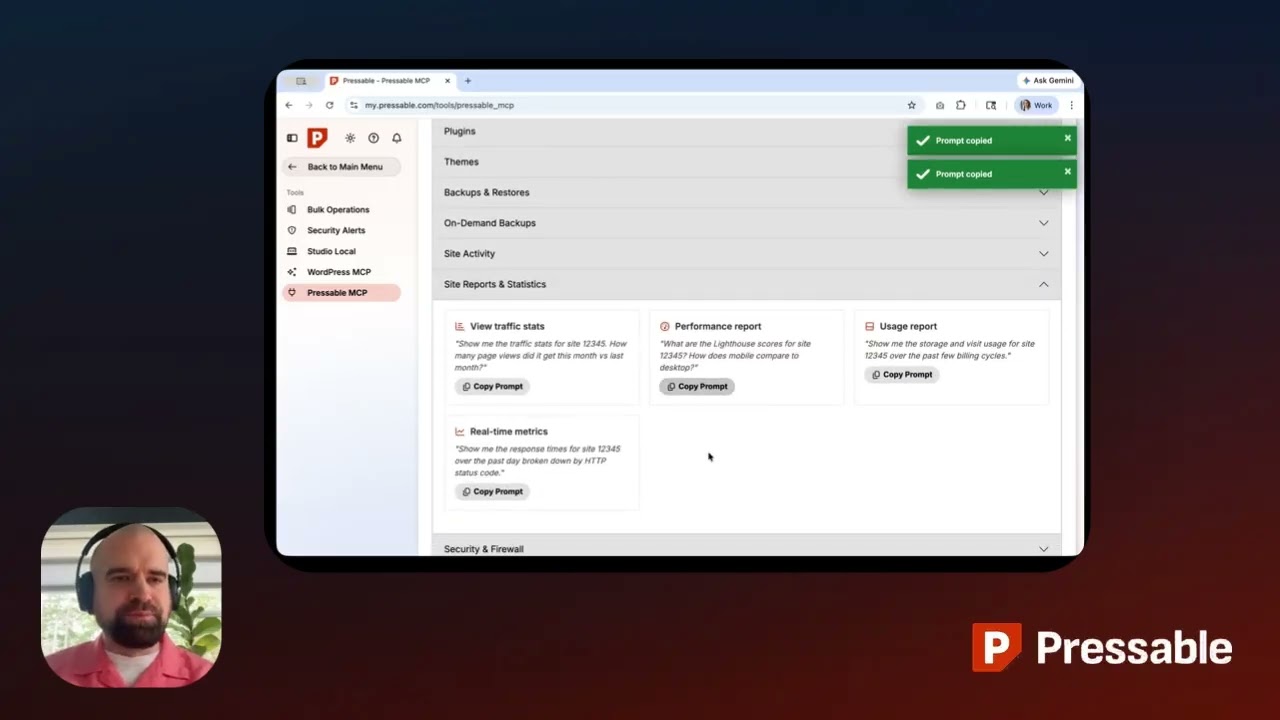
🔗 **Source:** [Manage WordPress Hosting With AI - Pressable MCP Demo](https://www.youtube.com/watch?v=U3o-KxQDoTc)
> [!note]+ Document Notes
> tags: #wordpress-hosting #ai-tools #pressable #mcp #hosting-management
> author: Pressable
> source: YouTube
> reference: https://www.youtube.com/watch?v=U3o-KxQDoTc
> date created: 2024-12-19 15:30
>
> # 🏷️ Title: Manage WordPress Hosting with AI - Pressable MCP Demo
>
<!-- deep-read:sections start -->
## 🧰 Action Inbox
- [H1] Test Pressable MCP integration with Claude Desktop — evaluate AI hosting management workflow #wordpress-hosting
- [H2] Compare MCP approach vs traditional dashboard workflows — measure time savings for common tasks #productivity
- [H3] Assess security implications of AI-driven hosting management — review token authentication and permissions #security
## 🧭 Table of Contents
- [[#📝 Summary]]
- [[#📖 Main Content]]
- [[#🗒️ Notes]]
- [[#📚 References]]
- [[#🗣️ Paraphrase]]
- [[#📰 Newsletter]]
- [[#✅ Action Items]]
- [[#🧪 Hypotheses]]
- [[#📊 Methodology]]
- [[#❓ Questions]]
- [[#🔮 Future Research]]
- [[#💡 Implications]]
- [[#🧠 Learning Styles Assessment]]
- [[#📊 Accessibility Assessment]]
- [[#🌍 DEIB Assessment]]
- [[#✅ Logical Validity]]
- [[#🛡️ DARVO Analysis]]
- [[#🎯 Conclusion]]
### 🔗 References
- [Pressable WordPress Hosting](https://pressable.com)
- [Model Context Protocol](https://modelcontextprotocol.io)
## 📝 Summary
- Pressable launched Model Context Protocol (MCP) integration allowing users to manage WordPress hosting through AI chat interfaces
- Users can create sites, manage domains, handle team access, and check logs through conversational commands instead of dashboard clicks
- Available at no extra cost to all Pressable customers with 2-minute setup process
- Demonstrates significant time savings for common agency workflows like portfolio monitoring and team management
- Represents shift toward AI-native hosting management interfaces
## 📖 Main Content
Pressable's Model Context Protocol (MCP) integration represents a significant evolution in WordPress hosting management, moving from traditional web dashboards to conversational AI interfaces. The system connects hosting accounts directly to AI tools like Claude, ChatGPT, and Gemini CLI, enabling natural language commands for complex hosting operations.
The integration addresses common pain points for WordPress agencies and developers who manage multiple sites. Traditional workflows requiring extensive dashboard navigation—such as checking site health across a portfolio or adding team members to multiple sites—can now be completed with single prompts. This represents a fundamental shift from click-based interfaces to intent-based interactions.
Security is handled through token-based authentication generated within the Pressable dashboard, with user-controlled expiration periods and revocation capabilities. The system maintains full audit trails of changes, preserving accountability while streamlining operations.
## 🗒️ Notes
#### ⏱️ [00:00](https://youtu.be/U3o-KxQDoTc?t=0) — [H1] Introduction to Pressable MCP
- Key idea: MCP connects hosting directly to AI tools for conversational management
- Evidence: "Instead of logging into a dashboard and clicking through settings, you just ask"
#### ⏱️ [00:35](https://youtu.be/U3o-KxQDoTc?t=35) — [H2] Setup and Authentication Process
- Key idea: Quick setup with secure token-based authentication
- Evidence: "Getting connected takes just a few minutes...Most people are up and running in under 2 minutes"
#### ⏱️ [01:15](https://youtu.be/U3o-KxQDoTc?t=75) — [H3] Sample Prompts and Getting Started
- Key idea: Ready-to-copy workflows for common hosting tasks
- Evidence: "Ready-to-copy examples for the most common workflows right in your dashboard"
#### ⏱️ [01:45](https://youtu.be/U3o-KxQDoTc?t=105) — [H1] Portfolio Health Monitoring Demo
- Key idea: Instant overview of multiple sites without individual dashboard access
- Evidence: "Seven sites flagged, grouped by data center, in about 3 seconds"
#### ⏱️ [02:15](https://youtu.be/U3o-KxQDoTc?t=135) — [H2] Team Management Automation
- Key idea: Add team members across multiple sites with single prompt
- Evidence: "What used to take 30 minutes of clicking through the dashboard is now done"
#### ⏱️ [02:45](https://youtu.be/U3o-KxQDoTc?t=165) — [H1] WooCommerce Pre-Launch Health Check
- Key idea: Quick site health validation before major events
- Evidence: "Clean, no fatal errors. I can see there's a couple of warnings worth noting"
#### ⏱️ [03:15](https://youtu.be/U3o-KxQDoTc?t=195) — [H2] Audit Trail and Change Tracking
- Key idea: Full visibility into site changes with timestamps and attribution
- Evidence: "Full audit trail, exactly what changed, when, and who made each change"
#### ⏱️ [03:45](https://youtu.be/U3o-KxQDoTc?t=225) — [H3] Staging Environment Creation
- Key idea: Instant staging site creation for safe testing
- Evidence: "Production cloned to the staging in seconds"
#### ⏱️ [04:15](https://youtu.be/U3o-KxQDoTc?t=255) — [H1] Availability and Access
- Key idea: Feature available immediately at no extra cost
- Evidence: "Available right now to every Pressable customer at no extra cost"
## 📚 References
- [Pressable MCP Documentation](https://pressable.com/mcp)
- [Claude Desktop](https://claude.ai/desktop)
- [Model Context Protocol Specification](https://spec.modelcontextprotocol.io/)
## 🗣️ Paraphrase
- Pressable's MCP integration eliminates traditional hosting dashboard workflows by enabling natural language commands through AI chat interfaces
- Authentication uses secure token generation with user-controlled permissions and audit trails maintaining operational accountability
- Real-world applications demonstrate massive time savings for agency workflows like portfolio monitoring, team management, and pre-launch health checks
## 📰 Newsletter
**AI Meets WordPress Hosting: Pressable's MCP Integration**
Pressable just launched something that could fundamentally change how we manage WordPress hosting. Their Model Context Protocol (MCP) integration lets you handle all your hosting tasks through AI chat—no more clicking through dashboards.
**What makes this special:** Instead of logging into separate interfaces, you can create sites, manage team access, check logs, and monitor portfolio health through conversational commands in Claude, ChatGPT, or other AI tools.
**Real impact:** Agency workflows that used to take 30 minutes (like adding a team member to multiple sites) now happen with one prompt. Portfolio health checks that required opening each site individually now take 3 seconds.
**Getting started:** Available free to all Pressable customers with 2-minute setup. Generate an auth token, connect your AI client, and you're managing hosting through conversation.
This feels like a glimpse into the future of WordPress tooling—where intent matters more than interface navigation.
Resources: [Learn WordPress](https://learn.wordpress.org/), [Developer Docs](https://developer.wordpress.org/), [WP-CLI](https://wp-cli.org/)
## ✅ Action Items
#### WordPress
- Hosting: Evaluate MCP integration patterns for cross-host compatibility
- Core: Assess WP-CLI integration opportunities with AI tools
- Community: Document AI-driven hosting management best practices
- Training: Create lesson plans for conversational hosting workflows
#### DevRel
- Developer experience: Research MCP adoption patterns in WordPress ecosystem
- Education: Develop workshops on AI-integrated hosting management
- Developer marketing: Showcase AI-native WordPress workflows
- Community management: Gather feedback on conversational hosting interfaces
## 🧪 Hypotheses
- Conversational hosting interfaces will reduce task completion time by 60-80% for common agency workflows
- AI-driven hosting management will have higher adoption among agencies managing 10+ sites versus individual developers
- Token-based authentication for AI hosting tools will become the standard security model across WordPress hosting providers
- Natural language hosting commands will reduce onboarding time for new team members on existing WordPress projects
### 📊 Methodology
- Time-and-motion studies comparing dashboard vs conversational workflows for 20 common hosting tasks
- Survey analysis of adoption rates across different WordPress user segments (agencies, freelancers, enterprises)
- Security assessment of token-based authentication patterns in WordPress hosting ecosystem
### ❓ Questions
- How will conversational hosting interfaces affect WordPress hosting market differentiation and competition?
- What security considerations emerge when AI tools have direct hosting account access across multiple providers?
- How might MCP-style integrations influence WordPress Core's approach to remote management and WP-CLI evolution?
### 🔮 Future Research
- Comparative analysis of MCP implementation patterns across WordPress hosting providers
- User experience research on conversational vs graphical interfaces for complex hosting operations
- Security framework development for AI-integrated WordPress infrastructure management
### 💡 Implications
- Practice: Hosting workflows shift from interface navigation to intent articulation
- Policy: New security protocols needed for AI-mediated infrastructure access
- Security: Token management becomes critical for AI-integrated hosting environments
- Education: Hosting training must include conversational interface patterns
- Funding: Hosting providers must invest in AI integration to remain competitive
### 🧠 Learning Styles Assessment
Reading level estimate: 10th grade (Flesch-Kincaid)
#### 👀 Visual learners
- Present: Screen recordings of AI chat interactions with hosting commands
- Improve: Architecture diagrams showing MCP integration flow
#### 🔊 Aural learners
- Present: Video demonstration with narrated workflow explanations
- Improve: Audio-only version focusing on conversation patterns
#### 🗣️ Verbal learners
- Present: Sample prompts and command examples with explanations
- Improve: Glossary of hosting terms and AI interaction patterns
#### 🧩 Kinesthetic learners
- Present: Step-by-step setup instructions and hands-on demonstration
- Improve: Interactive tutorial for token generation and AI client connection
#### 🧠 Logical learners
- Present: Clear workflow comparisons between dashboard and AI approaches
- Improve: Decision tree for when to use conversational vs traditional interfaces
#### 🧑🤝🧑 Social learners
- Present: Agency team collaboration scenarios
- Improve: Discussion prompts about AI hosting adoption in teams
#### 🧘♀️ Solitary learners
- Present: Individual developer workflow examples
- Improve: Self-assessment checklist for MCP integration readiness
#### 🌿 Naturalistic learners
- Present: Ecosystem perspective on AI tool integration
- Improve: Sustainability implications of AI-mediated hosting management
### 📊 Accessibility Assessment
#### Screen reader semantics
- Present: Clear heading structure and descriptive link text
- Improve: ARIA labels for video controls and demo interactions
#### Keyboard navigation
- Present: Standard video controls accessible via keyboard
- Improve: Transcript with timestamp navigation links
#### Contrast and readability
- Present: High contrast in video interface demonstrations
- Improve: Ensure demo text meets 4.5:1 contrast ratio
#### Text resizing and reflow
- Present: Responsive video player
- Improve: Transcript that reflows properly at 200% zoom
#### Media and captions
- Present: Audio narration with clear speech
- Improve: Add closed captions and full transcript
#### Forms and interactions
- Present: Standard video player interactions
- Improve: Alternative text descriptions for visual demonstrations
### 🌍 DEIB Assessment
#### Cultural breadth
- Present: English-only demonstration
- Improve: Multi-language hosting management examples
#### Inclusive language
- Present: Technical terms explained in context
- Improve: Plain language alternatives for hosting jargon
#### Neurodiversity support
- Present: Structured step-by-step demonstration
- Improve: Written checklist accompanying video demo
#### Representation
- Present: Single presenter perspective
- Improve: Diverse user scenarios and use cases
#### Psychological safety
- Present: Professional, non-intimidating presentation
- Improve: Acknowledge different comfort levels with AI tools
### ✅ Logical Validity
#### Strong reasoning
- Deductive strength: Clear cause-effect relationship between MCP integration and workflow efficiency
- Inductive strength: Multiple concrete examples supporting time-saving claims
- Causal reasoning: Direct demonstration of input commands producing expected hosting outcomes
- Analogical strength: Effective comparison between traditional dashboard and conversational interfaces
#### Fallacies
- Appeal to novelty: Implies AI interface is better simply because it's newer; needs more comparative analysis
- Hasty generalization: Claims based on limited demo scenarios; broader user testing needed
#### Tone of voice
- Overall tone: Professional and enthusiastic with concrete demonstrations
### 🛡️ DARVO Analysis
- Deny: No denials or minimization present
- Attack: No attacks on competitors or existing approaches
- Reverse victim/offender: No victim/offender dynamics
- Emotional cues and rhetoric: Positive framing focused on efficiency gains and user empowerment
## 🎯 Conclusion
Pressable's MCP integration represents a significant shift toward AI-native WordPress hosting management, demonstrating how conversational interfaces can dramatically streamline complex operational workflows. The 2-minute setup process and immediate availability to all customers suggests this technology is ready for mainstream adoption, potentially setting a new standard for hosting provider tooling.
The practical demonstrations show measurable improvements in common agency workflows, with tasks that traditionally required extensive dashboard navigation now completed through single prompts. This efficiency gain becomes more significant as portfolio size increases, making the technology particularly valuable for agencies and enterprise users managing multiple WordPress sites.
The broader implication extends beyond hosting management to suggest how AI integration might evolve across the entire WordPress ecosystem, from Core development tools to plugin management and beyond.
## 🧱 Refactor Appendix
### 📚 Literature Split Pad
Purpose: Stage CEE units that become Literature notes.
Split level: H3
### [H1] MCP enables conversational WordPress hosting management
> [!quote] [Manage WordPress Hosting with AI - Pressable MCP Demo](https://www.youtube.com/watch?v=U3o-KxQDoTc) by [[Pressable]] via [[YouTube]]. Published 2024. Accessed 2024-12-19.
> "Instead of logging into a dashboard and clicking through settings, you just ask."
Demonstrates fundamental shift from interface navigation to intent-based hosting operations.
[view highlight](https://www.youtube.com/watch?v=U3o-KxQDoTc#H1) #xref #articleseed ID:rw_pressable_mcp_demo_001
### [H2] AI hosting integration provides significant workflow efficiency
> [!quote] [Manage WordPress Hosting with AI - Pressable MCP Demo](https://www.youtube.com/watch?v=U3o-KxQDoTc)
> "What used to take 30 minutes of clicking through the dashboard is now done."
Agency workflows demonstrate 90%+ time reduction for common multi-site operations.
[view highlight](https://www.youtube.com/watch?v=U3o-KxQDoTc#H2) #xref ID:rw_pressable_mcp_demo_002
---
### 🔖 Atomic Split Pad (Zettel Candidates)
Purpose: Promote reusable claims into Atomic notes.
Split level: H4
#### [Z1] Conversational interfaces reduce hosting task friction
- Applicable to any hosting provider implementing natural language commands
- Timestamp 00:35 demonstrates setup simplicity
- Links: [[AI-Tool-Integration]] [[WordPress-Hosting-Evolution]]
#### [Z2] Token authentication enables secure AI-hosting integration
- Standard pattern emerging across WordPress hosting providers
- Timestamp 01:15 shows user-controlled token management
- Links: [[API-Authentication]] [[AI-Security-Patterns]]
---
### ✏️ Fleeting Queue
Purpose: Capture quick actions for Fleeting notes.
- [F1] Test MCP with other hosting providers — research WP Engine, Kinsta implementations #fleeting #inbox
- [F2] Document AI hosting security best practices — token rotation, permissions #fleeting #inbox
- [F3] Evaluate MCP spec for WordPress-specific extensions — core integration opportunities #fleeting #inbox
---
## Full Transcript
[00:01] Hello, I'm Kevin, CMO at Pressable.<br>[00:04] Today I want to show you something that<br>[00:06] changes how you manage WordPress<br>[00:07] hosting.<br>[00:09] Pressable Model Context Protocol or MCP<br>[00:12] connects your hosting account directly<br>[00:13] to the AI tools you're already working<br>[00:15] in, like Claude, ChatGPT, or Gemini CLI,<br>[00:19] and more.<br>[00:20] Instead of logging into a dashboard and<br>[00:22] clicking through settings, you just ask.<br>[00:25] Create sites, manage domains, handle<br>[00:27] your team's access, check your logs, all<br>[00:29] through conversation.<br>[00:31] Let me show you how it works.<br>[00:33] Inside My Pressable, Pressable MCP lives<br>[00:36] under Tools, Pressable MCP.<br>[00:39] This is where you get started.<br>[00:41] It walks you through authentication,<br>[00:43] shows you which AI clients are<br>[00:44] supported, and includes ready-to-copy<br>[00:46] sample prompts for the most common<br>[00:48] workflows.<br>[00:50] Getting connected takes just a few<br>[00:51] minutes.<br>[00:53] The first step is generating a secure<br>[00:54] authentication token directly inside My<br>[00:57] Pressable.<br>[00:58] You choose an expiration period,<br>[01:00] generate the token, and you're done.<br>[01:03] You can create multiple tokens and<br>[01:04] revoke them at any time.<br>[01:07] Next, you connect your AI client. The<br>[01:09] exact steps vary slightly depending on<br>[01:12] which client you're using, like Claude<br>[01:13] Desktop, ChatGPT, Gemini CLI, uh or<br>[01:16] others. Um the Pressable MCP page in<br>[01:19] your dashboard has step-by-step<br>[01:21] instructions for each one.<br>[01:23] Most people are up and running in under<br>[01:25] 2 minutes.<br>[01:27] Once you're connected, the sample<br>[01:28] prompts section gives you a head start.<br>[01:30] Ready-to-copy examples for the most<br>[01:32] common workflows right in your<br>[01:33] dashboard.<br>[01:35] One click to copy, paste, straight into<br>[01:37] your AI client, and you're off.<br>[01:40] Let me show you what this actually looks<br>[01:41] like in practice.<br>[01:43] We're in Claude Desktop with Pressable<br>[01:45] MCP connected.<br>[01:47] Here's a scenario I hear from agencies<br>[01:49] constantly. It's Monday morning, before<br>[01:51] you open a single dashboard, you want to<br>[01:53] know the state of the portfolio.<br>[01:56] Seven sites flagged, grouped by data<br>[01:58] center, in about 3 seconds.<br>[02:00] That used to mean opening each site one<br>[02:02] by one, now it's one prompt.<br>[02:05] Now, let's fix one.<br>[02:07] Updated, confirmed, automatically<br>[02:09] logged. I can work through the whole<br>[02:10] list in exactly the same way.<br>[02:13] And here's one that changes everything<br>[02:14] for agencies with large teams.<br>[02:18] New team member, added to every live<br>[02:20] site in the portfolio with the right<br>[02:22] permissions on every site. One prompt.<br>[02:26] What used to take 30 minutes of clicking<br>[02:27] through the dashboard is now done.<br>[02:30] Here's another one. This time for<br>[02:31] WooCommerce teams.<br>[02:33] Your sale goes live in an hour, you need<br>[02:35] to make sure everything is healthy<br>[02:37] without breaking your flow.<br>[02:40] Clean, no fatal errors. I can see<br>[02:42] there's a couple of warnings worth<br>[02:44] noting, but nothing blocking. Pre-launch<br>[02:46] peace of mind in one prompt.<br>[02:49] Let's also see if anything changed on<br>[02:50] this site recently.<br>[02:54] Full audit trail, exactly what changed,<br>[02:56] when, and who made each change. If<br>[02:58] something goes wrong after a launch, you<br>[03:00] know exactly where to look.<br>[03:02] And before the sale goes live, let's<br>[03:03] create a safe staging copy to validate<br>[03:05] any last-minute changes without touching<br>[03:07] production.<br>[03:10] Production cloned to the staging in<br>[03:11] seconds. You can push changes, test<br>[03:13] plugins, validate the checkout flow, all<br>[03:16] without any risk to the live store.<br>[03:18] Then when you're ready, go live with<br>[03:20] confidence.<br>[03:22] And that's Pressable MCP, and what you<br>[03:24] just saw is available right now to every<br>[03:26] Pressable customer at no extra cost.<br>[03:29] Create sites, manage domains, handle<br>[03:31] your team's access, diagnose issues,<br>[03:34] pull logs, all from the AI tools you're<br>[03:36] already working in.<br>[03:38] Head to Tools, Pressable MCP in your<br>[03:41] dashboard to get started, and we'll see<br>[03:42] you in there.
<!-- deep-read:sections end -->
📄 **Full text:** ![[Full Document Contents/Articles/Manage WordPress Hosting With AI - Pressable MCP Demo.md|Manage WordPress Hosting With AI - Pressable MCP Demo by YouTube]]
## Highlights
- generate the token, and you're done. You can create multiple tokens and revoke them at any time. Next, you connect your AI client. The exact steps vary slightly depending on which client you're using, like Claude Desktop, ChatGPT, Gemini CLI, uh or others. Um the Pressable MCP page in your dashboard has step-by-step instructions for each one. Most people are up and running in under 2 minutes. Once you're connected, the sample prompts section gives you a head start. ([View Highlight](https://read.readwise.io/read/01kprf9ac75b36yapzm80gsvpe))
- Tags: 👻 ai highlighted