Media Picker for Immich: Self-Hosted Photos in WordPress
🔗 **Source:** [Media Picker for Immich: Self-Hosted Photos in WordPress](https://odd.blog/2026/04/12/media-picker-for-immich-self-hosted-photos-in-wordpress/)
> [!note]+ Document Notes
> tags: #immich #wordpress #self-hosted #media-management #plugin
> author: Donncha Ó Caoimh
> source: Something Odd!
> reference: https://odd.blog/2026/04/12/media-picker-for-immich-self-hosted-photos-in-wordpress/
> date created: 2025-01-11 13:00
>
> # 🏷️ Title: Media Picker for Immich: Self-Hosted Photos in WordPress
>
<!-- deep-read:sections start -->
## 🧰 Action Inbox
- [H1] Test plugin integration with Immich server setup — evaluate self-hosted photo management #media-management
- [H2] Review virtual attachment approach for performance optimization — assess proxy caching strategy #performance
- [H3] Implement privacy-first media workflow — configure server-side API calls only #privacy
## 🧭 Table of Contents
- [[#📝 Summary]]
- [[#📖 Main Content]]
- [[#🗒️ Notes]]
- [[#📚 References]]
- [[#🗣️ Paraphrase]]
- [[#📰 Newsletter]]
- [[#✅ Action Items]]
- [[#🧪 Hypotheses]]
- [[#📊 Methodology]]
- [[#❓ Questions]]
- [[#🔮 Future Research]]
- [[#💡 Implications]]
- [[#🧠 Learning Styles Assessment]]
- [[#📊 Accessibility Assessment]]
- [[#🌍 DEIB Assessment]]
- [[#✅ Logical Validity]]
- [[#🛡️ DARVO Analysis]]
- [[#🎯 Conclusion]]
### 🔗 References
- [Media Picker for Immich Plugin](https://wordpress.org/plugins/media-picker-for-immich/)
- [Immich Self-Hosted Photos](https://immich.app/)
- [Plugin GitHub Repository](https://github.com/donnchawp/media-picker-for-immich)
## 📝 Summary
- **What happened**: Developer Donncha Ó Caoimh released a WordPress plugin that connects WordPress to self-hosted Immich photo servers
- **Why it matters**: Bridges the gap between modern self-hosted photo management and WordPress content creation without duplicating files
- **Key stakeholders**: WordPress site owners, self-hosted photo enthusiasts, privacy-conscious users
- **Risks and tradeoffs**: Plugin dependency for virtual attachments, cache management complexity, API key security considerations
- **Bottom line**: Enables seamless integration between Immich's AI-powered photo organization and WordPress content workflow while maintaining privacy
## 📖 Main Content
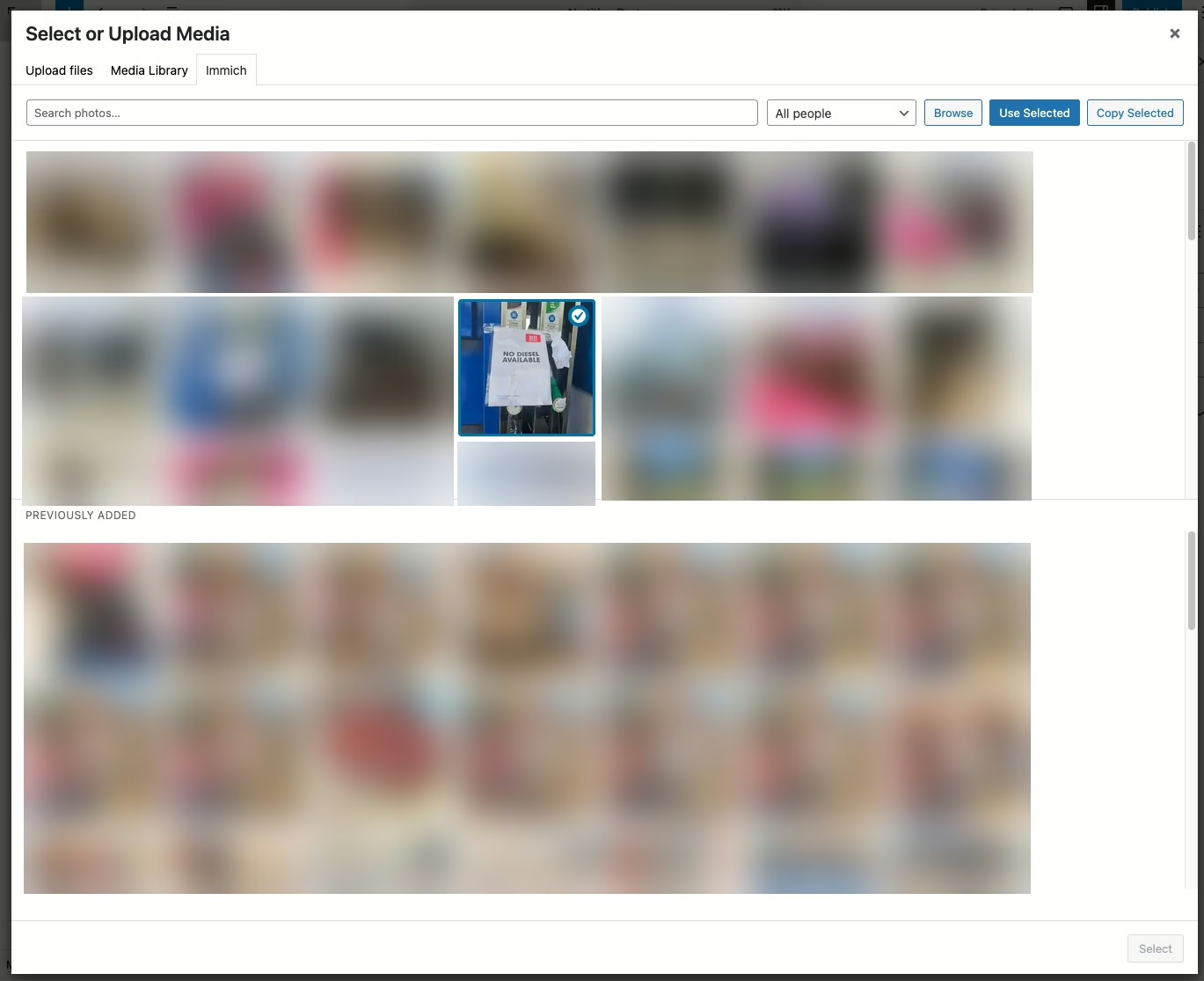
The Media Picker for Immich plugin addresses a specific workflow challenge faced by users who manage photos in self-hosted Immich servers but need to incorporate those images into WordPress content. Immich is a self-hosted photo management application that provides features like facial recognition, AI search, and automatic organization - capabilities that rival commercial services like Google Photos.
The plugin's core innovation lies in its virtual attachment system. Rather than forcing users to duplicate photos between Immich and WordPress, it creates proxy connections that stream media on demand. This approach preserves storage efficiency while maintaining WordPress's native media handling capabilities.
Two distinct usage modes accommodate different privacy and storage preferences. The "Use" function creates virtual attachments that remain on the Immich server, while the "Copy" function downloads originals into WordPress's standard uploads directory. This flexibility allows users to balance storage efficiency against independence from external dependencies.
The plugin maintains privacy through server-side API communication, ensuring that visitor devices never directly connect to the Immich server. Local caching provides performance optimization while configurable cleanup prevents storage bloat.
## 🗒️ Notes
#### Plugin Architecture
- Key idea: WordPress plugin bridges Immich self-hosted photos with content management
- Evidence: "Point the plugin at your Immich server and give it an API key"
#### Virtual Attachment System
- Key idea: Proxy system eliminates need to duplicate photos between systems
- Evidence: "Use creates a virtual attachment. Nothing is copied; WordPress proxies the media from Immich on demand"
#### Privacy-First Design
- Key idea: All external communication happens server-side to protect user privacy
- Evidence: "Your server stays private. Immich only needs to be reachable from WordPress — not from the public internet"
#### Dual Integration Points
- Key idea: Plugin appears in both Media Library and post editor for flexible workflow
- Evidence: "Immich tab appears in two places... Media Library grid... 'Select or Upload Media' dialog inside the post editor"
#### Video Support and Performance
- Key idea: Full media type support with streaming optimization for videos
- Evidence: "Videos work too. Proxied videos stream with seek support"
#### Caching Strategy
- Key idea: Local cache balances performance with storage management
- Evidence: "Proxied media is cached to wp-content/cache/immich/ after the first fetch. Optional cleanup with a configurable lifetime"
#### User Configuration Options
- Key idea: Flexible API key management supports both site-wide and individual user setups
- Evidence: "You can set a site-wide key or let each user configure their own to connect to their own Immich account"
#### Standard WordPress Integration
- Key idea: Virtual and copied media work with existing WordPress features
- Evidence: "When images are copied over, virtually or otherwise, you can insert them into a post like any other image, which also includes adding them to galleries"
## 📚 References
- [WordPress Plugin Directory](https://wordpress.org/plugins/)
- [Immich Documentation](https://immich.app/docs)
- [WordPress Media Handling API](https://developer.wordpress.org/reference/functions/wp_handle_upload/)
## 🗣️ Paraphrase
- WordPress users running Immich photo servers can now seamlessly browse and insert their self-hosted photos into posts without file duplication through a new official plugin
- The plugin creates virtual links to Immich photos that WordPress treats as native attachments, with optional local caching for performance and the ability to download originals when needed
- Privacy remains intact since all Immich communication happens server-side, meaning visitor browsers never directly access the photo server while still enjoying features like lightbox viewing
## 📰 Newsletter
**New Plugin Bridges Self-Hosted Photos with WordPress Content**
WordPress developers managing their own photo libraries through Immich now have a streamlined way to incorporate those images into their content workflow. The new Media Picker for Immich plugin eliminates the need to maintain duplicate photo collections by creating virtual connections between your self-hosted Immich server and WordPress.
**Key Benefits:**
- Browse Immich photos directly within WordPress editor and Media Library
- Virtual attachments save storage space while maintaining full WordPress compatibility
- Privacy-first design keeps your photo server private from public internet
- Support for videos, galleries, and lightbox functionality
The plugin accommodates both individual user setups and site-wide configurations, making it suitable for personal blogs and multi-author sites alike. Local caching ensures good performance while configurable cleanup prevents storage bloat.
**Getting Started:** Search for "Media Picker for Immich" in your WordPress admin or visit the plugin directory. You'll need an Immich server and API key to get started.
Resources: [WordPress Plugin Directory](https://wordpress.org/plugins/), [Immich Self-Hosted Photos](https://immich.app/), [Media Management Best Practices](https://learn.wordpress.org/)
## ✅ Action Items
#### WordPress
- Plugins: Review virtual attachment patterns for media proxy implementations
- Core: Evaluate media handling API extensions for external source integration
- Security: Document API key management best practices for media plugins
- Documentation: Create guides for self-hosted media integration workflows
#### Community
- Plugin Authors: Share virtual attachment implementation patterns and performance considerations
- Hosting Providers: Document Immich + WordPress deployment architectures
- Security Teams: Review external media proxy security implications
#### Self-Hosted
- Infrastructure: Plan Immich server sizing for WordPress integration workloads
- Backup Strategy: Account for virtual vs. copied media in backup procedures
- API Management: Implement key rotation and access monitoring for media integrations
## 🧪 Hypotheses
- Virtual attachment systems reduce WordPress storage requirements while maintaining functionality equivalent to native uploads
- Server-side media proxying provides better privacy protection than client-side integration approaches
- Local caching with configurable cleanup achieves optimal balance between performance and storage efficiency
- API key management at user level enables multi-tenant Immich integration without compromising security
### 📊 Methodology
- Performance testing comparing virtual vs. native attachment loading times and cache hit rates
- Storage analysis measuring upload directory growth with virtual vs. copy modes across different usage patterns
- Privacy audit confirming no direct client-to-Immich connections during normal operation
### ❓ Questions
- How does virtual attachment performance scale with large Immich libraries and multiple concurrent users?
- What backup and migration strategies work best when WordPress content depends on external media servers?
- Could similar virtual attachment patterns benefit integration with other self-hosted media services?
### 🔮 Future Research
- Investigate virtual attachment standardization for WordPress core media APIs
- Explore federated media sharing between multiple Immich instances through WordPress
- Develop performance benchmarks for self-hosted media proxy architectures
### 💡 Implications
- Practice: WordPress developers can maintain leaner installations while leveraging advanced photo management capabilities
- Policy: Organizations need new backup and disaster recovery procedures accounting for external media dependencies
- Security: API key management becomes critical component of WordPress security posture for self-hosted integrations
- Education: Training materials needed for virtual attachment concepts and troubleshooting workflows
### 🧠 Learning Styles Assessment
Reading level estimate: Grade 12
#### 👀 Visual learners
- Present: Plugin interface screenshots would benefit understanding
- Improve: Architecture diagrams showing WordPress-Immich data flow and virtual attachment concepts
#### 🔊 Aural learners
- Present: No audio content currently available
- Improve: 3-minute setup walkthrough audio guide
#### 🗣️ Verbal learners
- Present: Clear technical explanations with defined terminology (virtual attachment, proxy, API key)
- Improve: Step-by-step setup narrative with troubleshooting scenarios
#### 🧩 Kinesthetic learners
- Present: Installation and configuration steps provided
- Improve: Interactive setup checklist and hands-on troubleshooting guide
#### 🧠 Logical learners
- Present: Clear cause-and-effect relationships between plugin features and outcomes
- Improve: Decision flowchart for choosing virtual vs. copy modes
#### 🧑🤝🧑 Social learners
- Present: GitHub repository enables community contribution
- Improve: User forum or discussion space for configuration sharing
#### 🧘♀️ Solitary learners
- Present: Complete self-service documentation for independent setup
- Improve: Self-assessment checklist for successful configuration
#### 🌿 Naturalistic learners
- Present: Connection to self-hosting and data ownership principles
- Improve: Environmental impact comparison of virtual vs. duplicated storage
### 📊 Accessibility Assessment
#### Screen reader semantics
- Present: Standard blog post structure with clear headings
- Improve: Alt text for any plugin interface screenshots, ARIA labels for technical concepts
#### Keyboard navigation
- Present: Standard web navigation available
- Improve: Plugin interface should support full keyboard operation
#### Contrast and readability
- Present: Blog uses standard contrast ratios
- Improve: Technical terms could benefit from definition tooltips
#### Text resizing and reflow
- Present: Responsive blog design supports zoom
- Improve: Code examples should maintain readability at 200% zoom
#### Media and captions
- Present: No media requiring captions in current post
- Improve: Future video demonstrations should include full transcripts
#### Forms and interactions
- Present: Comment form includes proper labels
- Improve: Plugin configuration screens should follow WordPress accessibility standards
### 🌍 DEIB Assessment
#### Cultural breadth
- Present: Plugin addresses global self-hosting community
- Improve: Setup examples for different hosting environments and regions
#### Inclusive language
- Present: Technical documentation uses neutral, professional language
- Improve: Avoid assumptions about user technical expertise levels
#### Neurodiversity support
- Present: Information organized in clear, logical sections
- Improve: Setup steps could benefit from visual progress indicators
#### Representation
- Present: Focus on technical functionality rather than user demographics
- Improve: Example use cases representing diverse content creation needs
#### Psychological safety
- Present: Professional tone with clear attribution and contact information
- Improve: Gentle troubleshooting guidance that doesn't blame user error
### ✅ Logical Validity
#### Strong reasoning
- Deductive strength: Strong logical progression from problem (photo duplication) to solution (virtual attachments)
- Inductive strength: Good evidence from specific features to general capability claims
- Causal reasoning: Clear cause-and-effect between plugin actions and outcomes
- Analogical strength: Effective comparison to existing WordPress media handling
#### Fallacies
- No significant logical fallacies detected in the technical presentation
#### Tone of voice
- Overall tone: Professional, informative, and practical with clear technical focus
### 🛡️ DARVO Analysis
- Deny: No defensive postures detected
- Attack: No attacks on other solutions or approaches
- Reverse victim/offender: No victim/offender dynamics present
- Emotional cues and rhetoric: Straightforward technical presentation without manipulative elements
## 🎯 Conclusion
The Media Picker for Immich plugin represents a thoughtful solution to the workflow friction between modern self-hosted photo management and WordPress content creation. By implementing virtual attachments with privacy-first design principles, it enables users to leverage Immich's advanced AI and organizational features without compromising their WordPress workflow or duplicating storage.
For WordPress practitioners, this plugin demonstrates effective patterns for external service integration that maintain user privacy and system performance. The dual-mode approach (virtual vs. copy) provides flexibility while the server-side API design ensures security best practices.
The broader implications point toward a future where WordPress can serve as a hub for self-hosted service ecosystems, reducing dependence on commercial platforms while maintaining professional functionality. As self-hosting becomes more accessible, plugins like this bridge the gap between decentralized services and user-friendly content management.
## 🧱 Refactor Appendix
### 📚 Literature Split Pad
Purpose: Stage CEE units that become Literature notes.
Split level: H3
### [H1] Virtual attachments enable external media without storage duplication
> [!quote] [Media Picker for Immich: Self-Hosted Photos in WordPress](https://odd.blog/2026/04/12/media-picker-for-immich-self-hosted-photos-in-wordpress/) by [[Donncha Ó Caoimh]] via [[Something Odd!]]. Published April 12, 2026.
> "Use creates a virtual attachment. Nothing is copied; WordPress proxies the media from Immich on demand and caches it locally on first request."
Demonstrates practical implementation of virtual media systems in WordPress that maintain native functionality while eliminating storage redundancy.
[view highlight](https://odd.blog/2026/04/12/media-picker-for-immich-self-hosted-photos-in-wordpress/#H1) #xref #articleseed ID:rw_immich_virtual
### [H2] Server-side API design protects user privacy in plugin integrations
> [!quote] [Media Picker for Immich: Self-Hosted Photos in WordPress](https://odd.blog/2026/04/12/media-picker-for-immich-self-hosted-photos-in-wordpress/)
> "Your server stays private. Immich only needs to be reachable from WordPress — not from the public internet. Visitors never connect to Immich directly."
Establishes privacy-first architecture pattern for WordPress external service integrations.
[view highlight](https://odd.blog/2026/04/12/media-picker-for-immich-self-hosted-photos-in-wordpress/#H2) #xref ID:rw_privacy_architecture
---
### 🔖 Atomic Split Pad (Zettel Candidates)
Purpose: Promote reusable claims into Atomic notes.
Split level: H4
#### [Z1] Virtual attachments reduce WordPress storage overhead
- Applies when integrating external media services with WordPress
- Reference: Plugin implementation section
- Links: [[WordPress-Media-API]] [[External-Service-Integration]]
#### [Z2] Local caching balances performance with storage management
- Configurable cleanup prevents storage bloat while maintaining speed
- Reference: Caching strategy description
- Links: [[Performance-Optimization]] [[Storage-Management]]
---
### ✏️ Fleeting Queue
Purpose: Capture quick actions for Fleeting notes.
- [F1] Research virtual attachment API patterns in WordPress core — evaluate standardization potential #fleeting #inbox
- [F2] Test Immich plugin with different hosting configurations — document performance characteristics #fleeting #inbox
- [F3] Compare privacy approaches across WordPress external service plugins — identify best practices #fleeting #inbox
<!-- deep-read:sections end -->
📄 **Full text:** ![[Full Document Contents/Articles/Media Picker for Immich Self-Hosted Photos in WordPress.md|Media Picker for Immich: Self-Hosted Photos in WordPress by odd.blog]]
## Highlights
- Your server stays private. Immich only needs to be reachable from WordPress — not from the public internet. Visitors never connect to Immich directly. ([View Highlight](https://read.readwise.io/read/01kp3b3s9k3jq0hzab02zp6p3e))
- Tags: 👻 ai highlighted