WhatCable: Know What Your USB-C Cable Can Really Do
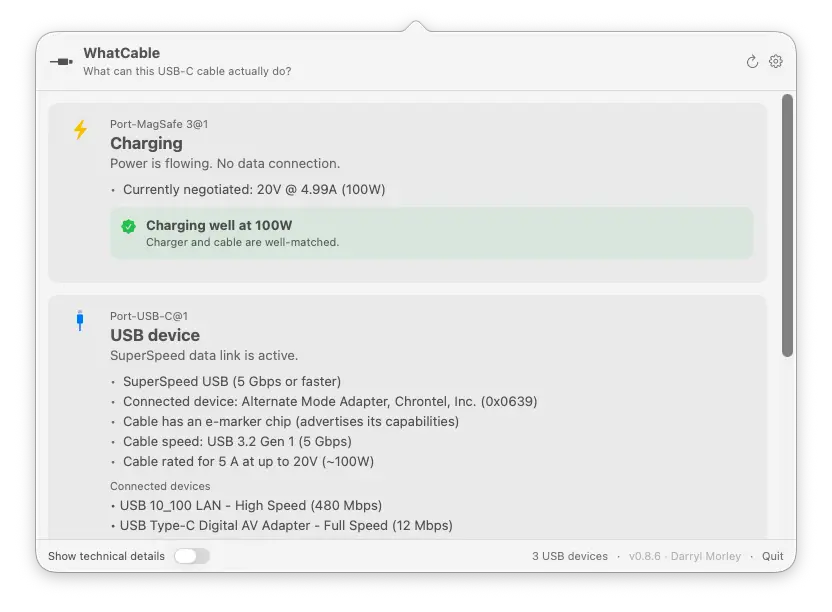
🔗 **Source:** [WhatCable: Know What Your USB-C Cable Can Really Do](https://www.whatcable.uk/)
> [!note]+ Document Notes
> tags: [usb-c, cable-diagnostics, macos-apps, apple-silicon, thunderbolt]
> author: Darryl Morley
> source: WhatCable (product site)
> reference: https://www.whatcable.uk/
> date created: 2026-07-14 08:00
>
> # 🏷️ Title: WhatCable: Know what your USB-C cable can really do
>
<!-- deep-read:sections start -->
## 🧭 Table of Contents
- [📝 Summary](#-summary)
- [📖 Main Content](#-main-content)
- [🗒️ Notes](#️-notes)
- [📚 References](#-references)
- [🗣️ Paraphrase](#️-paraphrase)
- [📰 Newsletter](#-newsletter)
- [✅ Action Items](#-action-items)
- [🧪 Hypotheses](#-hypotheses)
- [📊 Methodology](#-methodology)
- [❓ Questions](#-questions)
- [🔮 Future Research](#-future-research)
- [💡 Implications](#-implications)
- [🧠 Learning Styles Assessment](#-learning-styles-assessment)
- [📊 Accessibility Assessment](#-accessibility-assessment)
- [🌍 DEIB Assessment](#-deib-assessment)
- [✅ Logical Validity](#-logical-validity)
- [🛡️ DARVO Analysis](#-darvo-analysis)
- [🎯 Conclusion](#-conclusion)
## 📝 Summary
- WhatCable is a free, open-source (MIT) macOS menu bar app for Apple Silicon Macs (macOS 14+) that reads USB-C / USB Power Delivery data already exposed by macOS and translates it into plain-English diagnostics: charging bottlenecks, data-speed bottlenecks, display bottlenecks, cable e-marker data, active transports (USB 2/3, USB4, Thunderbolt, DisplayPort), and device identity.
- It matters because USB-C's single connector shape hides wildly different real capability — the page's own comparison table shows USB 2.0 (480 Mbps/60W), USB4 (40 Gbps/100W), and Thunderbolt 4 (40 Gbps/240W) cables are visually indistinguishable but perform nothing alike, and a cable can develop a fault mid-session without visual warning.
- Stakeholders: individual Mac users troubleshooting slow charging or failed displays (free tier); power users, IT/AV techs, and dock/peripheral testers who need live power metering, port health counters, and negotiation diagnostics (Pro tier, £9.99 one-time, up to 2 Macs); the broader USB-C ecosystem via a public, crowdsourced cable database and vendor-ID trust checks against the USB-IF list.
- Risks and tradeoffs: Intel Macs are explicitly unsupported (Titan Ridge Thunderbolt controllers don't expose USB-PD/e-marker state via public macOS API); "fake cable" detection is explicitly framed as a flag, not proof ("Not definitively... A flag means 'worth checking,' not 'definitely counterfeit'"); e-marker data can be genuinely absent from a working cable depending on how macOS chose to query it, which could read as a false negative to an uninformed user.
- Bottom line: this is narrow-scope, technically credible utility software solving a real and common annoyance (cable roulette), monetized via a modest one-time Pro unlock rather than a subscription, with no telemetry beyond an optional GitHub version check.
## 📖 Main Content
WhatCable's core pitch is translation, not new data collection: macOS's IOKit already exposes USB-C/USB-PD negotiation details, e-marker chip data, and Thunderbolt/DisplayPort transport state, but that information is normally buried in developer-facing system reports. WhatCable surfaces it as a menu bar popover with plain-English verdicts — "cable is limiting charging speed," "video is going through a HDMI adapter holding the display below its top mode" — rather than raw property dumps (those are still available behind an "Engineer mode" toggle for anyone who wants them).
Several terms are worth defining for a general reader. An **e-marker** is a small identification chip embedded in higher-power or higher-speed USB-C cables; it reports the cable's rated current, supported speed, vendor ID, and PD capability flags back to the host device. **USB Power Delivery (PD)** is the negotiation protocol that lets a device and charger agree on voltage/current (a "PDO," or Power Data Object, is one such negotiated profile). **Thunderbolt/USB4** are transport protocols that can share the same USB-C connector as plain USB or DisplayPort, which is precisely why identical-looking cables behave so differently — the connector shape carries no information about what protocols the cable inside actually supports.
The free tier covers cable/device identification, a charging-bottleneck verdict, and basic fault warnings. WhatCable Pro (£9.99 one-time, licensed per user for up to 2 Macs — not per-device) adds 16 features clustered around three ideas: **history** (name a cable, and WhatCable logs its behavior over time so a cable that's started degrading stands out), **negotiation detail** (Mac port / cable / device support shown side by side with the weak link called out, plus live power metering updating every 2 seconds and PD contract inspection), and **terminal/dashboard tooling** (a `--dashboard` full-screen CLI view, port health counters like lifetime resets/shorts/errors/FET failures, and DP Alt Mode/EDID monitor identity).
A notable secondary feature is the **cable trust signal** system: WhatCable checks e-marker fields against the USB-IF's published vendor ID list and validated PD spec ranges, and flags anomalies (vendor ID 0x0000, reserved bit patterns, a cable claiming 5A current but reporting USB 2.0 speed) with an orange warning card. The FAQ is careful to hedge this as a heuristic, not a counterfeit-detection guarantee — a meaningfully more honest framing than many "detect fake products" marketing claims.
The page also documents a **crowdsourced cable database** — every cable reported through the app is added to a public, searchable list (examples shown: CalDigit TB5, UGREEN Revodok Max 213, Anker 333 nylon, Monoprice Essentials, CalDigit TS4 bundled) — which is the one feature here that depends on network effects rather than pure local diagnostics, though the FAQ states contribution is opt-in and no other diagnostic data leaves the Mac.
Uncertainties/contested claims: none of the technical claims on the page are independently verifiable from the page alone (no benchmark methodology, no third-party test citations); they rest entirely on macOS/IOKit reporting being accurate, which the page itself doesn't audit — WhatCable is a translator of what the OS already reports, and inherits any inaccuracy in that underlying OS-level data.
## 🗒️ Notes
- Platform gate is a hard technical limitation, not a business decision: Intel Macs use Titan Ridge Thunderbolt controllers that don't expose USB-PD state or e-marker data through any public macOS API — so there is no code path that could add Intel support without new low-level access Apple doesn't currently expose.
- "No helper daemon, no private API, no background uploads" is repeated in two places (features list and FAQ) — a deliberate, load-bearing trust claim for a menu-bar app that reads low-level hardware negotiation data.
- The one network call disclosed is a version check against the public GitHub Releases API roughly every 6 hours — small, specific, and falsifiable by anyone willing to read the open-source code.
- e-marker "missing data" has an explained, non-alarming cause: macOS only queries a cable's e-marker chip when the connection actually needs it (>3A draw or a Thunderbolt/USB4 link) — plugging a marked cable into a low-power charger may never trigger a query, so absence of e-marker data isn't proof the chip (or the cable) is missing.
- CLI and GUI are explicitly two faces of "the same diagnostic engine" (their words), with the dashboard/watch-mode CLI features gated to Pro the same way the GUI's advanced features are — the free/Pro split is consistent across both surfaces rather than CLI being a separate free unlock.
- Localization claim is unusually specific: 19 named languages, with the diagnostic verdict text (not just menu chrome) translated, and an explicit community-refinement path via GitHub issues if a translation "reads oddly."
- Press logos shown (Lifehacker, MakeUseOf, Adafruit, Boing Boing) and a Product Hunt top-post badge are present as social proof but the scrape returned them as unlinked images — no direct citation URLs to the actual coverage were present in the page markup, so none are asserted as clickable references here.
- Per the task brief, this page has a companion CNET article covering the same app; that article's URL wasn't part of the page fetched and is not linked here to avoid fabricating a citation — flagged in Fleeting Queue below as a follow-up if the analysis needs that companion piece too.
## 📚 References
- [WhatCable homepage](https://www.whatcable.uk/)
- [Docs / Instructions](https://www.whatcable.uk/instructions)
- [CLI docs](https://www.whatcable.uk/cli)
- [Cable database](https://www.whatcable.uk/cables)
- [Blog](https://www.whatcable.uk/blog)
- [Pro feature comparison](https://www.whatcable.uk/pro)
- [Support](https://www.whatcable.uk/support)
- [Press](https://www.whatcable.uk/press)
- [Privacy](https://www.whatcable.uk/privacy)
- [GitHub source (darrylmorley/whatcable)](https://github.com/darrylmorley/whatcable)
- [Latest release download](https://github.com/darrylmorley/whatcable/releases/latest/download/WhatCable.zip)
- [Product Hunt listing](https://www.producthunt.com/products/whatcable)
## 🗣️ Paraphrase
WhatCable takes the USB-C and USB Power Delivery data your Apple Silicon Mac already collects internally and turns it into something a non-engineer can read at a glance: is this cable the reason charging is slow, is this cable why the monitor won't hit full resolution, and does this cable's chip data check out against the official USB-IF vendor list. The free app handles the everyday version of that question; the £9.99 one-time Pro tier adds the kind of longitudinal and live-metering detail (named cable history, live wattage, port health counters, a terminal dashboard) that a power user or someone testing docks/peripherals professionally would actually want.
The company is careful about the limits of what it's claiming — it won't call a cable "fake," only "worth checking," and it's upfront that Intel Macs are excluded for a specific hardware-API reason rather than an arbitrary business one. Pricing is a one-time purchase rather than a subscription, the core app is open source under MIT, and the disclosed telemetry footprint is essentially just an update check.
## 📰 Newsletter
**Your cable drawer is lying to you, and now there's a menu bar app that says so.**
Every USB-C cable looks the same, which is exactly the problem: one cable in your drawer charges at full 240W and drives dual 4K displays, and the identical-looking one next to it can barely keep a mouse alive. WhatCable (free, open source, Apple Silicon only) reads the USB-C/PD negotiation data macOS already has and turns it into a plain-English verdict — is it the cable, the charger, or the Mac that's the bottleneck — instead of making you decode a System Report.
The nice details: it names and tracks individual cables over time so you can spot the one that's started misbehaving, it flags e-marker chips whose vendor ID or PD fields look off against the USB-IF spec (a "worth checking" flag, explicitly not a fake-detector), and there's a `--dashboard` CLI mode for anyone who'd rather live in the terminal. Pro is a one-time £9.99, not a subscription, and covers two Macs.
**Worth doing if you deal with cables regularly:**
- Install via `brew install --cask darrylmorley/whatcable/whatcable` and check what's actually plugged into your dock right now.
- If you support end users or manage a shared cable bin, the public cable database is worth a look before buying "high speed" cables sight unseen.
- Read the FAQ on e-marker absence before assuming a missing chip means a bad cable — it's often just that macOS never had a reason to query it.
## ✅ Action Items
#### For individual Mac users
- Install the free tier (Homebrew or direct download) before buying a replacement cable to confirm whether the cable, charger, or Mac port is actually the bottleneck.
- Name and track a suspect cable in Pro if charging/display issues are intermittent rather than constant — the mid-session fault banner is built for exactly that pattern.
#### For IT / AV / peripheral testers
- Evaluate the Pro negotiation-diagnostics and port-health-counter features against whatever tool (if any) is currently used to triage dock and display complaints.
- Cross-check any cable inventory against the public cable database before standardizing on a "known good" cable SKU.
#### For the developer (Darryl Morley) / product itself
- Consider linking the press mentions (Lifehacker, MakeUseOf, Adafruit, Boing Boing) directly rather than as unlinked logos, since a diagnostics tool's credibility depends partly on third-party verification being easy to check.
- The e-marker-absence FAQ answer is genuinely good trust-building content; consider surfacing a shortened version of it in-app at the moment a cable shows no e-marker data, not just in the web FAQ.
## 🧪 Hypotheses
- Users who see a "cable is limiting charging speed" verdict are more likely to replace that specific cable than users who only see a generic "slow charging" symptom with no attributed cause.
- The Pro conversion rate is higher among users who own exactly 2 Macs (the license covers 2) than among single-Mac users, since the per-seat value doubles at no extra cost.
- Cable trust-signal flags (vendor ID 0x0000, reserved bit patterns) correlate with cables sourced from unbranded/marketplace listings more than from named-brand retail purchases.
- The crowdsourced cable database's growth rate depends more on Pro users (who already have cable-naming habits) opting in to contribute than on free-tier users.
- Positioning "no subscription, one-time £9.99" is a meaningful driver of conversion among users who have previously churned off subscription-based utility apps.
### 📊 Methodology
- For the verdict-driven replacement hypothesis: an in-app, opt-in event log (already partially implied by the existing "contribute to the cable database" opt-in) comparing self-reported cable replacement after a specific bottleneck verdict vs. after a generic warning, with user consent.
- For the 2-Mac conversion hypothesis: a cohort analysis of Pro purchasers against declared device count at purchase time (would require adding a lightweight, privacy-respecting purchase-time survey field, consistent with the app's stated no-telemetry stance).
- For the trust-signal/marketplace-sourcing hypothesis: an optional free-text or dropdown "where did you buy this cable" field attached to database submissions, analyzed against trust-flag rate.
- For the subscription-fatigue hypothesis: a simple exit-survey question at purchase ("what made you choose this over a subscription tool") coded into categories.
### ❓ Questions
- How does WhatCable's e-marker validation logic stay current as the USB-IF vendor ID list and PD spec evolve — is it bundled and updated with app releases, or fetched live?
- What is the actual conversion rate from free to Pro, and does the "up to 2 Macs" framing measurably outperform a single-seat price point in practice?
- Does the crowdsourced cable database get any moderation or deduplication, given it's described as public and searchable but the submission/verification process isn't detailed on this page?
- Since Intel Mac support is blocked by controller hardware, is there any prospect of at least a reduced feature set (transport/device identity without PD/e-marker detail) on Intel via a different macOS API?
- How does the "mid-session fault" detection distinguish a genuinely failing cable from a normal reconnection event (e.g., a laptop lid closing and reopening)?
### 🔮 Future Research
- Independent, third-party verification of WhatCable's diagnostic accuracy against a known-good bench setup (e.g., a USB-IF certified cable tester) — the page's claims are plausible but self-reported.
- A comparative review of WhatCable against other USB-C diagnostic tools/utilities (Windows or cross-platform equivalents, if any) to establish whether "plain English cable diagnostics" is a genuinely underserved niche or has existing competitors not mentioned here.
- Longitudinal data (once available) from the cable-history feature on how often a "known good" cable actually degrades over time, which would validate or undercut the core "cables misbehave silently" premise the whole product is built on.
### 💡 Implications
- **Practice**: For anyone regularly troubleshooting docks, monitors, or charging on Apple Silicon Macs, this closes a real diagnostic gap — System Information/IOKit data exists but isn't legible without expertise; a free tool removing that friction has plausible everyday utility.
- **Policy**: The USB-IF vendor-ID and PD-spec validation approach is a small, useful example of an ecosystem participant doing lightweight compliance-checking without needing to be USB-IF itself — worth watching whether the crowdsourced database becomes a de facto public reference for cable quality.
- **Security**: The explicit "no private API, no background uploads, one disclosed network call" stance is a reasonable minimum bar for a utility with this level of system access; it's stated but the page doesn't point to an independent audit, so it's a trust claim, not a verified one.
- **Education**: The plain-English translation of e-marker/PD/transport concepts (and the FAQ's honest explanation of e-marker absence) is a genuinely accessible bit of technical education for non-specialist users, more than most consumer hardware marketing manages.
- **Funding models**: One-time £9.99 for up to 2 Macs, with a free MIT-licensed core, is a deliberately anti-subscription positioning choice in a market segment (menu bar utilities) that has trended toward subscriptions — worth noting as a case study in indie-dev monetization choices.
### 🧠 Learning Styles Assessment
- Reading level estimate: short marketing sentences mixed with domain jargon (e-marker, PDO, DP Alt Mode, EDID, FET) pushes this to roughly Flesch-Kincaid grade 9–10 despite plain, conversational phrasing — the vocabulary, not the sentence structure, is what raises the bar for a general reader.
#### 👀 Visual learners
- Present: an annotated menu-bar screenshot with descriptive alt text, a three-tier cable comparison card (USB 2.0 / USB4 / Thunderbolt 4), and a labeled CLI terminal-output example.
- Improve: an actual annotated diagram of a USB-C connector cross-section or a signal-path diagram (Mac port → cable → adapter → display) would help readers who don't already know what "e-marker" refers to physically.
#### 🔊 Aural learners
- Not applicable to this source — no audio, podcast, or narrated content is present on the page.
#### 🗣️ Verbal learners
- Present: the page defines several jargon terms inline through example ("Charges slowly, no video output. Fine for a keyboard, terrible for an external display or fast storage"), and the FAQ uses analogy-free plain explanation well (e.g., the e-marker-absence answer).
- Improve: a short glossary (e-marker, PD, PDO, Alt Mode) would help readers who land mid-page via search rather than reading top to bottom.
#### 🧩 Kinesthetic learners
- Present: copy-paste-ready Homebrew install commands and a live CLI output example (`$ whatcable`) that a reader could run immediately.
- Improve: little to add here — the CLI examples already function as a hands-on walkthrough.
#### 🧠 Logical learners
- Present: the three-tier comparison table (speed/wattage/use case) functions as a decision aid, and the "charger vs. cable vs. Mac" bottleneck framing is an implicit decision tree.
- Improve: an explicit flowchart ("slow charging? → check X → check Y") would formalize what's currently implicit in prose.
#### 🧑🤝🧑 Social learners
- Present: the crowdsourced, searchable cable database and the "community-refinable" translation process (open a GitHub issue) both function as light social/collaborative touchpoints.
- Improve: no visible community forum or discussion space is linked beyond GitHub issues.
#### 🧘♀️ Solitary learners
- Present: the page is fully self-serve — install, run, read the verdict — with no requirement to interact with anyone.
- Not much to improve; this format already suits self-paced, independent use well.
#### 🌿 Naturalistic learners
- Not applicable to this source — no sustainability, environmental, or ecosystem-impact framing appears anywhere on the page.
### 📊 Accessibility Assessment
Assessed from the scraped page structure only (no rendered-DOM or automated a11y audit was run against the live site).
#### Screen reader semantics
- Present: a clear heading hierarchy (H1 tagline → H2 section headers like "The problem," "Features," "CLI," "Pro" → H3 feature names), and the hero screenshot carries a long, genuinely descriptive alt text (it narrates both ports' states in prose, not just "screenshot").
- Improve: cannot verify from markdown alone whether the smaller feature-card icons/images (press logos, cable-database thumbnails) carry equivalent alt text — worth a manual check.
#### Keyboard navigation
- Not applicable to this source — the scraped content doesn't expose focus order, tab index, or interactive widget behavior; would require a live-DOM/keyboard-driven audit to assess.
#### Contrast and readability
- Not applicable to this source — text/background contrast requires visual inspection of the rendered page, not the markdown extraction used here.
#### Text resizing and reflow
- Not applicable to this source — same limitation; requires live rendering to assess zoom/reflow behavior.
#### Media and captions
- Present: no video or audio content is on the page, so captioning isn't a relevant gap here.
#### Forms and interactions
- Present: the "Copy command" buttons for Homebrew install strings are a simple, low-risk interaction pattern; no complex forms (checkout, sign-up) are present on this page to assess.
#### Standards reference
- Given the above, the only WCAG 2.2 AA criteria assessable from this fetch are heading structure (1.3.1) and non-text content/alt text (1.1.1), both of which look reasonably handled; contrast (1.4.3), focus visibility (2.4.7), and reflow (1.4.10) would need a live-page audit to confirm.
### 🌍 DEIB Assessment
#### Cultural breadth
- Present: 19 supported languages with translated diagnostic verdicts (not just UI chrome) is a genuinely above-average localization commitment for an indie utility app, and it follows the Mac's system language by default.
#### Inclusive language
- Present: the copy avoids gendered or culturally specific idiom and defines jargon in plain terms where it appears; technical vocabulary (e-marker, PDO) is dense but not exclusionary in tone.
#### Neurodiversity support
- Present: consistent short-card structure (one feature, one short paragraph, repeated pattern) across the features and Pro sections supports predictable scanning.
#### Representation
- Not applicable to this source — the page is entirely hardware/UI-photography and contains no depictions of people, so representation of identities/roles isn't a meaningful axis to assess here.
#### Psychological safety
- Not applicable to this source — the content is technical product marketing with no sensitive, conflict, or vulnerable-population subject matter.
### ✅ Logical Validity
#### Strong reasoning
- The three-tier cable comparison table (USB 2.0 vs. USB4 vs. Thunderbolt 4) is a clear, well-structured analogical argument: same connector shape, materially different capability, directly supporting the page's central claim that "the connector tells you nothing."
- The trust-signal explanation is notably strong reasoning for a marketing page — it explicitly limits its own claim ("Not a guarantee the cable is fake... tells you where to look") rather than overclaiming detection capability, which is the correct epistemic humility for a heuristic-based check.
#### Fallacies
- No clear logical fallacies were identified in the page's argumentation — this is descriptive product marketing rather than persuasive argument-building, so there's little rhetorical surface for classic fallacies (appeal to authority, false dilemma, etc.) to appear on. The closest soft spot is unverified specificity in the feature claims (e.g., precise wattage/speed figures) presented without citation to a testing methodology, but this is a sourcing gap rather than a fallacy.
#### Tone of voice
- Confident, technically literate, and low-hype: sentences like "It is not a guarantee the cable is fake" and the detailed, honest e-marker-absence FAQ answer read as engineer-to-user rather than marketer-to-customer, which is consistent throughout the page.
### 🛡️ DARVO Analysis
Not applicable to this source — DARVO (Deny, Attack, Reverse Victim/Offender) is a framework for analyzing responses to accusations of wrongdoing in interpersonal or institutional conflict. This page contains no accusation, denial, or conflict narrative of any kind; it's a straightforward product marketing/FAQ page.
## 🎯 Conclusion
WhatCable is a narrowly scoped, technically credible macOS utility: it doesn't invent new hardware capability, it translates USB-C/PD/Thunderbolt data macOS already collects into verdicts a non-specialist can act on, backed by a free MIT-licensed core, an honest (hedged, not oversold) approach to "fake cable" detection, and an unusually thorough FAQ that explains rather than hides its own limitations (Intel exclusion, e-marker absence, telemetry scope). The clearest gaps in the page itself are sourcing (no linked third-party coverage despite naming four publications, no stated testing methodology behind the specific speed/wattage figures) and live-rendering-dependent accessibility criteria (contrast, keyboard nav, reflow) that couldn't be assessed from a text scrape. Practical next step for a reader: if you own an Apple Silicon Mac and have ever wondered why one cable charges fast and an identical-looking one doesn't, the free tier answers that question with no financial commitment before deciding whether Pro's history/live-metering features are worth £9.99.
## 🔄 Refactor Appendix — WhatCable: Know what your USB-C cable can really do
### 📚 Literature Atoms (H3)
#### [H1] Identical-looking USB-C cables have wildly different real capability
> [!quote] ID:rw_whatcable_h1
> Every USB-C cable looks the same. They are not.
**Context & use**:
- Section header framing "The problem" — immediately followed by the three-tier comparison (USB 2.0 / USB4 / Thunderbolt 4) that substantiates the claim with concrete speed/wattage figures
- This is the entire premise the product is built to solve; every other feature on the page traces back to this one line
**Tags**: #xref #aphorisms
**Highlight**: [view highlight](readwise://source-page)
<!-- atomicity: 1 idea ✓ -->
#### [H2] A cable can develop a fault after it's already plugged in
> [!quote] ID:rw_whatcable_h2
> If a cable develops trouble while it is plugged in (an overcurrent or the connection dropping and reconnecting), a banner appears on the port.
**Context & use**:
- Describes the "Mid-session fault warnings" feature, distinct from static cable identification — this is a monitoring claim, not just a diagnostic-at-a-point-in-time claim
- Notable because it implies WhatCable is polling connection state continuously, not just reading e-marker data once at plug-in
**Tags**: #xref
**Highlight**: [view highlight](readwise://source-page)
<!-- atomicity: 1 idea ✓ -->
#### [H3] Trust-signal flags mean "worth checking," not "definitely counterfeit"
> [!quote] ID:rw_whatcable_h3
> It is not a guarantee the cable is fake, but it tells you where to look.
**Context & use**:
- Direct quote from the "Cable trust signals" section explaining the e-marker validation heuristic (vendor ID checks, PD spec range validation, reserved-bit flags)
- The single clearest example of the page hedging a claim appropriately rather than overselling detection capability — load-bearing for the Logical Validity assessment above
**Tags**: #xref #addendum
**Highlight**: [view highlight](readwise://source-page)
<!-- atomicity: 1 idea ✓ -->
#### [H4] Missing e-marker data doesn't mean the cable lacks a chip
> [!quote] ID:rw_whatcable_h4
> macOS only asks a cable to identify itself when the connection needs it... Plug a marked cable into a low-power charger or a plain data connection and macOS may never query it, so there's nothing for WhatCable to show.
**Context & use**:
- From the FAQ answering "Why does my cable show no e-marker data?" — explains a specific, non-obvious false-negative scenario that a less careful product FAQ would gloss over
- Directly useful as a caution for anyone reading a "no data" result as "bad cable"
**Tags**: #xref #articleseed
**Highlight**: [view highlight](readwise://source-page)
<!-- atomicity: 1 idea ✓ -->
### 🧠 Permanent Candidates (H4)
#### [P1] Hedged detection claims are more trustworthy than binary ones
**Claim** (one sentence, Courtney's voice): A product that explicitly frames an anomaly-detection feature as "worth checking" rather than "proof of X" earns more credibility than one that claims certainty it can't actually deliver.
**Evidence pointer**: [[#H3]]
**Scope & conditions**: Holds for heuristic-based checks built on partial signals (vendor IDs, spec-range validation) where false positives/negatives are inherent to the method; doesn't apply to checks with genuinely deterministic ground truth.
**Links** (≥1 with annotation):
- [[Marketing honesty as a trust signal]] — because extends the general principle beyond this specific product
- [[USB-C ecosystem fragmentation]] — because applies-in any tool claiming to detect counterfeit or non-compliant hardware
<!-- atomicity: 1 idea ✓ -->
### ✏️ Fleeting Queue
- [F1] Find and read the companion CNET article about WhatCable referenced in the task brief — not linked from the scraped homepage, so it needs a separate lookup #fleeting #inbox
- [F2] Check whether WhatCable's press-logo claims (Lifehacker, MakeUseOf, Adafruit, Boing Boing) resolve to real, findable coverage before citing them anywhere else #fleeting #inbox
### → Things 3
- [ ] Look up the CNET article covering WhatCable and decide whether it needs its own deep-read pass alongside this one #things
<!-- deep-read:sections end -->
📄 **Full text:** [[Full Document Contents/Articles/WhatCable Know What Your USB-C Cable Can Really Do.md|WhatCable: Know What Your USB-C Cable Can Really Do by whatcable.uk]]
## Highlights
- If a cable develops trouble while it is plugged in (an overcurrent or the connection dropping and reconnecting), a banner appears on the port. Catches faults that only show up under load. ([View Highlight](https://read.readwise.io/read/01kxh9d4wsjqwq2b5z864cjkny))
- Tags: atom/literature/h2
- WhatCable checks the e-marker data against the USB Power Delivery spec. When something looks unusual, an orange card appears with the details. It is not a guarantee the cable is fake, but it tells you where to look. ([View Highlight](https://read.readwise.io/read/01kxh9d3fpkc1044tb13stfacs))
- Tags: atom/literature/h1
- Two reasons. Either the cable has no e-marker chip (cheap USB 2.0 cables and many cables rated at 3A or below don't have one), or it has a chip but macOS hasn't read it. macOS only asks a cable to identify itself when the connection needs it: a charge drawing more than 3A (a 5A cable on a high-wattage charger), or a Thunderbolt / USB4 link. Plug a marked cable into a low-power charger or a plain data connection and macOS may never query it, so there's nothing for WhatCable to show. To force the read, connect the cable to a high-wattage charger or a Thunderbolt device. ([View Highlight](https://read.readwise.io/read/01kxh9d6snc2g08nkwm5jb1wt8))
- Tags: atom/literature/h3
## Links
- [[Diagnostic Confidence Cannot Exceed Sensor Honesty]] — distilled claim: incomplete or false e-marker metadata bounds what software can conclude.
- [[An Audit Trail Is Trustworthy Only When It Is a By-Product of the Work]] — contrasts: observed under-load behavior can be stronger evidence than a cable's self-description.