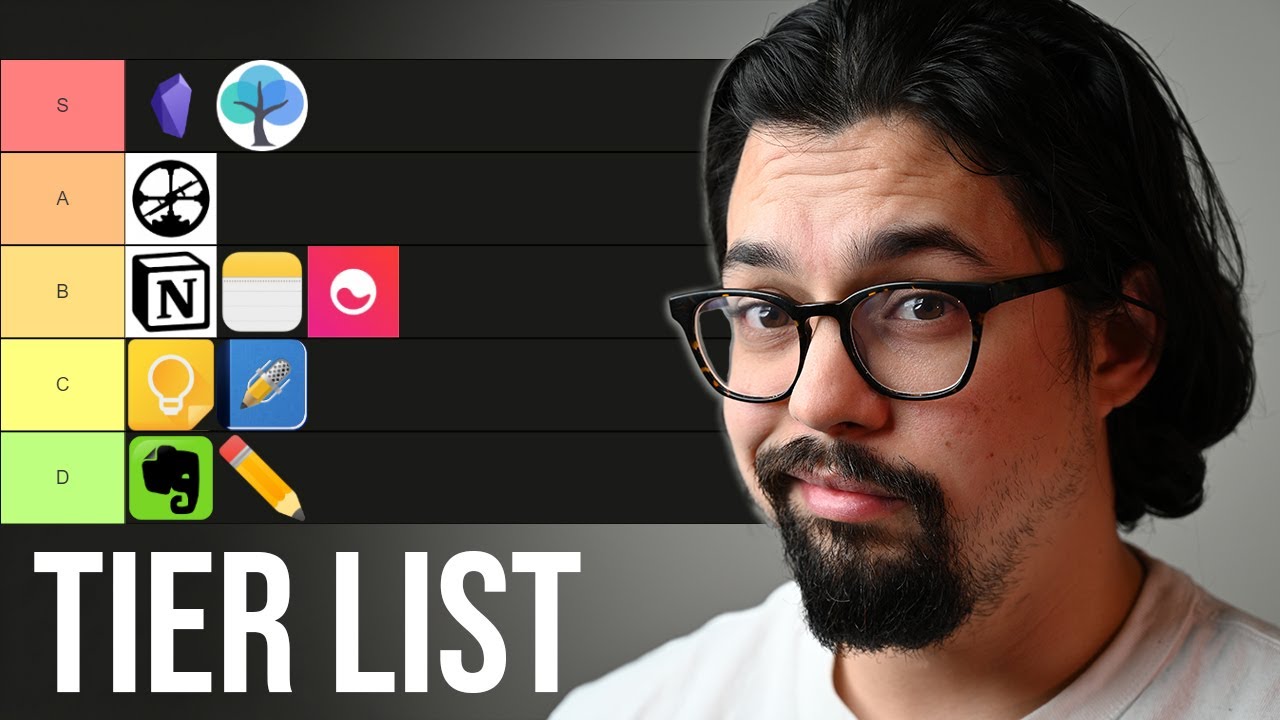
24 Notetaking apps RANKED (2021)
## Metadata
- Author: [[YouTube]]
- Full Title: 24 Notetaking apps RANKED (2021)
- Category: #articles
- Document Note: ---
tags: [productivity, note-taking, app-reviews]
author: Francesco D'Alessio
source: YouTube
reference: https://www.youtube.com/watch?v=5H3ISMFkUuQ
date created: 2024-01-16 10:30
---
# 🏷️ Title: 24 Notetaking apps RANKED (2021)
## 🧰 Action Inbox
- [H1] Try Remnote for spaced repetition learning — 17:32 student apps #productivity
- [H2] Evaluate Notion for project management — 20:45 power apps #workflow
- [H3] Consider Obsidian for PKM system — 24:15 overpowered apps #knowledge-management
## 🧭 Table of Contents
- [📝 Summary](#-summary)
- [📖 Main Content](#-main-content)
- [🗒️ Notes](#️-notes)
- [📚 References](#-references)
- [🗣️ Paraphrase](#️-paraphrase)
- [📰 Newsletter](#-newsletter)
- [✅ Action Items](#-action-items)
- [🧪 Hypotheses](#-hypotheses)
- [📊 Methodology](#-methodology)
- [❓ Questions](#-questions)
- [🔮 Future Research](#-future-research)
- [💡 Implications](#-implications)
- [🧠 Learning Styles Assessment](#-learning-styles-assessment)
- [📊 Accessibility Assessment](#-accessibility-assessment)
- [🌍 DEIB Assessment](#-deib-assessment)
- [✅ Logical Validity](#-logical-validity)
- [🛡️ DARVO Analysis](#-darvo-analysis)
- [🎯 Conclusion](#-conclusion)
### 🔗 References
- [Original Video](https://www.youtube.com/watch?v=5H3ISMFkUuQ)
- [Francesco D'Alessio's Channel](https://www.youtube.com/@FrancescoDAlessio)
## 📝 Summary
- Francesco D'Alessio ranks 24 note-taking applications from S-tier (excellent) to D-tier (not recommended)
- Categories include old school (pen/paper), simple notes, super nerd apps, student apps, folder-based, writing apps, power apps, and overpowered apps
- S-tier winners: Remnote, Notion, Roam Research, Obsidian
- D-tier: Google Keep, Vim, Athens Research
- Key factors: usability, features, cross-platform support, speed, privacy
## 📖 Main Content
This comprehensive review evaluates 24 note-taking applications across different categories and use cases. Francesco divides the apps into logical groupings from analog methods like pen and paper through to sophisticated "overpowered" applications for knowledge management professionals.
The ranking considers factors like ease of use, feature richness, cross-platform availability, performance, and suitability for different user types. Simple apps like Apple Notes receive high marks for their intended use case, while complex tools like Roam Research and Obsidian are praised for their powerful linking and organizational capabilities.
The review acknowledges that different apps serve different needs - student-focused apps like Remnote excel at memorization, while writing-focused tools like Bear provide distraction-free environments for authors.
## 🗒️ Notes
#### ⏱️ [00:00](https://www.youtube.com/watch?v=5H3ISMFkUuQ?t=0) — [H1] Introduction to Note-Taking App Tier List
- Key idea: Ranking 24 apps from S-tier (awesome) to D-tier (not recommended)
- Evidence: "S-tier being super awesome apps that I would love to use every day"
#### ⏱️ [01:30](https://www.youtube.com/watch?v=5H3ISMFkUuQ?t=90) — [H2] Old School: Pen and Paper (C-tier)
- Key idea: Handwriting great for memory but lacks searchability and durability
- Evidence: "handwriting is great for memory but you can't search your notes"
#### ⏱️ [02:15](https://www.youtube.com/watch?v=5H3ISMFkUuQ?t=135) — [H2] Old School: Zettelkasten (B-tier)
- Key idea: Index card system that worked for prolific writers but has limitations
- Evidence: "nicholas lumen who wrote dozens of papers and dozens of books"
#### ⏱️ [03:30](https://www.youtube.com/watch?v=5H3ISMFkUuQ?t=210) — [H1] Simple Notes: Apple Notes (A-tier)
- Key idea: Excellent within Apple ecosystem with folders, tags, and drawing capabilities
- Evidence: "if you're in the apple ecosystem apple notes is great"
#### ⏱️ [04:15](https://www.youtube.com/watch?v=5H3ISMFkUuQ?t=255) — [H2] Simple Notes: Google Keep (D-tier)
- Key idea: Poor organization and uncertain future make it unreliable
- Evidence: "the organization in google keep is kind of horrible"
#### ⏱️ [05:00](https://www.youtube.com/watch?v=5H3ISMFkUuQ?t=300) — [H2] Simple Notes: Simple Note (B-tier)
- Key idea: Cross-platform alternative that does what Google Keep should do
- Evidence: "simple note is what google keep wishes it was"
#### ⏱️ [05:30](https://www.youtube.com/watch?v=5H3ISMFkUuQ?t=330) — [H2] Simple Notes: Standard Notes (B-tier)
- Key idea: Privacy-focused with encryption but password loss means data loss
- Evidence: "everything is totally encrypted... if you lose your password you also lose all your notes"
#### ⏱️ [06:30](https://www.youtube.com/watch?v=5H3ISMFkUuQ?t=390) — [H2] Super Nerd Apps: Emacs (C-tier)
- Key idea: Highly extensible for the right person but not mainstream
- Evidence: "you can basically make your own note-taking app inside of it"
#### ⏱️ [07:15](https://www.youtube.com/watch?v=5H3ISMFkUuQ?t=435) — [H2] Super Nerd Apps: Vim (D-tier)
- Key idea: Great text editor but poor note-taking experience
- Evidence: "i love vim... but it really doesn't make a good note-taking app"
#### ⏱️ [08:30](https://www.youtube.com/watch?v=5H3ISMFkUuQ?t=510) — [H2] Student Apps: GoodNotes (B-tier)
- Key idea: Excellent iPad app for annotating and handwriting
- Evidence: "goodnotes is really nice for annotating lecture slides"
#### ⏱️ [09:15](https://www.youtube.com/watch?v=5H3ISMFkUuQ?t=555) — [H2] Student Apps: Notability (B+ tier)
- Key idea: Superior iPad app with lecture recording and playback features
- Evidence: "you can record a lecture and kind of play back the stuff that you're drawing"
#### ⏱️ [10:30](https://www.youtube.com/watch?v=5H3ISMFkUuQ?t=630) — [H1] Student Apps: RemNote (S-tier)
- Key idea: Combines note-taking with spaced repetition for powerful learning
- Evidence: "allows you to build context around your flashcards... space repetition is super powerful"
#### ⏱️ [12:00](https://www.youtube.com/watch?v=5H3ISMFkUuQ?t=720) — [H2] Folder-Based: OneNote (B-tier)
- Key idea: Robust cross-platform app with some UI and sync issues
- Evidence: "onenote is actually pretty robust it syncs across different devices"
#### ⏱️ [13:00](https://www.youtube.com/watch?v=5H3ISMFkUuQ?t=780) — [H2] Folder-Based: Evernote (B-tier)
- Key idea: Good for beginners but feels outdated and slow
- Evidence: "it feels like evernote is constantly updating the app without really changing much"
#### ⏱️ [15:00](https://www.youtube.com/watch?v=5H3ISMFkUuQ?t=900) — [H2] Writing Apps: Bear (A-tier)
- Key idea: Best markdown editor for writers with superior UI
- Evidence: "i like the ui a lot better than ia writer or ulysses"
#### ⏱️ [17:00](https://www.youtube.com/watch?v=5H3ISMFkUuQ?t=1020) — [H1] Power Apps: Notion (S-tier)
- Key idea: Scalable from simple to complex with databases and collaboration
- Evidence: "if you learn how to use databases and use linked databases it can be super super powerful"
#### ⏱️ [18:30](https://www.youtube.com/watch?v=5H3ISMFkUuQ?t=1110) — [H2] Power Apps: Amplenote (B-tier)
- Key idea: Powerful features with excellent task management but some bugs
- Evidence: "one of the best implementations of a task manager i've seen inside of a note-taking app"
#### ⏱️ [20:30](https://www.youtube.com/watch?v=5H3ISMFkUuQ?t=1230) — [H1] Overpowered: Roam Research (S-tier)
- Key idea: Revolutionary networked thought and bi-directional linking
- Evidence: "rome has brought about things like networked thought bi-directional linking"
#### ⏱️ [22:00](https://www.youtube.com/watch?v=5H3ISMFkUuQ?t=1320) — [H2] Overpowered: Athens Research (D-tier)
- Key idea: Open-source Roam clone lacks original vision
- Evidence: "you're always going to be behind them you're just going to be kind of living in the shadow"
#### ⏱️ [23:00](https://www.youtube.com/watch?v=5H3ISMFkUuQ?t=1380) — [H1] Overpowered: Obsidian (S-tier)
- Key idea: Excellent community, plugins, and responsive development
- Evidence: "how easy it is to install plugins to change themes how responsive the dev team seems to be"
## 📚 References
- [Original Video](https://www.youtube.com/watch?v=5H3ISMFkUuQ)
- [How to Take Smart Notes](https://takesmartnotes.com/)
- [Building a Second Brain](https://www.buildingasecondbrain.com/)
## 🗣️ Paraphrase
- The review categorizes 24 note-taking apps into logical groups from analog methods to sophisticated digital tools, evaluating each based on usability, features, and target audience
- Simple apps like Apple Notes excel in their intended use cases, while more complex tools like Notion and Obsidian offer powerful capabilities for advanced users
- The key insight is that different apps serve different needs - students benefit from spaced repetition tools, writers need distraction-free environments, and knowledge workers require linking and organization features
## 📰 Newsletter
🚀 **Note-Taking App Showdown: Finding Your Perfect Match**
Whether you're a student cramming for exams or a knowledge worker building a second brain, choosing the right note-taking app can transform your productivity. Francesco D'Alessio's comprehensive review of 24 applications reveals some surprising winners and losers.
**Key Takeaways:**
- **For Students**: RemNote combines note-taking with spaced repetition - a game-changer for memorization
- **For Everyone**: Apple Notes punches above its weight within the Apple ecosystem
- **For Power Users**: Notion and Obsidian lead the pack for complex knowledge management
The review emphasizes that the "best" app depends entirely on your specific needs and workflow. Don't get caught up in feature lists - focus on what actually helps you think and learn better.
**Resources**: [Original Review](https://www.youtube.com/watch?v=5H3ISMFkUuQ), [Obsidian](https://obsidian.md/), [Notion](https://notion.so/)
## ✅ Action Items
#### DevRel
- Developer education: Create comparison matrix for developer documentation tools
- Community management: Survey developers on preferred note-taking workflows
- Developer experience: Evaluate knowledge base organization based on tier rankings
#### WordPress
- Documentation: Review note-taking recommendations for WordPress contributors
- Community: Share productivity tips for WordCamp organizers and meetup leaders
- Training: Incorporate note-taking best practices into lesson planning guides
## 🧪 Hypotheses
- Apps with bi-directional linking create more valuable knowledge networks than folder-based organization
- Cross-platform availability significantly impacts long-term user adoption and retention
- Simple apps with focused use cases outperform feature-rich apps for most users
- Open-source clones struggle to innovate beyond their proprietary inspirations
### 📊 Methodology
- Comparative analysis across 24 applications using consistent evaluation criteria
- Categorical grouping by user type and complexity level
- Tier ranking system from S (excellent) to D (not recommended)
### ❓ Questions
- How do note-taking preferences correlate with learning styles and work patterns?
- What features actually improve knowledge retention versus those that just feel productive?
- How important is vendor lock-in consideration when choosing knowledge management tools?
### 🔮 Future Research
- Longitudinal study of productivity outcomes across different note-taking approaches
- Analysis of knowledge worker workflows and tool switching patterns
- Investigation of AI-powered note-taking features and their effectiveness
### 💡 Implications
- Practice: Tool choice should align with specific workflows rather than feature checklists
- Education: Different learning contexts require different organizational approaches
- Security: Privacy and data portability considerations vary significantly across applications
- Funding: Investment in productivity tools should consider long-term workflow integration
### 🧠 Learning Styles Assessment
Reading level estimate: 8th-9th grade (accessible)
#### 👀 Visual learners
- Present: Tier list visualization, app categorization
- Improve: Screenshots of interfaces, feature comparison charts
#### 🔊 Aural learners
- Present: Video format with clear narration
- Improve: Audio summary of key findings, podcast version
#### 🗣️ Verbal learners
- Present: Clear definitions, app comparisons, analogies
- Improve: Glossary of productivity terms, use case stories
#### 🧩 Kinesthetic learners
- Present: Hands-on app testing mentioned
- Improve: Step-by-step setup guides, trial checklists
#### 🧠 Logical learners
- Present: Systematic categorization, tier ranking logic
- Improve: Scoring rubric, decision tree for app selection
#### 🧑🤝🧑 Social learners
- Present: Twitter community input mentioned
- Improve: User testimonials, community recommendations
#### 🧘♀️ Solitary learners
- Present: Individual app evaluation, personal preferences
- Improve: Self-assessment questionnaire, reflection prompts
#### 🌿 Naturalistic learners
- Present: Organic workflow evolution concepts
- Improve: Ecosystem thinking about tool integration
### 📊 Accessibility Assessment
#### Screen reader semantics
- Present: Clear headings in video description
- Improve: Detailed alt text for tier list graphics
#### Keyboard navigation
- Present: Standard YouTube controls
- Improve: Timestamped navigation links
#### Contrast and readability
- Present: High contrast tier list colors
- Improve: Text overlays for key points
#### Text resizing and reflow
- Present: YouTube's responsive design
- Improve: Separate text-based summary
#### Media and captions
- Present: Video with audio
- Improve: Professional captions, full transcript
#### Forms and interactions
- Present: Basic YouTube interface
- Improve: Interactive tier list tool
### 🌍 DEIB Assessment
#### Cultural breadth
- Present: Global app selection (US, European, Asian companies)
- Improve: Discussion of international user needs
#### Inclusive language
- Present: Generally neutral technical language
- Improve: Acknowledge different work contexts and abilities
####
- Document Tags: [[workflow]] [[knowledge]] [[productivity]]
- Summary: 24 Notetaking apps RANKED (2021)
- URL: https://www.youtube.com/watch?v=5H3ISMFkUuQ
i spend way too much time thinking aboutand trying new note-taking apps so ithought it would be fun to put them on atier list i asked twitter what theirfavorite note-taking apps were and icollected a list of 24 which i'vearbitrarily divided up into differentcategories we're going to rank them froms-tier to d-tier s-tier being superawesome apps that i would love to useevery day and detail your apps that iwould recommend no one use all rightit's tier list timeall right we're gonna start with someold school apps ones that aren't evendigital so we're gonna start with penand paper i'm old enough that when i
went to school everything i did was penand paper three ring binder notebooksstacks of paper handwriting is great formemory but you can't search your notesand sometimes you lose your notes and ifyour house catches on fire youdefinitely lose your notes and we'regonna give classic pen and paper a ctier much better options out there thenext old school app is a zettel castingthis is another analog technique whereyou use index cards like these and putthem in a zettle cast in or a slip boxthis technique worked well for nicholaslumen who wrote dozens of papers anddozens of books i believe authors likerobert greene ryan holiday robert cairo
all use techniques that are similar tothe zeddle casting it requires some mindbending to get your head around how itworks i recommend you check out the bookhow to take smart notes but it's sort oflike a level up above pen and paper sowe're gonna give it a b still can'tsearch still have to do these like weirdindex things you might lose some stuffand again if it catches on fire youdon't have your notes our next categoryis simple notes these are apps thatprobably come with your phone or yourcomputer they might have like taggingand folders but other than that there'snothing complicated going on first up isapple notes we're gonna give apple notes
an a for apple if you're in the appleecosystem apple notes is great it's gotfolders it's got tags you can drawpictures in it if you've got an ipadit's very easy to access very quick andit seems like they're continuing to makeupgrades to it if you want to get morecomplicated you'll need to use adifferent app but apple notes isactually pretty great up next isgoogle's equivalent google keep googlemakes a lot of products that you're notreally sure if they're going to keepsupporting it years into the future ifeel like the future of google keep iskind of up in the air i feel like no onereally knows that it's there sometimesthey move it or like i'm worried theymight change the name of it or something
the organization in google keep is kindof horrible the only way you can doanything with it is to use these tagsthat aren't that great it's onlyavailable if you have a google accounti'm going to give it like a d tier ireally don't like google keep and idon't even know if it's going to bearound next up is simple note simplenote is what google keep wishes it wasif you're not locked into the appleecosystem simple note is cross-platformacross basically anything it also has aweb app again if all you need to do iskeep track of a to-do list or a giftlist or something it's perfect givingsimple note a b next up is standard
notes kind of another simple applicationbut the ui is really nice and if you'reworried about your privacy standardnotes has you covered everything istotally encrypted so even though you'resyncing your notes to their servers it'stotally encrypted they'll never be ableto look at what's in your notes that'spretty cool now the problem with that isif you lose your password you also loseall your notes so you to be reallycareful with encrypted notes like thisi'm going to give standard notes anotherb all right up next super nerd appsthese are apps for super nerds if youlike linux if you like coding if youlike open source these are your jam wheni asked twitter about different
note-taking apps i think some peoplewere joking when they said emacs and vibut we're gonna include him anyway iactually do know someone that keeps alot of his notes in emacs emacs is superextensible uh you can basically makeyour own note-taking app inside of it ifyou want that's kind of crazy to me butyou can do it for the right person emacsis an s tier i think for most peopleit's kind of a c or like a d tier i'llgive it a c to be nice vim is in asimilar boat although it's probably lessextensible than emacs i love vim it'slike my text editor of choice but itreally doesn't make a good note-takingapp you're basically looking at files
and folders on your computer system it'sgot to get the detail i love my bim butit's not a good note taking app next upis notational velocity this is one ofthe like original note-taking apps thatkind of abandoned the idea of foldersthe whole thing was based around textfiles that you could search reallyquickly i think notational velocity iscool but other note-taking apps havekind of replaced it i'm going to give ita c all right next we have apps forstudents first up is good notesgoodnotes is an ipad app so if you havean ipad that's great if you don't that'snot great goodnotes is really nice forannotating lecture slides for
handwriting stuff or drawing things ilike it a lot it's a solid b notabilityis another ipad note taking app forstudents i like it a little more thangood notes the something about theinterface is great you can record alecture and kind of play back the stuffthat you're drawing while you're doingthat it's really great if you likesketch notes the one downside to bothgood notes and notability is that it'skind of awkward to put in text whereyou're typing and then portability fromyour ipad to like a pc is not great i'malso going to give notability a b tiermaybe like a b plus i think it's alittle better than good notes but ifyou're a student you should definitelylook at these two apps and see if youlike them our last student app is
remnantremnant's an interesting one it's sortof like a note-taking app with abuilt-in space repetition system in itif you're not familiar with spacerepetition it's a way to time thefrequency of flashcards so that you canmemorize things faster if you're notfamiliar with space repetition andyou're a student i highly recommend youcheck out apps like anki or like thisone remnant rimnote is nice because itallows you to build context around yourflashcards that you're studying i thinkit's a really cool concept the ui is alittle janky but it's free if you're astudent i think it's totally worth
putting up with a kind of janky ui tolevel up your study game spacerepetition is super powerful if you're astudent highly recommend it i'm gonnaput rem note as an s tier that's ourfirst s tier pretty cool our nextcategory is folder based apps these areapps that organize the notes aroundfolders first up is the classicmicrosoft onenote onenote kind of has asoft spot in my heart it's the firstdigital note-taking tool i really usedin college i had a professor who forcedus to use onenote to submit homework andto take notes in class and actuallyreally appreciated that onenote isactually pretty robust it syncs across
different devices you can write in ityou can make equations in it i think theui is a little janky and sometimes it'sgot sync problems but it's actuallypretty solid i'm gonna give onenote a b4boomer next up we've got evernote ah manevernoteanother app that has a beautiful placein my heart when i first took building asecond brain i built my first secondbrain in evernote and it was wonderfulevernote's a great tool i stillrecommend it to people who are new tosecond brains and personal knowledgemanagement systems but man it's justnot something i want to use anymore itfeels like evernote is constantly
updating the app without really changingmuch or when they do change things it'sstuff i don't want i feel like the syncis slow just launching the app is slowit's like fine likei don't know i should give it a c buti'm going to give it a b just becauseyou know the nostalgia value next up isdevon think don't think it's great ifyou're a researcher or if you're someonewho handles a lot of pdf documents againit's another folder-based structure youcan annotate files like pdfs and addnotes if you're doing a lot of researchand organize stuff it's great i think ifyou're a researcher you would love
devonthink but for people who don'thandle pdfs a lot like i don't probablynot a necessary tool i'm going to givedevin think a b also all right our nextcategory is writing apps these are appsthat are optimized for people who writefor a living whether you're an author acopy editor or something like that firstup we have ia writer which is crossplatform and i believe a one-time fee iawriter is great it lets you focus in onthe stuff you're writing and kind ofhides all the organizational stuff butit still has organizational tools likefolders and tags and that sort of thingif you write a lot and you need afocused editor a writer is great ulysses
is like a writer but it is mac and iosonly and it is a subscription model iwould kind of put them both on par butthe subscription model part kind of putsme off a little bit and it's not crossplatform that could be a plus or minusfor you i'm gonna give it a c there isanother markdown editor that's forpeople who are writers i like the ui alot better than i ia writer or ulyssesand i think that fans of bear likereally like bear again it's another oneof those mac only apps i think as far asmarkdown editors for writers go there'sthe way to go i'm gonna give it a tier
our next section is power apps these areapps that start to let you organizeinformation in more complicated waysthey might include things like taskmanagement or calendars but they alsohave a user interface that allowssomeone who doesn't know how to code todo some really powerful stuff first upis notion i really like notion it's easyenough to get started with and get theball rolling if you want to dive deeperyou can if you learn how to usedatabases and use linked databases itcan be super super powerful but if thatstuff sounds too intimidating you canget a lot of good use out of notion it'sgood for collaborating it's great for
personal work if you want to manage yourtasks you can it's a great way to manageprojects in the past it's been kind ofslow but the team worked really hard tomake it faster notion gets an s tiereasily next up is ample note ample notehas a lot of really powerful featureslike bi-directional linking like taggingthey also have one of the bestimplementations of a task manager i'veseen inside of a note-taking app there'sthis ranking system for tasks that worksreally well i like it a lot it's still arelatively new software and there's somejanky things with tags and nested tagsthat kind of don't always work for thatreason i'm giving it like a b tier i
think in the future i could easily moveup to a or s tier if they continue towork on the product mem.ai i'll behonest i actually haven't had a chanceto use mem.ai yet but a lot of peoplewere asking about it and from what i'veseen of demos the creators of mem.aihave a very unique and creative take onhow you handle the way you work withnotes they allow you to do things likesnooze notes like have a dedicated inboxfor notes where you can handle them uhschedule things for the future i reallylike the direction that mem ai is goingmy one concern with apps like these is
if there's something in the workflowthat you disagree with it's gonna behard for you to change it so before yougo all in on an app like mem.ai makesure that you really like the workflowthat they're providing at the risk ofsounding like a broken record we'regonna give it a b and our last but notleast section is overpowered apps theseare apps for pkm nerds if you lovenote-taking if you spend a significantportion of your day inside of anote-taking app you should probably takea look at one of these rom research haskind of brought about a change in thenote-taking world whereas before mostthings were folder-based roma hasbrought about things like networked
thought bi-directional linking outlinerstyle apps in a lot of ways rome isrevolutionary although some of theseideas have been floating around beforeno one had put them together quite theway that the team at rome research hadbefore i like rome it's not perfectsometimes it's slow there's some privacyissues but man it's such a nice tool touse thinking of blocks is a totallydifferent mindset shift it has to get anest here next we have athens researchwhich is an open source clone of romei'm kind of conflicted about this one ilike that they're making an open sourcething that's self-hosted
that's like romebut i feel like if you're making acomplete clone of rome you're alwaysgoing to be behind them you're justgoing to be kind of living in the shadowof the other app and i really wish thatthe creators of athens research would dotheir own thing make something uniqueand more attuned to their creativevision rome is rome because of itsfounder conor athens research is athensresearch because they copy someone elsei'm not so big on that for that reason igive it a d tier and last but not leastis obsidian i've been playing aroundwith obsidian lately on my second
channel where i'm building a pkm fromscratch and i like it a lot it's gotsome similarities to rome in thatthere's bi-directional linking andemphasis on network thought there areobviously some differences it's notblock based it's page based it usesmarkdown for formatting but i reallylike how easy it is to install pluginsto change themeshow responsive the dev team seems to beto want to changes and how nice thecommunity is i'm putting obsidian andester also alright so that's my notetaking tier lists this is a lot of funto make and if you think that i put your
favorite note-taking app in the wrongslotyou're wrongif you enjoyed this video check out thisplaylistor check out this video that the youtubealgorithm hand-picked just for yousee you next time, 24 Notetaking apps RANKED (2021), YouTube, 01ka82qn4rq9jc8t0kydrh76rj.