An Introduction to Nested Blocks Using InnerBlocks

## Metadata
- Author: [[Ronald Huereca]]
- Full Title: An Introduction to Nested Blocks Using InnerBlocks
- Category: #articles
- Document Note: ---
tags:
- #wordpress
- #nestedblocks
- #gutenberg
Author: DLX Plugins Team
Source: DLXPlugins.com
Reference: https://dlxplugins.com/tutorials/an-introduction-to-nested-blocks-using-innerblocks/?utm_source=convertkit&utm_medium=email&utm_campaign=Within%20WordPress%20%E2%80%93%20WP.org%20AI%20Team,%20Huge%20Etch%20Collab%20&%20Performance%20Tips%20-%2017813900
date created: 2025-06-01 20:15
---
# Title: An Introduction to Nested Blocks Using InnerBlocks
## Table of Contents:
- 📝 [Summary](#-summary)
- 📖 [Main Content](#-main-content)
- 🗒️ [Notes](#️-notes)
- 📖 [References](#-references)
- 🗣️ [Paraphrase](#-paraphrase)
- 📰 [Newsletter](#-newsletter)
- ✅ [Action Items](#-action-items)
- 🧪 [Hypotheses](#-hypotheses)
- 📊 [Methodology](#-methodology)
- ❓ [Questions](#-questions)
- 🔮 [Future Research](#-future-research)
- 💡 [Implications](#-implications)
- 🧠 [Learning Styles Assessment](#-learning-styles-assessment)
- 📊 [Accessibility Assessment](#-accessibility-assessment)
- 🌍 [DEIB (Diversity, Equity, Inclusion, and Belonging) Assessment](#-deib-diversity-equity-inclusion-and-belonging-assessment)
- ✅ [Logical Validity](#-logical-validity)
- 🔍 [DARVO Analysis](#-darvo-analysis)
- 🔍 [SEO Evaluation](#-seo-evaluation)
- 🎯 [Conclusion](#-conclusion)
### References: Include a list of sources consulted and cited in the article.
- DLX Plugins Tutorials: “An Introduction to Nested Blocks Using InnerBlocks”
- Official WordPress Developer Handbook (Gutenberg Blocks API)
- WordPress Gutenberg Handbook: Nested Blocks and InnerBlocks Component
## 📝 Summary:
This article serves as a practical tutorial and introduction to the concept of nested blocks in WordPress’s Gutenberg editor, focusing specifically on the use of the `InnerBlocks` component. It explains why nested blocks are powerful for building complex, reusable block structures, and guides developers through the setup, configuration, and customization of `InnerBlocks` in custom block development. The tutorial highlights key methods to control allowed blocks, template locking, and how to enhance UX when building nested block experiences.
## 📖 Main Content:
DLX Plugins provides a developer-friendly walkthrough of how nested blocks work within the Gutenberg editor’s React-based framework. The article explains that `InnerBlocks` allow block authors to embed other blocks inside a parent block, enabling highly flexible and modular content layouts.
The tutorial breaks down the basic usage of `InnerBlocks`, including how to specify which child blocks are permitted, how to define default templates for inner content, and how to lock templates to maintain design consistency. It also offers tips on how to customize the inner block toolbar and manage block attributes for better control.
Throughout, the article balances technical detail with practical examples, such as code snippets for registering blocks with nested children and managing state. It underscores the benefits of nested blocks for theme and plugin developers seeking to create structured, user-friendly editing experiences without overwhelming content creators.
The author touches on best practices and potential pitfalls, such as avoiding overly complex nesting that could hinder editor performance or user understanding.
### 🗒️ Notes
- **Introduction to Nested Blocks**
- `InnerBlocks` allows embedding blocks within a parent block
- Enables flexible, modular layouts and reusable content components
- **Basic Usage**
- Simple `InnerBlocks` component renders a dropzone for nested blocks
- Default template prop can pre-populate inner blocks
- Template locking controls user ability to add/remove/rearrange child blocks
- **Controlling Allowed Blocks**
- Specify allowed child blocks via `allowedBlocks` prop
- Restricts which blocks can be inserted inside parent block
- **Template Locking Modes**
- `false` (default): full freedom to modify inner blocks
- `"all"`: locks layout, no changes allowed
- `"insert"`: allows insertions but prevents removal/reordering
- **Customization Tips**
- Use `InnerBlocks.Toolbar` for custom toolbar controls
- Manage inner block attributes to sync data or state
- **Practical Examples**
- Code snippets showing registration of a block with nested blocks
- Template definition examples for preset layouts
- **Best Practices and Considerations**
- Avoid deeply nested blocks to maintain editor performance
- Design user-friendly templates to prevent confusion
- Balance flexibility with structure for content creators
## 📖 References:
- DLX Plugins tutorial linked above
- WordPress Gutenberg Developer Handbook, https://developer.wordpress.org/block-editor/developers/
- Gutenberg InnerBlocks documentation
## 🗣️ Paraphrase:
- Original excerpt:
“The `InnerBlocks` component is an essential part of Gutenberg block development, enabling developers to create blocks that contain other blocks, allowing more complex and modular layouts within the editor.”
- Paraphrased:
`InnerBlocks` is a key tool in building Gutenberg blocks, letting developers nest blocks inside parent blocks, which supports creating intricate and modular content structures in the WordPress editor.
- Original excerpt:
“By controlling which blocks are allowed and locking templates, developers can guide users to build consistent layouts while still providing flexibility where needed.”
- Paraphrased:
Developers can manage user input by specifying permitted blocks and locking templates, helping maintain consistent designs but still allowing user flexibility when appropriate.
## 📰 Newsletter:
Hey WordPress developers! 🎉
Ready to take your block development skills up a notch? This week, DLX Plugins shares a fantastic beginner-friendly guide on nested blocks using Gutenberg’s powerful `InnerBlocks` component. Whether you’re building custom themes or plugins, mastering nested blocks unlocks new ways to create flexible, modular, and user-friendly content layouts.
Get step-by-step tips on setting allowed blocks, template locking, and customizing toolbars — all with practical code snippets to try out right away. Perfect for devs eager to enhance the editor experience without overwhelming users.
Check out the full tutorial here: [DLX Plugins Nested Blocks Tutorial](https://dlxplugins.com/tutorials/an-introduction-to-nested-blocks-using-innerblocks/).
#wordpress #gutenberg #blockdevelopment #developeradvocacy
## ✅ Action Items:
- Incorporate `InnerBlocks` examples into workshops and tutorials for WordPress block development students.
- Develop training materials that explain nested block concepts clearly for diverse learner groups.
- Advocate for best practices in nested block use, balancing flexibility and usability to support inclusive content creation.
- Engage with the WordPress developer community on GitHub and forums to share nested block insights and gather feedback.
- Align this knowledge with open source advocacy by encouraging modular, reusable block designs that lower barriers to contribution.
- Prepare advanced sessions covering nested block state management and template locking for experienced developers.
- Include nested block education in OSPO strategies for onboarding and sustaining contributor engagement.
## 🧪 Hypotheses:
- Teaching nested blocks with practical code examples increases learner retention and confidence in block development.
- Use of template locking in nested blocks improves end-user content consistency without harming creative freedom.
- Clear documentation and examples accelerate onboarding of new block contributors to WordPress projects.
- Modular nested block designs reduce technical debt and improve theme/plugin maintainability.
### 📊 Methodology:
- Conduct surveys and assessments before and after nested block workshops to measure learning outcomes.
- Analyze user content consistency metrics comparing sites with template-locked blocks versus free-form blocks.
- Track contribution rates to block repos with and without comprehensive nested block documentation.
- Case studies on maintenance effort compari
- Summary: Learn InnerBlocks through this comprehensive tutorial on what InnerBlocks are, how they work, and how to implement them in your blocks.
- URL: https://dlxplugins.com/tutorials/an-introduction-to-nested-blocks-using-innerblocks/?utm_source=convertkit&utm_medium=email&utm_campaign=Within%20WordPress%20%E2%80%93%20WP.org%20AI%20Team,%20Huge%20Etch%20Update,%20Greyd%20Collab%20&%20Performance%20Tips%20-%2017813900
[](https://ebwsd89wku2.exactdn.com/wp-content/uploads/2023/10/nsted-dolls.webp?strip=all&lossy=1&quality=92&webp=92&sharp=1&w=2560&ssl=1)InnerBlocks are Similar to Nested Dolls[Nested blocks](https://developer.wordpress.org/block-editor/how-to-guides/block-tutorial/nested-blocks-inner-blocks/), also known as InnerBlocks, were a mystery to me for the longest time. I stumbled upon them quite by accident. While using a [deprecated property in a RichText component](https://dlxplugins.com/tutorials/say-goodbye-to-richtext-multiline-how-to-use-innerblocks-instead/), a warning popped up, suggesting I switch to InnerBlocks. The transition was anything but smooth, largely because I was navigating through unfamiliar terminology and concepts.
If you’re confused by InnerBlocks, you’re not alone. Nested blocks are a game changer, and within this tutorial I will explain what InnerBlocks are, why they’re useful, and how to create your own nested blocks.
#### The structure of a block
Let’s quickly go over what the structure of a typical block looks like.
[Pin itWebShare](https://ebwsd89wku2.exactdn.com/wp-content/uploads/2023/10/dlxplugins-1696719528322-1x.webp?strip=all&lossy=1&quality=92&webp=92&sharp=1&w=2560&ssl=1)Diagram of a Block’s Overall StructureA block can be a lot of moving pieces, but for the sake of brevity, the major pieces of blocks are:
* **Properties**: these are [defined in block.json](https://developer.wordpress.org/block-editor/reference-guides/block-api/block-metadata/). These are things like the block’s name, keywords, scripts, etc.
* **Attributes**: also defined in block.json, attributes are like stored option variables for a block.
* **Save Function**: This saves any block or InnerBlocks, and the return type indicates whether it’s a dynamic block.
* **Edit Function**: This declares how the block is rendered in the block editor and the frontend (if not dynamic).
* **Render Callback**: This declares how the block is rendered on the frontend (only if dynamic).
#### How do InnerBlocks factor into the block structure?
Each block can have one set of InnerBlocks. Let’s take an alert block, for example. It has a title, a body, and a call-to-action button.
[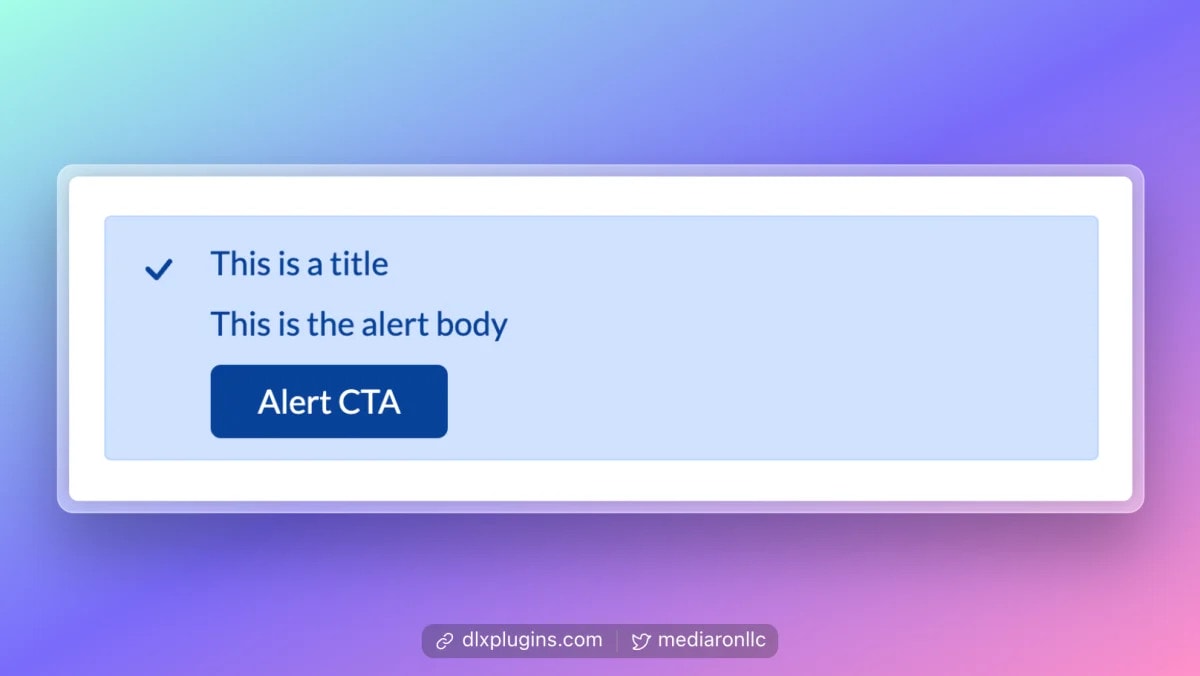Pin itWebShare](https://ebwsd89wku2.exactdn.com/wp-content/uploads/2023/11/dlxplugins-1701121147897-1x-1024x577.webp?strip=all&lossy=1&quality=92&webp=92&sharp=1&w=2560&ssl=1)Sample Alert BlockThe title and button are built into the block, but the alert body can be InnerBlocks in order to have multiple items as part of the body.
[Pin itWebShare](https://ebwsd89wku2.exactdn.com/wp-content/uploads/2023/11/dlxplugins-1701121319661-1x-1024x577.webp?strip=all&lossy=1&quality=92&webp=92&sharp=1&w=2560&ssl=1)Alert Block With Multiple ItemsIn this case, the InnerBlocks make up the body content. You can see this in the diagram below.
[Pin itWebShare](https://ebwsd89wku2.exactdn.com/wp-content/uploads/2023/11/dlxplugins-1701121646924-1x.webp?strip=all&lossy=1&quality=92&webp=92&sharp=1&w=2560&ssl=1)Alert Block Diagram With InnerBlocksIn this scenario, the title and CTA are part of the parent block but have InnerBlocks that make up the body text. The point here is that you can place InnerBlocks anywhere within your block structure.
#### Parent blocks and InnerBlocks
When you’re working with InnerBlocks, think of it like a family tree. You have a ‘Parent Block,’ which is the main block you start with. Inside this Parent Block, you have a placeholder, also known as InnerBlocks. You can insert new blocks within the InnerBlocks, allowing you to create more complex and interactive blocks.
For this next example, we’ll use a list block. The parent is the `UL` tag, while the InnerBlocks are the `LI` tags.
[Pin itWebShare](https://ebwsd89wku2.exactdn.com/wp-content/uploads/2023/10/dlxplugins-1696520365212-1x.webp?strip=all&lossy=1&quality=92&webp=92&sharp=1&w=2560&ssl=1)Parent Blocks Can Contain One Total InnerBlockThe diagram above shows one parent block, which acts like a `UL` tag wrapper. Within the parent block is an InnerBlock, which can create as many instances of the child block (`LI` tags) as you desire.
Here’s a simple animated gif showing how parent and child blocks interact.
[![Animation showing list items being added in a tree view]()Pin itWebShare](https://ebwsd89wku2.exactdn.com/wp-content/uploads/2023/10/innerblocks-list-fade-out.gif?strip=all&lossy=1&quality=92&webp=92&sharp=1&w=2560&ssl=1)Visual Tree View of Adding Nested BlocksAs you can see, the parent has one set of InnerBlocks, but you can have as many items within InnerBlocks as you desire. Adding to the complexity, InnerBlocks can have their own InnerBlocks, so you can do further nesting if required.
#### InnerBlocks concepts and definitions
InnerBlocks have their own internal lingo and terminology, and it’s important to know the concepts before diving in. Let’s start with React hooks.
##### React hooks
A [React hook](https://react.dev/learn#using-hooks) is just a function that returns values and only works in [functional components](https://www.freecodecamp.org/news/react-components-jsx-props-for-beginners/). Hooks can be useful for managing state, network lookups, or keeping tabs on data that might be changing.
For example, [the hook useState](https://react.dev/learn/state-a-components-memory) is extremely useful for setting and updating state within a functional component. Here’s an example of launching a modal in the block editor on a button click.
[![Code showing useState to open a modal]()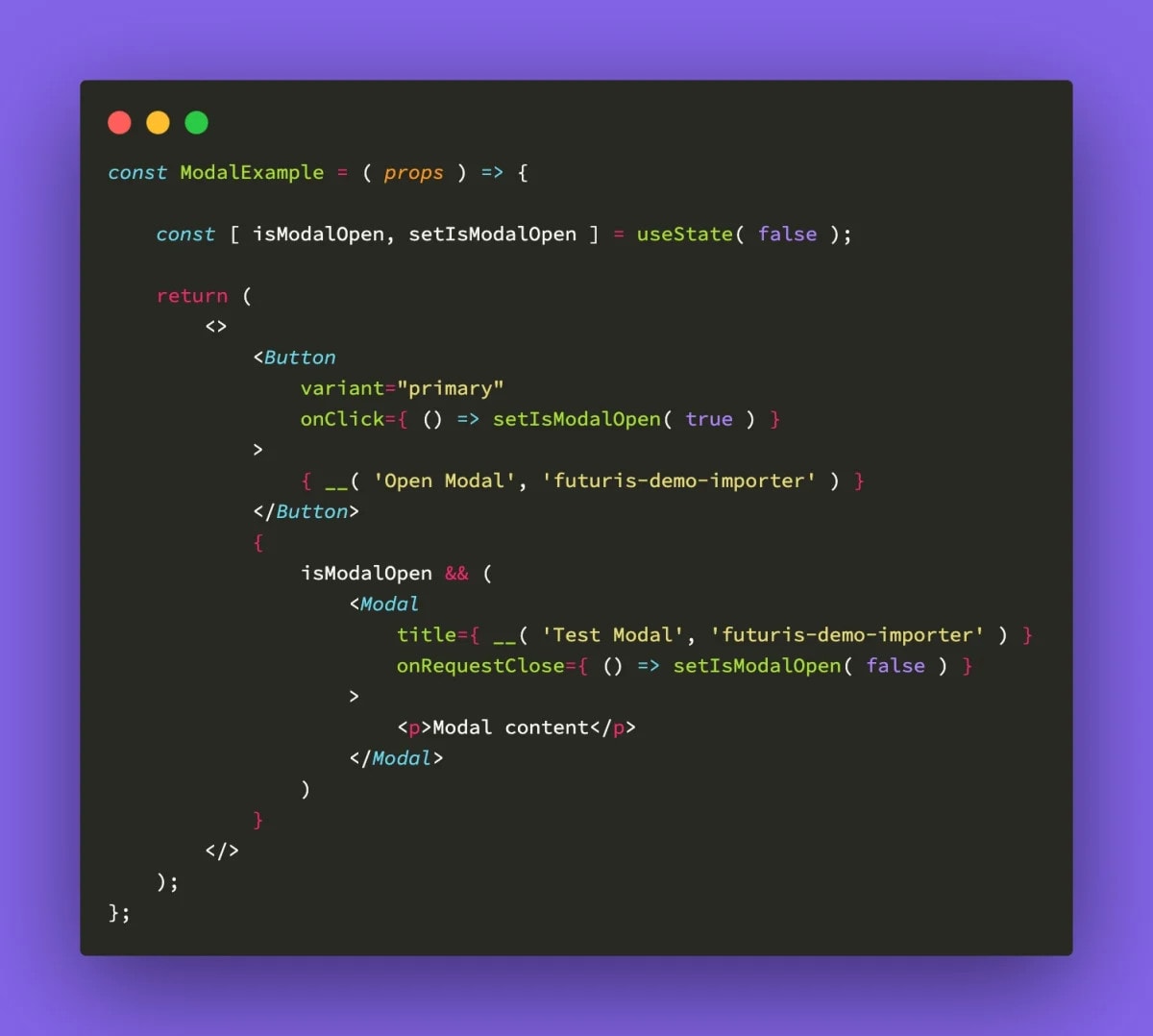Pin itWebShare](https://ebwsd89wku2.exactdn.com/wp-content/uploads/2024/01/code-modal-use-state.webp?strip=all&lossy=1&quality=92&webp=92&sharp=1&w=2560&ssl=1)Using Hook useState to Launch a ModalWe can even create our own hooks since they are just functions that return values. Here’s an example of a hook that returns the current post-author ID.
```
`const usePostAuthorId = () => {
const authorId = useSelect((select) => {
const { getCurrentPost } = select('core/editor');
const post = getCurrentPost();
return post ? post.author : undefined;
});
return authorId;
};`Code language: JavaScript (javascript)
```
Here’s how you would implement the above hook into a functional component.
```
`const ShowAuthor = (props) => {
const authorId = usePostAuthorId();
return (
<>
{ `Author ID: ${authorId}` }
</>
);
};
export default ShowAuthor;`Code language: JavaScript (javascript)
```
Whenever the post author is updated for the post, the author ID will change.
Since you can create custom hooks and hooks can return values, they are very useful for sharing functionality and sometimes data amongst different pieces of your component.
Please note that there are [rules of hooks](https://react.dev/warnings/invalid-hook-call-warning) that should be followed, notably:
* React hooks always start with the keyword `use` (e.g., `useState`, `useEffect`).
* Hooks should only be called in functional components.
* Hooks should be called at the top level of a component and not used in any conditions, effects, or loops.
Hooks are extremely useful, and this is just skimming the surface as to what’s possible. For more on React hooks, please learn more [about the built-in hooks](https://react.dev/reference/react/hooks) and [how to create custom ones](https://react.dev/learn/reusing-logic-with-custom-hooks).
Let’s move to the first hook we’ll encounter when dealing with InnerBlocks.
##### useBlockProps
The React hook `useBlockProps` is designed to be applied to a block’s outermost HTML wrapper. This means that when you’re outputting the structure of your block to the screen, [you need to wrap the outermost container](https://developer.wordpress.org/block-editor/reference-guides/block-api/block-edit-save/#block-wrapper-props) with the properties of this hook.
To understand what the hook `useBlockProps` does, we need to understand what it returns. I’ve pruned out most of what is returned by the hook. Please observe the various properties that are returned, which will be applied as HTML attributes to a wrapper element.
```
`return {
tabIndex: blockEditingMode === 'disabled' ? -1 : 0,
...wrapperProps,
...props,
ref: mergedRefs,
id: `block-${ clientId }${ htmlSuffix }`,
role: 'document',
'aria-label': blockLabel,
'data-block': clientId,
'data-type': name,
'data-title': blockTitle,
inert: isSubtreeDisabled ? 'true' : undefined,
className: classnames(
'block-editor-block-list\_\_block',
{
'wp-block': ! isAligned,
'has-block-overlay': hasOverlay,
'is-selected': isSelected,
'is-highlighted': isHighlighted,
'is-multi-selected': isMultiSelected,
'is-partially-selected': isPartiallySelected,
'is-reusable': isReusable,
'is-dragging': isDragging,
'has-child-selected': hasChildSelected,
'remove-outline': removeOutline,
'is-block-moving-mode': isBlockMovingMode,
'can-insert-moving-block': canInsertMovingBlock,
'is-editing-disabled': isEditingDisabled,
'is-content-locked-temporarily-editing-as-blocks':
isTemporarilyEditingAsBlocks,
},
className,
props.className,
wrapperProps.className,
defaultClassName
),
style: { ...wrapperProps.style, ...props.style },
};`Code language: JavaScript (javascript)
```
The return format of `useBlockProps` is an object, and with that, we can assign that object to a variable and use [JavaScript spread syntax](https://developer.mozilla.org/en-US/docs/Web/JavaScript/Reference/Operators/Spread_syntax) (the three dots `...`) to unravel the properties onto the chosen HTML wrapper.
Here’s an example of using `useBlockProps` to wrap a block:
```
`import { useBlockProps } from '@wordpress/block-editor';
import { \_\_ } from '@wordpress/i18n';
const QuotesBlockSample = ( props ) => {
const { attributes, setAttributes, isSelected, clientId } = props;
const blockProps = useBlockProps(
{
className: 'dlx-quotes-block',
}
);
return (
<>
<blockquote { ...blockProps }>
Blockquote content
</blockquote>
</>
);
};
export default QuotesBlockSample;`Code language: JavaScript (javascript)
```
In this particular example, I’m creating a simple quotes block. Since the outermost container will be a `blockquote`, I use spread syntax to distribute all the properties to the `blockquote` element. I’ve highlighted the area where spread syntax is used.
Here’s an example of some of the properties `useBlockProps` adds to a parent element:
```
`<blockquote
tabindex="0"
class="block-editor-block-list\_\_block wp-block dlx-quotes-block is-selected wp-block-dlxplugins-dlx-quotes-block-sample"
id="block-2847a027-fe6c-49de-9305-251c490d4229" role="document" aria-label="Block: DLX Quotes Block"
data-block="2847a027-fe6c-49de-9305-251c490d4229" data-type="dlxplugins/dlx-quotes-block-sample"
data-title="DLX Quotes Block">
Blockquote Content
</blockquote>`Code language: HTML, XML (xml)
```
As you can see, there are various block-specific attributes being applied, which would be hard to manage on your own without a hook, especially as a block’s state changes. The additional properties allow the block editor to manage the block internally.
Now that we have a basic block let’s set up the InnerBlocks.
##### useInnerBlocksProps
You would use hook `useInnerBlocksProps` to set up your InnerBlocks.
Hooks are simply functions, and `useInnerBlocksProps` takes two arguments:
1. A JavaScript object with any CSS classes or `[refs](https://react.dev/learn/referencing-values-with-refs)`.
2. A JavaScript object with InnerBlocks options.
It’s helpful to know what `useInnerBlocksProps` returns in order to gauge how it works:
```
`export function useInnerBlocksProps( props = {}, options = {} ) {
const fallbackRef = useRef();
const { clientId } = useBlockEditContext();
const ref = props.ref || fallbackRef;
const InnerBlocks =
options.value && options.onChange
? ControlledInnerBlocks
: UncontrolledInnerBlocks;
return {
...props,
ref,
children: (
<InnerBlocks
{ ...options }
clientId={ clientId }
wrapperRef={ ref }
/>
),
};
}`Code language: JavaScript (javascript)
```
The hook spreads out any passed props, but returns an object called `children`, which contains an `InnerBlocks` component.
Diving into the `InnerBlocks` component, it returns a block list of child blocks, which suggests this is the main reason why InnerBlocks can only have one parent block.
For the sake of this next example, and to ease things in gradually, we’ll use `useInnerBlocksProps` with just the defaults. With just the defaults, the InnerBlock that will be used is the `core/paragraph` block.
```
`import './editor.scss';
import { useBlockProps, useInnerBlocksProps, InnerBlocks } from '@wordpress/block-editor';
import { \_\_ } from '@wordpress/i18n';
const QuotesBlockSample = ( props ) => {
const { attributes, setAttributes, isSelected, clientId } = props;
const blockProps = useBlockProps(
{
className: 'dlx-quotes-block',
}
);
const innerBlocksProps = useInnerBlocksProps();
return (
<>
<blockquote { ...blockProps }>
<div { ...innerBlocksProps } />
</blockquote>
</>
);
};
export default QuotesBlockSample;`Code language: JavaScript (javascript)
```
Just as with `useBlockProps`, you need to use a parent element and spread the return value using spread syntax.
Before we dive into things, I’ll show you a maintenance tip that will save you some time when setting up InnerBlocks.
[![InnerBlocks and HTML Nesting]()Pin itWebShare](https://ebwsd89wku2.exactdn.com/wp-content/uploads/2024/01/dlxplugins-1704435042857-1x.webp?strip=all&lossy=1&quality=92&webp=92&sharp=1&w=2560&ssl=1)InnerBlocks and HTML NestingThe HTML structure is a bit off when setting up the `blockquote`. The structure is currently as follows:
* `blockquote`
+ `div.block-editor-block-list__layout`
This isn’t ideal, as the paragraph tags should be within the `blockquote` tag and not within any other wrapping element.
In this particular scenario, you can use spread syntax on the `blockquote` tag itself using `useBlockProps` and `useInnerBlocksProps` together.
```
`const QuotesBlockSample = ( props ) => {
const { attributes, setAttributes, isSelected, clientId } = props;
const blockProps = useBlockProps(
{
className: 'dlx-quotes-block',
}
);
const innerBlocksProps = useInnerBlocksProps();
return (
<>
<blockquote { ...blockProps } { ...innerBlocksProps } />
</>
);
};
export default QuotesBlockSample;`Code language: JavaScript (javascript)
```
This results in a more semantic HTML structure without any wrapper DIVs.
[![Paragraph Tags Wrapped Directly Beneath the Blockquote Tag]()Pin itWebShare](https://ebwsd89wku2.exactdn.com/wp-content/uploads/2024/01/dlxplugins-1704435565468-1x-1024x577.webp?strip=all&lossy=1&quality=92&webp=92&sharp=1&w=2560&ssl=1)Paragraph Tags Wrapped Directly Beneath the Blockquote TagLet’s move to some InnerBlocks terminology that will assist us in managing our InnerBlocks.
##### Allowed blocks
With just the defaults, any block is allowed as an InnerBlock. By passing a list of [allowed blocks](https://developer.wordpress.org/block-editor/how-to-guides/block-tutorial/nested-blocks-inner-blocks/#allowed-blocks), you can limit what types of blocks can be inserted. For example, I can set up the `blockquote` to accept a headline and a paragraph block.
Pass in a parameter called `allowedBlocks` as part of the 2nd argument to `useInnerBlocksProps`.
```
`const QuotesBlockSample = ( props ) => {
const { attributes, setAttributes, isSelected, clientId } = props;
const blockProps = useBlockProps(
{
className: 'dlx-quotes-block',
}
);
const innerBlocksProps = useInnerBlocksProps(
{},
{
allowedBlocks: [ 'core/heading', 'core/paragraph' ],
}
);
return (
<>
<blockquote { ...blockProps } { ...innerBlocksProps } />
</>
);
};
export default QuotesBlockSample;`Code language: JavaScript (javascript)
```
This will only allow the paragraph and heading blocks when inserting a new InnerBlock.
[![Paragraph and Heading Blocks Only for InnerBlocks]()Pin itWebShare](https://ebwsd89wku2.exactdn.com/wp-content/uploads/2024/01/dlxplugins-1704437663521-1x.webp?strip=all&lossy=1&quality=92&webp=92&sharp=1&w=2560&ssl=1)Paragraph and Heading Blocks Only for InnerBlocks##### Orientation
By default, blocks are a top-down affair. You can change the orientation of how the block behaves in the editor by passing an `orientation` parameter to `useInnerBlocksProps`.
Orientation should only be used if you are applying flex or grid styles to the InnerBlocks container and need the inserter to be horizontal instead of vertical. For example, you may have a social media block that has horizontal icons for the social networks.
Here’s an example of using `orientation`:
```
`const innerBlocksProps = useInnerBlocksProps(
{},
{
allowedBlocks: [ 'core/heading', 'core/paragraph' ],
orientation: 'horizontal',
}
);`Code language: JavaScript (javascript)
```
##### Templates
You can specify a template that will auto-insert when adding the parent block. For example, I can insert a headline followed by a paragraph.
```
`const innerBlocksProps = useInnerBlocksProps(
{},
{
allowedBlocks: ['core/heading', 'core/paragraph'],
template: [
['core/heading', { placeholder: 'Quote Author', level: 3 }],
['core/paragraph', { placeholder: 'Quote Text' }],
]
}
);`Code language: JavaScript (javascript)
```
When inserting the block, a headline and paragraph will be auto-inserted for us.
[![Example of Auto-Inserted Blocks]()Pin itWebShare](https://ebwsd89wku2.exactdn.com/wp-content/uploads/2024/01/inner-block-template-1024x576.gif?strip=all&lossy=1&quality=92&webp=92&sharp=1&w=2560&ssl=1)Example of Auto-Inserted Blocks##### Template lock
You can choose to lock InnerBlocks using the [`templateLock` property](https://github.com/WordPress/gutenberg/blob/3d5434d543874638437ed10a27a51848e8637db1/packages/block-editor/src/components/inner-blocks/README.md#templatelock). This allows you to control how blocks are handled within the InnerBlocks.
The `templateLock` property can accept the following values:
* `contentOnly`: This prevents any actions on the InnerBlocks and is fully locked down.
* `all`: Similar to `contentOnly`, this locks all blocks in place and prevents removing or reordering the blocks.
* `insert`: You can pass this to ensure that no new blocks are added, but reordering still works.
* `false`: This disables all locking of InnerBlocks, even if the parent block is locked.
Here’s an example with the `templateLock` set to `insert`.
```
`const innerBlocksProps = useInnerBlocksProps(
{},
{
allowedBlocks: ['core/heading', 'core/paragraph'],
template: [
['core/heading', { placeholder: 'Quote Author', level: 3 }],
['core/paragraph', { placeholder: 'Quote Text' }],
],
templateLock: 'insert',
}
);`Code language: JavaScript (javascript)
```
The result is a locked template, meaning I can’t insert or remove any blocks, but I can reorder them.
[![Locked Template Using templateLock]()Pin itWebShare](https://ebwsd89wku2.exactdn.com/wp-content/uploads/2024/01/dlxplugins-1704485966685-1x-1024x548.webp?strip=all&lossy=1&quality=92&webp=92&sharp=1&w=2560&ssl=1)Locked Template Using templateLockNow that the bulk of the terminology is out of the way, let’s set up a simple quotes block.
#### Setting up a simple Quotes block for InnerBlocks
In this next example, I’ll be using [@wordpress/create-block](https://developer.wordpress.org/block-editor/reference-guides/packages/packages-create-block/) to create a simple quotes block. The quote will have a content area, which will be InnerBlocks, and an attribution area, where someone can enter who authored the quote.
Here’s the command I’ve used to create the quotes block:
```
`npx @wordpress/create-block@latest --namespace=dlxplugins --title="DLX Quotes" --wp-scripts --variant=dynamic dlx-quotes-inner-blocks`Code language: Bash (bash)
```
[![Creating a Block using Node]()Pin itWebShare](https://ebwsd89wku2.exactdn.com/wp-content/uploads/2024/01/npx-create-block.gif?strip=all&lossy=1&quality=92&webp=92&sharp=1&w=2560&ssl=1)Creating a Block using NodeThe result is a block plugin that can be activated. Here’s the folder structure of the block plugin:
```
`.
└── dlx-quotes-inner-blocks-example/
├── build
├── src/
│ ├── block.json
│ ├── edit.js
│ ├── index.js
│ ├── render.php
│ └── style.scss
└── dlx-quotes-inner-blocks-example.php`Code language: AsciiDoc (asciidoc)
```
Let’s do a bit of configuring so we can begin setting up our quote block.
##### Updating block.json
I’ve added an `attributes` section and removed the `viewScript` property as we don’t need any scripts running on the frontend.
```
`{
"$schema": "https://schemas.wp.org/trunk/block.json",
"apiVersion": 3,
"name": "dlxplugins/dlx-quotes-inner-blocks-example",
"version": "0.1.0",
"title": "DLX Quotes",
"category": "widgets",
"icon": "smiley",
"description": "Example blockquote with inner blocks.",
"attributes": {
"cite": {
"type": "string",
"default": ""
}
},
"example": {},
"supports": {
"html": false
},
"textdomain": "dlx-quotes-inner-blocks-example",
"editorScript": "file:./index.js",
"editorStyle": "file:./index.css",
"style": "file:./style-index.css",
"render": "file:./render.php"
}`Code language: JSON / JSON with Comments (json)
```
##### Setting up the parent block
At the moment, our `edit.js` file outputs a placeholder.
```
`export default function Edit() {
return (
<p { ...useBlockProps() }>
{ \_\_(
'DLX Quotes – hello from the editor!',
'dlx-quotes-inner-blocks'
) }
</p>
);
}`Code language: JavaScript (javascript)
```
[![Placeholder for the Generated Block]()Pin itWebShare](https://ebwsd89wku2.exactdn.com/wp-content/uploads/2024/01/dlxplugins-1704491592751-1x-1024x538.webp?strip=all&lossy=1&quality=92&webp=92&sharp=1&w=2560&ssl=1)Placeholder for the Generated BlockLet’s modify `edit.js` to accept our `cite` attribute, and output a blockquote.
We’ll need the RichText component, so we’ll do an import.
```
`import { RichText } from '@wordpress/block-editor';`Code language: JavaScript (javascript)
```
Next, I’ll set up the placeholder in the blockquote and add a citation area, which is where the RichText component will be used.
```
`export default function Edit( props ) {
const { attributes, setAttributes, isSelected, clientId } = props;
const { cite } = attributes;
return (
<figure>
<blockquote>
Block quote placeholder
</blockquote>
<figcaption>
<RichText
tagName="cite"
placeholder="Enter quote citation"
value={ cite }
allowedFormats={ [ 'core/bold', 'core/italic' ] }
onChange={ ( value ) => setAttributes( { cite: value } ) }
/>
</figcaption>
</figure>
);
}`Code language: JavaScript (javascript)
```
The result is a placeholder and an input for a citation.
[![Blockquote Output Example]()Pin itWebShare](https://ebwsd89wku2.exactdn.com/wp-content/uploads/2024/01/dlxplugins-1704492541020-1x-1024x509.webp?strip=all&lossy=1&quality=92&webp=92&sharp=1&w=2560&ssl=1)Blockquote Output ExampleNext, let’s set up the InnerBlocks. We’ll need to import `useInnerBlocksProps`.
```
`import { useBlockProps, useInnerBlocksProps } from '@wordpress/block-editor';`Code language: JavaScript (javascript)
```
We’ll then set up a variable for the InnerBlocks.
```
`const innerBlocksProps = useInnerBlocksProps(
{},
{
allowedBlocks: ['core/paragraph'],
template: [
['core/paragraph', { placeholder: 'Please enter your Quote Text' }],
]
}
);`Code language: JavaScript (javascript)
```
And finally, add it to the blockquote:
```
`return (
<figure {...blockProps}>
<blockquote {...innerBlocksProps} />
<figcaption>
<RichText
tagName="cite"
placeholder="Enter quote citation"
value={ cite }
allowedFormats={ [ 'core/bold', 'core/italic' ] }
onChange={ ( value ) => setAttributes( { cite: value } ) }
/>
</figcaption>
</figure>
);`Code language: JavaScript (javascript)
```
The result is a blockquote with free text entry as long as it is a paragraph.
[![Blockquote With InnerBlocks Enabled]()Pin itWebShare](https://ebwsd89wku2.exactdn.com/wp-content/uploads/2024/01/inner-blocks-blockquote.gif?strip=all&lossy=1&quality=92&webp=92&sharp=1&w=2560&ssl=1)Blockquote With InnerBlocks EnabledOne added bonus you might have noticed is that you can reorder the InnerBlocks, which will save you from having to implement your own drag-and-drop mechanism.
##### Saving the InnerBlocks
Right now, the only thing saving is the citation. We haven’t yet wired up the InnerBlocks for saving just yet. We’ll need to modify the `index.js` file and add a save feature.
I’ll be demonstrating how to do a dynamic block, as it’s not as straightforward. For a JS only solution, you can follow the [developer documentation on using the useInnerBlocksProps hook](https://developer.wordpress.org/block-editor/how-to-guides/block-tutorial/nested-blocks-inner-blocks/#using-a-react-hook).
First, we’ll need to import InnerBlocks.
```
`import { InnerBlocks } from '@wordpress/block-editor';`Code language: JavaScript (javascript)
```
Next, we’ll add a `save` callback and return the content of the InnerBlocks.
```
`registerBlockType( metadata.name, {
edit: Edit,
save: () => {
return <InnerBlocks.Content />;
}
} );`Code language: JavaScript (javascript)
```
Now when we enter any content into the block, it’ll be saved.
##### Displaying the output
In `render.php`, we can modify what’s being displayed. We’ll mimic the HTML structure of the block.
There are three variables that are exposed in `render.php`:
* attributes (the block attributes)
* content (the InnerBlocks content)
* block (WP\_Block information about the block)
We’ll be using `$attributes` to get our `cite` value, and `$content` to retrieve our InnerBlocks content.
```
`<?php
$citation = $attributes['cite'];
?>
<figure class="wp-block-dlx-quotes-inner-blocks-example">
<blockquote>
<?php echo wp\_kses\_post( $content ); ?>
</blockquote>
<figcaption>
<cite><?php echo wp\_kses\_post( $citation ); ?></cite>
</figcaption>
</figure>`Code language: PHP (php)
```
Now we’re able to view the block on the frontend.
[![Blockquote With InnerBlocks on the Frontend]()Pin itWebShare](https://ebwsd89wku2.exactdn.com/wp-content/uploads/2024/01/dlxplugins-1704495436968-1x.webp?strip=all&lossy=1&quality=92&webp=92&sharp=1&w=2560&ssl=1)Blockquote With InnerBlocks on the FrontendWe have now successfully implemented InnerBlocks, saved the values, and have outputted them to the frontend.
####
Code is Available on GitHub
The full code in this example is available on GitHub.
#### Conclusion
InnerBlocks are definitely a concept that, once understood, can open the possibilities of what blocks are capable of doing.
In this tutorial, I’ve demonstrated how InnerBlocks works, how they interact with the parent block, and how to modify how InnerBlocks works and behaves.
In part 2 of this tutorial, I’ll be going over how to create a nested block. [Please subscribe](https://newsletter.dlxplugins.com/) to be alerted to new tutorials.
#### Like this tutorial? There's more like it. Subscribe today!

By: Ronald Huereca
**Published** **On:** on January 5, 2024
Ronald Huereca founded DLX Plugins in 2022 with the goal of providing deluxe plugins available for download. Find out more [about DLX Plugins](https://dlxplugins.com/about/), check out [some tutorials](https://dlxplugins.com/tutorials/), and check out [our plugins](https://dlxplugins.com/plugins/)., An Introduction to Nested Blocks Using InnerBlocks, Ronald Huereca, 01jwpt7wd9zxvkh0sg9506w5yv.