Building a CSS Carousel WordPress Block

## Metadata
- Author: [[Pascal]]
- Full Title: Building a CSS Carousel WordPress Block
- Category: #articles
- Document Note: ---
tags:
- #css
- #WordPress
- #Accessibility
- #webdevelopment
- #wordpressblocks
Author: Pascal Birchler
Source: https://pascalbirchler.com/css-carousel-block/
Reference: Full article available at the above link
date created: 2025-05-23 08:30
---
# Title: CSS Carousel Block – A Pure CSS Carousel for WordPress Blocks
## Table of Contents:
- [📝 Summary](#-summary)
- [📖 Main Content](#-main-content)
- [🗒️ Notes](#-notes)
- [📖 References](#-references)
- [🗣️ Paraphrase](#-paraphrase)
- [📰 Newsletter](#-newsletter)
- [✅ Action Items](#-action-items)
- [🧪 Hypotheses](#-hypotheses)
- [📊 Methodology](#-methodology)
- [❓ Questions](#-questions)
- [🔮 Future Research](#-future-research)
- [💡 Implications](#-implications)
- [🧠 Learning Styles Assessment](#-learning-styles-assessment)
- [📊 Accessibility Assessment](#-accessibility-assessment)
- [🌍 DEIB Assessment](#-deib-assessment)
- [✅ Logical validity](#-logical-validity)
- [🔍 DARVO Analysis](#-darvo-analysis)
- [🔍 SEO Evaluation](#-seo-evaluation)
- [🎯 Conclusion](#-conclusion)
### References:
- Birchler, Pascal. “CSS Carousel Block.” https://pascalbirchler.com/css-carousel-block/
- WordPress Block Editor Documentation
- CSS Tricks: Carousel Techniques and Patterns
## 📝 Summary:
The article presents a lightweight, purely CSS-driven carousel block built for WordPress’s Gutenberg editor. It emphasizes minimalism and accessibility by avoiding JavaScript dependencies and relying on native CSS features for interaction and animation. The author details the development rationale, design decisions, and implementation specifics, positioning the carousel as a performant and user-friendly option for developers and content creators within the WordPress ecosystem.
## 📖 Main Content:
Pascal Birchler introduces the CSS Carousel Block as a solution for embedding carousels in WordPress that are both efficient and accessible. Instead of traditional JavaScript-driven sliders, this block leverages modern CSS features—like `scroll-snap`, transitions, and pseudo-elements—to achieve smooth carousel functionality. This approach reduces complexity, improves load times, and aligns with progressive enhancement principles.
The article breaks down the technical structure of the block, including how slide navigation works via CSS controls and the use of input elements to toggle slides. It highlights the block’s responsiveness and keyboard navigability, which bolster accessibility compliance. The author also touches on customizability, allowing users to adapt styling via block controls.
Notably, the block integrates seamlessly with the WordPress block editor, supporting dynamic content insertion while maintaining a lightweight footprint. The article encourages developers to consider CSS-first solutions for interactive UI components to improve performance and maintainability.
Personal insights include a strong advocacy for avoiding unnecessary JavaScript and a recommendation for building modular, composable blocks that focus on core web technologies.
## 🗒️ Notes
- **Concept and Motivation:**
- Desire to create a carousel block without JavaScript dependencies
- Focus on performance, accessibility, and maintainability
- **Technical Implementation:**
- Uses CSS `scroll-snap` for smooth slide transitions
- Employs hidden radio inputs and labels for slide navigation
- Pseudo-elements add navigation arrows and indicators purely in CSS
- Transitions and transforms provide animation effects
- **Accessibility Features:**
- Keyboard navigable through native HTML input controls
- Supports screen readers by semantic HTML use
- Responsive design adjusts for different viewport sizes
- **WordPress Integration:**
- Developed as a Gutenberg block for easy insertion and configuration
- Customizable via block inspector controls (e.g., number of slides, layout)
- Lightweight with no JavaScript overhead improves page speed
- **Performance & UX:**
- Minimal CSS footprint (~2KB)
- No reliance on external libraries or heavy assets
- User-friendly controls with visible focus states
- **Limitations:**
- Some advanced carousel features (e.g., autoplay, infinite loop) require JavaScript
- Manual slide selection via radio inputs may not suit all use cases
- **Philosophy:**
- Advocates for CSS-first UI components
- Encourages developers to leverage browser-native capabilities
- Suggests modular design in block development
## 📖 References:
- Pascal Birchler’s website and article: https://pascalbirchler.com/css-carousel-block/
- WordPress Gutenberg Block Development Resources
- CSS Tricks on Scroll Snap: https://css-tricks.com/practical-css-scroll-snap-points/
- MDN Web Docs on CSS Transitions and Pseudo-elements
## 🗣️ Paraphrase:
**Paragraph 1 Paraphrase:**
Pascal Birchler designed a carousel block for WordPress that operates entirely through CSS, eliminating the need for JavaScript. This approach aims to keep the carousel fast, lightweight, and accessible, while seamlessly fitting into the WordPress block editing experience.
**Paragraph 2 Paraphrase:**
The carousel’s navigation leverages hidden radio buttons and labels styled with CSS pseudo-elements to create arrows and slide indicators. This technique allows users to switch slides intuitively and supports keyboard navigation without extra scripting, enhancing usability and accessibility.
## 📰 Newsletter:
🚀 **This Week in WordPress Development:** Explore the latest in CSS innovation with Pascal Birchler’s CSS Carousel Block—a smart, JavaScript-free slider that brings performance and accessibility together for Gutenberg users. Perfect for content creators wanting slick, responsive carousels without the bloat. Plus, sharpen your skills with fresh tutorials on PHP, JavaScript, and GitHub workflows that power modern WordPress development. Don’t miss community highlights and new plugins enhancing site design and user experience. Dive in and build better, faster sites today! [Learn More](https://pascalbirchler.com/css-carousel-block/)
## ✅ Action Items:
- Review and test the CSS Carousel Block within WordPress environments to evaluate performance benefits versus JS carousels.
- Incorporate this block as a case study in educational workshops emphasizing CSS-first UI development.
- Advocate for building accessible, performant blocks in the WordPress community and documentation.
- Create content to onboard contributors interested in front-end block development focusing on CSS techniques.
- Collaborate with GoDaddy and open source teams to integrate such lightweight solutions into hosting and page builder offerings.
- Align advocacy messaging around sustainable and maintainable development practices in WordPress.
- Explore enhancements or forks that might add progressive JavaScript features while preserving CSS-first principles.
## 🧪 Hypotheses:
- CSS-only interactive blocks reduce page load times and improve Core Web Vitals scores compared to JavaScript-heavy alternatives.
- Users find CSS-based carousels equally intuitive and accessible compared to JS counterparts.
- Developer adoption of CSS-first components increases maintainability and reduces bug incidence in WordPress blocks.
- Enhanced keyboard navigation in CSS carousels improves usability for users with disabilities.
### 📊 Methodology:
- **Performance Testing:** Benchmark load times and rendering speeds comparing CSS Carousel Block and popular JS carousels.
- **User Testing:** Conduct usability studies with diverse users, including those relying on keyboard navigation and screen readers.
- **Developer Surveys:** Gather feedback on ease of customization and maintenance of CSS-first blocks.
- **Accessibility Audits:** Employ automated and manual audits to assess compliance with WCAG standards.
- **Analytics Review:** Monitor adoption rates in the WordPress plugin repository and block marketplace.
### ❓ Questions:
- How do CSS-only UI components scale in complexity compared to JavaScript solutions?
- What accessibility trade-offs, if any, exist with radio-input based navigation for carousels?
- Can CSS-only blocks support dynamic content without JavaScript?
- How might progressive en
- Summary: It's easier than ever to build modern UI components on the web, such as tooltips or CSS carousels. Even in WordPress blocks.
- URL: https://pascalbirchler.com/css-carousel-block/

Written by
in
Today I want to introduce you to the latest addition to CSS, specifically the [CSS Overflow 5 specification](https://drafts.csswg.org/css-overflow-5/). I don’t usually write about CSS features, but this one is particularly intriguing because it allows for [pure CSS-based carousels](https://developer.chrome.com/blog/carousels-with-css) — no JavaScript required! Why is this significant?
The last few years have seen great improvements in the web performance space. We have been [democratizing performance for WordPress](https://pascalbirchler.com/democratizing-performance/) and beyond. This trend continues also in 2025. New web platform features make it easier than ever to build websites with great performance, accessibility, and developer experience.
For example, [invoker commands](https://pascalbirchler.com/invoker-commands-api-wordpress/) enable building interactive UIs declaratively using only HTML attributes. Similarly, there are new enhancements in the works to easily build tooltips. They use a combination of [`popover="hint"`](https://developer.chrome.com/blog/popover-hint), [CSS anchor positioning](https://developer.chrome.com/docs/css-ui/anchor-positioning-api), and [interest invokers](https://open-ui.org/components/interest-invokers.explainer/). Full [customization of `<select>` elements](https://developer.chrome.com/blog/a-customizable-select) is possible too. And now, CSS carousels.
According to HTTP Archive, **over 54% of all WordPress sites use a JavaScript slider library** ([source](https://github.com/GoogleChromeLabs/wpp-research/pull/181)). These libraries are often quite heavy, negatively impacting performance. For example, Swiper is a whopping 140KB (minified). With CSS carousels, there is no need for such libraries anymore!
#### Why CSS carousels are superior
Here’s why I am excited about this new web platform addition:
1. **Great performance**
Less JavaScript means better performance for your website. This CSS-powered solution also won’t block the main thread like some of these JavaScript libraries. That means it will always perform better than any JavaScript solution.
2. **Strong accessibility**
Carousel best practices such as keyboard support are handled by the browser, so you don’t have to worry about it. Sure, you might be able to build an equally accessible carousel yourself. However, it would cost you a lot more time (and code). Plus, CSS carousels work even with JavaScript disabled.
3. **Excellent developer experience**
No external dependencies, strong accessibility, and performance out of the box. CSS carousels make maintenance a bliss, saving you lots of valuable time now and in the future.
CSS carousel demo from the Chrome for Developers blog
Right now this feature is available in Chrome ([as of version 135](https://developer.chrome.com/blog/new-in-chrome-135)). Other browsers will probably follow soon. Meanwhile, they could fall back to existing JavaScript solutions.
#### Key ingredients for a CSS-only carousel
At the core of a basic carousel is a scrolling list of items (either horizontal or vertical). Ideally combined with some [scroll snapping](https://developer.mozilla.org/en-US/docs/Web/CSS/CSS_scroll_snap) (where content “snaps” into place as you scroll) to ensure that the items are always nicely visible. It could look something like this:
```
<ul class="carousel">
<li><img ...></li>
<li><img ...></li>
<li><img ...></li>
</ul>Code language: HTML, XML (xml)
```
```
.carousel {
display: grid;
grid-auto-flow: column;
grid-auto-columns: 100%;
overflow-x: auto;
overscroll-behavior-x: contain;
scroll-snap-type: x mandatory;
anchor-name: --carousel;
> li {
scroll-snap-align: center;
}
}Code language: CSS (css)
```
Carousels often have arrows on the side to go forward and backward (or up and down). With CSS Overflow Level 5, these arrows can now be easily added using the new [`::scroll-button()`](https://developer.mozilla.org/en-US/docs/Web/CSS/::scroll-button) pseudo-elements. For example:
```
.carousel {
/* for the left/right arrows */
/* Note: they are actually siblings of .carousel */
&::scroll-button(*) {
position: fixed;
position-anchor: --carousel;
}
&::scroll-button(inline-start) {
position-area: inline-start center;
/* emoji/icon with alt text for accessibility */
content: "⬅️" / attr(data-previous);
}
&::scroll-button(inline-end) {
position-area: inline-end center;
content: "➡️" / attr(data-next);
}
}Code language: CSS (css)
```
Similarly, if you want to add “dots” below the carousel, you can do so using the new [`::scroll-marker`](https://developer.mozilla.org/en-US/docs/Web/CSS/::scroll-marker) (the dot) and [`::scroll-marker-group`](https://developer.mozilla.org/en-US/docs/Web/CSS/::scroll-marker-group) (wraps all the dots) pseudo-elements. It could look like this:
```
.carousel {
scroll-marker-group: after;
/* Note: this is actually a sibling of .carousel */
&::scroll-marker-group {
display: grid;
grid-auto-columns: 20px;
grid-auto-flow: column;
gap: 20px;
}
/* This will add one dot for each <li> */
& > li::scroll-marker {
content: "⭕";
cursor: pointer;
aspect-ratio: 1;
&:target-current {
content: "🔴";
}
}
}Code language: CSS (css)
```
Finally and optionally, you could use [CSS inertness](https://chromestatus.com/feature/5107436833472512) to hide any “hidden” carousel elements from the accessibility tree. This of course depends on your use case. The behavior is the same as when using the [HTML inert attribute](https://developer.mozilla.org/en-US/docs/Web/HTML/Global_attributes/inert), but defined using CSS. Example:
```
.carousel {
> li {
container-type: scroll-state;
> .card {
@container not scroll-state(snapped: x) {
interactivity: inert;
opacity: .25;
}
}
}
}Code language: CSS (css)
```
These are all the basic components you need to create a carousel using modern CSS. The result is pretty impressive:
[](https://i0.wp.com/pascalbirchler.com/wp-content/uploads/2025/04/Sydney-Harbor-Bridge.jpg?ssl=1)Sydney Harbor Bridge [](https://i0.wp.com/pascalbirchler.com/wp-content/uploads/2025/04/Rain-Ripples.jpg?ssl=1)Raindrop ripples on a pond [](https://i0.wp.com/pascalbirchler.com/wp-content/uploads/2025/04/Basel-by-the-River.jpg?ssl=1)Basel by the river
If you are using Chrome 135 or later, you should see a carousel complete with arrows, dots, and keyboard support. In other browsers you simply get a swipeable set of images. Here’s a screenshot:
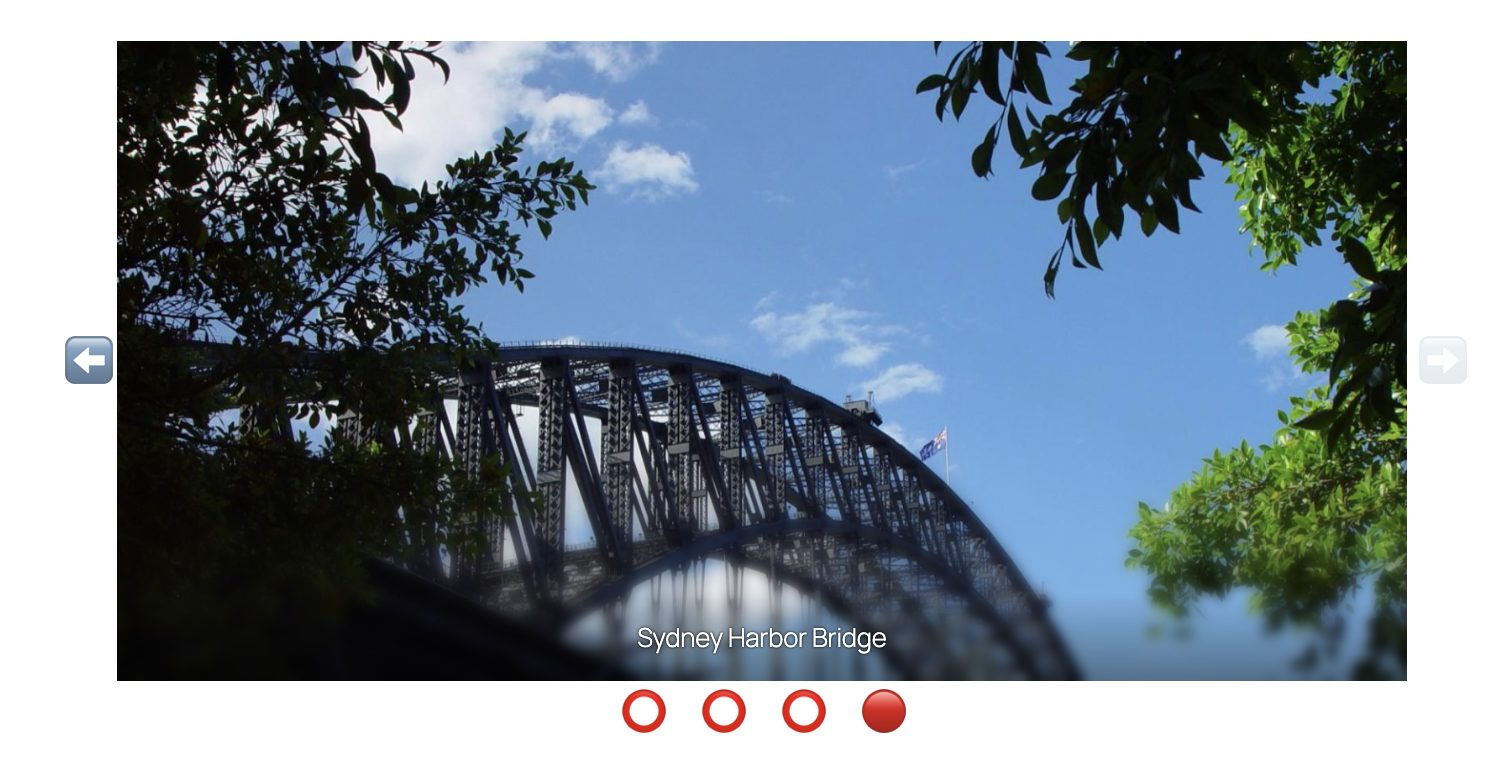The combined CSS in action to build a fully functioning carousel. Note the filled dot and the disabled arrow on the last slide.
But CSS carousels can do a lot more. If you would like some inspiration, I highly recommend checking out the [Carousel Gallery](https://chrome.dev/carousel/) site with tons of incredible demos. Each demo covers a real use case found on the internet. They all show how to orchestrate scroll buttons and markers with [scroll-driven animations](https://developer.chrome.com/docs/css-ui/scroll-driven-animations), [`scroll-state()` queries](https://developer.chrome.com/blog/css-scroll-state-queries), and much more. Here’s one of the demos of a e-commerce product image gallery using a CSS carousel:
You can build a gallery of product images for your online store using only CSS
Want to get more hands on and dive right in? Try the [Carousel Configurator](https://chrome.dev/carousel-configurator/) to help visualize the capabilities of CSS-only carousels.
#### Building a CSS carousel WordPress block
As I mentioned earlier, over 54% of all WordPress sites use at least one of the popular slider libraries. So it’s no wonder that there have been discussions about introducing a [first-party carousel block](https://github.com/WordPress/gutenberg/issues/43369) for many years. One of the main blockers was of course the reliance on JavaScript.
In 2025, building a performant, accessible, and maintainable carousel using only CSS finally becomes a breeze. To prove it, let’s apply these new features in WordPress by building a custom carousel block!
**Tip:** If you want to see the final result, check out [this GitHub repository](https://github.com/swissspidy/css-carousel-block).
##### Setting up a carousel block variation
For the sake of simplicity, I am not going to build a completely new block from the ground up. Instead, I am leveraging the [Block Variations API](https://developer.wordpress.org/block-editor/reference-guides/block-api/block-variations/) to make a carousel a variation of the gallery block. This saves a lot of boilerplate code.
The nice thing about block variations is that I can set them up entirely using PHP. I only need some JavaScript to update the block’s HTML class attribute for properly targeting the carousel variation using CSS. Here’s an excerpt:
```
/**
* Adds carousel variation to gallery block.
*
* @param array $variations List of all block variations.
* @param WP_Block $block_type Block type instance.
* @return array Filtered list of block variations.
*/
function css_carousel_block_add_carousel_variation( $variations, $block_type ) {
if ( 'core/gallery' !== $block_type->name ) {
return $variations;
}
$variations[] = array(
'name' => 'carousel',
'title' => __( 'Carousel', 'css-carousel-block' ),
'description' => __( 'A carousel', 'css-carousel-block' ),
'scope' => array( 'block', 'inserter', 'transforms' ),
'isDefault' => false,
'attributes' => array(
'displayType' => 'carousel',
),
);
return $variations;
}
add_filter( 'get_block_type_variations', 'css_carousel_block_add_carousel_variation', 10, 2 );Code language: PHP (php)
```
Check out [the GitHub repository](https://github.com/swissspidy/css-carousel-block) for the full code.
##### CSS carousels in the editor
The block markup on the frontend and in the editor is very similar. That means we can use the same CSS in both places, making for a true WYSIWYG experience. Additional bonus: we do not have to use any janky JavaScript library in the block editor that messes with React. The result:
[](https://i0.wp.com/pascalbirchler.com/wp-content/uploads/2025/04/css-carousel-block-editor.jpg?ssl=1)CSS carousel block variation in the editor.
While the CSS carousel already works great in the editor, there are some minor differences to the frontend.
For example, the translated, human-readable labels for the scroll markers (arrows) are added via `data-*` attributes on the frontend. This way, they can be used in the `content` CSS property. Unfortunately, I couldn’t find a suitable filter in the editor to achieve the same.
Second, in the editor we need to cater for the gallery block’s inner image blocks and their block toolbar. It looks odd when the toolbar stays in place when swiping through the carousel. This would be a great opportunity to use [new scroll snap events](https://developer.chrome.com/blog/scroll-snap-events) such as `scrollSnapChange`. We can hide the toolbar when swiping and automatically select the next block upon slide change.
#### Further iterating on this CSS carousel block
Turning a basic gallery block into a feature-rich carousel is surprisingly easy. But of course this is a mere proof of concept. There is a lot more that could be done.
For instance, the scroll buttons and markers in this demo are positioned using the new [CSS anchor positioning API](https://developer.chrome.com/docs/css-ui/anchor-positioning-api). This requires each carousel to have its unique anchor name. That’s something I haven’t implemented yet in this proof of concept.
In addition to that, cross-browser support is an important consideration when implementing such new features. Since CSS carousels are currently only supported by Chrome, there could be a fallback solution using JavaScript in other browsers. This is very easy to implement. Check out this [pull request for the Twenty Fourteen theme](https://github.com/WordPress/wordpress-develop/pull/8352) for an example.
It’s also worth mentioning that work on CSS carousels is still ongoing. For example, work is already being done to let you add your own components for scroll buttons and markers. This makes it easier to add custom SVG icons or use Tailwind classes. Another highly requested feature is support for cyclic scrolling. Right now this still requires JavaScript.
#### Share your feedback
Long story short, CSS carousels are really powerful. WordPress users and contributors have been wanting a carousel block for years. This proof of concept could be the start of it. And if you are a developer who builds carousels for clients’ websites, why use this new feature in your next project? That’s why I would love for you to try it out, provide feedback, and help make it happen.
[Chrome](https://pascalbirchler.com/tag/chrome/) [Performance](https://pascalbirchler.com/tag/performance/) [WordPress](https://pascalbirchler.com/tag/wordpress/), Building a CSS Carousel WordPress Block, Pascal, 01jvyefsp3rm1frv5att4xzyg7.