Complete WordPress Custom Plugin Development Handbook
## Metadata
- Author: [[Birgit Olzem]]
- Full Title: Complete WordPress Custom Plugin Development Handbook
- Category: #articles
- Document Note: ---
tags: [WordPress, Plugins, Development]
author: Birgit Olzem
source: Codeable
reference: [https://www.codeable.io/blog/custom-wordpress-plugin-development/]
date created: 2025-11-07 00:00
---
# 🏷️ Title: Complete WordPress Custom Plugin Development Handbook
## 🧭 Table of Contents
- [📝 Summary](#-summary)
- [📖 Main Content](#-main-content)
- [🗒️ Notes](#️-notes)
- [📚 References](#-references)
- [🗣️ Paraphrase](#️-paraphrase)
- [📰 Newsletter](#-newsletter)
- [✅ Action Items](#-action-items)
- [🧪 Hypotheses](#-hypotheses)
- [📊 Methodology](#-methodology)
- [❓ Questions](#-questions)
- [🔮 Future Research](#-future-research)
- [💡 Implications](#-implications)
- [🧠 Learning Styles Assessment](#-learning-styles-assessment)
- [📊 Accessibility Assessment](#-accessibility-assessment)
- [🌍 DEIB Assessment](#-deib-assessment)
- [✅ Logical Validity](#-logical-validity)
- [🛡️ DARVO Analysis](#-darvo-analysis)
- [🎯 Conclusion](#-conclusion)
### 🔗 References
- Include links cited in or relevant to the article.
## 📝 Summary
- What happened: The article explains when and why to build custom WordPress plugins, outlines secure, scalable development workflows, budgets, maintenance, and how to hire vetted experts via Codeable.
- Why it matters: Custom plugins shift teams from “making do” to “making exactly,” improving performance, security, and UX—especially for WooCommerce.
- Key stakeholders: Site owners, product managers, dev teams, WooCommerce merchants, security/compliance leads.
- Risks and tradeoffs: Higher upfront cost and responsibility for maintenance vs. reduced bloat, better security posture, and fit-to-spec functionality.
- Bottom line: If performance, compliance, deep integrations, or unique workflows are critical, a custom plugin—with secure practices and a vetted partner—is the right path.
## 📖 Main Content
- Core arguments: Off‑the‑shelf plugins are “multi-tools”; custom plugins are “precision instruments” tailored to exact workflows, performance, security, and integration needs. A phased process (discovery → development → QA/deploy → maintenance) reduces risk. Vet developers rigorously or use Codeable’s pre-vetted network with transparent pricing and warranties.
- Context/definitions:
- Hooks: actions (run code at events) and filters (modify data).
- Security basics: sanitization, validation, escaping, nonces, capability checks.
- TCO: initial build + ~15%/year maintenance.
- Uncertainties: Exact costs vary by scope, urgency, and brief quality; integration complexity can shift timelines.
### 🗒️ Notes
- “Move from ‘making do’ to ‘making exactly’” with a custom plugin designed for your problem.
- When to build: unique workflows, mission‑critical performance, strict security/compliance (HIPAA/GDPR), deep CRM/ERP integrations, and scale needs.
- Security: “97% of all WordPress vulnerabilities originated from plugins” (Patchstack 2024). Private custom code reduces mass‑exploit incentives—but only if built securely.
- Secure coding: input sanitization, data validation, output escaping, nonces, capability checks.
- Process:
- Phase 1 (Discovery): goals, stakeholders, prioritized features, project brief, specs, wireframes, realistic timeline.
- Phase 2 (Dev): local/staging env; PHP + JS/jQuery; plugin header; hooks (add_action/add_filter); OOP + coding standards.
- Phase 3 (QA/Deploy): functional, compatibility, performance (e.g., Query Monitor), security, UX; deployment checklist (disable WP_DEBUG on prod, clean artifacts).
- Hiring: strong brief, portfolio + references, structured interviews, contract with IP ownership and support terms.
- Codeable: selective network, $80–$120/hr guidance, fixed-price estimate, 17.5% service fee, escrow, 28‑day bug-fix warranty, you own IP.
- Budgeting: scope/complexity, experience, urgency, and brief quality drive cost; plan ~15%/yr for maintenance (compatibility, security, minor features).
- WooCommerce: extensible via hooks; best practices (namespacing, check WooCommerce active, Git, local env). Advanced UX: product configurators, guided selling, specialized filters, unique product displays. Deep integrations: CRM, ERP/inventory, accounting, carriers.
## 📚 References
- WordPress Plugin Handbook: Hooks (actions/filters) https://developer.wordpress.org/plugins/hooks/
- WordPress Coding Standards https://developer.wordpress.org/coding-standards/wordpress-coding-standards/
- Patchstack 2024 WordPress security report https://patchstack.com/
- Query Monitor plugin https://wordpress.org/plugins/query-monitor/
- WooCommerce Developer Docs https://developer.woocommerce.com/
- Codeable (vetted WordPress experts) https://www.codeable.io/
## 🗣️ Paraphrase
- Paragraph A: Prebuilt plugins are broad but compromise-heavy; a custom plugin is tailored to your exact requirements, boosting performance and security.
- Paragraph B: A rigorous, phased approach—solid discovery, standards‑based coding, and thorough QA—delivers durable plugins; hire carefully or use Codeable’s vetted experts.
## 📰 Newsletter
- This week’s deep dive: Custom plugins turn WordPress from “standard” into “strategic.” If speed, compliance, or unique UX matter, tailor it.
- Highlights:
- Security reality: Most WP vulns are in plugins—private, well‑built custom code reduces broad attack surface.
- WooCommerce wins: Configurators, guided selling, and ERP/CRM syncs drive conversion and ops efficiency.
- Hiring shortcut: Vetted pros with escrow and warranties via Codeable.
- Useful links: WordPress Coding Standards, WooCommerce Dev Docs, Query Monitor, Patchstack 2024 report.
## ✅ Action Items
#### DevRel
- Publish examples-first custom-plugin templates; run office hours on hooks/OOP.
- Demos: secure form handling with nonces and capability checks; Query Monitor profiling.
- Content funnel: “Build vs. Buy” guide → checklist → estimator.
#### OSPO
- Policy: IP ownership defaults to client; code signing and provenance.
- License review for third-party libs; scanning cadence quarterly.
- Security intake: SLA for vuln reporting; embargo policy; attestations.
#### Community
- Maintainers: release hygiene checklists; conflict testing matrices.
- Contributors: first-issue labels on coding standards linting.
- Sponsors: budget transparent reports on security hardening.
#### WordPress
- Core: triage perf regressions; hook docs examples.
- Core Performance: profiling dashboards; perf budgets per release.
- Core AI: evaluation sets for code suggestions; guardrails for nonce/cap checks.
- Core Program Team: cross-team release retros with security metrics.
- Mobile: improve offline auth flows for headless carts.
- Playground: labs for plugin scaffolds and reproducible bug reports.
- Community: meetup kits on plugin security.
- Training: lesson plans on hooks/OOP/testing.
- Marketing: “making exactly” campaign with case studies.
- Support: KB articles on safe deployment.
- Design: UX patterns for admin pages.
- Documentation: examples-first patterns; style guide.
- Photos/TV/Polyglots/etc.: ensure localized docs and captions.
- CLI: plugin scaffold improvements; smoke tests.
- Hosting: common defaults; telemetry for reliability.
- Tide: surface security signals; reduce false positives.
- Openverse/Themes/Plugins: review throughput, mentoring, provenance checks.
#### The WPCC
- Programs: microgrants for security audits of custom plugins.
- Projects: governance clinics; documentation sprints.
- Funding: milestone payouts tied to perf/security KPIs.
### FAIR
- Technical independence: local metadata and signature checks.
- Policies: funding transparency; anti-capture covenants.
- Governance artifacts: reusable charters and scorecards.
## 🧪 Hypotheses
- Custom plugins reduce TTFB and query load versus comparable “all-in-one” plugins.
- Private codebases reduce automated exploit attempts relative to public plugins.
- Guided selling increases conversion rate and AOV in WooCommerce stores.
- Strong discovery briefs lower change requests and total project cost.
- Namespacing + capability checks reduce plugin conflict and security incidents.
### 📊 Methodology
- A/B compare performance on staging (Query Monitor metrics, Web Vitals).
- Security tele
- Summary: Transform your site with custom WordPress plugin development. Learn to scope, budget, and build secure, high-performance assets with the help of vetted experts.
- URL: https://www.codeable.io/blog/custom-wordpress-plugin-development/

Have you ever held your breath during a WordPress update, praying it doesn’t break that critical code in your functions.php file? Or is your site buckling under a dozen clunky plugins, all failing at one job that’s unique to your business?
If so, you need to stop patching problems and start building a real solution – **custom WordPress plugin development**.
At its core, this involves elevating your site from a standard platform into a powerful, tailored asset that does *exactly* what you need.
In this guide, we’ll turn this massive unknown into a manageable project, covering:
* When your business truly needs a custom solution.
* How custom plugins elevate your WooCommerce store.
* The entire development process, from discovery to deployment.
* The real talk on budgeting for the build and ongoing maintenance.
* How to find the right expert, and why [Codeable](https://www.codeable.io/) could be the safe partner you need.
So, without further ado…
#### **Why choose custom plugins over off-the-shelf solutions**
The decision to “build vs. buy” is one of the most significant strategic choices you’ll make for your website. Opting for a pre-built plugin from the WordPress directory is fast and often cheap, but it’s a path of compromise. You’re “making do” with a tool built for thousands of different businesses.
Custom WordPress plugin development is the alternative. It’s the process of hiring a developer to create a plugin from scratch, designed exclusively to solve *your* specific problem. It’s about moving from “making do” to “making exactly.” This approach gives you a massive advantage in functionality, performance, and, most critically, security.
##### **What makes custom plugins different**
An off-the-shelf plugin is like a **multi-tool**. It has a lot of little gadgets, many of which you’ll never use, and the ones you do use aren’t as strong or precise as a dedicated tool. A custom plugin is like a **specialist’s precision instrument**. It’s engineered to do one specific job perfectly, fitting your workflow exactly and delivering professional-grade results every time.
Here are some more nuanced differences between pre-built plugins and custom plugins:
| | | |
| --- | --- | --- |
| **Feature** | **Pre-built plugin** | **Custom plugin** |
| **Functionality** | Has generic, “one-size-fits-all” features, many of which may be unnecessary for your needs. | **Built precisely for you.** It does exactly what you need it to do, with no unnecessary features. |
| **Performance** | Often “bloated” with code for features you don’t use, which can slow down your site. | **Optimized performance.** The code is lean and essential, resulting in much faster load times. |
| **Control** | You are constrained by the third-party developer’s vision, update schedule, and support availability. | **You have complete control.** You set the feature list and manage the future development roadmap. |
| **Ownership** | You are **licensing** the software. The developer can change pricing or discontinue the plugin. | It becomes your **intellectual property.** Your organization owns this digital asset entirely. |
##### **When your business actually needs custom development**
So, how do you know when to make the leap? Pre-built plugins are often fine for common tasks, like setting up contact forms or taking site backups. But you’ll hit a clear tipping point where a generic solution starts costing you more in workarounds and lost efficiency than a custom build would cost upfront.
It’s time to build a custom plugin when your business depends on any of the following:
* **Your unique process is your competitive advantage.** If your success is tied to unique internal workflows – complex pricing calculations, sophisticated inventory management, or multi-layered approval hierarchies – a generic tool can’t offer what you need out of the box.
* **Performance is mission-critical.** When every millisecond of page speed directly impacts your revenue, you need a lean, highly optimized solution built just for speed, not a bloated plugin that slows down every database query.
* **You have strict security and compliance needs.** If you handle sensitive data and must comply with regulations like [HIPAA](https://www.hhs.gov/hipaa/index.html) or [GDPR](https://gdpr-info.eu/), you often can’t risk using code that’s exposed in a public repository. Custom development allows you to keep your code private.
* **You need deep system integration.** Your website needs to integrate deeply with your other essential business systems, such as a Customer Relationship Management (CRM) or Enterprise Resource Planning (ERP) system, or other proprietary tools. Off-the-shelf connectors rarely provide the deep, tailored integration you need.
* **You’re building to scale.** A generic plugin might work today, but it can easily become a performance bottleneck that chokes your growth as your user traffic, data volume, or operational complexity increases. A custom solution is designed to scale right alongside your business.
##### **The security advantage of custom plugins**
One of the major drawbacks of WordPress, as an open-source CMS, is that its public plugin ecosystem is the number one target for hackers.
The data is staggering: according to a 2024 security report by Patchstack, a massive [**97% of all WordPress vulnerabilities originated from plugins**](https://patchstack.com/whitepaper/state-of-wordpress-security-in-2024/), not from the core WordPress software itself.
Think about it from a hacker’s perspective. When a vulnerability is found in a popular public plugin, its code is available for anyone to study. It becomes a public blueprint. Attackers can then write a script to automatically scan and exploit that *one* weakness on *thousands* of sites simultaneously. For them, it’s a low-effort, high-reward jackpot.
Your custom plugin, however, is a black box. Its code is **private and invisible** to the outside world.
For a hacker to attack your site, they can’t use an automated, mass-market script. They would have to target you *specifically*, somehow get a copy of your unique code, and then spend significant time and effort analyzing it just to *find* a potential weakness. The potential reward for all that work? Compromising just *one* site.
This creates a powerful **economic disincentive**. Hackers typically seek the cheapest, fastest way to get the biggest payout. Your private, custom plugin simply isn’t worth their time or effort, making it a fundamentally less appealing target.
Of course, this massive advantage only holds if the plugin is built securely from the ground up. A professional developer can help you here by building defenses into your plugin features. They can fortify your plugin by adhering to strict security protocols, including:
* **Input sanitization:** Cleaning all data that e*nters* the plugin (such as from a user form) to remove any malicious code.
* **Data validation:** Checking that all submitted data is in the expected format (e.g., ensuring a field for a phone number only contains numbers).
* **Output escaping:** Neutralizing all data before it’s displayed *out* to the browser, a practice that prevents common Cross-Site Scripting (XSS) attacks.
* **Using nonces:** Adding unique, one-time security tokens (numbers used once) to verify that actions, like submitting a form or deleting data, are legitimate and not coming from a malicious external site.
* **Capability checks:** Restricting sensitive plugin functions (like changing settings) to ensure that only authorized users with the correct permissions can perform them.
#### **Planning your custom plugin project**
An effective custom plugin is planned, architected, and managed through a structured process. Going from a simple idea to a stable, secure, and fully functional tool involves a clear, multi-phase lifecycle. This strategic approach is what separates a professional build that lasts for years from a quick-fix that breaks on the first update.
##### **Phase 1: Discovery and requirements definition**
Mapping out the project scope during the discovery phase | Photo by Brands&People on Unsplash
This is the single most important phase of the entire project. It’s where you lay the foundation for success, and skipping steps here is the number one cause of budget overruns and project failure.
It starts with a deep dive into the *why* behind the plugin. This involves stakeholder interviews, competitive research, and industry analysis to get a complete picture. The goal is to clearly define the business goals, ensuring the plugin is being built to solve a specific, well-understood problem.
With the “why” established, the focus shifts to the “what.” This includes:
* Identifying the target audience who will use the plugin.
* Creating a prioritized feature list to establish a clear scope and avoid “feature creep” – the uncontrolled addition of new features that can derail the timeline and budget.
* Drafting a detailed and unambiguous project brief. This document serves as the blueprint for the project, and a well-crafted one **significantly reduces the need for expensive revisions** down the line.
Finally, this phase concludes with the initial technical plan. This means developing technical specifications, creating wireframes to map out the user interface, and setting a realistic project timeline.
A professional developer will also establish a scalable and organized folder structure (e.g., creating separate directories like /assets for CSS/JavaScript and /includes for PHP logic) to make the plugin easy to manage and maintain.
##### **Phase 2: Core development and implementation**
Core plugin development phase | Photo by Nubelson Fernandes on Unsplash
This is where the blueprint from Phase 1 gets turned into a tangible product. A professional developer will never work on your live site. Instead, they’ll set up a proper development environment first.
**Environment setup.** This is a safe, private workspace for building and testing. It typically consists of:
* A text editor (like VS Code) for writing the code.
* A File Transfer Protocol (FTP) client (like FileZilla) for moving files.
* A working WordPress installation on a **local machine or a staging server**. This is a non-negotiable best practice to avoid disrupting your live website.
**Technical foundation.** The technical expertise required centers on a few key technologies:
* [**PHP**](https://www.php.net/)**:** This is the core programming language of WordPress, and proficiency is essential.
* [**JavaScript**](https://www.w3schools.com/js/) **and** [**jQuery**](https://jquery.com/)**:** These are used to implement dynamic and interactive front-end features, like pop-up modals or forms that update in real-time.
The first step in coding is to create a dedicated folder for the plugin inside the /wp-content/plugins/ directory of the WordPress installation. Inside this new folder, the developer creates the main plugin file. This file must begin with a specially formatted comment block known as the **“Plugin Header.”** This header provides WordPress with all the metadata, like the plugin’s name, version, and author, so it can be recognized in your admin dashboard.
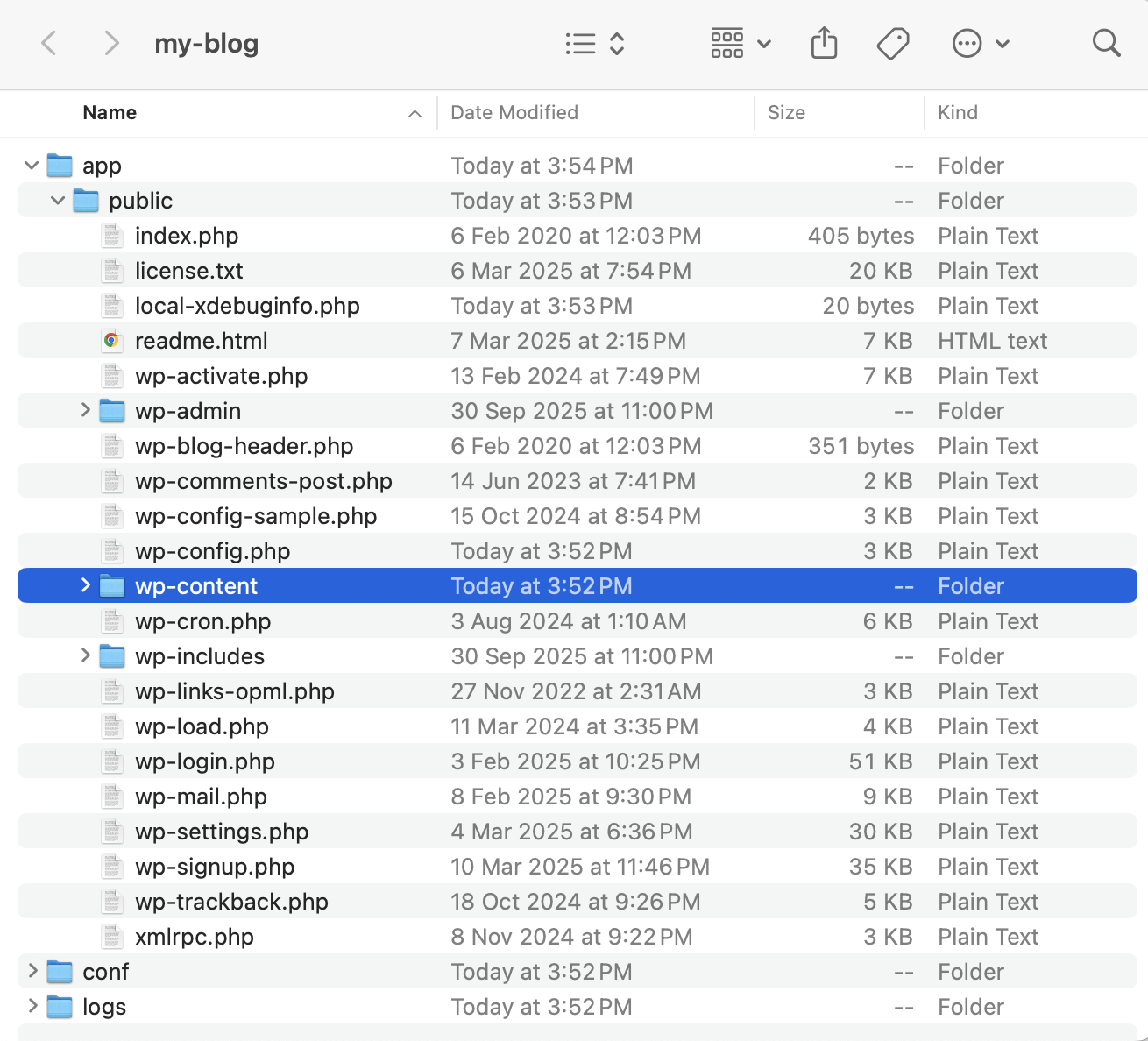The wp-content folder in your database
**Development approach:** The core of this process revolves around WordPress **hooks (actions and filters)**. These are the fundamental mechanisms that allow a plugin to interact with and modify WordPress without ever touching the core software files.
* **Actions** are used to execute a custom function at a specific point in the WordPress lifecycle (e.g., add\_action could be used to send a custom email *after* a post is published).
* **Filters** are used to modify data before it’s saved to the database or displayed to the user (e.g., add\_filter could be used to change the text of the “Add to Cart” button).
Throughout this phase, developers must adhere to the official [**WordPress coding standards**](https://developer.wordpress.org/coding-standards/wordpress-coding-standards/), which govern everything from variable naming to database query practices. For more complex plugins, developers will often employ Object-Oriented Programming (OOP) principles. This is a modern best practice that helps create code that is highly organized, reusable, and far less likely to conflict with other themes or plugins.
##### **Phase 3: Testing, quality assurance, and deployment**
Test your plugin before deployment | Photo by David Travis on Unsplash
The quality assurance (QA) process is an exhaustive “boot camp” for the plugin, designed to catch every possible issue on your staging site, before your visitors do on the live version.
A professional developer will run a full suite of tests, including:
* **Functional testing.** This verifies that every single feature works exactly according to the project specifications.
* **Compatibility testing.** This confirms that the plugin functions properly with the latest version of WordPress, as well as with a variety of popular themes and other plugins to prevent conflicts.
* **Performance testing.** This measures the plugin’s impact on your website’s speed and server resource usage. Tools like [Query Monitor](https://wordpress.org/plugins/query-monitor/) are often used here to identify any inefficient code or slow database queries.
* **Security testing.** This involves actively probing the plugin for common vulnerabilities, such as SQL injection, Cross-Site Scripting (XSS), and improper data validation, to ensure it’s secure against attacks.
* **User experience (UX) testing.** This assesses the plugin’s interface for clarity, ease of use, and intuitive design. Is it simple for every user role to access?
Once the plugin has passed all tests and is approved for launch, a developer will follow a systematic checklist to move it to the live server.
###### **✨Your plugin deployment checklist**
* Complete final validation of all code.
* Run cross-browser compatibility checks (testing on Chrome, Firefox, Safari, etc.).
* Ensure WordPress debugging mode (WP\_DEBUG) is turned **off** on the live site.
* Confirm that search engine visibility is **enabled** in the WordPress settings.
* Remove any unnecessary development files or database dumps from the server to keep the production environment clean and secure.
#### **Working with development partners**
A great idea is only as good as the team you hire to build it. Securing the right development talent is one of the most critical factors in your custom plugin’s success. This process requires a methodical approach, starting with a clear brief and moving through a rigorous vetting process to find the perfect partner for your project.
##### **Defining requirements and creating your project brief**
You should always start the hiring process by looking inward. Before you even *think* about searching for a developer, you must first create a detailed outline of your project’s scope, features, and objectives.
A fantastic exercise is to find inspirational websites or existing tools that already demonstrate the functionality you want. This gives potential candidates a clear visual and functional reference, making your idea much more concrete.
With that vision in place, you can craft a comprehensive project brief. This document is your primary tool for attracting qualified developers. It should clearly state the type of engagement (is this a single project or an ongoing role?) and provide a detailed list of the tasks and responsibilities the developer will handle.
This might seem like a lot of upfront work, but a well-written, detailed brief is an investment that pays for itself. It **minimizes the back-and-forth communication** and dramatically **reduces the likelihood of costly revisions** later on.
##### **Vetting and interviewing developers**
Once the applications start coming in, you need a structured process to identify true expertise. Here are the key steps you should include without fail:
* **Portfolio review.** You should thoroughly review a developer’s past work to assess the quality and complexity they are used to handling. Pro tip: check out their own professional website or blog. This can be a very strong indicator of their personal skills and attention to detail.
* **References and reviews.** Don’t just take their word for it. Seek out testimonials and reviews from their previous clients. This gives you invaluable insight into their reliability, communication skills, and, most importantly, their ability to deliver on their promises.
* **Structured interview questions.** Prepare a list of questions ahead of time to evaluate both technical skills and soft skills. Be sure to ask pointed questions like:
+ “Can you describe your experience developing custom WordPress plugins from scratch?”
+ “Please share an example of a project you’ve worked on that is similar in complexity to ours.”
+ “How do you incorporate security best practices, like input sanitization and nonces, into your workflow?”
+ “What is your process for communicating project progress and handling feedback?”
* **Contract formalization.** Once you’ve picked your expert, you must formalize the engagement with a legally sound contract. This document is non-negotiable and should explicitly detail the project scope, timeline, and payment terms. It also needs to specify who owns the intellectual property (it should be you!), include confidentiality clauses, and define provisions for post-launch support and bug fixes.
##### **Why choose Codeable for custom plugin development**
The vetting process we just described is time-consuming, technical, and carries a lot of risks. If you’re not a developer yourself, how can you be sure you’re hiring a true expert?
[**Codeable**](https://www.codeable.io/) solves this by giving you access to [**pre-vetted** **top-tier WordPress experts**](https://www.codeable.io/developers/).
While general freelance marketplaces are open to everyone, Codeable is incredibly selective. Most developers on the platform have **over six years of professional experience**, so you know you’re only connecting with seasoned professionals.
Here’s what makes the Codeable model different:
* **Fair, expert pricing.** Our recommended hourly rate is between **$80–$120 USD**. Instead of a “race-to-the-bottom” bidding war, Codeable provides you with a **single fixed-price estimate** for your project. This price is a weighted average of the quotes submitted by the qualified experts interested in your job.
* **Total transparency.** A fixed **17.5% service fee** is included in your final price. This fee covers the rigorous expert vetting process and a secure escrow service that holds your payment until you confirm the project is completed to your satisfaction.
* **Built-in guarantees.** All projects include a **28-day bug-fixing warranty**, giving you peace of mind after launch. The platform also guarantees that you retain **full intellectual property ownership** of all the code you pay for.
The core value of using a platform like Codeable is the elimination of risk and overhead. It saves you all the time and energy you would have spent on vetting, interviewing, and project management, connecting you directly with a proven expert so you can focus on the results.
#### **Budget and ongoing investment**
The cost of a custom plugin isn’t just about the initial price tag. It’s about appreciating the *total cost of ownership*, from the first line of code to the essential updates you’ll need next year. A clear budget is the key to a successful project with no surprises.
##### **Understanding development cost factors**
The cost to develop a custom plugin can vary wildly, from a few hundred dollars for a tiny utility to tens of thousands for an enterprise-level system. This final price is influenced by:
* **Complexity and scope.** This is the single **most significant cost driver**. A simple plugin that adds a social sharing button is a completely different project from a comprehensive booking system that needs to integrate with payment gateways and your company’s CRM.
* **Developer experience and rates.** As with any profession, you get what you pay for. More experienced developers command higher rates, but they often deliver more efficient, secure, and maintainable code, which saves you money in the long run.
* **Project urgency.** Need it done yesterday? Projects with extra-tight deadlines typically incur premium fees. This compensates the developer for needing to prioritize your project over all other work.
* **Quality of the project brief.** A vague or incomplete brief is a recipe for misunderstandings and endless revision cycles. Every round of changes adds to the bill. A clear, detailed brief (from Phase 1) is one of your best cost-control tools.
##### **What goes into the development process?**
A development quote covers [everything that a WordPress developer does](https://www.codeable.io/blog/wordpress-ecommerce-developer-responsibilities/) for your project; it’s a comprehensive professional process. It starts with in-depth requirement analysis and UI/UX design, moves into the core back-end and front-end coding, and concludes with rigorous quality assurance testing. This entire process, including final deployment and documentation, is held together by active project management to keep everything on track.
##### **Planning for ongoing maintenance**
Your investment doesn’t end when the plugin is launched. Post-launch maintenance is essential to ensure your plugin remains secure, functional, and compatible with future updates to WordPress, your theme, and other plugins.
A widely accepted guideline is to **allocate approximately 15% of the initial development cost annually** for this ongoing maintenance. This is often handled through a monthly or yearly retainer.
Here’s a common breakdown of what those maintenance plans look like:
| | | |
| --- | --- | --- |
| **Plan level** | **Services included** | **Ideal for** |
| **Basic maintenance** | Core, theme, and plugin updates, regular backups, and basic security monitoring. | Small business websites or blogs with low traffic and minimal complexity. |
| **Intermediate maintenance** | All basic services *plus*: enhanced security (like malware scanning), performance optimization, and monthly reports. | Growing businesses or dynamic sites that need more proactive care. |
| **Premium / eCommerce maintenance** | All intermediate services *plus*: a bank of custom development hours, advanced security (like DDoS protection), real-time uptime monitoring, and priority support. | High-traffic websites, eCommerce stores, and any mission-critical application where downtime means lost revenue. |
#### **Custom plugins for WooCommerce**
In the crowded, competitive world of eCommerce, a generic, “out-of-the-box” storefront is hardly enough. Your customers expect unique, smooth, and engaging shopping experiences. Custom WooCommerce plugins enable you to move beyond a standard store and build a user-centric platform that delights customers and streamlines your operations.
##### **The WooCommerce extension architecture**
How is this level of customization possible? [WooCommerce](https://woocommerce.com/), just like its parent, [WordPress](http://wordpress.org), was **built from the ground up for extensibility**. It runs on a robust system of hooks (both actions and filters) that act as connection points, allowing developers to add new features or modify existing ones without ever touching the core WooCommerce plugin files. This is a critical best practice that keeps your store stable and easy to update.
To build a [custom WooCommerce plugin](https://www.codeable.io/blog/woocommerce-plugin-development/), a developer also needs a solid technical foundation.
* **PHP proficiency** is essential, as it’s the core language.
* A professional workflow always includes a **local development environment** (using tools like Local WP or MAMP) and a **version control system like** [**Git**](https://git-scm.com/) to track changes safely.
* To create the dynamic, responsive, and “app-like” experiences modern shoppers expect, developers often incorporate a JavaScript stack using tools like [**Node.js**](http://node.js)**,** [**React**](https://react.dev/)**, and** [**Webpack**](https://webpack.js.org/).
**Best practices**
A professional build also follows strict best practices to ensure your plugin plays nicely with the rest of your site.
* They **namespace all functions, classes, and variables** with a unique prefix. This is a crucial step that prevents conflicts with other plugins that might accidentally use the same function name.
* They **include a check to ensure WooCommerce is active** before running any code. This simple step prevents fatal errors on your site if the main WooCommerce plugin is ever deactivated.
* They **leverage WordPress’s existing database structures** (like custom post types and options tables) instead of creating new custom tables whenever possible, which improves compatibility and performance.
##### **Creating enhanced shopping experiences**
A custom plugin can transform a standard product page into a highly interactive and personalized platform. The possibilities are vast, but they generally fall into a few key categories.
**Product personalization and configuration**
This is one of the most powerful ways to create a unique experience.
* **Simple options.** This can include adding custom text fields for engravings, date pickers for scheduling a delivery, or file upload buttons for custom-printed items.
* **Advanced implementations.** Think of a visual configurator for a complex product. This allows a customer to select different colors, materials, or components (like for a bicycle or a piece of furniture) and see those changes reflected on the product image in **real-time**. This is a highly engaging and informative experience that gives customers the confidence to buy.
**Advanced filtering and guided selling**
Standard product filters are often limited. Custom plugins can create far more intuitive systems.
* **Sophisticated filtering.** You can build filtering systems based on unique product attributes that matter to your customers, such as filtering skincare products by “skin concern” or outdoor apparel by “sustainability credentials”.
* **Guided selling.** This approach uses interactive quizzes or multi-step forms to ask customers about their needs and preferences. Based on their answers, the plugin presents a curated list of recommended products. This personalized journey can significantly increase conversion rates and customer satisfaction.
**Unique product displays and interactions**
You can break the mold of the standard product grid with custom functionality.
* Interactive **360-degree product views** that let customers see an item from every angle.
* Side-by-side **product comparison tools** so shoppers can make an informed decision.
* **Dynamic layouts** that enhance the visual appeal and usability of your product catalog.
##### **Integrating with the broader business ecosystem**
This is where custom plugins truly become transformative. A bespoke integration can turn your WooCommerce site from a siloed sales channel into the central hub of all your commercial activities.
A custom plugin can be built to:
* **Sync customer data and order history** in real-time with your CRM system.
* **Connect with your ERP or inventory management system** to ensure that stock levels on the website are always perfectly accurate.
* **Automate the creation of invoices** in your accounting software as soon as an order is placed.
* **Integrate with specialized shipping carriers** to provide custom shipping rate calculations or automate the label printing process.
This level of deep, tailored integration automates complex workflows, eliminates the need for manual data entry, and ensures your data is consistent across the entire organization.
In today’s homogenous eCommerce environment, where many stores use similar themes and plugins, this custom functionality creates a powerful **“competitive moat”**. A unique, superior user experience combined with highly efficient back-end operations becomes a key brand differentiator. It allows you to offer better service and greater reliability than your competitors, transforming your website from a simple digital storefront into a defensible, strategic competitive asset.
#### **Take the next step with Codeable**
Custom WordPress plugin development is a powerful, strategic decision to get **complete control** over your website’s functionality, **dramatically enhance its security**, and build a tailored solution that delivers **measurable business results**.
But as we’ve also seen, the success of this entire investment, from the first line of code to the long-term maintenance, depends entirely on working with the right partner.
Navigating the freelance marketplace to [find a true WordPress expert](https://www.codeable.io/developers/) can feel like a high-stakes, time-consuming second job. You have to sift through proposals, try to verify skills you may not even understand, and hope you’ve chosen someone who won’t disappear.
That’s precisely why [Codeable](https://www.codeable.io/) exists. We provide a safe, reliable, and expert-driven path to get your custom plugin built right, the first time, without the guesswork.
When you’re ready to build, Codeable will build your custom plugin for you!
Let’s work together to create a lasting advantage for your business.
[**Post your project on Codeable today**](https://app.codeable.io/v2/project-submission/) **to get a no-obligation, fixed-price estimate from a vetted WordPress expert.**
#### 20 000+ businesses of every shape and size have already trusted us to hire WordPress developers and scale their growth., Complete WordPress Custom Plugin Development Handbook, Birgit Olzem, 01k9ffs7szrxz5vqb12mm8cjna.