Developing real estate sites with Toolset
## Metadata
- Author: [[Dario]]
- Full Title: Developing real estate sites with Toolset
- Category: #articles
- Summary: Developing real estate sites with Toolset just got a lot easier. We are proud to announce the addition of a fully-featured real estate site to the collection of Toolset Reference Sites. Toolset Real Estate Reference Site is our response to your needs.
- URL: https://wp-types.com/2016/03/developing-real-estate-sites-with-toolset/
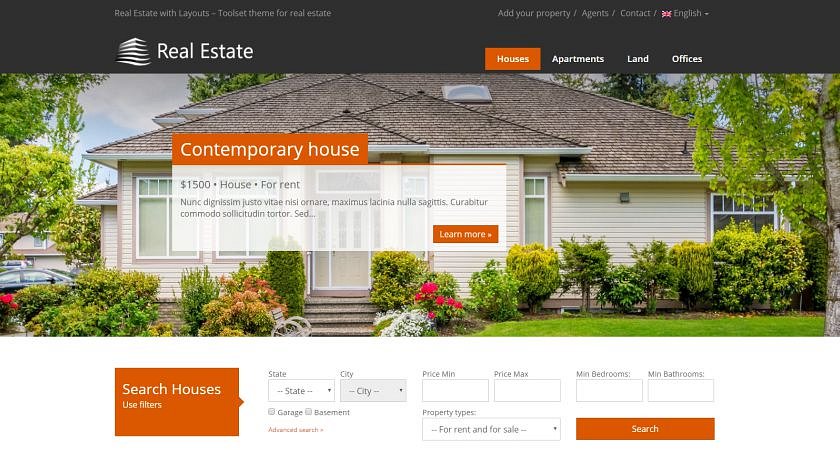
Developing real estate sites with Toolset just got a lot easier. We are proud to announce the addition of a fully-featured real estate site to the collection of Toolset Reference Sites. Toolset Real Estate Reference Site is our response to your needs. It includes what realtors need in order to sell their properties.
You can use this reference site as the basis for client projects. It includes the elements that you would expect to see in a modern real estate site, such as:
* Property search
* Google Maps integration
* Property submission forms
* Agent assignments to properties
Since it’s built with Toolset, you can modify and extend anything. The entire site is developed without any PHP and without even creating a child theme. You can change anything you see in the WordPress admin, using Toolset plugins. You can easily add your own features, just like we did, using Toolset.
#### Different post types and templates for a wide range of property types
When you build a site that lists houses, apartments and lots, you probably want to display them in different ways. Apartments have ‘storeys’. Houses may have ‘basements’. Different property types have different fields and should be displayed with different templates.
The Real Estate Reference Site uses different post types, with their unique fields and templates, for various property types. This way, you can customize each property without causing a clutter for the other property types.
Since it’s all built with Toolset, you can change anything you like. Consider the property types that we created as examples. Remove the ones that you don’t need and create the property types that your sites require.
#### Property search with Google Maps display
Real estate sites are determined by their ability to sell. But customers don’t want a site to force houses upon them. They want to find the best house that matches their needs. This means that a good search feature is a most important attribute for any real estate site.
Property search with Google Maps display
Of course, it’s all built using Toolset features! The search runs using the [Views custom search](https://toolset.com/course-lesson/creating-a-custom-search/) and results display with the [Google Maps integration](https://toolset.com/course-chapter/display-directory-items-on-maps/). The search section in our Real Estate Reference Site lets visitors find their dream house according to location and features. It displays the results as a list and on a Google Map. Search results update as visitors set different filters. If there are many results, pagination is enabled. You can change everything, including what fields to search by, how the search box looks, how the results look and how they display on the map.
Front-end properties submission
#### Front-end properties submission
The Real Estate Reference Site allows visitors to submit properties through front-end forms. The reference site includes basic functionality with a form that’s open to everyone wishing to submit.
You can use this feature as a basis and take it anywhere you want. For example, you can restrict property submission to only agents or you can allow site members to submit properties. You can even charge a fee for submitting new properties.
Lead generation
#### Lead generation
You can assign agents to estates for direct contact and list all the estates belonging to a certain agent. Contact forms can be added above the individual contact details.
#### How to customize the Real Estate Reference Site
You should consider all Toolset sites as starting points and not as the final design.
To edit the content types and fields, go to the WordPress admin and start with Types. The different property types appear under **Types->Custom types**. Remove and add, as needed. You can change the fields that properties have in **Types->Custom fields**.
Customizing layout
Once you’ve updated the types and fields, you will want to update the front-end display. Click on the ‘Design with Toolset’ link in the WordPress admin-bar and edit the page layout. Move, resize, add and remove content as you need.
Since it’s all built with Toolset, you can fully customize your site without writing any PHP. There are no templates to edit and no code to debug. Edit with Toolset from the WordPress admin and you’re done.
#### Getting the Real Estate Reference Site
If you are already a Toolset user, you can use this reference site for free. Just follow the [instructions](https://toolset.com/?post_type=course-lesson&p=358647) to download and install Toolset Reference Site. Otherwise, [buy Toolset](https://toolset.com/?add-to-cart=1089280&buy_now=1) and receive access to Toolset plugins and all the reference sites.
#### Your feedback
This site is a major new proposition, so we would love to hear back from you. In return for your feedback, you will have an opportunity to influence various features of the reference site. What is more, we would like to learn how you find our [documentation page](https://toolset.com/?page_id=367557) for the real estate.
Let us know your thoughts in the comments below. Any feedback will be appreciated and put to good use., Developing real estate sites with Toolset, Dario, 01gnmcy95q52rmq8dvpem5nxxw.