Drupal 8 Theme Development – Final Part
## Metadata
- Author: [[The Official Cloudways Blog]]
- Full Title: Drupal 8 Theme Development – Final Part
- Category: #articles
- Summary: In the previous installment of my Drupal 8 theme development tutorial, I showed you how to add regions in your theme as well as CSS and JS files. In this tutorial, I will show you how to add libraries such as Bootstrap to your theme and add content to the theme as well.
- URL: https://www.cloudways.com/blog/drupal-8-theme-development-final-part/
Some content could not be imported from the original document. [View content ↗](https://www.facebook.com/v3.2/plugins/like.php?action=like&app_id=&channel=https%3A%2F%2Fstaticxx.facebook.com%2Fx%2Fconnect%2Fxd_arbiter%2F%3Fversion%3D46%23cb%3Df2fc0a261364dd%26domain%3Dwww.cloudways.com%26is_canvas%3Dfalse%26origin%3Dhttps%253A%252F%252Fwww.cloudways.com%252Ff120e3a15e6142c%26relation%3Dparent.parent&container_width=0&href=https%3A%2F%2Fwww.facebook.com%2Fcloudways%2F&layout=button_count&locale=en_GB&sdk=joey&share=false&show_faces=true&size=small)
Some content could not be imported from the original document. [View content ↗](https://platform.twitter.com/widgets/follow_button.644279d1635fd969e87af94a98bd232b.en.html#dnt=false&id=twitter-widget-0&lang=en&screen_name=Cloudways&show_count=true&show_screen_name=true&size=m&time=1672500664598)
In the [previous installment](https://www.cloudways.com/blog/integrate-twig-structural-components-drupal-theming-tutorial/) of my Drupal 8 theme development tutorial, I showed you how to add regions in your theme as well as CSS and JS files. In this tutorial, I will show you how to add libraries such as Bootstrap to your theme and add content to the theme as well. I will also dive a little deeper into the details of the twig file.
#### Add Library (Bootstrap)
Bootstrap is one of the most popular, perhaps the easiest framework for developing a website that looks good on screens of all sizes. The good news is that Drupal 8 supports Bootstrap right out of the box. As with most elements, when developing a theme for Drupal 8, I will need to define the Bootstrap so that it could be used in the projects. Fortunately, this is very easy, especially if you have been keeping up with the previous parts of this series.
The bootstrap.css file is located in the **includes/bootstrap/css** directory in the theme’s root folder.
In Drupal 8, all libraries are now defined in the **theme\_name.libraries.yml** file where **theme\_name** is the name of your theme. The lines for adding the Bootstrap library will look like this
#### Twig Templating Syntax Overview
Before moving on, let’s take a look at Twig templating once again. Understanding the syntax for twig files is very important here because the theme development process in Drupal 8 has been completely moved to Twig templating. This move has the added benefit of a shallower learning curve for theme development because fluency in PHP is not a requirement.
There are three main syntaxes that you need to be aware of when using twig templating engine for theme development in Drupal 8.
**{{something}} – This is used to ‘print’ or display something on the screen.**
**{%something%} – This is used for executing statements**
**{#something#} – This is used for comments**
Twig also has support for various filters, a list of which can be found [here](https://twig.sensiolabs.org/doc/2.x/filters/index.html).
Let’s take a look at an example of how to use twig commands.
This code will check if the header region has anything in it. If it has, it will ‘**print**’ or display the contents.
The complete code for the regions I added in the previous part(s) of this series will look something like this in the **page.html.twig** file:
The above example shows the code without Bootstrap. When I add Bootstrap into the mix, I can make use of its classes. This is what the above code will look like when the Bootstrap classes are added:
#### Add Content in Regions
Now that I have defined the regions, a very basic theme is ready.
The next step is to add content to this theme. Drupal uses blocks to divide a web page into regions. This makes it convenient to place appropriate content in the correct place on the page. To check out the regions created in your theme, access your Drupal website’s admin panel and navigate to **structure/block**. Here you will see all the regions you defined.
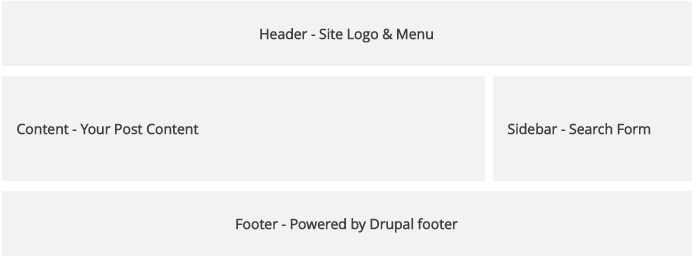
Next, simply place the content you want in the region of your choice. Here is an example of content relevant to each block:
**Header**
Main navigation (your menu)
Site Branding (Your logo, and slogan)
**Content (your front-page display)**
**Sidebar**
Search Form
**Footer**
Powered by Drupal
Below is a sample structure of the theme’s basic layout

#### Conclusion
That’s it, You now have the basic knowledge required for setting up a Drupal theme. Throughout this tutorial, I discussed how to:
* Define a Drupal 8 Theme
* Make Drupal recognize the theme
* Add CSS and JavaScript references
* Add CSS and JavaScript files to the theme
* Add libraries such as Bootstrap
* Use Twig templating engine
* Enable Twig templating engine
* Define regions in the theme
* Add content to the theme
Keep in mind that this tutorial focuses on the fundamentals of Drupal 8 theme development. After this, you are free to style your theme however you see fit by making use of CSS, JavaScript, and Bootstrap.
I hope that you have found this series useful. Now go and conquer the vast Drupal 8 theming landscape and unleash your inner artist! Until next time, ciao!
###### Create interactive Drupal websites easily on the Cloud.
Host your website on optimized Drupal hosting servers., Drupal 8 Theme Development – Final Part, The Official Cloudways Blog, 01gnmcxm2xa1dshchckeh2yer3.