Git Updater Lite

## Metadata
- Author: [[thefragens.com]]
- Full Title: Git Updater Lite
- Category: #articles
- Document Note: ---
tags: [#git-updater, #wordpress, #rest-api, #open-source, #developer-tools]
Author: Andy Fragen
Source: [Git Updater Lite Article](https://thefragens.com/git-updater-lite/)
Reference: [Git Updater Lite Documentation](https://github.com/afragen/git-updater-lite)
date created: 2024-12-02 12:00
---
# Title: Git Updater Lite Overview and Integration Guide
## Table of Contents:
1. [📝 Summary](#summary)
2. [📖 Main Content](#main-content)
- [🗒️ Notes](#notes)
- [📖 References](#references)
3. [🗣️ Paraphrase](#paraphrase)
4. [📰 Newsletter Blurb](#newsletter)
5. [✅ Action Items](#action-items)
6. [🧪 Hypotheses](#hypotheses)
- [📊 Methodology](#methodology)
7. [❓ Questions](#questions)
8. [🔮 Future Research](#future-research)
- [💡 Implications](#implications)
9. [🧠 Learning Styles Assessment](#learning-styles-assessment)
10. [📊 Accessibility Assessment](#accessibility-assessment)
11. [🌍 DEIB Assessment](#deib-assessment)
12. [✅ Logical Validity](#logical-validity)
13. [🔍 DARVO Analysis](#darvo-analysis)
14. [🔍 SEO Evaluation](#seo-evaluation)
15. [🎯 Conclusion](#conclusion)
---
## 📝 Summary:
Git Updater Lite is a lightweight, developer-friendly solution for integrating WordPress plugin and theme updates from Git hosting platforms outside of the wp.org repositories. It leverages Git Updater's REST API for seamless updates and offers a small Composer library to reduce overhead. This approach prioritizes simplicity, performance, and flexibility for developers hosting their own plugins and themes.
---
## 📖 Main Content:
### 🗒️ Notes
- **Core Features**:
- A lightweight Composer library under 300 lines of code.
- Integration requires only two lines of PHP code.
- Compatible with major Git hosts: GitHub, GitLab, Bitbucket, and Gitea.
- REST API endpoint provides JSON responses for `plugins_api()` or `themes_api()`.
- **Integration Steps**:
- Add required headers to the plugin’s main file or theme’s `style.css`.
- Run `composer require afragen/git-updater-lite:^1` and add integration code.
- Set up an update server with a public WordPress installation using Git Updater.
- **REST API**:
- Examples:
- Plugins: `/wp-json/git-updater/v1/plugins-api/?slug=my-plugin`
- Themes: `/wp-json/git-updater/v1/themes-api/?slug=my-theme`
- API data is cached via a 6-hour transient.
- **Authentication**:
- Tokens are required for private repositories and GitLab/Gitea.
- Tokens stored on the update server are used for API requests.
- **Advantages**:
- Minimal performance impact.
- Reduced complexity compared to embedded updaters.
- Supports auto-updates once integrated.
- **Requirements**:
- Active development for full integration with Git Updater and Lite.
---
### 📖 References:
- [Git Updater Lite Repository](https://github.com/afragen/git-updater-lite)
- [Git Updater Knowledge Base](https://github.com/afragen/git-updater/wiki)
- [Example Plugin Integration](https://github.com/afragen/test-plugins-gu-lite)
---
## 🗣️ Paraphrase:
1. Git Updater Lite provides a REST API endpoint that seamlessly integrates with WordPress's plugin and theme update mechanisms. Developers can utilize JSON responses compatible with `plugins_api()` or `themes_api()` by adding a few headers and a small Composer library to their projects.
2. To serve updates efficiently, Git Updater Lite relies on a public WordPress installation as an update server. Plugins or themes don’t need to be active on this server but must be installed and linked to Git Updater.
---
## 📰 Newsletter Blurb:
🎉 **Git Updater Lite: Streamlining WordPress Updates from Git Hosting Platforms**
Discover Git Updater Lite, a minimalistic and powerful solution for managing WordPress plugin and theme updates outside wp.org. This tool leverages Git Updater’s REST API and a compact Composer library, ensuring seamless updates with minimal site overhead. Whether you use GitHub, GitLab, Bitbucket, or Gitea, Git Updater Lite offers robust support, even for private repositories. Perfect for developers seeking performance and simplicity. Learn more: [Git Updater Lite](https://github.com/afragen/git-updater-lite).
---
## ✅ Action Items:
- **Alignment with Open Source Goals**:
- Advocate for Git Updater Lite as a tool to reduce WordPress repository dependency.
- Include this tool in developer education initiatives for plugin and theme creators.
- **Career Aspirations**:
- Explore integration with OSPO strategies to enhance open-source project sustainability.
---
## 🧪 Hypotheses:
1. Simplified update management tools improve developer productivity.
2. Reduced integration complexity encourages broader adoption of self-hosted solutions.
### 📊 Methodology:
- Conduct developer surveys pre- and post-integration.
- Analyze adoption rates based on Git Updater Lite usage stats.
---
### ❓ Questions:
- What challenges do developers face when hosting their own updates?
- How does caching impact the performance of the REST API?
---
### 🔮 Future Research:
- Investigate expanding Git Updater Lite for additional CMS platforms.
- Explore automated testing tools for validating update endpoints.
---
### 💡 Implications:
- Could democratize plugin and theme distribution for smaller developers.
- Potential to reduce wp.org repository dependency.
---
### 🧠 Learning Styles Assessment:
- **Visual**: Add flowcharts for integration steps.
- **Aural**: Include tutorial videos.
- **Kinesthetic**: Suggest hands-on coding exercises.
---
### 📊 Accessibility Assessment:
- **Alt Text**: Ensure images in documentation include descriptive alt text.
- **Semantic HTML**: Use proper markup for REST API examples.
---
### 🌍 DEIB Assessment:
- **Inclusive Language**: Use gender-neutral terms in documentation.
- **Global Accessibility**: Provide multilingual support for guides.
---
### ✅ Logical Validity:
- **Sound Reasoning**: Clear steps for integration strengthen the argument.
- **Weakness**: More use cases could improve credibility.
---
### 🔍 DARVO Analysis:
No signs of DARVO detected. Content is factual and developer-focused.
---
### 🔍 SEO Evaluation:
- Keywords: "Git Updater Lite," "WordPress REST API," "Composer library."
- Improve: Add internal links to related guides and Git Updater.
---
## 🎯 Conclusion:
Git Updater Lite is a game-changer for WordPress developers, offering a lightweight, flexible solution for managing plugin and theme updates. Its seamless REST API integration and support for multiple Git hosts make it ideal for modern development workflows. 🎉
- Document Tags: [[andy fragen]] [[open source]] [[wordpress]] [[WordPress plugin]]
- Summary: Given the recent concerns regarding publishing plugins or themes on wordpress. org, there has been much interest in other methods of distribution and updating within the ecosystem.
- URL: https://thefragens.com/git-updater-lite/
Given the recent concerns regarding publishing plugins or themes on wordpress.org, there has been much interest in other methods of distribution and updating within the ecosystem. [Git Updater](https://git-updater.com) is a method of providing this type of service but it does have a drawback. The user must install and activate the Git Updater plugin along with any of the plugins or themes that are using it for updating.
Many developers would like a solution that can be directly incorporated into their projects. There are solutions out there to provide this functionality, but I feel they have a much higher overhead and are quite weighty. I have created a two part solution based upon Git Updater running on the developer’s site as an update server and a small composer library integrated with the plugin or theme.
Currently, an embedded updater must contain a fair amount of code to gather and create the necessary data to integrate with WordPress’ update transient. Git Updater performs all these functions with a series of API calls to the git host to gather data and then parse that data to a format that is tightly integrated into WP Core’s updating system. The integration with Git Updater is only a [few additional headers](https://git-updater.com/knowledge-base/required-headers/) in the main plugin file or in the theme’s style.css. Any embedded updater must accomplish something similar but for each individual plugin or theme. Consequently all the code to gather data from API calls to the git host must reside in the plugin or theme to be updated.
Since Git Updater already gathers and parses this data, Git Updater Lite only needs to query an update server run by the developer. Since the update server, and Git Updater, does all the heavy lifting the user has much less overhead and is able to gather the data in the proper format from the update server via a single REST API endpoint for each plugin or theme.
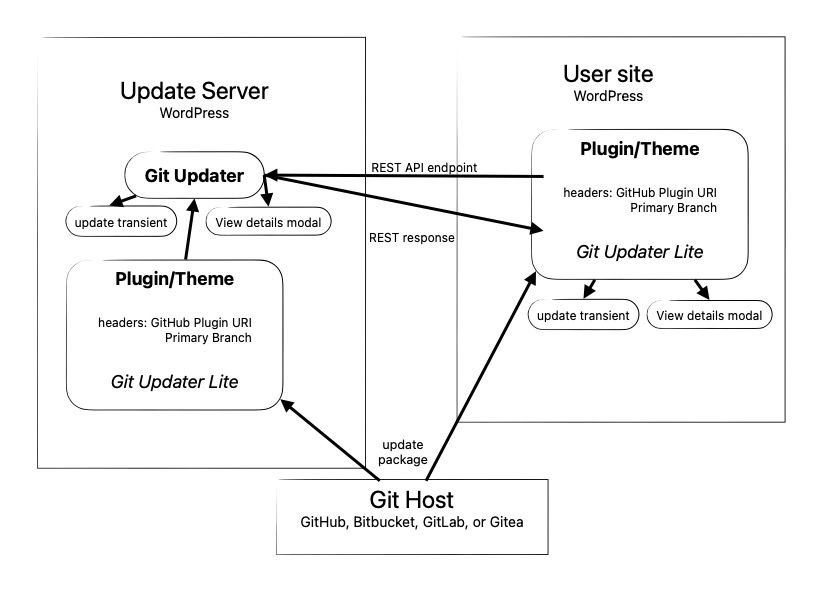
The primary advantage is that the most complicated code lies outside of the actual embedded updater library. It also means less overhead for the user’s site when that data needs to be refreshed.
#### Composer library
I have written a small composer library, [afragen/git-updater-lite](https://github.com/afragen/git-updater-lite). Currently it is a single class file less than 300 lines and less than 7 Kb in size. This is significantly lighter weight than the current most popular embedded updater. The integration is only two lines of code. The reason that Git Updater Lite can be so lightweight is its tight integration with Git Updater on the update server.
#### REST API Endpoint
Git Updater has a REST API endpoint capable of providing a JSON response compatible with the `plugins_api()` or `themes_api()`. This REST endpoint requires that the plugin or theme is fully integrated with Git Updater. This integration is only a few additional headers in the main plugin file or the theme’s style.css file for Git Updater and only a small composer library and 2 lines of code to integrate `git-updater-lite`.
Examples of the endpoints are as follows:
* `https://my-site.com/wp-json/git-updater/v1/plugins-api/?slug=my-plugin`
* `https://my-site.com/wp-json/git-updater/v1/themes-api/?slug=my-theme`
Obviously each individual distributed plugin or theme with `git-updater-lite` must be active to receive updates.
Git Updater Lite is capable of serving updates from any of the following git hosts: GitHub, Bitbucket, GitLab, or Gitea. Currently Git Updater Lite supports public and private repositories. This support depends upon the developer having a complete integration of their own plugins and themes with Git Updater and that they host their own plugins/themes in a publicly accessible WordPress installation. These plugins and themes do not need to be active on their site to maintain the current versions.
The REST API endpoint returns a JSON response that provides all the information necessary to provide complete integration with the dashboard update system. The API data is cached via a transient for 6 hours.
#### Getting Started – For Developers
**Step 1:** *Integrate your plugin or theme with Git Updater.*
* Add the [required headers](https://git-updater.com/knowledge-base/required-headers/) to your plugin’s main file or your theme’s style.css
* Ensure that Git Updater is able to update your plugin or theme.
**Step 2:** *Integrate your plugin or theme with Git Updater Lite*
* Run `composer require afragen/git-updater-lite:^1`
* Add the following lines to your main plugin file or theme’s functions.php
```
require_once __DIR__ . '/vendor/autoload.php';
( new \Fragen\Git_Updater\Lite( __FILE__ ) )->run('<URI>');Code language: PHP (php)
```
* Change `<URI>` to your REST endpoint.
+ For a plugin: `https://my-site.com/wp-json/git-updater/v1/plugins-api/?slug=my-plugin`
+ For a theme: `https://my-site.com/wp-json/git-updater/v1/themes-api/?slug=my-theme`
* Update your plugin or theme on the on the git host to this fully integrated version.
**Step 3:** *Set up the update server.*
* Have a publicly accessible WordPress installation, such as the plugin’s website.
* Install and activate Git Updater 12.7.0 or later.
* Install your plugin or theme via the Git Updater Install Plugin or Install Theme tabs. It doesn’t need to be active.
#### Access tokens
Any private repositories, or repositories on GitLab or Gitea, require an authentication token. If the tokens are set on the update server, they will be used via the API response for the Authentication header to download the update from the appropriate git host.
#### General Comments
This system puts slightly more work on the developer to have their plugins and themes integrated with both Git Updater and Git Updater Lite on their update server. After that, all they really need to do is set those plugins and themes to auto-update. This will help the update server continue to distribute up-to-date plugins and themes. Please refer to [Git Updater’s Knowledge Base regarding versioning](https://git-updater.com/knowledge-base/versions-branches/).
I believe this to be the simplest method of integrating an updater into your plugin or theme and update outside of the wp.org repositories.
There is more information at <https://github.com/afragen/git-updater-lite>. Please let me know if you have any issues integrating your projects with either Git Updater or Git Updater Lite. There is an example plugin at <https://github.com/afragen/test-plugins-gu-lite>. To test, I usually decrease the local version number., Git Updater Lite, thefragens.com, 01je3xsnegw005z4rfz47rbt7s.