Good-Looking GitHub Profile Pages

## Metadata
- Author: [[Joost de Valk]]
- Full Title: Good-Looking GitHub Profile Pages
- Category: #articles
- Document Note: # Title: Enhancing GitHub Profiles for Organizations and Individuals
- - -
tags: #GitHub #Profile #Organization #PersonalProfile
Author: Courtney Robertson
Source: Courtney's Blog
Reference: N/A
date created: 2023-12-22T15:30
- - -
## Table of Contents:
1. 📝 Summary
2. 📖 Main Content
- 🗒️ Notes
3. 📖 References
4. 🗣️ Paraphrase
5. 🧪 Hypotheses
- 📊 Methodology
- 💡 Implications
- 🔮 Future Research
- ❓ Implications
- ✅ Logical validity
6. Conclusion
## 📝 Summary:
In this blog post, Courtney Robertson shares valuable insights on optimizing GitHub profiles for both organizations and individuals. She highlights the importance of profile README files, pinning repositories, and adding relevant information to enhance the overall appearance and credibility of these profiles.
## 📖 Main Content:
Courtney's article provides practical advice on creating attractive GitHub profiles for organizations and personal use. Let's delve into the main points:
### 🗒️ Notes:
#### A good-looking GitHub organization page
1. **Add a profile readme:** Create a `.github` repository, add a directory, and include a `README.md` file. This file appears above pinned repositories and allows organizations to introduce themselves and share important links.
2. **Pin your most interesting repositories:** Ensure that your pinned repositories have informative descriptions to attract visitors.
3. **Add your company URL and social profiles:** Customize your organization settings by adding your company's URL, description, and social profiles. Verify the organization URL for authenticity.
#### A good-looking personal GitHub profile
1. **Create a profile readme:** Similar to organizations, individuals can create a "magic" repository named after their username. Add a `README.md` file to provide context about yourself.
2. **Pin some repositories:** Pin your favorite repositories with proper descriptions, ensuring they are healthy GitHub repositories.
3. **Set your profile data:** In your profile settings, add your social URLs, website, and a description. This enhances trust and connections between your GitHub profile and other online platforms.
## 📖 References:
No external references were cited in this article.
## 🗣️ Paraphrase:
1. "After my blog post about healthy GitHub repositories, I learned that many people didn't know how to create .github repositories and what you can do with those. That automatically also means that you don't know about organization profile pages, so I wrote a quick post about those, too, which you're reading now."
- Paraphrase: Following my previous blog post on maintaining healthy GitHub repositories, I realized that some individuals lacked knowledge about creating .github repositories and harnessing their potential. This also implies a gap in understanding organization profile pages, which prompted me to write this informative post that you're currently reading.
2. "A good-looking GitHub organization page
The Emilia Capital GitHub organization profile is very new and a bit empty, but it already looks quite good:"
- Paraphrase: Achieving an appealing GitHub organization page
While the Emilia Capital GitHub organization profile is relatively new and somewhat lacking in content, it already boasts an attractive appearance.
## 🧪 Hypotheses:
### 📊 Methodology:
To explore the hypotheses generated from this article, researchers could employ the following methodologies:
1. **Hypothesis 1: Well-structured GitHub profiles attract more engagement.**
- Methodology: Analyze a sample of GitHub profiles, comparing engagement metrics (e.g., followers, stars) between profiles with and without profile READMEs.
- Data Source: GitHub API and user data.
2. **Hypothesis 2: Pinned repositories with informative descriptions lead to increased repository visits.**
- Methodology: Conduct an A/B test by pinning repositories with and without detailed descriptions, measuring the visit frequency and user interactions.
- Data Source: GitHub repository statistics.
### 💡 Implications:
The outcomes of future research in this area could have significant implications:
1. **Enhanced GitHub Profiles:** Understanding how to optimize GitHub profiles can benefit organizations and individuals by improving visibility and engagement.
2. **Online Presence:** Effective profiles can strengthen an individual's or organization's online presence, leading to better networking and collaboration opportunities.
### 🔮 Future Research:
Potential areas for future research related to GitHub profile optimization:
1. **User Experience and Design:** Investigate how different profile layouts and designs impact user interactions and perceptions.
2. **Security and Privacy:** Explore the security implications of sharing personal information on GitHub profiles and propose best practices for privacy-conscious users.
### ❓ Implications:
1. Investigate the potential ethical and privacy implications of sharing personal and company information on GitHub profiles.
2. Examine how GitHub profiles might impact hiring decisions and assess any biases introduced through this platform.
### ✅ Logical validity:
Courtney's arguments are logically sound and based on practical experience. She provides clear instructions for enhancing GitHub profiles and offers valuable insights. Her tone is informative and approachable, making the content accessible to a wide audience.
## Conclusion:
In this comprehensive guide, Courtney Robertson emphasizes the importance of optimizing GitHub profiles for both organizations and individuals. By following her advice on creating profile READMEs, pinning repositories, and adding essential information, users can enhance their online presence and engagement within the GitHub community.
- Summary: This article provides a guide on how to create good-looking GitHub profile pages for both organizations and individuals. For organization pages, it suggests adding a profile readme in the .github repository, pinning interesting repositories, and adding company URL and social profiles. For personal profiles, it recommends creating a "magic" repository with the same name as the username, adding a README.md file to that repository, pinning repositories, and setting profile data. These steps help improve the appearance of GitHub profile pages and make them more appealing to visitors.
- URL: https://joost.blog/good-looking-github-profile-pages/
After my [blog post about healthy GitHub repositories](https://joost.blog/healthy-github-repository/), I learned that many people didn’t know how to create `.github` repositories and what you can do with those. That automatically also means that you don’t know about organization profile pages, so I wrote a quick post about those, too, which you’re reading now. I’ll start by explaining how to make a good-looking organization page, and then we’ll talk about your [*personal* GitHub profile](https://joost.blog/good-looking-github-profile-pages/#h-personal-github-profile).
#### A good-looking GitHub organization page
The Emilia Capital GitHub organization profile is very new and a bit empty, but it already looks quite good:
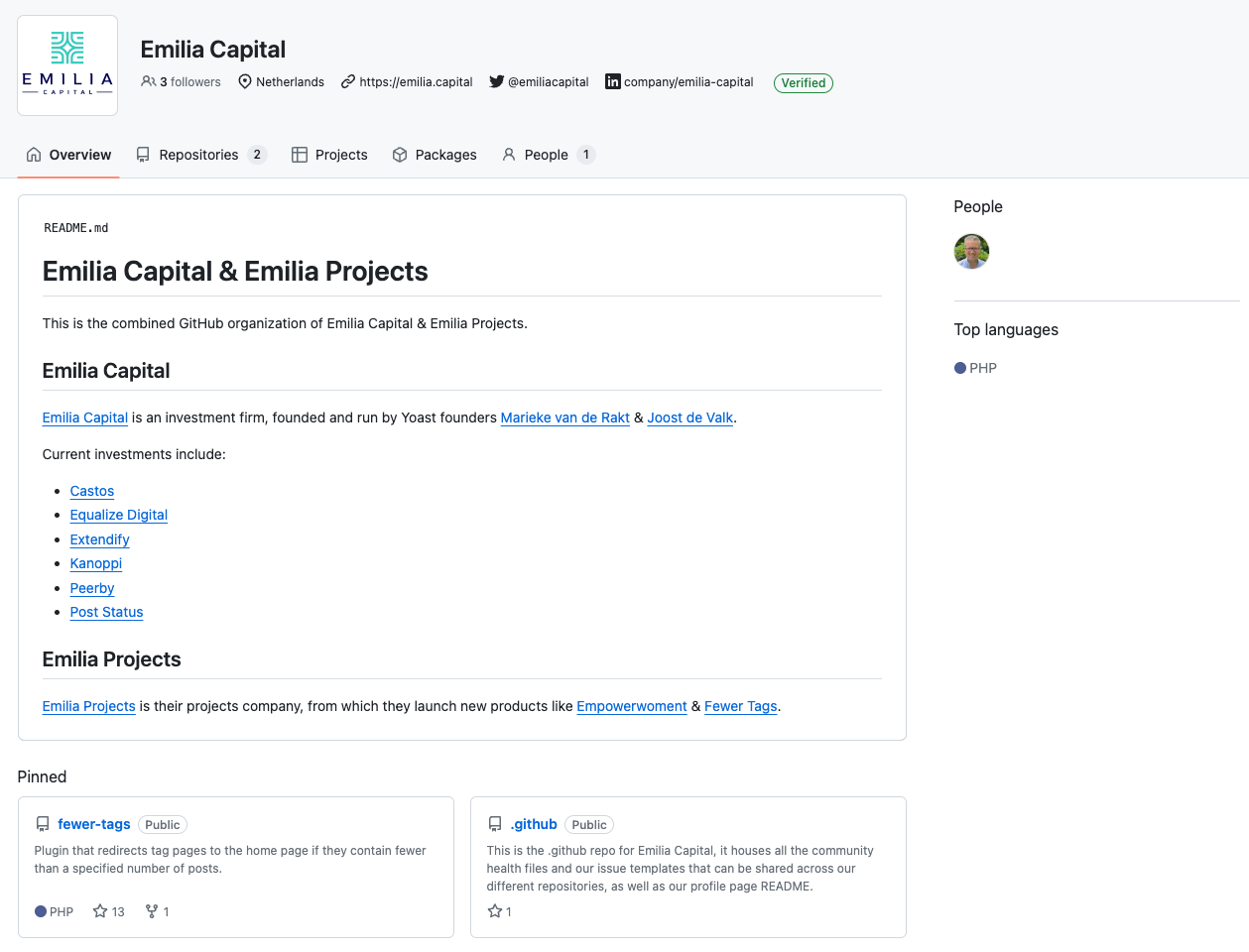Screenshot of the Emilia Capital GitHub profile, showing a README file.
##### 1. Add a profile readme
The fact that this looks good is the result of a few things. First, and most importantly, it’s the `profile/README.md` in our `.github` repository, which renders above our pinned repositories. This allows you to explain who you, as an organization, are and point to interesting links. It’s really as simple as this: create a `.github` repository, which you should for reasons I outlined in my previous post anyway, add a directory and create a `README.md` file in that directory.
##### 2. Pin your most interesting repositories
Of course, ensure those repositories have good descriptions, so people know why they should check them out. In practice, a simple first step is pinning your most starred repositories.
##### 3. Add your company URL and social profiles
Go to your organization settings:
* Click your Avatar
* Go to “Your Organizations”
* Click “Settings” for your organization.
Add your company’s URL, a description, and a few social profiles like your organization’s X/Twitter and LinkedIn. Then, make sure to *verify* that organization URL by going to “Verified & approved domains” in the left-hand menu and following the steps outlined there.
#### A good-looking *personal* GitHub profile
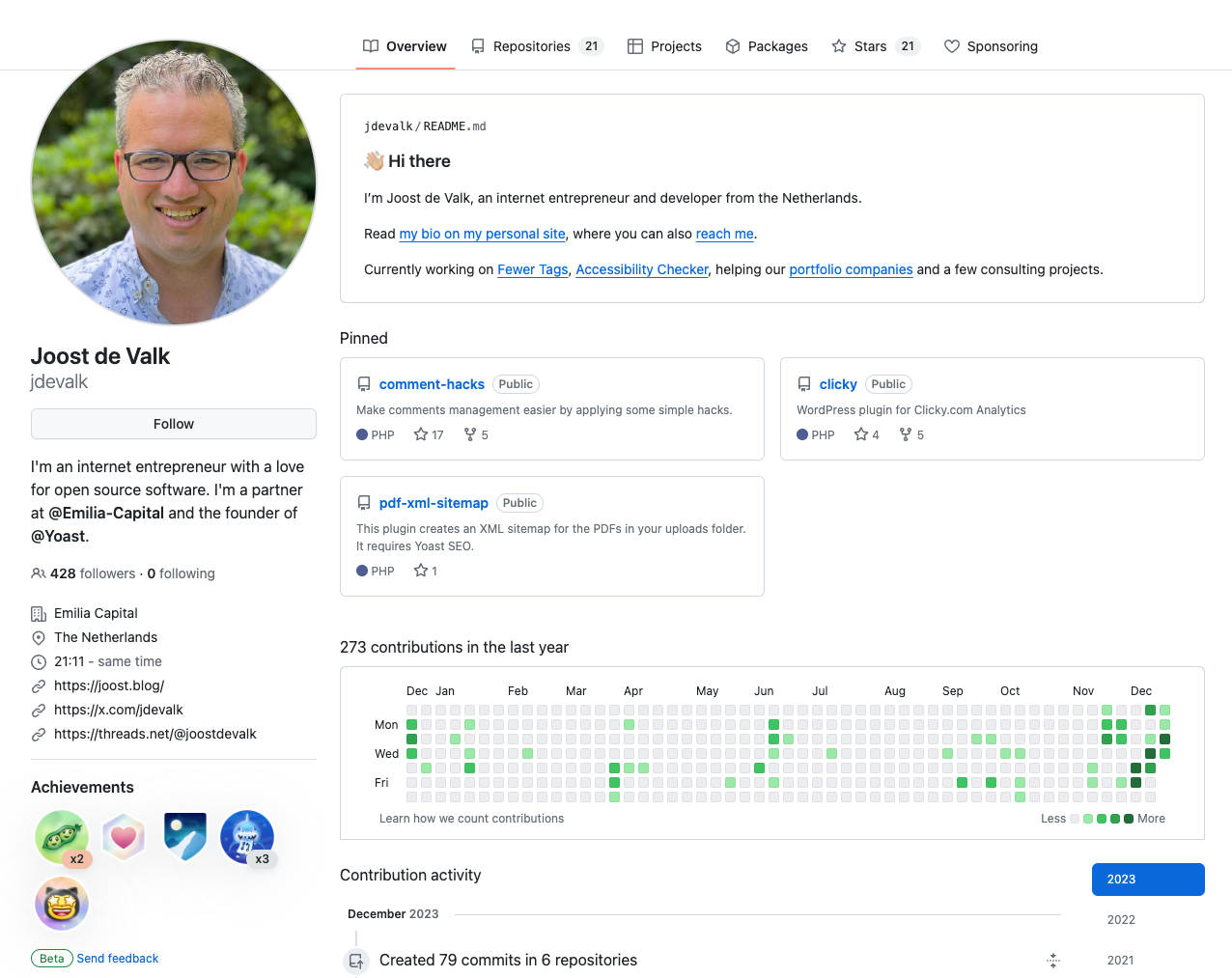
You can quite simply have a good-looking personal GitHub profile [like mine](https://github.com/jdevalk):
##### 1. Create a profile readme
Just like you can create a `.github` repository for organizations, you can create a “magic” repository for your personal profile too. But this repository has a different name: it should be identical to your username. So for me, it’s `jdevalk`, as [you can see here](https://github.com/jdevalk/jdevalk). If you add a `README.md` file to that personal repository, you get the same benefits as the `profile/README.md` does for organization profiles. And then it renders above your pinned profiles as you can see in the screenshot.
**Note**: you can have a `.github` repository for your personal GitHub too. It has *all* the benefits of a `.github` repository for your personal repositories; the only thing that’s different is the method for the profile page.
##### 2. Pin some repositories
Here too, you should pin some favorite repositories, and make sure those repositories have proper descriptions. Of course, those repositories should be [healthy GitHub repositories](https://joost.blog/healthy-github-repository/) themselves too.
##### 3. Set your profile data
Go to your [profile settings](https://github.com/settings/profile) and add your social URLs, website, description, etc. Make sure to do this as it “connects” this repository to your important social profiles and then, create a link back from those social profiles and your website to your GitHub profile too. This makes people trust your profile a lot more.
, Good-Looking GitHub Profile Pages, Joost de Valk, 01hj4jvw2tq30sebp41ca9k9zj.