Goodnotes Bible Journaling | iBible Tour
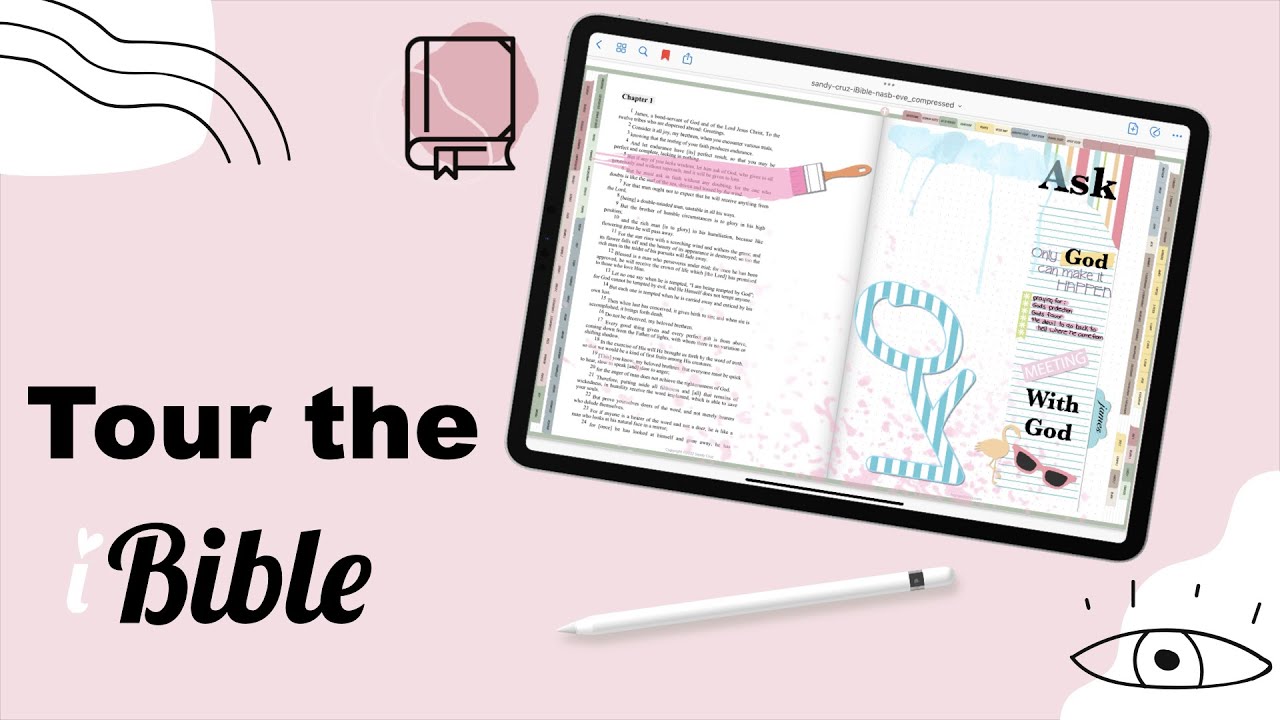
## Metadata
- Author: [[Sandy Cruz]]
- Full Title: Goodnotes Bible Journaling | iBible Tour
- Category: #articles
- Document Note: ---
tags:
- #BibleJournaling
- #DigitalTools
- #FaithAndTechnology
Author: Sandy Cruise
Source: YouTube - iBible Tour
Reference: https://www.youtube.com/watch?v=Z8Ce_a5j4Ek
date created: 2025-08-23 20:00
---
# Title: Goodnotes Bible Journaling | iBible Tour
## Table of Contents:
- [📝 Summary](#-summary)
- [📖 Main Content](#-main-content)
- [🗒️ Notes](#️-notes)
- [📖 References](#-references)
- [🗣️ Paraphrase](#️-paraphrase)
- [📰 Newsletter](#-newsletter)
- [✅ Action Items](#-action-items)
- [🧪 Hypotheses](#-hypotheses)
- [📊 Methodology](#-methodology)
- [❓ Questions](#-questions)
- [🔮 Future Research](#-future-research)
- [💡 Implications](#-implications)
- [🧠 Learning Styles Assessment](#-learning-styles-assessment)
- [📊 Accessibility Assessment](#-accessibility-assessment)
- [🌍 DEIB Assessment](#-deib-diversity-equity-inclusion-and-belonging-assessment)
- [✅ Logical Validity](#-logical-validity)
- [🔍 DARVO Analysis](#-darvo-analysis-prompt)
- [🔍 SEO Evaluation](#-seo-evaluation)
- [🎯 Conclusion](#-conclusion)
---
## 📝 Summary:
The Goodnotes Bible Journaling iBible Tour introduces a **digital Bible designed for apps like GoodNotes and Notability**. It eliminates the mess and limitations of physical journaling, offering **16 customizable covers, 66 books, 1,189 chapters, 18 templates, and a reading tracker**. Linked through **Bible Gateway**, users can copy their preferred translations into a blank Bible for journaling. Templates include sermon notes, prayer journals, gratitude pages, and inductive studies. Despite being 2,032 pages, the file is under 30 MB, optimized for clarity and portability.
---
## 📖 Main Content:
The iBible bridges **traditional scripture study** and **modern digital convenience**. By using GoodNotes, it creates a hybrid space for creativity, reflection, and scripture interaction. Its navigation system (tabs, outlines, links) supports quick access across Old and New Testament books. Personalization stands out, from customizable covers to journaling templates. It integrates flexibility (adding translations via Bible Gateway) with creative reflection (drawing, highlighting, decorating).
The design shows intentionality: readers can **track progress, duplicate templates, and personalize studies** while maintaining structure. It reduces barriers to entry for people who fear “ruining” a physical Bible with messy notes, while empowering users to keep faith journaling portable and accessible.
---
### 🗒️ Notes
- **Core Features**
- 16 customizable covers
- 66 books, 1,189 chapters
- 18 built-in templates
- Linked navigation with tabs and outlines
- Tracker for reading plans and study
- Cross icon on each page to return to the index
- **Bible Gateway Integration**
- Blank Bible provided for inserting chosen translations
- Supports NIV, NAB, NLT, and others
- Encourages comparative study
- **Templates**
- Devotional, sermon notes, gratitude, prayer, verse mapping
- Inductive and SOAP studies
- Customizable blank templates
- **User Benefits**
- Reduces physical clutter of journaling tools
- Portable (iPad + GoodNotes)
- Flexible layouts for creative study
- Under 30 MB, high readability zoom
- **Educational Applications**
- Supports structured reflection
- Enables long-term habit tracking
- Bridges spiritual practice with digital literacy
---
## 📖 References:
- YouTube: [Goodnotes Bible Journaling | iBible Tour](https://www.youtube.com/watch?v=Z8Ce_a5j4Ek)
---
## 🗣️ Paraphrase:
1. *Original*: “This Bible lets me journal without fear of messing up my paper Bible or carrying lots of tools.”
*Paraphrased*: The digital Bible removes the worry of damaging a traditional Bible and eliminates the need for physical journaling supplies.
2. *Original*: “Even with 2,032 pages, it’s under 30 MB and still clear when zoomed in.”
*Paraphrased*: Despite containing thousands of pages, the iBible remains lightweight in file size while keeping crisp text resolution.
---
## 📰 Newsletter:
📖 **Digital Faith Tools Spotlight**
Ever wish Bible journaling could be both **organized and creative**—without lugging supplies? The **Goodnotes iBible** offers just that. With 16 customizable covers, 18 journaling templates, and built-in links to Bible Gateway, it transforms an iPad into a portable journaling hub. You can copy your favorite translations, decorate notes, track reading progress, and never worry about smudges or space again. Perfect for sermon prep, devotional study, or prayer journaling. Check it out here: [Goodnotes Bible Journaling iBible Tour](https://www.youtube.com/watch?v=Z8Ce_a5j4Ek).
---
## ✅ Action Items:
- Explore how iBible-style digital journaling aligns with **open-source education principles** (personal customization, flexible formats).
- Consider parallels for **WordPress contributor onboarding**: modular templates, personal progress tracking, easy entry.
- Reflect on integrating **faith-tech approaches** into community education (portable tools, accessibility).
- Apply as a model for **OSPO education tools**: lightweight, customizable, inclusive learning templates.
---
## 🧪 Hypotheses:
- Digital journaling tools **increase consistency** in devotional practices compared to analog methods.
- Users feel more **creative freedom** when journaling digitally due to undo/redo, customizable templates.
- File size optimization impacts adoption (lighter files = more accessibility).
### 📊 Methodology:
- Mixed-method surveys of digital vs. paper journaling participants.
- Usage analytics from GoodNotes integration.
- Qualitative interviews on spiritual practice engagement.
### ❓ Questions:
- Does digital journaling improve scripture retention?
- How does customization impact long-term spiritual habits?
- Can digital journaling reduce barriers for neurodiverse learners?
### 🔮 Future Research:
- Comparative study of **faith journaling apps vs. traditional notebooks**.
- Impact of **gamification (trackers, achievements)** on scripture engagement.
- Potential integration with **AI-based note summarization** for devotionals.
### 💡 Implications:
- Could reshape spiritual education into **more inclusive, portable, and engaging practices**.
- Offers model for **tech adoption in other reflective disciplines** (therapy, coaching).
- Suggests WordPress could build **digital templates for contributor journeys**.
---
## 🧠 Learning Styles Assessment:
- **Visual**: Templates, covers, and layouts support this.
*Improve*: Add infographics for reading plans.
- **Aural**: None present.
*Improve*: Offer audio-read Bible integration.
- **Verbal**: Strong—plenty of scripture, journaling, prompts.
*Improve*: More storytelling-style guides.
- **Kinesthetic**: Annotation provides interactive elements.
*Improve*: Add journaling challenges.
- **Logical**: Structured navigation aids.
*Improve*: More data dashboards for trackers.
- **Social**: No direct group study.
*Improve*: Add share/export options for group devotionals.
- **Solitary**: Strong—supports private reflection.
- **Naturalistic**: None present.
*Improve*: Incorporate nature-based devotional prompts.
---
## 📊 Accessibility Assessment:
- **Screen Reader**: May struggle without semantic tagging.
- **Keyboard Navigation**: Limited (GoodNotes not fully keyboard-driven).
- **Contrast/Readability**: Clear, but font customization could help.
- **Text Resizing**: Supported in GoodNotes.
*Improvements*: Add alt-text, optimize templates for accessibility readers.
---
## 🌍 DEIB (Diversity, Equity, Inclusion, Belonging) Assessment:
- **Cultural Relevance**: Limited to KJV; inclusivity expands with blank Bible.
- **Inclusive Language**: Neutral, but could better contextualize non-Christian readers.
- **Neurodiversity Support**: Templates break structure down well.
- **Representation**: No imagery of diverse users.
- **Psychological Safety**: Positive; invites reflection.
*Improvements*: Provide global Bible versions, contextual devotionals for diverse groups.
---
## ✅ Logical Validity:
- **Strengths**:
- Clear causal reasoning: digital tools reduce clutter → enable more
- Summary: Goodnotes Bible Journaling | iBible Tour is a digital Bible that can be used in apps like Notability and Goodnotes for Bible journaling. It eliminates the fear of messing up a paper Bible and allows for easy Bible journaling anytime, anywhere. The Bible comes with 16 covers to choose from, and users can also create their own covers. It includes features like outlined navigation, linked tables with categorized information about each book, and templates for sermon notes, verse mapping, and more. The digital Bible is under 30 megabytes and is linked to Bible Gateway for scripture comparisons.
- URL: https://www.youtube.com/watch?v=Z8Ce_a5j4Ek&t=434
hello and welcome to the I Bible journaling Bible this is a digital Bible and you use it in apps such as notability good notes any app that you can annotate and so I've created this Bible I use good notes so that's what you're looking at on my screen but I created this Bible so that I can Bible journal without the fear of messing up my paper Bible and I don't have to have
all the tools and all the equipment and carry that around or find somewhere to store it or get it all out when I want a Bible Journal I can Bible Journal anytime anywhere and all I need is just my iPad so if you're watching this in early October or mid-october you may have seen that this is one of the fast action bonuses that comes with the I Bible journaling Bible course if you
missed the fast action bonus this will be available for purchase in the eye store at hayesandycruise.com okay so what I want to do is I want to give you a tour of this Bible so that you can see everything that it has packed full of features okay so first of all I'm going to start on the very very first part of the Bible because it comes with 16 covers to choose from of course you can
make your own I teach this in the course and on my YouTube channel but I've included 16 that comes with the Bible that matches the theme all right so let's go to the very beginning now one of the things about this Bible is it's all outlined so you can get to any of the books from the outline and to get to the chapters you just twirl down and that's not the only way to navigate but I just thought since I'm here I'd show you that real
quick all right so currently this digital Bible is only available in King James but it also comes with in the package a blank Bible all right so these are the covers there's all 16 covers and here's a close-up of the covers so you can choose any one of these that you like and I've put scripture on some of the leather covers
but some of the other covers like this one you can put your own scripture on or you can put your name or you could just use your own font and just put Bible on the cover or whatever version that is your favorite I'll show you how to move these around okay so let's say you want to use this as your cover you'll simply tap and hold
and you bring it all the way to the very beginning and so that will be your cover so when you go to your thumbnail I've got so many of them because I've been testing but as you can see the thumbnail now shows that cover so let's go back into that Bible all right so the next thing I want to point out the very first page in the Bible is tables these tables
are all categorized by color and it also includes let me zoom in a little bit here the date it was written if that's available and the book abbreviation the book title and who the author is if that's available so these are all linked they're linked to Bible Gateway and the reason for that is and let me let me explain now why you get a blank Bible if
you press on one of these links it'll take you to Bible Gateway and you can copy the scripture of your favorite translation and bring it into your blank Bible so let's just test that out here let's see I'll go ahead and I'll just go to Genesis so open link it's an external link so I have to verify that I want to go to that link
and so here we are and the King James opens up but you have all these other options so if your favorite version is The New American Bible the NIV version new live version that's the one that you'll select so let me just go ahead and pick the NIV okay so now I'm in Genesis 1 and IV so
what I'm going to do is I'm going to press and hold on my screen and I'm going to select the scripture and I'm just going to select six through six I think it's through no it's eight I'm looking at my computer screen again and holding my iPad in my hand okay so I'm going to copy this I'm going to go back over to good notes and this is the King James Bible let me
open the blank Bible and I'm going to go to Genesis 1. tap one and it takes me to the very first page so that's chapter one and I'm going to press and hold and paste now you can keep this as wide as you want or you can leave yourself a margin you don't really need a margin because you've got all this Blank Space to write
take notes and decorate so you can bring this all the way to the center if you want to you can also change the font you can change the color you can change the size here in good notes and I teach all of this in the course all right so let me go back to the King James version all right so this is the first page this is linked to Bible Gateway so that you can grab scripture or do comparisons and
the next page starts the books of the Bible so on each front page you've got all the chapters that are included these chapters are linked to the chapter so let me just go ahead and tap on chapter one and that brings me to chapter one some of the chapters overflow into the next page
so here's where you can mark up the scripture you can highlight zoom in if the text is too small for you you can do your decorating here in the side and I've also left you a margin so not only can you navigate to the books in the Bible from the outline that I showed you in the beginning of the video but you can also navigate using the tabs so all the
tabs on the left is the Old Testament all the tabs on the right is the New Testament and then of course it comes with templates we have to have templates and I'm going to go through those here in a minute so all the tabs on the left are linked to each book of the Bible and that will bring you to a page where you can get to the chapters there are also links to some extra dot Pages the dot one will
take you to a page where you have it blank on the left and Dot on the right there's also a DOT 2 and that has dot on the left and Dot on the right the same goes for the graph Pages the lined pages and then there's a completely blank page so there's nothing at all on it this way you can make your own templates if you
want to or bringing bringing in any of your designs from keynote using I design shapes and patterns okay so now let's see oh the tracker let's look at the tracker okay now this tracker is not linked to anything so these aren't linked so this tracker basically is if you're going through a reading program or if you want
to keep track of the books that you've studied or books that you've already read if you're on a reading plan if you want to go to one of the books and Link to the chapter it's so simple to just tap on the tab okay so the tracker is just a template for you to track your reading all right so there's also four blank tabs so that you can label them however you like if
you're in a Bible study or if you're in a group or if you want to put your prayer requests here or your favorite verses just anything you'd like and then these tabs take you to the templates now what I like to do in my digital Bible is I like to keep the template where it is and I'll just duplicate it so if I go to the devotional template here you can see the template and if I
tap on the thumbnail but tap on the thumbnail here you can see there's that template so what I like to do if I'm going to use one of them for my devotions I'll duplicate it so I'll leave the original as it is and where it is and I'll duplicate and now it puts one right behind it and that's the one that I'll actually use I'll keep it there because when I want to go through my devotions
I simply hit this tab and it takes me to all my devotions so I keep them behind that tab so let's look at some of the other templates this one's for sermon notes this one is for go-to versus so if you've got some favorite verses that you're either memorizing or that help you in time of need or in time of Joy or praise you can keep them all keep a
record of them all here and you could duplicate these as many times as you need them because over time you may collect a lot of scriptures okay there's a gratitude Journal and again this can also be duplicated prayer Journal you can keep all your prayers in one place check them off as they're answered you can have a page for
each family member your country your state your church and this template is for verse mapping if you've tried that there's tons of YouTube videos on that and I'm just now starting to get into this myself all right and then inductive study and most all of these templates have the right side for you to decorate keep track keep note this one is for soap
studies and this is a custom template this template you can label yourself however you'd like I like to use it for the verse mapping actually I like to put my verse here in the middle and then pull out keywords into these circles and then Mark my prayers and Revelations here on the right and then last but not least verse study so as you could see it comes
packed with templates and blank pages you can duplicate them as much as you'd like and one of the really cool things about this Bible even though let me see let me see if it gives me the page amount of pages yes even though there's 2032 pages in here this Bible is under 30 megabytes and it still keeps its clear text when you zoom
in and if you've been using any of my eye planners you know that's how I like things alright so let me close this now and look at my notes okay so there's so the I Bible comes with 66 books 16 covers 1189 chapters 18 templates a reading plan tracker
and then the tables page it's all linked and It's All Digital and last but not least no matter what page you're on there's a little cross right here and that will always bring you back to the tables page so that you can jump over to Bible Gateway and do your scripture comparisons you can go to let's see let me go to Matthew one and what you can do is You've Got King
James here on the side and then you can put some other versions of one scripture or all the scriptures on the right so you can do your comparisons that way okay I hope you enjoyed the tour and like I said if you're watching this in mid-october you can get in on the course you can get in on the fast action bonus thanks for watching guys have an outstanding day
foreign [Music]
thank you, Goodnotes Bible Journaling | iBible Tour, Sandy Cruz, 01hjpefm8st653j63cf98mfgm5.