How to Create Facebook Video Ads
## Metadata
- Author: [[Rocco Alberto Baldassarre]]
- Full Title: How to Create Facebook Video Ads
- Category: #articles
- Summary: Do you use Facebook ads? This article explains how to create Facebook video ads through both the live advertising interface and Power Editor.
- URL: https://www.socialmediaexaminer.com/create-facebook-video-ads/
[](https://www.socialmediaexaminer.com/category/how-to/)[social media how to](https://www.socialmediaexaminer.com/category/how-to/)
Do you use Facebook ads?
Have you considering adding video to your ads?
If you want to drive Facebook users to your website, videos on Facebook are worth a look.
In this article I'll explain how to **create Facebook video ads through both the live advertising interface and Power Editor**.
Discover how to create Facebook video ads.
#### Create Video Ads With the Live Interface
The Facebook ad live interface process is relatively straightforward and it allows you to [create video](https://www.socialmediaexaminer.com/8-visual-content-apps/) [advertising campaigns](https://www.socialmediaexaminer.com/facebook-ad-campaign-changes/) in no time.
1. **Log into your advertising manager**. **Click on Create Ad** on the top right corner of the screen.
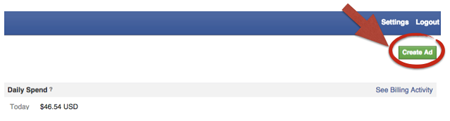To create a video ad with Facebook ads live interface, log into your advertising manager and click Create Ad.
2. Next, **select Get Video Views**.
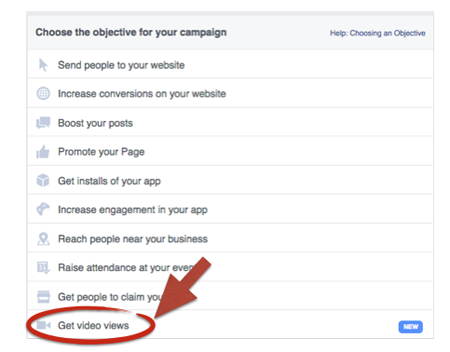On the next screen, click on Get Video Views.
3. Facebook will then ask you to **choose which page you want to use to promote the video**.
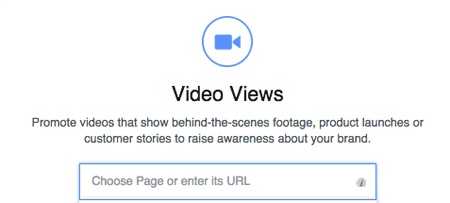Select the page for which you want to do the video ad.
4. Now, **set up the campaign**. Insert the campaign name and then select your [target audience](https://www.socialmediaexaminer.com/retarget-content-to-facebook-custom-audiences/) demographics (location, age, gender), interests and behaviors. Finally choose your bidding strategy and budget.
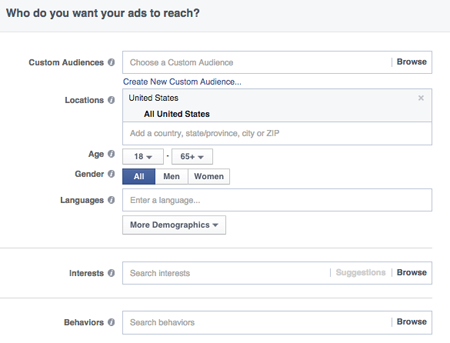Set up the campaign for your video ad.
5. Once the campaign is set up, **[upload your video](https://www.socialmediaexaminer.com/5-social-media-video-options/)**. The format required for the videos is .MOV files. Upload files up to 1 GB with resolution of at least 720p and an aspect ratio of at least 16:9.
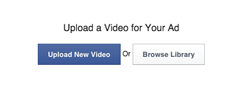Upload a new video or select a video already on your page.
6. After you successfully upload the video, **set up the text and a call to action for the ad**.
This is an extremely important step because you only will be able to set up a landing page if you pick one of the eligible calls to action. The [call to action](https://www.socialmediaexaminer.com/how-to-improve-your-social-media-calls-to-action/) will show up while the video is playing and you won't be able to see it in the preview.
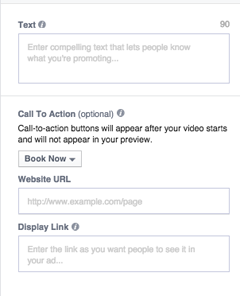Once the video is uploaded, add text and set up a call to action.
#### Create Video Ads With Power Editor
Creating a [video campaign](https://www.socialmediaexaminer.com/how-to-explainer-videos/) within the Facebook Power Editor might seem more complex. However, it's the easier option if you want to create several variations of your ads for testing purposes.
#### SAVE $600 on Your On-Demand Ticket - Sale Ends Friday!
Travel to Social Media Marketing World off the table? Get all of the great content at a fraction of the price with an On-Demand ticket.
That’s full access to **recordings of every keynote, every workshop, and every session**—the ones people travel thousands of miles to see. Don't wait. Get your On-Demand ticket now!
[YES, I WANT TO SAVE BIG ON MY TICKET](https://www.socialmediaexaminer.com/smmworld/on-demand/?smesite=world23-site-midpage-ad-top-on-demand)
1. To start, **enter your Facebook ad manager and click on Power Editor**.
Click on Power Editor in your Facebook ad manager.
2. **Download your advertising account in Power Editor** before you start the campaign-creation process.
Click on the Download to Power Editor button at the top of your screen.
3. First, **sort your data by campaign**. Then, **create a new one**.
Sort your data by campaign and then click on the Create Campaign button.
4. **Insert the name of the campaign, the ad buying type and objective**. To drive traffic to the site, you need to **select Video Views as the objective**.
#### Looking for something to make your life easier?
Discover the tools we recommend to **drive engagement, save you time, and boost sales** across your entire marketing funnel or business.
Whether you need help planning content, organizing social posts, or developing your strategy, you’ll find something for every situation.
[FIND YOUR NEXT FAVORITE TOOL](https://www.socialmediaexaminer.com/tools/?smesite=toolspage-site-midpage-ad-middle)
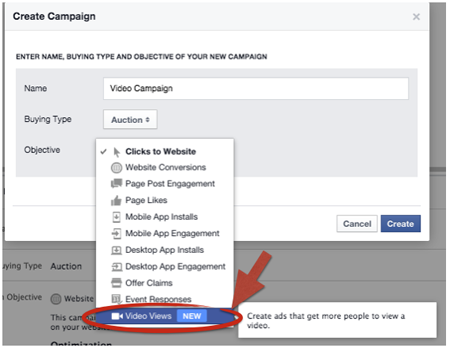To create the campaign, name it and then select buying type and objective. Your objective needs to be Video Views.
5. Next, **switch to the ad set view** within the Campaign tab and **create a new ad set for your video ads**.
An ad set is group of ads [targeting a specific group of people](https://www.socialmediaexaminer.com/remarket-twitter-users-with-tailored-audiences/). Each target group needs its own ad set. Segment your ad sets as much as possible in order to analyze the results of your campaigns at the target group level.
Create a new ad set for your video ad so you can better analyze the results of your campaign.
**Set up the targeting method, budgets, placements and the bidding model at the ad set level**, as is now required by Facebook.
Here's how to **set up the ideal viewer profile for your video ad**.
6. **Switch from the campaign view to the ad set view in the vertical menu of Power Editor**. **Select the ad set you just created** and then **click on the Ads tab at the top of your screen**. You will now be able to **create a new ad**.
To create your ad, switch to the ad set view in the vertical menu of Power Editor. Select your new ad set and click on the Ads tab.
7. Name the ad and then customize it.
First, **select the page you will use to promote it**. Then **insert the text, upload the video you want to use and select a call to action to insert your landing page URL**.
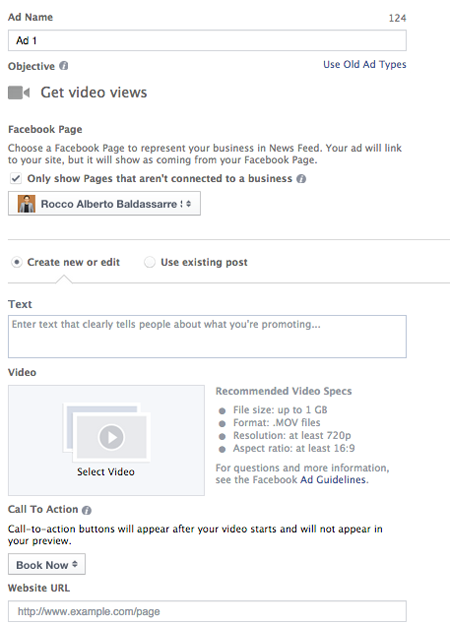To create your video ad, name the ad, select the right Facebook business page, insert the text, upload the video, choose a call to action and insert your landing page URL.
The nice part about Facebook Power Editor is that once it's set up, you can duplicate ads to quickly create new split tests. You can also **duplicate ad sets to target other groups**.
Easily duplicate ads for split tests and to target different groups.
**Live Interface vs. Power Editor: Advantages and Disadvantages**
The live interface is a more user-friendly approach to video advertising than Power Editor, since you follow a guided process that ends with the creation of the whole ad. However, this method has its disadvantages. It's slower in creating [split tests](https://www.socialmediaexaminer.com/split-test-facebook-page-posts-ads/) and requires more time to create multiple ad sets.The [Facebook Power Editor](https://www.socialmediaexaminer.com/facebook-power-editor-guide/) allows you to scale your campaigns quickly. Even though it's a bit more complex to learn, it has many long-term advantages.
With Power Editor you can work in a non-live environment and only publish changes when you're happy with the final results. Also you can quickly review the settings of your [campaigns](https://www.socialmediaexaminer.com/facebook-ad-campaign-changes/) and spot potential improvements and fixes, modify the content of existing ads in a few clicks and change targeting methods and bidding strategies in multiple ad sets without having to navigate across several screens.
If Power Editor is not perfectly aligned with your live account, you may run into errors. To avoid this, download the account you want to work on every time you enter Power Editor to make sure the version you're working on aligns with the online account version. Also don't make changes in the live account while working in Power Editor and only publish a few changes at a time. Too much data might cause your browser to crash and you could lose some of your work.
**Conclusion**
Video advertising represents great opportunities for your business. Test it in your [Facebook ads](https://www.socialmediaexaminer.com/facebook-ads-with-rick-mulready/) account. You may also want to split test video ads against standard posts in your Facebook marketing.
While it's easy to set up video ads in the live account, it might be limiting when it comes to optimizing and scaling. Become familiar with Power Editor and unlock the functionality that comes with it.
Video ads will bring your marketing efforts to the next level!
**What do you think? Have you tried videos in your Facebook ads? Do you use the live interface or Power Editor? What has been your experience?** Please leave your comments below.
#### Get Your FREE Course: Web3 for Beginners
Curious about Web3, but don't know where to start or who to trust?
Introducing Web3 for Beginners, a course taught by Michael Stelzner, the founder of Social Media Examiner.
Learn the basics of Web3 and apply it to your business with this FREE comprehensive course.
[CLICK HERE TO GET FREE ACCESS](https://www.socialmediaexaminer.com/web3-for-beginners-your-guide-to-getting-started-with-web3/?smesite=web3course-site-midpage-ad-bottom), How to Create Facebook Video Ads, Rocco Alberto Baldassarre, 01gnmczp4gcsnjw1fkzz6m9wa3.