How to Get Metadata From Google Books

## Metadata
- Author: [[DEVONtechnologies]]
- Full Title: How to Get Metadata From Google Books
- Category: #articles
- Document Note: 1. What other sources of metadata can you import into DEVONthink?
2. How do you ensure the accuracy of the metadata imported from Google Books?
3. How is the Google Book ID used in the metadata?
Abstract:
This document provides a comprehensive guide on how to get metadata from Google Books. It outlines the steps to search for and locate metadata, acquire and use the data, and create applications with the data. This guide also provides tips and best practices for working with metadata from Google Books.
Main Point:
- Searching for Metadata on Google Books
- Find the book in Google Books
- Use the “Preview” feature
- Take note of the ISBN number
- Acquiring and Using the Data
- Use the Google Books API
- Understand the fields of metadata
- Use the data in applications
- Tips and Best Practices
- Rely on the book's structure
- Work with the right data formats
- Use the right API
Paraphrased Paragraphs:
Paragraph 1:
Searching for metadata on Google Books is relatively straightforward, but it helps to know what to look for. The “Preview” feature on Google Books is particularly useful, as it includes the ISBN number of the book, which can be used to acquire more data.
Paraphrased:
Finding the necessary metadata on Google Books is an uncomplicated task, but it is beneficial to have an understanding of what to seek out. Utilizing the “Preview” function on the platform will be beneficial, as it includes the ISBN number of the book, which can be used to acquire more detailed data.
Paragraph 2:
When working with the data from Google Books, developers should take advantage of the book's structure and use the right data formats and API to access the data.
Paraphrased:
When working with the information from Google Books, developers should make the most of the book's organizational structure and use the appropriate data formats and API to access the data.
- Document Tags: [[devonthink]]
- Summary: DEVONtechnologies develops DEVONthink, DEVONagent, and other Mac and iOS apps for document and information management and web research.
- URL: https://www.devontechnologies.com/blog/20230328-google-books-metadata
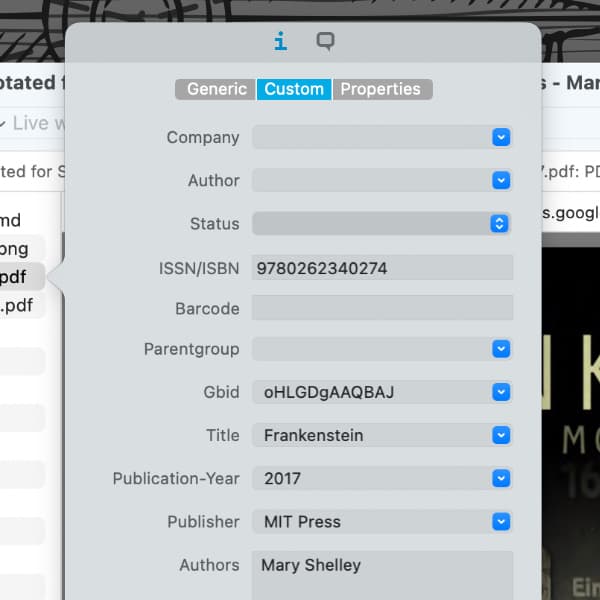Screenshot showing a document's custom metadata imported from Google Books in DEVONthink.
If you want to build a digital bookshelf or maybe even a digital library, is a good place to do this. Many of the books you store there are likely found amongst the more than 10 million books available on . For users of the Pro or Server editions of , here’s how you can look up metadata and apply it to a book in your database.
From DEVONthink’s *Scripts* menu (the little paper symbol), choose *More Scripts* and from there, install the script *Google Books Metadata*. Now select a book in your database and run the script by choosing it from *Scripts > Download*. A dialog box will appear showing potential matches with your book. Select the desired match and the script will add found metadata to the document. These attributes may include:
* Title
* Subtitle
* Publication Year
* ISBN/ISSN
* Author(s)
* Google Book ID
Thanks to our forum friend, *Benoît Pointet*, for contributing the original version of this script!, How to Get Metadata From Google Books, DEVONtechnologies, 01gx20zm798j00exc9rtykbtnc.