How to Print on Post-it Notes
## Metadata
- Author: [[YouTube]]
- Full Title: How to Print on Post-it Notes
- Category: #articles
- Document Note: ---
tags: [education-technology, classroom-tools, diy-printing]
author: Vocabulary Luau
source: YouTube
reference: https://www.youtube.com/watch?v=Thx3RfknQo4
date created: 2024-12-19 10:30
---
# 🏷️ Title: How to Print on Post-it Notes
## 🧰 Action Inbox
- [H1] Download template file from description — Google Slides template for 3x3 Post-its #classroom-tools
- [H2] Test print alignment with adhesive strip — Feed paper with adhesive end first #printing-setup
- [H3] Create vocabulary matching activity — Use images and words for student engagement #vocabulary-instruction
## 🧭 Table of Contents
- [📝 Summary](#-summary)
- [📖 Main Content](#-main-content)
- [🗒️ Notes](#️-notes)
- [📚 References](#-references)
- [🗣️ Paraphrase](#️-paraphrase)
- [📰 Newsletter](#-newsletter)
- [✅ Action Items](#-action-items)
- [🧪 Hypotheses](#-hypotheses)
- [📊 Methodology](#-methodology)
- [❓ Questions](#-questions)
- [🔮 Future Research](#-future-research)
- [💡 Implications](#-implications)
- [🧠 Learning Styles Assessment](#-learning-styles-assessment)
- [📊 Accessibility Assessment](#-accessibility-assessment)
- [🌍 DEIB Assessment](#-deib-assessment)
- [✅ Logical Validity](#-logical-validity)
- [🛡️ DARVO Analysis](#-darvo-analysis)
- [🎯 Conclusion](#-conclusion)
### 🔗 References
- [How to Print on Post-it Notes](https://www.youtube.com/watch?v=Thx3RfknQo4)
- Template file (mentioned in video description)
## 📝 Summary
- Educational technique for printing custom content directly onto Post-it notes using Google Slides templates
- Enables teachers to create vocabulary activities, visual aids, and interactive classroom materials
- Requires specific printer setup with adhesive strip feeding first to avoid damage
- Templates provided for both 3x3 and 2x1.5 inch Post-it sizes
- Cost-effective way to create personalized learning materials
## 📖 Main Content
This tutorial demonstrates how educators can print custom content directly onto Post-it notes using a Google Slides template system. The method involves using pre-designed templates that align with standard Post-it note dimensions, allowing teachers to add text, images, shapes, and other elements before printing.
The process requires careful attention to printer setup, particularly feeding the paper with the adhesive strip entering the printer first. The Google Slides platform provides the design interface where educators can insert various content types including text boxes, images from multiple sources, shapes, and interactive elements like checkboxes.
The presenter emphasizes the critical "hide background" step in Google Slides print settings, which removes template guidelines before printing. This ensures clean output on the Post-it notes without unwanted visual elements.
## 🗒️ Notes
#### ⏱️ [00:00](https://www.youtube.com/watch?v=Thx3RfknQo4&t=0) — [H1] Introduction and Template Overview
- Key idea: Google Slides template enables direct printing on 3x3 Post-it notes
- Evidence: "I printed those out on my very own printer today"
#### ⏱️ [00:30](https://www.youtube.com/watch?v=Thx3RfknQo4&t=30) — [H2] Template Setup Process
- Key idea: Template page provides six boxes for Post-it placement alignment
- Evidence: "You lay the post-it notes that you want to print on in each of these six boxes"
#### ⏱️ [01:15](https://www.youtube.com/watch?v=Thx3RfknQo4&t=75) — [H2] Design Interface Features
- Key idea: Google Slides provides comprehensive content insertion tools
- Evidence: "You can add in text, insert images, search the net, pull in from Google photos, add shapes, checkboxes"
#### ⏱️ [02:00](https://www.youtube.com/watch?v=Thx3RfknQo4&t=120) — [H1] Critical Hide Background Step
- Key idea: Hide background function removes template guidelines for clean printing
- Evidence: "You have to follow these directions exactly especially this part that says click the hide background button"
#### ⏱️ [02:45](https://www.youtube.com/watch?v=Thx3RfknQo4&t=165) — [H1] Print Settings Configuration
- Key idea: Access hide background through File > Print Settings and Preview
- Evidence: "Now it looks like a blank page because what had been inserted as a background is now gone"
#### ⏱️ [03:30](https://www.youtube.com/watch?v=Thx3RfknQo4&t=210) — [H1] Printer Feed Direction Critical
- Key idea: Adhesive strip must enter printer first to prevent damage
- Evidence: "Make sure that that's what's going into your printer first if you put in the post-it notes upside down it'll mess up your printer"
#### ⏱️ [04:00](https://www.youtube.com/watch?v=Thx3RfknQo4&t=240) — [H2] Vocabulary Activity Example
- Key idea: Template includes pre-made vocabulary matching activities
- Evidence: "I put in pictures of angles and then these are the words that describe those angles"
#### ⏱️ [04:30](https://www.youtube.com/watch?v=Thx3RfknQo4&t=270) — [H2] Multiple Template Sizes Available
- Key idea: Templates provided for both large and small Post-it dimensions
- Evidence: "You're also going to get the two by one and a half templates so that's for those little tiny post-its"
#### ⏱️ [05:00](https://www.youtube.com/watch?v=Thx3RfknQo4&t=300) — [H3] Template Package Contents
- Key idea: Complete package includes blank templates and inspiration examples
- Evidence: "You'll also get a blank one and an inspiration slide"
#### ⏱️ [05:30](https://www.youtube.com/watch?v=Thx3RfknQo4&t=330) — [H3] Educational Applications
- Key idea: Post-it printing enables diverse classroom activities
- Evidence: "As a teacher I print on post-its all the time I find it super helpful"
## 📚 References
- [How to Print on Post-it Notes - YouTube](https://www.youtube.com/watch?v=Thx3RfknQo4)
- Vocabulary Luau website (mentioned for extended article)
- Google Slides platform
- Template download link (video description)
## 🗣️ Paraphrase
- Teachers can use Google Slides templates to print custom educational content directly onto Post-it notes of different sizes
- The process requires careful printer setup with adhesive strips feeding first, and using the "hide background" function before printing
- Templates support various content types and come with examples for vocabulary activities, enabling cost-effective creation of interactive learning materials
## 📰 Newsletter
**Transform Your Classroom with DIY Printed Post-its**
Discover how to create custom educational materials using Google Slides templates that align perfectly with Post-it notes. This technique opens up endless possibilities for vocabulary activities, visual aids, and interactive learning tools.
**Key Benefits:**
- Cost-effective alternative to commercial educational materials
- Customizable content for specific curriculum needs
- Engages multiple learning styles through visual and tactile elements
**Getting Started:**
Download the free templates and follow the step-by-step printing process. Remember the critical "hide background" step and proper paper feeding direction.
**Resources:**
- [Google Slides](https://slides.google.com/)
- [Educational Technology Resources](https://edtechmagazine.com/)
- [Classroom Innovation Ideas](https://www.teachthought.com/)
## ✅ Action Items
#### DevRel
- Developer advocacy: Create tutorial series on educational technology integration
- Education: Develop workshops on DIY classroom technology solutions
- Developer experience: Document template creation workflows
- Developer marketing: Showcase creative use cases for presentation software APIs
- Community management: Foster educator technology communities
#### Community
- Contributors: Template design contributions and improvements
- Sponsors: Educational technology tool funding
- Ecosystem: Cross-platform template compatibility
#### WordPress
- Training: Lesson plans for educational content management
- Community: WordCamp education track sessions
- Documentation: Tutorial creation best practices
- Photos: Educational image repositories
## 🧪 Hypotheses
- Custom printed Post-its increase student engagement compared to handwritten materials
- Template-based creation reduces lesson preparation time for educators
- Visual vocabulary activities improve retention rates over text-only methods
- DIY educational materials provide better customization than commercial alternatives
### 📊 Methodology
- Classroom observation studies comparing engagement levels
- Time-motion studies of lesson preparation workflows
- Learning outcome assessments for visual vs traditional vocabulary instruction
### ❓ Questions
- How does printing cost compare to purchasing pre-made educational Post-its?
- What printer models work best for consistent Post-it printing?
- Could this technique extend to other adhesive note formats and sizes?
### 🔮 Future Research
- Integration with digital classroom management systems
- Automated template generation based on curriculum standards
- Student-created content workflows using similar techniques
### 💡 Implications
- Practice: Enables rapid prototyping of classroom materials
- Policy: May require updated technology budgets for printer supplies
- Education: Supports differentiated instruction through customizable materials
- Funding: Reduces dependency on commercial educational material purchases
### 🧠 Learning Styles Assessment
Reading level estimate: 8th grade (Flesch-Kincaid)
#### 👀 Visual learners
- Present: Step-by-step screenshots, template examples, printed samples
- Improve: Infographic summarizing entire process, printer setup diagrams
#### 🔊 Aural learners
- Present: Video narration with clear instructions
- Improve: Audio-only version for podcast distribution
#### 🗣️ Verbal learners
- Present: Clear definitions of technical terms, step-by-step explanations
- Improve: Glossary of printing terminology, troubleshooting FAQs
#### 🧩 Kinesthetic learners
- Present: Hands-on printing process, physical template handling
- Improve: Downloadable checklist, practice exercises with different content types
#### 🧠 Logical learners
- Present: Sequential process flow, cause-and-effect relationships
- Improve: Flowchart for troubleshooting, decision tree for template selection
#### 🧑🤝🧑 Social learners
- Present: Classroom application examples, teacher community references
- Improve: Teacher collaboration templates, sharing galleries
#### 🧘♀️ Solitary learners
- Present: Self-contained tutorial, independent practice opportunities
- Improve: Reflection prompts for educational applications
#### 🌿 Naturalistic learners
- Present: Real classroom environment examples
- Improve: Connections to sustainable teaching practices, paper usage considerations
### 📊 Accessibility Assessment
#### Screen reader semantics
- Present: Clear heading structure, descriptive language
- Improve: Alt text for visual examples, transcript formatting
#### Keyboard navigation
- Present: Standard video controls
- Improve: Chapter markers, skip-ahead options
#### Contrast and readability
- Present: Clear audio narration
- Improve: High-contrast template examples, larger text options
#### Text resizing and reflow
- Present: Video format accommodates various screen sizes
- Improve: Responsive written instructions
#### Media and captions
- Present: Audio narration available
- Improve: Closed captions, downloadable transcript
#### Forms and interactions
- Present: Simple template download process
- Improve: Accessible template design with proper form labels
### 🌍 DEIB Assessment
#### Cultural breadth
- Present: Universal classroom application concepts
- Improve: Examples from diverse educational systems, multilingual template options
#### Inclusive language
- Present: Gender-neutral teacher references, accessible vocabulary
- Improve: Plain language alternatives for technical terms
#### Neurodiversity support
- Present: Clear step-by-step structure, visual confirmation
- Improve: Multiple format options, sensory considerations for classroom use
#### Representation
- Present: Focus on educational practice rather than individual identity
- Improve: Diverse student work examples, varied classroom contexts
#### Psychological safety
- Present: Encouraging tone, emphasizes helpfulness
- Improve: Troubleshooting support, community resources for questions
### ✅ Logical Validity
#### Strong reasoning
- Deductive strength: Template system logically enables custom printing
- Inductive strength: Teacher experience supports broader applicability
- Causal reasoning: Proper setup prevents printer damage
- Analogical strength: Compares to commercial educational materials effectively
#### Fallacies
- Appeal to authority: Relies on personal teaching experience without broader validation
- Hasty generalization: Assumes all printers will work similarly without testing
#### Tone of voice
- Overall tone: Helpful, instructional, enthusiastic about educational innovation
### 🛡️ DARVO Analysis
- Deny: No defensive patterns observed
- Attack: No attacking language present
- Reverse victim/offender: Not applicable to educational content
- Emotional cues and rhetoric: Positive, encouraging tone focused on educator empowerment
## 🎯 Conclusion
This tutorial provides a practical, cost-effective method for educators to create customized learning materials using readily available technology. The technique demonstrates how creative use of standard software can address specific educational needs while maintaining professional quality outputs.
The key to success lies in following the precise printing setup instructions, particularly the background hiding step and proper paper orientation. This approach exemplifies how educators can leverage technology to create more engaging, personalized learning experiences for their students.
## 🧱 Refactor Appendix
### 📚 Literature Split Pad
### [H1] Template systems enable custom educational material creation
> [!quote] [How to Print on Post-it Notes](https://www.youtube.com/watch?v=Thx3RfknQo4) by [[Vocabulary Luau]] via [[YouTube]]. Published 2024. Accessed 2024-12-19.
> "This template page you print out then you lay the post-it notes in each of these six boxes."
Demonstrates systematic approach to aligning physical materials with digital templates for precise printing results.
[view highlight](https://www.youtube.com/watch?v=Thx3RfknQo4&t=30) #educational-technology #template-design ID:rw_001
### [H2] Printer setup critical for adhesive material success
> [!quote] [How to Print on Post-it Notes](https://www.youtube.com/watch?v=Thx3RfknQo4)
> "Make sure that that's what's going into your printer first if you put in upside down it'll mess up your printer."
Proper material handling prevents equipment damage and ensures successful output.
[view highlight](https://www.youtube.com/watch?v=Thx3RfknQo4&t=210) #printer-maintenance ID:rw_002
---
### 🔖 Atomic Split Pad (Zettel Candidates)
#### [Z1] Background hiding prevents template artifacts in output
- Essential step in Google Slides printing workflow
- Timestamp: 2:00-2:45
- Links: [[Print-Settings]] [[Template-Design]]
#### [Z2] Visual vocabulary activities combine images with terminology
- Matching exercises engage multiple learning modalities
- Timestamp: 4:00
- Links: [[Vocabulary-Instruction]] [[Visual-Learning]]
---
### ✏️ Fleeting Queue
- [F1] Test printer compatibility with different Post-it sizes — equipment validation #fleeting #testing
- [F2] Create template collection for other subjects — curriculum expansion #fleeting #content-creation
- [F3] Develop troubleshooting guide for common printing issues — user support #fleeting #documentation
- Document Tags: [[printing]] [[template]] [[classroom]] [[vocabulary]] [[educational]]
- Summary: How to Print on Post-it Notes
- URL: https://www.youtube.com/watch?v=Thx3RfknQo4
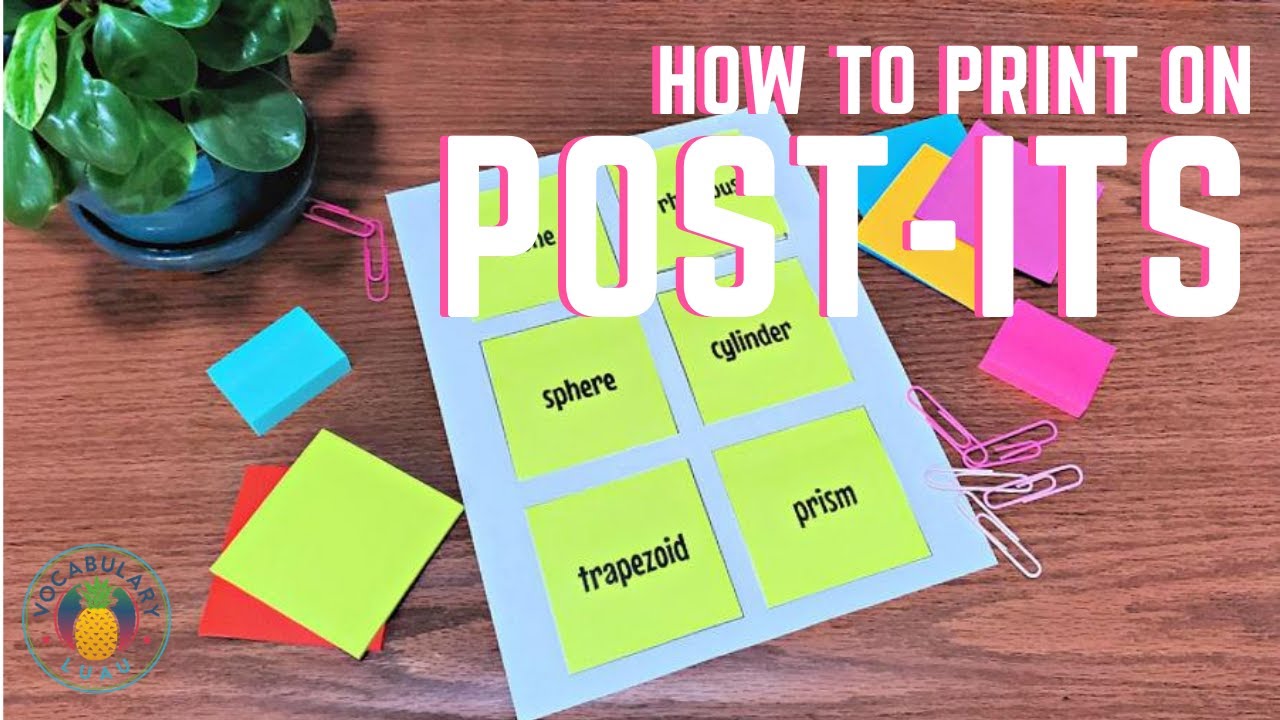
hi it's lisa from vocabulary luau and i want to show you this little trick i've got for printing post-it notes and i'm going to give you the link to the file in the description box below but what you'll be able to do is print on post-its just like you see here in this picture i printed those out on my very own printer today so what the slide deck looks like is first this template page and this is for three by three post-it notes the the larger size so
this template page you print out then you lay the post-it notes that you want to print on in each of these six boxes now if you need more you can reuse the same template page or you can print out additional pages of it when you're ready to design on your post-its what you do is you use this design slide inside these squares you can add in text just by clicking text box right and putting text where you want
you can also insert images you can that you can upload from your computer you can search the net right from here you can pull in from your google photos you can add in shapes you can add in check boxes quotes rubrics anything you want to do now over here it will tell you how to print those post-it notes out and you have to follow these directions exactly especially this part the part that says
click the hide background button how that works so let me show you what it is it would be file file and then i have to scroll down to where it says print settings and preview now hide background let's let's scroll down to to this one watch what happens hide background and now it looks like a blank page because what had been inserted as a background is now gone then you can
you can download it as a pdf and then print it or you can print right here from from your google drive now this is my printer yours will look different i want to make sure i change the pages to just the page i want right i don't want to print page one that shows this and you just put in whatever page you want and then you will print and it will come out on your printer now you have to make sure that you feed the end
of the paper into the printer where the adhesive strip is so if this is the adhesive strip of the post-it make sure that that's what's going into your um to your printer first if you put in the post-it notes upside down it'll mess up your printer so also on this template you're going to get a page that already has the word word here in a text box and you could type in the words and the reason is that
this is for a specific vocabulary activity that i do that i have kids use and so it tells you some directions of what to do and again every page has those print directions on it um this is just an example of one activity that i do i put in pictures of angles and then these are the words that describe those angles and of course i mix them up for the students but then i have them match them that's just an example of one of the things you can do in addition to the three by three template you're also going to get
the two by one and a half templates so that's for those little tiny post-its and you'll get a page that has those with the words again everyone is going to have the printing instructions you'll also get a blank one for this if you just want to design then you're going to get an inspiration slide this is where i just show some of the things that you might want to print on a post-it and so you can make your own for however you would like to use them in your classroom so as a teacher i
print on post-its all the time i find it super helpful and i hope that with this easy template it will help you do the same now i also have a link in the description box for a longer article on the website where you can go and learn more about printing on post-its and get some ideas for yourself in your classroom, How to Print on Post-it Notes, YouTube, 01ka847gjhg6p2sza54hxcxw9w.