How to Repurpose Your Facebook Live Videos
## Metadata
- Author: [[Rachel Moore]]
- Full Title: How to Repurpose Your Facebook Live Videos
- Category: #articles
- Summary: Do you want more mileage out of your Facebook Live broadcasts? Discover how to repurpose your Facebook Live videos on other social media platforms.
- URL: https://www.socialmediaexaminer.com/how-to-repurpose-your-facebook-live-videos/
[](https://www.socialmediaexaminer.com/category/how-to/)[social media how to](https://www.socialmediaexaminer.com/category/how-to/)
Are you using Facebook Live?
Do you want more mileage out of your broadcasts?
Reusing your Facebook Live video can help improve your impact and visibility.
In this article, you’ll **discover how to download and repurpose your Facebook Live videos on other social media platforms**.
Discover how to repurpose your Facebook Live broadcasts for other social media platforms.
#### Listen to this article:
#### #1: Download From Your Facebook Profile
[Facebook Live](https://www.socialmediaexaminer.com/5-new-facebook-live-video-features-for-marketers/) lets you broadcast a live-stream video from your phone. If you’ve live-streamed a great video you’d like to keep, follow these steps to download the video file from your Facebook:
First, **log into Facebook.com and go to your profile**. Next, **locate the Videos tab** below your profile’s cover photo (along the bottom of the image or in the More drop-down).
Now, **click on Videos** to see a list of videos you’ve posted to your profile.
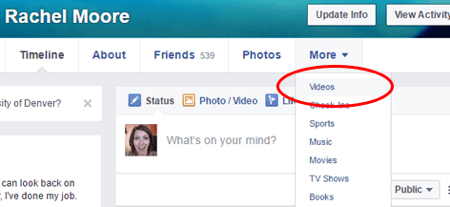Your Facebook profile page is where you can see how your profile appears to other users. Find your videos in the tabs along the bottom of your cover photo.
Next, **click on the thumbnail of the Facebook Live video**. After the video opens, **click on Options** (along the bottom of the video) to reveal the menu to download it.
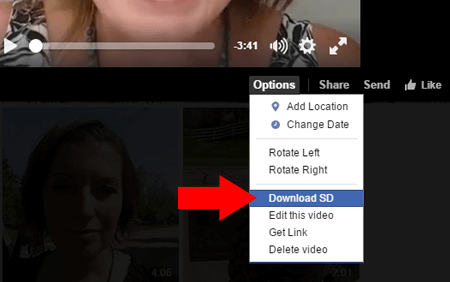Options for your Facebook Live video include downloading as SD (standard definition) or HD (high definition).
Once you **click the Download option**, your stand-alone video will open. **Right-click on the video and select Save Video As** to save the video as an MP4 file to your computer.
#### #2: Download From Your Facebook Page
If your [Facebook page](https://www.socialmediaexaminer.com/how-to-manage-your-facebook-page-effectively/) is lively, the steps below are your best route to download your Facebook Live video from your page. Note: You must be an authorized manager on the page to access the options below. Let’s get started!
Once you complete a Facebook Live video from your page, you have a few optimization options to increase the reach and purpose of your post. (The options below are presently only available for Facebook Live videos streamed from a Facebook page.)
First, **log into the Facebook page** you used for your Facebook Live post. Next, **click on the [Publishing Tools](https://www.socialmediaexaminer.com/6-publishing-tools-from-facebook-for-marketers/) tab** along the top.
Look at the tabs along the top of your Facebook page to select Publishing Tools.
In the left-hand column of tabs, **click on Videos** to see a list of your page’s posted videos. **Find and click on the Facebook Live video** you wish to download.
**Look for the Video Details pop-up window**. Along the bottom, you’ll see any posts related to your video. **Click on the post link** to uncover additional optimization and download options for your video.
#### SAVE $600 on Your On-Demand Ticket - Sale Ends Friday!
Travel to Social Media Marketing World off the table? Get all of the great content at a fraction of the price with an On-Demand ticket.
That’s full access to **recordings of every keynote, every workshop, and every session**—the ones people travel thousands of miles to see. Don't wait. Get your On-Demand ticket now!
[YES, I WANT TO SAVE BIG ON MY TICKET](https://www.socialmediaexaminer.com/smmworld/on-demand/?smesite=world23-site-midpage-ad-top-on-demand)
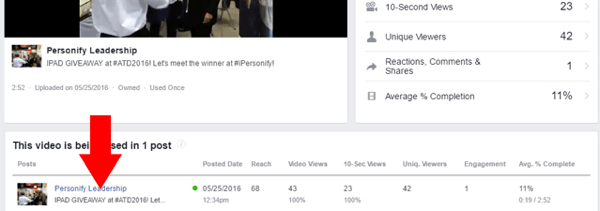While the Video Details window provides performance statistics for your Facebook Live video, you need to access the original post to download the video.
In the bottom-right corner of the Post Details pop-up window, find and **click on the Edit Post button**.
To optimize your Facebook Live video from the Basic tab, **add titles, tags, and custom thumbnail images**. From the Advanced Tab, you can also **choose to allow or prevent your video from being embedded in an external website**.
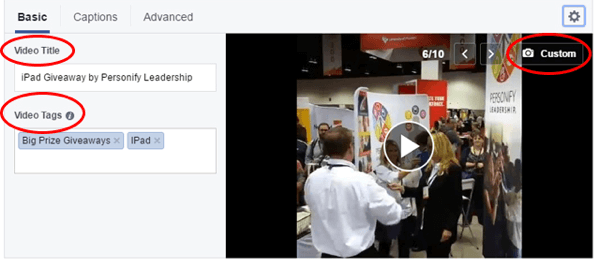After you’ve shot and posted your Facebook Live video, go to the Edit Video box to optimize your broadcast for searches and viewers.
In addition, you can **upload a Closed Captioning file to your video** for access by the hearing-impaired.
#### Get Expert Social Media Marketing Training from the Pros

Want to get ahead of the competition and learn how to diversify your social marketing strategy?
Learn from the industry's most trusted experts, rub elbows with other smart marketers, and take your marketing to the next level during this 3-day event in sunny San Diego, California.
[CLICK TO LEARN MORE](https://www.socialmediaexaminer.com/smmworld/?smesite=world23-site-midpage-ad-middle)
Next, look for the gear icon above the top-right corner of your video’s image. **Click the gear icon and select which version you want to download**.
In addition to selecting download options for your Facebook Live video, don’t forget to optimize your video using the Basic, Captions, and Advanced tabs in the Edit Video box.
If you just went live from your page in the last day or two, there’s a slightly faster way to find the download option. This brief video will show you how to quickly [download your most recent live video](https://www.youtube.com/watch?v=dmIPVn4ow1Q).
#### #3: Repurpose Your Facebook Live Videos
The show doesn’t stop once you click Finish and Post in your [Facebook Live broadcast](https://www.socialmediaexaminer.com/6-tips-for-better-facebook-live-broadcasts/). While your video post can reach far and wide on Facebook, you can push that reach even further after the video has wrapped up.
**Upload Your Live Video to YouTube or Vimeo**
Once you’ve downloaded your Facebook Live video, you can **upload your video to other video hosting sites or channels** to reach a wider audience. If you upload it to YouTube, you can even **use YouTube’s simple video editing tools to trim your video down** to the moment(s) you want to keep and share. Don’t forget to use YouTube’s features to **add a branded watermark, action cards, a description, and tags**.
**Share Your Live Video With Newsletter Subscribers**
If your email newsletter could use a shot in the arm, add your Facebook Live video into your next issue.
Video and media consistently boost email marketing performance.
Personify Leadership shot partner interviews at an international conference and later used the Facebook Live videos to inform newsletter subscribers. The company was able to increase credibility by highlighting their key partnerships.
**Embed Your Live Video in Your Website or Blog**
To see the options to embed, edit, and even schedule an expiration date for your Facebook Live video, **go back the Post Details pop-up window and click the Post tab**.
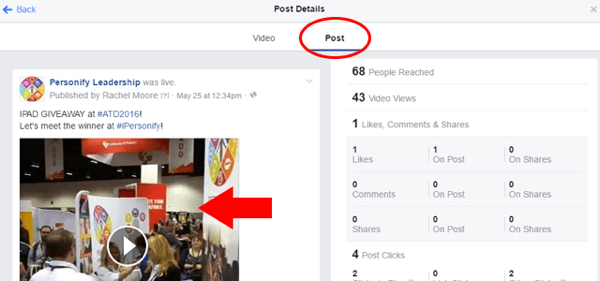Click on the Post tab.
After clicking the Post tab, **click on the image of the video** to access video options (including downloading the video file).
Then you’ll **click on Options so you can view the options for your video post**. You can **click Embed to copy the code** to add an iFrame of the video to your website or blog.
To get an embed code for your Facebook Live video, follow these additional steps to grab an iFrame code for your website or blog.
**Provide Your Live Video to Featured Guests and Partners**
If you collaborate with other individuals, brands, or organizations for your Facebook Live content, use their social media and digital influence to stretch your video’s impact further.
A great example of a brand partnering with others to expand the reach of Facebook Live is HarperCollins Publishers. They shoot [promotional Facebook Live videos](https://www.wsj.com/articles/harpercollins-launches-daily-facebook-live-program-featuring-authors-1465210800) featuring authors and also allow viewers to ask questions in real time before book signing events at brick-and-mortar bookstores.
Once the post is live, the videos are then shared and hosted on HarperCollins’ domain, as well as the authors’ websites to capture more eyes. This approach has led to higher attendance at in-person events.
By coupling the reach of Facebook Live with existing website traffic and visits, your business can get even more out of your [live-streaming videos](https://www.socialmediaexaminer.com/live-streaming-video-for-business/).
**Conclusion**
Facebook Live videos offer excellent repurposing opportunities that you can quickly plug into other social media marketing channels. Live videos are ready and waiting to expand your reach and grow your audience even more.
**What do you think? How are you repurposing your Facebook Live videos to do more for you?** Please share the different ways you’ve used and reused your Facebook Live broadcasts in the comments below!
Tips on how to repurpose your Facebook Live video for other platforms.
#### Curious about Web3?
Follow the Web3 Business podcast to find out how Web3 will affect your business in the near future.
Every Friday, host Michael Stelzner interviews leading industry experts about what works right now in Web3 and what to expect in the future, so you can prepare your business for the shift, even if you're a total newbie.
[FOLLOW THE SHOW](https://www.socialmediaexaminer.com/web3-business-podcast/?smesite=cbp-site-midpage-ad-bottom), How to Repurpose Your Facebook Live Videos, Rachel Moore, 01gnmcxyz4sh32r1gp9s5exj73.