How to Research Your Competition on Facebook

## Metadata
- Author: [[Andrea Vahl]]
- Full Title: How to Research Your Competition on Facebook
- Category: #articles
- Summary: Are your competitors getting massive reach and engagement on Facebook? This article show how to research what your competition on Facebook.
- URL: http://www.socialmediaexaminer.com/research-competition-on-facebook/
[](https://www.socialmediaexaminer.com/category/how-to/)[social media how to](https://www.socialmediaexaminer.com/category/how-to/)
Are your competitors getting massive reach and engagement on Facebook?
Would you like to learn the secret of their Facebook success?
While we'd never advocate copying your competitor's posts exactly, it's helpful to monitor and study the posts of your competition.
You may get ideas on how to tweak your own posting strategy to build on what's working for someone else.
In this article I'll show you how to **research what your competition is doing on Facebook so you can study what works and model it on your own page**.
Find tools to research your competition on Facebook.
#### #1: Set Up Facebook Pages to Watch
[Facebook Pages to Watch](https://www.socialmediaexaminer.com/facebook-pages-to-watch/) is a great way to start sleuthing. It's also a very underutilized area in Facebook Insights. You don't have to worry that page owners will know that you have put them on your list; they'll just get a notification that “someone” has put their page on a Pages to Watch list.
**Go to the Overview section of Insights on your Facebook page and scroll down to Pages to Watch**. **Click Add Pages**. There will probably be some suggestions, but you can also search for and select pages to watch.
**Add competitors' pages, as well as pages that get a lot of engagement in other industries**. You can add up to 100 Pages to Watch, so don't worry about running out of space.
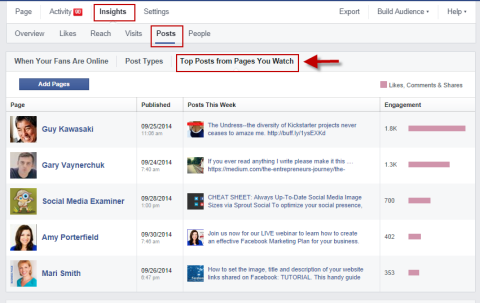You can add up to 100 Pages to Watch on Facebook. Keep an eye on Posts This Week and Engagement this Week.
Check Pages to Watch regularly, and take note of how many times they post and what type of engagement they get. If you **click on each page**, you'll **see their top posts of the last week, starting with one that received the highest [engagement](https://www.socialmediaexaminer.com/facebook-fan-engagement-tips/)**.
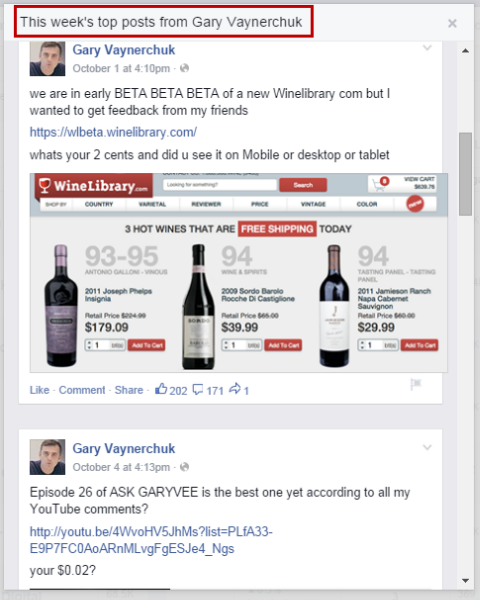Go to Pages to Watch and click on each page name to see their top posts for the week.
Next, **go to the Posts section of your Insights, and click on the Top Posts from Pages You Watch**. This will only show the top five posts across all of the pages you watch, so you may want to adjust your selections, depending on what you want to monitor easily from this page.
Go to Insights, Posts and the Top Posts from Pages to Watch to see at a glance what types of posts are getting the most engagement.
Dig a little deeper into the type of engagement these posts are getting. **Click on the post itself for likes, shares and comments**. When you know which posts are getting what kind of engagement, you can discover ways to **adapt the strategy for your own page**.
#### #2: Create Facebook Interest Lists
Another way to easily monitor pages without letting them know you are watching is to put competitor pages on a Facebook interest list. You can even add a page to a list without liking it (thus keeping you in stealth monitoring mode).
**Click on Interests on the left sidebar of your personal Facebook home page** or just go there directly: [http://www.facebook.com/bookmarks/interests](https://www.facebook.com/bookmarks/interests). Now **click the Add Interests button**.
#### The Conference You've Been Waiting For
As a small business marketer, you can probably only pick one or two events to attend each year. Get back into the game with an unbeatable conference experience and expert training at Social Media Marketing World in sunny San Diego, California—from your friends at Social Media Examiner.
🔥🔥 As a valued reader, you can **save $600 if you act now! Sale Ends Friday!**
[CLICK HERE TO LEARN MORE](https://www.socialmediaexaminer.com/smmworld/?smesite=world23-site-midpage-ad-top-smallbiz)
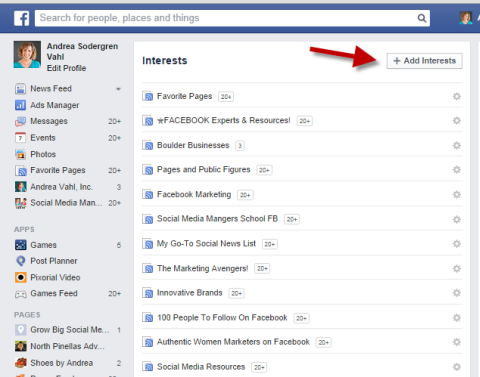Click Add Interests to start your list.
Next, **click Create List**. **Then search for the pages you want to add to that list**. **Click on each page you want to add**.
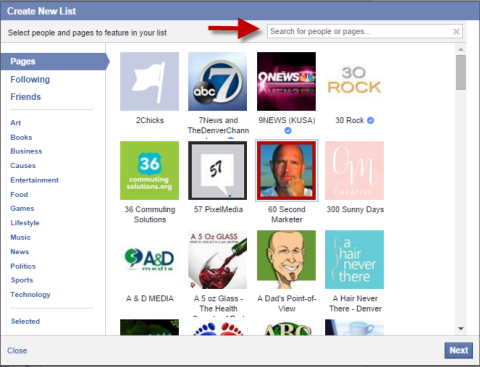Search by page name to find the pages you want to add.
After you **add several pages, click Next and name your list**.
If this is a list of competitors that you want to monitor, select Only Me under the “Who can see this list” option. That way it's private.
If you decide to make a public list to curate as a resource, make sure the name's descriptive.
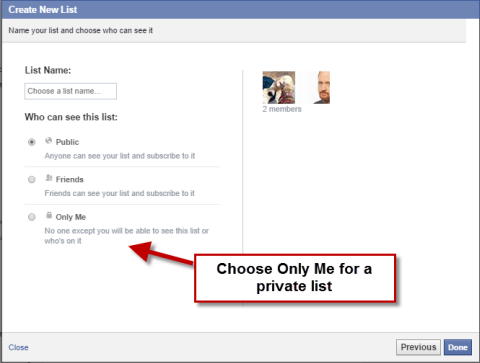To keep your list of competitors private, choose Only Me under who can see the list.
Once you name your list and select privacy, click Done.
Now you can click on this list name on under your Facebook Interests, and **watch and review all of the recent posts on that list**.
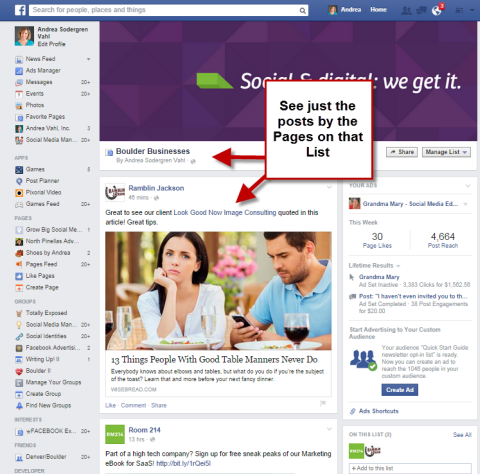Click on the interest list page name and see only posts by the pages on that list.
Creating an interest list is an easy way to **check on what types of things competitors are posting daily without navigating to their pages individually**.
#### Get Expert Social Media Marketing Training from the Pros

Want to get ahead of the competition and learn how to diversify your social marketing strategy?
Learn from the industry's most trusted experts, rub elbows with other smart marketers, and take your marketing to the next level during this 3-day event in sunny San Diego, California.
[CLICK TO LEARN MORE](https://www.socialmediaexaminer.com/smmworld/?smesite=world23-site-midpage-ad-middle)
#### #3: Use Viral Photos From Post Planner
While the Pages to Watch feature in Facebook Insights is a great way to review your competition's recent posts, you may want to go back a little farther in time. Post Planner has a great tool to help you **discover what photo has had the best engagement of all-time on any page**.
[Viral Photos](http://www.postplanner.com/user-guide/how-to-find-photos/) is part of the Guru package of Post Planner, which is currently $29/month. When you **go into the app**, you can **access Viral Photos** to see photos from a variety of pages. Also, to watch specific pages, **add a fan page URL**.
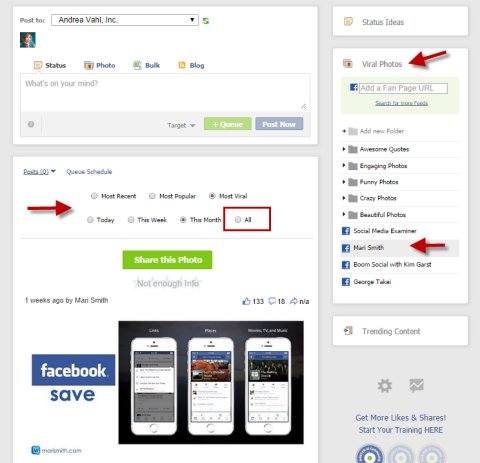Use Viral Photos to find the most viral photo on a page recently or all-time.
If a [photo got a lot of engagement](https://www.socialmediaexaminer.com/how-to-sell-on-facebook-using-images/), you may even want to share that photo to your own page. However, I only recommend doing this if it's not from a direct competitor's page.
Use Viral Photos to **gather examples of what photos inspire engagement on other pages**.
Remember, you can't download images from other pages and upload them to your own (yes, we know it's done all the time), because of [copyright infringements](https://www.socialmediaexaminer.com/copyright-fair-use-and-how-it-works-for-online-images/).
Think of ways to **model the types of posts that are getting a lot of engagement on other people's pages**.
#### #4: Monitor With AgoraPulse
[AgoraPulse](http://www.agorapulse.com/) is a low-cost tool to help you see what's working on other pages. **Monitor several competitors** and see at a glance how they're doing with their engagement. The different colors indicate their performance compared to other pages of their size.
Use AgoraPulse to see how your competitors are doing at a glance.
Use AgoraPulse to **keep an eye on your competitors' growth and engagement and to see which ones merit closer analysis**.
#### #5: Use Simply Measured Free Reports
Get a host of free reports to **analyze your [competition on several different social media sites](https://www.socialmediaexaminer.com/social-strategy-competitor-research/)** on [Simply Measured](http://simplymeasured.com/). In addition to Facebook, there are reports for Instagram, Google+, LinkedIn, Twitter and Vine.
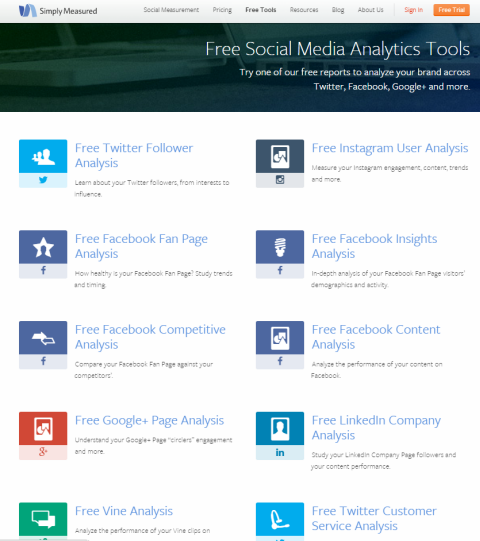Use Simply Measured's Free Facebook Competitive Analysis tool, as well as their other reports.
[**Access the free reports** here](http://simplymeasured.com/free-social-media-tools/). **Select [Free Facebook Competitive Analysis](http://simplymeasured.com/freebies/facebook-competitive-analysis) and choose up to 10 pages with a total number of fans of 250,000 or fewer**. (They'll ask you to post about them on Facebook in exchange for the free report.) They'll email the report to you or you can click a link.
Use Simply Measured's free tool to compare your page to your competition.
The free tool will **compare the last 2 weeks of data between [you and your competitors](https://www.socialmediaexaminer.com/how-to-compare-your-facebook-page-with-the-competition/)**. If you want to see a wider range, sign up for their service.
**Be Aware of Boosts From Facebook Ads**. Keep in mind that certain posts may be boosted or promoted through Facebook ads, so the reach and engagement will be higher. If you see a large spike of engagement on one of your competitor's posts, it may be due to advertising. The only way to tell is if you see the sponsored tag when the post goes through the news feed.
Some posts will show high engagement, but you can't tell if they've been unless they're in your news feed.
**Compare the high-engagement post to the typical posts on the competitor's timeline to see if high engagement is organic or due to advertising**.
Typical posts on this page have lower engagement than the one that was promoted. This is important information to have when doing research and comparisons.
Watch which posts competitor pages promote and **make sure you aren't copying a technique that's artificially inflated by using Facebook ads**.
Competitor analysis can be done on a regular basis and/or whenever your strategy could use a lift.
**Conclusion**
**Keep an eye on your competition** to discover effective techniques and content types to use to improve your [Facebook marketing strategy](https://www.socialmediaexaminer.com/tips-for-a-successful-facebook-page/).
Just remember to **stay true to your own brand and message**. If your competition on Facebook posts nothing but cat videos, that technique may work for better engagement, but it isn't going to help you with your overall marketing efforts.
**Use a variety of tools to watch and analyze**. Then **choose the right techniques to modify for your company**.
**What do you think? What tools do you use to monitor other businesses? Have you found any inspiration from watching your competitors? What works for you?** Share your thoughts with us in the comments below!
#### Curious about Web3?
Follow the Web3 Business podcast to find out how Web3 will affect your business in the near future.
Every Friday, host Michael Stelzner interviews leading industry experts about what works right now in Web3 and what to expect in the future, so you can prepare your business for the shift, even if you're a total newbie.
[FOLLOW THE SHOW](https://www.socialmediaexaminer.com/web3-business-podcast/?smesite=cbp-site-midpage-ad-bottom), How to Research Your Competition on Facebook, Andrea Vahl, 01gnmd02nsejsgpcms0m1f9gaz.