How to Self-Host MCP Servers With N8n#
## Metadata
- Author: [[Security Dozo 👺]]
- Full Title: How to Self-Host MCP Servers With N8n#
- Category: #articles
- Document Note: ---
tags: [MCP, n8n, Cloudflare Tunnels]
author: Security Dozo 👺
source: securitydozo.com
reference: [https://securitydozo.com/how-to-self-host-mcp-servers-with-n8n/?utm_source=linkedin]
date created: 2025-10-20 00:00
---
# 🏷️ Title: How to Self-Host MCP Servers with n8n#
## 🧭 Table of Contents
- [📝 Summary](#-summary)
- [📖 Main Content](#-main-content)
- [🗒️ Notes](#️-notes)
- [📚 References](#-references)
- [🗣️ Paraphrase](#️-paraphrase)
- [📰 Newsletter](#-newsletter)
- [✅ Action Items](#-action-items)
- [🧪 Hypotheses](#-hypotheses)
- [📊 Methodology](#-methodology)
- [❓ Questions](#-questions)
- [🔮 Future Research](#-future-research)
- [💡 Implications](#-implications)
- [🧠 Learning Styles Assessment](#-learning-styles-assessment)
- [📊 Accessibility Assessment](#-accessibility-assessment)
- [🌍 DEIB Assessment](#-deib-assessment)
- [✅ Logical Validity](#-logical-validity)
- [🛡️ DARVO Analysis](#-darvo-analysis)
- [🎯 Conclusion](#-conclusion)
### 🔗 References
- Include links cited in or relevant to the article.
## 📝 Summary
- What happened: Step-by-step guide to self-host an MCP server using n8n on Linux/Raspberry Pi, exposed via Cloudflare Tunnels, and consumed from VSCode Copilot.
- Why it matters: Lets you connect “USB‑C for AI” tools to secure, fast, customizable workflows you control.
- Key stakeholders: Security engineers, builders, homelabbers, AI power users, DevOps.
- Risks and tradeoffs: TLS termination at Cloudflare with local HTTP; bearer-token storage; public admin bootstrap; ChatGPT lacks header auth for MCP.
- Bottom line: You can stand up a production-ready n8n MCP endpoint with Docker + Cloudflare and wire it into Copilot in minutes.
## 📖 Main Content
- Core idea: Use n8n’s MCP Server Trigger to expose any workflow as an MCP tool. Cloudflared provides a secure public URL; Docker keeps it portable; VSCode Copilot consumes the tool via mcp.json.
- Context:
- MCP: an open standard for LLM-to-tool communication (“USB‑C for AI”).
- n8n: visual, self-hostable automation with hundreds of nodes and AI-friendly features.
- Cloudflare Tunnel: encrypted egress from your host to Cloudflare, no inbound ports.
- Setup flow:
- Install cloudflared and create a named tunnel routing to http://localhost:5678.
- Run n8n with Docker Compose (no Traefik; Cloudflare handles TLS).
- Create admin, add MCP Server Trigger node, set a bearer token credential.
- In VSCode, enable MCP access and configure the n8n server with Authorization header.
- Execute the workflow to accept connections; approve Copilot tool usage.
- Uncertainties:
- Local TLS to container skipped (author notes cert pain); feasible but not detailed.
- ChatGPT MCP header auth unsupported; OAuth not yet available in n8n’s MCP trigger.
### 🗒️ Notes
- “Any flavor of Linux will do… You don't need a raspberry pi…”
- Assumes: Linux host, Docker basics, Cloudflare account/domain, an MCP-capable client (Copilot, Claude, Cursor).
- Cloudflare Tunnel:
- Install cloudflared; create tunnel; route your domain/subdomain to http://localhost:5678.
- TLS terminates at Cloudflare; local hop is HTTP by choice.
- n8n via Docker:
- Compose exposes 127.0.0.1:5678 to Cloudflare tunnel.
- Uses env vars for host, timezone, webhook URL; enables runners.
- First-run:
- Quickly create admin (instance is public); then daemonize.
- MCP in n8n:
- Add MCP Server Trigger; set bearer token; save it externally (n8n won’t reveal later).
- VSCode + Copilot:
- Enable chat.mcp.access; add “http” MCP server with Authorization: Bearer header.
- Execute workflow to listen; start MCP in VSCode; paste token; enable tools in Copilot UI.
- Practical tip: Test with a “-test” path, then switch to production URL and activate the workflow.
## 📚 References
- Model Context Protocol overview (Anthropic): https://www.anthropic.com/news/model-context-protocol
- n8n Docker Compose docs: https://docs.n8n.io/hosting/installation/docker/
- n8n MCP Server Trigger (community context): https://n8n.io
- Cloudflare Tunnel (Zero Trust): https://developers.cloudflare.com/cloudflare-one/connections/connect-networks/
- VSCode MCP settings (Copilot docs): https://code.visualstudio.com/docs/copilot/copilot-chat
- urlscan.io API: https://urlscan.io/docs/api/
- NetworkChuck’s n8n intro video: https://www.youtube.com/results?search_query=NetworkChuck+n8n
## 🗣️ Paraphrase
- A: The guide shows how to expose n8n workflows as MCP tools through Cloudflare, making them usable in LLM chat clients like Copilot.
- B: You configure Dockerized n8n, add an MCP trigger with a bearer token, and point VSCode’s MCP client to your tunnelled endpoint.
## 📰 Newsletter
Spin up AI tools you control: this week we self-host an n8n MCP server behind Cloudflare Tunnels, then light it up in VSCode Copilot. You’ll wire bearer-auth, skip Traefik complexity, and ship a practical tool (like a urlscan.io phishing hunter) to your chat sidebar. Resources: n8n Docker quickstart, Cloudflare Tunnel guide, MCP primer. Build faster, own your data, and keep latency low.
## ✅ Action Items
#### DevRel
- Demo: “MCP on n8n in 10 minutes” with Cloudflare Tunnels.
- Publish sample workflows and mcp.json templates.
- Track activation → tool-call success metrics.
#### OSPO
- Policy: clarify self-hosted AI tool auth requirements.
- Security: bearer token rotation and storage guidance; incident playbooks.
#### Community
- “First tool” pairing sessions; starter kits for Raspberry Pi.
- Sponsor hosting credits for testing.
#### WordPress
- Plugins: example integration calling n8n MCP tools.
- Docs: quickstarts; sandbox in Playground.
- Support: KB on MCP patterns and webhooks.
#### The WPCC
- Microgrants for MCP workflow packs.
- Maintainer stipends for security reviews.
### FAIR
- Independence: sign workflows, pin container digests.
- Governance: sunset clauses for sample endpoints; provenance logs.
## 🧪 Hypotheses
- Cloudflare Tunnels reduce time-to-first-MCP-call vs. reverse proxy by ≥40%.
- Bearer tokens are sufficient for single-user homelabs with password manager storage.
- n8n workflows lower time-to-prototype vs. custom code by ≥50%.
- Copilot usage increases when users can invoke personal MCP tools inline.
### 📊 Methodology
- A/B tutorial cohorts (Tunnel vs. Traefik) measuring setup time, error rate.
- Security review of token handling; simulated leak tabletop.
- Task-timing study: same tool in n8n vs. Python script.
- Copilot telemetry: tool-call frequency before/after MCP enablement.
### ❓ Questions
- When should local TLS terminate in-container vs. at Cloudflare?
- Best practice for multi-user auth with n8n MCP?
- How to version and test MCP schema changes safely?
### 🔮 Future Research
- OAuth support in n8n’s MCP trigger.
- Policy-based model access control per tool or workflow.
- Observability: tracing tool calls end-to-end.
### 💡 Implications
- Practice: faster secure AI tool wiring for teams.
- Policy: clearer auth standards for LLM toolchains.
- Security: shift-left token hygiene and audit trails.
### 🧠 Learning Styles Assessment
- Reading level: Flesch-Kincaid Grade ≈ 8–9.
#### 👀 Visual learners
- Present: screenshots; could add architecture and data-flow diagrams.
#### 🔊 Aural learners
- Improve: 3-minute audio summary of setup.
#### 🗣️ Verbal learners
- Present: definitions and steps; add glossary for MCP terms.
#### 🧩 Kinesthetic learners
- Present: step-by-steps; include checklist runbooks.
#### 🧠 Logical learners
- Present: sequences; add decision trees (TLS options).
#### 🧑🤝🧑 Social learners
- Improve: guided cohort labs and office hours.
#### 🧘♀️ Solitary learners
- Improve: self-check quizzes after each stage.
#### 🌿 Naturalistic learners
- Improve: note energy/latency tradeoffs and sustainable hosting tips.
### 📊 Accessibility Assessment
#### Screen reader semantics
- Improve: alt text for all screenshots; landmark roles.
#### Keyboard navigation
- Improve: ensure focus indicators in code samples.
#### Contrast and readability
- Maintain 4.5:1; verify code sample theming.
#### Text resizing and reflow
- Ensure no clipping at 200%; respect reduced motion.
#### Media and captions
- Add captions/descriptions to any emb
- Summary: Homelab Ready! Self-host MCP servers with n8n on Raspberry Pi or Linux. Set up Cloudflare Tunnels, deploy with Docker, and connect Claude, Copilot & VSCode to fast, secure AI workflows.
- URL: https://securitydozo.com/how-to-self-host-mcp-servers-with-n8n/?utm_source=linkedin
Having custom tooling for your LLM usage provides a personalized experience that is remarkably valuable for tailored personal and professional use. After following this post you'll have a tinkerer's old friend, a Raspberry Pi, wired up to **quickly** build useful capabilities right into the chat app of your choosing.
> 🥧 Any flavor of Linux will do. You don't need a raspberry pi to end up with a working solution
To spark your imagination... Here is a super quick vibe code looking for interesting Coinbase phishing pages using Copilot, Sonnet 4, an n8n MCP server with a [urlscan.io](https://urlscan.io/?ref=securitydozo.com) search tool.
Finding Phishing Pages with MCP YouTube Video
1. Linux command line basics
2. Docker basics
3. A Linux host – We'll be using a Raspberry Pi
4. A [Cloudflare](https://www.cloudflare.com/?ref=securitydozo.com) account and a domain managed by Cloudflare
5. Github Copilot **or** any LLM Chat App with Custom MCP Support
But first a little background...
> MCP (Model Context Protocol) is an open, open-source standard that lets AI apps like Claude or ChatGPT connect to external tools, data sources, and workflows through a common interface—often described as a “USB-C for AI.” It defines a client-server protocol and schemas so LLMs can request capabilities from MCP servers (files, databases, web search, etc.) in an interoperable way across platforms.
Simply put another way; MCP allows LLMs to find and call external functions.
### What is n8n?[#](https://securitydozo.com/how-to-self-host-mcp-servers-with-n8n/?utm_source=linkedin#what-is-n8n)
> n8n is an open source workflow automation platform for building visual, node-based workflows that connect apps, APIs, and data—self-hosted or in the cloud. It offers hundreds of integrations and **AI-ready nodes** so teams can orchestrate complex automations end-to-end.
If you've used Tines before you'll be at home with n8n. If not, then get ready to enjoy working at the rapid pace of no-code builders.
Link to n8n.io
### Self-Hosting n8n with a Raspberry Pi[#](https://securitydozo.com/how-to-self-host-mcp-servers-with-n8n/?utm_source=linkedin#self-hosting-n8n-with-a-raspberry-pi)
Shoutout to NetworkChuck who put together an initial tutorial that we're building off of. To get a high-level overview I suggest watching his video. However, I ran into some issues he didn't address and had to deviate from his provided configs to get things up and running.
NetworkChuck n8n YouTube Video
#### Setting up the Cloudflare Tunnel[#](https://securitydozo.com/how-to-self-host-mcp-servers-with-n8n/?utm_source=linkedin#setting-up-the-cloudflare-tunnel)
A Cloudflare Tunnel is going to enable public access to our locally hosted n8n instance. This is critical since the vast majority of use cases you'll have with n8n, including our MCP server, will require a publicly exposed endpoint for another service to hit.
To kick us off we're going to assume you already have SSH access to the Linux host you'll be installing software on. Once you're on the host let's get some Cloudflare utilities installed.
> 🥧 Not on a Pi? Find your flavor in [Cloudflare's docs](https://pkg.cloudflare.com/index.html?ref=securitydozo.com)
```
# Add cloudflare gpg key
sudo mkdir -p --mode=0755 /usr/share/keyrings
curl -fsSL https://pkg.cloudflare.com/cloudflare-main.gpg | sudo tee /usr/share/keyrings/cloudflare-main.gpg >/dev/null
# Add this repo to your apt repositories
echo 'deb [signed-by=/usr/share/keyrings/cloudflare-main.gpg] https://pkg.cloudflare.com/cloudflared any main' | sudo tee /etc/apt/sources.list.d/cloudflared.list
# install cloudflared
sudo apt-get update && sudo apt-get install cloudflared
```
Install cloudflared
Now we'll pop over to the Cloudflare Zero Trust Dashboard to start configuring the tunnel.
1. Log in to [Zero Trust ↗](https://one.dash.cloudflare.com/?ref=securitydozo.com) and go to **Networks** > **Tunnels**.
2. Select **Create a tunnel**.
3. Choose **Cloudflared** for the connector type and select **Next**.
4. Enter a name for your tunnel. Something like: `n8n-tunnel`
5. Now you'll see the option to connect your host to Cloudflare with a command that looks like this `sudo cloudflared service install eyJhIjo.....`. Copy and execute it... Your host will now show up as connected on the Cloudflare dashboard.
6. Select the domain and optional subdomain you'd like to use for your n8n instance. Additionally, use `http://localhost:5678` for the Service destination. Reference image below 👇
 Route Traffic Cloudflare Dashboard
> 🔑 The cloudflared service we installed earlier is going to be maintaining an encrypted tunnel to Cloudflare's infra. This includes providing TLS for connecting to n8n. However, the traffic between localhost and the n8n Docker container will be unencrypted. I ran into a number of certificate issues and ultimately decided the risk tradeoff wasn't worth it for me. If it's important to you please let me know how you set it up!
You should now see a `Healthy` connection on the Tunnels dashboard!
#### Installing n8n[#](https://securitydozo.com/how-to-self-host-mcp-servers-with-n8n/?utm_source=linkedin#installing-n8n)
Now that we've established an encrypted tunnel to Cloudflare we need to connect the `http://localhost:5678` defined in our tunnel to a local hosted n8n instance.
We're going to be running n8n via Docker Compose. The official n8n Docker Compose docs [can be found here](https://docs.n8n.io/hosting/installation/server-setups/docker-compose/?ref=securitydozo.com). However, as mentioned previously we'll need to deviate from it slightly for our purposes.
First up – Install Docker.
```
curl -fsSL https://get.docker.com -o get-docker.sh
sudo sh get-docker.sh
```
Install Docker
> ✍️ Note: You may feel more comfortable getting the proper Docker managed repos configured instead of piping curl to a bash script. I chose this method for simplicity.
After Docker is installed we're going to create the directory structure to house the configuration files and a Docker volume for n8n data persistence.
```
mkdir n8n && cd n8n && mkdir local-files && touch .env compose.yml
```
Configure local environment for n8n
With the directory structure in place let's configure n8n. This `compose.yml` file differs slightly from the official compose file as it strips out the traefik container reverse proxy for TLS. We do this because the Cloudflare tunnel is going to be handling the proxying for us. Cloudflared got particularly grumpy and caused a number of cert issues which I won't go into detail here.
```
services:
n8n:
image: docker.n8n.io/n8nio/n8n
restart: always
ports:
- "127.0.0.1:5678:5678"
environment:
- N8N_ENFORCE_SETTINGS_FILE_PERMISSIONS=true
- N8N_HOST=${SUBDOMAIN}.${DOMAIN_NAME}
- N8N_PORT=5678
- N8N_PROTOCOL=http
- N8N_RUNNERS_ENABLED=true
- NODE_ENV=production
- WEBHOOK_URL=https://${SUBDOMAIN}.${DOMAIN_NAME}/
- GENERIC_TIMEZONE=${GENERIC_TIMEZONE}
- TZ=${GENERIC_TIMEZONE}
volumes:
- n8n_data:/home/node/.n8n
- ./local-files:/files
volumes:
n8n_data:
```
compose.yml
And last but not least, our `.env` . Tailor each of the fields to your particular setup. If you don't plan on using a subdomain then you can comment out that line and update the `WEBHOOK_URL` and `N8N_HOST` variables in `compose.yml` ☝️.
```
# DOMAIN_NAME and SUBDOMAIN together determine where n8n will be reachable from
# The top level domain to serve from
DOMAIN_NAME=securitydozo.com
# The subdomain to serve from
SUBDOMAIN=n8n
# The above example serve n8n at: https://n8n.example.com
# Optional timezone to set which gets used by Cron and other scheduling nodes
# New York is the default value if not set
GENERIC_TIMEZONE=Asia/Tokyo
# The email address to use for the TLS/SSL certificate creation
[email protected]
```
.env file
For the first run I recommend running the docker compose command without `-d` just to catch any errors that may pop up.
```
sudo docker compose up
```
Execute docker compose
If everything worked as planned you should now be greeted with a glorious n8n auth page upon visiting your personal n8n url. It's going to prompt you to create a user account with an email and password. I've already done that so mine is just the login page.
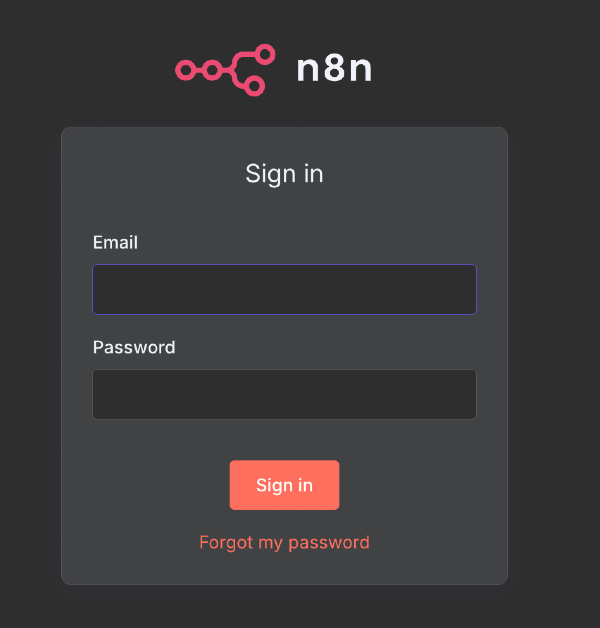 n8n Login Page
Quickly create your admin account since this instance is now public. While this does temporary expose the instance the alternative is setting up an SSH proxy to your docker container to visit the webpage and bring down the Cloudflare tunnel. If you're like me the "quickly login" approach meets the "good enough" threshold for getting started. If for *some reason* you're not prompted to create an account you should recreate the Docker volume and try again. A simple `rm -rf local-files && mkdir local-files` will do.
Follow the on-screen steps for account activation and collect your free self-hosted license key.
Pop back over the Linux host and restart the Docker container to run in the background instead of the foreground.
```
sudo docker compose up -d
```
Run docker compose as a daemon
Congrats 👏! You now have the power of n8n at your fingertips. This no/low-code builder will enable you to easily chain together multiple services and workflows much quicker than coding them up.
To get up to speed on the n8n basics I'll defer once again to the NetworkChuck video linked earlier.
#### The MCP Node[#](https://securitydozo.com/how-to-self-host-mcp-servers-with-n8n/?utm_source=linkedin#the-mcp-node)
Now that you have an understanding of n8n nodes in general. Take a look at this puppy...
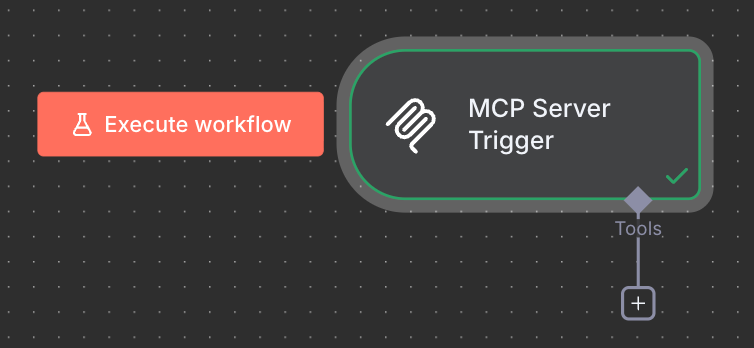 n8n MCP Server Trigger Node
It's *actually* as simple as it looks. Drop in the node, configure a bearer token credential (safety first! 👷) and connect other nodes for your MCP client of choice to use as a tool.
> 🔑 **Save your bearer token credential you created in a password manager.** n8n doesn't support revealing credentials once they've been created. You'll need this credential later to authenticate the MCP client to your MCP Server Trigger.
At this point your mind is likely racing with ideas! All of these nodes, workflows, and even drop-in Python code at your disposal. We'll just be sticking to a proof of concept for now 😉
Now that you've played around with n8n and selected a tool that you want to incorporate it's time to connect it to your MCP Client of choice. I'll be covering VSCode and Copilot in this post. If Claude or Cursor is more your vibe they have very good doc support for connecting your n8n MCP server up.
> ‼️ At the time of publishing OpenAI [does not support Authorization headers for MCP Server authentication in ChatGPT](https://platform.openai.com/docs/mcp?ref=securitydozo.com#test-and-connect-your-mcp-server). They only support no auth or OAuth. n8n doesn't yet support OAuth for our MCP Server Trigger. Use no auth at your own personally discretion.
Whichever chat app you use you'll still want to read the [Connecting to the n8n MCP Server](https://securitydozo.com/how-to-self-host-mcp-servers-with-n8n/?utm_source=linkedin#connecting-to-the-n8n-mcp-server) section below to ensure n8n is ready for connections from Claude
#### Configure Claude Remote MCP Servers[#](https://securitydozo.com/how-to-self-host-mcp-servers-with-n8n/?utm_source=linkedin#configure-claude-remote-mcp-servers)
Follow Claude's documentation to point Claude to your n8n MCP server.
Link to Claude's guide on setting up MCP servers
#### VSCode and Copilot[#](https://securitydozo.com/how-to-self-host-mcp-servers-with-n8n/?utm_source=linkedin#vscode-and-copilot)
The [chat.mcp.access](vscode://settings/chat.mcp.access) setting controls which MCP servers can be installed and run in VS Code. Enable it. By default, all MCP servers are allowed. If you'd like more control and flexibility check out [Microsoft's Docs](https://code.visualstudio.com/docs/copilot/customization/mcp-servers?ref=securitydozo.com#_configuration-format).
Assuming you're on a Mac, use the `cmd+shift+p` hotkey to bring up VSCode's dev tools and search for `MCP: Open User Configuration` .
This will bring you to your user-wide `mcp.json` file where we will configure our newly created n8n MCP server. Add the following content to the config file.
```
{
"inputs": [
{
"type": "promptString",
"id": "n8n-mcp-api-token",
"description": "n8n MCP API Token",
"password": true
}
],
"servers": {
"n8n": {
"type": "http",
"url": "https://n8n.securitydozo.com/mcp-test/dd4e5efa-585e-4e49-8992-2d0535f78f64",
"headers": {
"Authorization": "Bearer ${input:n8n-mcp-api-token}"
}
}
}
}
```
mcp.json config file
#### Connecting to the n8n MCP Server[#](https://securitydozo.com/how-to-self-host-mcp-servers-with-n8n/?utm_source=linkedin#connecting-to-the-n8n-mcp-server)
VSCode gives you some helpful intellisense to start the server. My screenshot looks a little different since I've already configured a server.
VSCode Intellisense to start MCP Client
Before attempting to connect to the server we need to make sure the MCP Server Trigger is ready to accept the connection. Head over to n8n and click the big ol `Execute Workflow` button to listen for connections.
n8n Execute Workflow
Clicking `start` in VSCode should prompt you to enter the `n8n-mcp-api-token` secret which VSCode will helpfully store securely for us via [input variables](https://code.visualstudio.com/docs/reference/variables-reference?ref=securitydozo.com#_input-variables). Paste in your n8n bearer token credential that you saved earlier and hooked up to your n8n MCP Server Trigger Node.
You can either start your server via the intellisense modal or, under the extensions tab, you should now see an n8n server listed.
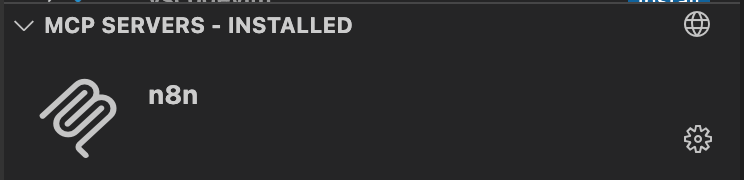 VSCode MCP Server Listing
When you right-click, or click the ⚙️, go to `Configure Model Access` and select the models you'd like to access the tools in your MCP server. I'd recommend selecting all of them so that you can switch between them freely.
Once you've confirmed that Copilot is able to connect to your server then swap in the production n8n url by removing the `-test` from your test url. Then, switch your inactive workflow to `active` in the upper right hand corner.
Last but not least we need to now enable the newly discovered tools in Copilot via the 🛠️ icon in the chat menu (There's probably a command to pull up this menu but I couldn't find it. Email me if you know it and I'll credit you here)
Select the tools you created to expose them in Copilot's chat.
***Finally*** we have everything we need. Kindly ask your friendly model in the chat to use a tool it now has access to.
Hopefully you see Copilot requesting access to use the tool. Approve it. 🤞 The output of your tool call has been incorporated into the chat output and you see a workflow execution in your n8n instance 🎉
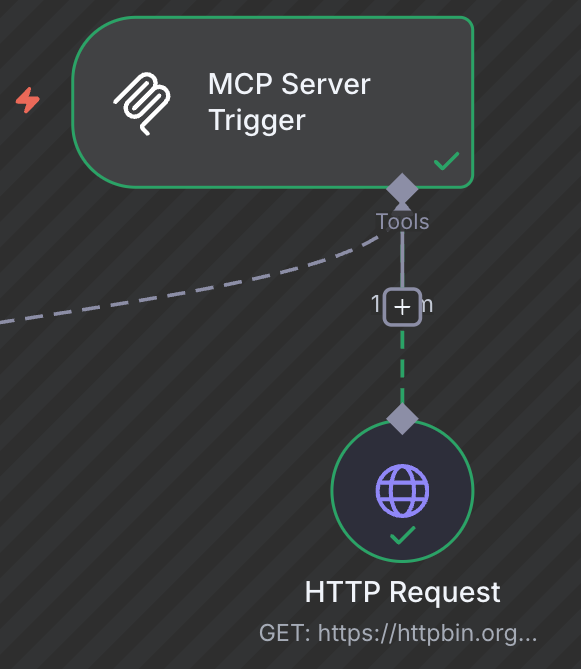 n8n Workflow Execution
### Getting the most out of n8n[#](https://securitydozo.com/how-to-self-host-mcp-servers-with-n8n/?utm_source=linkedin#getting-the-most-out-of-n8n), How to Self-Host MCP Servers With N8n#, Security Dozo 👺, 01k7q8jagc07wmternj63291v6.