How to Share Your Smart Rules

## Metadata
- Author: [[DEVONtechnologies]]
- Full Title: How to Share Your Smart Rules
- Category: #articles
- Document Note: 1. What other automation tools are available in DEVONthink?
2. How do I control-click a smart rule?
3. What is the purpose of exporting individual smart rules?
This document outlines how to share smart rules from DEVONthink. To do this, the user must locate the desired smart rule in the Smart Rules section of the Navigate sidebar, control-click it, and choose Export. This will save the rule as a .dtSmartRule file to a location of the user's choice. The recipient of the file can double-click it to install it in DEVONthink. The user may also wish to export the rules individually in order to install them on other Macs.
- Document Tags: [[devonthink]]
- Summary: DEVONtechnologies develops DEVONthink, DEVONagent, and other Mac and iOS apps for document and information management and web research.
- URL: https://www.devontechnologies.com/blog/20230321-share-smart-rules
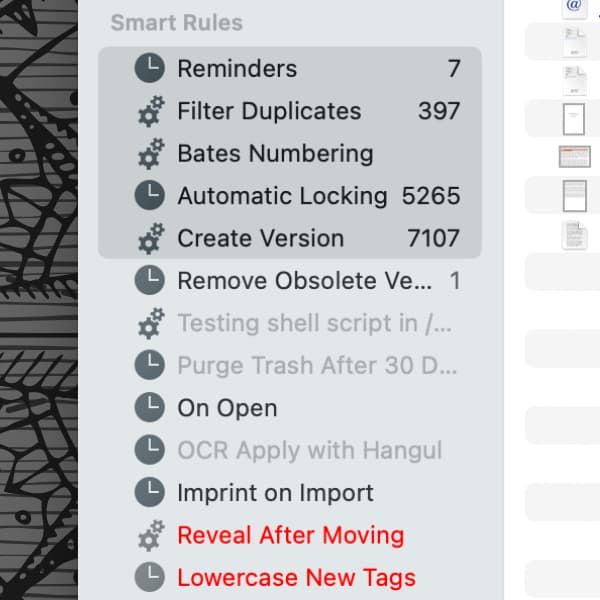
Smart rules are a powerful automation tool in [DEVONthink](https://www.devontechnologies.com/apps/devonthink), allowing the application to act on matching documents. Used wisely, they can be great allies in the quest to organize your databases. Maybe you want to share a specific rule with someone or install it on another Mac? Here’s how you can easily share smart rules.
Technically speaking, smart rules are stored in a property list file: `~/Library/Application Support/DEVONthink 3/SmartRules.plist`. But this is a single file containing data about *all* your smart rules.
Instead of sharing this file, go to the *Smart Rules* section in DEVONthink’s *Navigate* sidebar and locate the desired smart rule. Control-click it and choose *Export*. It will be saved as a `.dtSmartRule` file to a location of your choice. You can also select more than one smart rule and export them to individual smart rule files. Send these files off to someone or move it to another of your Macs.
On the receiving Mac, double-click the file to install it in DEVONthink. It is possible that the location defined in the smart rule does not exist on this Mac and you will be shown a notice. In this case, double-click the newly installed smart rule in DEVONthink and set an appropriate target in the *Search in* menu.
Even if you’re not sharing the smart rules with anyone, it may be useful to export the rules individually after you have them working properly. Then you can individually install the necessary rules you created, e.g., after a reinstallation or when setting up a new machine., How to Share Your Smart Rules, DEVONtechnologies, 01gwhpqchj1mp96rcx5r5t4gkr.