How to Split Test Facebook Video Ads
## Metadata
- Author: [[Megan O'Neill]]
- Full Title: How to Split Test Facebook Video Ads
- Category: #articles
- Summary: Do you want more views for your Facebook video campaigns? Discover how to split test Facebook video ads to find out which video content performs best.
- URL: http://www.socialmediaexaminer.com/how-to-split-test-facebook-video-ads/
[](https://www.socialmediaexaminer.com/category/how-to/)[social media how to](https://www.socialmediaexaminer.com/category/how-to/)
Do you want more views for your Facebook video campaigns?
Interested in finding out which Facebook video content performs best?
Split testing different variations of video ads will help you identify the content that resonates best with your Facebook audience.
In this article, you'll **discover how to split test Facebook video ads**.
How to Split Test Facebook Video Ads by Megan O'Neill on Social Media Examiner.
#### #1: Decide Which Variable to Split Test
[Split testing](https://www.socialmediaexaminer.com/facebook-split-testing-how-to-make-your-ads-better-andrea-vahl/) (or A/B testing) is the practice of testing multiple versions of one variable to find out which performs best.
To create a [video](https://www.socialmediaexaminer.com/9-tips-for-better-facebook-video-ads/) variation, **start with a copy of your original video** and then **make a slight change** to the copy. You can then **run both videos as ads with the same setup** (the only variation is the change you made in the video) and **see which performs best for a given objective**. You can test a number of variables, including:
* Clips and photos that make up your video
* Text
* Titles
* Video length
You can't test everything at once, but over time, you can **run a variety of tests**, **track results**, and use these insights to **inform your video strategy** moving forward.
Where do you start? Well, most types of video split tests fall into five categories: visual, text, audio, length, and format variations.
**Visual**
Visual variations involve swapping out or reorganizing the video clips or photos in your video. For example, [WV Skydivers](http://animoto.com/business/success-stories/wv-skydivers), an adventure company in West Virginia, created the following variations for a Facebook test. One variation begins with a photograph and the other begins with a video clip.
Some content could not be imported from the original document. [View content ↗](https://www.youtube.com/embed/05z64_rzVPU?feature=oembed)
Looking to **test visual variations** in one of your videos? Try some of these tactics: **swap out a photo for a video clip** (as in the example above), **change the order of clips** (especially the clip that appears first in your video; the first 3 seconds are most important for capturing viewers' attention), or **show different subjects or framing** in your video.
**Text**
#### The Conference You've Been Waiting For
As a small business marketer, you can probably only pick one or two events to attend each year. Get back into the game with an unbeatable conference experience and expert training at Social Media Marketing World in sunny San Diego, California—from your friends at Social Media Examiner.
🔥🔥 As a valued reader, you can **save $600 if you act now! Sale Ends Tuesday!**
[CLICK HERE TO LEARN MORE](https://www.socialmediaexaminer.com/smmworld/?smesite=world23-site-midpage-ad-top-smallbiz)
With text, you can **test the amount of time text appears on the screen, copy or script variations, calls to action (CTAs), text design** (including colors, fonts, and backgrounds), and more. Don't have time to make a second video? You can also do a split test with the same video using two different text titles and descriptions.
**Audio**
While the majority of people [watch Facebook videos with the sound off](http://digiday.com/media/silent-world-facebook-video/), you may decide to test some audio variations for those who are listening. **Test different songs, voiceover actors, or voiceover script variations**.
**Length**
Shorter videos often perform better than longer ones, so testing length can be interesting as well. In the example below, Rescue Chocolate tested a 15-second version of a video ad against a 30-second version of the same ad.
Some content could not be imported from the original document. [View content ↗](https://www.youtube.com/embed/J0QRdbUK40A?feature=oembed)
**Format**
Finally, you can **test the video format or aspect ratio**. For example, see how a landscape version of your video performs against a portrait or square video.
Buffer recently [spent $1,500 on experiments](http://blog.bufferapp.com/square-video-vs-landscape-video) split testing the performance of square videos vs. landscape videos. The results showed the square videos got more views than the landscape videos on Facebook, Instagram, and Twitter, and the square videos got 3X more engagement. Wondering if this holds true for your audience? Run a split test and find out!
Once you've decided which variation to test and created your videos, here's how to set up your test on Facebook.
#### #2: Set Up Your First Test Ad Set
To start, **log into [Facebook Ads Manager](https://www.socialmediaexaminer.com/facebook-ads-manager-updates-what-marketers-need-to-know/)** and **click +Create Campaign** or Create Ad.
Next, **choose the objective of your campaign**. Do you want to drive video views? Engagement? Conversions? You can choose from a variety of objectives in three categories: Awareness, Consideration, and Conversion.
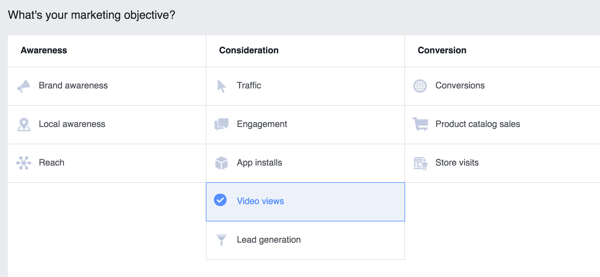Choose an objective for your Facebook ad campaign.
Once you've selected an objective, you'll be asked to **name your campaign**. Choose a name that will make it easy to remember your objective and the split test you're running. This will be helpful later when you review the results. When you're finished, **click Create Ad Account**.
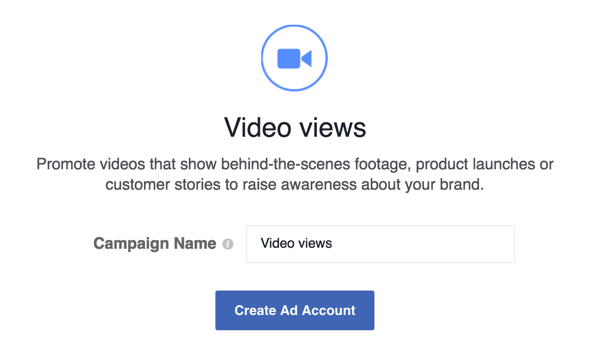Type in a name for your Facebook campaign.
Next, [**define your audience**](https://www.socialmediaexaminer.com/how-to-improve-your-facebook-ad-performance/) (in other words, whom you want Facebook to show your ad to). You can [target a wide range of details](https://www.socialmediaexaminer.com/8-ways-to-optimize-facebook-ad-targeting/) including age, gender, language, interests, behaviors, location, specific email lists, lookalike audiences, and more. Remember, you'll be serving both versions of your video to the same audience to see which variation performs best.
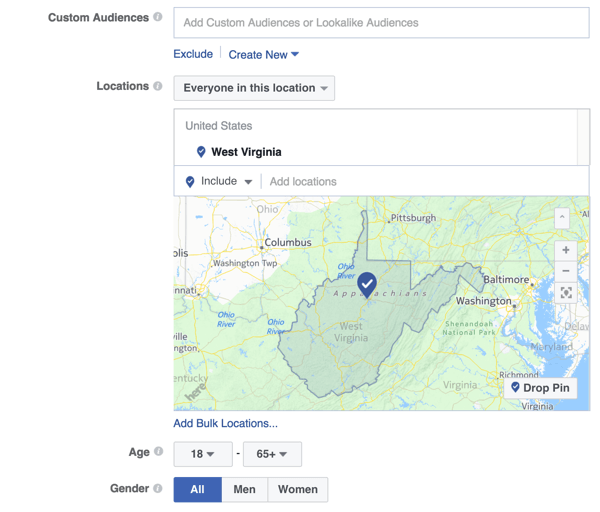Define the audience you're targeting with your Facebook ad.
Now **choose placements** (where you want your ad to appear). If you're just starting out, I suggest keeping the default setting, Automatic Placements. However, you can also edit your placements so your ads appear only on Facebook, Instagram, mobile, or desktop.
#### Get Expert Social Media Marketing Training from the Pros

Want to get ahead of the competition and learn how to diversify your social marketing strategy?
Learn from the industry's most trusted experts, rub elbows with other smart marketers, and take your marketing to the next level during this 3-day event in sunny San Diego, California.
[CLICK TO LEARN MORE](https://www.socialmediaexaminer.com/smmworld/?smesite=world23-site-midpage-ad-middle)
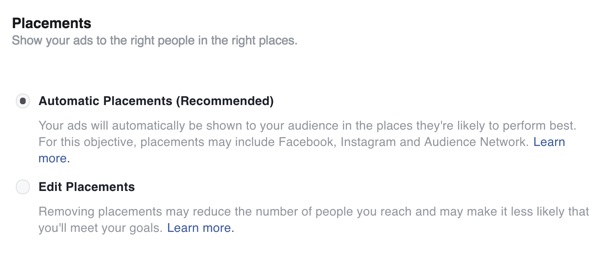Select placements for your Facebook ad.
Next, **set a budget for your campaign and a timeline**. As you adjust your budget, the Estimated Daily Reach on the right side of the screen will adjust as well. This estimate gives you an idea of how many people you'll be reaching with the amount you've budgeted.
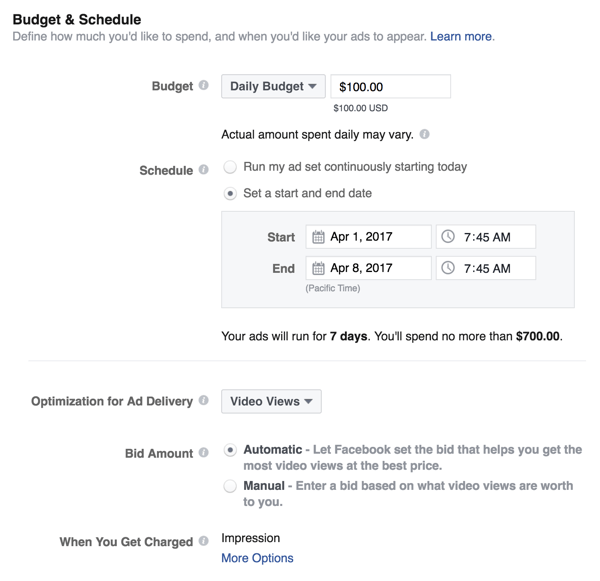Set the budget and schedule for your Facebook ad.
At the bottom (or possibly the top) of the page, **fill in your ad set name**. Choose a name that indicates which variation is represented in the ad set. For instance, if you're testing a square video vs. a landscape video, include the word “square” in the ad set name.
Once you've named your ad set, **click Continue** to finish setting up the first ad set (your “A” test).
On the next screen, **choose an ad format**. **Select Single Video** to do a split test for video. Then **upload the video for the first variation** (the one you indicated in your ad set name).
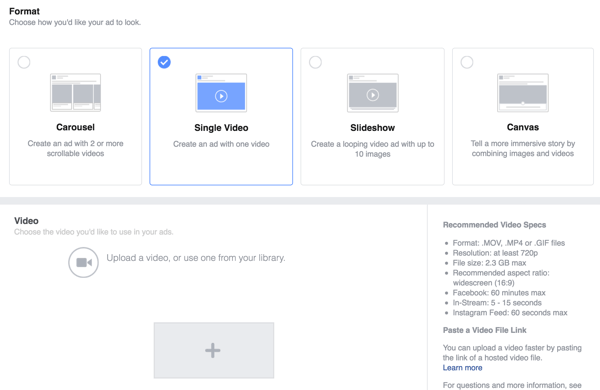Select Single Video as the Facebook ad format and then upload your video.
Once your video has uploaded, **provide additional details**, including a thumbnail image, the page you'd like to post to (if you have more than one), the text to display alongside your video, your website URL, and other information. Again, these details will be the same for both video ads; the only variation is the video itself.
When you're done, **click Place Order** at the bottom of the screen. Your first variation is ready!
#### #3: Create Your Second Test Ad Set
Next, you'll need to set up your second ad set: your “B” variation. Remember, the ad information will be identical except for the video. For this reason, you can simply **duplicate your first ad set**.
To make a copy of your original ad set, **click Edit** **next to the original ad set** in Ads Manager. Then **change the name** of the new ad set to reflect the variation. For example, if you called your “A” variation “square,” call this one “landscape.”
Then **click Edit** **to the right of the new ad set** you just created.
Click the Edit link to the right of your new Facebook ad set.
Now you need to upload your video variation. **Click Change Video** and **upload your video file**.
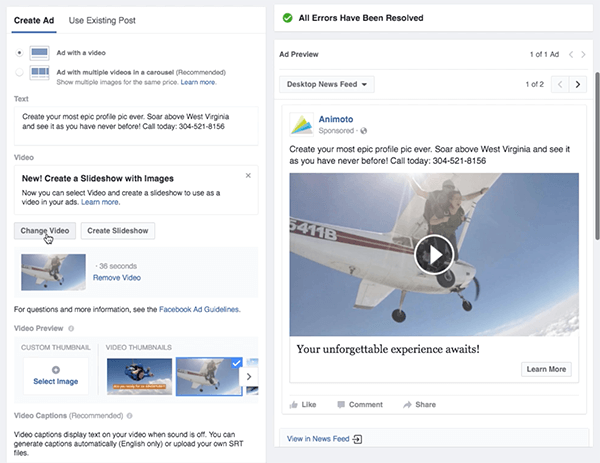Click Change Video and then upload your video variation. Keep all of the other details the same.
Remember to **keep all of the other information the same** as in your first variation, including the video thumbnail. When you're done, **click Save and Continue and then, Place Order**.
Now that you've set up both variations, you're good to go. Facebook will review your campaign, which can take up to 24 hours. If the campaign is approved, your ads will begin running and you can stay tuned for the results!
#### #4: Run Your Ad Sets and Analyze the Results
Ready to find out which video performed better? **Head back to your Ads Manager** and find your campaign. **Click on your campaign** to open up your ad sets and you can scroll across the screen to **compare the results**.
Compare the results from your Facebook ad sets to see which performed best.
**Tip**: The columns are shown based on the objective you set for your campaign. If you'd like to **customize the information you see**, **click the Columns drop-down menu** on the right side of the screen to see your options.
Click the Columns drop-down list for options to change the columns you see in Facebook Ads Manager.
Once you've determined a winner, you have a couple of options:
* **Move forward with your winner** (pushing it out to even more people) and stop spend on the losing variation.
* **Create a new variation** **to** **test against your winner** in hopes of getting even better results.
Whichever option you choose, remember to **track the results of every split test** and keep those results in mind as you create videos going forward. This will help you continue to improve your video strategy.
**Conclusion**
Marketers and businesses have been split testing everything from landing pages to banner ads, headlines, CTAs, and more for decades. However, video remains a marketing asset untouched by testing for many.
Today video is huge for marketers, especially on social media. [Video gets more engagement](http://blog.bufferapp.com/3-unusual-lessons-we-learned-by-studying-over-100000-brands-and-16-million-posts-on-social-media) than other types of content in the social feed. If you're split testing your other marketing collateral, you should be testing your videos too.
**What do you think? What types of marketing collateral have you split tested in the past? Have you run any video tests?** Please share any experiences or interesting results in the comments!
How to Split Test Facebook Video Ads by Megan O'Neill on Social Media Examiner.
#### Curious about Web3?
Follow the Web3 Business podcast to find out how Web3 will affect your business in the near future.
Every Friday, host Michael Stelzner interviews leading industry experts about what works right now in Web3 and what to expect in the future, so you can prepare your business for the shift, even if you're a total newbie.
[FOLLOW THE SHOW](https://www.socialmediaexaminer.com/web3-business-podcast/?smesite=cbp-site-midpage-ad-bottom), How to Split Test Facebook Video Ads, Megan O'Neill, 01gnmcxm3hma7kt8259h92jj33.