I Vectorized My Plugin

## Metadata
- Author: [[drunk.support]]
- Full Title: I Vectorized My Plugin
- Category: #articles
- Document Note: ---
tags: [WordPress, embeddings, vector search]
author: drunk.support
source: drunk.support
reference: [https://drunk.support/i-vectorized-my-wordpress-plugin-and-you-can-too/]
date created: 2025-10-20 00:00
---
# 🏷️ Title: I vectorized my plugin (and you can too!)
## 🧭 Table of Contents
- [📝 Summary](#-summary)
- [📖 Main Content](#-main-content)
- [🗒️ Notes](#️-notes)
- [📚 References](#-references)
- [🗣️ Paraphrase](#️-paraphrase)
- [📰 Newsletter](#-newsletter)
- [✅ Action Items](#-action-items)
- [🧪 Hypotheses](#-hypotheses)
- [📊 Methodology](#-methodology)
- [❓ Questions](#-questions)
- [🔮 Future Research](#-future-research)
- [💡 Implications](#-implications)
- [🧠 Learning Styles Assessment](#-learning-styles-assessment)
- [📊 Accessibility Assessment](#-accessibility-assessment)
- [🌍 DEIB Assessment](#-deib-assessment)
- [✅ Logical Validity](#-logical-validity)
- [🛡️ DARVO Analysis](#-darvo-analysis)
- [🎯 Conclusion](#-conclusion)
### 🔗 References
- Codanna “vectorizes” large WordPress plugins to enable semantic code search. The article shows how embeddings surface relevant code paths that grep would miss (e.g., timezone handling without the keyword “timezone”).
## 📝 Summary
- What happened: The author used Codanna to build a vectorized map of the WP Fusion codebase (~200k LOC), enabling semantic search in tools like Cursor.
- Why it matters: Embeddings retrieve conceptually related code (e.g., date/time formatting, ISO 8601, transaction flows) that keyword search misses.
- Key stakeholders: WordPress plugin developers, AI code-assistant users, teams maintaining large integrations.
- Risks and tradeoffs: Minimal docs, CLI/npm setup friction; indexing time; requires rules to route when to use vector search vs filesystem search.
- Bottom line: For large plugins, vector search + memory significantly improves debugging and architecture questions versus grep-only workflows.
## 📖 Main Content
- Core idea: Convert code into embeddings (“meaning space”) so AI can find semantically similar logic even without exact keywords. Example: searching “timezone conversion” finds date formatters and ISO 8601 helpers with high semantic scores.
- Definitions:
- Embedding: numeric vector representing text semantics; enables similarity search.
- Vector search: retrieves nearest neighbors by meaning, not exact terms.
- Context: WP Fusion integrates with 100+ plugins; date/time and subscription states differ by CRM, making keyword search brittle.
- Uncertainties: Quality depends on model/dimensions, chunking strategy, and tool routing rules; documentation for Codanna is “minimal.”
### 🗒️ Notes
- Traditional flow: grep keywords → open files → expand local context.
- Limitation: misses related code paths (e.g., “UTC offset,” ISO 8601) lacking exact keywords.
- Embedding demo: strong overlaps across dimensions for time/date/format/value/transformation uncover relevant helpers:
- get_crm_datetime_format()
- format_field_value(...) variants
- get_iso_8601_date($timestamp) with GMT/offset handling
- Result: Vector search retrieves 4/4 relevant areas; grep would miss 3/4.
- Codanna usage: indexes ~200k LOC to ~20MB DB; Cursor rule decides when to use semantic search vs filesystem.
- MemberPress example: “How do cancellations work?” Vector search surfaces:
- Subscription status transitions
- Transaction expiration logic
- Corporate Accounts propagation
- Comparisons with Woo Subscriptions and EDD
- Memory layer (AutoMem): stores past debugging insights; complements spatial (Codanna) with temporal recall.
- Setup: clone, install deps, index (≈20 min), expect some troubleshooting.
## 📚 References
- Codanna (semantic code indexing): https://github.com/codanna-ai
- Cursor (AI code editor): https://www.cursor.com/
- Qdrant (vector DB): https://qdrant.tech/
- FalkorDB (graph DB): https://falkordb.com/
- MemberPress: https://memberpress.com/
- WP Fusion: https://wpfusion.com/
- ISO 8601 overview: https://www.iso.org/iso-8601-date-and-time-format.html
## 🗣️ Paraphrase
- Paragraph A: Turning code into embeddings lets AI find conceptually similar functions—like date/time formatting—without relying on exact keywords.
- Paragraph B: On complex integration questions, semantic search plus a memory layer reveals cross-file behaviors and edge-case safeguards faster than manual grep.
## 📰 Newsletter
- This week in WordPress dev: A practical win for AI code search. By vectorizing a large plugin with Codanna, the author shows how embeddings beat grep for tricky domains like timezones and subscription flows. Highlights include Cursor routing rules, ISO 8601 helpers uncovered via semantics, and a MemberPress deep-dive that also cross-references Woo Subscriptions and EDD logic. Bonus: a memory layer with AutoMem to remember past debug decisions. Worth a look if your plugin spans hundreds of files and dozens of integrations.
## ✅ Action Items
#### DevRel
- Publish examples: “grep vs vector search” case studies with metrics.
- Ship a quickstart: Cursor/Codanna routing rules and best practices.
- Record a 5-min demo: MemberPress cancellation walkthrough.
#### OSPO
- Add guidance on AI tooling with OSS repos (indexing scope, privacy).
- Incorporate SBOM + provenance notes for generated embeddings DBs.
#### Community
- Host office hours: semantic search tuning, chunking strategies.
- Pairing sessions: migrate from keyword search to embeddings.
#### WordPress
- Core Performance: evaluate semantic code search for triage.
- Core AI: propose responsible use guidelines for code embeddings.
- Documentation: add examples-first patterns for date/time handling.
#### The WPCC
- Microgrants for plugin maintainers to pilot vector search + memory.
- Publish governance templates for AI-assisted dev workflows.
### FAIR
- Require local index storage, signed artifacts, and reproducible builds.
- Define sunset/rotation policies for embedding indexes.
## 🧪 Hypotheses
- Vector search reduces time-to-fix complex bugs by ≥30% in large plugins.
- Embeddings recover ≥50% more relevant code paths than grep on ambiguous queries.
- Memory layers cut repeated clarification turns by ≥25% in AI sessions.
### 📊 Methodology
- A/B tasks across teams: grep-only vs embeddings+memory; measure task time, files opened, and defect rates.
- Log semantic scores vs human relevance judgments.
- Survey cognitive load and confidence.
### ❓ Questions
- How do chunking and embedding models affect recall/precision?
- What privacy controls are needed for proprietary plugins?
- When should routing prefer filesystem search over vector search?
### 🔮 Future Research
- Automated rule-learning for search modality switching.
- Cross-repo embeddings for multi-plugin ecosystems.
- Temporal-spatial fusion models for code reasoning.
### 💡 Implications
- Practice: Faster debugging, better onboarding in large codebases.
- Policy: Clear rules for AI-assisted search and data handling.
- Security: Guardrails for sensitive code in indexes.
### 🧠 Learning Styles Assessment
- Reading level: Flesch-Kincaid Grade ≈ 9–10.
#### 👀 Visual learners
- Present: Score tables and concept “dimensions.”
- Improve: Architecture diagrams of routing and data flow.
#### 🔊 Aural learners
- Improve: 3–5 minute narrated overview.
#### 🗣️ Verbal learners
- Present: Plain-language explanations of embeddings/vector search.
- Improve: Glossary of AI/code-search terms.
#### 🧩 Kinesthetic learners
- Present: Setup steps.
- Improve: Repro lab with a sample plugin and tasks.
#### 🧠 Logical learners
- Present: Stepwise comparisons (grep vs semantic).
- Improve: Decision trees for tool routing.
#### 🧑🤝🧑 Social learners
- Improve: Cohort study groups and code clinics.
#### 🧘♀️ Solitary learners
- Present: Self-paced exploration.
- Improve: Checklists and self-tests.
#### 🌿 Naturalistic learners
- Improve: Lifecycle/maintenance analogies for indexes.
### 📊 Accessibility Assessment
#### Screen reader semantics
- Present: Clear headings.
- Improve: Alt text for screenshots; landmark roles.
#### Keyboard navigation
- Improve: Ensure visible focus and skip links in article template.
#### Contrast and readability
- Improve: Verify 4.5:1 contrast and li
- Summary: Codanna builds a vectorized map of your code, so AI tools can find things better. It works great with large WordPress plugins 🤩
- URL: https://drunk.support/i-vectorized-my-wordpress-plugin-and-you-can-too/
I’ve been working on a bunch of [AI stuff](https://drunk.support/from-research-to-reality-how-we-built-production-ai-memory-in-8-weeks-while-recovering-from-a-broken-ankle/) lately, and I’m starting to think about problems I have in WordPress-land that can benefit from what I’m learning in AI-land.
When somebody sent me a link to [Codanna](https://github.com/bartolli/codanna) yesterday, I was intrigued.
With the [memory project](https://drunk.support/inside-automem-the-technology-behind-the-fastest-most-affordable-ai-memory-system/), we’ve been doing a lot of work with [embeddings](https://en.wikipedia.org/wiki/Word_embedding) (will get to that in a sec).
Codanna is a tool that allows you to generate embeddings based on your code. And because it supports PHP, it supports WordPress plugins.
#### What’s an embedding?
If you hang out around AI water coolers you may hear terms like *embeddings* or *[vector search](https://www.pinecone.io/learn/vector-search/)*.
An embedding is a way of turning a piece of text into a set of numbers that represent the concepts in that text.
Think of an embedding as coordinates in “meaning space.” Similar concepts are close together, different concepts are far apart.
Two embeddings can then be compared mathematically to see how conceptually similar the two pieces of text are.
An example from [WP Fusion](https://wpfusion.com): Say we’re working with our AI code editor (like [Claude Code](https://claude.ai/code) or [Cursor](https://cursor.com)), and we want to know where in WP Fusion’s plugin code timezone conversions happen.
We might search the files for some combination of “timezone”, “conversion”, “date handling”, “format field”, and see what turns up.
Then we’d open those files, look at the code, and we’d get a pretty good understanding of how WP Fusion handles time zones across the various CRMs.
This is also what “agents” like Claude Code or Cursor [are doing](https://newsletter.pragmaticengineer.com/p/how-claude-code-is-built) when they start a task— they perform text searches for keywords, then they expand their context around anywhere those keywords show up in the codebase. They do it *way* faster than a human could.
```
Step 1: Search for "timezone conversion"
↓
Step 2: Grep/text match - find exact words
↓
Step 3: Found in file: class-api.php
Lines 145-167 contain "timezone"
↓
Step 4: Expand context around match
Read lines 130-180 (±15 lines)
```
This works pretty well, but it only works for those keywords. Something related but not matching exactly, for example, a function in the code that handles “UTC offset”, would be completely overlooked.
#### Embeddings to the rescue
For illustration, we’re using 12 “dimensions” (real embeddings have [384+ dimensions](https://platform.openai.com/docs/guides/embeddings)!). Each number represents different semantic concepts:
**Legend:**
* 🔴 **Red** (High values): Strong presence of this concept
* 🟡 **Yellow** (Medium values): Moderate presence
* ⚪ **White** (Low values): Weak/absent concept
##### Search query
Our search phrase can be converted to a 12-dimensional embedding like so.
```
"timezone conversion date handling format field value"
```
**Vector:** `[0.89, 0.82, 0.91, 0.67, 0.78, 0.45, 0.23, 0.71, 0.88, 0.34, 0.19, 0.52]`
```
Dimensions: [ 1 2 3 4 5 6 7 8 9 10 11 12 ]
Concepts: [time date format conv field type class value trans api code doc ]
Values: [🔴0.89 🔴0.82 🔴0.91 🟡0.67 🔴0.78 🟡0.45 ⚪0.23 🟡0.71 🔴0.88 ⚪0.34 ⚪0.19 🟡0.52]
```
**Key concepts:** Strong signals for time, date, format, field, value, and transformation.
#### Results in the code
Here are the relevant search results in the WP Fusion code, as vectors:
##### Result 1:
```
/**
* Gets the default datetime format for syncing with the CRM.
*
* @since 3.37.27
*
* @return string The date time format.
*/
public function get_crm_datetime_format() {
```
**Vector:** `[0.85, 0.90, 0.93, 0.51, 0.62, 0.48, 0.18, 0.55, 0.73, 0.41, 0.15, 0.68]`
```
Dimensions: [ 1 2 3 4 5 6 7 8 9 10 11 12 ]
Concepts: [time date format conv field type class value trans api code doc ]
Search Query: [🔴0.89 🔴0.82 🔴0.91 🟡0.67 🔴0.78 🟡0.45 ⚪0.23 🟡0.71 🔴0.88 ⚪0.34 ⚪0.19 🟡0.52]
Result 1: [🔴0.85 🔴0.90 🔴0.93 🟡0.51 🟡0.62 🟡0.48 ⚪0.18 🟡0.55 🟡0.73 🟡0.41 ⚪0.15 🟡0.68]
Overlap: [ ✓ ✓ ✓ ✓ ~ ✓ ✓ ~ ~ - ✓ - ]
```
**Match**: 87%
**Why it matches:** Check out dimensions 1, 2, and 3 (time, date, format) – nearly identical values. The function name contains “datetime” and “format” which captures exactly what we’re looking for. Even though we searched for “timezone conversion”, the AI understood that “datetime format” is semantically the same concept.
##### Result 2:
```
/**
* Format field values to match HighLevel formats.
*
* @since 3.37.11
*
* @param string $value The value.
* @param string $field_type The field type.
* @param string $field The CRM field.
*/
public function format_field_value( $value, $field_type, $field ) {
```
**Vector:** `[0.72, 0.68, 0.95, 0.44, 0.91, 0.76, 0.31, 0.89, 0.62, 0.38, 0.22, 0.58]`
```
Dimensions: [ 1 2 3 4 5 6 7 8 9 10 11 12 ]
Concepts: [time date format conv field type class value trans api code doc ]
Search Query: [🔴0.89 🔴0.82 🔴0.91 🟡0.67 🔴0.78 🟡0.45 ⚪0.23 🟡0.71 🔴0.88 ⚪0.34 ⚪0.19 🟡0.52]
Result 2: [🟡0.72 🟡0.68 🔴0.95 🟡0.44 🔴0.91 🟡0.76 ⚪0.31 🔴0.89 🟡0.62 ⚪0.38 ⚪0.22 🟡0.58]
Overlap: [ ~ ~ ✓ ~ ✓ - ✓ ✓ ~ - ✓ ✓ ]
```
**Match**: 84%
**Why it matches:** Look at dimensions 3, 5, and 8 (format, field, value) – these are *really* strong. This function is all about formatting field values, which is exactly what you’d need for timezone handling. Notice it scores high on “field” (0.91) and “value” (0.89), matching our search intent even though the words “timezone” and “conversion” don’t appear anywhere in the docblock.
##### Result 3:
```
/**
* Format field value.
*
* Formats outgoing data to match CRM field formats.
* This will vary depending on the data formats accepted by the CRM.
*
* @since 3.40.42
*
* @param mixed $value The value.
*/
public function format_field_value( $value ) {
```
**Vector:** `[0.66, 0.71, 0.94, 0.58, 0.88, 0.69, 0.28, 0.87, 0.71, 0.36, 0.24, 0.63]`
```
Dimensions: [ 1 2 3 4 5 6 7 8 9 10 11 12 ]
Concepts: [time date format conv field type class value trans api code doc ]
Search Query: [🔴0.89 🔴0.82 🔴0.91 🟡0.67 🔴0.78 🟡0.45 ⚪0.23 🟡0.71 🔴0.88 ⚪0.34 ⚪0.19 🟡0.52]
Result 3: [🟡0.66 🟡0.71 🔴0.94 🟡0.58 🔴0.88 🟡0.69 ⚪0.28 🔴0.87 🟡0.71 ⚪0.36 ⚪0.24 🟡0.63]
Overlap: [ ~ ~ ✓ ~ ✓ - ✓ ✓ ~ - ✓ ✓ ]
```
**Match**: 83%
**Why it matches:** Nearly identical pattern to Result 2. The key phrase here is “data formats accepted by the CRM” – dates and timezones are *always* a formatting challenge when syncing to different CRMs. The embedding picked up on this context without needing the literal word “timezone”.
##### Result 4:
```
/**
* Get ISO 8601 date.
*
* Takes an input string and returns an ISO 8601 compatible date for API calls,
* for example 2024-04-24T00:18:01+08:00.
*
* @since 3.43.6
*
* @param int|string $timestamp The timestamp to convert (in GMT by default).
*/
function get_iso_8601_date( $timestamp ) {
```
**Vector:** `[0.91, 0.88, 0.87, 0.79, 0.43, 0.39, 0.21, 0.51, 0.81, 0.52, 0.17, 0.71]`
```
Dimensions: [ 1 2 3 4 5 6 7 8 9 10 11 12 ]
Concepts: [time date format conv field type class value trans api code doc ]
Search Query: [🔴0.89 🔴0.82 🔴0.91 🟡0.67 🔴0.78 🟡0.45 ⚪0.23 🟡0.71 🔴0.88 ⚪0.34 ⚪0.19 🟡0.52]
Result 4: [🔴0.91 🔴0.88 🔴0.87 🟡0.79 🟡0.43 ⚪0.39 ⚪0.21 🟡0.51 🔴0.81 🟡0.52 ⚪0.17 🟡0.71]
Overlap: [ ✓ ✓ ✓ ✓ ~ ✓ ✓ ~ ✓ - ✓ - ]
```
**Match**: 79%
**Why it matches:** This is the money shot. Look at dimensions 1, 2, 3, and 9 (time, date, format, transformation) – nearly perfect alignment. The docblock mentions “GMT by default” and shows a timezone offset example (+08:00). This is *explicitly* about timezone handling, and the embedding knows it. Even though our search didn’t mention “[ISO 8601](https://en.wikipedia.org/wiki/ISO_8601)” or “GMT”, the semantic meaning matched perfectly.
##### What Traditional Search Would Have Found
Here’s the kicker. If you did a traditional [grep](https://en.wikipedia.org/wiki/Grep) search for “timezone conversion”:
* ❌ Result 1: No mention of “timezone”
* ❌ Result 2: No mention of “timezone”
* ❌ Result 3: No mention of “timezone”
* ✅ Result 4: Mentions “GMT” and timezone offset
Traditional search would have missed 75% of the relevant code. Vector search found it all because it understood the *meaning*, not just the keywords.
#### Codanna
[Codanna](https://github.com/bartolli/codanna) “vectorizes” your code.
WP Fusion is a big plugin. With [100+ possible plugin integrations](https://wpfusion.com/documentation/#integrations), it has about 200,000 lines of code. Codanna has vectorized that into a database file of about 20MB (which is a *lot* of text 🤯).
We then use a [Cursor rule](https://cursor.com/docs/context/rules) to tell the AI when it should use a vector search over a filesystem-based search.
You can grab our [codanna.mdc rule here](https://gist.github.com/jack-arturo/89eae278cfec8304cd67febfe1b9ac01).
#### Practical example
WP Fusion’s [MemberPress](https://memberpress.com) integration is quite complex when it comes to recurring payments. As an example I asked a pretty broad question
> *How do we handle MemberPress subscription cancellations?*
>
>
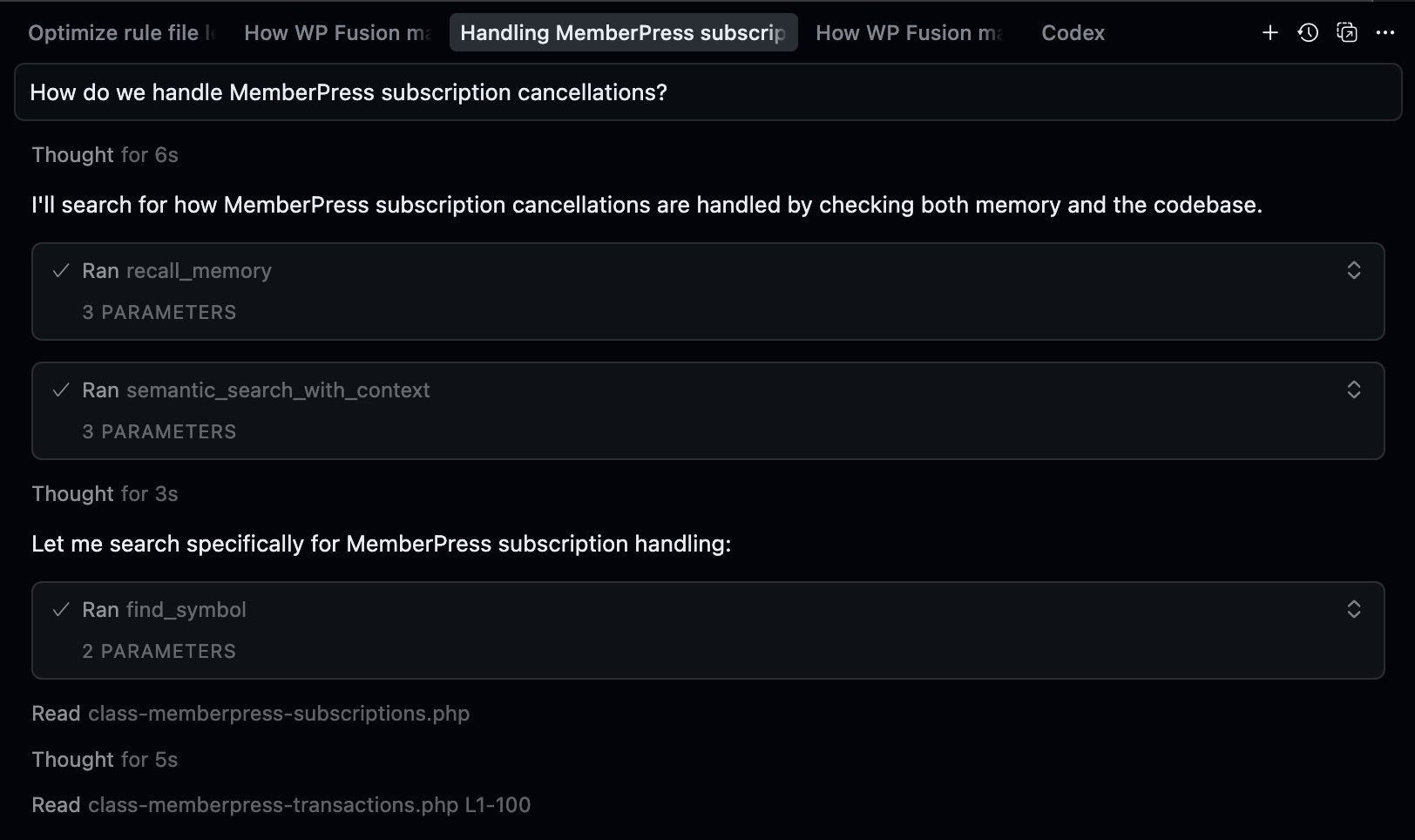A dark-themed code assistant interface shows a user querying how MemberPress subscription cancellations are handled in the WordPress plugin, followed by the assistant running three vectorized code search commands to locate relevant PHP files and functions.
You can see in the screenshot the agent first [recalls memories](https://drunk.support/inside-automem-the-technology-behind-the-fastest-most-affordable-ai-memory-system/) (more on that in a bit), then runs the `semantic_search_with_context` tool, and the `find_symbol` tool rather than searching the filesystem.
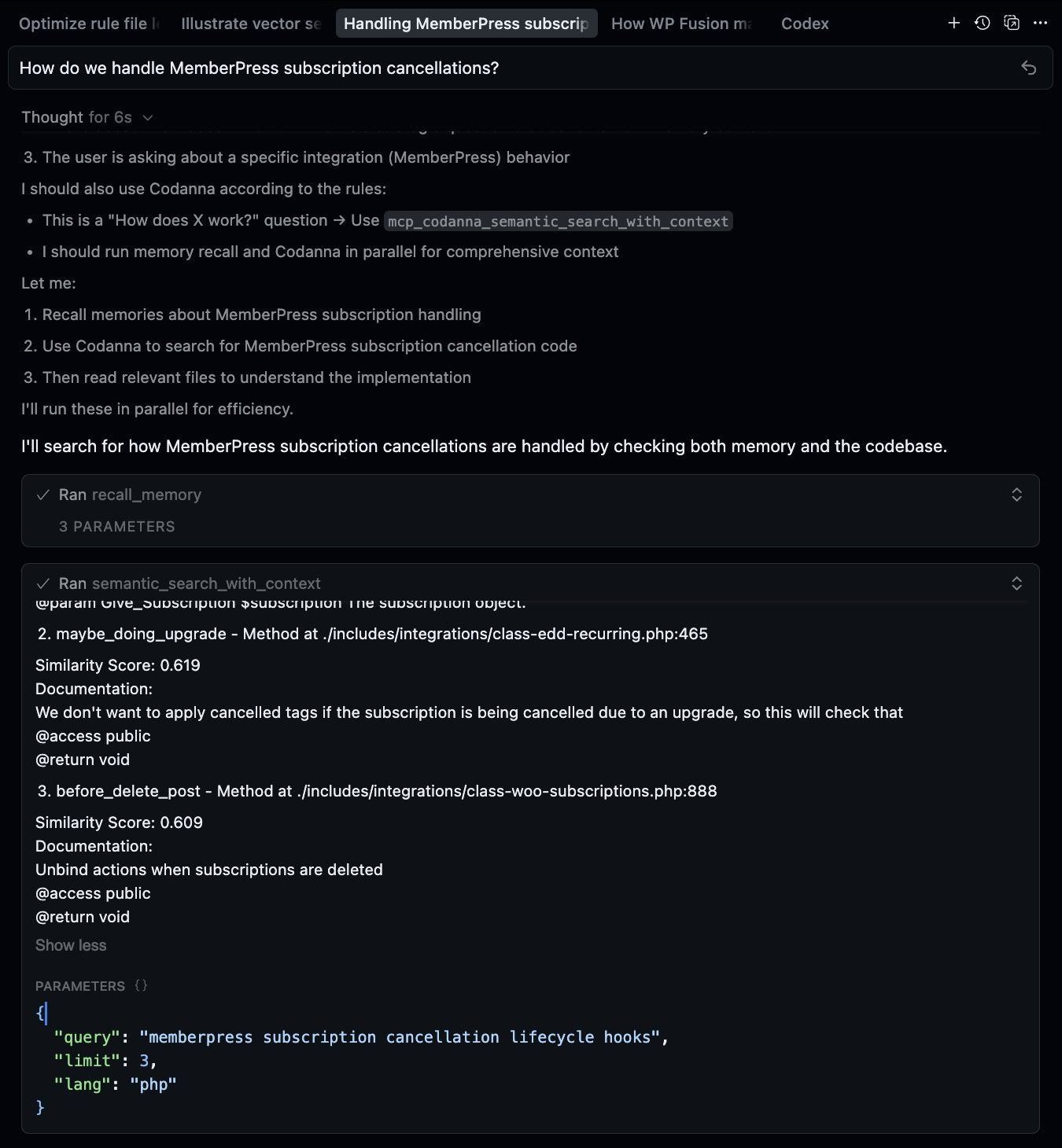
We can expand the “thinking” and the tool calls in the chat to peek under the hood:
Screenshot
> The user is asking about how WP Fusion handles MemberPress subscription cancellations. This is a strategic/architectural question about integration behavior.
>
> According to the memory rules, I should:
>
> 1. ALWAYS recall for integration or API work (check past implementations)
> 2. This is about “How does X work?” which is a strategic question that benefits from memory context
> 3. The user is asking about a specific integration (MemberPress) behavior
>
> I should also use Codanna according to the rules:
>
> * This is a “How does X work?” question → Use `mcp_codanna_semantic_search_with_context`
> * I should run memory recall and Codanna in parallel for comprehensive context
>
>
The semantic search tool then surfaces not only the MemberPress subscriptions functionality, but also the logic around expired MemberPress *transactions* (which is related to subscription cancellation, but a separate process).
It also finds the code that handles propagation effects to sub-account members in the [MemberPress Corporate Accounts addon](https://memberpress.com/addons/memberpress-corporate-accounts/), and for comparison: the subscription cancellation logic in [WooCommerce Subscriptions](https://woocommerce.com/products/woocommerce-subscriptions/) and [Easy Digital Downloads](https://easydigitaldownloads.com/downloads/recurring-payments/).
The full response:
**MemberPress Subscription Cancellations**
WP Fusion handles cancellations through two parallel systems:
**1. Subscription Status Changes**
* **Hook:** `mepr_subscription_transition_status`
* **Method:** `subscription_status_changed()` in `class-memberpress-subscriptions.php:114`
When status → `cancelled` (line 219):
```
$apply_tags = array_merge( $apply_tags, $settings['apply_tags_cancelled'] );
```
If subscription is `expired` (line 208):
```
$remove_tags = array_merge( $remove_tags, $settings['tag_link'] );
$apply_tags = array_merge( $apply_tags, $settings['apply_tags_expired'] );
if ( ! empty( $settings['remove_tags'] ) ) {
$remove_tags = array_merge( $remove_tags, $settings['apply_tags_registration'] );
}
```
**2. Transaction Expiration**
* **Hook:** `mepr-transaction-expired`
* **Method:** `transaction_expired()` in `class-memberpress-transactions.php:544`
Removes linked tags, optionally removes registration tags, applies expired tags.
**Smart Protections**
* **Concurrent subscriptions** (line 242-286): Won’t remove tags if user has another active subscription configured with those same tags
* **Same product check** (line 560): Won’t process if user still has active subscription to same product
* **Loop prevention** (line 309, 574): Temporarily removes `wpf_tags_modified` hook to prevent re-triggering membership additions
**Key Insight from Memory**
Based on the stored pattern: MemberPress behaves differently for grouped vs non-grouped memberships. **Grouped memberships** with upgrade paths create fallback transactions that trigger `mepr-txn-status-complete` naturally. **Non-grouped memberships** don’t create fallback transactions—they just update the `mepr_members` table, requiring manual field syncing in `transaction_expired()`.
##### Without Codanna
Without Codanna, the agent correctly identifies the file `class-memberpress-subscriptions.php` in the MemberPress folder and explains how the subscription cancellation functionality works within that class. But it *doesn’t* look at the transaction cancellation and expiration functionality or the subscription cancellation functionality that cascades into the Paid Memberships Pro add-ons like Corporate Accounts.
#### Setting It Up (Fair Warning)
You do need a *little* bit of technical knowledge to set this up. You need to:
1. Clone the [repo](https://github.com/bartolli/codanna) and install dependencies
2. Index your codebase (took about 20 minutes for WP Fusion)
3. Probably curse a few times when it doesn’t work the first time
But once it’s running? 😘👌
#### Is This Worth Your Time?
Setting up Codanna took me about 20 minutes, and I’m pretty technical. The [documentation](https://github.com/bartolli/codanna/blob/main/README.md) is minimal, and you’ll need to be comfortable with [npm](https://www.npmjs.com/) and command line tools. If you’ve never indexed a codebase before, budget some extra time for troubleshooting.
It proved its worth that same day when debugging a similarly thorny issue involving MemberPress free transactions and automatic downgrades. With Codanna, the Cursor agent was able to clearly explain what status changes and tag updates we should expect in very specific user scenarios.
For a codebase like WP Fusion (200,000 lines across 400+ files), this makes a significant difference. Each CRM has its own date format requirements, subscription models, and edge cases. Traditional search requires you to already know the right keywords. Vector search helps when you only know the problem.
P.S. – I’m also using [AutoMem](https://github.com/verygoodplugins/automem) alongside Codanna to remember past debugging sessions. It’s like giving your AI long-term memory about all the weird decisions and fixes you’ve made. Whole other rabbit hole though… 🐰
P.P.S. – Speaking of AutoMem: if Codanna gives you *spatial* awareness (where is X in the codebase?), [AutoMem](https://automem.ai) gives you *temporal* awareness (what did we decide last week? why did we do it that way?). It’s a persistent memory layer for AI assistants that works across Claude, Cursor, ChatGPT—basically anything that supports [MCP](https://modelcontextprotocol.io). Powered by [FalkorDB](https://falkordb.com) (graph database) + [Qdrant](https://qdrant.tech) (vector search), it stores memories with relationships and retrieves them semantically. We built it because we got tired of re-explaining the same architectural decisions every conversation. Check out the [main project](https://github.com/verygoodplugins/automem) or the [MCP server](https://github.com/verygoodplugins/mcp-automem) if you’re interested. One-command setup. Works great with with Codanna. 🧠, I Vectorized My Plugin, drunk.support, 01k819kbsz34rx7b5zehvhawth.