Maximizing SEO in WordPress With Yoast

## Metadata
- Author: [[Web Savvy Marketing]]
- Full Title: Maximizing SEO in WordPress With Yoast
- Category: #articles
- Summary: On any given week, I talk a lot about maximizing SEO in WordPress. This discussion takes place with prospects, existing clients, and even fellow WordPress developers. While there are many great tools available, the majority of WordPress users are simply not maximizing SEO in WordPress.
- URL: https://www.web-savvy-marketing.com/2014/05/maximizing-seo-in-wordpress-with-yoast/

On any given week, I talk a lot about maximizing SEO in WordPress. This discussion takes place with prospects, existing clients, and even fellow WordPress developers. While there are many great tools available, the majority of WordPress users are simply not maximizing SEO in WordPress.
In some cases people are simply not sure where to start. In other cases, people have installed an SEO plugin and have forgotten to configure it or to even use it.
The sad part of this is optimizing content in WordPress is easy. It isn’t hard, I promise. You just need to do it! Take baby steps, learn, and grow. Before you know it, you’ll have it down like an SEO pro.
Consider this my plea for you to maximize your content and capture all the search activity you deserve. My plea will be in two parts:
* The first part – this post – will focus on things to do within your actual page or post.
* The second post will cover configuration settings, XML sitemaps, and some off page SEO tactics.
Let’s start with SEO plugins…
##### Available Plugins for Mastering SEO in WordPress
There are a lot of great SEO plugins available for WordPress. If you [search the WordPress plugin repository for the term SEO](http://wordpress.org/plugins/search.php?page=2&q=seo), you’ll receive 1,333 results (as of this post). Common SEO plugins include:
For a long time I **was** a fan of the All in One SEO plugin. Years ago I found Yoast SEO to be a bit to advanced for real world users, so I opted for All in One SEO.
Yoast changed that a while back and now the plugin can be effective used by all levels of website owners and authors. Thus I’m now **100% bought into WordPress SEO by Yoast** and I believe it can turn around your SEO if you let it.
Because I’m a strong advocate of WordPress SEO by Yoast, we’ll focus entirely on this plugin for today’s discussion. It’s what we use on our website and it’s what we encourage all of our customers to use as well.
##### Three Cheers for WordPress SEO by Yoast!
Not only is Joost de Valk and this team well versed on SEO, they stay up to date with changes like HTML5 and schema. They also make sure their SEO plugin accommodates new SEO strategies and they are always educating users on why these new features are important.
The plugin also forces uses into doing the right thing and this is something I truly love. I can build someone a website, install Yoast, and perform training. If the client follows instructions and uses the plugin properly, I know they are in good hands and they are within white hat practices.
Another reason I like the Yoast plugin is it comes packed with oodles of features. From on-page optimization and page specific meta robots control to rock solid XML sitemaps and open graph meta data, Yoast is top notch.
You can also extend the free version of the Yoast SEO plugin with some nifty extensions:
Have I sold you on Yoast yet? I hope so, because I do believe this is the best plugin to help guide WordPress users through optimizing their websites for search.
##### Rocking SEO in WordPress With On-Page Optimization
If you use the focus keyword field, the plugin will grade the entire page or post for on-page SEO and provide a color-coded bubble on your skill-set. Red means you’re dying a slow SEO death, while green means you’re an SEO rock star. We always want to see a nice pretty green bubble.
*For a page or post to score well within search engines, you can only have one focused keyword for SEO purposes. Yes I really said one, but it is for a very good reason. You’ll create more confusion than good should you decide to throw in five keywords per page. Pick one and make it count!*
Yoast does not allow you to enter more than one focused keyword and this is because it is against best practice. You have to clearly define one keyword phrase per page or post to allow the search engines to best know which piece of content it should deliver in search results.
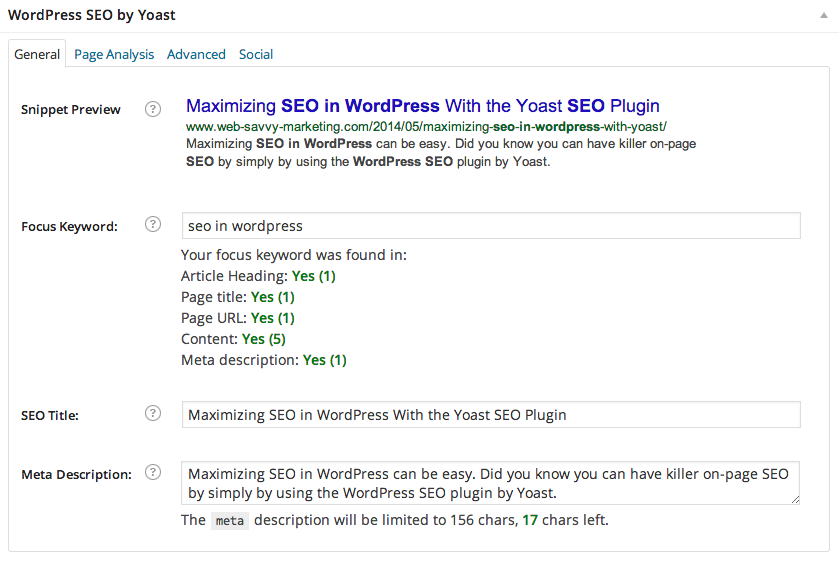
In this blog post, I selected SEO in WordPress as my focused keyword. You’ll see this as indicated in the field below.

*What if I don’t see my desired phrase in the focused keyword box?
This means there is most likely not a lot of search traffic for that phrase and you’re better off selecting another one.*
The WordPress SEO plugin provides easy to use fields for defining meta titles and descriptions on pages, posts, and virtually any custom post type created by plugins. There are specific character allotments, so you need to make sure you stay within the guidelines.
Your maximum characters are 70 for titles and 156 for descriptions. Don’t try and remember those numbers. You don’t have to do so, because Yoast will remind you when you make a mistake.
I’ve input a meta title and description for my blog post and I’ve made sure my focused phrase of SEO in WordPress appear in both.

*Placement of keywords matter. If at all possible, place your keywords as far to the left of the title and description as possible.
Just remember usability trumps SEO, so don’t force it if it doesn’t come naturally.*
As you complete the data, the plugin will create a preview of what your page or post will look like in the search results page of Google or Bing.

Remember the plugin will be a bit snarky if you don’t follow best practice, so pay attention to any red notices that arise during entry.
*Watch your blog categories and tags. It is very easy to duplicate a focused keyword by using the same phrase (as a focus) on a page and post, then again in tags and categories. If “purple rubber ducky” is your focused phrase for a page, don’t make it the focus on a post and don’t assign it as a blog category or tag.*
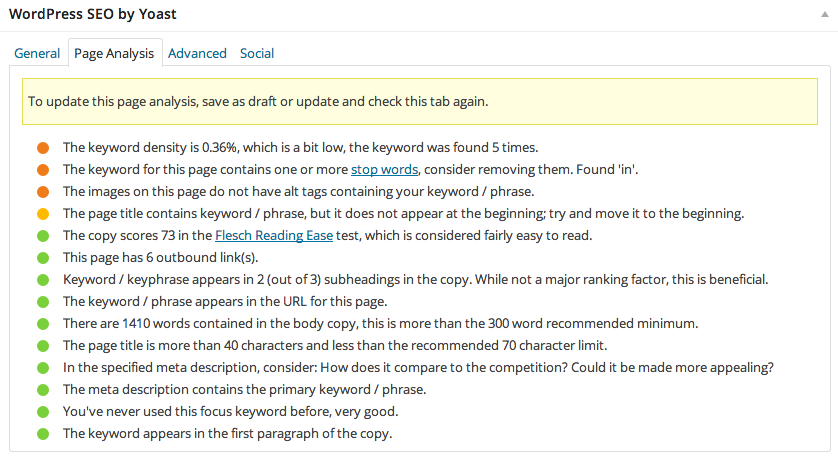
When you’ve finished writing your page or post, you can review the in content grading tool to see how well you’ve done in areas such as:
* **Article heading** – This is what you’ve called your page or post when creating it. Your keyword phrase should be found here.
* **SEO title** – This is what the search engines see and use as the title of your content. Your keyword phrase should be found here. You also want the phrase to be more than 40 characters but less than 70 characters.
* **Meta description** – This is what the search engines see and use as the description of your content. Your keyword phrase should be found here. This shouldn’t be just a bunch of words. It should be a cohesive sentence or two that is compelling in nature.
* **Page URL** – This is the web address or permalink for your content. Your keyword phrase should be found here.
* **Keyword density** – This refers to the usage of your keyword phrase in the website copy of the page or post. It is a percentage. It is easy to forget or slightly change the focused phrase in content edits. Your focused phrase should be used within the content in it’s original state.
* **Keyword usage in subheadings** – These are the H2, H3, and H4 marked words and phrases. They do more than just give your content visual depth. Having your keyword here also helps with SEO.
* **External links** – Yes the search engines like when you link to off site content. Having links with your focused keyword phrase helps with SEO.
* **Images** – Having an image on the page that includes your keyword in the alt tag is beneficial as well. This one is hard, so don’t force it. Better to be safe without it, then force in an image that doesn’t relate to your focused phrase.
* **First paragraph of the content** – Having the focused keyword phrase in the first paragraph of the content is always advisable. It immediately confirms to the search engines and visitors that they are in the right place for the given word or phrase.
* **Flesch Reading Ease** – This score relates to the readability of your content. You want to score in a range that is understandable by most website visitors. If you write for normal people, this should be the case. If you write for a scientist, then you won’t be doing well for SEO.
That’s a lot of stuff right? It is, but you have Yoast there to guide you through each and every piece of content you write.
*If you do nothing else, pick a focused keyword and input an SEO title and meta description that include that focused phrase.
Your post won’t be perfect, but it will be far better off than ignoring SEO completely.*
You can get your SEO in WordPress right if you follow along with this plugin and you review all the colored dots and notices.
##### Let’s Dissect this Post’s SEO and See How I Did
So how did I do on this post? Well Yoast gave me a green bublle, but I had this almost right away. The real proof is displayed when you look at the General and Page Analysis tabs.
On the General tab I have all greens. Yeah me! On the Page Analysis tab I have lots of greens but also some oranges and yellows. Oranges and yellows are not great.
**Let’s have an SEO reality check.**
It is very very hard to get everything completely green. In fact, I don’t even try. Work on getting a lot of things green, especially on the General tab and you’ll be doing well. Score a number of greens on the Page Analysis tab and you’re doing even better.
*Set your content URL before you publish and go live. If change your content’s URL after it is shared on social media or indexed by the search engines, you will cause visitors to bounce when clicking through to it. Worse yet, you’ll reset your SEO with the search engines, because SEO is based on URL.*
So how are you feeling about SEO and the Yoast plugin?
##### Are You Ready to Rock Your Website’s SEO With Yoast?
This post had a whole bunch of information. The nice part about having a written document like this is you can read it and digest it in part, then return to read and digest the rest. You don’t have to try and learn everything right away or get everything right immediately. Start with what you can do and continue to better with each post.
> Do the best you can until you know better. Then when you know better, do better.― Maya Angelou
>
>
This is one of my favorite quotes. For me it applies to so many things in work and life: SEO, web design, managing people, and even parenting. It minds me to stress less, learn more, and continue to always work towards growth.
##### Coming Up Next
As I mentioned earlier in this post, there will be a part two installment of this blog post coming soon. There is just to much SEO information to cover in one blog post. Our next post will cover the following items:
* Automatically populating meta titles and descriptions in pages, posts, categories, and tags
* Permalink structure
* Webmaster Tools integration
* XML sitemap creation and submission
* HTML sitemaps
* Social media sharing
Until next time, blog on and SEO wisely., Maximizing SEO in WordPress With Yoast, Web Savvy Marketing, 01gnmd167dtra5p190c7dta48v.