NPM Install Playground-Step-Library

## Metadata
- Author: [[kirk.at]]
- Full Title: NPM Install Playground-Step-Library
- Category: #articles
- Document Note: ---
tags:
- #wordpress
- #playground
- #automation
Author: kirk.at
Source: Personal website
Reference: https://alex.kirk.at/2025/09/05/npm-install-playground-step-library/
date created: 2025-09-06 00:00
---
# Title: npm install playground-step-library
## Table of Contents:
- [📝 Summary](#-summary)
- [📖 Main Content](#-main-content)
- [🗒️ Notes](#️-notes)
- [📖 References](#-references)
- [🗣️ Paraphrase](#-paraphrase)
- [📰 Newsletter](#-newsletter)
- [✅ Action Items](#-action-items)
- [🧪 Hypotheses](#-hypotheses)
- [📊 Methodology](#-methodology)
- [❓ Questions](#-questions)
- [🔮 Future Research](#-future-research)
- [💡 Implications](#-implications)
- [🧠 Learning Styles Assessment](#-learning-styles-assessment)
- [📊 Accessibility Assessment](#-accessibility-assessment)
- [🌍 DEIB Assessment](#-deib-assessment)
- [✅ Logical validity](#-logical-validity)
- [🔍 DARVO Analysis](#-darvo-analysis)
- [🔍 SEO Evaluation](#-seo-evaluation)
- [🎯 Conclusion](#-conclusion)
### References:
- WordPress Playground CLI: https://github.com/WordPress/wordpress-playground
- Presentation “Building Automated Tests with WordPress Playground” (WCEU 2025) by Berislav “Bero” Grigicak: publicly referenced in the article
- Demos by Fellyph referenced in-article
## 📝 Summary:
The author announces that the Playground Step Library—previously a UI tool for advanced WordPress Playground steps—has been migrated to TypeScript, restructured, and published as an npm package (playground-step-library) for programmatic use. The library compiles custom, higher-level “syntactic sugar” steps (e.g., setSiteName, addPage) into valid WordPress Playground blueprints that can be executed via the production-ready Playground CLI. The post includes a minimal code example: define a blueprint with custom steps, compile it with PlaygroundStepLibrary, and run it with @wp-playground/cli. The repo includes examples and a short screen recording. Overall, it’s about making automated WordPress environments and tests more ergonomic, composable, and scriptable.
## 📖 Main Content:
- Motivation:
- Previously, the Step Library was UI-centric; now it also serves programmatic workflows via npm.
- TypeScript migration enables shared code between the Web UI and the npm package, improving maintainability and typings.
- Core idea:
- Write human-friendly custom steps (like setSiteName, addPage).
- Compile them to canonical Playground steps (e.g., setSiteOptions, runPHP).
- Example flow:
- Create a blueprint with custom steps (setSiteName, addPage).
- Compile: compiler.compile(blueprint) outputs a valid Playground blueprint.
- Execute via @wp-playground/cli runCLI with the compiled blueprint.
- Ecosystem tie-ins:
- Production-ready Playground CLI unlocks CI, testing, and scripted site provisioning.
- Integration with Playwright for automated plugin testing (as highlighted in the WCEU 2025 talk).
- Try-it links for Playground and a Step Library UI for browsing steps.
- Benefits:
- Reuse and share step macros across teams.
- Reduce boilerplate (e.g., runPHP snippets) by encapsulating common tasks.
- Strong typing and shared code paths increase reliability.
- Getting started:
- npm install playground-step-library
- Instantiate compiler, compile blueprint, pass to CLI.
### 🗒️ Notes
- Publishing as npm
- Enables programmatic use in CI/CD, tests, and scripts.
- TS refactor provides types and shared code between UI and package.
- Custom steps to canonical steps
- setSiteName → setSiteOptions with blogname/blogdescription.
- addPage → runPHP that inserts a published page with title/content.
- Execution path
- Author shows compile step and direct CLI invocation with login and server options: runCLI({ command: 'server', login: true, blueprint: compiledBlueprint })
- Ecosystem pointers
- WCEU 2025 talk on automating tests with Playground+Playwright.
- Demos by Fellyph; repo includes examples and a short screencast.
- Developer experience
- Cleaner blueprints, less boilerplate PHP, composable steps, and better onboarding for teams.
## 📖 References:
- Original article: https://alex.kirk.at/2025/09/05/npm-install-playground-step-library/
- WordPress Playground CLI: https://github.com/WordPress/wordpress-playground
- Playwright: https://playwright.dev/
- WordCamp Europe 2025 session referenced in article (speaker: Berislav “Bero” Grigicak)
## 🗣️ Paraphrase:
- Original idea: “I have updated my Playground Step Library… so that it can now also be used programmatically… It is now an npm package… migrating it to TypeScript and restructuring the code so that it now both powers the Web UI and the npm package.”
- Paraphrase: The Playground Step Library has been revamped to support programmatic workflows and published to npm. During the process, the codebase was converted to TypeScript and reorganized so that the same implementation drives both the web interface and the npm module.
- Original idea: “Having those custom steps available now makes even more sense that the Playground CLI is production ready… you can use it for things like testing your WordPress plugin with Playwright…”
- Paraphrase: With the Playground CLI now stable, providing custom steps through this library is especially useful. It enables practical automation scenarios, such as Playwright-based end-to-end testing for WordPress plugins.
## 📰 Newsletter:
Playground power-up alert! The Playground Step Library just leveled up: it’s now a TypeScript-powered npm package that compiles human-friendly macros (think setSiteName and addPage) into valid WordPress Playground blueprints. Pair it with the production-ready @wp-playground/cli and you’ve got a slick path to automated plugin testing, repeatable demos, and CI-friendly WordPress environments. Want to see it in action? Check out the WCEU 2025 session on automated tests with WordPress Playground by Berislav “Bero” Grigicak, and explore community demos from Fellyph. Pro tip: wrap your common site setup as reusable steps, then run them with runCLI for instant, scripted environments. Links:
- The announcement: npm install playground-step-library
- WordPress Playground CLI on GitHub: WordPress Playground CLI
- Playwright docs for web testing: Playwright
## ✅ Action Items:
Prompt for aligning articles with your Developer Advocate/OSPO trajectory:
“Analyze the provided article in terms of:
- Open-source advocacy: Identify how the tool/library strengthens the WordPress OSS ecosystem (e.g., reduces friction for contributors, improves reproducibility, or fosters standardization). Cite specific features or workflows.
- Contributor engagement: Explain how the approach can onboard new contributors, support mentorship, and create low-barrier entry points (e.g., reusable steps, examples, demos).
- Education & curriculum design: Outline how to integrate the tool into lesson plans for PHP/JS/HTML/CSS/Git/GitHub; include hands-on labs, assessments, and rubrics for measuring learning outcomes.
- Sustainable funding & stewardship: Discuss how automation and reproducible environments lower maintenance costs and enable community-driven QA; note opportunities for sponsorship, grants, or OSPO-backed initiatives.
- OSPO readiness: Map governance, documentation, versioning, security practices, and community guidelines needed to scale adoption. Recommend metrics (adoption, PR velocity, CI pass rates) and transparency practices (roadmaps, changelogs).
- Inclusivity & transparency: Propose DEIB-aligned documentation patterns, code of conduct references, accessible examples, and multi-language resources.
- Speaking & advocacy: Suggest talk abstracts, workshop outlines, and demo scripts that merge pedagogy with tech passion to champion sustainable, inclusive WordPress contributions.”
## 🧪 Hypotheses:
- H1: Providing higher-level, typed step abstractions increases successful first-run automation for new WP contributors by ≥25%.
- H2: Teams using compiled custom steps see a reduction in blueprint boilerplate and errors by ≥40% compared to raw runPHP usage.
- H3: Integrating Playground + Playwright via CLI improves plugin CI failure detection sensitivity without increasing false positives.
- H4:
- Summary: I have updated my Playground Step Library (which I had written about before)–the tool that allows you to use more advanced steps in WordPress Playground–so that it can now also be used programmatically: It is now an npm package: playground-step-library.
- URL: https://alex.kirk.at/2025/09/05/npm-install-playground-step-library/
I have updated [my Playground Step Library](https://github.com/akirk/playground-step-library/) ([which I had written about before](https://alex.kirk.at/2024/07/11/wordpress-playground-step-library/))–the tool that allows you to use [more advanced steps](https://github.com/akirk/playground-step-library/tree/main/docs) in [WordPress Playground](https://playground.wordpress.net/)–so that it can now also be used programmatically: It is now an npm package: [playground-step-library](https://www.npmjs.com/package/playground-step-library).
Behind the scenes this actually [dominoed into](https://github.com/akirk/playground-step-library/pull/5) migrating it to TypeScript and restructuring the code so that it now both powers the [Web UI](https://akirk.github.io/playground-step-library/) and the npm package.
Having those custom steps available now makes even more sense that the [Playground CLI](https://www.npmjs.com/package/@wp-playground/cli) is production ready and you can use it for things like testing your WordPress plugin with Playwright, see this presentation [Building Automated Tests with WordPress Playground](https://wordpress.tv/2025/06/07/building-automated-tests-with-wordpress-playground/) from WordCamp Europe 2025 by my colleague [Berislav “Bero” Grigicak](https://github.com/bgrgicak/).
In this example you can see a blueprint JSON that contains steps `setSiteName` and `addPage` that [don’t exist in the library of steps of Playground](https://wordpress.github.io/wordpress-playground/blueprints/steps/#).
```
import PlaygroundStepLibrary from 'playground-step-library';
const compiler = new PlaygroundStepLibrary();
const blueprint = {
steps: [
{
step: 'setSiteName',
sitename: 'My Site',
tagline: 'A WordPress site'
},
{
step: 'addPage',
postTitle: 'Welcome',
postContent: '<p>Welcome to my site!</p>'
}
]
};
const compiledBlueprint = compiler.compile(blueprint);
console.log(compiledBlueprint);
```
Which turns this into a valid blueprint:
```
{
"steps": [
{
"step": "setSiteOptions",
"options": {
"blogname": "My Demo Site",
"blogdescription": "A WordPress Playground demo"
}
},
{
"step": "runPHP",
"code": "\n<?php require_once '/wordpress/wp-load.php';\n$page_args = array(\n\t'post_type' => 'page',\n\t'post_status' => 'publish',\n\t'post_title' => 'Welcome Page',\n\t'post_content' => '<p>Welcome to my WordPress site!</p>',\n);\n$page_id = wp_insert_post( $page_args );"
}
]
}
```
You can then pass this blueprint to playground CLI to run it ([see other demos](https://github.com/fellyph/playwright-testing-plugin/tree/main/demos) by my colleague [Fellyph](https://blog.fellyph.com.br/)):
```
import { runCLI, RunCLIServer } from '@wp-playground/cli';
await runCLI({
command: 'server',
login: true,
blueprint: compiledBlueprint
});
```
You can also [conveniently try it out in WordPress Playground with this link](https://playground.wordpress.net/?blueprint-url=data:application/json;base64,eyJzdGVwcyI6W3sic3RlcCI6InNldFNpdGVPcHRpb25zIiwib3B0aW9ucyI6eyJibG9nbmFtZSI6Ik15IFNpdGUiLCJibG9nZGVzY3JpcHRpb24iOiJBIFdvcmRQcmVzcyBzaXRlIn19LHsic3RlcCI6InJ1blBIUCIsImNvZGUiOiI8P3BocCByZXF1aXJlX29uY2UgJy93b3JkcHJlc3Mvd3AtbG9hZC5waHAnO1xuJHBhZ2VfYXJncyA9IGFycmF5KFxuJ3Bvc3RfdHlwZScgICAgPT4gJ3BhZ2UnLFxuJ3Bvc3Rfc3RhdHVzJyAgPT4gJ3B1Ymxpc2gnLFxuJ3Bvc3RfdGl0bGUnICAgPT4gJ1dlbGNvbWUnLFxuJ3Bvc3RfY29udGVudCcgPT4gJzxwPldlbGNvbWUgdG8gbXkgc2l0ZSE8L3A%2BJyxcbik7XG4kcGFnZV9pZCA9IHdwX2luc2VydF9wb3N0KCAkcGFnZV9hcmdzICk7dXBkYXRlX29wdGlvbiggJ3BhZ2Vfb25fZnJvbnQnLCAkcGFnZV9pZCApO3VwZGF0ZV9vcHRpb24oICdzaG93X29uX2Zyb250JywgJ3BhZ2UnICk7In1dfQ%3D%3D) (and also [view in the Step Library UI](https://akirk.github.io/playground-step-library/#eyJzdGVwcyI6W3sic3RlcCI6InNldFNpdGVOYW1lIiwidmFycyI6eyJzaXRlbmFtZSI6Ik15IFNpdGUiLCJ0YWdsaW5lIjoiQSBXb3JkUHJlc3Mgc2l0ZSJ9fSx7InN0ZXAiOiJhZGRQYWdlIiwidmFycyI6eyJwb3N0VGl0bGUiOiJXZWxjb21lIiwicG9zdENvbnRlbnQiOiI8cD5XZWxjb21lIHRvIG15IHNpdGUhPC9wPiIsImhvbWVwYWdlIjp0cnVlfX1dfQ==)).
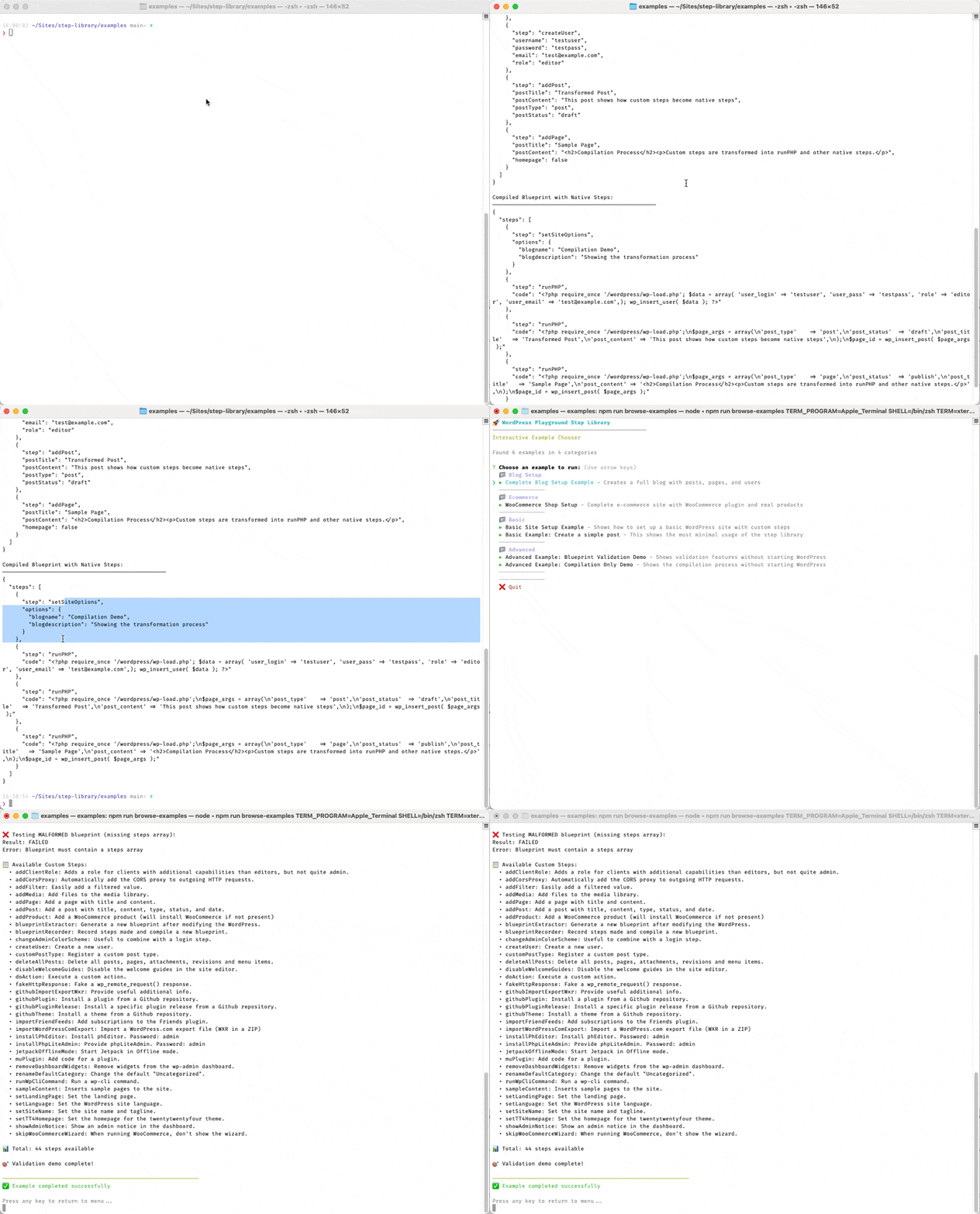
Finally, in the repo there are [a number of examples](https://github.com/akirk/playground-step-library/tree/main/examples) that you can browse and I created a little screen recording of a few of them:
Happy coding!, NPM Install Playground-Step-Library, kirk.at, 01k4fqa5h9mpvbys7sd3egxmte.