Note-Taking Strategy 2023

## Metadata
- Author: [[Charl P. Botha]]
- Full Title: Note-Taking Strategy 2023
- Category: #articles
- Document Note: related to the document.
Abstract:
This document provides a comprehensive overview on note-taking strategies for the year 2023. It examines the current state of note-taking in the digital age, including the advantages of digital note-taking and the challenges of staying organized in a world of digital distraction. It then outlines a series of strategies to help students and professionals alike to develop more effective and efficient note-taking habits. The strategies include breaking down complex ideas into smaller chunks, using visual cues to help create a mental image, and using technology to create an effective note-taking system. The document also provides tips on how to review and use notes to help maximize learning and recall. Finally, it provides some thought-provoking questions to consider when developing a note-taking strategy.
Main Points:
-Digital note-taking is the current standard, with advantages such as searchability, portability, and ease of collaboration.
-However, digital note-taking also poses challenges such as distraction, lack of organization, and difficulty in maintaining focus.
-To address these issues, the document outlines a series of strategies for effective note-taking:
-Breaking down complex ideas into smaller chunks
-Using visual cues to help create a mental image
-Using technology to create an effective note-taking system
-Reviewing and using notes to maximize learning and recall
Paraphrases:
Paragraph 1:
In the digital age, note-taking has become increasingly popular due to its convenience, portability, and ease of collaboration. With the right tools and strategies, note-taking can be an effective way to capture and organize ideas.
Paraphrase 1:
In the modern era, note-taking has become a popular practice due to its accessibility, mobility, and ability to be shared with others. With the right tools and approaches, note-taking can be an efficient way to record and arrange thoughts.
Paragraph 2:
When taking notes, it is important to break down complex ideas into smaller chunks so that they are easier to remember. Visual cues such as pictures, diagrams, or flowcharts can be used to help create a mental image that can be used to better recall information.
Paraphrase 2:
When making notes, it is essential to divide complex concepts into more manageable pieces so that they can be more easily remembered. Visual aids like images, diagrams, or flow charts can be used
---
---
tags:
- #personal-knowledge-management
- #orgmode
- #emacs
- #obsidian
- #workflows
- #productivity
- #onedevicesync
- #filesnotapps
Author: Charl P. Botha
Source: Personal blog article
Reference: https://cpbotha.net/2023/04/11/note-taking-strategy-2023/
date created: 2025-08-21 00:00
---
# Title: Note-taking strategy 2023
## Table of Contents:
- [🔭 Overview](#-overview)
- [🧩 Requirements & Principles](#-requirements--principles)
- [🧠 Emacs + Org-mode + Org-roam](#-emacs--org-mode--org-roam)
- [📅 Monthly Journals & Reviews](#-monthly-journals--reviews)
- [🗓️ Org-agenda](#️-org-agenda)
- [📚 Core Notes Database](#-core-notes-database)
- [📁 Projects & Areas](#-projects--areas)
- [📧 Email Linking](#-email-linking)
- [📱 Mobile Workflow](#-mobile-workflow)
- [🔁 SyncThing & Local-first](#-syncthing--local-first)
- [🗺️ Obsidian Vault for Mobile Access](#️-obsidian-vault-for-mobile-access)
- [☁️ OneDrive vs Dropbox](#️-onedrive-vs-dropbox)
- [🧰 braindump4000](#-braindump4000)
- [🧾 Reproducible Filing + PARA + Johnny.Decimal](#-reproducible-filing--para--johnnydecimal)
- [📝 Summary](#-summary)
- [📖 Main Content](#-main-content)
- [🗒️ Notes](#-notes)
- [📖 References](#-references)
- [🗣️ Paraphrase](#-paraphrase)
- [📰 Newsletter](#-newsletter)
- [✅ Action Items (DevRel/OSPO alignment)](#-action-items-devrelospo-alignment)
- [🧪 Hypotheses](#-hypotheses)
- [📊 Methodology](#-methodology)
- [❓ Questions](#-questions)
- [🔮 Future Research](#-future-research)
- [💡 Implications](#-implications)
- [🧠 Learning Styles Assessment](#-learning-styles-assessment)
- [📊 Accessibility Assessment](#-accessibility-assessment)
- [🌍 DEIB Assessment](#-deib-assessment)
- [✅ Logical validity](#-logical-validity)
- [🎯 Conclusion](#-conclusion)
### References:
- Charl P. Botha, “Note-taking strategy 2023” — https://cpbotha.net/2023/04/11/note-taking-strategy-2023/
- Related: PARA method; Johnny.Decimal; Org-mode; Org-roam; SyncThing; OneDrive; Obsidian; Zotero; mu4e; ripgrep
## 📝 Summary:
The article documents the author’s 2023 personal knowledge management system centered on Emacs, Org-mode, and Org-roam, with a strong local-first, files-not-apps philosophy. Key pillars include fast capture, robust retrieval, reproducible filing, monthly journals with enforced review and “kill your darlings,” dynamic task views via org-agenda, and cross-platform access via SyncThing and an Obsidian mirror (braindump4000). OneDrive replaces Dropbox for cost/ecosystem reasons; email is deeply linked via message:// URIs. The system balances structured project/area files with a densely linked notes graph, optimized for longevity and serendipity.
## 📖 Main Content:
The system is designed around two core characteristics: a single search interface to “find everything ever stored,” and keeping canonical sources as plain files on local drives, synced via commodity services. Functionally, it must support fast capture, project/task tracking, precise retrieval, and serendipitous resurfacing.
Emacs + Org-mode is the nexus. Org-roam transforms the corpus into a linked exocortex, while org-agenda aggregates tasks across curated files. Monthly journals act as working logs, day planners, and review checkpoints; the manual carry-over of tasks enforces a curation ritual to cancel stale commitments. Project/Area files mirror the journal pattern. The core database spans thousands of Org files (and a few Markdown via md-roam), with ripgrep-based custom search. Email integration uses universal message:// links working across clients (mu4e, FastMail, previously macOS Mail).
Mobile access hinges on SyncThing (Möbius Sync on iPhone) to keep full local copies and an Obsidian Vault generated by braindump4000, enabling rapid retrieval and image rendering in apps like PlainOrg and 1Writer. For web capture, the flow uses Inoreader/Mastodon/Reddit, PrintFriendly PDFs, and Microsoft Lens for scans; saved PDFs land in a predictable structure applying PARA/Johnny.Decimal concepts.
The author migrated from Dropbox to OneDrive for cost and ecosystem reasons, accepting slower sync but ensuring ownership and portability of files. Closing reflections emphasize Emacs’s shapeability and the compounding value of a stable, evolving system.
### 🗒️ Notes
- High-level requirements
- Fast capture on desktop/mobile
- Project/task tracking with metadata
- Fast, accurate retrieval; serendipity via linking/search
- Single search interface across everything
- Canonical local files; sync vendor-agnostic
- Core stack
- Emacs + Org-mode + Org-roam as the hub
- Ripgrep-based search integrations
- Org-agenda with org-super-agenda grouping
- Data model and structure
- Thousands of interlinked notes
- Monthly journals: day planning template, morning review, clocking, blog-ready headings
- Manual carry-over monthly enforces review (“kill your darlings” → CANC older tasks)
- Project/Area files with Tasks + datetree
- Email linking
- message://message-id links portable across mu4e/FastMail/macOS Mail
- Links attached to tasks/notes for quick context retrieval
- Mobile workflow
- Obsidian Vault mirror via braindump4000 for fast retrieval
- PlainOrg and 1Writer for light editing and previews
- Capture: InoReader, Mastodon, Reddit → PDFs via Print Friendly; scans via Lens
- Siri shortcut to inbox-mobile.org; local-first sync via SyncThing
- Sync and storage
- OneDrive for sync/search (cheaper, good enough); Dropbox noted as faster/solid historically
- SyncThing + Möbius Sync keep full local copies on phone
- Filing philosophy
- Reproducible, deterministic placement rules
- PARA influence + modified Johnny.Decimal for Areas
- PDFs of web pages (JBOP) kept locally for durability and anno
- Summary: The author discusses their evolved note-taking system that now focuses more on personal knowledge management than simple note-taking. The system includes interlinked notes, saved articles, project and task tracking, and a reproducible digital filing system. They use tools like Org mode, org-roam, and Obsidian to manage their notes efficiently across desktop and mobile devices.
- URL: https://cpbotha.net/2023/04/11/note-taking-strategy-2023/
[](https://cpbotha.net/2023/04/11/note-taking-strategy-2023/images/my_personal_knowledge_management_strategy_2022/emacs-user-dalle.jpg)
I wrote about my note-taking approach for [the first time in 2016](https://cpbotha.net/2016/01/05/note-taking-strategy-early-2016/) (read for fun), and [then pretty expansively about its evolved version in 2019](https://cpbotha.net/2019/09/21/note-taking-strategy-2019/).
In spite of the title of these posts, already in 2019 it had become more a system for *personal knowledge management* than just for note-taking.
It is now again three years later (3.5 to be slightly more accurate), and the system has continued on its path of steady evolution.
It currently contains thousands of interlinked notes, as well as hundreds of saved articles and web-pages. It also tracks of all of my projects and tasks, both work and personal.
The purpose of this post is to document the *current* state of the system. You don’t need any prior knowledge from the other posts; this post should be self-contained.
#### High level overview
The system has to satisfy the following functional requirements:
1. Fast capture of any information on desktop and mobile, including free-form notes, web-pages and other media.
2. Tracking of projects, tasks and metadata such as due dates and schedules.
3. Fast and accurate retrieval of any information relevant to the current situation.
4. Potentially serendipitous surfacing of assets that might be relevant to the main search focus, for example through linking or through search.
The system should have the following two characteristics:
1. There should be a single search interface that can in theory find everything that was ever stored in the system. This is to prevent the situation where you urgently need some document and can’t remember into *which* notes app you stored it so many years ago. (True story)
2. As far as possible, the canonical source of everything should be plain old files on local drives, and be synchronized with a tool like Dropbox or OneDrive. In this way, the system is robust to the whims of a note-taking SaaS. The litmus test for this is that you are able to change out sync services and still remain with a working system. (True story)
At the highest level, my system, which satisfies the requirements and characteristics above, consists of the following components:
Emacs with Org-mode and Org-roam This is the nexus of the whole thing. It tracks projects, tasks and notes, spread out over just over a thousand org-files, each of them containing one or more (org-roam) notes, all linked together. Mobile device for capturing and access In my case that’s an iPhone with a number of additional apps for the capturing into and accessing of my notes database. See figure below, and explanation further down. Reproducible digital filing system This just refers to the fact that over the years I’ve evolved a recipe for “where to put that file” which is reproducible in the sense that if I receive the same file a year later, my brain will automatically follow the same logic and end up in the same spot. Over the past year or two, I have started applying aspects of the [PARA method](https://fortelabs.com/blog/para/) to a subset of my files, and a heavily modified [Johnny•Decimal](https://johnnydecimal.com/) to the “areas” in PARA. I am happy with the results so far. PDF’d web-pages and articles (JBOP) Locally stored PDF versions of reference-worthy web-pages and articles can be annotated, linked and shared, and they remain usable long after the source website has disappeared. Academic articles managed with Zotero Zotero is one of the best ways to manage all of your academic literature and metadata. As if that’s not enough, it’s fully open source. Since I’m doing less academia these days, this is seeing minimal use. OneDrive (previously Dropbox) for cloud synchronization and searching This infrastructural component is critical. It ensures that all of the files are synced and available on all devices that I use, and, quite importantly, it indexes everything so that I can interactively search through the contents of hundreds of thousands of files. There are some work-arounds and caveats which I will get into further down. SyncThing Having a local version of my whole notes database, both in its native Org format as well as an automatically updated Obsidian Vault version, gives the best experience on mobile.
The following figure is a different view of the Rube Goldberg machine described above:
[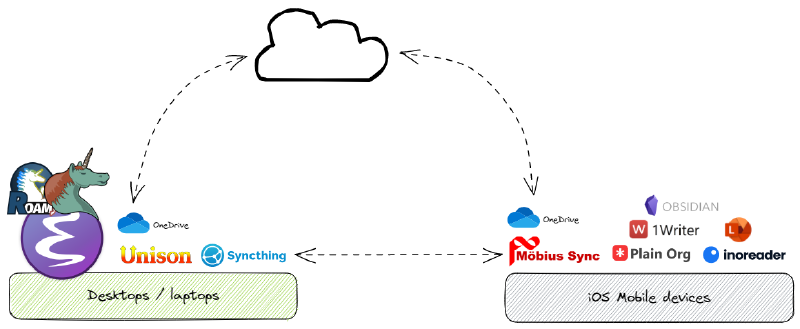](https://cpbotha.net/2023/04/11/note-taking-strategy-2023/images/my_personal_knowledge_management_strategy_2022/cpbotha-pkm-2023.excalidraw.png)Figure 1: Selected apps forming my note-taking approach on desktop and mobile.
#### Some of the components in more detail
##### Emacs with Org-mode and Org-roam
At the **heart of my knowledge management system**, let’s call it `pkb4000`, is [Emacs](https://www.gnu.org/software/emacs/), together with the venerable [Org mode](https://orgmode.org/) package, its more recent augmentation [Org-roam](https://www.orgroam.com/), and a whole zoo of finely tuned packages.
Org mode, or “Your life in plaintext”, is a powerful text-file-based system for managing notes, task lists, projects and even authoring documents.
Once you get used to the programmable flexibility that it and especially Emacs itself are able to offer, you will find it hard to go back to any conventional system.
After some years of trial and error, I have settled on using the following main Org-mode sub-components:
monthly journal files a diary-like setup where I try to document every single day, and where I keep track of personal tasks and projects. notes database consisting of hundreds of interlinked notes about people, things and tricks. Thanks to the magic of org roam, notes can live as files or as headings in a month or project file. project / area of responsibility files where each org-file contains or links all information related to a specific project, product or area of responsibility. org-agenda This Org mode feature dynamically creates a view of all of my projects and tasks, extracted from a subset of the files mentioned above.
###### Monthly journal files
In my main Org mode directory, I have a subdirectory named `journals`, which contains a directory for each year.
Each of these year directories contains an `.org` file for each month, so we would have for example `journals/2022/2022-06-Jun.org`.
Each month file follows the structure showed in the following redacted version of my current journal file:
[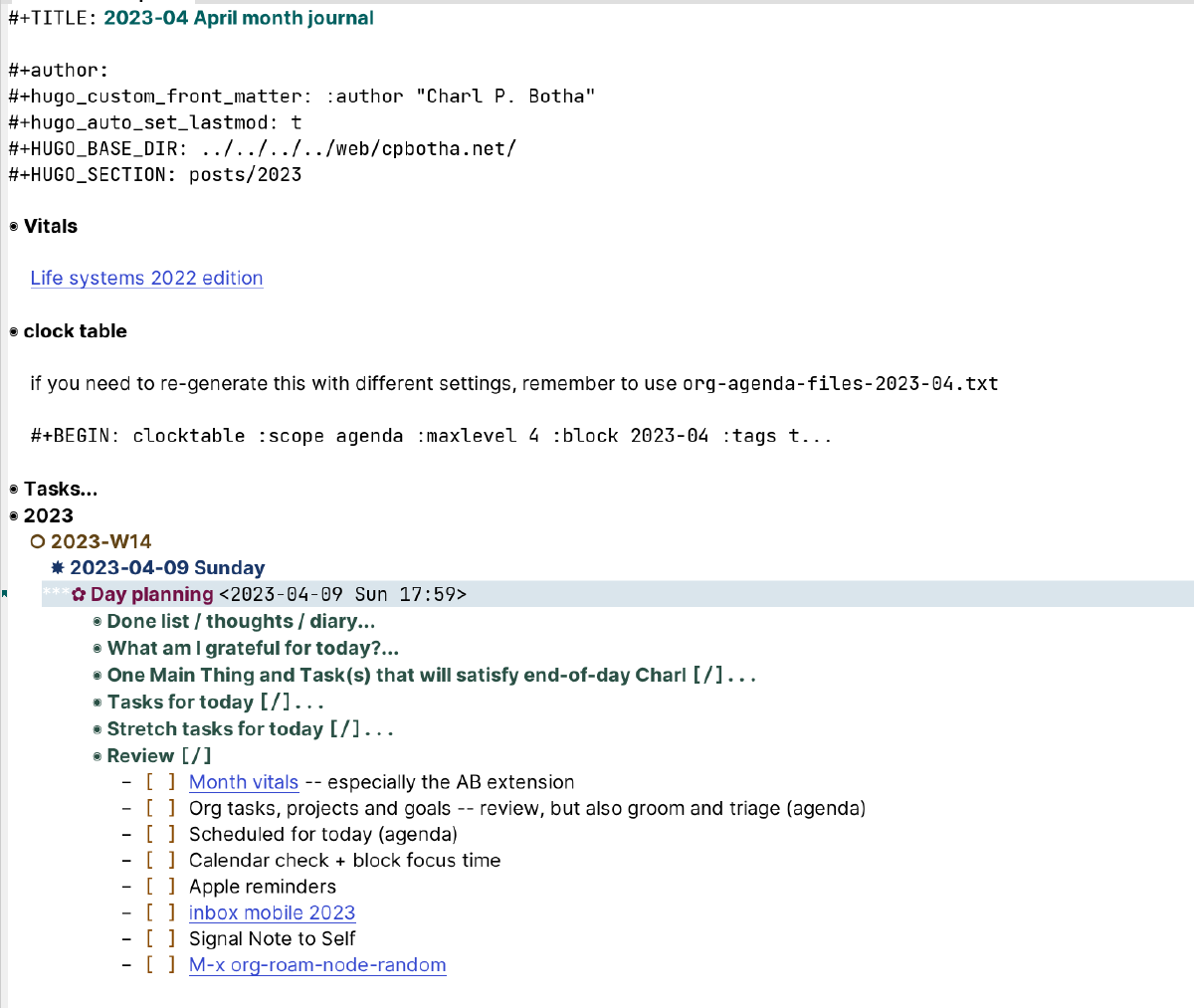](https://cpbotha.net/2023/04/11/note-taking-strategy-2023/images/my_personal_knowledge_management_strategy_2022/2023-04-09_19-28-05_screenshot.png)Figure 2: A simplified example of a month journal file
Aside from the Hugo properties which mean I’m ready to publish any heading as a blog post (this is usually how [WHVs](https://cpbotha.net/categories/weekly-head-voices/) are done), my Life Systems 2022 aka personal philosophy reminder, and the clock table where I get a complete break-down of all work-time spent, I would like to mention the following two aspects of the month journal.
* Day planning
When I start the day, I instantiate a new org-capture “day planning” template by pressing `C-c c p`.
This creates the *Day planning* subsection with all of its subsections and checklists. As you will see, this guides me through the morning review, which in turn has me check each of those additional sources of incoming information and tasks.
New bits of information are filed into their correct place, whilst the org-agenda-powered task review shows me a list of tasks, extracted from the month file and the list of current project files, so that I can decide which ones should be taken on.
I list tasks which should preferably be taken care of today under *Tasks for today*, whilst any really high-value high-satisfaction tasks go under *One Main Thing and Task(s) that will satisfy end-of-day Charl*.
* Kill your darlings (during the monthly review).
I’ve mentioned this before, but it’s just an important aspect of my “system” that I would like to mention it again.
When I still used primitive task management systems such as **everything else** that’s not Org mode, the collection of more mature tasks would soon grow out of control.
However, because I create a new Org mode file for every month, I have to copy across manually any tasks that have not been completed yet.
“WHY IS THAT NOT AUTOMATED YET?!” you are probably thinking.
Well, the advantage of having to copy each task over manually is that it is the ideal opportunity to evaluate the task and ask some hard questions as to its continued relevance…
When a task gets too old, I will often make the decision to change its status to `CANC` (for cancelled), sometimes with the reason for the cancellation explained in the task body, and then just leave it there in the old month file.
With most of these task systems, regular reviews are of crucial importance. The monthly start-over is a great, almost enforced, opportunity for review, as is the morning routine when I instantiate the day planner template.
###### Org-agenda
Org-agenda is a standard Org mode feature which extracts, filters and then shows a dynamic summary of projects and tasks from an arbitrary subset of org files that you specify.
In my case, there are currently 15 org files that are consulted. This collection evolves over time as projects and areas of responsibility come and go.
I use [org-super-agenda](https://github.com/alphapapa/org-super-agenda) for additional filtering and grouping, so that on an average weekend day my agenda looks like this:
[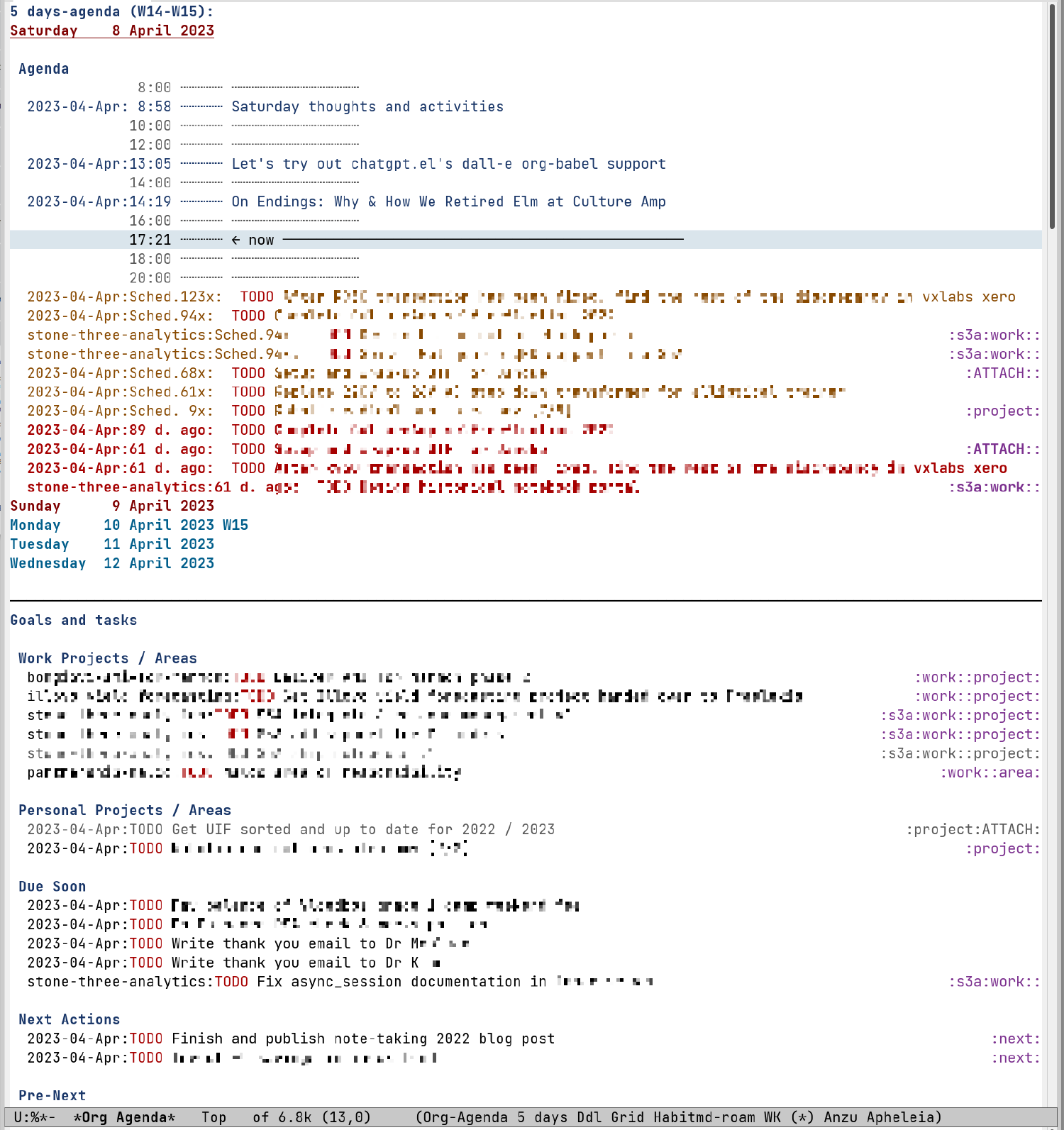](https://cpbotha.net/2023/04/11/note-taking-strategy-2023/images/my_personal_knowledge_management_strategy_2022/2023-04-08_17-22-50_screenshot.png)Figure 3: Semi-anonymised screenshot of my org-agenda on 2023-04-09
One noteworthy extra here is that I have two lists of respectively my highest level work and personal projects or areas of responsibility.
Sometimes when I get lost in the weeds, it helps to pull back to that level to get a summary of *everything*.
Also, it really helped me to distinguish between projects (something with a clear end and expected end date) vs areas of responsibility, something that could continue indefinitely.
This distinction was inspired by the [PARA method](https://fortelabs.com/blog/para/), which has also influenced how I organise a large subset of my filesystem.
On my better days, I manage to start work with a few minutes of active task and project review (see [Day planning](https://cpbotha.net/2023/04/11/note-taking-strategy-2023/#day-planning)), and then Org agenda is incredibly useful.
###### Core notes database
With “database” I of course refer to just over a thousand org (and a few markdown, which form part of my org-roam database via [my md-roam changes](https://vxlabs.com/2022/09/24/modify-md-roam-for-frontmatter-less-operation/)) files, most of which find themselves in the top-level `pkb4000/pages` directory (for logseq compatibility, story for a different time), adjacent to the `journals` directory containing all of the monthly journal files.
There are files on various `rsync` and `ffmpeg` invocations, files on programming languages, software tools, note-taking strategies, personal information on each of my kids, and much more.
Org mode enables me to combine document structure, math, vector and bitmap images and executable source code in many different languages.
I have configured my Emacs (where by “configured” I mean “coded up the emacs lisp for”) to invoke ripgrep on different subsets of my notes database, and to proffer up the results in different ways.
I can usually find anything that went in to this database at any point.
What I really like, is also being able to tell you on which day, and during which hour, I learned this or that, or experimented with something or the other.
On [February 26, 2020, a commenter on the 2019 post asked if I’d taken a look at org-roam](https://cpbotha.net/2019/09/21/note-taking-strategy-2019/#isso-2654), a question to which my answer at that point was that I had looked but not really gotten into it yet.
I just checked my notes (an `org-roam` buffer with backlinks, which sort of gives away the story), and it turns out that a week later on March 3 of 2020 I indeed got `org-roam` configured and running.
From that point on, it pretty much took over the [core notes database](https://cpbotha.net/2019/09/21/note-taking-strategy-2019/#core-notes-database) function of my PKM.
Fortunately `org-roam` relies as much as possible on standard Org-mode functionality while adding all of the instantaneous note searching, creation and linking that has succeeded in drastically upgrading my Org-mode implementation to a increasingly densely linked, tagged and far more useful exocortex.
Although I *can* use [`org-roam-ui`](https://github.com/org-roam/org-roam-ui) to visualize graphically the linkage in my notes database, as shown below, I don’t often do it. However, I *do* really often follow internal links around, so I do my best to create them when and where I can.
[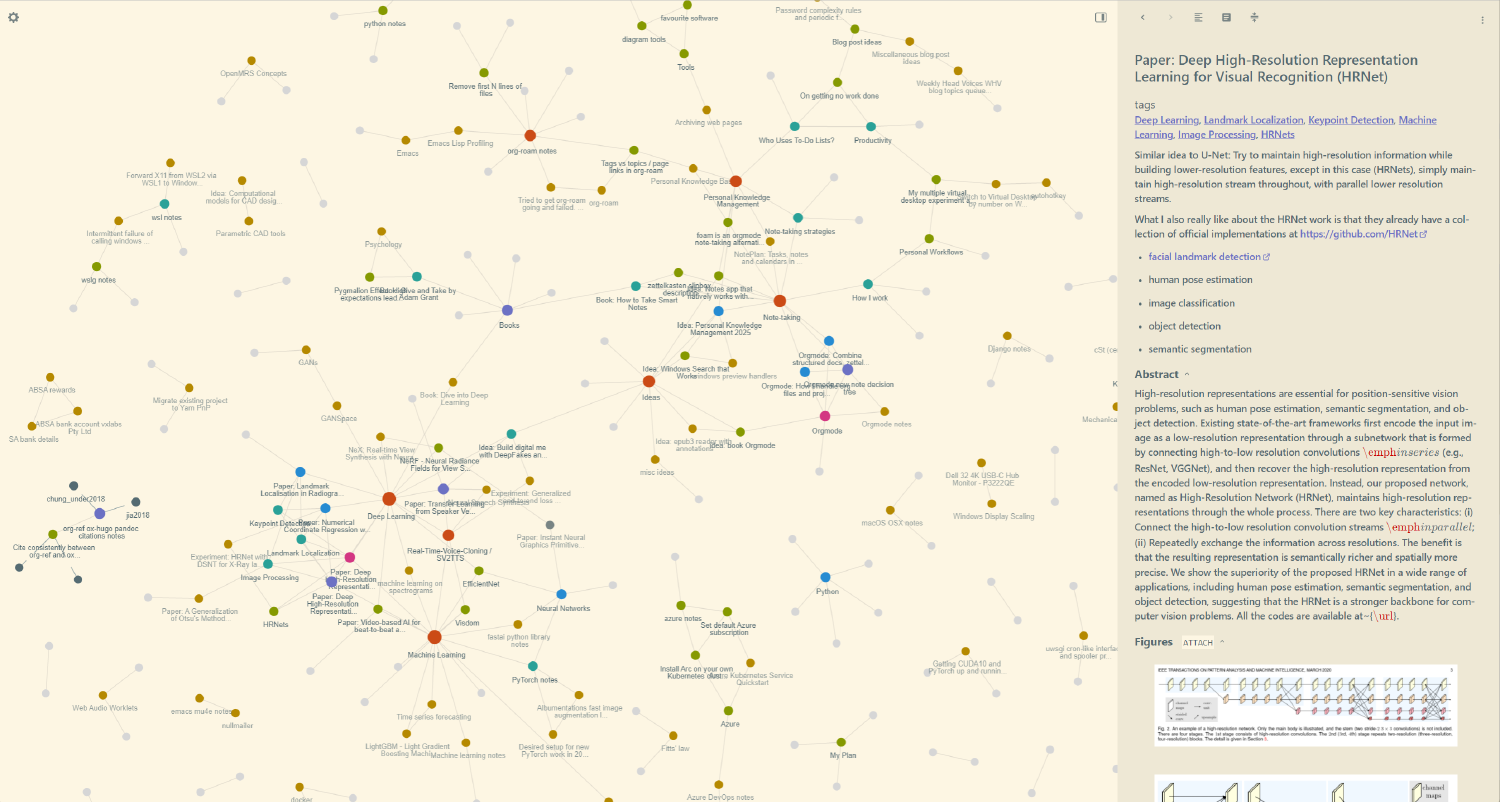](https://cpbotha.net/2023/04/11/note-taking-strategy-2023/images/Personal_knowledge_management_strategy_2022/2022-02-26_22-16-07_screenshot.png)Figure 4: A screenshot of org-roam-ui showing a part of my knowledge base in February of 2022.
I really appreciate and use the flexibility that org-roam offers in having notes either be complete files, or headings within larger files.
###### Project files
Work and personal projects, and areas of responsibility, each get their own Org file. Some projects even get a whole directory to themselves, in cases where the project will have many more files than just the main Org file.
Each project / area org file has its own `Tasks` and datetree sections, similar to the month journal.
###### Email linking
An important part of knowledge and task management is one’s emails.
Although I currently prefer processing my email using [`mu4e`](https://cpbotha.net/2019/07/17/weekly-head-voices-173-i-know/#would-you-like-some-more-emacs-with-that-email), an email client which lives inside of Emacs, I have used other tools in the past, and will probably use new tools in the future.
Even at this moment I alternate between `mu4e` and the [FastMail](https://cpbotha.net/2016/08/06/moving-12-years-of-email-from-gmail-to-fastmail/) web-interface.
Long story short, I have it setup so that I can easily convert any email in `mu4e` into a universal `message://message-id` link to be integrated with a new task or note entry.
When I later open that link using a shortcut, I have programmed it so that `mu4e` will open the relevant email if it is active, or the `FastMail` webmail when it is not. From here I can either review the email to see what the associated task requires, or respond to it, if the task has been completed.
Some of these `message://` links were created using macOS mail and they still work. In future, if I add a new mail client to the mix, I will still be able to jump to specific old emails, no matter where they find themselves inside of my FastMail mailboxes.
##### Mobile
My workflow on mobile can be summarised as:
* Rapidly find info that I need from my notes using the converted Obsidian Vault (see below).
* Very occasionally I edit org files using [PlainOrg](https://plainorg.com/). Once this app gets the [often-requested directory search function](https://www.reddit.com/r/plainorg/comments/rfivtn/feature_request_search_directory/), I hope to use it more for retrieval as well.
* Keep up to date with online material via paid-for [InoReader](https://www.inoreader.com/) (RSS), [Mastodon](https://emacs.ch/@cpbotha), and reddit (tiny “argh” there).
* Either save interesting articles as PDF into `03-Resources/refs/YEAR` via the OneDrive Files integration, or send the link into `pkb4000/journals/YEAR/inbox-mobile.org` via [my Siri shortcut](https://orgmode-exocortex.com/2020/04/30/voice-capture-org-mode-notes-and-more-using-siri-shortcuts-on-ios/) automation, slightly modified to write to the local org file which will be synced via SyncThing.
+ On mobile, I strongly recommend the [Print Friendly & PDF bookmarklet](https://www.printfriendly.com/extensions/safari) to strip out all of the cruft, yielding PDFs that focus on the content.
* Scan and OCR any invoices and other physical documents to PDF using [Microsoft Lens](https://support.microsoft.com/en-us/office/microsoft-lens-for-ios-fbdca5f4-1b1b-4391-a931-dc1c2582397b). Previously I used the Dropbox scan app for this.
* There are a small number of markdown files which I mostly need to edit on mobile. [1writer](https://1writerapp.com/) is great for this, thanks to preview, directory search, favourited directories and files.
* I keep a small subset of ephemeral notes (think loyalty cards, shopping lists) in Apple Notes because it’s still the quickest to open up to the note that I need, almost in one action.
###### SyncThing
An important improvement here over my 2019 setup is the addition of the paid-for [Möbius Sync](https://www.mobiussync.com/) iPhone app in order to keep full copies of my read/write org database and its read-only Obsidian Vault version (see below) on the phone.
Apps like [PlainOrg](https://plainorg.com/) and [1writer](https://1writerapp.com/) work really well, even rendering image attachments (which I use often), when you have a fully local copy of the files.
###### Obsidian for efficient notes access on mobile
Recently, inspired by Jethro Kuan’s braindump scripts, I created [braindump4000](https://github.com/cpbotha/braindump4000), which I have hooked up to a cronjob to convert (incrementally of course) my whole org mode database into an Obsidian Vault.
This vault is synced to the correct location on my phone using the Möbius Sync SyncThing app so that I can use the Obsidian mobile app to access my whole database.
Due to much better UX, this has (fortunately) almost completely replaced the use of [my slightly strange system for converting my org database into docx files](https://vxlabs.com/2021/09/29/convert-org-mode-files-to-docx-with-cmake-and-pandoc-for-mobile-accessibility/), although said strange system is still useful to ensure that OneDrive’s lacklustre search is able to find notes when I do a global search.
#### Noteworthy changes since the 2019 version
##### Replacing Dropbox with OneDrive
After more than a decade, I switched out Dropbox for OneDrive. You can [read more about the switch in this post](https://cpbotha.net/2023/01/01/the-2022-to-2023-transition-post/#byeeeeee-dropbox), but in short:
* I **really** enjoyed using Dropbox Paper, but it meant I had a bunch of info stuck in the Dropbox cloud (not synced file on disk).
* Dropbox were really dragging their feet migrating us loyal customers to the 2020 Paper version, and they were being *frustratingly* opaque about it. This was a reminder to take and maintain control of one’s own files.
* For the record, Dropbox’s syncing is substantially faster (lower latency) than OneDrive, and, although I have not yet had any issues with OneDrive, Dropbox has been extremely solid for me for over a decade, in spite of my over half a million files, [including many active git repos](https://cpbotha.net/2022/11/11/weekly-head-voices-248-oh-snap/#yes-you-can-keep-your-checked-out-source-code-in-dropbox-or-onedrive).
* However, I was already paying $80 / year for Microsoft 365 Family, which includes Office software licenses for the whole family (initially the main reason to get it) and 6 x 1 TB OneDrive accounts vs. a minimum of $120 / year for Dropbox for me only… Currently, the difference in practical functioning does not justify that extra money, plus that I felt I had to vote with my wallet re the frustrating Dropbox Paper situation.
* On the bright side, being able to switch out the main cloud sync layer of my system ensures that it’s just a sync layer, and not sync-layer plus services which subtly lock you in.
##### org-roam for interlinked atomic notes
I have already written about this, but org-roam more than deserves a place on this list for the drastic way in which it improved how I take and use notes.
##### braindump4000: Obsidian to access notes on the go
Over the years I have attempted to compensate for the lack of a worthy Emacs representative on the iPhone first by [importing my database to Apple Notes](https://vxlabs.com/2018/10/29/importing-orgmode-notes-into-apple-notes/) (updates are very tricky), then through [a bulk docx conversion](https://vxlabs.com/2021/09/29/convert-org-mode-files-to-docx-with-cmake-and-pandoc-for-mobile-accessibility/) (klunky and ugly, but updates work, and I *can* find stuff in a pinch) and now finally using [braindump4000](https://github.com/cpbotha/braindump4000), in obsidian mode, to convert to and update an Obsidian Vault which is synced to my phone via SyncThing.
Note that you can also use braindump4000 to generate a Hugo website with all of your notes, which was initially the main motivation to build it!
#### Closing thoughts
One of the aspects which has convincingly remained the same in my whole personal knowledge management setup is…
Emacs.
Over the years I have seen, and sometimes been thoroughly tempted, by all of the brilliant new tools that have gone by: Roam, Notion, Dendron, LogSeq, Obsidian and many more.
However, the power of a tool which can be so thoroughly shaped as Emacs should not be under-estimated.
The more I use it, the more I learn how to make it sing in new and interesting ways.
The other advantage of this constant in particular, is that the utility of a knowledge base can grow tremendously when you can consistently work on that same system, accruing knowledge whilst all the while evolving the system itself to remain useful in an ever-changing environment., Note-Taking Strategy 2023, Charl P. Botha, 01gy7vadpma1qzq8n38e9sy4c0.