Patterns to Avoid: Disappearing Toast Notifications
🔗 **Source:** [Patterns to Avoid: Disappearing Toast Notifications](https://wpaccessibility.org/docs/topics/design/avoid/toasts/)
> [!note]+ Document Notes
> > [!info] Provenance
> > **Analysis generated:** 2026-08-27 by Claude (Opus 5) via the `readwise-deep-read` pipeline.
> > **Source:** wpaccessibility.org — https://wpaccessibility.org/docs/topics/design/avoid/toasts/
> > **Published:** 2026-08-21 · **Length:** 882 words · article (normative guidance document, not news)
> > **Byline:** **Absent from the captured markup.** Reader's `author` field is the bare domain. `[INFERENCE]` The sample code uses the `wp-a11y` text domain and a `wpa11y_` function prefix, and the site is structured as a WordPress accessibility documentation handbook — consistent with WordPress Accessibility Team conventions. **Inference from code conventions, not a byline.** Not asserted as fact, and no individual author is named below.
> > **Register key used throughout:** `[STATED]` author-stated claim · `[EVIDENCE]` demonstrated evidence · `[INFERENCE]` reviewer inference · `[RECOMMEND]` reviewer recommendation.
> > **Coverage:** Full document retrieved and read (7,186 chars of HTML): 7 headings, 7 outbound links, 2 images, 1 blockquote, 2 `<pre>` blocks, 3 lists — all enumerated.
> > **Verification performed:** The document's PHP sample was **executed** against the attribute-building loop in `wp-includes/functions.php :: wp_get_admin_notice()` from a local **WordPress 7.0.2** checkout (`~/.wp-tests/wordpress`). Result recorded below under [Verified defect](#verified-defect-the-code-sample-does-not-do-what-its-own-docblock-says). This is the one claim here that is tested rather than reasoned.
> # 🏷️ Title: Patterns to avoid: Disappearing toast notifications
> ## 🧭 Table of Contents
> - [📝 Summary](#-summary)
> - [📖 Main Content](#-main-content)
> - [🗒️ Notes](#️-notes)
> - [📚 References](#-references)
> - [🗣️ Paraphrase](#️-paraphrase)
> - [📰 Newsletter](#-newsletter)
> - [✅ Action Items](#-action-items)
> - [🧪 Hypotheses](#-hypotheses)
> - [📊 Methodology](#-methodology)
> - [❓ Questions](#-questions)
> - [🔮 Future Research](#-future-research)
> - [💡 Implications](#-implications)
> - [🧠 Learning Styles Assessment](#-learning-styles-assessment)
> - [📊 Accessibility Assessment](#-accessibility-assessment)
> - [🌍 DEIB Assessment](#-deib-assessment)
> - [✅ Logical Validity](#-logical-validity)
> - [🛡️ DARVO Analysis](#-darvo-analysis)
> - [🎯 Conclusion](#-conclusion)
> ### 🔗 References
> - [Adrian Roselli — Defining 'Toast' Messages](https://adrianroselli.com/2020/01/defining-toast-messages.html)
> - [WCAG 2.2 Quick Reference — Reflow (1.4.10)](https://www.w3.org/WAI/WCAG22/quickref/#reflow)
> - [WCAG 2.2 Quick Reference — Resize Text (1.4.4)](https://www.w3.org/WAI/WCAG22/quickref/#resize-text)
> - [wpaccessibility.org — Feedback on dynamic changes](https://wpaccessibility.org/docs/topics/code/dynamic-changes/)
> - [WordPress developer reference — `admin_notices`](https://developer.wordpress.org/reference/hooks/admin_notices/)
> - [Gutenberg — `Notice` component](https://github.com/WordPress/gutenberg/tree/trunk/packages/components/src/notice)
> - [Gutenberg — `Snackbar` component](https://github.com/WordPress/gutenberg/tree/trunk/packages/components/src/snackbar)
> ## 📝 Summary
> **What it is.** A normative "patterns to avoid" guidance page. It distinguishes **banner** (multi-paragraph, top of screen, persists until dismissed), **snackbar** (short, bottom or near focus, "preferably stays on screen until dismissed"), and **toast** (short, auto-disappears after a few seconds); argues against the third; and supplies WordPress-specific replacements.
> **The argument, and it is a good one.** `[STATED]` Six concrete failure modes for auto-dismissing toasts: the user must *notice* it, must have *time to read* it, cannot *re-read* it, may be looking somewhere else entirely, may lose it outside the viewport when zoomed, and gets nothing at all if it isn't announced to assistive tech. `[EVIDENCE]` The killer example is WordPress's own: **the Publish button is upper-right; its toast fires lower-left.** That is a real, checkable, present-tense defect in the software the audience ships on, and naming it is the page's strongest move.
> **Why it matters.** `[INFERENCE]` This is a document people will **cite in audits and code review**, which raises the bar on it: guidance is load-bearing in a way commentary is not. Judged at that bar it is largely right, practically useful, and carries **one verified defect and three gaps** that matter for exactly that use.
> **Risks and tradeoffs.** `[EVIDENCE]` **The PHP sample does not produce the markup its own docblock promises.** Executed against WP 7.0.2, `'attributes' => array( 'role', 'alert' )` emits `<div class="notice notice-error" role alert>` — an empty `role` and a junk `alert` attribute — not `role="alert"`. It fails silently: no error, no warning, correct-looking output, and the announcement simply never happens.
> **Bottom line.** `[INFERENCE]` Adopt the guidance; **do not copy the code.** And before citing this page in an audit finding, supply the WCAG mapping it omits — because the success criterion a reader will reach for first, **4.1.3 Status Messages, is *satisfied* by a properly marked-up toast that vanishes.** The real argument is 2.2.1 Timing Adjustable, and the page never makes it.
> ## 📖 Main Content
> ### Verified defect: the code sample does not do what its own docblock says
> The page offers this as its `admin_notices` example, with a docblock reading `[STATED]` *"Output an admin notice with `role="alert"`, so it will be announced by assistive technology."*
> ```php
> wp_admin_notice(
> $message,
> array(
> 'type' => 'error',
> 'attributes' => array( 'role', 'alert' ),
> )
> );
> ```
> `[EVIDENCE]` `array( 'role', 'alert' )` is a **numerically indexed** array — keys `0` and `1`, values `'role'` and `'alert'` — where core expects `attr => value` pairs. The relevant loop in `wp-includes/functions.php :: wp_get_admin_notice()` (WP 7.0.2) is:
> ```php
> foreach ( $args['attributes'] as $attr => $val ) {
> if ( is_bool( $val ) ) {
> $attributes .= $val ? ' ' . $attr : '';
> } elseif ( is_int( $attr ) ) {
> $attributes .= ' ' . esc_attr( trim( $val ) );
> } elseif ( $val ) {
> $attributes .= ' ' . $attr . '="' . esc_attr( trim( $val ) ) . '"';
> }
> }
> ```
> `[EVIDENCE]` Both keys are integers, so both hit the **second** branch and are emitted as bare valueless attributes. Executed output:
> ```html
> <!-- doc example: array( 'role', 'alert' ) -->
> <div class="notice notice-error" role alert><p>Your message will be output.</p></div>
> <!-- correct: array( 'role' => 'alert' ) -->
> <div class="notice notice-error" role="alert"><p>Your message will be output.</p></div>
> ```
> The fix is one character-pair: `array( 'role' => 'alert' )`.
> `[INFERENCE]` **The instructive part is why this survives.** Core's `is_int( $attr )` branch exists deliberately, to support valueless HTML attributes like `hidden` or `disabled` written as `array( 'hidden' )`. That legitimate feature is precisely what swallows the most common malformed-array mistake. A stricter function would have thrown a `_doing_it_wrong()` — as this same function *does* for a `type` containing spaces. **The API validates the argument that fails loudly and accepts the one that fails silently.**
> `[RECOMMEND]` This is a **detectable class**, not a one-off. Any `wp_admin_notice()` / `wp_get_admin_notice()` call whose `attributes` array has integer keys is almost certainly a bug, and it is greppable. Worth adding to the `wp-a11y-reviewer` agent as an explicit check, alongside the general rule: **flag any core API that accepts a malformed argument shape without complaint.** Silent-failure surfaces are where accessibility defects accumulate, because nothing in the toolchain ever objects.
> ### The deeper problem: even the corrected code is unreliable
> `[INFERENCE]` Fixing the array shape yields valid `role="alert"` markup — and still probably does not announce, for two reasons the page does not raise.
> **One: live regions announce *changes*, not initial content.** A region must exist in the DOM *before* its content changes for assistive tech to register and monitor it. `admin_notices` output is present in the **initial page HTML**, so there is no change to announce. Behaviou
There are different ways to dynamically provide a user with information. Methods might include using a banner, a snackbar, or a toast. What are the differences, and what is important to ensure all users get the same information?
#### Banners, snackbars, and toasts
What is the difference?
* A **banner** is a message of one or more paragraphs that appears on top of the screen and stays there until dismissed by the user. It can contain actions such as Close, Undo, or Retry, as well as links.
* A **snackbar** is a short message that appears at the bottom of the screen or close to the user’s focus and can contain one or more actions. A snackbar preferably stays on screen until dismissed by the user.
* A **toast** is a short message that appears on screen and disappears after a few seconds.
#### Accessibility concerns of toasts
In order to receive the message in a toast, the user must notice it appear on the screen and have enough time to read it.
Because a toast notification typically appears in a part of the page unrelated to where the user is interacting and disappears only for a few seconds, the user may not have **enough time** to notice it.
Chances are that the user is busy with another task on the page and misses the message altogether. Also, not everyone reads fast; the reader may see the message too late or doesn’t have enough time to read what it says.
The disappearing message cannot be read again; the information is lost after a few seconds.
**Example**: the ‘publish’ button in WordPress is in the upper right corner, but triggers a toast notification in the lower left corner. This distance increases the likelihood that users will miss the notification.
**Delaying** the disappearance of the message on hover or focus can help, but the user must know this is possible, and a keyboard user may not have enough time to tab to the toast before it disappears.
If a user is **zoomed in** the messages may fall outside the viewport or be overlapped by other elements.
Another concern is that **screen reader users** won’t receive the message at all if it isn’t announced using, for example, `aria-live="polite"` or `role="status"`.
Adrian Roselli wrote an extensive article [Defining ‘Toast’ Messages](https://adrianroselli.com/2020/01/defining-toast-messages.html) about its accessibility issues.
These are not only accessibility concerns but also usability issues.
> How many days of my life have I wasted in wait to get a confirmation for an action only to see in the corner of my eye on my 27-inch screen that a toast message has just disappeared?
>
> Please, for the love of kittens: Stop using toast messages. Thank you.
>
>
– Eric Eggert Mastodon
#### How to provide dynamic information
The best way to dynamically provide a user with information is to use a message component that stays on screen. Let the user close the status message manually or let it disappear when the user leaves the page or when it’s no longer valid.
A common pattern is to add messages to a region in a consistent place, for example, at the top of the screen, close to the previous user interaction, or, for form error messages, just above the form.
Test if the message stays visible when a user zooms in or enlarges the text by using [reflow](https://www.w3.org/WAI/WCAG22/quickref/#reflow) or [text only](https://www.w3.org/WAI/WCAG22/quickref/#resize-text).
Announce a dynamically generated message with, for example, `aria-live="polite"` or `role="status"` to inform the screen reader user too.
For WordPress core, you can use `wp.a11y.speak()` and for the Block editor `speak()` to announce the message. The topic [Feedback on dynamic changes](https://wpaccessibility.org/docs/topics/code/dynamic-changes/) provides you with more information on how to do this in WordPress.
Then you are ensured all users will notice the information and have time enough to read and even re-read it.
#### Summarized
Make sure that:
* The message always appears in a consistent and easy-to-discover position on the screen.
* The message stays on screen until the user dismisses it, or after a page reload.
* The message isn’t overlapped by other elements or falls outside the viewport when the user zooms in or enlarges the text.
* The message is announced by a screen reader.
#### Banners, snackbars, and toasts in WordPress code
WordPress core provides a few options for displaying dynamic messages; when you use these, test for the accessibility issues mentioned above first.
To print admin screen notices use: [do\_action( ‘admin\_notices’ )](https://developer.wordpress.org/reference/hooks/admin_notices/).
For example:
```
add_action( 'admin_notices', 'wpa11y_do_admin_notice' );
/**
* Output an admin notice with `role="alert"`,
* so it will be announced by assistive technology.
*/
function wpa11y_do_admin_notice() {
$message = __( 'Your message will be output.', 'wp-a11y' );
wp_admin_notice(
$message,
array(
'type' => 'error',
'attributes' => array( 'role', 'alert' ),
)
);
}
```
For Gutenberg:
* [Notice](https://github.com/WordPress/gutenberg/tree/trunk/packages/components/src/notice), to communicate prominent messages to the user.
* [Snackbar](https://github.com/WordPress/gutenberg/tree/trunk/packages/components/src/snackbar), to communicate low-priority, non-interruptive messages to the user. **Note**: set `explicitDismiss` to `true`.
##### Examples in WordPress of dynamic messages
###### Update a theme
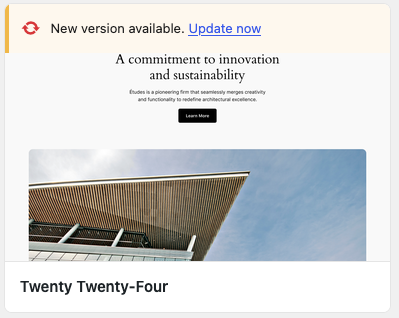
Updating themes in the WordPress Admin is done well; the new message is announced by a screen reader and is easy to spot.
Notification: New version available
After pressing the link “Update now”, the message is replaced by “Updated!”.
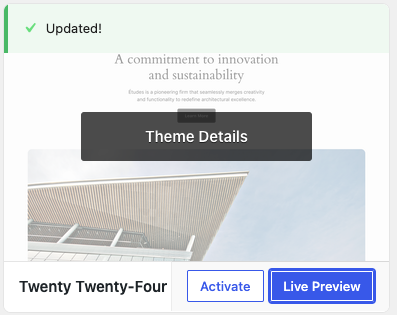Notification: Updated
The screen reader feedback is added to the `a11y-speak-polite` region in the HTML at the bottom of the page with aria-live=”polite”:
```
<div id="a11y-speak-polite" class="a11y-speak-region" style="position:absolute;margin:-1px;padding:0;height:1px;width:1px;overflow:hidden;clip-path:inset(50%);border:0;word-wrap:normal !important;" aria-live="polite" aria-relevant="additions text" aria-atomic="true">
Update completed successfully.
</div>
```, Patterns to Avoid: Disappearing Toast Notifications, wpaccessibility.org, 01m11dh2h9r58bh85c90eeeca9.