Personalization, Analytics and a/B Testing With Accelerate
## Metadata
- Author: [[YouTube]]
- Full Title: Personalization, Analytics and a/B Testing With Accelerate
- Category: #articles
- Document Tags: [[ab]] [[analytics]] [[personalization]] [[segmentation]] [[wordpress]]
- Summary: Personalization, Analytics and A/B testing with Accelerate
- URL: https://www.youtube.com/watch?v=F7N1GAf0dVw
Hello internet. I am Chris Reynolds, senior developer advocate at Pantheon. Today on the stream, we're going to be
talking about personalization inside WordPress. And to do that, I've got Joe Hoy on the stream today uh to talk about what Human Made's been working on for a while. Uh a plugin called Accelerate. Uh welcome to the stream, Joe. Joe is the chief technology officer of Human Made, I guess I should say. Uh and yeah, tell tell us about yourself and what you've been working on. >> Thanks, Chris. uh excited to be on um tout our our latest wear um which is our accelerate plug-in. Um but I guess more
generally uh I guess I've been working with WordPress for 15 16 17 years something like that. Uh obviously human's whole existence which is about I don't know must be claimed close to 15 years. >> Yeah. Um so done a lot with WordPress and this is our latest I guess uh yeah for into building a plug-in. >> Yeah. And I mean Accelerate has been
baking in the oven for a while. Uh talk about sort of the journey of like what you were looking for uh what you were trying to build and and what what I guess because it's gone through a couple different iterations too, right? Uh so like where how did it get to be the thing that it is today and how has it changed uh over time? Yeah, sure. So, um, yes, it grew out of what we had been doing several years ago with a thing called Altus DXP. There was like a digital experience platform which essentially took WordPress and added a
bunch of uh what is kind of in the industry term DX features around like personalization, AB testing and things. Um ultimately that um didn't exactly pan out as a unified platform, but we took a lot of the ideas there of these kind of extra uh functions that we built on top of WordPress and some of that span out into what is now the Accelerate plugin um which is just a a standalone plugin that anybody can use. um the Altus DXP
platform, you know, went more in the direction of just being uh kind of, you know, solid WordPress enterprise host and then some other bits and pieces also span out of that. So ultimately it's from our kind of learnings of uh from technically what we were able to do in the Altus DXP platform, but also we've really tried to simplify as much as possible. So hopefully we'll get stuck into it obviously today but really uh hopefully it comes across of what we've built is like very simple but those
building blocks allow uh a large amount of like possibility and creativity in what you're able to do with the tool. >> Yeah. Awesome. Well, I will bring up my screen over here uh because I've got a site that uh has the Accelerate plugin installed. Um, and I'm just gonna kind of let you uh walk me through. Tell me what I'm looking at. >> That's a a great start. So, I guess uh on the right side obviously we have the
the website using the Accelerate plugin which will probably look like a normal WordPress site. Uh on the left you have the the admin dashboard. Um so I guess you know I'm I'm tempted to take this from the front end first of like what does it mean that you can do with your site? what does it look like as as a user? So, right now you're landed on this site. You have a header um you know for uh for for the site and then if you scroll down um you have like a latest post block there with the latest post and then you have like a kind of
recirculated internal ad kind of in the footer. Um so as as you as the user viewing this then um that is how the site appears. However, um if you go to the top where it says audience preview there and then you switch uh on one of those. So if you put evening um so it changes the page. So um that's probably where you will get a rough idea of what Accelerate allows you to do is ultimately personalize and test content on your site depending on either who who
is viewing it or on like an AB test a kind of randomized assortment. Um, so right now, for example, I've preset up some content on this site for the header, which has three different versions of a header. Um, one is based off of a time of day. So that's the evening. Um, or if you switch to being France, so a geoloccation based one, then we have different header for that. And then the the default one that you're seeing is is what we term the fallback. So if you're not part of any audience that I've kind of chosen what to see,
then then that's what you're going to get. Um so that's kind of um what we term content personalization. So that is ultimately um you want to do multiple variants of either you know literally content on pages or sitewide elements via full-sight editing and um ultimately do different content for different audiences. Uh could be audiences based off of location. It could be uh audiences based off of um like a
marketing campaign. Maybe they clicked in through an email. So now they're considered a certain type of user. You want to change their experience of the site. Uh so so that is content personalization broadly. And we the example here is the header, but obviously that could be kind of any any element of your site. Um if you scroll down a little bit, there's a couple of other um areas here. So what you're seeing in the bottom here of this kind of like internal ad, right? we've got like free skiing or whatever. Um that is
a recirculation module but if you reload the page then there is actually like a content cue of different content that is coming in through that slot. Um, so where something like personalization or AB testing is about testing the just the specific content and you know you're probably always going to get that variant at least for that session because you know you're you're not moving uh countries whilst you're reloading the pages or anything. uh the broadcast block which is the way that you can uh rotate in different content
in in a given area and again it will will be measuring um the conversion rates of that content for that specific location that you've put it in. Um so that's another thing that uh ultimately is I guess ultimately bringing the WordPress site to life more right making it more dynamic allowing you to do different variations of different things. because I just got a two pieces of content in that queue. Another thing that you will see, well, you won't see this, you'd actually have to open up the
site in an incognito window. Um, but we also have a um AB test that is running on this page as well. So, I think hopefully if you go to the website here, you just scroll down. Okay, you if close your window and try it again because you're you're randomly now getting assigned to different audiences. We've we've we've got a uh 50/50 chance of of uh of the site that you're actually going to see uh sorry of the
specific content. >> Oh, here we go. >> Um yeah, so e either on the homepage block here where it's pushing you through to that other post or if you scroll down to where the latest post block is is there there as well. So this is something that isn't it's not exactly content personalization, right? I haven't had to do two versions of that latest post block. Um, we also have a system to be able to do headline and featured image and other testing at the kind of more meta level. So that's actually a test running on that post, right? It's not a test of my homepage.
That is a test of me trying different headlines and images. And then wherever that post may be shown across the site in things like latest post blocks or whatever else, uh, then I'm going to see um, uh, randomly um, one one of those. And again, I've been assigned to a specific audience here. So, so whenever you reload the page, you're going to get the same one when you just clicked through it there from the homepage that is going to be attributed to that version of the AB test. So, obviously
we're measuring the performance, right, based off of the clickthroughs to the posts. Well, which headline did you come through on? And then we'll surface that. And then when the ten test is actually finished over a configurated amount of days, it'll automatically pick whatever the the highest performing uh one was. So that's a very quick just kind of like run through a few of the things that I set up on the demo site here just to be hopefully give you an idea of the kind of things that accelerate is trying to do. It's ultimately around being able to iterate on your content, your designs,
and be able to measure the impact and performance of those iterations and then kind of keep doing that. So, um that's that's how it looks for a user on the front end, which is uh as an individual user, you're probably actually not seeing that much of that stuff because you know you're you're not seeing all the people and what they're getting apart from the recirculator module at the bottom. Um if you jump over to the admin I can just show a couple of things therefore that we have on the analytics to understand um how how your site is
used. So one thing that you'll notice when you come onto the accelerate main dashboard in the admin straight away is we have like a traditional analytics layer. So you get some top level view metrics of your site. You can see data coming in things like that. We also have this thing that we call a content explorer which is essentially just a different um way to get at your your uh existing content just as you would go through p post pages synced patterns
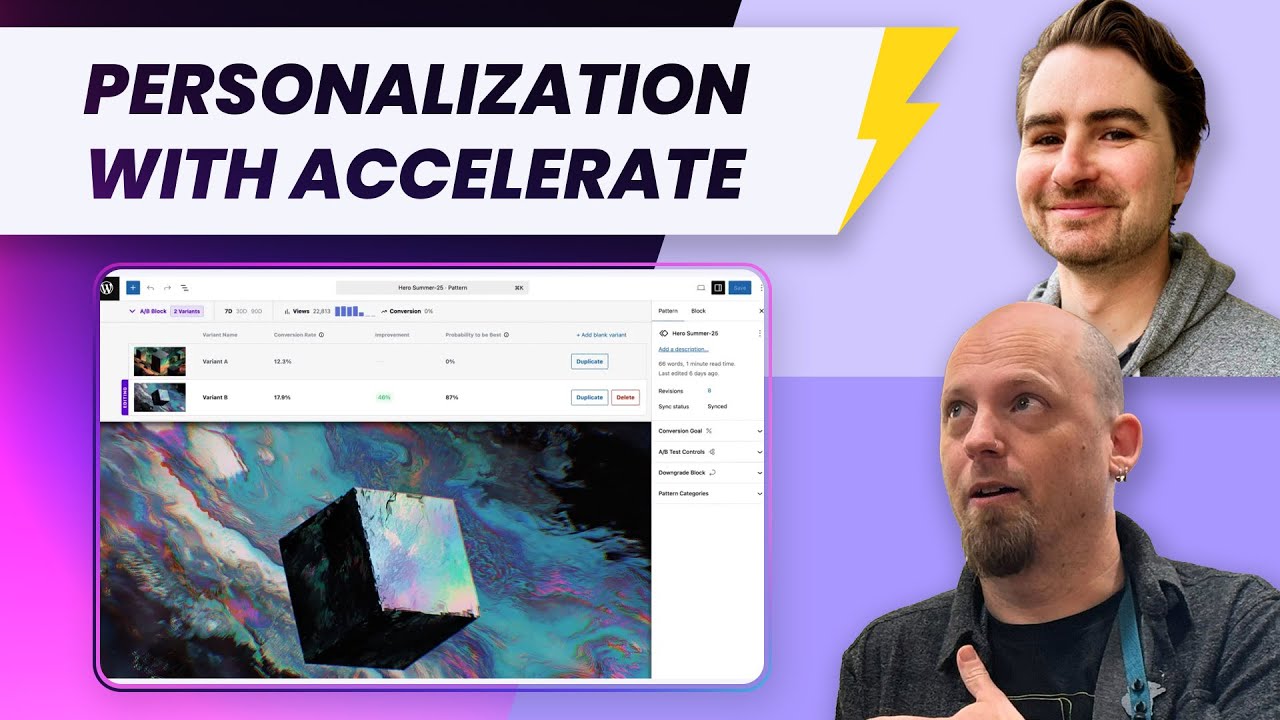
things like that. It's just kind of a unified view that is going to give you analytics uh alongside that. If you jump into something like um the uh header for example in this um yeah in the center there I'll show you exactly kind of what it looks like to be editing this from a uh content authoring point of view. >> Nice. >> Um so hopefully it's fairly kind of obvious what's happening here. Um I have three variants right now. I can click between them to edit different different
ones of those. Um, and within that editor, um, below that is just your, you know, your usual block editor there. Um, so I can change anything that I would want. And at a per block level there, I see the amount of views it has, the overall conversion rate, the conversion rate for each version. So, it's it's very kind of important that not only do we show different variants depending on what audience might be looking at the website. Ultimately, if you don't have a way to measure it, there's not really
any point in doing that because you're never really going to know how effective is it that I show a different message to uh somebody in a different country or if I, you know, have have a different uh uh call to action for somebody coming from a marketing campaign. you need to be able to track the conversion rate to understand whether that was a good thing to personalize or or not. So, we have a um fairly robust um off-site analytics layer that isn't, you know, stored in the WordPress database or or something like that where we push a lot of user
interaction behavior to be able to give editors and site authors like the the information that they need to to edit. Um, so that's what the experience looks like. Whether that's an AB test or a personalized test for at the block level. Um, you can kind of see hopefully it's a fairly intuitive experience based off already being able to use the block editor. >> And then I can see you've got different conversion goals. So you can be tracking different things depending on uh what
you >> Exactly. Yeah. Yeah. So so typically, you know, I think the default Yes. would be any like clicking of a link or submitting anything any kind of um event that can happen within the block by default that would be considered a conversion but yeah you can scope it down there. >> Um so so that's what it looks like to to create personalized content. U maybe you can yeah jump back to the main dashboard and we could have a quick look at the uh analytics um page in the back end. >> Um so we're not a you know we're not
Google Analytics. We're not like a full deep analytics suite, but ultimately um we do have really good analytics data because we have to track so many things at the block level as well and at the page level that um we think that we provide a really good out of the box just like how do I get analytics on my site for free? Just install this plug-in and it's done kind of thing. we already need all of this data for the personalization stuff. Um with things like you know uh Google Analytics and uh
cookie law and cookie optin on Google and things like that. It's definitely um providing a kind of anonymized analytics solution out of the box I think is like a good win and certainly a immediate benefit that people can get from using the accelerate plug-in. Whereas like personalization AB testing you do need to go and do things right. >> Yeah. You got to do the stuff. got to write the content. Um whereas uh analytics we're just obviously collecting from day one. So it's it's fairly typical of what you would expect.
Um but it does give you an idea what is my breakdown by you know countries, by browsers, pages, things like that. So you can start to think about how can I create audiences because ultimately and accelerate what audiences are is ultimately a facet of your analytics data. Um, so though we don't show everything here that's in the analytics database yet, something like if you come in through a UTM link to the website, that is stored in our analytics data and
therefore that's how you create a audience based off of that value. So that's kind of how the data pipeline works. >> Um, yeah, tell me about audiences. Um, obviously we have to have some audiences if we're going to have uh different views for different uh different things. So let's let's pop in there. I'm interested in in this because uh well I don't see anything. >> Yeah. Yeah. This is just I think it takes takes a couple of seconds to load in. So the the general idea with with
audiences again is like create criteria of the um kind of demographic type data that might come in via analytics. So by default uh most of it is going to be based off of things that are determined on the front end from the browser. Um you can uh certainly uh like hook into this at a developer level to add other things maybe like you would hook in and add some like I don't know has purchased this product via WooCommerce or something right like you you could do
those kind of things. >> Um or you can have like yeah the logged in attribute here is like a WordPress you know specific if if you're logged into X Y or Z. So we have um generally a bunch of different things that you can facet by and you can do groups of those you can do andors you can do you know yada yada all of that boolean logic to build up your audience of like uh how how you might want so here yeah then I'm saying if the hour is more than 16 consider part of the evening audience and that's going to be local time for the user uh so that's quite a a basic
one that's that's simple to do but as well as that you could do you know if the referer includes github.com, consider them a developer. And then maybe, you know, right when I'm writing my like um uh my call to actions or something, I might vary those based off of which audience is is viewing the site. >> And then I guess for for country, it's actually telling me this is the percentage of of pe visitors that I'm
getting from that country. So in this case, it says France, 25% because 25% of my audience is coming from France. So, >> exactly. >> In that way, I can really be targeted for like, oh, I've got a lot of German uh audience or I've got a lot of uh French people coming to my website. I'm going to have this this content or this page or this header or whatever, this advertisement that is specific to that group of people. >> Exactly. Yeah. Because there's ultimately not much point putting in a load of effort maybe targeting Canada
here that's at 3%. Sure. >> So, uh, a lot of the personalization is kind of like what is the what is the returns on all of the work that you might need to do to create variations on your content? Um, and and how much impact is is that likely to have. So, there are um that's that's come at it from purely I would say like a performance marketing point of view. There are other are other use cases where uh you may want to have uh
more functional things like if they're logged in show them this otherwise show them this. Okay, that's not that that's probably you're actually just trying to like use the boolean logic of of the plug-in which it can definitely be used that way. Um I know that it is used on uh blog.playstation.com PlayStation.com for example for the different rating images on whether you're in Europe or whether you're in the US etc. So again not really somewhere where they're looking to like maximize conversion rates on those clickthroughs of like Peggy ratings or whatever but ultimately
it can be just a tool in the tool belt of how can I uh you know ultimately solve the functional problem of like different audiences means different functionality on the site as well. Yeah, I mean I was actually going to ask about uh what sort of practical uses have you seen of of this sort of stuff in the field and PlayStation's a really good example because not only you know the the rating system is different but like a lot of times like uh the the covers for a game in the US is going to
be different or even the games that are available in the US are going to be different than the games that are available in Japan for example uh things like that. And so you might want to have like uh those images or or those titles being you know different content for depending on on the region. Yeah. >> Yeah. Yeah. Exactly. GIO I would say is the most obvious one that comes to mind when when people start using this. We've got we've had other um I would say more custom use cases where you're hooking it into the functionality of the site. So,
for example, we had a site build where um they have like a newsletter signup box and if you're already subscribed to the newsletter, right, this is a site where people are logging into the site so you know whether they're subscribed already. Then you we've registered that as an attribute of an audience. So then you can target the audience ultimately and then use fullsight editing, right, to say well uh if they haven't subscribed, show them that widget. If they have, then show them a different widget instead. Um, so there's there's
those kind of sight specific use cases of what is the functionality of your site? Can you actually hook those things in to start u making the site a bit more dynamic? What you often would have done right there would be in a traditional theme, right? You're just embedding all of those conditionals directly in your PHP templates. >> In the world of full-sight editing, that's actually a little bit different now because all of this stuff is shifted to the admin layer. doing dynamic things in the full in full-sight editing is actually a lot more difficult because you need the abstraction to be at the
editor and block level. You can't kind of just drop in these quick like PHP oneliner to switch out a different template part or something like that. So, so we're definitely um uh using it in that like block conditional kind of sense as well. >> Yeah. Yeah. Where is this from a nerdy perspective? Where is this data coming from? Is it all coming from like the HTTP headers that that the site is like seeing reading coming in? >> Yeah. So, uh virtually all of the analytic stuff is all front end. So, it's coming from the brow like uh I
guess what's it called? Uh document.navigator or whatever the JavaScript API is. So, it's not HTTP headers. Um it's coming from uh the navigator. And again, all of the uh data and everything is all sent through a JavaScript front-end tracking just like many other, you know, web web tracking type stuff. So, for one thing, you're not going to get any data from like just um let's say like HTTP crawling bots or something like that. You will from like sophisticated headless bots obviously
that are running a full browser. Um and >> interesting. Yeah. >> Also, all of the variants that are shown. So, if you're doing AB testing or personalization, it's worth saying again like getting into the nerdy details here. Um, all of those variants are sent down to the browser and then it's ultimately the JavaScript layer that chooses which one to show based off of what audience you might be a part of. So, it means a single cache on your on your CDN and page cache for example. So, there's no need to have any custom
server configuration here. I think Pantheon, right, you're running this with page caching. Is that right? >> Mhm. Yeah. Yeah. No, I was we were talking earlier before we we hit record and I I was looking under the hood because I wanted to see uh like I saw the image changing. I'm like, how's that how's that done? And the way that that's done is okay, we've got we've got the image that is this one. Um and then the other one is over here. Uh which is the can't really see because it's super small, but like um
it's now it's too big. Uh um yeah. So you can see the other images right there. So like basically both both sets of content are being are being downloaded. They're in the browser cache and it's it's uh it's just you're hiding and showing one specific one depending on uh what the conditions are. Yeah. >> Yeah. Yeah. Effectively there is some nuances there like when the browser will download those images and things. it it it won't literally have to download every image but but ultimately what the browser is seeing is a custom HTML
element and when it comes to rendering it the JavaScript is looking up what audience am I a part of and therefore which one should I pick um so it it means that um yeah no no issues for like server caching server load or anything again all of the analytics of like when you interact it's not sending the data to the WordPress PHP side it's sending the data to our analytics database um in the cloud so to speak. >> Yeah. And the other thing that's uh relevant to our Pantheon audience, I'm
using this uh really old internal uh uh page cache sort of like viewer that tells me that it is actually in fact uh cached and it says age is 915 seconds. Um and that change I mean that stays the same. It's like it's the same page cache depending on uh the thing. So again, like from a Pantheon perspective, like this is still just coming from the edge and it's already it's like cached. You're not you're not going to have like, oh, there's there's this one variant and there's a cache uh tag for
that one and there's a separate variant and there's a cache tag for that one independently. It's just one one thing. Yeah. Yeah. I would say there there's one small exception to this which is for anybody you know really astute might be wondering how we do geoloccation because that is not a thing that you get in the browser. So we have our own separately hosted endpoint that essentially will do a geo geo IP lookup based off of the IP address that is requesting. So when you request our JavaScript library drop in
that's also going to inject as part of that response here's the country that you're coming from um as the viewer. Uh so we do have a little bit of you know clever goip stuff in the mix there but again it's not running on the server of the WordPress site or anything. Um, so it's ultimately it's a scalable solution from that point of view, right? Like if if if you got a site with many millions of visitors, um, then you're not going to be bogging down your WordPress site with that. Um, so that yeah, it's
definitely an important design goal for us. >> Yeah. Um, what else? What else do we got? What else we have under the hood? Like, uh, we talked about, uh, like blocks specifically a little bit or you mentioned them. >> Yeah. Yeah. So that's like blocks is how you're going to do your different variations of things. Audiences is going to be how you're going to target them. If you you can drop into one of those pages there, you can kick me out of that demo page and personalization one >> take over. >> Um so so this is effectively just
showing the same thing that you would have seen on the homepage, right? I have a embedded uh synced pattern. Synced patterns is actually how we do this content personalization thing. So there's three variants within that one. But you can obviously just drop those in anywhere you can show a synced pattern. So, so that's really what we're showing here. It'd be quite typical maybe you have a marketing page um like a landing page that's quite a fancy layout design and you want to vary uh have variations of some elements within that page for example. Um so so that's how you can do
that. Um yeah so the the block here all come under under the um I think that's the sync patterns that you're showing core keeps changing where it shows sync patterns but um it's I called the sync pattern header uh confusingly so uh it's also the name of a template. >> Yeah. Yeah. >> There we go. Yeah. Yeah. So I also have some other sync patterns in there as
well. >> Yeah. Um and then the last thing that I could probably quickly show is the broadcast um block on on how that is managed. >> Uh that is a block. >> Uh yeah, but sorry you'll need to jump back to the main admin in this in the um accelerate sidebar. >> Okay. >> Yeah. So there's this that's how we're managing this content queue. So I have a footer rearch broadcast here and then um you can see the two that the two
different um pieces of content that I'm recirculating through. So any synced pattern can be inserted as a uh a circulation piece of content. And then if you went to the site edit into the footer, that's where I'm putting in the broadcast block. So there has to be like two levels of abstraction here. I have the broadcast block with all of the different options in it and then I need to put the broadcast block somewhere and that is in if you go to template parts I think it is in the site header
>> which is confusingly underpants. Yeah. Uh footers. >> Uh footer, I guess. Uh is it just the main footer? Maybe. I think if you click Oh, yeah. No, it's >> No, I'm out. >> Wait, is that it? >> It's definitely I think you can. Yeah, I think that's it. Yeah. Yes, you can see that I have the broadcast block embedded there. Um and that that's showing me. >> I think that will bounce you through. >> Yeah. >> Um yeah, that that'll take you back to
the the screen that we were on. So, so that's how broadcast works. Again, in situations where um you kind of got a content cue or internal ad network, you can kind of think of it like that as well. Um which is like, okay, if the user didn't click it, you know, once, let's show them something else the next time they view the page kind of stuff. >> Yeah. or like a you know an alternative to the dreaded uh um scrolling like anim you know slider uh in your
>> carousel. Yeah. >> Yeah. Exactly. >> Yeah. >> Um so that that's pretty much uh what we have. So that's really like I would say there's um a few primitives there around how we do synced patterns and the analytics and then broadcast and then being able to convert sync patterns into either AB test or personalized. That's really everything that there is. But hopefully you can kind of see once you combine that with the block editor and full sight editing, you actually now
have quite a lot of uh different options of how those things can be combined, how those blocks can be combined to create a site that is ultimately a bit more dynamic or a lot more dynamic depending how much work you put in um based off of the different types of users that are using the site. And that's ultimately the design goal is is to be able to um allow for that kind of dynamic nature of the WordPress site. Um I will say that you know to to go through the effort of doing that you kind of do need a website
with a good amount of uh viewership otherwise yeah you you are putting in a lot of work. I you know on my personal site that maybe like five people visit a month right >> it's not really worth me you know uh AB testing my headlines. So, so there's definitely kind of a certain scale where this makes more sense, I think. You know, >> well, I'm going to take this a little bit personal because Joe, I have a problem that I discovered because of uh
>> Okay. >> having the Accelerate plugin installed. And the problem uh is uh make my window a little bit bigger, too. That wasn't what I wanted to do. um is that I discovered that I have a great deal of traffic that is coming from China that is definitely not the normal traffic of my site. >> Yeah. Yeah. Except for China that's about like what my website looks like
>> and like so my site is just a normal blog. Uh it just has some stuff. It's got like you know I I have do Devril stuff so I have like all presentations and stuff that I've given and things like that. So like nothing nothing super special but I I happened to to update accelerate log into to the uh analytics page and I saw this this big thing from China. So uh I created an audience uh for China and then everything except China. >> Okay. so that I can go into here and
look at my analytics and basically see >> this is what I would expect. This is the traffic that seems normal. >> Yeah. >> Um but now that I have this audience for China, um what sorts of things could I do uh either through the plug-in itself or even maybe with code that would like with with like this China audience that I have? So, these people that are coming from China that I assume are probably
robots because my site isn't written in Chinese. Like, you know, I could probably use uh put a header that is only visible to China and like say maybe even in Chinese uh hey robot like you know like have a special message for them like what what sorts of things uh could I do uh now that I I've identified that sort of thing. >> Yeah. Yeah. So you could uh if you wanted to, it depends if this is a problem that you feel like you want to combat or something where you know maybe
there are some maybe you do have a genuine audience from China that you never knew about. U you you never know. So it could prompt you to do some actual personalization for China. Do something like, hey, if you're Chinese, let me know here if you want to understand my site or something. Um so yeah, you you can definitely segment that way. Um, like you said, you I mean you could maybe if there were things on your website, I don't know if you had sensitive things on there or just I don't know for for for whatever reason,
right? Content that you wanted to restrict, you could you could use accelerate for something like that. It's obviously not like the most secure way of achieving that because it is ultimately all a kind of front-end tool. Um but but I think yeah the most obvious thing to me would be to have a big banner to say like please stop scraping my site or something. >> Is there like is there a code level uh like hook or something that I could do that would uh basically allow me to like for those
China visitors give them like a redirect to some other page or a different like google.com or something like that. >> Yeah. Yeah. So we have uh we have documentation on how to like hook into our um uh it it would be a front-end JavaScript based hook, right? Because again everything is essentially running on the client here. Um so there you would basically hook into um we have a little thing that fires every page load. This is the data for the user and then you can check their country and then change their you know document.loation
or whatever and and do it at the code level. So on um accelerateplugin.com we have uh documentation linked I believe in in the header there um and that is uh may maybe it's actually in the footer maybe we relegated the importance of the documentation >> documentation >> uh there we go yeah so that's that's something where we are kind of um as as more use cases and questions emerge like integration with the consent API for
example um anal yeah analytics integration things like that we're kind of adding those as additional um additional kind of guides. So so the more that we hear from people on how they're looking to use this or questions that they have then we're trying to kind of bake that into our docs and uh you know have have it be useful for more people ultimately. >> Awesome. Yeah. Um >> first time I've seen that that specific you know problem though of having like all of this I don't know. Well,
>> that that you didn't want. >> Yeah, I'm as I'm looking at it, there seems to be a lot of hits to WP Signup for some bizarre reason. So, >> okay. Which presumably doesn't even exist on your site because it's not multicight. I know. >> Oh, it is multiight. It is multicight. >> Okay. >> Uh well, thanks a lot. I mean, I think that's really awesome. Um I'm super impressed. Like, uh I've obviously watched uh this plugin develop for for quite a while. Uh for for those of you
at home, uh I you know, >> Joe used to be my boss. I used to work at Human Maid. So, uh I you've seen >> I've seen this evolve over time and I've seen a couple different uh incarnations of it. Um, so, uh, I I definitely noticed, uh, when it when it, uh, changed and I really do like I really like the idea of, you know, the the base level like the analytics like just by itself. I mean, >> there's a lot of analytics plugins out
there. Um, >> and like you can and some of them are Google and some of them hook into Google and some of them like you know there's you know Jetack has its analytics thing and whatever and they all kind of approach it in a slightly different way. Um, but I really like, you know, like this. This actually gave me valuable information in with like a couple clicks that I don't know that I would have gotten. I I mean, I could have gotten that stuff from Google and I could have gotten that stuff probably from Jetack, but like I could do that in like five minutes, whereas I don't like I'd have
to refer to documentation to do it in Google. >> Yeah. Yeah. that that's kind of the thesis of the whole tool to be honest is like anybody that's watching this that is like a marketer or performance marketer or something is not going to be wowed by like oh wow I didn't realize I could run an AB test or something right those tools have existed and like frankly the suites for those tools are really powerful and you can do way more than you can do in accelerate but the problem is it's like it's not close by it's not something that is just like
plugandplay click install ready to go I don't need to uh set set up a complex integration. I don't need to log into several tools. Really, the idea of uh accelerate is more like a uh dare I say, you know, use the WordPress buzzword, a kind of democratization play in that like you need to spend quite a lot of money to set up something like uh uh optimizely or you know a full kind of uh enterprise suite like that. Um and then what you also get at the end of the day
is still a very cumbersome process. Whereas really what we're trying to do with Accelerate is just have it be install it. If you're in the block editor, you're going to be ready to go. If you're using full-sight editing, it's even better because obviously you just get all the same primitives at the fullsite editing level and you never have to go to another tool and you know, you don't need to write your variations for your headline in a different tool, right? Those things should be in the CMS. That's where you're writing. That's where you're building your pages. Um whereas I've seen literally demos from
other tools where yes you have your your main version of the page there but then you've got five versions of the page in a separate tool where you don't have any of the WordPress functionality. >> Um so I think that it's it's just about bringing the things together and like you say analytics is just that it's just like well it's right there on the dashboard when you're viewing your uh synced pattern that you're making. You're seeing the views there over time. you're understanding is this an important piece of content because I have the data right there in front of
me. I'm not flicking and not building reports in Google Analytics or something. So, while those tools are way more powerful than what we have, hopefully the kind of at the fingertips useful when you actually need it nature that we're trying to accelerate kind of like actually balances out to be a net plus and on top of that it's like it's free up to like a million views a month as well and things. So, like it's free is always good. >> Yeah. Yeah. And obviously this this tool has come out of your sort of
professional services experience in the field working as an agency with uh companies and organizations who need stuff like this. Are there any sort of like success stories or interesting things that you can share about like sort of what what like that that this or tools like this have enabled or unlocked or things like that for for people that you're working with. >> Yeah. Sure. Yeah. So it's it's there there's definitely the the the type of
situation we like to use it is an agency and then there is kind of like probably the 80% of your more standard let's say setup. So so we definitely see on the agency side we're working on stuff where it's going to be more custom like I kind of mentioned on uh PlayStation using it. Um another site that is using it is recipe tinets that has uh a lot a lot of traffic. let's just say I think they're within uh maybe the top 10 recipe sites in the world or something. Um so so uh
we had to engineer this to work at that kind of scale. So I I think that's kind of um hopefully a balance that we've been able to strike is it works on very big stuff but we've tried to make it simple enough to use for anybody and that is that is why it's valuable as well at the enterprise level is like enterprise technology is not always the most usable and that's ultimately why WordPress is is relatively successful in enterprise is like it's the easy tool
that people kind of know how to use and um if they don't get too bogged down with kind of like millions of checklists of what the software needs to do. WordPress is a good option. And that's just the same balance that we we have kind of with uh Accelerate is like we're not trying to be better than an enterprise um uh performance marketing tool. But um where it actually kind of gets used is in the situations where uh it's going to be like we're going to migrate to um the Adobe suite for
analytics in one year. So then we're going to do personalization, right? Typical client thing is to do a site build and then they've got some um uh plan down the road to introduce these things that Accelerate has. So it's just kind of like well let's just use Accelerate now then and then obviously that thing down the road never even happens because it never kind of does in in uh enterprise tech anyway. It's it's always a thing on the future road map, right? So that's where we've seen success with it is um we're not trying
to convince an organization that this is needs to be their you know uh personalization platform for their whole team and everything cuz it's it's not that. What it is is a tool that works right now that allows your web team to actually get stuff done right now and not have to wait for that kind of like future um big big platform. And um in in our experience it's it's kind of filled that gap pretty well. >> Yeah. Yeah. I really like the example of of a recipe site because I can I can already think of like five different
things that Accelerate would be useful for in that context from AB testing headlines to like maybe different images to all sorts of things. Um we do have a a question coming in from LinkedIn. Is is Accelerate only for WordPress sites? I think the answer to that is yes. Human Made is a WordPress agency. Um are there any thoughts about like or or are there things that could be uh extracted or maybe shared from like a service perspective? uh that accelerate into. >> Yeah. So there's there's kind of two
sides to that. One is we have seen situations where you have accelerate on your uh main WordPress site and maybe there's a couple of like micro sites or pages that are just hosted on something else and it would be valuable to unify the data of those things. So um like just drop our JavaScript embed essentially on one of those other sites and make sure that the data is is is centralized between those. So that that is possible but ultimately because our whole well I actually want to write
personalized content now that's all got to be in WordPress. Uh so like if if you're not on a WordPress site at all no don't don't don't uh go for Accelerate. Again, that's kind of like that is the point really is like this is a WordPress solution and though general purpose solutions are very powerful and everything, the integration point is just in my experience really painful. Um, so we've ultimately just accepted the tradeoff there. It's like we're go for the WordPress people who have got WordPress sites that don't really want
to leave WordPress. How can we make something good enough for them? >> Uh, and I've got one other question that came in from LinkedIn as well. Um any plans to integrate with CDP platforms? >> Uh yeah so CDP CDP platform customer data platform which is generally uh your big business and you use terms like data lake and data warehouses and like all of your customer data just goes into this you know kind of black box. Um how could you integrate with something like that
for the website? That's kind of I think what what the question is is getting at here. Um so yeah we we definitely do have there are ways that you can already do that at a code level right I'm kind of mentioned we have like developer APIs that would look something like you know when the um browser is gathering the information that it has on the current user right it knows the time of day based off of you know the date in the browser right you could ultimately pull information from a CDP and feed that
into the same pipeline so then I can go and create personalized content based off of attributes on the user maybe in my CDP, you know, that that's the general flow. Um, so we don't have any like plugandplay adapters right now for specific CDPs, but but the um the the lower level is there and we're still looking to ultimately work on a kind of case by case of like uh let's let's do a specific integration when one arises that there's something tangible to do
with because quite quite what happen often happens with customer data is um it's very like high level, move the data, put the data there, connect the data. Yeah, great. Sharing my data or whatever. But like what is the actual user journey and what specific data would you use and when could you use it? Because if I just open my iPhone now and go to your website for the first time ever, though I might be in your CDP, it doesn't mean that there is a way to meaningfully link me right now. So there's all kinds of practical
challenges to do with you know good things around data privacy and third party cookies and why it's difficult to do all those things. So so um there definitely can be a tendency to look a little too high level in terms of connecting data and targeting users and things like that. Right? If I go watch something on Netflix and then I go on on my phone on Netflix when I've never visited before I'm not logged in. Well, I'm not getting any personalization. Right? There are a lot of limitations around what you can do uh with with customer data. So I would say the devil is in the details when it comes to any
kind of CDP or CRM integration is you kind of do need to be able to drop a step lower. We usually have to talk to clients you know okay what are you specifically looking to do where is that data how do you identify users to understand how that could be achieved because you know yeah there's there's one thing kind of having the idea there's another thing being out of building into the product you know >> right yeah for sure yeah and focusing on the outcome that you're actually going for particularly with uh personalization is probably you know the most important
thing because personalization is hard enough as it is I mean that's the thing that I know that you all have been looking at for a long time. Pantheon's been looking at it for a long time. And the problem with personalization is is like what you said, like there's a lot of work involved. So like if you don't want to spend a ton of work on on on something uh without knowing that it's actually valuable work, >> right? Right. Right. Exactly. It's it's kind of a tricky one because uh it can be that like you know the marketer's dream is just to know everything about
everybody, right? And then like uh you know sell as much stuff to them, right? And then the kind of like uh users uh dream is often just like I want to stay anonymous and don't don't want to have uh kind of anything specific uhly targeted to towards me. So, you know, uh we we're definitely um trying to play as much as we can on the on the privacy side of this, right? like we're not um uh doing anything uh untoward of trying to like circumvent the the the the user
in in terms of the the the data that that uh might be held on them that that kind of thing. Um but yeah, I I think uh there's there is always a bit of a tension there ultimately between uh more data is better ultimately from um a uh a marketer's point of view and less data is is is better from the user. You have you definitely have to strike the balance. Um and there are certainly uh yeah like ways that you can overstep
that line and definitely have to be careful. Um it's definitely something that is important to us like I mentioned on the documentation right integration we've had with the WP consent API from day one because that is just a key thing I mean not only for like regulation and stuff in Europe but ultimately um we we want to be playing nice and respecting the privacy tools that are in place and you know choices of users. >> Yeah. Yep. Well and and anyone who's watching this you can go find uh the accelerate plugin either on accelerateplugin.com which we talked
about earlier or just in the WordPress.org or repository. Uh, where can folks find you if they want to find you, Joe Hoy, specifically? >> Yeah. Yeah, you can go to my website with Accelerate on with about five people visiting a day, which is jo.co.uk, though that's kind of changed into a website about woodworking. Um, and but I'm on I'm on uh I'm I I'm sorry to say I am still on Twitter um as Joe\_HoY. That probably is the best way to to contact me.
>> Well, awesome. I'm definitely going to go uh play around some more with Accelerate on my personal website. Uh I hope all of you watching either live or in the future uh check it out on on your website. Uh thanks Joe for coming on to the live stream and for everyone else uh thank you for joining and we'll see you on the internet. >> All right. Thanks very much much for having us Chris. >> Yeah, no worries., Personalization, Analytics and a/B Testing With Accelerate, YouTube, 01kbfycj93z1zbhm8cc888h0y4.