Should Masonry Be Part of CSS Grid?
## Metadata
- Author: [[Ahmad Shadeed]]
- Full Title: Should Masonry Be Part of CSS Grid?
- Category: #articles
- Document Note: ---
tags:
- #css
- #grid
- #masonry
Author: Ahmad Shadeed
Source: Blog article
Reference: https://ishadeed.com/article/css-grid-masonry/
date created: 2025-08-21 00:00
---
# Title: Should masonry be part of CSS Grid?
## Table of Contents:
- [📝 Summary](#-summary)
- [📖 Main Content](#-main-content)
- [🗒️ Notes](#-notes)
- [📖 References](#-references)
- [🗣️ Paraphrase](#-paraphrase)
- [📰 Newsletter](#-newsletter)
- [✅ Action Items](#-action-items)
- [🧪 Hypotheses](#-hypotheses)
- [📊 Methodology](#-methodology)
- [❓ Questions](#-questions)
- [🔮 Future Research](#-future-research)
- [💡 Implications](#-implications)
- [🧠 Learning Styles Assessment](#-learning-styles-assessment)
- [📊 Accessibility Assessment](#-accessibility-assessment)
- [🌍 DEIB Assessment](#-deib-deib-assessment)
- [✅ Logical validity](#-logical-validity)
- [🔍 DARVO Analysis](#-darvo-analysis)
- [🔍 SEO Evaluation](#-seo-evaluation)
- [🎯 Conclusion](#-conclusion)
### References:
- Feedback needed: How should we define CSS masonry? – Chrome Developers blog
- Help us choose the final syntax for Masonry in CSS – WebKit blog
- CSS Grid Level 3 (Editor’s Draft) reference to masonry-track properties
Note: All in-article “timestamps” here refer to section anchors and code blocks within the piece, since it’s a written article with sectioned headings and demos.
## 📝 Summary:
Ahmad Shadeed argues that CSS masonry should be integrated into CSS Grid rather than introduced as a separate display mode (e.g., display: masonry). He reasons that masonry is conceptually a grid, and integrating it avoids duplicated APIs, eases progressive enhancement, improves responsiveness workflows, and reduces code repetition. Through multiple practical layouts—footer, news, section gallery, card arrangements, and FAQs—he contrasts “grid-integrated” (grid-template-rows: masonry) vs “grid-independent” (display: masonry with masonry-template-tracks) approaches, consistently showing better ergonomics, maintainability, and fallback behavior when masonry is part of Grid. He also notes naming concerns (preferring “packed” or “collapse” over “masonry”) and predicts that once masonry becomes trivial, it will likely be used more sparingly.
## 📖 Main Content:
The article opens by defining masonry/waterfall layouts and situates the current standards debate: integrate into Grid or create a separate module. Shadeed critiques the naming (“masonry” feels non-idiomatic compared to typical CSS keywords) and emphasizes real-world constraints: responsiveness, progressive enhancement, and conditional application of masonry within already-defined grids.
Key arguments:
- Masonry is a grid: Many real interfaces mix standard grid and masonry behavior based on viewport, content count, or item aspect ratios. Switching the entire layout module to get masonry is costly.
- Progressive enhancement: If masonry is a Grid option (e.g., grid-template-rows: masonry), unsupported browsers still render a sensible grid; separate display would require larger fallbacks and duplicate code.
- Responsiveness and conditional logic: He demonstrates patterns where masonry is only applied at certain breakpoints or when item counts or classes match. This is simpler if masonry is an attribute of Grid.
- Practical demos: Multiple examples show how grid-integrated masonry is terser and less fragile than a separate display mode.
Personal reflections:
- The piece is developer-experience driven. The strongest appeal is to maintainability and progressive enhancement.
- The examples reveal subtle workflow realities (e.g., featured cards spanning tracks) that become awkward with a new module that duplicates Grid concepts (e.g., masonry-track vs grid-column).
### 🗒️ Notes
- What is masonry?
- Also known as waterfall; stacks uneven-height/width items tightly without gaps (“Pinterest-like,” but not limited to that look).
- Use-cases extend beyond Pinterest clones to on-demand balancing of variable content blocks.
- The syntax debate
- Two paths: integrate with Grid vs new display mode.
- References to Chrome and WebKit blog calls for feedback.
- Naming concerns
- Prefers “packed” or “collapse” over “masonry.”
- Example: grid-template-rows: collapse; feels more CSS-idiomatic than display: masonry;.
- Progressive enhancement
- Separate module would need years for full support and creates hard fallbacks.
- Integrating into Grid guarantees a functional layout even without masonry enhancement.
- Responsiveness realities
- Real CSS often toggles layouts; switching between modules (grid ↔ masonry) is heavy-handed and repetitive.
- Example code shows media queries and :has() conditions where masonry is conditional.
- “Masonry is a grid”
- Conceptually still grid tracks with special packing in one axis.
- Learning curve is smaller if it extends Grid rather than duplicating APIs.
- Common needs:
- Normal grid on small screens; masonry on larger.
- Trigger masonry when content count exceeds a threshold.
- Trigger masonry when specific classes are present.
- Examples: grid-integrated vs grid-independent
- Footer layout:
- Integrated: grid-template-rows: masonry; minimal diff and safe fallback.
- Independent: display: masonry; duplicates track definitions; brittle in unsupported browsers.
- News layout with featured card:
- Integrated: uses grid mechanisms (grid-column: 1 / -1).
- Independent: must switch to masonry-track, duplicating concepts.
- @supports approach adds more code and potential reset issues.
- Section/gallery:
- Dynamic behavior based on breakpoints and item count (e.g., &:has(img:nth-last-child(n + 5))).
- Integrated: set grid-template-rows: masonry and adjust columns/ratios responsively.
- Independent: toggling display: masonry complicates column logic and enhancements.
- Arranging elements in a grid:
- Masonry can auto-balance orphan items based on siblings; ideal as an on-demand Grid enhancement.
- FAQs layout:
- Equal-height per content without manual column grouping favored by integrated approach.
- Prediction
- Once masonry is easy, it may be less popular—novelty fades when adoption is democratized.
- Conclusion
- Strong preference for Grid integration; avoids duplication and preserves ergonomic fallbacks.
## 📖 References:
- WebKit: “Help us choose the final syntax for Masonry in CSS”
- Chrome Developers: “Feedback needed: How should we define CSS masonry?”
- CSS Grid Level 3 editor’s draft discussing masonry-track concepts
## 🗣️ Paraphrase:
1) Original idea: Naming
- Original: In CSS, names are simple; “masonry” feels off. Alternatives like “packed” or “collapse” read better. Imagine if display: flex was “rubberband.”
- Paraphrase: CSS typically favors terse, descriptive keywords, and “masonry” breaks that pattern. Labels like “packed” or “collapse” align more naturally with the platform’s vocabulary. Calling Grid “chessboard” would feel as odd as “masonry” for a layout primitive.
2) Original idea: Progressive enhancement and duplication
- Original: A new display: masonry will take years to land; progressive enhancement is hard for layouts. Making it part of Grid ensures a usable layout without the masonry behavior. Separate syntax duplicates Grid features and increases fallbacks.
- Paraphrase: Introducing a stand-alone masonry display would exacerbate support gaps and complicate fallbacks, since layout isn’t easily progressively enhanced. If masonry were a Grid option, unsupported browsers still render a conventional grid. A distinct module would mirror Grid’s API surface, forcing developers to write more code and maintain parallel paths.
## 📰 Newsletter:
This week in the WordPress and web dev world:
- Learn: Curious about CSS masonry? Ahmad Shadeed makes a compelling case for baking masonry into CSS Grid rather than inventing a separate display mode. His demos show how grid-template-rows: masonry could deliver cleaner fallbacks, less duplication, and smoother responsive design in real-world layouts (footers, news cards, galleries, FAQs). It’s a masterclass in developer ergonomics and progressive enhancement. Read “Should masonry be part of
- Summary: An exploration of examples showing masonry as both a part of CSS Grid and as its own display type.
- URL: https://ishadeed.com/article/css-grid-masonry/
#### Table of contents
* [What is a masonry layout?](https://ishadeed.com/article/css-grid-masonry/#what-is-a-masonry-layout)
* [The debate on the syntax](https://ishadeed.com/article/css-grid-masonry/#the-debate-on-the-syntax)
* [The name](https://ishadeed.com/article/css-grid-masonry/#the-name)
* [My thoughts on the debate](https://ishadeed.com/article/css-grid-masonry/#my-thoughts-on-the-debate)
+ [If the new syntax is supported now, how we should use it?](https://ishadeed.com/article/css-grid-masonry/#if-the-new-syntax-is-supported-now-how-we-should-use-it)
+ [Responsive design](https://ishadeed.com/article/css-grid-masonry/#responsive-design)
* [Masonry is a grid](https://ishadeed.com/article/css-grid-masonry/#masonry-is-a-grid)
* [Examples of the new vs the grid-integrated syntax](https://ishadeed.com/article/css-grid-masonry/#examples-of-the-new-vs-the-grid-integrated-syntax)
+ [Footer layout](https://ishadeed.com/article/css-grid-masonry/#footer-layout)
- [Grid-integrated option](https://ishadeed.com/article/css-grid-masonry/#grid-integrated-option)
- [Grid-independent option](https://ishadeed.com/article/css-grid-masonry/#grid-independent-option)
+ [News layout](https://ishadeed.com/article/css-grid-masonry/#news-layout)
- [Grid-integrated option](https://ishadeed.com/article/css-grid-masonry/#grid-integrated-option-1)
- [Grid-independent option](https://ishadeed.com/article/css-grid-masonry/#grid-independent-option-1)
+ [Section Layout](https://ishadeed.com/article/css-grid-masonry/#section-layout)
- [Grid-integrated option](https://ishadeed.com/article/css-grid-masonry/#grid-integrated-option-2)
- [Grid-independent option](https://ishadeed.com/article/css-grid-masonry/#grid-independent-option-2)
+ [Arranging elements in a grid](https://ishadeed.com/article/css-grid-masonry/#arranging-elements-in-a-grid)
- [Grid-integrated option](https://ishadeed.com/article/css-grid-masonry/#grid-integrated-option-3)
- [Grid-independent option](https://ishadeed.com/article/css-grid-masonry/#grid-independent-option-3)
+ [FAQs layout](https://ishadeed.com/article/css-grid-masonry/#faqs-layout)
- [Grid-integrated option](https://ishadeed.com/article/css-grid-masonry/#grid-integrated-option-4)
- [Grid-independent option](https://ishadeed.com/article/css-grid-masonry/#grid-independent-option-4)
* [Once masonry is easy to do, it will become less popular](https://ishadeed.com/article/css-grid-masonry/#once-masonry-is-easy-to-do-it-will-become-less-popular)
* [Conclusion](https://ishadeed.com/article/css-grid-masonry/#conclusion)
> The examples in this article work only in Firefox with experimental features enabled or the latest Safari Technology Preview. I’ve included videos below each interactive demo for easy viewing on browsers without support.
>
>
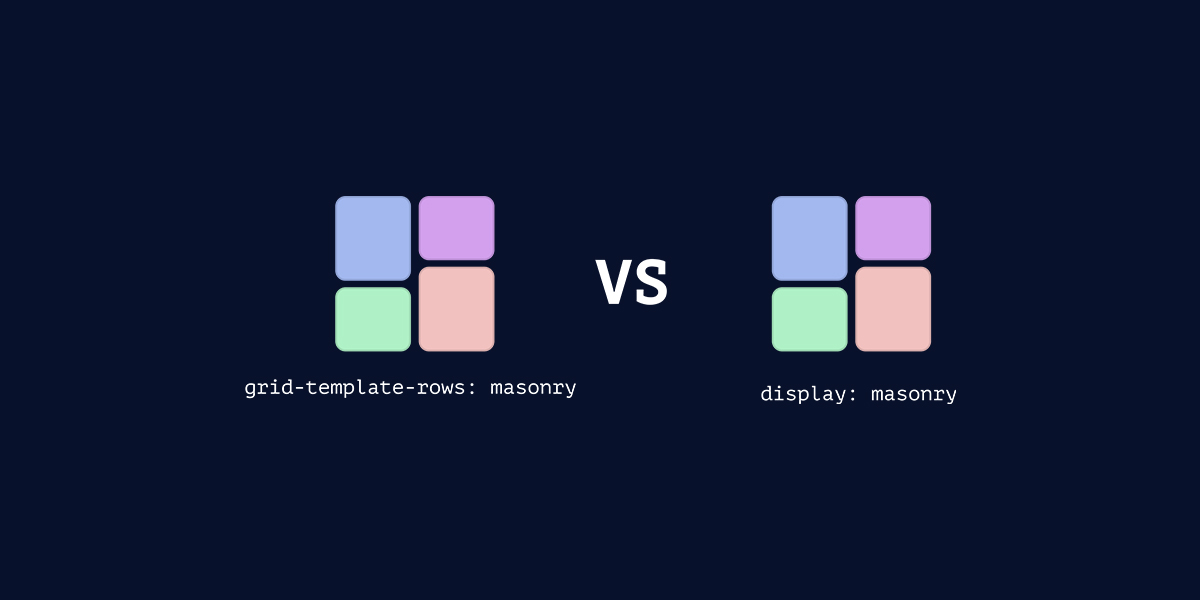
Currently, the CSS Working Group (CSSWG) is discussing whether to include masonry as part of CSS grid, or as a new layout module?
In this article, I will share my thoughts and examples about whether it should be part of the CSS grid or not.
#### [What is a masonry layout?](https://ishadeed.com/article/css-grid-masonry/#what-is-a-masonry-layout)
First of all, a few details in case you are not aware of what masonry is.
A layout type is also called the “waterfall”, where elements with different widths or height stack horizontally or vertically.
Here is an example of vertically stacked elements. This has been known as the “Pinterest” layout for years.
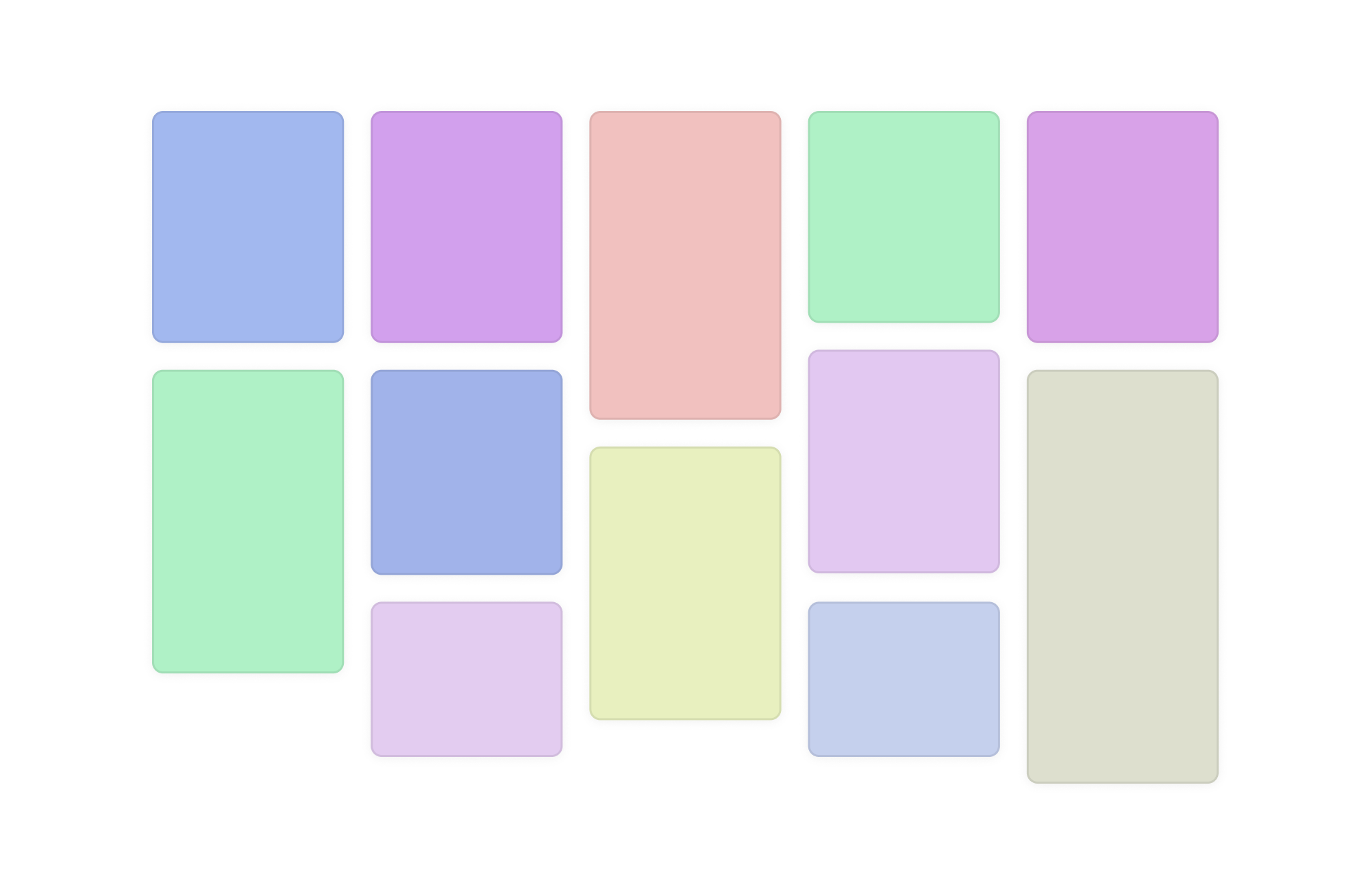 In this article, I will go through examples that don’t look like the Pinterest layout. In particular, examples that might use CSS masonry on demand.
#### [The debate on the syntax](https://ishadeed.com/article/css-grid-masonry/#the-debate-on-the-syntax)
Currently, there is a debate on whether to make masonry part of the CSS grid, or as a separate layout module. You can look at the following blog posts for more info.
* [Feedback needed: How should we define CSS masonry?](https://developer.chrome.com/blog/masonry-syntax) - Chrome blog
* [Help us choose the final syntax for Masonry in CSS](https://webkit.org/blog/16026/css-masonry-syntax/) - Webkit blog
#### [The name](https://ishadeed.com/article/css-grid-masonry/#the-name)
I agree with this [webkit article](https://webkit.org/blog/15269/help-us-invent-masonry-layouts-for-css-grid-level-3/#p-s-about-the-name) about the name.
In CSS, the names and keywords are simple and easy to read and write. Some options work better in my opinion. For example:
* waterfall
* packed
* collapse (as suggested by the Webkit blog)
* brick
```
.masonry {
display: grid;
grid-template-columns: repeat(5, 1fr);
grid-template-rows: collapse;
gap: 1rem;
}
```
To me, `packed` or `collapse` work better.
Imagine if `display: flexbox` were named `display: rubberband`, or if CSS `display: grid` is named `display: chessboard`. That feels the same to me when I read `display: masonry`.
#### [My thoughts on the debate](https://ishadeed.com/article/css-grid-masonry/#my-thoughts-on-the-debate)
##### [If the new syntax is supported now, how we should use it?](https://ishadeed.com/article/css-grid-masonry/#if-the-new-syntax-is-supported-now-how-we-should-use-it)
If we go with the new syntax (`display: masonry`), it will need a few years to become supported in all major browsers. Let’s be honest, a layout is a major part of a web page that makes it hard to apply progressive enhancement. You either have a masonry or not, right?
Making it part of CSS grid will at least guarantee that the layout will work, but without the masonry stuff.
##### [Responsive design](https://ishadeed.com/article/css-grid-masonry/#responsive-design)
In practical CSS applications, it’s rare to find a grid like this:
```
.masonry {
display: masonry;
masonry-template-tracks: repeat(3, 1fr);
masonry-direction: column-reverse;
}
```
It might be like this:
```
.masonry {
display: grid;
grid-template-columns: 1fr;
gap: 1rem;
padding: 1rem;
@media (min-width: 700px) {
display: masonry;
masonry-template-tracks: repeat(3, 1fr);
gap: 10px;
padding: 0;
&:has(.card-fixed) {
display: grid;
}
}
}
```
At the end of the day, masonry is a grid. If we go with the new syntax, then changing a layout will require changing the whole layout module (grid, masonry, or flex). This is too much work.
#### [Masonry is a grid](https://ishadeed.com/article/css-grid-masonry/#masonry-is-a-grid)
Masonry is a grid, right? Introducing a new layout module would require a significant learning curve to fully understand and memorize new properties.
Fun fact: I still can’t memorize some grid properties or values, let alone get a new layout module for masonry.
Consider the following example. We have a typical grid where all the grid items have the same size.
```
.layout {
display: grid;
grid-template-columns: 1fr 1fr 1fr;
gap: 1rem;
}
```
If some of the grid items have a larger height than the others, the layout will look like this if we’re using CSS grid. Try to toggle between “Same size” and “Dynamic size”.
Same size
Dynamic size
1
2
3
4
5
6
At this point, it doesn’t make sense to have a new layout module (i.e.: `display: masonry`) only because a few items have a larger height (At least for me).
In a real-life case, I might need:
* have a normal grid on small viewport sizes, then switch to masonry on larger ones.
* or apply masonry if there are 10+ items in the grid
* or apply masonry if items have the class `dynamic-size`
* and so on.. the options are endless
A masonry layout doesn’t necessarily imply that a layout is always masonry. It can be a mix of flexbox, normal grid, and masonry grid. **It might be needed to be applied to an already defined grid**.
Try to switch between the options below. Note: the masonry option works in Firefox and Safari Technology Preview at the time of writing this article.
Same size
Dynamic size
Masonry
1
2
3
4
5
6
Here is a video version:
#### [Examples of the new vs the grid-integrated syntax](https://ishadeed.com/article/css-grid-masonry/#examples-of-the-new-vs-the-grid-integrated-syntax)
##### [Footer layout](https://ishadeed.com/article/css-grid-masonry/#footer-layout)
We have a footer layout where sections are displayed next to each other. Here is the design:
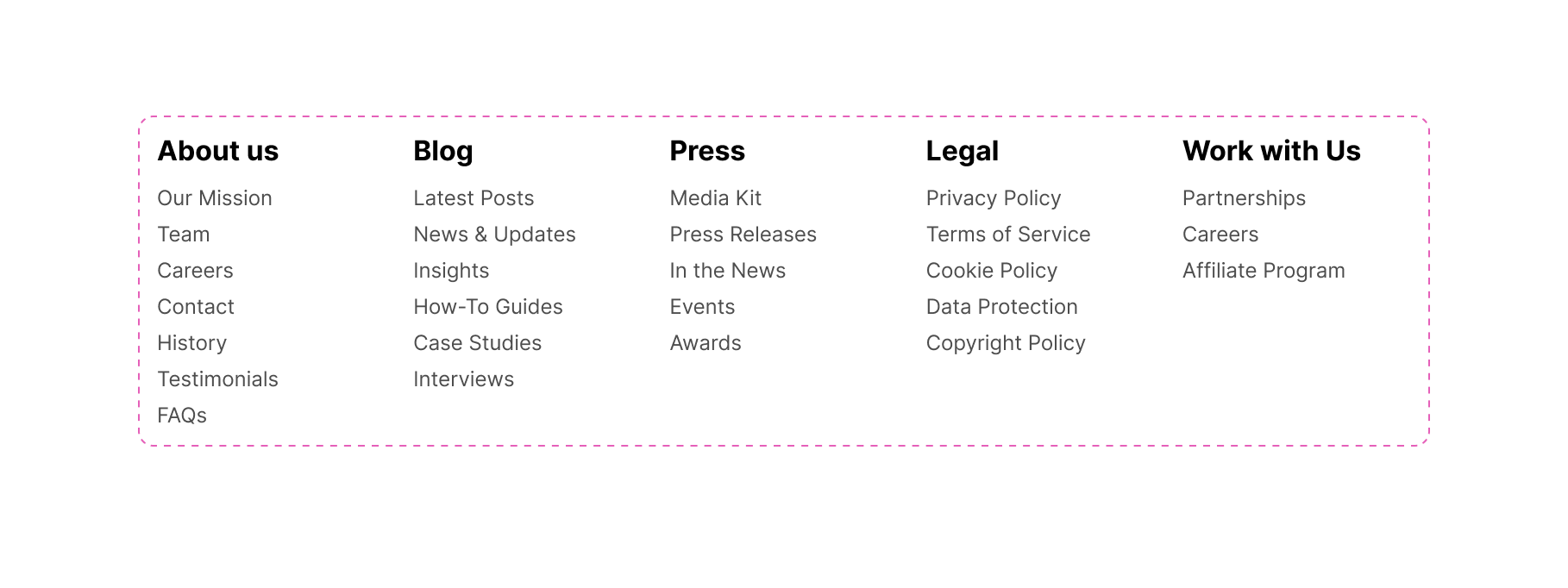 When there is no enough space, the footer groups will wrap. This is a default behaviour in CSS grid.
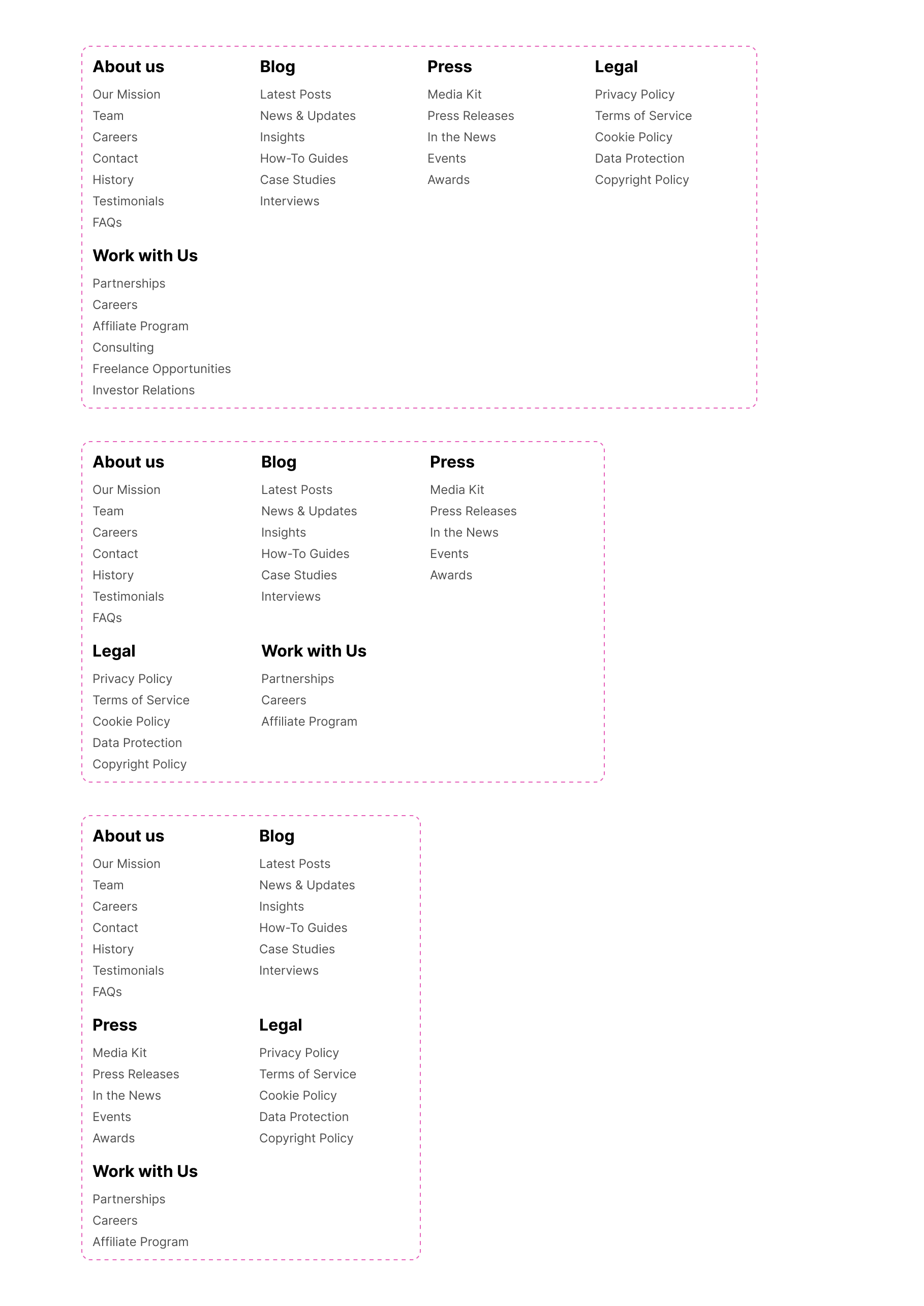 How would you build this layout? Let’s assume that we’ll use a CSS grid.
```
.footer {
display: grid;
grid-template-columns: repeat(auto-fit, minmax(120px, 1fr));
gap: 1rem;
}
```
With that, the grid works fine. Try to resize it.
About usOur MissionTeamCareersContactHistoryTestimonialsFAQs
BlogLatest PostsNews & UpdatesInsightsHow-To GuidesCase StudiesInterviews
PressMedia KitPress ReleasesIn the NewsEventsAwards
LegalPrivacy PolicyTerms of ServiceCookie PolicyData ProtectionCopyright PolicyGDPR Compliance
Work with usPartnershipsCareersAffiliate Program
Let’s explore enhancing this layout by using masonry.
###### [Grid-integrated option](https://ishadeed.com/article/css-grid-masonry/#grid-integrated-option)
In this solution, the grid is enhanced by adding `masonry` as a value for `grid-template-rows`.
```
.footer {
display: grid;
grid-template-columns: repeat(auto-fit, minmax(120px, 1fr));
grid-template-rows: masonry;
gap: 1rem;
}
```
In the following demo, try:
* Resizing the layout.
* Toggle the checkbox to see the difference between the default grid and masonry.
masonry
About usOur MissionTeamCareersContactHistoryTestimonialsFAQs
BlogLatest PostsNews & UpdatesInsightsHow-To GuidesCase StudiesInterviews
PressMedia KitPress ReleasesIn the NewsEventsAwards
LegalPrivacy PolicyTerms of ServiceCookie PolicyData ProtectionCopyright PolicyGDPR Compliance
Work with usPartnershipsCareersAffiliate Program
Here is a video version:
###### [Grid-independent option](https://ishadeed.com/article/css-grid-masonry/#grid-independent-option)
If the grid-independent option is used, how will it work? I have a few thoughts:
* This is a grid by default and I don’t know the exact number of items it will have.
* Even if I know the number of footer groups, they will need to be arranged differently when the viewport/container width is resized.
* If I need to change to a new layout module, how I can manage them in the default grid style (i.e: no)
Let’s explore using the grid-independent option. Please note that the following CSS still doesn’t work in any browser.
```
.footer {
display: masonry;
masonry-template-tracks: repeat(auto-fit, minmax(120px, 1fr));
gap: 1rem;
}
```
As a developer, if I want `masonry` to be applied to a grid under certain cases, **I will be forced to use `display:masonry`**. For me, that doesn’t make sense because:
* It will fail in browsers that don’t support `display: masonry`. I can write fallback, but why write more CSS when we can avoid it upfront by integrating it into the CSS grid?
* It’s a duplication of the CSS grid syntax.
##### [News layout](https://ishadeed.com/article/css-grid-masonry/#news-layout)
In this example, we have a news section. It contains a featured news item on a large viewport and a grid with 3 columns.
Try to resize the layout and see how it behaves.
Mastering Palestinian Ma’amoul: A Step-by-Step Guide
Discover the secrets behind Ma’amoul, the stuffed pastry filled with dates, nuts, or figs, that holds a special place in Palestinian celebrations. From dough preparation to perfecting the fillings, this guide covers it all.
The Art of Perfectly Flaky Palestinian Baklava
Baklava is more than just a dessert.
Zalabia: Palestinian Sweet Fritters for Festive Occasions
Zalabia, crispy fritters drenched in syrup, are perfect for special occasions. This article shares a traditional recipe and tips for achieving the right texture.
Exploring the Origins and Recipes of Knafeh Nabulsiyeh
Knafeh Nabulsiyeh is a beloved cheese-based dessert with roots in Nablus.
Palestinian Barazek: Sesame and Pistachio Cookies
Learn to make Barazek, a crunchy cookie coated with sesame and pistachios that pairs perfectly with tea.
Jerusalem Bagels: A Palestinian Street Food Staple
A deep dive into the history and recipe of Jerusalem bagels. These oval-shaped, sesame-crusted bagels are sold.
Sweet and Savory Palestinian Pastries
Palestinian cuisine boasts a variety of pastries, both sweet and savory, each with its own regional twist.
Did you notice the white space within each card? This is a default behaviour in CSS grid. Let’s explore how it will look when enabling masonry.
Default grid
Masonry
Mastering Palestinian Ma’amoul: A Step-by-Step Guide
Discover the secrets behind Ma’amoul, the stuffed pastry filled with dates, nuts, or figs, that holds a special place in Palestinian celebrations. From dough preparation to perfecting the fillings, this guide covers it all.
The Art of Perfectly Flaky Palestinian Baklava
Baklava is more than just a dessert.
Zalabia: Palestinian Sweet Fritters for Festive Occasions
Zalabia, crispy fritters drenched in syrup, are perfect for special occasions. This article shares a traditional recipe and tips for achieving the right texture.
Exploring the Origins and Recipes of Knafeh Nabulsiyeh
Knafeh Nabulsiyeh is a beloved cheese-based dessert with roots in Nablus.
Palestinian Barazek: Sesame and Pistachio Cookies
Learn to make Barazek, a crunchy cookie coated with sesame and pistachios that pairs perfectly with tea.
Jerusalem Bagels: A Palestinian Street Food Staple
A deep dive into the history and recipe of Jerusalem bagels. These oval-shaped, sesame-crusted bagels are sold.
Sweet and Savory Palestinian Pastries
Palestinian cuisine boasts a variety of pastries, both sweet and savory, each with its own regional twist.
Here is a video version:
Here is the default grid CSS:
```
.layout {
display: grid;
grid-template-columns: repeat(auto-fit, minmax(180px, 1fr));
gap: 1rem;
}
.card.featured {
@container news (min-width: 600px) {
grid-column: 1 / -1;
display: grid;
grid-template-columns: max-content 1fr;
}
}
```
If we want to enable masonry, we’ve two options.
###### [Grid-integrated option](https://ishadeed.com/article/css-grid-masonry/#grid-integrated-option-1)
```
.layout {
display: grid;
grid-template-columns: repeat(auto-fit, minmax(180px, 1fr));
grid-template-rows: masonry;
gap: 1rem;
}
.card.featured {
@container news (min-width: 600px) {
grid-column: 1 / -1;
display: grid;
grid-template-columns: max-content 1fr;
}
}
```
###### [Grid-independent option](https://ishadeed.com/article/css-grid-masonry/#grid-independent-option-1)
Take a look:
```
.layout {
display: masonry;
masonry-template-tracks: repeat(auto-fit, minmax(180px, 1fr));
gap: 1rem;
}
```
For the featured card, I want to place it from the start to the end column with `1 / -1`. According to the [css-grid-3](https://www.w3.org/TR/css-grid-3/#masonry-placement-masonry-option) spec:
> Item placement in the grid axis of a masonry container is established with the masonry-track-start and masonry-track-end properties (and their masonry-track shorthand), whose syntax and interpretation are analogous to the grid-column-start and grid-column-end properties (and their grid-column shorthand).
>
>
That means I need to replace `grid-column` with `masonry-track`.
```
.card.featured {
@container news (min-width: 600px) {
masonry-track: 1 / -1;
display: grid;
grid-template-columns: max-content 1fr;
}
}
```
Let’s assume that I want to use `display: masonry` as an enhancement.
```
.layout {
display: grid;
grid-template-columns: repeat(auto-fit, minmax(180px, 1fr));
gap: 1rem;
}
.card.featured {
@container news (min-width: 600px) {
grid-column: 1 / -1;
display: grid;
grid-template-columns: max-content 1fr;
}
}
@supports (display: masonry) {
.layout {
display: masonry;
masonry-template-tracks: repeat(auto-fit, minmax(180px, 1fr));
/*gap: 1rem;*/ /* gap is already there */
}
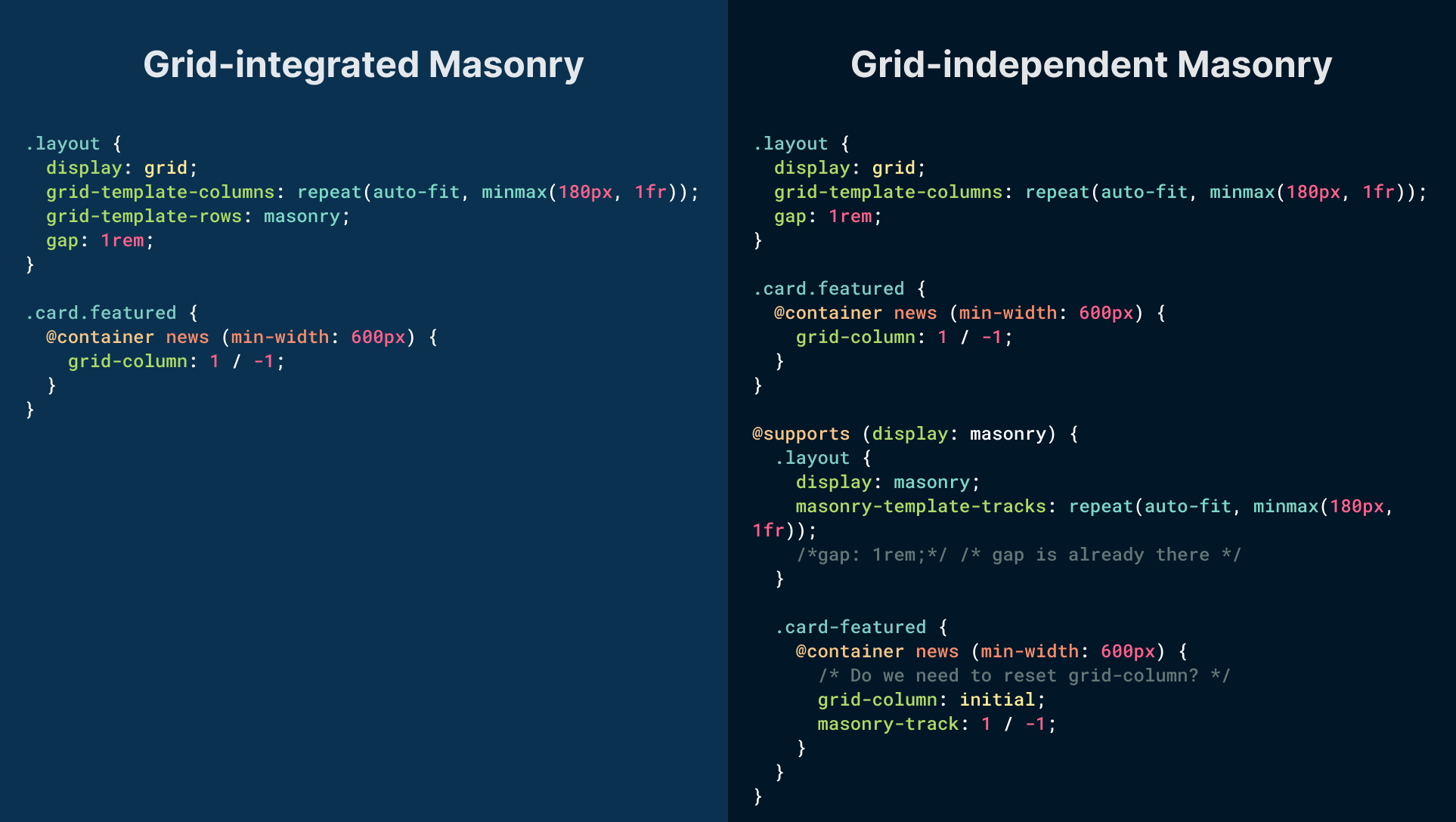
.card-featured {
@container news (min-width: 600px) {
/* Do we need to reset grid-column,
or masonry-track will override it? */
grid-column: initial;
masonry-track: 1 / -1;
}
}
}
```
If we compare the above to the grid-integrated option, the most obvious difference is that `grid-template-rows: masonry` will work on supported browsers. If not, it will simply show the default behavior.
 Another example that shows how masonry can be useful on top of CSS grid, not a separate layout module.
##### [Section Layout](https://ishadeed.com/article/css-grid-masonry/#section-layout)
In this design, we have a section that consists of:
* Headline and description
* Gallery of images
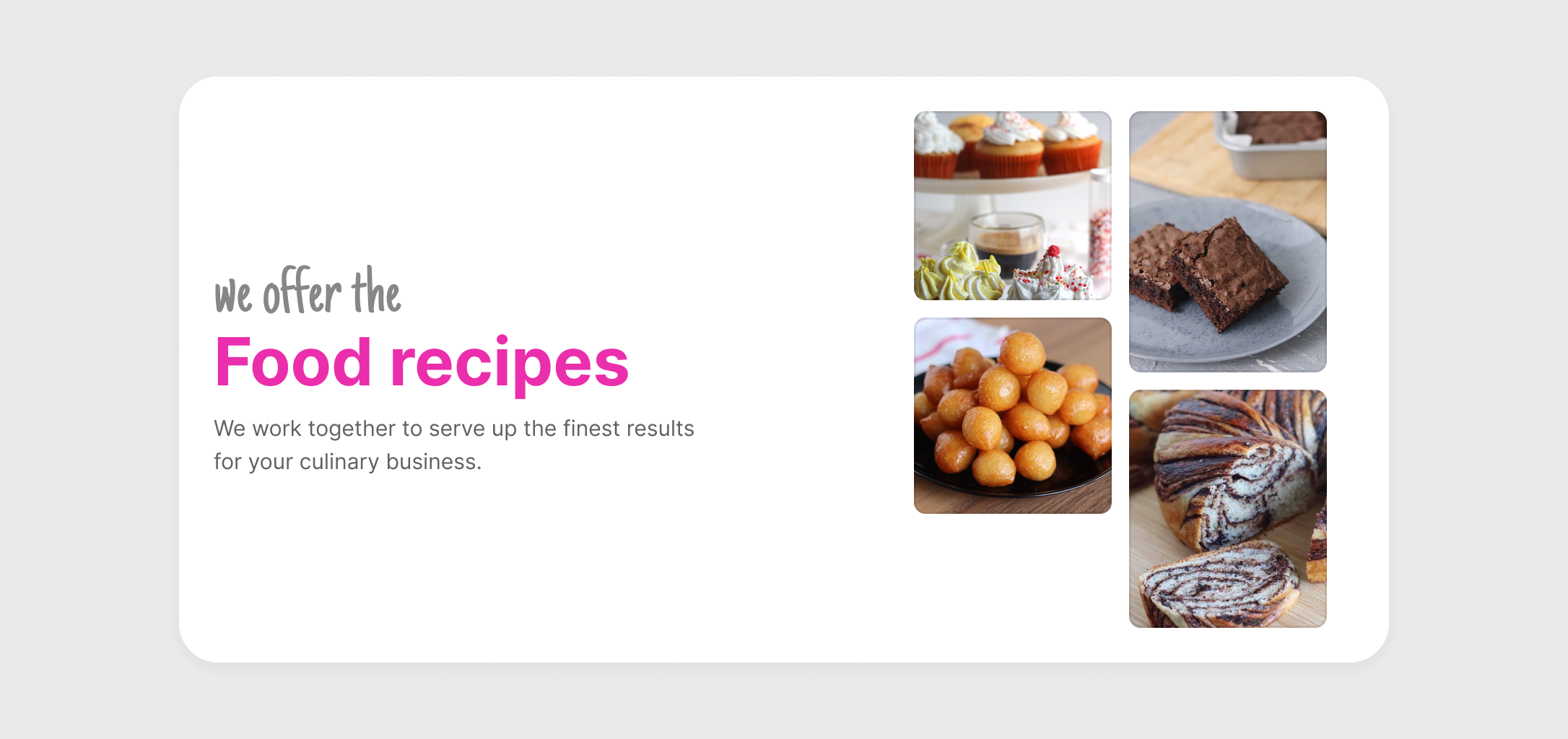 We need to build the image gallery dynamically:
* On small sizes, the images will get a masonry style, but when the image container is wider (around tablet size), the images should be squared
* If there are 5+ photos, the layout will change (e.g: square look)
See the following figure:
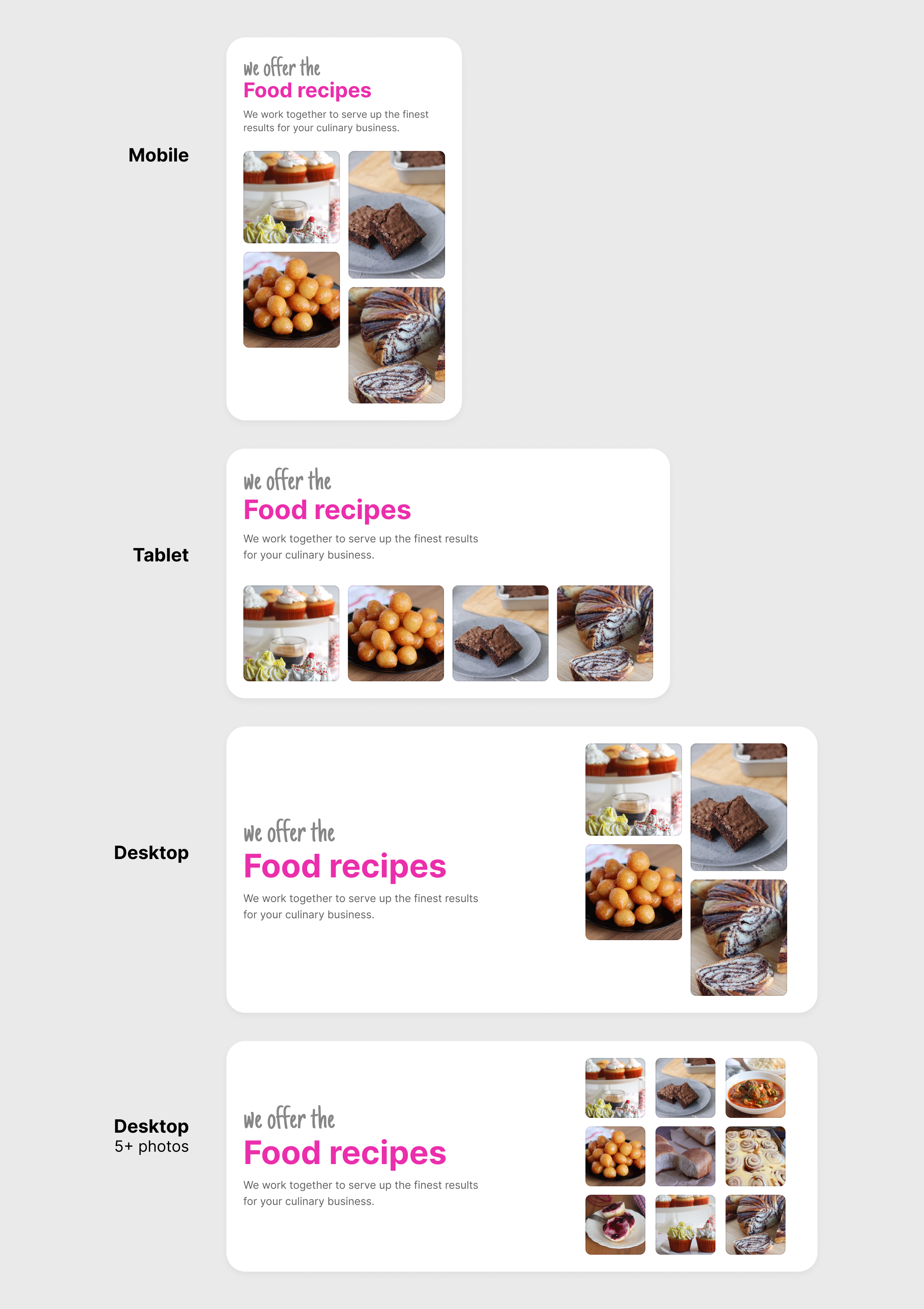 As you’ve seen, we are switching from masonry style frequently based on:
* The viewport/container sizes
* Number of items
###### [Grid-integrated option](https://ishadeed.com/article/css-grid-masonry/#grid-integrated-option-2)
First, I built the outer grid (section layout):
```
.section {
display: grid;
grid-template-columns: repeat(auto-fit, minmax(250px, 1fr));
align-items: center;
}
```
For the images gallery, I need to do the following:
* The default aspect ratio for the images is `1 / 1`
* If the container is large enough, change to a 2-col layout
* If the number of images is 5+, change the image aspect ratio to `1 / 1` and the dynamic columns grid
```
.gallery {
--dynamic: repeat(auto-fit, minmax(100px, 1fr));
--cols: var(--dynamic);
display: grid;
grid-template-columns: var(--cols);
grid-template-rows: masonry;
gap: 1rem;
/* Change the image aspect ratio on tablet-y size */
@container (min-width: 450px) {
img {
aspect-ratio: 1;
}
}
/* Switch to a 2-col layout */
@container (min-width: 535px) {
--cols: 1fr 1fr;
img {
aspect-ratio: initial;
}
/* If 5+ images, use the dynamic grid and change aspect ratio to 1. */
&:has(img:nth-last-child(n + 5)) {
--cols: var(--dynamic);
img {
aspect-ratio: 1;
}
}
}
}
```
See the interactive demo below and try to add or remove items.
Food recipes
We work together to serve up the finest results for your culinary business.
Here is a video version:
###### [Grid-independent option](https://ishadeed.com/article/css-grid-masonry/#grid-independent-option-2)
To implement the masonry style, we first need to use the default grid. If `display: masonry` is supported, we can enhance further and change the columns.
```
.gallery {
--dynamic: repeat(auto-fit, minmax(100px, 1fr));
--cols: var(--dynamic);
display: grid;
grid-template-columns: var(--cols);
gap: 1rem;
@supports (display: masonry) {
display: masonry;
masonry-template-tracks: var(--cols);
@container (min-width: 535px) {
--cols: 1fr 1fr;
}
/* Here, the layout is a normal grid. */
&:has(img:nth-last-child(n + 5)) {
--cols: var(--dynamic);
}
}
}
```
Even though having `display: masonry` sounds like a super power, I can’t see it work well with the dynamic examples shown.
##### [Arranging elements in a grid](https://ishadeed.com/article/css-grid-masonry/#arranging-elements-in-a-grid)
An uneven grid is something that the human eye will spot quickly. We can make it better with CSS grid and masonry.
By using CSS masonry, the browser can decide on its own where to place the orphan item in the grid based on the size of its siblings.
In the following demo, play with the range slider to increase the highlighted item height.
Item height
Food recipes
We work together to serve up the finest results for your culinary business.
Here is a video version:
Notice how the orphan item moves around. The browser is trying to balance the layout.
Considering that this layout might contain two items with the same aspect ratio, using masonry might be needed on demand only.
Food recipes
We work together to serve up the finest results for your culinary business.
###### [Grid-integrated option](https://ishadeed.com/article/css-grid-masonry/#grid-integrated-option-3)
We can use CSS grid and keep masonry there just in case.
```
.gallery {
display: grid;
grid-template-columns: 1fr 1fr;
grid-template-rows: masonry;
gap: 1rem;
}
```
In that case, the layout is a grid and masonry will be used by the browser only if there are multiple items with different aspect ratios.
###### [Grid-independent option](https://ishadeed.com/article/css-grid-masonry/#grid-independent-option-3)
This is where using a separate masonry becomes confusing. It’s a 2-col grid with two items only, why do I have to use masonry?
```
.gallery {
display: grid;
grid-template-columns: 1fr 1fr;
gap: 1rem;
@supports (display: masonry) {
display: masonry;
masonry-template-tracks: 1fr 1fr;
}
}
```
As you’ve seen, CSS grid is used by default. If `display: masonry` is supported, the code is duplicated.
##### [FAQs layout](https://ishadeed.com/article/css-grid-masonry/#faqs-layout)
In this example, we have a list of questions. I saw this example multiple times in the past. A design that requires each question height to be equal to its content.
The current solution for this is to group each column in its element in HTML, and it will work, but that is not an optimal solution, right?
What is CSS Grid?
How is CSS Grid different from Flexbox?
How do I create a basic CSS Grid?
What does 1fr mean in CSS Grid?
How can I create responsive layouts with CSS Grid? And do I need to use CSS media queries or it's not needed?
What is a grid area, and how can I define one?
How can I control spacing between grid items?
Can I nest CSS Grids within one another?
###### [Grid-integrated option](https://ishadeed.com/article/css-grid-masonry/#grid-integrated-option-4)
By design, this is a grid by default, so we can use CSS grid and keep masonry here just in case.
```
.section {
display: grid;
grid-template-columns: repeat(auto-fit, minmax(250px, 1fr));
grid-template-rows: masonry;
gap: 1rem;
}
```
###### [Grid-independent option](https://ishadeed.com/article/css-grid-masonry/#grid-independent-option-4)
With this solution, masonry is used if supported. Again, there is code repetition.
```
.section {
display: grid;
grid-template-columns: repeat(auto-fit, minmax(250px, 1fr));
gap: 1rem;
@supports (display: masonry) {
display: masonry;
masonry-template-tracks: repeat(auto-fit, minmax(250px, 1fr));
}
}
```
You can switch between the default grid and the masonry style below.
Default grid
Masonry
What is CSS Grid?
How is CSS Grid different from Flexbox?
How do I create a basic CSS Grid?
What does 1fr mean in CSS Grid?
How can I create responsive layouts with CSS Grid? And do I need to use CSS media queries or it's not needed?
What is a grid area, and how can I define one?
How can I control spacing between grid items?
Can I nest CSS Grids within one another?
Here is a video version:
#### [Once masonry is easy to do, it will become less popular](https://ishadeed.com/article/css-grid-masonry/#once-masonry-is-easy-to-do-it-will-become-less-popular)
The masonry style isn’t very common. You might say, but that’s because we don’t have the right tools to do it in CSS. Well, once something is easy to do by everyone, it will become less popular.
#### [Conclusion](https://ishadeed.com/article/css-grid-masonry/#conclusion)
I’m a strong believer that making masonry part of CSS grid is better as making a new display value sounds like a duplication to CSS grid. Also, I’m not convinced that if we went with making it part of grid, adding new features to CSS grid will require us to think of masonry. What else do we need to add to CSS grid? It’s been there since 2017 and I can only remember changing `grid-gap` to `gap`.
#### Join my mailing list
Join over **2740 subscribers** and learn my work, thoughts, and links I like around the web.
I will share content that:
* Clear and explain the point without too much words.
* Contains at least one figure or clear example.
* Make you learn something new, or at least to remind you of it.
Rest assure that you will receive top notch quality content recommendations.
Your email, Should Masonry Be Part of CSS Grid?, Ahmad Shadeed, 01jbfn2nbfb4ecvfrdtwhkvv22.