Synced Patterns: The Evolution of Reusable Blocks
## Metadata
- Author: [[WordPress News]]
- Full Title: Synced Patterns: The Evolution of Reusable Blocks
- Category: #articles
- Document Note: ## Summarize:
The article discusses the upcoming changes to WordPress 6.3, focusing on the new feature of synced patterns that will replace reusable blocks. Patterns are collections of blocks that allow users to easily add complex layouts and designs to their WordPress sites without starting from scratch. With WordPress 6.3, users will be able to arrange blocks in unlimited ways and save them as patterns for use throughout their site. The update introduces the ability to create both synced and unsynced patterns, offering more flexibility to users. Agencies and site builders can now curate their own patterns for clients directly in the site building process. The article also explains how previously made reusable blocks will transition to the new synced pattern name. Additionally, the post encourages users to contribute their patterns to the Pattern Directory to democratize design for every WordPress user and the web.
## Bullet Points:
- WordPress 6.3 introduces synced patterns, replacing reusable blocks.
- Patterns allow users to add complex layouts and designs to their sites without starting from scratch.
- Users can arrange blocks in unlimited ways and save them as patterns for reuse.
- Both synced and unsynced patterns can be created for different use cases.
- Agencies and site builders can now curate their own patterns for clients.
- Previously made reusable blocks will function as synced patterns in the new update.
- Patterns provided by themes and plugins will be listed in the Site Editor > Patterns section.
- Users can contribute their patterns to the Pattern Directory to democratize design for all WordPress users.
## Paraphrase:
1. **Patterns Replacing Reusable Blocks**: The article discusses the upcoming changes in WordPress 6.3, focusing on the introduction of synced patterns that will replace the existing reusable blocks. Patterns are a useful collection of blocks that allow users to effortlessly add intricate layouts and designs to their WordPress sites without having to start from scratch. This new feature promises to enhance the site-building experience by offering users the ability to arrange blocks in countless ways and save them as patterns for easy reuse throughout their site.
2. **Flexibility and Customization**: With the introduction of patterns, users will have greater flexibility and customization options. They can now create their own patterns, alongside using the ones bundled with each WordPress release. This opens up a world of possibilities, as users can now design their patterns to suit their specific needs. For example, if they frequently use the same contact information across their site and want to keep it updated consistently, they can create a synced pattern with all the necessary details. Conversely, if they need various banners with a similar layout but unique content, they can create unsynced patterns to speed up their workflow while maintaining a consistent approach.
### Conclusion:
WordPress 6.3 will introduce synced patterns to replace reusable blocks, offering users a more streamlined and flexible way to create intricate layouts and designs on their websites. The update enables users to arrange blocks in various ways, save them as patterns, and decide whether to sync them for consistent changes throughout the site or keep them unsynced for customization. This new feature empowers agencies and site builders to curate their patterns for clients, simplifying the site-building process. Users will find their previously made reusable blocks seamlessly transitioning into synced patterns. Moreover, WordPress encourages users to contribute their patterns to the Pattern Directory, promoting the democratization of design for all WordPress users and the broader web community.
### Questions:
- How will the introduction of synced patterns affect the overall user experience in WordPress 6.3?
- In what ways can users leverage the flexibility of synced and unsynced patterns to enhance their website designs?
- How can agencies and site builders benefit from curating their patterns for clients within the site building process?
- Are there any potential drawbacks or challenges in transitioning from reusable blocks to synced patterns?
- How can the democratization of design through the Pattern Directory positively impact WordPress users and the web community?
### Auto-tagging:
synced patterns, reusable blocks, WordPress 6.3, layouts, designs, flexibility, customization, site building, agencies, site builders, Pattern Directory, democratization of design
### Index Creation:
- Synced patterns
- Reusable blocks (now Synced patterns)
- WordPress 6.3
- Layouts and designs
- Flexibility and customization
- Site building process
- Agencies and site builders
- Pattern Directory
- Democratization of design
### Table of Contents:
1. Introduction
2. Patterns Replacing Reusable Blocks
- Craft complex layouts effortlessly
- Unlimited arrangement and reuse
3. Flexibility and Customization
- Creating synced patterns for consistency
- Utilizing unsynced patterns for customization
4. Transitioning from Reusable Blocks to Synced Patterns
5. Curating Patterns for Clients
6. Contributions to the Pattern Directory
7. Conclusion
### References:
The article on WordPress 6.3 and the introduction of synced patterns is based on insights provided by contributors Chloé Bringmann, Jonathan Pantani, Josepha, Krista Stevens, Nicholas Garofalo, and Peter Rubin.
### Future Research:
- Investigate user feedback and experiences with the new synced patterns in WordPress 6.3 to assess their impact on website design and user satisfaction.
- Explore the implications of democratizing design through the Pattern Directory, including its effects on website aesthetics and accessibility.
- Conduct a comparative study between synced and unsynced patterns to determine the most effective use cases for each approach.
- Examine how agencies and site builders adapt their workflows and client interactions with the introduction of curated patterns.
- Research the potential integration of artificial intelligence in pattern creation to automate layout suggestions and improve user experience.
### Hypotheses:
1. Websites using synced patterns in WordPress 6.3 will experience faster development times and increased consistency in design.
2. The democratization of design through the Pattern Directory will lead to a broader range of creative and accessible websites within the WordPress community.
3. Users who extensively customize unsynced patterns will report higher satisfaction and a stronger sense of personalization on their websites.
4. Agencies and site builders who curate patterns for clients will streamline their design processes and enhance customer satisfaction.
5. Artificial intelligence integration in pattern creation will reduce the time required to design complex layouts and improve overall website quality.
### Methodology:
1. Conduct user surveys and interviews to gather feedback on the experience of using synced patterns in WordPress 6.3.
2. Analyze website designs contributed to the Pattern Directory to assess their diversity, accessibility, and overall quality.
3. Perform A/B testing on websites utilizing synced and unsynced patterns to compare user satisfaction and design outcomes.
4. Interview agencies and site builders to understand their strategies in curating patterns for clients and the impact on project efficiency.
5. Implement AI-based pattern creation tools and compare the results with manual pattern development in terms of time and design quality.
### Implications:
The future research on WordPress 6.3's synced patterns and the democratization of design through the Pattern Directory has significant implications for the field. It can advance knowledge by uncovering the best practices for pattern usage, benefiting both experienced developers and novice website creators. The findings could influence practice by encouraging the adoption of reusable patterns for more efficient website building. Moreover, the democratization of design can foster a more inclusive web environment with diverse and accessible website templates. From a policy perspective, the research might encourage the WordPress community to prioritize pattern contributions, enhancing the overall user experience and promoting open-source collaboration.
### Logical validity:
The main argument presented in the article centers around the introduction of synced patterns in WordPress 6.
- Document Tags: [[wordpress]]
- Summary: Synced patterns are a new feature in WordPress 6.3 that replace reusable blocks. Patterns are collections of blocks that allow users to easily add complex layouts and designs to their WordPress sites. With synced patterns, users can arrange blocks in unlimited ways and save them for use throughout their site. They can choose to sync their patterns to apply changes site-wide or keep them unsynced for customization. The update also allows users to create their own patterns, offering greater flexibility and consistency in design.
- URL: https://wordpress.org/news/2023/07/synced-patterns-the-evolution-of-reusable-blocks/
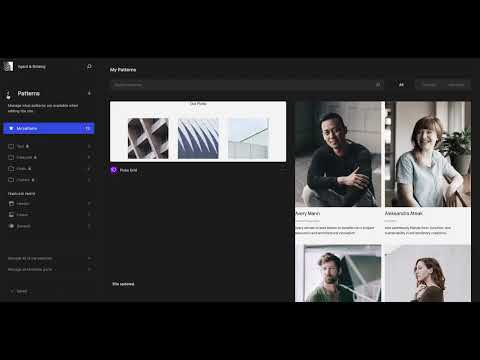
Synced patterns are replacing Reusable blocks, offering a unified creation experience for new pattern functionality coming to WordPress 6.3. Patterns, first introduced in WordPress 5.5, are a collection of blocks that make it simple to add complex layouts and designs to any WordPress site without starting from scratch. With WordPress 6.3, set to be released on August 8th, you will be able to arrange blocks in unlimited ways and save them as patterns for use throughout your site, directly within the editing experience. You can also specify whether to sync your patterns, so that one change applies to all parts of your site, or to keep them unsynced, so you can customize each instance.
Some content could not be imported from the original document. [View content ↗](https://www.youtube.com/embed/plZIF3jrU7E?version=3&rel=1&showsearch=0&showinfo=1&iv_load_policy=1&fs=1&hl=en-US&autohide=2&wmode=transparent)
#### Create your own patterns
The ability to create your own patterns, on top of using the ones bundled into each WordPress release, opens up a world of possibilities. Need to repeat the same contact information across your site and keep it up to date? Create a synced pattern with all the details, and say goodbye to repeating yourself, with the ability to quickly insert the synced pattern wherever you need it. If you find yourself creating various banners for your site and want them to have the same layout with unique content, creating an unsynced pattern speeds up your workflow and ensures a level of consistency in approach. While themes and plugins have been able to offer patterns to users and [curate the experience](https://developer.wordpress.org/block-editor/how-to-guides/curating-the-editor-experience/#utilizing-patterns), this update allows agencies and site builders to do the same for their clients, directly in the site building process.
#### Dig into the details
Any previously made Reusable blocks will continue to function as they do now, just under the new Synced pattern name. To help adjust to these changes, a few contextual notices will be placed throughout the interface. Specifically, the menu item in the creation flow will show as “Create pattern/reusable block” until the prompt describing the switch is dismissed in one of the various locations, including the naming and syncing modal:
Some content could not be imported from the original document. [View content ↗](https://www.youtube.com/embed/fbrhammtn3Y?version=3&rel=1&showsearch=0&showinfo=1&iv_load_policy=1&fs=1&hl=en-US&autohide=2&wmode=transparent)
For folks using block themes, all patterns will be listed alongside template parts in the Site Editor > Patterns section, where you can enter a focused editing mode to make changes. For Classic themes, the prior reusable block management page will now house patterns in a list, similar to the Posts > All Posts view.

For a complete overview of patterns on your site, all patterns provided by themes and plugins will be shown in this section but without the option to edit directly.
#### Go further
With the ability to create your own patterns baked into the creation experience, remember that you can copy the patterns available in the [Pattern Directory](https://wordpress.org/patterns/) and [contribute back](https://wordpress.org/patterns/about/), an excellent way to democratize design for every WordPress user and the web.
*For more exciting features coming to patterns in WordPress 6.3,* [*read on in the Advancing the Power of Patterns post*](https://make.wordpress.org/core/2023/07/13/core-editor-improvement-advancing-the-power-of-patterns/)*. Thank you to the contributors who collaborated on this post:* [*Chloé Bringmann*](https://profiles.wordpress.org/cbringmann/)*,* [*Jonathan Pantani*](https://profiles.wordpress.org/jpantani/)*,* [*Josepha*](https://profiles.wordpress.org/chanthaboune/)*,* [*Krista Stevens*](https://profiles.wordpress.org/kristastevens/)*,* [*Nicholas Garofalo*](https://profiles.wordpress.org/eidolonnight/)*, Peter Rubin*., Synced Patterns: The Evolution of Reusable Blocks, WordPress News, 01h78p2jgans4s817ddj9t01cz.