Tables in the Content
🔗 **Source:** [Tables in the Content](https://wpaccessibility.org/docs/topics/content/tables/)
> [!note]+ Document Notes
> ---
> tags: [wordpress-accessibility, data-tables, wcag, gutenberg, semantic-html]
> author: WordPress Accessibility Documentation project
> source: wpaccessibility.org
> reference: https://wpaccessibility.org/docs/topics/content/tables/
> date created: 2026-09-09
> ---
> > [!info] Generated analysis — not the author's words. Sections below are machine-written
> > from the captured source. Only text inside `> [!quote]` blocks is verbatim from the author.
> > Do not quote or attribute any other line to the named author.
> <!-- deep-read: light-touch -->
> Light-touch by design: this is a 588-word how-to documentation page, not an argument. It gets a
> short capture rather than the full 18-section treatment, which would pad it with sections the
> source cannot fill.
> # 🏷️ Title: Tables in the content
> ## 📝 Summary
> Practical guidance for content authors on building accessible data tables in WordPress, aimed at
> editors rather than developers. Three requirements: use a real HTML table (not spaces or
> dividers), use table headers for columns and rows, and give the table a caption — or, failing
> that, a heading directly above it that fits the page's heading structure. It then walks the
> default Table block step by step, current as of WordPress 7.1, and points at the open Gutenberg
> work to improve it.
> ## 🗒️ Key claims
> - **Layout tables are a conformance failure, not just bad practice.**
> > [!quote]
> > Warning: Using a table only for layout and not for displaying data makes the content hard to understand for screen reader users. It is actually a WCAG violation to use a table for layout only.
> - **Complexity is a shared signal.** The page's most transferable idea, and the one that isn't
> really about tables:
> > [!quote]
> > when a complex table is hard to make accessible, it’s probably also hard to understand for every reader
> The prescribed response is to split a complex table into several, or switch to a different
> structure such as an unordered list.
> - **What a screen reader actually announces**: the caption first, then the headers, then each
> cell with its header repeated. That's the concrete reason captions and header rows matter, and
> it's the part editors usually haven't heard.
> - **Plugin caution.** The default block does simple tables only. Row headers and captions need a
> plugin, and the page tells you to verify the plugin's *output* before adopting it rather than
> trusting the feature list.
> ## ✅ Action items
> - **Make WordPress Accessible / Training:** this page is directly reusable in a Learn WordPress
> lesson on accessible content authoring — it's already step-by-step and screenshot-driven.
> - **Contribute:** the page links open Gutenberg issues labeled `Block Table` and says outright
> that "assistance is welcome." Concrete contribution path if you want a scoped a11y issue.
> - **Two copy errors to fix if you have commit access to the docs site:** a figcaption reads
> "SCreenshot of the table in the web page", and step 3 says "give the table a sort heading"
> where it means *short*. Small, but this is a documentation site teaching correctness.
> ## 🔗 References
> - [WCAG 1.3.1 Info and Relationships (Level A)](https://www.w3.org/WAI/WCAG22/quickref/#info-and-relationships)
> - [WCAG 1.3.2 Meaningful Sequence (Level A)](https://www.w3.org/WAI/WCAG22/quickref/#meaningful-sequence)
> - [Table block — WordPress documentation](https://wordpress.org/documentation/article/table-block/)
> - [WAVE Browser Extension](https://wave.webaim.org/) — the page's suggested way to verify a plugin's output
> - [Gutenberg issues labeled Block Table](https://github.com/WordPress/gutenberg/issues?q=state%3Aopen+label%3A%22%5BBlock%5D+Table%22)
> - Sibling pages: Tables in code, Semantic HTML, heading structure
> ## 🎯 Conclusion
> Nothing novel, and it isn't trying to be — it's a clean authoring reference with a real WordPress
> 7.1 walkthrough. The one line worth extracting past its subject is the complexity heuristic: a
> table too complex to make accessible is probably too complex to read. That generalizes to forms,
> navigation, and dashboards.
When you want to show information in a structured way, a table made up of rows and columns is a clear way to present your data. How do you do this so that everyone understands the information?
Important to make the data understandable for users that rely on assistive technology like a screen reader:
* Make sure you use a **real HTML table** and not, for example, spaces or other dividers to separate the data.
* Use **table headers** to describe the columns and rows.
* If possible, give the table a **caption** to describe the purpose of the table. If that is not possible, add a **heading** just above the table with a heading level that fits within the [heading structure](https://wpaccessibility.org/docs/topics/content/headings/) of the page.
How to create tables in frontend development is addressed in the “Frontend code” section [Tables in code](https://wpaccessibility.org/docs/topics/code/tables/).
The cities of WordCamp Europe | Year | City | Country |
| 2026 | Kraków | Poland |
| 2025 | Basel | Switzerland |
| 2024 | Turin | Italy |
Entering the table, the caption is announced, then the table headers, and then with each cell the header is repeated with the cel data. In the table above “The cities of WordCamp Europe” is the caption. “Year”, “City”, and “Country” are the table headers.
When designing the structure of a table, keep in mind: when a complex table is hard to make accessible, it’s probably also hard to understand for every reader. It’s sometimes best to split up a complex table into multiple tables or use a different structure, such as unordered lists. Try to display the data as simply as possible, always keeping your reader in mind.
**Warning:** Using a table only for layout and not for displaying data makes the content hard to understand for screen reader users. It is actually a WCAG violation to use a table for layout only. See [WCAG 1.3.1 Info and Relationships](https://www.w3.org/WAI/WCAG22/quickref/#info-and-relationships).
#### The table block in WordPress Admin
With the default Table block you can create simple accessible tables. This example is created with WordPress 7.1.
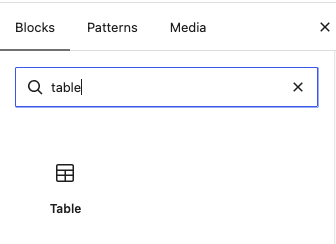
Step 1. When editing or adding a post, search for the table block and select it.
Search for the table block
Step 2. Select how many columns and rows you want in the table and add the table to the content.
Step 3. Give the table a sort heading that describes the purpose of the table.
Step 4. Select the table block and select with the options: Header section.
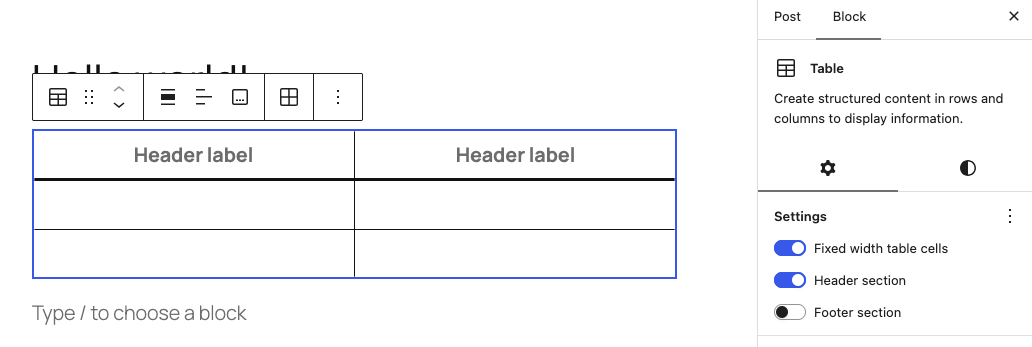Check the Header section
Step 5. Fill in the table headers and the cells.
Step 6. Save the post and check the table on the webpage
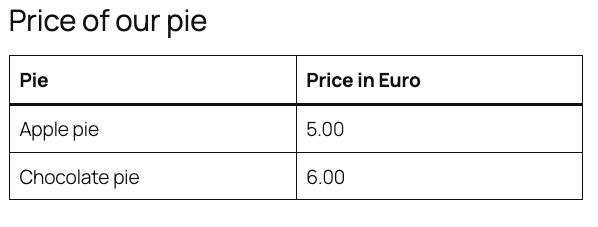SCreenshot of the table in the web page
Read [Table block](https://wordpress.org/documentation/article/table-block/) in the WordPress documentation for more information about how to use the Table block in the Admin read.
These are the current options to create an accessible table in the WordPress Admin. If you want more, try out one of the plugins that can add more features to the table block, like row headers and captions. Before using a plugin, make sure it creates accessible tables in the website. You can test this by using a test tool like the [WAVE Browser Extension](https://wave.webaim.org/) on the webpage with the table.
Work is currently underway to improve and enhance the table block in the WordPress Admin. You can follow this in the GitHub [issues labeled Block Table](https://github.com/WordPress/gutenberg/issues?q=state%3Aopen%20label%3A%22%5BBlock%5D%20Table%22). There are plans for expanding the capabilities of the table block, assistance is welcome in making this happen.
#### Resources
##### Related WCAG success criteria for tables
* [1.3.1 Info and Relationships](https://www.w3.org/WAI/WCAG22/quickref/#info-and-relationships) (Level A).
* [1.3.2 Meaningful Sequence](https://www.w3.org/WAI/WCAG22/quickref/#meaningful-sequence) (Level A).
##### Related pages in this documentation
* [Tables in frontend development](https://wpaccessibility.org/docs/topics/code/tables/) in Frontend code.
* [Semantic HTML](https://wpaccessibility.org/docs/topics/code/semantics/) in Frontend code.
##### Other resources, Tables in the Content, WordPress Accessibility Documentation project, 01m230rq45k66drt52jh3agwy5.