Tidying WordPress’s HTML
## Metadata
- Author: [[https://www.facebook.com/itsdanq]]
- Full Title: Tidying WordPress’s HTML
- Category: #articles
- Document Note: # Title: Optimization of WordPress HTML with Tidy
---
tags: #WordPressHTML #Tidy #HTMLOptimization
Author: Terence Eden
Source: DanQ.me
Reference: N/A
---
## Table of Contents:
- Summary
- Main Content
- Paraphrase
- Hypotheses
- Methodology
- Questions
- Future Research
- Implications
- Logical validity
- Conclusion
## Index Creation:
1. get_the_post_thumbnail() function in WordPress
2. HTML optimization with Tidy
3. Solving redundant closing marks
4. Running HTMLTidy over WordPress
## 📝 Summary:
The article delves into optimizing WordPress's HTML output using Tidy, focusing on enhancing the readability, standardizing style, and correcting invalid HTML elements within a webpage.
## 📖 Main Content:
Terence Eden highlights the need for tidying up HTML to improve page readability and user experience. By utilizing Tidy, outdated HTML elements are modernized, inline styles are converted to classes, and invalid HTML is repaired to facilitate parsing.
### 🗒️ Notes:
- Tidy enhances HTML readability and standardization.
- Outdated HTML elements like <i> are updated to modern standards like <em>.
- Implementing Tidy with WordPress requires careful installation and caching to avoid repeated processing.
- Tidy's absence in PHP results in silent failures, requiring deliberate enabling in PHP extensions.
## 📖 References:
None listed in the source material.
## 🗣️ Paraphrase:
- WordPress generates unnecessary closing marks in HTML images, which can be rectified using Tidy.
- Tidy standardizes HTML structure, enhances readability, and corrects invalid HTML elements.
## 🧪 Hypotheses:
- Implementing Tidy in WordPress can potentially lead to improved webpage performance.
- Further research can explore the impact of HTML optimization on user engagement metrics.
### 📊 Methodology:
Utilize user testing to compare page load times between standard WordPress output and Tidy-optimized HTML. Perform A/B testing to assess the impact on bounce rates post-optimization.
### ❓ Questions:
- How does Tidy integration affect mobile responsiveness of WordPress websites?
- Are there security implications associated with the implementation of Tidy in WordPress?
### 🔮 Future Research:
Investigate the correlation between Tidy implementation and search engine rankings for WordPress websites. Explore Tidy's compatibility with different WordPress themes.
### 💡 Implications:
Successful integration of Tidy in WordPress can enhance SEO rankings, improve user experience, and reduce loading times, consequently benefiting website owners.
### ✅ Logical validity:
The argument for using Tidy to optimize WordPress HTML exhibits logical coherence and validity by addressing inefficiencies in HTML rendering and readability.
## 🎯 Conclusion:
Optimizing WordPress's HTML output using Tidy presents a promising avenue for enhancing webpage readability and standardization. The practice holds the potential to significantly improve user experience and streamline webpage performance.
- Document Tags: [[html]] [[tips]] [[wordpress]]
- Summary: Terence Eden found a way to fix redundant closing marks in WordPress's HTML output, but he couldn't address all instances. The author shares his solution using Tidy to clean up HTML on his blog, making it more readable and modern. He provides a guide for integrating Tidy with WordPress, including installation steps and caching tips.
- URL: https://danq.me/2024/07/31/wordpress-htmltidy/
[Terence Eden](https://shkspr.mobi/), who’s [apparently](https://danq.me/2024/07/29/shared-email-addresses/) inspiring several posts this week, recently [shared a way](https://shkspr.mobi/blog/2024/07/remove-unnecessary-closing-slash-on-get_the_post_thumbnail-in-wordpress/) to attach a hook to WordPress’s `get_the_post_thumbnail()` function in order to remove the extraneous “closing mark” from the (self-closing in HTML) `<img>` element.
By default, WordPress outputs e.g. `<img src="..." />`, where `<img src="...">` would suffice.
It’s an inconsequential difference for most purposes, but apparently it bugs him, so he fixed it… although he went on to observe that he hadn’t managed to successfully tackle *all* the instances in which WordPress was outputting redundant closing marks.
This is a problem that **I’ve already solved** here on my blog. My solution’s slightly hacky… but it works!
[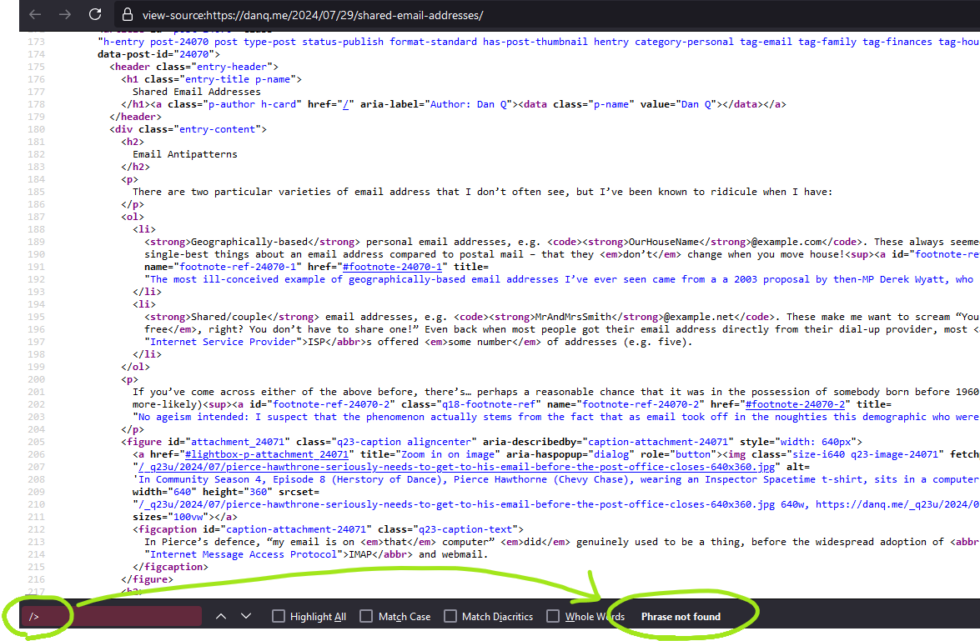](https://danq.me/2024/07/31/wordpress-htmltidy/#lightbox-p-attachment_24084) There are many things you could say about the HTML produced to make the page you’re reading now. But “it needs fewer `/>`s” isn’t among them.
#### My Solution: Runing HTMLTidy over WordPress
[Tidy](https://www.html-tidy.org/) is an excellent tool for tiding up HTML! I used to use its predecessor back in the day for all kind of things, but it languished for a few years and struggled with support for modern HTML features. But [in 2015 it made a comeback](https://github.com/htacg/tidy-html5/releases/tag/5.0.0) and it’s gone from strength to strength ever since.
I run it on *virtually all pages* produced by DanQ.me (go on, click “View Source” and see for yourself!), to:
* Standardise the style of the HTML code and make it easier for humans to read[1](https://danq.me/2024/07/31/wordpress-htmltidy/#footnote-24079-1).
* Bring old-style emphasis tags like `<i>`, in my older posts, into a more-modern interpretation, like `<em>`.
* Hoist any inline `<style>` blocks to the `<head>`, and detect any repeated inline `style="..."`s to convert to classes.
* Repair any invalid HTML (browsers do this for you, of course, but doing it server-side makes parsing easier for the browser, which might matter on more-lightweight hardware).
WordPress isn’t really designed to have Tidy bolted onto it, so anything it likely to be a *bit* of a hack, but here’s my approach:
1. **Install `libtidy-dev` and build the PHP bindings to it**.
Note that if you don’t do this the code might *appear* to work, but it won’t actually tidy anything[2](https://danq.me/2024/07/31/wordpress-htmltidy/#footnote-24079-2).
2. **Add a new output buffer** to my theme’s `header.php`[3](https://danq.me/2024/07/31/wordpress-htmltidy/#footnote-24079-3), with a callback function: `ob_start('tidy_entire_page')`.
Without an corresponding `ob_flush` or similar, this buffer will close and the function will be called when PHP finishes generating the page.
3. **Define the `function tidy_entire_page($buffer)`** Have it instantiate Tidy (`$tidy = new tidy`) and use `$tidy->parseString` (with your buffer and Tidy preferences) to tidy the code, then `return $tidy`.
4. **Ensure that you’re caching the results!** You don’t want to run this every page load for anonymous users! [WP Super Cache](https://wordpress.org/plugins/wp-super-cache/) on “Expert” mode (with the requisite webserver configuration) might help.
[I’ve open-sourced a demonstration that implements a child theme to TwentyTwentyOne to do this](https://github.com/Dan-Q/wp-htmltidy-hack-demo): there’s a richer set of instructions in the repo’s readme. If you want, you can run my example in Docker and see for yourself how it works before you commit to trying to integrate it into your own WordPress installation!
#### Footnotes
[1](https://danq.me/2024/07/31/wordpress-htmltidy/#footnote-ref-24079-1) I miss the days when most websites were handwritten and View Source typically looked *nice*. It was great to learn from, too, especially in an age before we had DOM debuggers. Today: I can’t justify dropping my use of a CMS, but I *can* make my code readable.
[2](https://danq.me/2024/07/31/wordpress-htmltidy/#footnote-ref-24079-2) For a few of its extensions, some PHP developer made the interesting choice to *fail silently* if the required extension is missing. For example: if you don’t have the `zip` extension enabled *you can still use* *PHP* *to make ZIP files*, but they won’t be *compressed*. This can cause a great deal of confusion for developers! A similar issue exists with `tidy`: if it isn’t installed, you can still call all of the methods on it… they just don’t *do* anything. I can see *why* this decision might have been made – to make the language as portable as possible in production – but I’d prefer if this were an *optional* feature, e.g. you had to set `try_to_make_do_if_you_are_missing_an_extension=yes` in your `php.ini` to enable it, or if it at least *logged* that it had done so.
[3](https://danq.me/2024/07/31/wordpress-htmltidy/#footnote-ref-24079-3) My approach probably isn’t suitable for FSE (“block”) themes, sorry., Tidying WordPress’s HTML, https://www.facebook.com/itsdanq, 01j451scs6p9hf65pbje5qvcg5.