Transferring Your Plugin to a New Owner

## Metadata
- Author: [[WordPress Developer Resources]]
- Full Title: Transferring Your Plugin to a New Owner
- Category: #articles
- Document Note: ---
tags:
- #WordPress
- #pluginmanagement
- #opensourcegovernance
Author: [WordPress Developer Handbook]
Source: [WordPress.org](https://developer.wordpress.org/plugins/wordpress-org/transferring-your-plugin-to-a-new-owner/)
Reference: [Transferring Your Plugin to a New Owner](https://developer.wordpress.org/plugins/wordpress-org/transferring-your-plugin-to-a-new-owner/)
date created: 2024-10-20 17:45
---
# Title: Transferring Your Plugin to a New Owner
## Table of Contents:
- [📝 Summary](#-summary)
- [📖 Main Content](#-main-content)
- [🗒️ Notes](#-notes)
- [📖 References](#-references)
- [🗣️ Paraphrase](#-paraphrase)
- [📰 Newsletter](#-newsletter)
- [✅ Action Items](#-action-items)
- [🧪 Hypotheses](#-hypotheses)
- [📊 Methodology](#-methodology)
- [❓ Questions](#-questions)
- [🔮 Future Research](#-future-research)
- [💡 Implications](#-implications)
- [🧠 Learning Styles Assessment](#-learning-styles-assessment)
- [📊 Accessibility Assessment](#-accessibility-assessment)
- [🌍 DEIB Assessment](#-deib-assessment)
- [✅ Logical Validity](#-logical-validity)
- [🔍 SEO Evaluation](#-seo-evaluation)
- [🎯 Conclusion](#-conclusion)
### References:
- [Transferring Your Plugin to a New Owner - WordPress Developer Handbook](https://developer.wordpress.org/plugins/wordpress-org/transferring-your-plugin-to-a-new-owner/)
## 📝 Summary:
This guide outlines the steps and best practices for transferring ownership of a WordPress plugin on WordPress.org. Whether selling your plugin or simply handing it over, ensuring a smooth transition for the new owner is critical for continued development and user trust. It discusses responsibilities, permissions, and how to request transfers via WordPress.org’s plugin repository.
## 📖 Main Content:
The transfer process involves multiple steps that ensure both the original developer and the new owner properly transition control of the plugin while maintaining its integrity for users. It’s critical to keep user support in mind, ensuring the plugin is still well-maintained and that users are informed of the change.
### Key Steps:
1. **Preparation**: Before transferring, ensure that the new owner is prepared to maintain the plugin and continue support.
2. **Permissions and Roles**: Transfer of permissions in WordPress.org's plugin repository requires a request to the WordPress Plugin Team.
3. **Maintaining User Trust**: Communicate transparently with users about the change, ensuring that trust is maintained during the transition.
4. **Repository Update**: The new owner needs to be given full commit access to the SVN repository of the plugin.
5. **Final Transfer**: Once the WordPress Plugin Team has approved the transfer, the new owner takes over management responsibilities.
### 🗒️ Notes:
- **Ownership Handover**: The original owner must ensure the new developer has the resources to continue supporting the plugin.
- **Communication**: It's crucial to notify users of the ownership change to prevent any trust issues or user confusion.
- **SVN Repository**: The new owner should gain access to the plugin's repository after approval by the Plugin Review team.
- **Best Practices**: Always document any changes and ensure smooth collaboration between both parties during the transition.
## 📖 References:
- [Transferring Your Plugin to a New Owner - WordPress Developer Handbook](https://developer.wordpress.org/plugins/wordpress-org/transferring-your-plugin-to-a-new-owner/)
## 🗣️ Paraphrase:
1. Transferring a WordPress plugin involves ensuring the new owner has full access to the plugin's codebase and the necessary permissions in the WordPress.org repository. This transition needs to be smooth to maintain user support and trust.
2. It’s important to inform plugin users about ownership changes to ensure transparency. Clear communication about the new maintainer’s commitment and future plans can help retain user confidence.
## 📰 Newsletter:
📢 **WordPress Plugin Ownership Transfers Made Easy**
In case you ever find yourself in a situation where you need to transfer your WordPress plugin to a new owner, fear not! WordPress.org has detailed guidelines to ensure a seamless transition. The process involves giving proper repository access and notifying your users of the change. Make sure the new owner is ready to maintain the plugin's quality and support users effectively. Learn more about the process [here](https://developer.wordpress.org/plugins/wordpress-org/transferring-your-plugin-to-a-new-owner/).
## ✅ Action Items:
As a Developer Advocate specializing in open-source, understanding the intricacies of plugin ownership transfers will help you guide contributors and maintainers. Align your advocacy efforts by promoting transparency during plugin handovers, ensuring developers adhere to best practices for seamless transitions. Encourage GoDaddy’s team to follow similar guidelines when acquiring or transferring plugin projects.
## 🧪 Hypotheses:
- Clear communication and transparent transitions increase user trust when a plugin changes ownership.
- Delays in granting repository access during plugin ownership transitions could lead to disruptions in plugin support and updates.
### 📊 Methodology:
- **Survey Plugin Users**: Survey users of plugins that have undergone ownership changes to determine their trust levels before and after the transfer.
- **Track Plugin Updates**: Measure the frequency and quality of plugin updates pre- and post-transfer to assess if the transition impacted the plugin’s performance.
### ❓ Questions:
- How can WordPress improve communication between plugin developers and users during ownership changes?
- Are there cases where plugin ownership transfers led to a decrease in plugin quality?
### 🔮 Future Research:
Future studies could focus on analyzing how plugin ownership transitions affect the overall WordPress plugin ecosystem, especially the impact on plugin reliability, update frequency, and user engagement.
### 💡 Implications:
Understanding the challenges of plugin ownership transfers could lead to better governance frameworks for open-source projects like WordPress. This could ensure more seamless transitions while maintaining high-quality support for users.
### 🧠 Learning Styles Assessment:
1. **Visual Learners (Spatial)**:
- **Present**: No visual aids are present in the guide.
- **Improve**: Add diagrams or flowcharts explaining the step-by-step process of transferring plugin ownership.
2. **Aural Learners (Auditory-Musical)**:
- **Present**: No auditory content is available.
- **Improve**: Offer an audio version or podcast explaining the plugin ownership transfer process.
3. **Verbal Learners (Linguistic)**:
- **Present**: Detailed written explanations are present.
- **Improve**: Incorporate examples and case studies to make it more engaging for verbal learners.
4. **Physical Learners (Kinesthetic)**:
- **Improve**: Add actionable tasks such as practice scenarios for transferring plugins in a test environment.
5. **Logical Learners (Mathematical)**:
- **Present**: Logical steps are outlined clearly.
- **Improve**: Introduce a checklist to help logical learners follow through the process systematically.
6. **Social Learners (Interpersonal)**:
- **Present**: Opportunities for collaboration are not directly encouraged.
- **Improve**: Encourage developers to work together during the transfer process, possibly involving both parties in plugin community forums.
7. **Solitary Learners (Intrapersonal)**:
- **Present**: Reflective activities are not present.
- **Improve**: Suggest documenting personal experiences or reflections on the transfer process for future reference.
8. **Naturalistic Learners**:
- **Improve**: Introduce nature-based metaphors or examples to describe plugin handoffs for better real-world connection.
### 📊 Accessibility Assessment:
- **Screen Reader Compatibility**: Ensure all images and steps have alt-text to describe processes for visually impaired users.
- **Keyboard Navigation**: Improve keyboard-only navigation for better accessibility.
- **Contrast and Readability**: Review the color scheme for high contrast, particularly
- Document Tags: [[plugin directory]] [[wordpress]] [[WordPress plugin]]
- Summary: While any plugin can have an unlimited number of committers and support reps, there is only one official owner of a plugin at any time. This…
- URL: https://developer.wordpress.org/plugins/wordpress-org/transferring-your-plugin-to-a-new-owner/
While any plugin can have an unlimited number of committers and support reps, there is only one official owner of a plugin at any time. This is akin to how a post on WordPress can only have one official post author.
#### [For Plugins With Under 10,000 Users](https://developer.wordpress.org/plugins/wordpress-org/transferring-your-plugin-to-a-new-owner/#for-plugins-with-under-10000-users)
If you’re transferring your plugin to a new owner, there are two steps that must take place.
First, add the new user as a **committer** to the plugin:
* go to `https://wordpress.org/plugins/YOURPLUGIN/advanced` and add their username in as a committer
* update the `readme.txt` to add their userID as an author
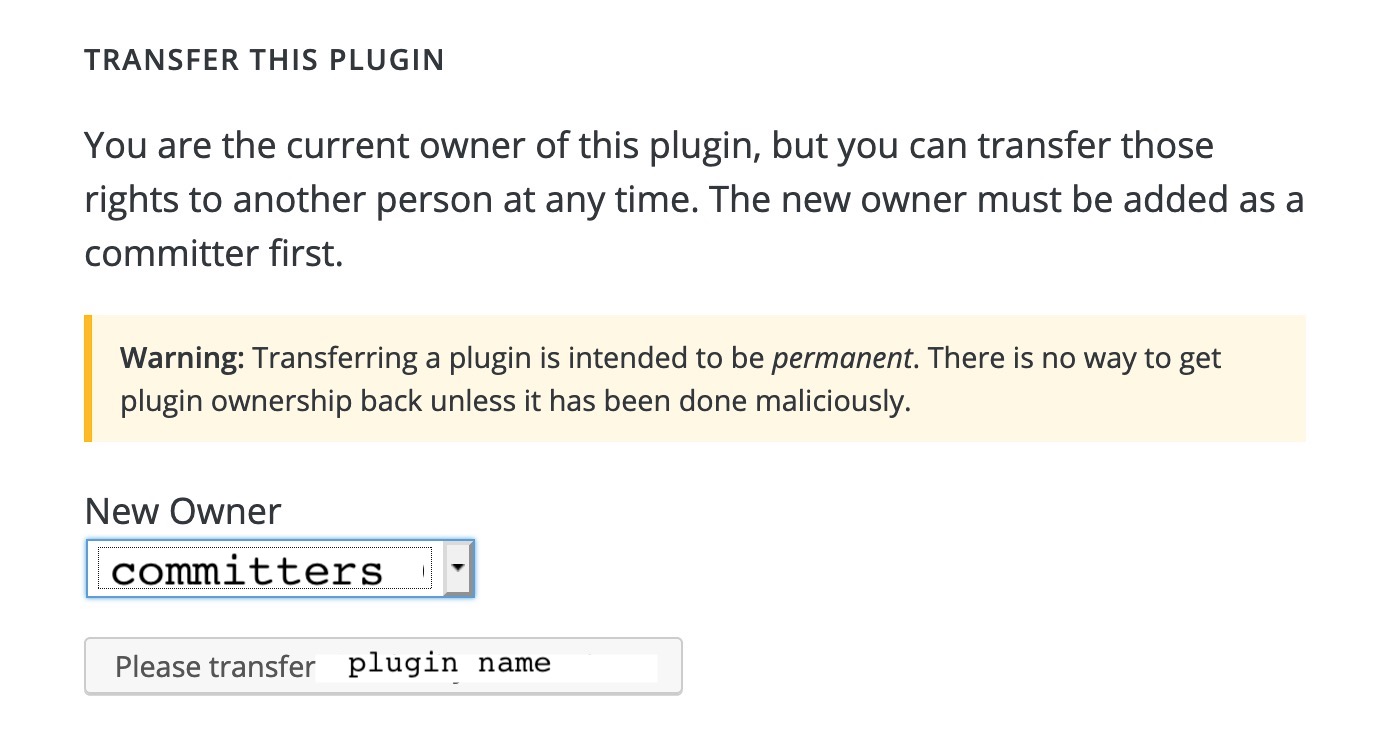
Next, go to the Advanced tab and scroll down to the Danger Zone. There you will see a section for **Transfer Your Plugin**. Pick someone from the dropdown and click the button.
If there are no other committers, the plugin will not be available to be transferred, so you must do that first.
[](https://i0.wp.com/developer.wordpress.org/files/2020/04/transfer.jpeg?ssl=1)
#### [For Plugins with OVER 10,000 Users (or are beta/featured)](https://developer.wordpress.org/plugins/wordpress-org/transferring-your-plugin-to-a-new-owner/#for-plugins-with-over-10000-users-or-are-beta-featured)
In order to prevent abuse, larger plugins and those officially recognized as featured/beta are restricted from these changes.
To transfer a plugin in this case, you will need to email `
[email protected]` from the **CURRENT** owner’s email the following information:
1. A *brief* explanation of the reason for the transfer
2. The user ID of the new owner
3. If applicable, any changes to the status of being a featured/beta plugin
Most requests are processed without issue, however should a plugin be determined to be critical to the WordPress.org project, or should there be reason to believe the request was invalid (i.e. not sent from the current owner’s email, or an email address positively connected back to them), it may be denied or delayed., Transferring Your Plugin to a New Owner, WordPress Developer Resources, 01jagbx5yhpz3je29zrgptwhas.