Using Obsidian’s Graph View Productively
## Metadata
- Author: [[Theo Stowell]]
- Full Title: Using Obsidian’s Graph View Productively
- Category: #articles
- Document Note: # Title: Unpacking the Utility of Obsidian's Graph View
---
tags: #Obsidian #NoteTaking #GraphView
Author: Virtual Assistant
Source: AI Knowledge Database
Reference: N/A
---
## Table of Contents:
- Summary
- Main Content
- Notes
- References
- Paraphrase
- Hypotheses
- Methodology
- Questions
- Future Research
- Implications
- Logical validity
- Conclusion
## Index Creation:
1. Zettelkasten
2. Obsidian's graph view
3. Customizations
4. Excluded files
## 📝 Summary:
The article discusses the author's shift in perspective regarding Obsidian's graph view, emphasizing the importance of creating a graph that serves a functional purpose rather than one for aesthetic appeal.
## 📖 Main Content:
The author initially dismissed the utility of the graph view in Obsidian but later found ways to customize it to enhance their workflow. By highlighting key notes in their Zettelkasten and excluding unrelated files, the author was able to create a more meaningful and practical graph view.
### 🗒️ Notes:
- Author initially believed direct linking between notes was sufficient
- Decided to explore the graph view for enhanced navigation
- Customized graph view to highlight important Zettelkasten notes
- Used Obsidian's excluded files feature to filter out irrelevant content
- Resulted in a more practical and useful graph view
## 📖 References:
N/A
## 🗣️ Paraphrase:
1. Initially skeptical of Obsidian's graph view, the author eventually found practical uses for it by making customizations such as highlighting crucial notes in their Zettelkasten.
2. By selectively displaying specific content in the graph view, the author transformed it from a mere visual aid to a functional tool for daily use.
## 🧪 Hypotheses:
1. The customized graph view could improve knowledge management efficiency.
2. Experimenting with different color-coding schemes in the graph view might enhance cognitive connections between notes.
### 📊 Methodology:
Utilize user feedback to gauge the effectiveness of customized graph views.
Analyze user interaction data to assess the impact of graph view personalization on workflow.
### ❓ Questions:
- How can other note-taking apps incorporate customizable graph views?
- What are the potential drawbacks of using a visually structured note-taking system like Obsidian's graph view?
### 🔮 Future Research:
Investigate the impact of visually structured note-taking systems on information retention.
Explore the intersection of aesthetics and functionality in digital knowledge management tools.
### 💡 Implications:
Enhancing graph view customization could lead to more personalized and efficient note-taking practices.
This research may inspire similar innovations in other digital tools designed for knowledge organization.
### ✅ Logical validity:
The author's arguments for the practicality of customizing the graph view are well-supported by their personal experience and insights. The emphasis on utility over aesthetic appeal enhances the logical coherence of the article.
## 🎯 Conclusion:
In conclusion, the article highlights the shift in the author's perspective on Obsidian's graph view, showcasing how customization can transform it into a valuable tool for daily note-taking and knowledge management.
- Document Tags: [[obisidian]]
- Summary: Obsidian's Graph View feature has been a topic of debate among users of the note-taking app. However, the author of this article shares their changed perspective on its usefulness after exploring how it can be used productively. They explain their experience with using the graph view to navigate their Zettelkasten and creating a customized graph that is actually functional and not just visually appealing. The author also discusses their customizations, such as coloring nodes based on importance and using Obsidian's 'excluded files' feature to hide irrelevant content from the graph view.
- URL: https://medium.com/obsidian-observer/using-obsidians-graph-view-productively-f3106139af4a
### Using Obsidian’s Graph View Productively
#### Or is it pretty but pointless?
It’s a controversial feature of the popular note-taking app. It’s also great thumbnail content if you’re making work about the note-taking app.
But is the graph view in Obsidian actually useful?
For a long time, I didn’t think so. However, my mind has been changed somewhat as I stepped back from the hype and thought about how the feature could be used productively.
Here’s my opinion on the Obsidian graph view, starting from my own experience with it…
For almost two years I was writing content into a Zettelkasten and creating links between my ideas. During almost all of this time, I thought that the best way to follow these links and navigate between them was by clicking them in the document and moving through your notes one by one.
One day, however, I decided to start looking into the graph view. To start with this didn’t seem like a good idea to me. I wanted to create a graph that I actually used, rather than one with loads of arbitrary notes that just looks good on a social media post.
Anything that’s part of your vault should be useful, not just a tool for vanity.
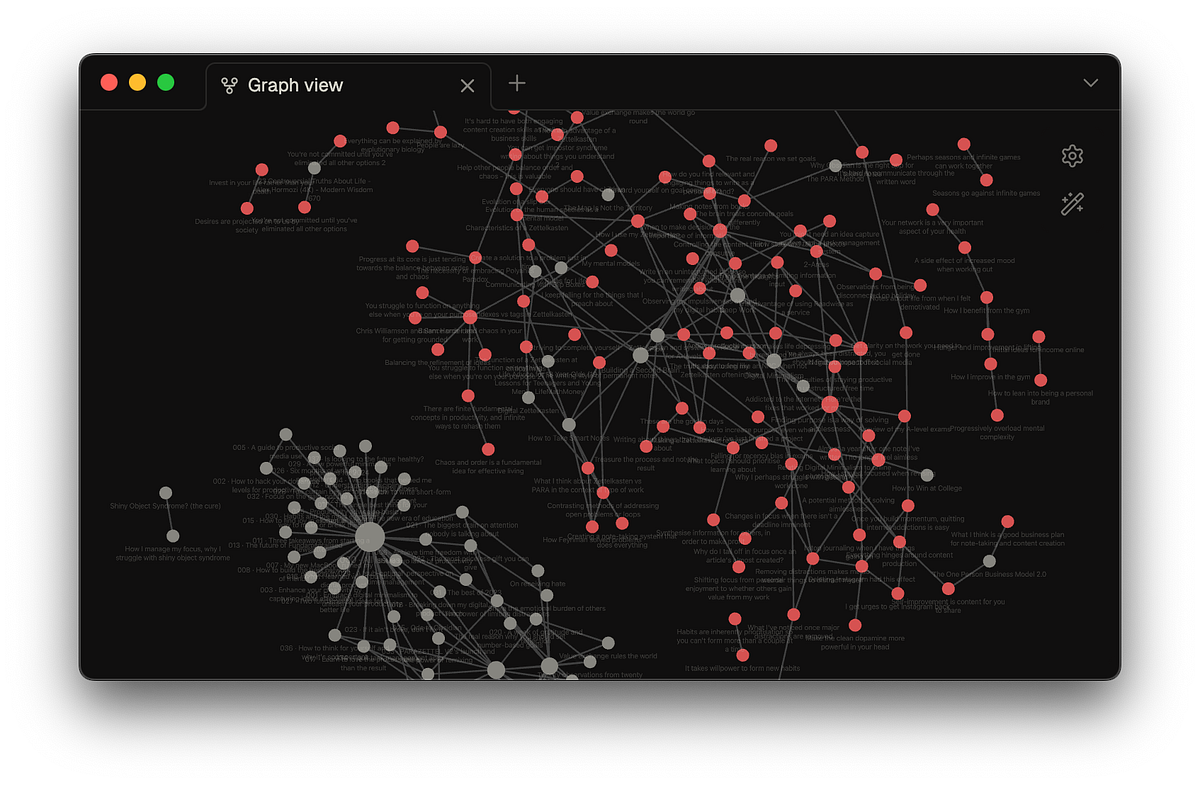
So here is my working graph view — something that I actually use, day in, day out:
From the author’s Obsidian vaultIn the rest of this piece, I’m going to give you a bit more detail about it…
I made a few customisations to the files that are displayed in my graph view. The nodes you see in red are inside my Zettelkasten — they are notes containing individual points of my own insight. This makes these notes the most important, hence the colouring that I’ve chosen for them.
Most of the other content in my vault is hidden from the graph view. I do this using Obsidian’s ‘excluded files’ feature, where you can specify certain folders whose files you don’t want appearing in the quick switcher or the graph view. I have a lot of files in my vault that aren’t really linked to anything because they’re part of different work, such as lecture notes for university as…, Using Obsidian’s Graph View Productively, Theo Stowell, 01hq8kasfc3x89nzmrzk3p06pp.