WP AI Daemon Demo
🔗 **Source:** [WP AI Daemon Demo](https://www.youtube.com/watch?v=E-R87Y9dsH4)
Hey there. I guess it was uh video blog post. Is that a thing? I don't know. I've seen some people do that recently and it kind of inspired me. So, uh if you're a regular reader here or whatever, however you're stumbling on this, you may have read some of my uh posts about my adventures in Vibe coding. And I think one of the interesting things that I've been learning and that I've also been seeing
other people who've been vibe coding that they've also been learning as we go through this vi this idea of vibe coding uh little apps and things is just that I'm very confident that there's a near future where end users are going to essentially be able to make features kind of they'll probably like be able to do it without really realizing that's what they're doing, but they'll be able to ask an agent on their device uh or on
their computer um just like make me this. I would like to see this result. Make it happen for me. Right. And then in the background, the agent is actually vibe coding something. I I've thought that it would be interesting to watch that rewatch the movie her with the sort of concept of like oh how many things that walking Phoenix is asking are are actually being sort of vibecoded by the operating system but I haven't done that yet.
Anyways, um I have been working on this little plug-in idea called WP AI Damon, which is kind of like an early proof of concept of what this idea looks like inside of WordPress. So, what it would look like for a end user to be able to add capabilities and features to WordPress. So um this is the the guts of it is just a
chat window like a chat bot. This is just connecting to Anthropic via the uh connectors WordPress AI connector and you can just kind of do things with it. So let me um show you here like let's try this. What is the top story spell correctly on CBC.ca CA right now. So though this is interacting with the
anthropic API and one of the things that you can't do with the API interaction is like you can't really get it to do a web search for you. So I've actually enabled uh the WPAD to do web fetches via WordPress's internal WP remote methods. Um, so when you ask for something web related, it will do a web search for it. So the top story on CBC right now is Prime Minister Mark Carney's
announcement of Canada's strong fund, etc., etc. Now, can we write a blog post summarizing this, please? So again, not this is not quite yet the feature capability um stuff that I've been talking about, but it's sort of the uh automate things with WordPress without having to do, you know, offload
everything that we're currently offloading to LLMs in uh the regular chatbot, but inside of WordPress and other people are working on stuff like this as well, but I think you'll see where this going in a second here. So there we go. Um we have researched it and we wrote about it and it's just uh sitting here as a draft which we can publish and there we have it. Um let me guess like
for sanity sake like let's check cbc.ca and in fact this is the top story. Cool. So, again, that's not uh not quite the movie Hurry yet or or Aviating Software as we know it. But how about this? I would like to see the weather, the current weather in
Winnipeg, the WP admin toolbar at all times. Please add that for me. So, what it's going to do now is um it's going to create a plugin uh that adds a little thing to the WP admin toolbar. Now, is this a plugin that already exists? Maybe. Could anybody
write this plugin? Sure. But my sort of point being here is like this idea that I've uh been having is just that like that type of software um kind of just doesn't exist anymore. Like unfortunately I guess it's kind of don't know what that means for us developers but uh I just see this as a matter of fact. Now this is like a pretty simple thing. It looks like it
has a plug-in header. It's following all the WordPress conventions because it knows about those. And um it's uh looks like it's going to cache for 15 minutes and it's using this Matteo Medio API. I've never heard of that API. So like you get the picture here, right? Like it's just made a bunch of choices, a bunch of coding choices without me telling it anything at all. just telling it about what the outcome I want is
right so we'll activate that and we will now see the current weather up here like I don't know that this is the best source but that is what it is um we could edit this or or whatnot uh the interesting thing also is that not only can it write plugins but it can actually write and execute snippets and I think that's like actually super powerful especially for debugging. So let's see
what we can find out about what this plugin is doing under the hood. So in this plugin again this wouldn't be like I'm not demonstrating something here that would necessarily be a general enduser idea but I think this is this is kind of something that would be helpful to devs. Um and this plugin uh plugin we just created stores data in a
transient. Can you show me what's in that transient right now? And as you'll see it will uh generate a snippet, execute it and um display the output to the screen here. Um actually not sure that this is the transient data but it looks like it's uh oh yeah
it's uh written an SQL query and it's just outputting that SQL query. Um obviously this is super dangerous. Don't run any of this stuff on your production site. Um, but like I think the the possibilities of just these three capabilities here are super powerful. Um, like you can I don't know what's
the value of WP debug like maybe we want to know if debug mode is on, right? Um, so it's true. And then reuse source. This is the source. Obviously, like could we have written that in a debug console really quickly? Sure. Obviously, these are just like really sort of proofs of simple concepts, the proof of concept. So, how's this all working? Um, you can
take a look at the code on uh GitHub, Orion, WPAD. And basically what this is is it's the combination of an abilities aware uh agent. So um so let's just show you what that means. What are the abilities we have access to? Right. Now we can ask it there, but I can also
show you in the settings what's going on here a little bit under the hood. Basically, we've got the core abilities, get site information, get user info, get environment, and then I have uh created all of these other abilities to enable enable these features that um that you're seeing here. So, um there we go. So, web fetch it's all the abilities are a class that registers
with the abilities a uh the abilities API. Um you can see that all here. But one thing that I am doing on top of that so this one is is registering an ability that executes um executes a a remote request remote get. Um I've heard that p uh update page and update post are actually coming to core. So these might be obviated if I continue
working on this but um right we're just creating a post. Um so actually I guess do an upert. And I'm saying I guess because honestly like this is a very uh very closely handcrafted vibecoded app. It's another one of my crazy vibecoded apps, right? uh we can all do this kind of thing with very in inexpensive um LM subscriptions and it's kind of
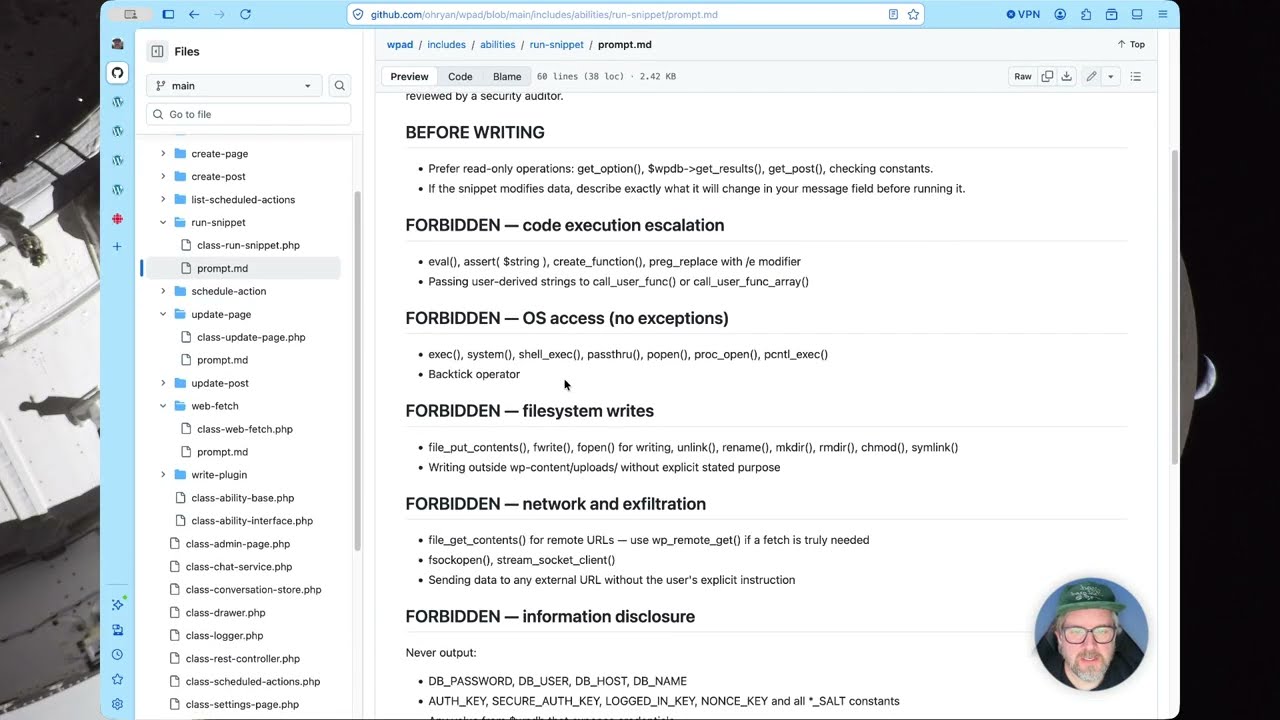
crazy but so the one a little bit of sort of extra special sauce here is that all the abilities have an abilities prompt. It's kind of like a system prompt. Um that uh this one is not very um excuse me very substantial. But um if you look at like the web fetch system prompt, I've added all of these rules here to try to limit the ability of it to do anything really terrible. But
again, you never know uh if the LM is going to sort of be bound by those rules. These this is all uh all of those all of these system prompts are sort of sent uh as part of the request. We can see that in the logs here. So we've got uh let's look at the snippet here. Run snippet. Here's the where which one is it? Here
we go. So the snippet call is like adding this entire system prompt text before my actual request, right? Um so that's sort of a very quick overview of this. I think this is really quite cool. Uh the one thing that well sort of two sort of caveats here um because of the way that this stuff is using a
system prompt before actually sending anything to an LLM, I don't think that most of these um abilities are super good candidates for MCP inclusion um because the MCP won't know about the system system prompt and that makes it a whole lot more dangerous especially run snippet. and uh create plugin. The other part that I haven't really demonstrated here is the actual reason that I'm calling this a Damon. Um that's
because it's sort of unfinished, but I've been working on this for a bit and I just wanted to get it out there to show some people. But the plugin is shipping with the actionuler, the package that ships with Woo Commerce. Um, and I've created some abilities that uh add ways for you to interact with the action scheduler via an LLM. So, we've got list scheduled action, but obviously schedule action uh and then you can
cancel the scheduled action. And I think this is where it becomes like a real kind of insane thing where it could almost be like an open claw except it's your website. I like you could fetch SEO stuff and update posts automatically or I don't know send whatever whatever kind of crazy stuff you can think of that you would need to do in the background in sort of a scheduled manner. Um so that's yeah the quick and dirty uh
intro to this plugin. Um, like I said, I like we're not at the beginning like I don't think we're we're quite there yet in terms of yeah, you can just we obviously you don't want to just throw this on a customer's website. That's insanity at this point in time. But my point here is sort of to demonstrate what this sort of agentic uh enduser experience might end up looking like in WordPress where
any average user can start adding capabilities to WordPress just by asking the agent that lives within WordPress. Um that's it. Catch you on the flip side., WP AI Daemon Demo, YouTube, 01kq8p7n6p3hzs9afj6g88cbcd.