WP Rollback
## Metadata
- Author: [[Devin Walker]]
- Full Title: WP Rollback
- Category: #articles
- Document Note: ---
tags:
- #WordPress
- #Plugins
- #SiteManagement
Author: Unknown (Plugin Demonstration)
Source: YouTube
Reference: https://www.youtube.com/watch?v=oJzrtT0Adjs
date created: 2025-09-10 13:45
---
# Title: 🔄 WP Rollback — Safely Reverting WordPress Plugin & Theme Updates
## Table of Contents:
- [📝 Summary](#-summary)
- [📖 Main Content](#-main-content)
- [🗒️ Notes](#️-notes)
- [📖 References](#-references)
- [🗣️ Paraphrase](#-paraphrase)
- [📰 Newsletter](#-newsletter)
- [✅ Action Items](#-action-items)
- [🧪 Hypotheses](#-hypotheses)
- [📊 Methodology](#-methodology)
- [❓ Questions](#-questions)
- [🔮 Future Research](#-future-research)
- [💡 Implications](#-implications)
- [🧠 Learning Styles Assessment](#-learning-styles-assessment)
- [📊 Accessibility Assessment](#-accessibility-assessment)
- [🌍 DEIB Assessment](#-deib-assessment)
- [✅ Logical Validity](#-logical-validity)
- [🛡️ DARVO Analysis](#️-darvo-analysis)
- [🔍 SEO Evaluation](#-seo-evaluation)
- [🎯 Conclusion](#-conclusion)
---
## 📝 Summary:
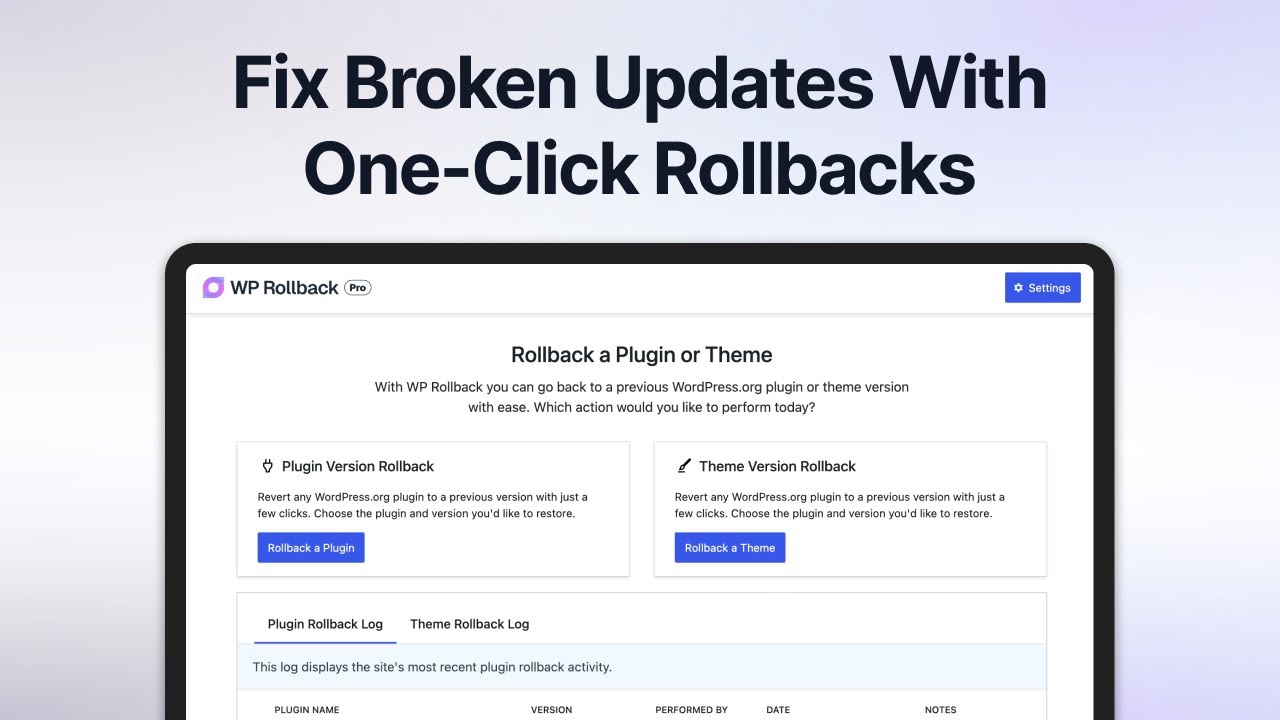
WP Rollback is a WordPress plugin designed to simplify reverting plugin and theme updates when they cause problems. It eliminates the need for manual reinstallation by providing a safe, fast rollback mechanism. The Pro version extends functionality to premium plugins and themes, offering secure version archives, support for Envato Marketplace assets, and compatibility with single-site and multi-site setups.
---
## 📖 Main Content:
The demo highlights a persistent challenge: updates can introduce bugs, styling issues, or break essential functionality. WP Rollback solves this by giving admins a straightforward rollback option. Instead of digging through plugin repositories or FTP clients, users select the affected update and revert it instantly.
The **Pro version** extends rollback capability to premium assets (e.g., Elementor, Gravity Forms, Envato purchases). It creates version archives, enabling site owners to restore working states with confidence. For agencies and network admins, WP Rollback provides peace of mind, ensuring updates are reversible across multiple sites.
---
### 🗒️ Notes
- [00:04](https://www.youtube.com/watch?v=oJzrtT0Adjs&t=4): Updates can break sites via styling conflicts, PHP errors, or slowdowns.
- [00:17](https://www.youtube.com/watch?v=oJzrtT0Adjs&t=17): WP Rollback reverts plugins/themes quickly and safely.
- [00:28](https://www.youtube.com/watch?v=oJzrtT0Adjs&t=28): One-click rollback restores previous stable versions.
- [00:40](https://www.youtube.com/watch?v=oJzrtT0Adjs&t=40): Resolves CSS conflicts, JavaScript errors, and debug warnings.
- [00:50](https://www.youtube.com/watch?v=oJzrtT0Adjs&t=50): Pro supports premium plugin rollbacks (Elementor, Gravity Forms).
- [01:00](https://www.youtube.com/watch?v=oJzrtT0Adjs&t=60): Handles Envato Marketplace assets with ease.
- [01:10](https://www.youtube.com/watch?v=oJzrtT0Adjs&t=70): Secure version archiving enables restore at any time.
- [01:22](https://www.youtube.com/watch?v=oJzrtT0Adjs&t=82): Supports both single and multi-site networks.
---
## 📖 References:
- WP Rollback [YouTube demo](https://www.youtube.com/watch?v=oJzrtT0Adjs)
- WordPress.org plugin repository (contextual reference)
---
## 🗣️ Paraphrase:
1. Original: “With just a few clicks, you can roll back any plugin or theme safe, fast, and reliably.”
Paraphrase: “In seconds, WP Rollback lets you restore plugins and themes to a previous version without risk or complexity.”
2. Original: “WP Rollback Pro works with virtually any premium asset that updates through WordPress.”
Paraphrase: “The Pro edition expands compatibility, making nearly all premium WordPress tools eligible for safe version restoration.”
---
## 📰 Newsletter:
**🔄 WP Rollback: Your Safety Net for Updates**
We’ve all felt it — you click “update” and suddenly your site is broken. WP Rollback swoops in as a lifesaver, letting you revert plugins and themes with a single click. Even better, **WP Rollback Pro** supports premium assets like Elementor, Gravity Forms, and Envato Marketplace purchases. It even archives versions automatically, so you can roll back whenever chaos strikes.
👉 Check out the [demo on YouTube](https://www.youtube.com/watch?v=oJzrtT0Adjs).
---
## ✅ Action Items:
- Position WP Rollback as a **case study for sustainable tooling** in WordPress: small plugins solving big problems.
- Highlight rollback as a contributor onramp for **developer education workshops**.
- For OSPO goals: illustrate how WP Rollback Pro models **value capture** while maintaining community trust.
- Advocate rollback workflows in **WordPress training** to reduce update fear.
---
## 🧪 Hypotheses:
- H1: WP Rollback reduces average downtime after faulty updates by >60%.
- H2: Agencies managing >10 sites benefit disproportionately from Pro features.
- H3: Confidence in updates increases contributor willingness to test new releases.
### 📊 Methodology:
- Collect survey data from agencies using WP Rollback vs. manual fixes.
- Run A/B test of contributor willingness to update with/without rollback.
- Analyze rollback logs from Pro users for frequency and severity of issues.
### ❓ Questions:
- Should rollback features be integrated into **core WordPress updates**?
- How might rollback change **plugin developer accountability**?
- What risks exist when restoring older, insecure versions?
### 🔮 Future Research:
- Explore rollback automation triggered by failed health checks.
- Study rollback adoption in enterprise WordPress environments.
- Evaluate long-term ecosystem effects of easy downgrades.
### 💡 Implications:
- Encourages safer adoption of updates → fewer insecure legacy installs.
- May normalize premium support models for utility plugins.
- Could influence WordPress.org’s plugin governance policies.
---
## 🧠 Learning Styles Assessment:
- **Visual**: Screenshots/demos shown, could add flowcharts.
- **Aural**: Limited; add podcast or narration of rollback scenarios.
- **Verbal**: Strong explanatory text; analogies would help.
- **Physical**: Weak; add sandbox labs for testing rollbacks.
- **Logical**: Present via step-by-step rollback instructions.
- **Social**: Could include case studies or community forums.
- **Solitary**: Reflection prompts missing.
- **Naturalistic**: No environmental metaphors—opportunity for “gardening” analogies.
---
## 📊 Accessibility Assessment:
- Alt-text missing for visuals; should describe rollback steps.
- Transcript provided (positive).
- High contrast and keyboard navigation not assessed; should be confirmed.
---
## 🌍 DEIB Assessment:
- **Inclusive Language**: Neutral, accessible.
- **Representation**: No identity-based examples; could add global use cases.
- **Neurodiversity**: Break into shorter segments with visuals.
- **Psychological Safety**: Creates reassurance—“peace of mind.”
---
## ✅ Logical Validity:
- **Strengths**:
- Causal reasoning: updates → breakage → rollback solution.
- Strong inductive reasoning from real-world WordPress experiences.
- **Weaknesses**:
- **Appeal to Fear**: Messaging leans heavily on “update risk.”
- **False Dilemma**: Implies rollback is the only safe path, ignoring staging/testing.
- **Tone**: Reassuring, promotional, slightly sales-driven.
---
## 🛡️ DARVO Analysis:
- **Deny**: No denial present.
- **Attack**: No attacks; competitors not disparaged.
- **Reverse Victim/Offender**: Slight suggestion that users are victims of “bad updates” and WP Rollback rescues them — but not manipulative.
- **Overall**: Marketing tone, not defensive.
---
## 🔍 SEO Evaluation:
- **Keywords**: “WP Rollback,” “WordPress rollback plugin,” “plugin rollback,” “theme rollback.”
- **Meta Description**: Add: “Easily restore previous WordPress plugin and theme versions with WP Rollback.”
- **Title Tag**: Optimize for “Rollback WordPress Updates.”
- **Headers**: Clear structure, could include H2 for Pro features.
- **Content Length**: Short demo; expand for SEO blog.
- **Links**: Add internal WordPress.org links + external authoritative r
- Summary: Updating WordPress plugins and themes should be easy, but sometimes a new update breaks your site, slows it down, or removes features you rely on. This WordPress tutorial demonstrates how to fix WordPress update problems using WP Rollback to quickly rollback a plugin or theme, restoring your site in just a few clicks. Learn how to downgrade WordPress safely!
- URL: https://www.youtube.com/watch?v=oJzrtT0Adjs
Updating WordPress plugins and themes should be easy, but sometimes a new update breaks your site, slows it down, or removes features you rely on. Whether it's styling conflicts, JavaScript errors, or PHP warnings, problems can appear fast. And that's where WP Rollback comes in. With just a few clicks, you can roll back any plug-in or theme safe, fast, and reliably. Simply select the problematic update, click roll back, choose the appropriate
version, add an optional note, and watch as WP Rollback safely and intelligently handles the rest. The result: errors gone, CSS conflicts fixed, and debug logs finally quiet. With WP Rollback Pro, you unlock even more power. roll back premium plugins and themes like Elementor, Gravity Forms, and purchases from the Invato Marketplace. And it's not just those. Pro works with virtually
any premium asset that updates through WordPress. Each time you update, WP Rollback securely saves a version archive you can restore at any time. Whether you're managing one site or an entire network, WP Rollback gives you peace of mind so you can update with confidence knowing you always have a way back. WP roll back updates made, WP Rollback, Devin Walker, 01k4tbv2re525semvq8gy1x1dg.