WebP: The WebPage Compression Format

## Metadata
- Author: [[purplesyringa's blog]]
- Full Title: WebP: The WebPage Compression Format
- Category: #articles
- Document Note: ---
tags: [WebCompression, WebDevelopment, ImageOptimization]
- WebCompression
- WebDevelopment
- ImageOptimization
Author: [Author's Name]
Source: [Author/Book/Article/Website]
Reference: [https://purplesyringa.moe/blog/webp-the-webpage-compression-format/]
date created: 2024-09-14 12:30
---
# Title: WebP: The Webpage Compression Format Explained
## Table of Contents:
1. [Introduction](#introduction)
2. [What is WebP?](#what-is-webp)
3. [Advantages of Using WebP](#advantages-of-using-webp)
4. [WebP vs. Other Formats](#webp-vs-other-formats)
5. [Implementing WebP](#implementing-webp)
6. [Conclusion](#conclusion)
### References:
- WebP Official Documentation: [WebP](https://developers.google.com/speed/webp)
- ImageMagick WebP Conversion Guide: [ImageMagick](https://imagemagick.org/script/webp.php)
## 📝 Summary:
The article explores WebP, a modern image format developed by Google, designed to compress images efficiently for use on the web. WebP offers both lossy and lossless compression, making it superior to older formats like JPEG and PNG. This format is a valuable tool for optimizing website performance by reducing image sizes without significant quality loss.
## 📖 Main Content:
WebP was developed by Google to provide web developers with a better way to compress images, balancing file size and quality. By using WebP, websites can improve their load times and SEO. The article explains the technical features of WebP, its advantages over older formats, and provides guidance on how to implement it on websites.
### 🗒️ Notes
- **WebP Features**:
- Offers both lossy and lossless compression.
- Reduces image file sizes by 25-34% compared to JPEG and PNG.
- Supports transparency and animation.
- **Advantages**:
- Faster load times due to smaller file sizes.
- Better performance on mobile networks and slower connections.
- Optimizes website SEO and user experience.
- **Comparison to Other Formats**:
- WebP files are smaller than JPEG but retain more image quality.
- PNG images tend to be larger, making WebP a better choice for transparent images.
## 📖 References:
- WebP Compression Guide: [Google Developers](https://developers.google.com/speed/webp)
- Image Conversion: [ImageMagick Guide to WebP](https://imagemagick.org/script/webp.php)
## 🗣️ Paraphrase:
1. **Original**: "WebP offers both lossy and lossless compression, meaning it can reduce file sizes while maintaining image quality, making it a strong alternative to older formats."
**Paraphrased**: WebP supports both types of compression, allowing file size reduction while preserving quality, making it a superior choice over older formats.
2. **Original**: "Compared to JPEG, WebP can reduce image sizes by up to 34%, significantly improving load times for websites with heavy image content."
**Paraphrased**: WebP compresses images up to 34% more efficiently than JPEG, helping websites with large image content load faster.
## 📰 Newsletter:
📧 **WordPress Weekly Development Tip**:
Want to speed up your WordPress site? Consider switching to the WebP format for your images. It compresses images by up to 34% more than traditional JPEGs, offering faster load times and improved user experience. Google backs WebP, and it's a game-changer for developers who care about performance. Check out this guide on how to convert your site images to WebP using tools like ImageMagick. [Learn more about WebP](https://purplesyringa.moe/blog/webp-the-webpage-compression-format/).
## ✅ Action Items:
1. Integrate WebP image format into WordPress sites for better image optimization.
2. Explore conversion tools like ImageMagick to streamline the process.
3. Emphasize the use of WebP in your open-source advocacy, especially when discussing performance optimization in the WordPress community.
## 🧪 Hypotheses:
- Switching to WebP images will decrease page load times and increase user retention on media-heavy sites.
- Sites implementing WebP will see an improvement in mobile SEO rankings due to faster load times.
### 📊 Methodology:
- Perform A/B testing to measure load time improvements on websites before and after implementing WebP images.
- Use tools like Google PageSpeed Insights to analyze performance differences between WebP and JPEG/PNG image formats.
### ❓ Questions:
- What challenges could arise when converting existing large image libraries to WebP?
- How does WebP handle images in low-bandwidth areas compared to other formats?
### 🔮 Future Research:
- Investigate how emerging image formats like AVIF compare to WebP in terms of compression and quality.
- Explore the impact of WebP on accessibility and its compatibility with assistive technologies like screen readers.
### 💡 Implications:
- By transitioning to WebP, web developers can significantly improve website load times and optimize for performance, particularly in mobile-first environments.
### 🧠 Learning Styles Assessment:
1. **Visual Learners (Spatial)**:
- **Present**: Diagrams comparing file sizes of different formats.
- **Improve**: Add infographics showing WebP performance gains versus other formats.
2. **Aural Learners (Auditory-Musical)**:
- **Present**: No audio resources provided.
- **Improve**: Include an audio or video tutorial on converting images to WebP.
3. **Verbal Learners (Linguistic)**:
- **Present**: Clear explanations of technical concepts.
- **Improve**: Provide additional case studies or success stories of WebP implementation.
4. **Physical Learners (Kinesthetic)**:
- **Present**: Practical instructions on using conversion tools.
- **Improve**: Include more step-by-step coding exercises for implementing WebP in WordPress.
5. **Logical Learners (Mathematical)**:
- **Present**: Detailed comparison charts showing file size savings.
- **Improve**: Include more technical breakdowns of how WebP's compression algorithms work.
6. **Social Learners (Interpersonal)**:
- **Present**: No social learning elements included.
- **Improve**: Add a forum for readers to discuss WebP implementation challenges and solutions.
7. **Solitary Learners (Intrapersonal)**:
- **Present**: Offers reflection opportunities through individual experimentation with image conversion.
- **Improve**: Provide journaling prompts for reflecting on how image compression can affect website performance.
8. **Naturalistic Learners**:
- **Present**: No nature-based connections made.
- **Improve**: Draw an analogy comparing WebP optimization to conservation efforts—both aim to achieve maximum efficiency with minimal resource use.
### 📊 Accessibility Assessment:
- **Screen Reader Compatibility**: Ensure all images include descriptive alt-text for WebP.
- **Keyboard Navigation**: Test WebP conversion tools for accessibility to ensure users can navigate using only the keyboard.
- **Contrast and Readability**: Maintain optimal contrast in all charts and diagrams included in the article.
### 🌍 DEIB (Diversity, Equity, Inclusion, and Belonging) Assessment:
- **Cultural Relevance**: Explore how WebP optimization could benefit regions with limited bandwidth or slower internet speeds.
- **Inclusive Language**: The article uses neutral language but could further simplify technical terms for non-native English speakers.
- **Neurodiversity Support**: Ensure the article uses a clear, concise structure that is friendly to users with ADHD or other neurodiverse conditions.
- **Representation**: Highlight case studies from diverse industries or geographical regions where WebP has had a positive impact.
### ✅ Logical validity:
- **Sound Deductive Reasoning**: The article builds its argument for WebP by comparing the performance of multiple image formats, logically concluding that WebP is the best option.
**Fallacies to Watch**:
- **Appeal to Authority**: The article sometimes relies on Google's backing of WebP rather than providing more independent, third-party data.
### 🔍 SEO Evaluation:
1. **Keywords**:
- **Present**: Keywords such as "WebP," "image compression," and "website optimization" are used effectively.
- **Improve**: Integrate long-tail keywords like "best image format for we
- Document Tags: [[github pages]] [[webp]]
- Summary: I want to provide a smooth experience to my site visitors, so I work on accessibility and ensure it works without JavaScript enabled. I care about page load time because some pages contain large illustrations, so I minify my HTML.
But one thing makes turning my blog light as a feather a pain in the ass.
- URL: https://purplesyringa.moe/blog/webp-the-webpage-compression-format/
I want to provide a smooth experience to my site visitors, so I work on accessibility and ensure it works without JavaScript enabled. I care about page load time because some pages contain large illustrations, so I minify my HTML.
But one *thing* makes turning my blog light as a feather a pain in the ass.
The hurdleSee, a major win in traffic reduction (and thus latency savings on mobile!) comes not from minification but from compression. HTTP supports gzip and Brotli via the `Content-Encoding` header. This is opt-in because compression takes resources, so transferring uncompressed data might be faster.
Typically, Brotli is better than gzip, and gzip is better than nothing. gzip is so cheap everyone enables it by default, but Brotli is way slower.
Annoyingly, I host my blog on GitHub pages, which doesn’t support Brotli. So [Recovering garbled Bitcoin addresses](https://purplesyringa.moe/blog/recovering-garbled-bitcoin-addresses/), the longest post on my site, takes `92 KiB` instead of `37 KiB`. This amounts to an unnecessary `2.5x` increase in load time.
A naive ideaThere’s no *reason* why GitHub can’t support Brotli. Even if compressing files in-flight is slow, GitHub could still allow repo owners to upload pre-compressed data and use that.
GitHub doesn’t do that for us, but we can still take advantage of precompressed data. We’ll just have to manually decompress it in JavaScript on the client side.
Like a good developer, the first thing I do upon finding a problem is search for a solution on Google. [brotli-dec-wasm](https://www.npmjs.com/package/brotli-dec-wasm) turned up after a quick search, providing a `200 KB` Brotli decompressor in WASM. [tiny-brotli-dec-wasm](https://www.npmjs.com/package/tiny-brotli-dec-wasm) is even smaller, at `71 KiB`.
Alright, so we’re dealing with `92 KiB` for gzip vs `37 + 71 KiB` for Brotli. Umm…
Fool me twiceWhy would I need WASM in the first place? My browser certainly has a Brotli decoder in its HTTP stack. Does it have an API or something?
Actually, it does! [Compression Streams API](https://developer.mozilla.org/en-US/docs/Web/API/Compression_Streams_API) provides exactly that. For example, the constructor of [DecompressionStream](https://developer.mozilla.org/en-US/docs/Web/API/DecompressionStream/DecompressionStream) takes the `format` argument, documented as:
> One of the following compression formats:
>
> * `"gzip"`
>
> Decompress the stream using the GZIP format.
> * `"deflate"`
>
> Decompress the stream using the DEFLATE algorithm in ZLIB Compressed Data Format. The ZLIB format includes a header with information about the compression method and the uncompressed size of the data, and a trailing checksum for verifying the integrity of the data
> * `"deflate-raw"`
>
> Decompress the stream using the DEFLATE algorithm without a header and trailing checksum.
>
Wait, where’s Brotli? Oh, it just doesn’t exist for… [reasons](https://github.com/whatwg/compression/issues/34). This might hopefully change soon, but that’s not where we are presently, and you know how slowly these things progress.
I also briefly contemplated using `gzip` anyway, but precompressing gzip with a more efficient library – Zopfli – only produces an `86 KiB` file, still significantly worse than Brotli.
Breaking lawsI was about to give up, but then I remembered a neat technique from [demoscene](https://en.wikipedia.org/wiki/Demoscene).
Browsers can decode images. So we can encode data in pictures and decode it via Canvas API, and *if* the image compression is lossless and efficient enough, it’ll be a net win.
I hope you see where I’m going with this and are yelling “Oh why the fuck” right now.
The simplest compressed lossless image format is GIF. GIF flattens the image in row-major order and applies [LZW](https://en.wikipedia.org/wiki/Lempel%E2%80%93Ziv%E2%80%93Welch), a very dated (1984) compression scheme. The DEFLATE method gzip uses was designed to replace LZW, hence we won’t score a win here.
PNG also uses DEFLATE, but vitally, it passes image data through another transform beforehand. Instead of compressing the raw pixel data, DEFLATE is applied to the difference between neighboring pixels, e.g. to `[a, b-a, c-b, d-c]` instead of `[a, b, c, d]`. (Other, slightly more complicated transforms are also possible.) In effect, this makes PNG a predictive format: instead of storing raw data, the difference from the prediction (“error”) is stored, which is small in most cases (yay, probability asymmetry, Huffman likes that).
Oh God noBut the real winner here is [WebP](https://developers.google.com/speed/webp/docs/webp_lossless_bitstream_specification), the format half the lunatics believe is the creation of the devil, and the other half sees as a treasure. WebP has two variants: lossy and lossless, using completely different approaches. We’re talking about VP8L the lossless format here.
VP8L is similar to PNG. It too uses a predictive transform, slightly more complicated than PNG’s, but the better part is that Google replaced DEFLATE with a hand-rolled DEFLATE-like method.
DEFLATE enables you to split the file into pieces and use a custom Huffman tree for each piece. This is reasonable: realistic data is not uniform, so different parts have different character and backreference probability distributions. For example, JavaScript, SVG, and markup will probably use different trees when embedded into one HTML file.
VP8L supports this too, but with a twist. A WebP file can define an arbitrarily large table of distinct Huffman trees and use different trees for each 16x16 pixel block. Crucially, this enables tree reuse. In DEFLATE, JavaScript followed by CSS, followed by JavaScript would encode three trees despite the 1st and the 3rd being quite similar, but VP8L would need just two trees. In addition, this enables more locality because trees are cheaper to switch often.
More tweaksAnother cool thing VP8L has is the *color cache*. Here’s a neat demonstration of a similar technique.
Suppose you’re writing a stupid JSON compressor. You might want to encode marker characters like `"`, `[`, `]`, `{` and `}` efficiently. It turns out that sometimes, just saying “this character is a marker” is enough to infer the exact value. For example, in `"s<MARKER>`, the marker is clearly `"`, and in `[1, 2, 3<MARKER>` it’s clearly `]`.
The idea here is similar. Sometimes, instead of storing the exact pixel, it suffices to store an indication that we want a copy of the most recent pixel with a certain property (e.g. a 6-bit hash).
Trying it outI’ll use the [Recovering garbled Bitcoin addresses](https://purplesyringa.moe/blog/recovering-garbled-bitcoin-addresses/) post as a benchmark for now.
```
$ curl https://purplesyringa.moe/blog/recovering-garbled-bitcoin-addresses/ -o test.html
$ wc -c test.html
439478 test.html
$ gzip --best <test.html | wc -c
94683
```
Good. Let’s use the [webp](https://docs.rs/webp/latest/webp/) crate for a quick compression test.
```
$ cargo add webp
```
```
fn main() {
let binary_data = include_bytes!("../test.html");
// Umm... 1xN?
let width = binary_data.len() as u32;
let height = 1;
// Convert to grayscale RGB
let mut image_data: Vec<u8> = binary_data.iter().flat_map(|&b| [b, b, b]).collect();
// Lossless, quality 100 (translates to best compression)
let compressed = webp::Encoder::from_rgb(&image_data, width, height)
.encode_simple(true, 100.0)
.expect("encoding failed");
println!("Data length: {}", compressed.len());
std::fs::write("compressed.webp", compressed.as_ref()).expect("failed to write");
}
```
Why grayscale? WebP supports a “subtract green” transform, where before bitmap encoding, the G channel is subtracted from both the R and B channels. For grayscale pictures, this effectively zeroes them out. WebP encodes the three channels with separate Huffman trees and thus stores fixed-value channels in O(1) space.
```
$ cargo run
thread 'main' panicked at src/main.rs:13:100:
encoding failed: VP8_ENC_ERROR_BAD_DIMENSION
note: run with `RUST_BACKTRACE=1` environment variable to display a backtrace
```
Umm, apparently WebP only supports pictures up to `16383x16383`. We can do that.
```
fn main() {
let binary_data = include_bytes!("../test.html");
// Umm... 16383xN?
let width = 16383;
let height = (binary_data.len() as u32).div_ceil(width);
// Convert to grayscale RGB, padding the image to width * height
let mut image_data: Vec<u8> = binary_data.iter().flat_map(|&b| [b, b, b]).collect();
image_data.resize((width * height * 3) as usize, 0);
// Lossless, quality 100 (translates to best compression)
let compressed = webp::Encoder::from_rgb(&image_data, width, height)
.encode_simple(true, 100.0)
.expect("encoding failed");
println!("Data length: {}", compressed.len());
std::fs::write("compressed.webp", &*compressed).expect("failed to write");
}
```
```
$ cargo run
Data length: 45604
```
That’s a good start. It’s already 2x smaller than gzip. It’s even smaller than bzip2 at `49764` bytes!
ShenanigansWe can, however, do better by applying WebP-specific tricks.
For one thing, using a *wide* image with a row-major order means that 16x16 blocks contain bytes from far away (the first 16 consecutive pixels are from the first 16 KiB of input, and the next ones are from the following 16 KiB of input). Let’s use a tall image instead.
```
// Umm... Nx16383?
let height = 16383;
let width = (binary_data.len() as u32).div_ceil(height);
println!("Using {width}x{height}");
```
```
$ cargo run
Using 27x16383
Data length: 43232
```
The `cwebp` library provides a way to affect compression performance other than quality, called “method”. Let’s try it out.
```
// Lossless, quality 100
let mut config = webp::WebPConfig::new().unwrap();
config.lossless = 1;
config.quality = 100.0;
for method in 0..=6 {
// Try different methods (4 is the default one)
config.method = method;
let compressed = webp::Encoder::from_rgb(&image_data, width, height)
.encode_advanced(&config)
.expect("encoding failed");
println!("Method {method}, data length: {}", compressed.len());
}
```
```
$ cargo run
Method 0, data length: 48902
Method 1, data length: 43546
Method 2, data length: 43442
Method 3, data length: 43292
Method 4, data length: 43232
Method 5, data length: 43182
Method 6, data length: 43182
```
Let’s settle for `5`, it seems to be as good as `6` but faster.
We’re `2.2x` better than gzip and `1.2x` worse than Brotli – quite an achievement under our conditions.
BenchmarkJust for fun, let’s compare the formats on different files. I’m going to use [snappy’s testdata](https://github.com/google/snappy/tree/main/testdata), [the Canterbury Corpus and the Large Corpus](https://corpus.canterbury.ac.nz/), and [two](https://upload.wikimedia.org/wikipedia/commons/1/18/Digital-camera_aj_ashton_01.svg) [large](https://dev.w3.org/SVG/tools/svgweb/samples/svg-files/displayWebStats.svg) SVG files.
I’ll start by rewriting the script to be usable in a pipe:
```
use std::io::{Read, Write};
fn main() {
let mut binary_data = Vec::new();
std::io::stdin().read_to_end(&mut binary_data).expect("failed to read stdin");
let width = (binary_data.len() as u32).div_ceil(16383);
let height = (binary_data.len() as u32).div_ceil(width);
// Convert to grayscale RGB, padding the image to width * height
let mut image_data: Vec<u8> = binary_data.iter().flat_map(|&b| [b, b, b]).collect();
image_data.resize((width * height * 3) as usize, 0);
// Lossless, quality 100, method 5
let mut config = webp::WebPConfig::new().unwrap();
config.lossless = 1;
config.quality = 100.0;
config.method = 5;
let compressed = webp::Encoder::from_rgb(&image_data, width, height)
.encode_advanced(&config)
.expect("encoding failed");
std::io::stdout().write_all(&compressed).expect("failed to write to stdout");
}
```
(I also slightly changed the dimension computation to suit data of different sizes.)
And then I’ll compare `gzip`, `bzip2`, `brotli`, and `webp` on the corpus:
```
#!/usr/bin/env bash
cd corpus
printf "%24s%8s%8s%8s%8s%8s\n" File Raw gzip brotli bzip2 webp
for file in *; do
printf \
"%24s%8d%8d%8d%8d%8d\n" \
"$file" \
$(<"$file" wc -c) \
$(gzip --best <"$file" | wc -c) \
$(brotli --best <"$file" | wc -c) \
$(bzip2 --best <"$file" | wc -c) \
$(../compressor/target/release/compressor <"$file" | wc -c)
done
```
| File | Raw | gzip | brotli | bzip2 | webp |
| --- | --- | --- | --- | --- | --- |
| AJ\_Digital\_Camera.svg | 132619 | 28938 | 22265 | 27113 | 26050 |
| alice29.txt | 152089 | 54179 | 46487 | 43202 | 52330 |
| asyoulik.txt | 125179 | 48816 | 42712 | 39569 | 47486 |
| bible.txt | 4047392 | 1176635 | 889339 | 845635 | 1101200 |
| cp.html | 24603 | 7973 | 6894 | 7624 | 7866 |
| displayWebStats.svg | 85737 | 16707 | 10322 | 16539 | 14586 |
| E.coli | 4638690 | 1299059 | 1137858 | 1251004 | 1172912 |
| fields.c | 11150 | 3127 | 2717 | 3039 | 3114 |
| fireworks.jpeg | 123093 | 122927 | 123098 | 123118 | 122434 |
| geo.protodata | 118588 | 15099 | 11748 | 14560 | 13740 |
| grammar.lsp | 3721 | 1234 | 1124 | 1283 | 1236 |
| html | 102400 | 13584 | 11435 | 12570 | 12970 |
| html\_x\_4 | 409600 | 52925 | 11393 | 16680 | 13538 |
| kennedy.xls | 1029744 | 209721 | 61498 | 130280 | 212620 |
| kppkn.gtb | 184320 | 37623 | 27306 | 36351 | 36754 |
| lcet10.txt | 426754 | 144418 | 113416 | 107706 | 134670 |
| paper-100k.pdf | 102400 | 81196 | 80772 | 82980 | 81202 |
| plrabn12.txt | 481861 | 194264 | 163267 | 145577 | 186874 |
| ptt5 | 513216 | 52377 | 40939 | 49759 | 49372 |
| sum | 38240 | 12768 | 10144 | 12909 | 12378 |
| urls.10K | 702087 | 220198 | 147087 | 164887 | 170052 |
| world192.txt | 2473400 | 721400 | 474913 | 489583 | 601188 |
| xargs.1 | 4227 | 1748 | 1464 | 1762 | 1750 |
Let’s analyze this in a more intuitive way.
Compression rate diagramTo start with, WebP is almost always better than gzip, except on tiny files (grammar.lsp and xargs.1) and these:
| File | Raw | gzip | brotli | bzip2 | webp |
| --- | --- | --- | --- | --- | --- |
| kennedy.xls | 1029744 | 209721 | 61498 | 130280 | 212620 |
| paper-100k.pdf | 102400 | 81196 | 80772 | 82980 | 81202 |
paper-100k.pdf is noise (the file contains 19 KB of XML followed by compressed data, so we’re effectively measuring small data at this point).
I’m not sure what the deal with kennedy.xls is. The results are also strange because of the relative Brotli/bzip2 performance. I believe that the reason is that this file contains a lot of heterogeneous closely located data, which is notably difficult for compressors to handle.
WebP fares slightly worse than bzip2, overtaking it in some cases and losing in plenty of others. This is hardly surprising, as the two use significantly different algorithms, so they score differently on disparate data.
Unsurprisingly, WebP is always worse than Brotli (except fireworks.jpeg, a uniformly random blob, so it’s up to noise). Still, it provides a measurable improvement over gzip on large plain-text data, including the SVGs and, most notably, html\_x\_4, where it provides a `3.3%` compression rate, worse than Brotli’s `2.8%` but significantly better than gzip’s `13%`.
On the whole, WebP seems to be quite a good candidate for Web.
JavaScriptWith that said, let’s return to quote-unquote practical applications.
Decoding the WebP is quite simple via the Canvas API:
```
<script type="module">
// Fetch WebP blob
const result = await fetch("compressor/compressed.webp");
const blob = await result.blob();
// Decode to RGBA
const bitmap = await createImageBitmap(blob);
const context = new OffscreenCanvas(bitmap.width, bitmap.height).getContext("2d");
context.drawImage(bitmap, 0, 0);
const pixels = context.getImageData(0, 0, bitmap.width, bitmap.height).data;
// The R channel is the raw HTML bytes
const bytes = new Uint8Array(bitmap.width * bitmap.height);
for (let i = 0; i < bytes.length; i++) {
bytes[i] = pixels[i * 4];
}
// Decode UTF-8
const html = new TextDecoder().decode(bytes);
document.documentElement.innerHTML = html;
</script>
```
…except it’s not. See, the Canvas API is widely used for fingerprinting, so browsers mess up with you by adding noise to the data returned by `getImageData`.
These modifications are slight. Visit [this link](https://tiansh.github.io/detect-canvas-noise/) in Firefox with strict tracking protection enabled and see that fewer than 1% of pixels are affected. In effect, this introduces typos to the HTML, which I initially thought to be genuine.
I loathe this privacy protection technique. Not only does it break real use cases for no reason (WebP decoding can’t be device-dependent), but it is also useless because adding predictable (!) noise increases uniqueness instead of decreasing it.
It is also unclear to me why using WebGL instead of the 2D context works:
```
const bitmap = await createImageBitmap(blob);
const context = new OffscreenCanvas(bitmap.width, bitmap.height).getContext("webgl");
const texture = context.createTexture();
context.bindTexture(context.TEXTURE_2D, texture);
context.texImage2D(context.TEXTURE_2D, 0, context.RGBA, context.RGBA, context.UNSIGNED_BYTE, bitmap);
context.bindFramebuffer(context.FRAMEBUFFER, context.createFramebuffer());
context.framebufferTexture2D(context.FRAMEBUFFER, context.COLOR_ATTACHMENT0, context.TEXTURE_2D, texture, 0);
const pixels = new Uint8Array(bitmap.width * bitmap.height * 4);
context.readPixels(0, 0, bitmap.width, bitmap.height, context.RGBA, context.UNSIGNED_BYTE, pixels);
// Look ma! No noise!
```
Why `readPixels` is not subject to anti-fingerprinting is beyond me. It does not sprinkle hardly visible typos all over the page, so that works for me.
WebGL only reliably supports textures up to `2048x2048`, so some bounds need to be updated.
This code minifies to about 550 bytes. Together with the WebP itself, this amounts to `44 KiB`. In comparison, gzip was `92 KiB`, and Brotli would be `37 KiB`.
PolishingOne thing I hate about this solution is the goddamn flicker.
As `await` is implicitly rewritten to use promises, the browser believes that the script has finished execution before the WebP is downloaded. There is nothing in the DOM yet, so the browser shows an empty white page.
A hundred milliseconds later, with the WebP loaded and decoded, the HTML parsed, CSS downloaded, and styles computed, is the DOM rendered to the screen, replacing the nothingness.
A simple way to fix this is to keep the styling and the top of the page (about `8 KiB` uncompressed) in the gzipped HTML and only compress the content below the viewport with WebP. It’s still going to feel junky when refreshing the page below the viewport, but it’s still manageable.
Another nuisance is scroll behavior. Scroll position is typically preserved upon refresh, but when you’re at `Y = 5000px`, you refresh, and the page is `0px` tall, the position resets. Temporarily adding a really huge `<div>` helps with this. In addition, assigning to `document.documentElement.innerHTML` instead of calling `document.write` is necessary because that updates the current document instead of replacing it with a new one.
EmbeddingFinally, let’s decrease the latency a tiny bit more by embedding the WebP directly into JavaScript.
The simplest way to do that is to use a base64 data URL. Oh, but wouldn’t it increase the blob size `1.33x`? Sure, but gzip offsets this effect almost entirely:
```
$ wc -c compressed.webp
43182 compressed.webp
$ base64 -w0 compressed.webp | wc -c
57576
$ base64 -w0 compressed.webp | gzip --best | wc -c
43519
```
Why? Well, WebP, being a compressed blob, is almost uniformly random, a property retained after base64, the 8-bit-to-6-bit transform. The Huffman tree generated by gzip, applied to uniformly random data, effectively provides an inverse 6-bit-to-8-bit transform.
We could use Unicode and UTF-16, but sometimes the first solution is the right one.
ExampleA real-world web page compressed with WebP? Oh, how about the one you’re reading right now? Unless you use an old browser or have JavaScript turned off, WebP compresses this page starting from the “Fool me twice” section. If you haven’t noticed this, I’m happy the trick is working :-)
Oh, and if you want to know what the WebP looks like? Here is a square WebP of this page:
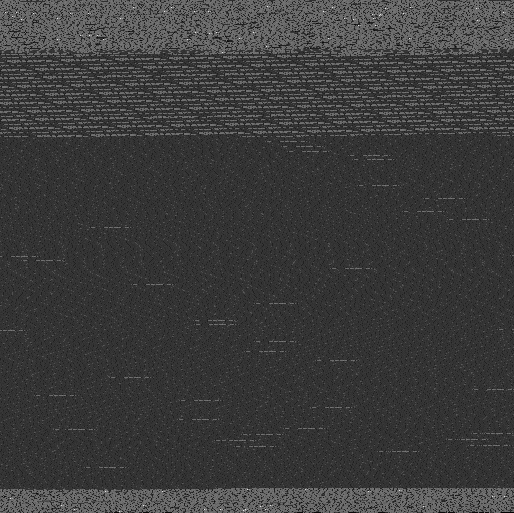
The WebP used in code is tall and narrow, but this gives a better view.
The bright part on the very top and the very bottom is text and code. The hatched one at about 1/5 is the diagram. The dark part, taking most of the page, is the *text* on the diagram. (Yes, it doesn’t use a font.)
The few brightest pixels throughout the text? Those are Unicode characters, mostly punctuation like the apostrophe and the ellipsis.
The actual savings here are moderate: the original is `88 KiB` with gzip, and the WebP one is `83 KiB` with gzip. In contrast, Brotli would provide `69 KiB`. Better than nothing, though.
Also, hey, it’s fun. I like having fun.
LinksRust code, the corpus, and various other files are available [on GitHub](https://github.com/purplesyringa/site/tree/master/blog/webp-the-webpage-compression-format). Join the discussion [on Reddit](https://www.reddit.com/r/programming/comments/1fb5pzh/webp_the_webpage_compression_format/) or [on Hacker News](https://news.ycombinator.com/item?id=41475124) if you feel like it., WebP: The WebPage Compression Format, purplesyringa's blog, 01j7r83dd0t10jctwvpe8pks0a.