What’s new for developers? (May 2026)

🔗 **Source:** [What’s new for developers? (May 2026)](https://developer.wordpress.org/news/2026/05/whats-new-for-developers-may-2026/?utm_source=twitter&utm_medium=social&utm_campaign=fedica-WP-Dev-Blog)
> [!note]+ Document Notes
> ---
> tags: #wordpress #gutenberg #block-editor #development #content-types #templates #plugins
> author: Justin Tadlock
> source: WordPress Developer Blog
> reference: https://developer.wordpress.org/news/2026/05/whats-new-for-developers-may-2026/?utm_source=twitter&utm_medium=social&utm_campaign=fedica-WP-Dev-Blog
> date created: 2024-12-19 13:45
> ---
> # 🏷️ Title: What's new for developers? (May 2026)
> ## 🧰 Action Inbox
> - [H1] Test plugins and themes against WordPress 7.0 RC3 before May 20 release — final release approaching #testing
> - [H2] Explore Content Types experiment for editorial workflow improvements — early development stage #content-management
> - [H3] Review Guidelines CPT API changes for content governance tools — renamed and type-aware #api
> ## 🧭 Table of Contents
> - [[#📝 Summary]]
> - [[#📖 Main Content]]
> - [[#🗒️ Notes]]
> - [[#📚 References]]
> - [[#🗣️ Paraphrase]]
> - [[#📰 Newsletter]]
> - [[#✅ Action Items]]
> - [[#🧪 Hypotheses]]
> - [[#📊 Methodology]]
> - [[#❓ Questions]]
> - [[#🔮 Future Research]]
> - [[#💡 Implications]]
> - [[#🧠 Learning Styles Assessment]]
> - [[#📊 Accessibility Assessment]]
> - [[#🌍 DEIB Assessment]]
> - [[#✅ Logical Validity]]
> - [[#🛡️ DARVO Analysis]]
> - [[#🎯 Conclusion]]
> ### 🔗 References
> - [WordPress 7.0 Release Schedule](https://make.wordpress.org/core)
> - [Content Types Tracking Issue](https://github.com/WordPress/gutenberg)
> - [Guidelines CPT Playground](https://playground.wordpress.net)
> ## 📝 Summary
> - What happened: WordPress 7.0 approaches May 20 release with real-time collaboration removed due to technical concerns
> - Why it matters: Major architectural changes affect plugin/theme compatibility and introduce new content management systems
> - Key stakeholders: Plugin developers, theme authors, site builders, editorial teams
> - Risks and tradeoffs: RTC delay disappoints but prevents stability issues; new features require testing
> - Bottom line: Significant block editor improvements and early content types work, but developers must test 7.0 compatibility immediately
> ## 📖 Main Content
> WordPress 7.0's final release on May 20, 2026, represents a significant milestone with substantial Gutenberg improvements, though the headline feature removal of real-time collaboration (RTC) has shifted the focus. The RTC feature was pulled due to technical concerns including surface area complexity, race conditions, server load issues, and memory efficiency problems revealed through fuzz testing.
> The Content Types experiment represents the most ambitious long-term development, addressing content type management requests dating back to WordPress 3.0's custom post types introduction. This system aims to standardize how different content structures are managed within WordPress core.
> Major improvements include extending the revisions panel to templates, template parts, and patterns, bringing consistency to the editorial experience across different content types. The new @wordpress/grid package provides standardized tools for building grid-based interfaces within the WordPress ecosystem.
> The Guidelines custom post type has undergone significant refinement, including renaming from "content guidelines" to "guidelines" and becoming type-aware for context-specific behavior. This CPT targets editorial workflows and content governance use cases.
> Various block improvements enhance the editing experience, particularly for the Tabs block (experimental), Search block styling consistency, and Image block alignment preservation. Layout and Global Styles received important fixes addressing classname application and pseudo selector rendering.
> ## 🗒️ Notes
> #### 📅 Release Timeline and RTC Removal
> - Key idea: WordPress 7.0 releases May 20, 2026, with RTC feature removed
> - Evidence: "RC3 is out now—if you haven't tested your plugins and themes against 7.0 yet, now is the time to do so"
> #### 🔧 Content Types Experiment
> - Key idea: Ambitious content management system addresses decade-old feature requests
> - Evidence: "content type management in Core has been a long-requested feature, going back until at least the introduction of custom post types in WordPress 3.0"
> #### 📋 Revisions Panel Extension
> - Key idea: Templates, template parts, and patterns now support revision tracking
> - Evidence: "This is a meaningful improvement for anyone managing complex site structures, making it much easier to track changes over time"
> #### 🎛️ New Grid Package
> - Key idea: @wordpress/grid provides standardized tools for complex layouts
> - Evidence: "aimed at providing a consistent, standardized set of tools for building grid-based interfaces within WordPress"
> #### 📝 Guidelines CPT Refinements
> - Key idea: Guidelines custom post type renamed and made context-aware
> - Evidence: "CPT was renamed from 'content guidelines' to 'guidelines', with corresponding updates to the slug, classes, and routes"
> #### 🔌 REST API Template Updates
> - Key idea: Templates and Template Parts endpoints now include date fields
> - Evidence: "This is a small but useful addition if you're querying these endpoints and need to sort or filter by creation or modification date"
> #### 🎨 Custom CSS Capability Enforcement
> - Key idea: Per-block custom CSS properly gated by user capabilities
> - Evidence: "Users who lack the edit_css capability will no longer have their per-block custom CSS inadvertently preserved on save"
> #### 📁 HEIC File Extension Fix
> - Key idea: HEIC-to-JPEG conversion now uses correct .jpg extension
> - Evidence: "the resulting file now correctly carries a .jpg extension rather than retaining the .heic extension"
> #### 🌐 Translation Polyfill Support
> - Key idea: Script module translations work on WordPress versions before 7.0
> - Evidence: "A polyfill has been added to ensure that script module translations load correctly on sites running WordPress versions prior to 7.0"
> #### 📑 Tabs Block Improvements
> - Key idea: Experimental Tabs block receives structural and accessibility refinements
> - Evidence: "The tabs blocks have been renamed to follow the WCAG Tabs pattern, improving semantic clarity"
> #### 🏷️ Site Identity Design Panel
> - Key idea: Site title and tagline moved to Design → Identity panel
> - Evidence: "This should make it easier for users to find and update these settings without needing to dig through the Customizer"
> #### 🔍 Search Block Style Consistency
> - Key idea: Color and border settings now work correctly across all Search block states
> - Evidence: "a mismatch between global styles (set via theme.json) and local inspector controls for borders and colors has been corrected"
> #### 📐 Image Block Alignment Preservation
> - Key idea: Aspect ratio and scale values maintained when changing image alignment
> - Evidence: "When switching an Image block to wide or full alignment, the aspect ratio and scale values are now preserved"
> #### 🎯 Layout and Global Styles Fixes
> - Key idea: Multiple layout rendering issues resolved for themes and developers
> - Evidence: "Layout classnames are now correctly applied to the inner blocks wrapper, rather than to its siblings"
> ## 📚 References
> - [WordPress Developer Blog](https://developer.wordpress.org/news/)
> - [Gutenberg Plugin](https://wordpress.org/plugins/gutenberg/)
> - [WordPress Playground](https://playground.wordpress.net)
> - [WordPress 7.0 Release Party](https://make.wordpress.org/core/)
> ## 🗣️ Paraphrase
> - WordPress 7.0's May release brings major editor improvements but drops the promised real-time collaboration feature due to technical problems discovered during testing
> - A new Content Types system is being developed to finally give WordPress proper content management tools that developers have requested for over a decade
> - Many blocks received important fixes for styling consistency and layout preservation, while new developer tools like the grid package expand possibilities for complex interfaces
> ## 📰 Newsletter
> WordPress 7.0 is arriving May 20 with significant improvements for developers and content creators! While the anticipated real-time collaboration feature won't make this release due to technical concerns, there's still plenty to celebrate.
> The big news is early work on a Content Types system that could revolutionize how we manage different content structures in WordPress. Plus, the revisions panel now works with templates and patterns, making site management much smoother.
> Block editor improvements include better styling consistency for Search blocks, preserved image aspect ratios when changing alignment, and experimental Tabs block refinements following WCAG patterns.
> Don't forget to test your plugins and themes against RC3 before the final release!
> Resources: [Developer Blog](https://developer.wordpress.org/news/), [Gutenberg Plugin](https://wordpress.org/plugins/gutenberg/), [WordPress Playground](https://playground.wordpress.net)
> ## ✅ Action Items
> #### WordPress
> - Core: Test RC3 compatibility for plugins and themes before May 20 release
> - Core: Monitor Content Types experiment development for content management opportunities
> - Core: Review Guidelines CPT API changes for editorial workflow integration
> - Accessibility: Implement WCAG Tabs pattern improvements in custom block development
> - Design: Leverage new @wordpress/grid package for complex layout requirements
> - Documentation: Update developer guides for new REST API date fields in templates
> ## 🧪 Hypotheses
> - Content Types experiment will significantly improve WordPress's competitiveness against headless CMS solutions
> - Guidelines CPT will become foundation for editorial workflow plugins and enterprise content governance
> - Grid package adoption will lead to more consistent and accessible complex layouts across WordPress ecosystem
> - RTC delay will push real-time collaboration solutions toward plugin ecosystem rather than core
> ### 📊 Methodology
> - Track Content Types experiment adoption through GitHub activity and community feedback
> - Measure Guidelines CPT usage via plugin directory integrations and enterprise implementations
> - Monitor grid package integration in popular page builders and theme frameworks
> - Survey developer sentiment on RTC removal versus stability concerns
> ### ❓ Questions
> - How will the Content Types system interact with existing custom post type implementations?
> - What performance impact will the new revision tracking have on large sites with many templates?
> - When will the Guidelines CPT transition from experimental to stable status?
> ### 🔮 Future Research
> - Content Types system architecture and migration paths for existing content structures
> - Real-time collaboration alternative implementations in plugin ecosystem
> - Enterprise adoption patterns for Guidelines CPT in content governance workflows
> ### 💡 Implications
> - Practice: Developers must immediately test WordPress 7.0 compatibility and plan Content Types integration
> - Policy: Guidelines CPT enables new content governance and editorial workflow capabilities
> - Security: Proper CSS capability enforcement improves multi-user site security
> - Education: New developer tools require updated documentation and learning materials
> - Funding: Content Types development represents significant long-term platform investment
> ### 🧠 Learning Styles Assessment
> Reading level estimate: 12th Grade (technical developer audience)
> #### 👀 Visual learners
> - Present: Code examples, block interface descriptions
> - Improve: Architecture diagrams for Content Types system, before/after UI comparisons
> #### 🔊 Aural learners
> - Present: No audio version available
> - Improve: Podcast summary of key changes, developer interview recordings
> #### 🗣️ Verbal learners
> - Present: Clear technical definitions, feature comparisons
> - Improve: Analogies for complex architectural changes, glossary of new terms
> #### 🧩 Kinesthetic learners
> - Present: Playground testing links, step-by-step testing instructions
> - Improve: Hands-on migration guides, interactive feature demos
> #### 🧠 Logical learners
> - Present: Release timeline, feature dependency explanations
> - Improve: Decision trees for adoption strategies, compatibility matrices
> #### 🧑🤝🧑 Social learners
> - Present: Community feedback references, collaborative testing calls
> - Improve: Developer discussion forums, peer code review processes
> #### 🧘♀️ Solitary learners
> - Present: Individual testing recommendations, self-paced exploration
> - Improve: Personal compatibility checklists, reflection questions on impact
> #### 🌿 Naturalistic learners
> - Present: WordPress ecosystem evolution context
> - Improve: Platform lifecycle thinking, sustainable development practices
> ### 📊 Accessibility Assessment
> #### Screen reader semantics
> - Present: Proper heading structure, descriptive link text
> - Improve: More detailed alt text for UI element descriptions
> #### Keyboard navigation
> - Present: Standard web navigation patterns
> - Improve: Skip links for long feature lists, keyboard shortcuts documentation
> #### Contrast and readability
> - Present: Meets standard contrast requirements
> - Improve: Consistent formatting for code snippets and technical terms
> #### Text resizing and reflow
> - Present: Responsive design supports text scaling
> - Improve: Ensure code examples remain readable at 200% zoom
> #### Media and captions
> - Present: Text-only content, no media accessibility issues
> - Improve: Consider video demos with captions for complex features
> #### Forms and interactions
> - Present: Basic comment form with proper labels
> - Improve: Enhanced error handling for form submissions
> ### 🌍 DEIB Assessment
> #### Cultural breadth
> - Present: Global WordPress community context
> - Improve: Multi-region impact examples, internationalization considerations
> #### Inclusive language
> - Present: Technical but accessible language, defined jargon
> - Improve: Plain language summaries for complex features
> #### Neurodiversity support
> - Present: Well-structured content with clear headings
> - Improve: Shorter paragraphs in technical sections, consistent formatting
> #### Representation
> - Present: Focuses on technical content rather than individuals
> - Improve: Diverse contributor acknowledgment, varied use case examples
> #### Psychological safety
> - Present: Professional, respectful tone throughout
> - Improve: Clear guidance for developers concerned about breaking changes
> ### ✅ Logical Validity
> #### Strong reasoning
> - Deductive strength: Clear cause-effect relationships between technical decisions and outcomes
> - Inductive strength: Good use of specific examples to support general trends
> - Causal reasoning: Appropriate attribution of RTC removal to technical concerns
> - Analogical strength: Effective comparison to historical WordPress development patterns
> #### Fallacies
> - Appeal to tradition: Minor tendency to justify new features based on historical requests rather than current needs
> - Hasty generalization: Some conclusions about developer impact based on limited examples
> #### Tone of voice
> - Overall tone: Professional, informative, appropriately technical for developer audience
> ### 🛡️ DARVO Analysis
> - Deny: No denial patterns present in technical reporting
> - Attack: No attacks on individuals or groups
> - Reverse victim/offender: No victim/offender dynamics in technical content
> - Emotional cues and rhetoric: Balanced presentation of both positive developments and setbacks
> ## 🎯 Conclusion
> WordPress 7.0 represents a significant platform evolution despite the real-time collaboration setback. The Content Types experiment and Guidelines CPT development signal WordPress's commitment to enterprise-grade content management, while numerous block improvements enhance the daily development experience. Developers should prioritize immediate compatibility testing while monitoring the longer-term architectural changes that will shape WordPress's future direction.
> ## 🧱 Refactor Appendix
> ### 📚 Literature Split Pad
> ### [H1] WordPress 7.0 removes real-time collaboration due to technical concerns
> > [!quote] [What's new for developers? (May 2026)](https://developer.wordpress.org/news/2026/05/whats-new-for-developers-may-2026/) by [[Justin Tadlock]] via [[WordPress Developer Blog]]. Published May 12, 2026.
> > "The feature has been removed from the release due to concerns around surface area, race conditions, server load, and memory efficiency."
> Critical decision affecting WordPress's collaborative editing roadmap and demonstrating platform stability prioritization over feature delivery.
> [view highlight](https://developer.wordpress.org/news/2026/05/whats-new-for-developers-may-2026/#rtc-removal) #xref #articleseed ID:rw_001
> ### [H2] Content Types experiment addresses decade-old WordPress feature gap
> > [!quote] [What's new for developers? (May 2026)](https://developer.wordpress.org/news/2026/05/whats-new-for-developers-may-2026/)
> > "content type management in Core has been a long-requested feature, going back until at least the introduction of custom post types in WordPress 3.0."
> Represents significant architectural investment in content management capabilities that could transform WordPress's competitive position.
> [view highlight](https://developer.wordpress.org/news/2026/05/whats-new-for-developers-may-2026/#content-types) #xref ID:rw_002
> ---
> ### 🔖 Atomic Split Pad (Zettel Candidates)
> #### [Z1] Guidelines CPT enables content governance workflows
> - Scope: Editorial teams and enterprise content management
> - Pointer: Guidelines CPT section with API changes
> - Links: [[Content-Governance]] [[Custom-Post-Types]] [[Editorial-Workflows]]
> #### [Z2] Block editor revisions extend to template management
> - Scope: Site builders and theme developers managing complex structures
> - Pointer: Revisions panel improvements section
> - Links: [[Template-Development]] [[Site-Building]] [[Version-Control]]
> ---
> ### ✏️ Fleeting Queue
> - [F1] Test current projects against WordPress 7.0 RC3 — compatibility deadline May 20 #fleeting #inbox
May has been a busy month on the Gutenberg front. There’s a lot to dig into, from early work on a new content types system to a handful of block fixes and improvements that will affect how themes style and structure their layouts. As always, the monthly roundup is here to help you get caught up.
WordPress 7.0 is also approaching quickly. The [updated release schedule](https://make.wordpress.org/core/2026/04/22/wordpress-7-0-release-party-updated-schedule/) puts the final release on May 20, 2026, following a cycle that saw an extension from the original April date to allow more time for architectural work. [RC3 is out now](https://wordpress.org/news/2026/05/wordpress-7-0-release-candidate-3/)—if you haven’t tested your plugins and themes against 7.0 yet, now is the time to do so.
The headline news going into the final stretch is that real-time collaboration (RTC) [will not ship in 7.0](https://make.wordpress.org/core/2026/05/08/rtc-removed-from-7-0/). The feature has been removed from the release due to concerns around surface area, race conditions, server load, and memory efficiency, with recurring bugs surfacing through fuzz testing. The team has been clear that RTC remains a priority—work will continue toward a future release—but it won’t be part of 7.0.
But let’s get into the new stuff. As usual, when testing features mentioned in these *What’s new?* posts, ensure that you’re running WordPress trunk and the latest version of the Gutenberg plugin. You can also [test the latest updates via Playground](https://playground.wordpress.net/?wp=nightly&plugin=gutenberg).
Table of Contents
WordPress admin screen that showcases a form for creating a custom taxonomy with its various fields.
One of the more ambitious features underway is the [Content Types experiment](https://github.com/WordPress/gutenberg/issues/77600). This is still in early stages and worth bookmarking as something to follow. It represents the kind of longer-horizon work that sets the direction for where WordPress is headed. Not to mention, content type management in Core has been a long-requested feature, going back until at least the introduction of custom post types in WordPress 3.0. The tracking issue is a good read if you want to get a sense of what’s being explored.
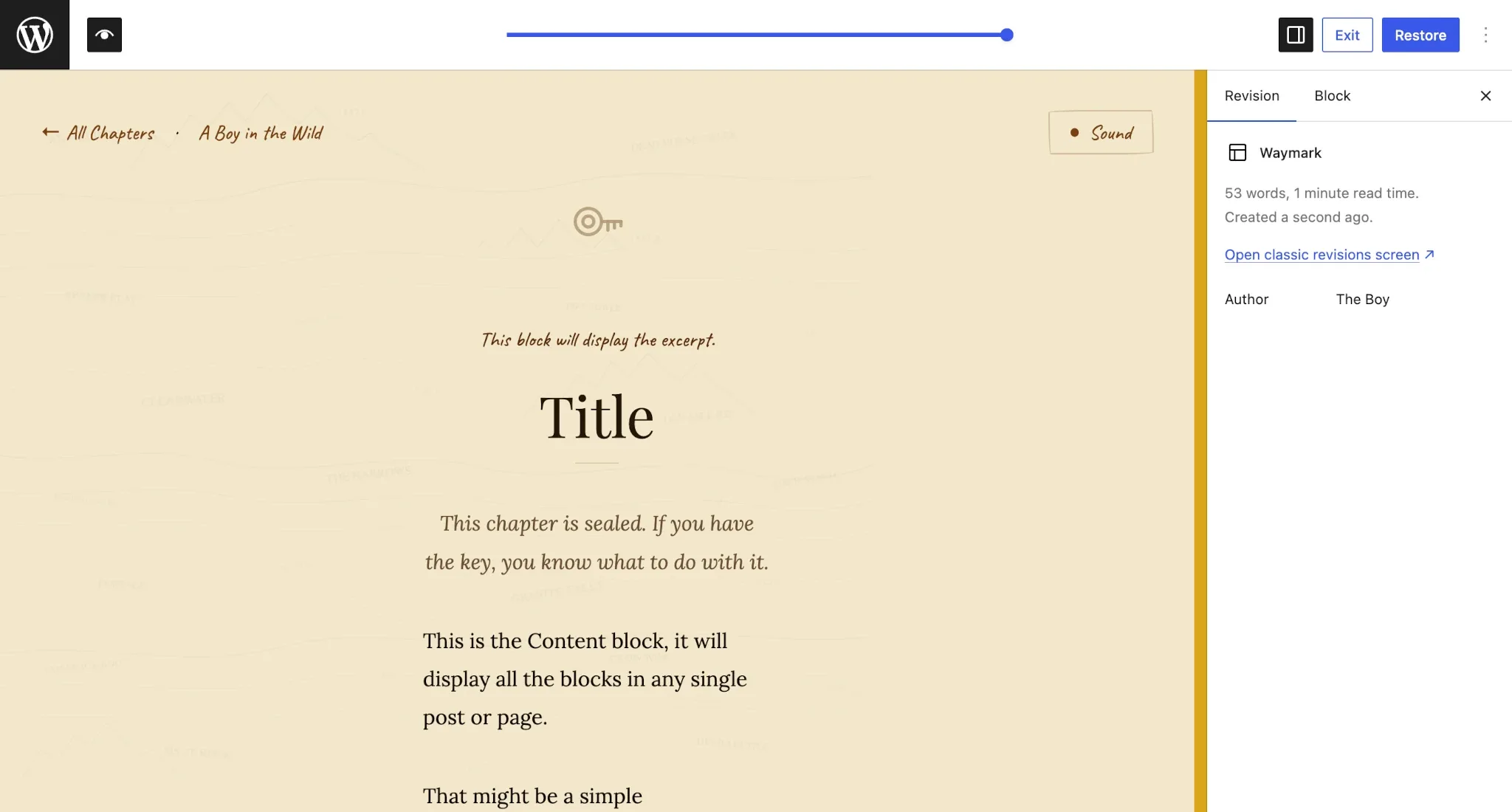WordPress site editor displaying a Revisions tab for a specific template.
The revisions panel has now been [extended to templates, template parts, and patterns](https://github.com/WordPress/gutenberg/pull/77008). This is a meaningful improvement for anyone managing complex site structures, making it much easier to track changes over time and roll back to earlier versions when needed. It also brings these editor entities in line with the revision experience of editing posts.
A brand new [@wordpress/grid package has been added](https://github.com/WordPress/gutenberg/pull/77562) to Gutenberg. This package is aimed at providing a consistent, standardized set of tools for building grid-based interfaces within WordPress. If you’re building plugin UIs or extending the editor with complex layouts, this is worth keeping an eye on as it matures.
##### Guidelines CPT renamed and refined
There has been a cluster of related work around the Guidelines custom post type that is worth following collectively. First, the CPT was [renamed from “content guidelines” to “guidelines”](https://github.com/WordPress/gutenberg/pull/77147), with corresponding updates to the slug, classes, and routes also [landing separately](https://github.com/WordPress/gutenberg/pull/77223). The CPT has also been made [type-aware](https://github.com/WordPress/gutenberg/pull/77491), so it can adapt its behavior depending on the context in which it’s used.
Additional work in this area includes [improvements to the guideline revision UX](https://github.com/WordPress/gutenberg/pull/76560), the [registration of a new `wp_guideline_type` taxonomy](https://github.com/WordPress/gutenberg/pull/77156), and the [extraction of initial public API methods](https://github.com/WordPress/gutenberg/pull/77643). The [singleton REST API has also been split](https://github.com/WordPress/gutenberg/pull/77734) into a dedicated /content-guidelines route, and the [actions section and import/export workflow have been updated](https://github.com/WordPress/gutenberg/pull/76621).
If you’re building tools around editorial workflows or content governance, the Guidelines CPT experiment is the area to watch. You can [test it via Playground](https://playground.wordpress.net/?blueprint-url=https://raw.githubusercontent.com/smithjw1/blueprints/trunk/blueprints/gutenberg-guidelines/blueprint.json).
The Templates and Template Parts REST API endpoints have been updated to [include a date field](https://github.com/WordPress/gutenberg/pull/77134). This is a small but useful addition if you’re querying these endpoints and need to sort or filter by creation or modification date.
A [widget-types data layer has been added](https://github.com/WordPress/gutenberg/pull/77752) to the Widgets module. This brings widget management more in line with the data patterns used elsewhere in Gutenberg, and should make it easier to work with widget data programmatically going forward.
Users who lack the `edit_css` capability will no longer have their [per-block custom CSS inadvertently preserved on save](https://github.com/WordPress/gutenberg/pull/76650). If you’re building multi-user workflows or managing contributor roles, this is worth being aware of—per-block CSS is now properly gated by capability on save, consistent with how custom CSS is handled elsewhere.
##### HEIC-to-JPEG conversion now uses .jpg extension
When a HEIC image (common on Apple devices) is converted to JPEG on the client side before upload, the resulting file [now correctly carries a `.jpg` extension](https://github.com/WordPress/gutenberg/pull/77506) rather than retaining the `.heic` extension. If you have any code that inspects file extensions on uploaded media, this change brings the behavior in line with what you’d expect.
##### I18N: Script module translation polyfill for WordPress < 7.0
A polyfill has been added to ensure that [script module translations load correctly](https://github.com/WordPress/gutenberg/pull/77214) on sites running WordPress versions prior to 7.0. If you’re distributing plugins that target a broad range of WordPress installs and use script modules with translations, this broadens your backwards compatibility without any changes needed on your end.
The Tabs block, which must be enabled via **Gutenberg → Experiments**, saw a [major structural refactor earlier this year](https://developer.wordpress.org/news/2026/02/whats-new-for-developers-february-2026/#tabs-block-restructured). The block has continued to receive polish and refinement this month. Here’s what landed:
* The [active tab menu item style has been simplified](https://github.com/WordPress/gutenberg/pull/77195), cleaning up some of the earlier complexity in how the active state was handled.
* [Sequential numbering has been removed from new tab labels](https://github.com/WordPress/gutenberg/pull/77321), which was adding visual noise to the default tab names.
* [Classic theme styles have been added](https://github.com/WordPress/gutenberg/pull/77607) to reset button defaults within the Tabs block, preventing inherited button styles from bleeding into tabs in classic themes.
* The [top-level structure is now locked and visibility controls have been disabled](https://github.com/WordPress/gutenberg/pull/77370) to prevent users from inadvertently breaking the Tabs block’s required structure.
The Site Tagline and Site Title fields are now [surfaced directly in the Design → Identity panel](https://github.com/WordPress/gutenberg/pull/76264) within the Site Editor. This should make it easier for users to find and update these settings without needing to dig through the Customizer or admin settings screens.
A couple of long-standing Search block inconsistencies have been resolved. First, color settings now correctly [apply to the input field when the button is disabled](https://github.com/WordPress/gutenberg/pull/77219)—previously, the input could end up unstyled in that state. Second, a mismatch between global styles (set via theme.json) and local inspector controls for [borders and colors has been corrected](https://github.com/WordPress/gutenberg/pull/77060), so the two methods of applying styles no longer conflict.
The Accordion block now has [dimension controls along with limited customization options](https://github.com/WordPress/gutenberg/pull/77780). This brings it more in line with what you’d expect from other comparable blocks and gives theme and plugin developers more to work with when styling accordions.
When switching an Image block to wide or full alignment, the [aspect ratio and scale values are now preserved](https://github.com/WordPress/gutenberg/pull/76914). Previously, these settings would be dropped when changing alignment, which could result in unexpected layout shifts. This fix should make working with aligned images feel a lot more predictable.
##### Layout and Global Styles fixes
A few important fixes landed this month that affect how layouts and styles are rendered:
* Layout classnames are now correctly [applied to the inner blocks wrapper](https://github.com/WordPress/gutenberg/pull/77408), rather than to its siblings. This was causing styling issues for themes targeting layout classes.
* A bug where [pseudo selector block style rendering was broken](https://github.com/WordPress/gutenberg/pull/76879) in the editor when using Global Styles has been fixed.
* The Post Template block’s [fallback styles will no longer apply](https://github.com/WordPress/gutenberg/pull/77411) when `minimumColumnWidth` is defined, preventing a conflict between automatic and explicitly set column widths.
* The Grid block received a fix for `width: 'fill'` [not working correctly when tiles span multiple rows](https://github.com/WordPress/gutenberg/pull/77769).
* **Cover block:** A fix is in for the [embed video background Error 153 in the editor](https://github.com/WordPress/gutenberg/pull/76904). If you’ve been hitting this with video backgrounds in Cover blocks, the patch is now merged.
* **Code block:** An overflow issue with [highlighted white-space in the Code block](https://github.com/WordPress/gutenberg/pull/77085) has been corrected.
* **Video block:** The [z-index for the tracks popover has been updated](https://github.com/WordPress/gutenberg/pull/77517) to ensure proper stacking context, fixing cases where the popover would render behind other UI elements.
* **Form blocks (experimental):** The block categories for the Form, Form Input, Form Submission Notification, and Form Submit Button blocks [have been updated](https://github.com/WordPress/gutenberg/pull/61916) to more logically group them together in the block inserter.
One new tutorial was published on the Developer Blog in the past month, and it’s worth checking out to learn more about testing your extensions:
There’s also a few other noteworthy posts from official WordPress blogs to read if you haven’t already done so:, What’s new for developers? (May 2026), developer.wordpress.org, 01krhetmvygp8kvafknbx22rhh.