WordPress 4.4 Streamlines Content Sharing
## Metadata
- Author: [[WP Tavern]]
- Full Title: WordPress 4.4 Streamlines Content Sharing
- Category: #articles
- Summary: For the last six years, WordPress has been an oEmbed consumer, adding support for services with nearly every major release since 2.9. In WordPress 4.4, it switches roles and is an oEmbed provider.
- URL: http://wptavern.com/?p=48797
For the last six years, WordPress has been an [oEmbed consumer](https://codex.wordpress.org/Embeds), adding support for services with nearly every major release since 2.9. In WordPress 4.4, it switches roles and is an oEmbed provider.
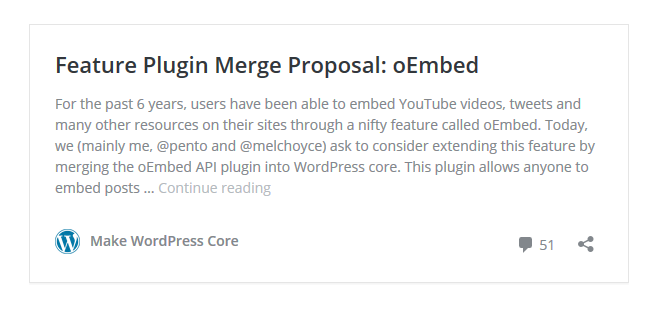
Proposed by Pascal Birchler [earlier this year](https://make.wordpress.org/core/2015/09/30/feature-plugin-merge-proposal-oembed/), oEmbeds for posts streamlines how they’re shared across the web. Here’s an example of what an oEmbedded post looks like.
For the past 6 years, users have been able to embed YouTube videos, tweets and many other resources on their sites through a nifty feature called oEmbed. Today, we (mainly me, @pento and @melchoyce) ask to consider extending this feature by merging the oEmbed API plugin into WordPress core. This plugin allows anyone to embed posts … [Continue reading](https://make.wordpress.org/core/2015/09/30/feature-plugin-merge-proposal-oembed/)
Content is displayed in an iFrame with a link to comments, a sharing button, and a link to the main page the article is hosted on. The continue reading link takes visitors to the source site. In the last three months, Birchler and members of the core team have worked hard to make sure embedded content is secure.
* The iFrames use the [sandbox attribute](https://developer.mozilla.org/en/docs/Web/HTML/Element/iframe#Attributes) to enable extra restrictions on content that can appear in the inline frame.
* The host and the embedded site communicate via postMessage to allow resizing and clicking on links safely
oEmbed discovery is turned on by default in WordPress 4.4. Too disable it, you’ll need install and activate the [Disable Embeds](https://wordpress.org/plugins/disable-embeds/) plugin. The plugin does the following:
* Prevents others from embedding your site.
* Prevents you from embedding other non-whitelisted sites.
* Disables all JavaScript
Some people [are requesting](https://make.wordpress.org/core/2015/10/28/new-embeds-feature-in-wordpress-4-4/#comment-28263) that an option be added to disable oEmbeds rather than installing a plugin. In response to requests, Aaron Jorbin, WordPress core contributor, reemphasized [WordPress’ philosophy](https://wordpress.org/about/philosophy/#decisions) on adding options.
> Every time you give a user an option, you are asking them to make a decision. When a user doesn’t care or understand the option this ultimately leads to frustration. As developers we sometimes feel that providing options for everything is a good thing, you can never have too many choices, right?
>
> Ultimately these choices end up being technical ones, choices that the average end-user has no interest in. It’s our duty as developers to make smart design decisions and avoid putting the weight of technical choices on our end users.
>
>
Birchler also responded saying, “The new embed functionality was developed with the majority of users in mind.” One of the largest problems with adding to options to WordPress is that they’re difficult to remove.
Some WordPress developers are excited to see how post embeds can be extended. [Hugh Lashbrooke](http://hughlashbrooke.com/), who works for Automattic, thinks post embeds will be great for Custom Post Types, “I think the oEmbed feature has loads of awesome use cases for Custom Post Types. For example, being able to embed eCommerce products on other sites with dynamic add to cart links,” he said.
The easiest way to try post embeds is to log into [TryWPBeta](https://wptavern.com/test-new-wordpress-features-without-installing-anything-via-trywpbeta) using these credentials.
* **Username**: wcpdx
* **Password**: wcpdx15
Create a new post and make sure the visual editor is selected. Copy a URL from one of the Make Core WordPress blog posts and paste it into the editor.
If you’d like to learn more about how this feature works, check out [Birchler’s post](https://make.wordpress.org/core/2015/10/28/new-embeds-feature-in-wordpress-4-4/) where he explains what developers need to take note of and how to customize the output. WordPress 4.4 is [scheduled for release](https://make.wordpress.org/core/version-4-4-project-schedule/) in December., WordPress 4.4 Streamlines Content Sharing, WP Tavern, 01gnmcyjzqxs1cgg5p994pjrwy.