WordPress as Your Personal Knowledge Base
🔗 **Source:** [WordPress as Your Personal Knowledge Base](https://alex.kirk.at/2026/10/01/wordpress-as-your-personal-knowledge-base/)
> [!note]+ Document Notes
> ---
> tags: [wordpress, wp-apps, personal-knowledge-base, mcp, abilities-api, ai-assistants]
> author: alex.kirk.at
> source: alex.kirk.at
> reference: https://alex.kirk.at/2026/10/01/wordpress-as-your-personal-knowledge-base/
> date created: 2026-10-14 08:46
> ---
> > [!info] Generated analysis — not the author's words. Sections below are machine-written
> > from the captured source. Only text inside `> [!quote]` blocks is verbatim from the author.
> > Do not quote or attribute any other line to the named author.
> # 🏷️ Title: WordPress as your Personal Knowledge Base
> ## 🧭 Table of contents
> - [📝 Summary](#-summary)
> - [📖 Main content](#-main-content)
> - [🗒️ Notes](#️-notes)
> - [📚 References](#-references)
> - [🗣️ Paraphrase](#️-paraphrase)
> - [📰 Newsletter](#-newsletter)
> - [✅ Action items](#-action-items)
> - [🧪 Hypotheses](#-hypotheses)
> - [📊 Methodology](#-methodology)
> - [❓ Questions](#-questions)
> - [🔮 Future research](#-future-research)
> - [💡 Implications](#-implications)
> - [🧠 Learning styles assessment](#-learning-styles-assessment)
> - [📊 Accessibility assessment](#-accessibility-assessment)
> - [🌍 DEIB assessment](#-deib-assessment)
> - [✅ Logical validity](#-logical-validity)
> - [🛡️ DARVO analysis](#️-darvo-analysis)
> - [🎯 Conclusion](#-conclusion)
> - [🔄 Refactor appendix](#-refactor-appendix--wordpress-as-your-personal-knowledge-base)
> ## 📝 Summary
> This is a first-person advocacy post on the personal blog alex.kirk.at, published 2026-10-01 (date per Reader). The captured text has no byline, so the author field names the site. The task metadata identifies the site as the personal blog of Alex Kirk. The text is written in first person throughout and uses no third-person pronoun for the author, so this analysis says "the author." The post promotes the author's own project, WP Apps (wpapps.kirk.at), and two plugins the author wrote, MCP Connect and WebMCP Abilities. It is opinion and product advocacy, not independent review. The commercial interest is not stated as a price. The captured text names no fee for any app, and says only that ZIP downloads exist (¶38).
> Paragraph labels like ¶n count non-blank lines of the captured text file in order, headings included (66 in all).
> - **What happened.** The author explains how the WP Apps (Cook App, Memex, Travel App, AI Assistant) turn a WordPress site into a personal knowledge base that AI tools can read and write. The mechanism has three layers: structured data in the apps (¶14), the WordPress 6.9 Abilities API that exposes app functions (¶13), and MCP or WebMCP as the transport for outside AI clients (¶14, ¶16-¶19).
> - **The claim.** Self-hosted structured data plus a standard abilities layer lets you use an existing Claude or ChatGPT subscription against your own data, switch providers freely, or skip AI entirely (¶28-¶30, ¶64-¶66). Evidence is the author's own use: a recipe clean-up that cost "about €3" through an API key (¶10) and a trip-planning flow that "replaced TripIt for me" (¶25).
> - **Why it matters.** WordPress core has no native MCP support, and the post names the gap: the MCP Adapter on GitHub lacks OAuth, which subscription-based AI clients need (¶17). The author wrote MCP Connect to fill it and is "not (yet?) planning" to submit it to WordPress.org (¶18).
> - **Key stakeholders.** The author (developer of the apps and both plugins), WordPress site owners, the WordPress core AI contributors who maintain the Abilities API and the MCP Adapter, OpenAI (ChatGPT desktop app site tools), Anthropic (Claude), and Chrome (experimental WebMCP).
> - **Risks and tradeoffs.** Two plugins that grant external AI write access to personal data are self-published GitHub releases, one with an OAuth layer the author says you could use "if you’re daring" (¶18). The post says destructive abilities "typically need confirmation" (¶61), a hedge, not a guarantee. Pasting flight and hotel reservations into a hosted chat (¶24) sends them to the provider, and the post does not discuss that tradeoff.
> - **Bottom line.** A working, specific pattern with named moving parts and a candid statement of what is missing. The evidence is one user's setup, and the security claims are descriptions, not audits.
> ## 📖 Main content
> **The pattern (¶1-¶4, ¶13-¶14).** WP Apps are WordPress plugins that each store one area of life as structured data: recipes with ingredient taxonomies, trips with trip items, and so on (¶4). Each app exposes its functions through the Abilities API, which the author says WordPress 6.9 added as "a standard way to expose their functionality" (¶13, paraphrased). An AI client reaches those abilities externally through MCP or WebMCP (¶14).
> **Internal use: the AI Assistant app (¶6-¶10, ¶40-¶44).** The author imported recipes from the web and ended up with ingredient and cuisine data in inconsistent forms: several types of flour, notes inside ingredient names, cuisines in English and German (¶7). The author told the AI Assistant app to clean up the cookbook, it proposed changes first and then applied them (¶8). The conversation ran on an API key and cost about €3 (¶10). The setup steps for this route are: install the apps, install AI Assistant, connect a hosted AI by API key or a local LLM (LM Studio or Ollama), and start with a small request (¶41-¶44).
> **External use: MCP (¶16-¶18, ¶47-¶53).** The post says WordPress has no native MCP support and that the MCP Adapter plugin, available only on GitHub, lacks OAuth (¶17). Without OAuth you would have to make the data public or publicly writable, which the author rejects (¶17). MCP Connect adds the OAuth layer and bundles the MCP Adapter (¶18, ¶50). The setup steps are: WordPress 6.9 or newer, install the apps, install and activate MCP Connect, open Tools → MCP Connect, hide any abilities you don't want AI clients to see, follow the on-screen instructions to add the site to ChatGPT, Claude, or another client, and sign in to authorize (¶49-¶52). After that, the client picks abilities itself (¶53).
> **External use: WebMCP (¶19, ¶55-¶59).** The WebMCP Abilities plugin exposes abilities to AI tools that work inside a browser the user has open. The post's example is the ChatGPT desktop app's built-in browser (¶57). The author says no WebMCP support is known in the Claude app, and notes experimental WebMCP support in Chrome (¶59).
> **The example (¶22-¶26).** The author tells ChatGPT about a weekend in London, and it creates the trip in Travel App. The author continues by pasting flight and hotel reservations, and says this replaced TripIt (¶24-¶25). The post does not say whether TripIt supports MCP (¶26, "Maybe TripIt also supports MCP these days").
> **Does it require AI? (¶28-¶31).** No. The author says the examples use Anthropic or OpenAI but a local LLM works, and so does no AI at all (¶28). Because the data sits in the author's WordPress, the author can cancel one provider and use another, and the data isn't spread across external services (¶29-¶30). Travel App also works offline, and each trip shows offline status at the bottom (¶31).
> **Try it without installing (¶34-¶38).** Each WP App page links to a my.wordpress.net demo, "a free WordPress that runs in your browser." Several apps can share one browser-based WordPress, and its data "stay private to your computer" (¶34-¶37). Each app page also offers a ZIP, except apps already in the WordPress.org plugin directory such as Travel App (¶38).
> **Access control (¶61-¶62).** Both plugins let you restrict which abilities they expose. Destructive abilities "typically need confirmation." Outside AI use, WP Apps are limited to logged-in users by default.
> **What the post does not establish.** It shows no performance, accuracy, or error-rate data for the clean-up. It reports no security review of MCP Connect or WebMCP Abilities. It gives no cost or time comparison with TripIt beyond "replaced." It names no non-ChatGPT client that completed the full flow in the captured text, though the setup steps list Claude (¶52). The first-hand evidence is the author's own use.
> ## 🗒️ Notes
> #### 📄 ¶1-¶4 Thesis and context
> - ¶1 states the thesis: WP Apps turn WordPress into a personal knowledge base where each app organizes one aspect of life, stores data
Using WP Apps, you can turn your WordPress into your personal knowledge base: each app can help you organize a different aspect of your life with your data stored in structured ways, under your control, and available to the tools you choose.
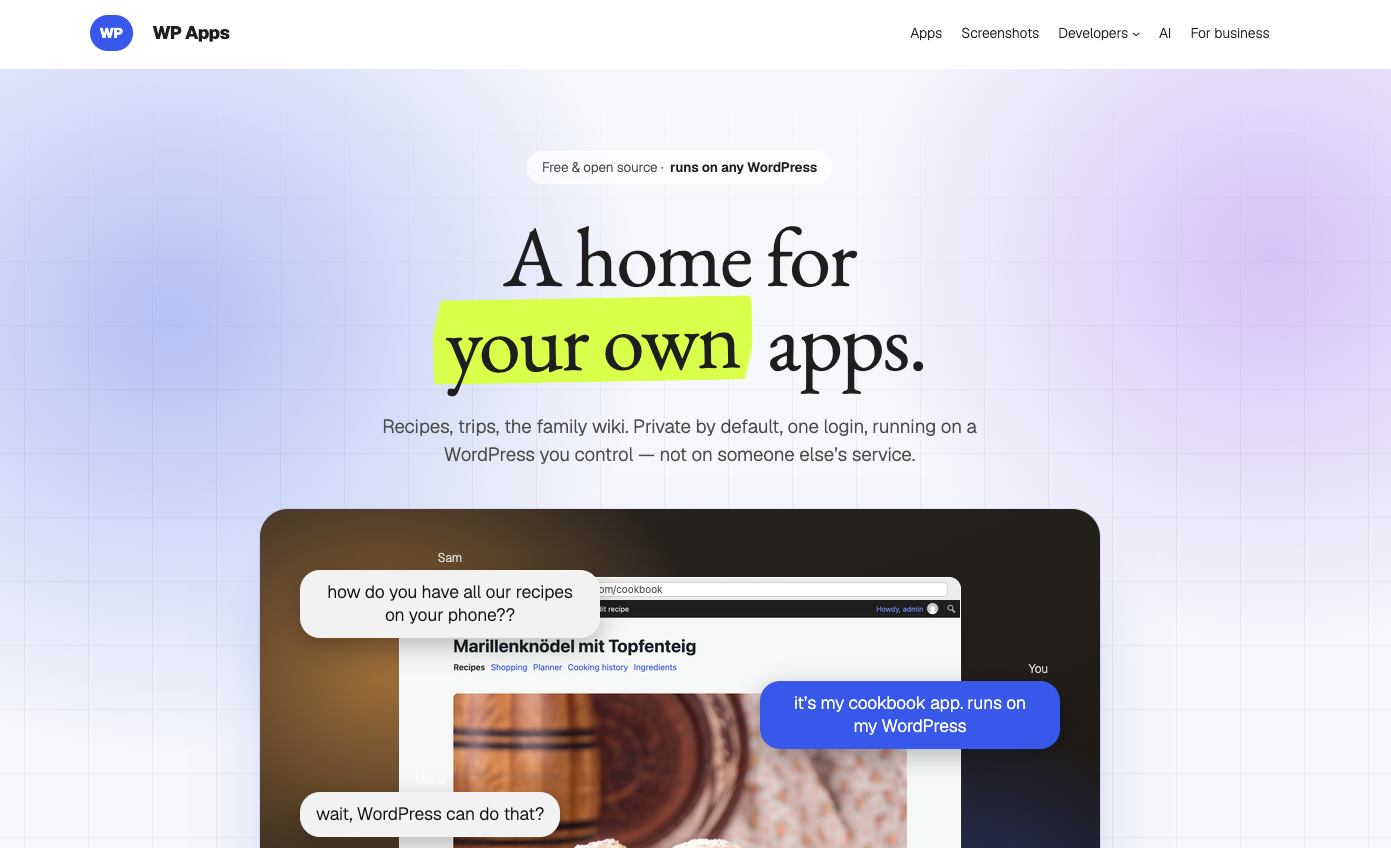
To explain my vision for establishing [WP Apps](https://alex.kirk.at/tag/wpapps/), I have created a landing page and showcase at [wpapps.kirk.at](https://wpapps.kirk.at). If you think it’s a good idea, please spread the word!
[](https://wpapps.kirk.at)wpapps.kirk.at
There is [a knowledge base section on the “AI” page](https://wpapps.kirk.at/ai/#knowledgebase), and I would like to explain it using my own setup.
I use WP Apps extensively, I have several aspects of my life stored in [different WP Apps](https://wpapps.kirk.at/apps/), for example, [Cook App](https://wpapps.kirk.at/apps/cook-app/), [Memex](https://wpapps.kirk.at/apps/memex/), and [Travel App](https://wpapps.kirk.at/apps/travel-app/). These apps store the data in structured ways: recipes with ingredient taxonomies, trips with trip items, and so on.
#### Using AI to Clean Up
For example, I imported some recipes to my Cookbook from the web that I used to look up again and again. I also had to remember the small adaptations I had made.
This created a problem: different recipes had ingredients stored in all sorts of ways. Although the app tries to consolidate them, I still ended up with different types of flour, notes that had made it into ingredient names, and cuisines in both English and German. It was a bit of a mess.
So I used the [AI Assistant](https://wpapps.kirk.at/apps/ai-assistant/) and told it: “Help me clean up my cookbook. There is a bit of chaos in the ingredients and cuisines.” And, of course, it did: first by suggesting what it would do and then by doing the actual clean-up.
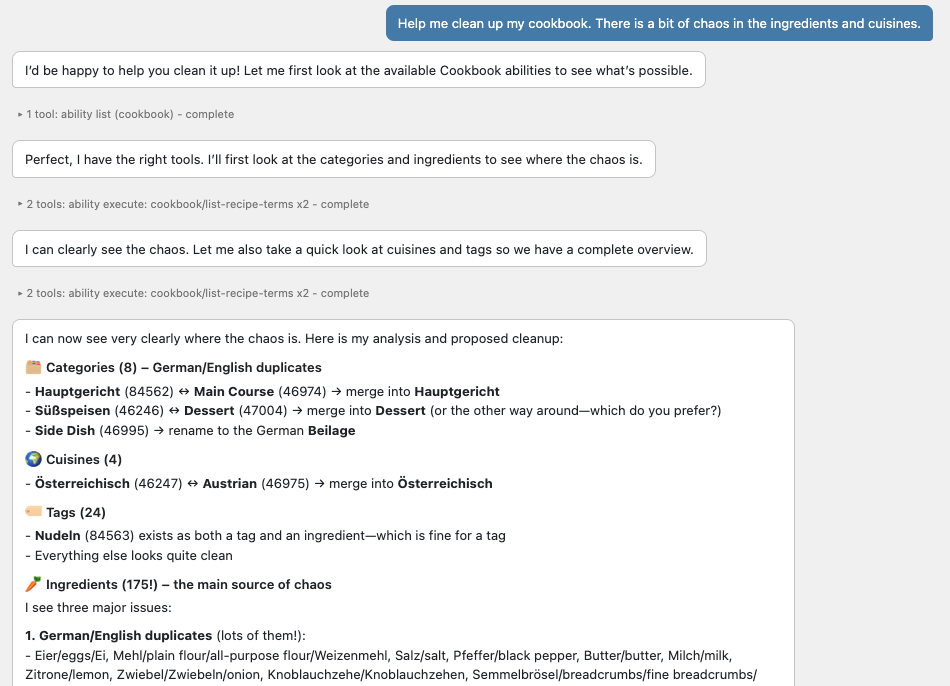This is a translated version of my German conversation
This was very satisfying, and I wonder how many other cookbook apps allow this when you don’t have the same freedom over your data.
In this case, I used an API key for the conversation, and it cost about €3. For me, it was worth it!
But can you use a Claude or ChatGPT subscription that you might already have for the same thing? Turns out, yes!
#### How AI Can Interact with WP Apps
A quick detour before we get there: WordPress 6.9 added the [Abilities API](https://make.wordpress.org/ai/handbook/projects/abilities-api/), which gives plugins a standard way to expose their functionality. [All the WP Apps I created](https://wpapps.kirk.at/apps/) expose such abilities. This means that AI can interact with them. For example, in the screenshot above, you can see how it talked to the plugins using abilities.
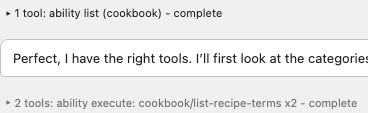Crop of the screenshot above showing the abilities being used
The apps store the structured data, the Abilities API makes their functionality available, and you can let AI access this externally via MCP, or potentially WebMCP (see [WebMCP or MCP](https://mcpservers.org/learn/what-is-webmcp#webmcp-vs-mcp)).
#### Using AI Subscriptions with Your Knowledge Base
MCP is what lets subscription-based AI assistants interact with your site.
WordPress doesn’t yet have native MCP support. There is an MCP Adapter plugin that exposes the Abilities API, but [it is only available on GitHub](https://github.com/wordpress/mcp-adapter), and it is missing something crucial for use with subscription-based AI assistants: OAuth. Since you don’t want to make your data public (or publicly writable), you need a way to authorize the AI to access it on your behalf.
So I wrote the [MCP Connect plugin](https://github.com/akirk/mcp-connect), which adds this OAuth layer. I am not (yet?) planning to publish it in the [WordPress.org Plugin Directory](https://wordpress.org/plugins/) because I think we eventually need an official solution. For now, I use it myself and you could too, if you’re daring.
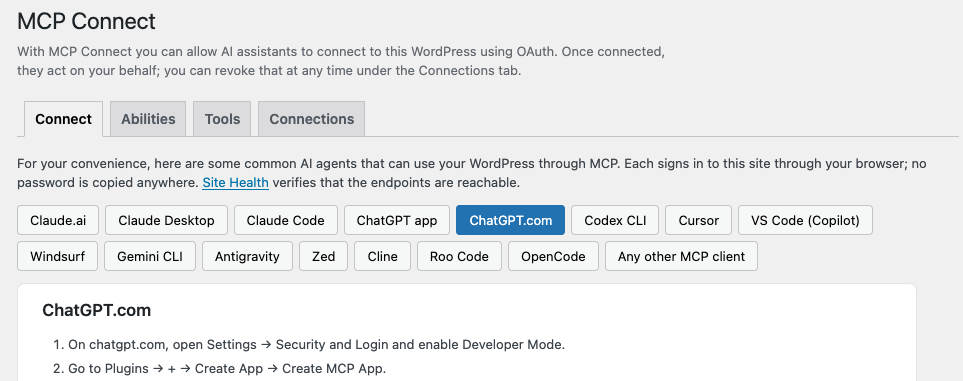Instructions for connecting an AI assistant to WordPress with the MCP Connect plugin
Similarly, WordPress does not yet officially support WebMCP. I have a [WebMCP Abilities plugin](https://github.com/akirk/webmcp-abilities) that exposes Abilities over WebMCP. If you have the ChatGPT app and ask it to open your website, you can log in there and use all the available abilities.
#### Example: Using ChatGPT to Talk to Your WordPress
There is a chance that MCP is old news to you since it has been around for quite a while. But it makes particular sense in combination with WP Apps and the abilities they expose.
Say I’m going to London next weekend. I can do this using the Travel App:
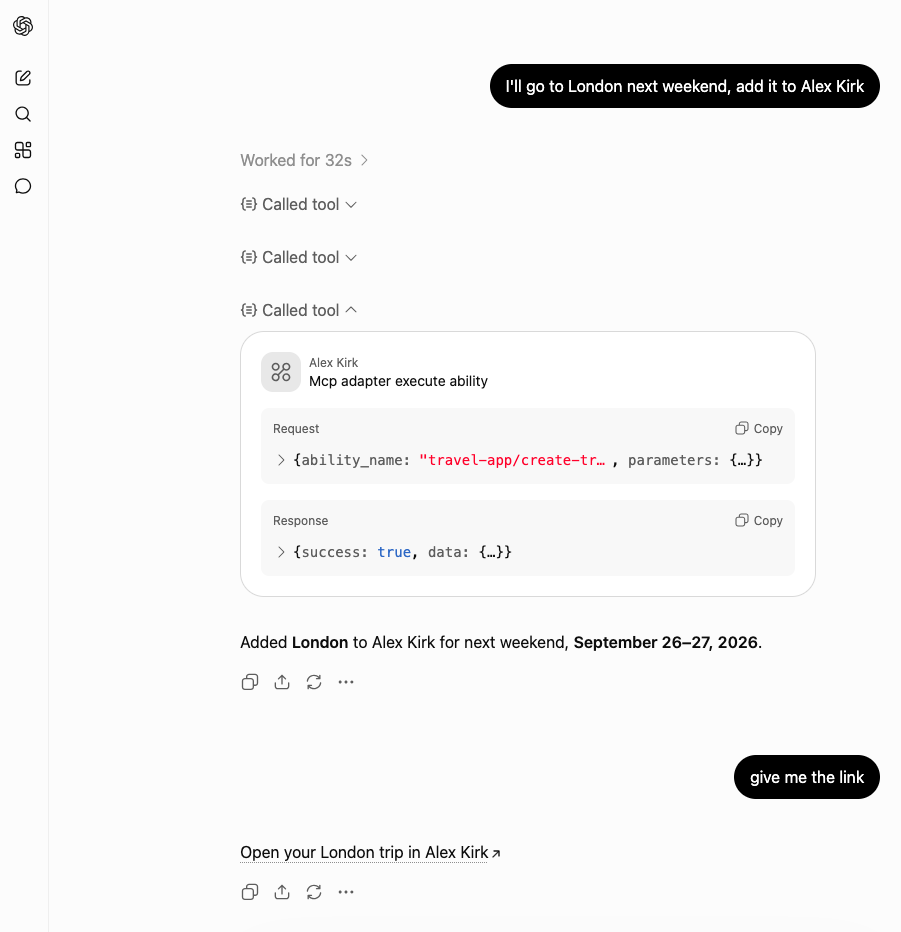ChatGPT knows to ask my WordPress because I have added MCP access under the name “Alex Kirk”, the name of my site.
And arrive at this:
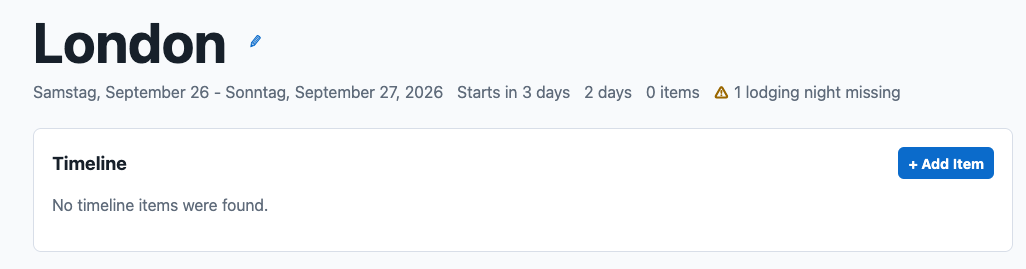The London Trip as it appears in Travel App, freshly created and still empty.
Next, I could continue the conversation and paste my flight and hotel reservations, and it would add them.
I didn’t want to share a real example, but I use this to organize my trips. [This replaced TripIt for me](https://alex.kirk.at/2026/07/20/own-your-apps-alternatives-you-can-run-in-wordpress/).
I can also query past trips.
Maybe TripIt also supports MCP these days. But this setup can use all the apps I have installed, if I want it to.
#### Does This Require AI?
It is important for me to mention that I am showing what is possible with AI, not arguing that AI is required. While I used Anthropic or OpenAI above, all of this can also be done with local LLMs. Or I can choose not to use AI at all.
Because the data is in my WordPress, I can switch AI providers as I like. If I cancel one subscription and start another, the new service can still access and work with my data.
My data is also not spread across many external services where I don’t know what they will do with it. I can choose whether to use AI, and I can use it only for selected tasks. If I stop using AI, my data remains in my WordPress.
Oh, and because I have been asked about this: Travel App is available offline. On each trip you can verify its offline availability at the bottom:
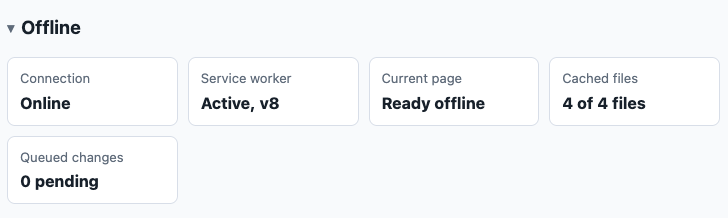Connection: Online. Service worker: Active, 8. Current page: Ready offline.
#### How to Try It?
##### Without Installing Anything
[Each WP App page](https://wpapps.kirk.at/apps/) has an install link for [my.wordpress.net](https://my.wordpress.net/), a free WordPress that runs in your browser. To get started:
1. Choose the WP App you want to try.
2. Open its [my.wordpress.net](https://my.wordpress.net/) demo. You can install multiple WP Apps in the same browser-based WordPress and use them together.
3. Add your own data and experiment with the apps. This WordPress and its data stay private to your computer, so you can use it with real data.
[Each WP App](https://wpapps.kirk.at/apps/) page also has a ZIP download (except for those that are already in the WordPress.org plugin directory, like [Travel App](https://wordpress.org/plugins/travel-app/)), to install it on a WordPress you already own.
##### Use WP Apps with AI from Inside WordPress
The first option is to use AI from inside WordPress through the [AI Assistant](https://wpapps.kirk.at/apps/ai-assistant/) app. The assistant can work with all the abilities exposed by your installed WP Apps.
1. Install the WP App or apps you want to use.
2. Install AI Assistant.
3. Connect it to a hosted AI using an API key, or configure it to use a local LLM (e.g. [LM Studio](https://lmstudio.ai/) or [Ollama](https://ollama.com/)).
4. Open AI Assistant and start with a small request, such as listing your recipes or creating a test trip.
##### Use WP Apps with an AI Subscription from Outside WordPress
The second option is to let an AI assistant that you already use connect to your WordPress. There are two ways to do this, depending on whether you want the AI to access your site directly or work with it while you have it open in a browser.
###### Connect Directly Through MCP
With MCP, AIs like ChatGPT, Claude, or another MCP client can access it directly, they don’t have to be open in the browser. The connection remains available across conversations.
1. Make sure your site runs WordPress 6.9 or newer, then install the WP App or apps you want to use.
2. Install and activate [MCP Connect](https://github.com/akirk/mcp-connect/releases/latest). It includes the MCP Adapter, so you don’t need to install that separately.
3. Go to **Tools → MCP Connect**. Review the available abilities and hide any that you don’t want AI clients to see.
4. Follow the ready-made instructions on that screen to add your site to ChatGPT, Claude, or another supported client. Then sign in to your WordPress and authorize the connection.
5. Now you can ask your AI to do things related to your WP Apps, it will automatically determine the right abilities to use.
###### Work Together in the Browser Through WebMCP
Some AI tools, such as the ChatGPT app, use WebMCP to interact with the site that is open in the in-app browser. To use them:
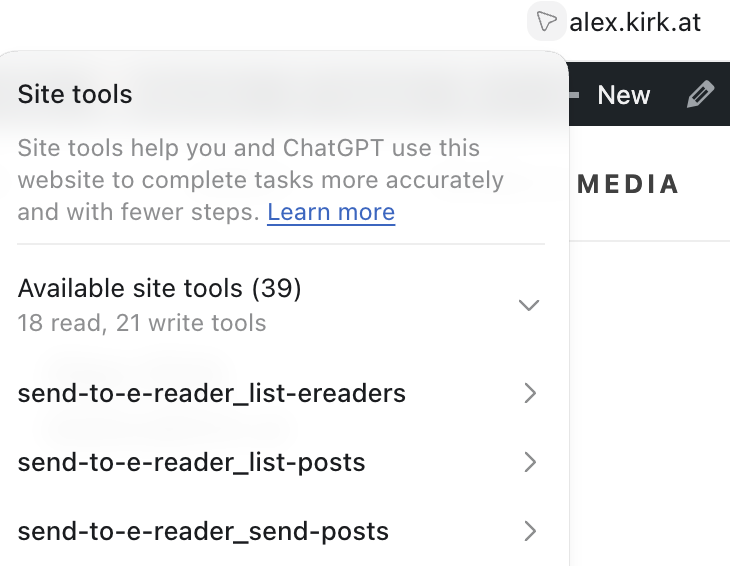ChatGPT shows the tools exposed via WebMCP
1. Install the WP App or apps you want to use, then install [WebMCP Abilities](https://github.com/akirk/webmcp-abilities/releases/latest).
2. Open your site in the built-in browser of the ChatGPT desktop app and log in to WordPress. You can inspect the tools that ChatGPT can see with the little arrow icon.
3. Ask ChatGPT to do things related to your WP Apps, it will automatically determine the right abilities to use.
At the moment, [this primarily means using site tools in the ChatGPT desktop app](https://help.openai.com/en/articles/20001423-using-site-tools-in-the-chatgpt-desktop-app). I am not aware of WebMCP support in the Claude app yet. In the future, WebMCP could also work with AI agents built into browsers or provided through browser extensions. Chrome already has [experimental WebMCP support](https://developer.chrome.com/docs/ai/webmcp).
##### Access Control?
Both [MCP Connect](https://github.com/akirk/mcp-connect) and [WebMCP Abilities](https://github.com/akirk/webmcp-abilities) let to limit the abilities exposed. Destructive abilities (like deleting) typically need confirmation from the user.
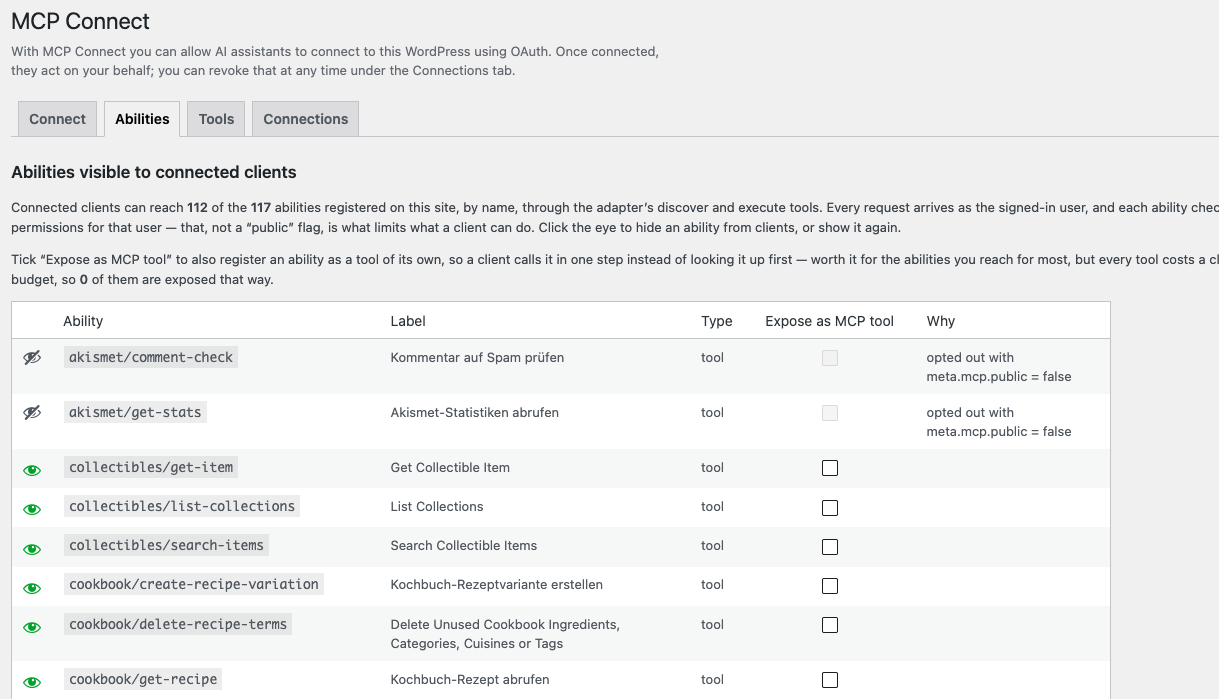A screenshot of the Abilities screen in the MCP Connect plugin, where access to abilities can be limited
Apart from AI, WP Apps are restricted to logged-in users by default, so you can use them alongside whatever you already use your WordPress for. They give your data a durable home and leave you in control of which tools, AI or otherwise, can work with it.
#### Conclusion
For me, it is a compelling combination to use [WP Apps](https://wpapps.kirk.at/) as an opinionated complement to subscription AI like [ChatGPT](https://chatgpt.com/) or [Claude.ai](https://claude.ai/).
You can have AI fill in data, organize it, and then use a nice WP App to browse it and interact with the data. But you remain in control and can decide when to involve AI.
You can use the apps standalone and import from elsewhere and fine-tune the contents yourself, because it [they are all apps](https://wpapps.kirk.at/apps/) that run on your WordPress., WordPress as Your Personal Knowledge Base, alex.kirk.at, 01m4x74ademgzpn32a7q99h9y2.