WordPress plugins and accessibility
## Metadata
- Author: [[Michiel Heijmans]]
- Full Title: WordPress plugins and accessibility
- Category: #articles
- Summary: WordPress recently announced that “all new or updated code released into WordPress core and bundled themes must conform with the WCAG 2.0 guidelines at level AA.” This means WordPress will be making the product more accessible with every new update.
- URL: https://yoast.com/wordpress-plugins-accessibility/
WordPress recently announced that “all new or updated code released into WordPress core and bundled themes must conform with the WCAG 2.0 guidelines at level AA.” This means WordPress will be making the product more accessible with every new update. Rian Rietveld’s article [WordPress goes WCAG](https://make.wordpress.org/accessibility/2016/03/21/wordpress-goes-wcag/) clearly reflects her enthusiasm about this step forward in terms of accessibility.
*Before we dive in, if you want to learn more about accessibility and other essential SEO skills, you should check out our [All-around SEO training!](https://yoast.com/academy/academy-all-around-seo-training/) It doesn’t just tell you about SEO: it makes sure you know how to put these skills into actual practice!!*
It aligns with Morten Rand Hendriksen’s statement during the [State of Word 2015](http://wordpress.tv/2015/12/07/matt-mullenweg-state-of-the-word-2015/) (at 1:12:04 to be precise). We shouldn’t just focus on “study Javascript deeply” but also on “study accessibility deeply”.
For us plugin developers, Rian makes a clear statement: “The accessibility of plugins is the responsibility of each plugin author.” In our book, that means you can’t just ignore accessibility altogether, because you don’t *like* to focus on it. In this post, I’d like to illustrate what this responsibility means to us.
#### Write clean code
I’m not a code writer myself but have seen my share of plugin code over the last several years. Some are well coded, some are ‘poor’ coded. And by poor, I mean that some drawings by two-year-old kids have more structure than the code of those plugins. Write clean code, it’s as simple as that. It will make sure screen readers and tools like that will do a better job. It will make a site more accessible.
At Yoast, we don’t take this lightly. We have a well-thought-out code design and development process, which contains a lot of feedback moments. That feedback comes from colleagues and for instance from beta testers. It’s our and your responsibility as a plugin developer to make sure you’re not just outputting code. You have to make sure that you’re outputting *clean* code.
#### Use (free) accessibility tools
Running your code through the [W3C Validator](https://validator.w3.org/) every once in a while already helps you determine if you’re writing clean code. Usually, the recommendations this validator gives you, are easy to fix. And they might already make a huge difference in term of accessibility.
Another great and very easy-to-use tool is [WAVE](http://wave.webaim.org/). Simply install the chrome extension and see for yourself:
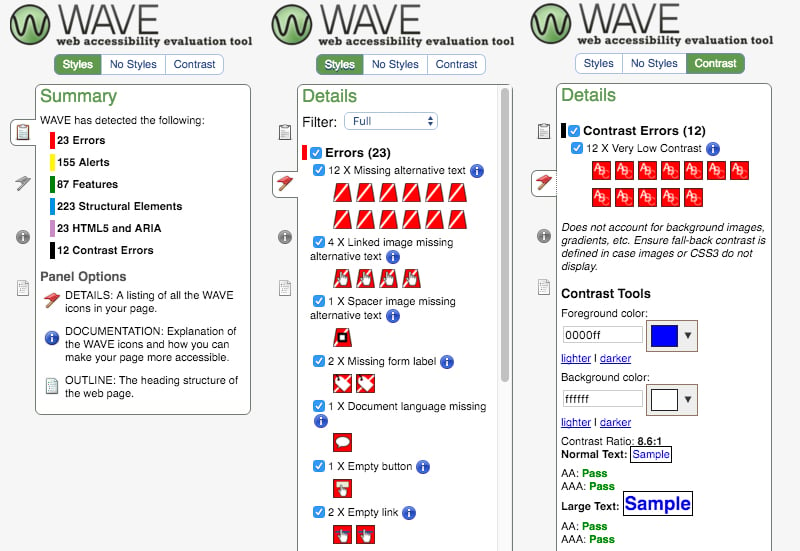
The WAVE extension analyses a variety of possible accessibility issues. In the screenshot above, you can see things like missing ALT attributes and contrast issues. And how about adding these labels to your forms? It’s all not that hard. This WAVE analysis is all done in seconds and really tells you where your code (or website) should be improved for accessibility.
Contrast is also something that’s really easy to test *and* improve. Simply use WAVE or [Lea Verou’s contrast ratio tool](http://leaverou.github.io/contrast-ratio/). No need to do that on a live website, as we’re talking about your plugin’s user interface here. Please go read my post on [easy-to-use accessibility tools](https://yoast.com/accessibility-tools/) for more testing tools.
#### “Your plugin’s not perfect either”
You were thinking just that, right? Our plugin isn’t perfect either, in terms of accessibility. But we have shown to you over the last years that we’re listening and we’re improving accessibility at a fast pace. Just the other week, we took that to the next level by **hiring [Andrea Fercia](https://profiles.wordpress.org/afercia)** **full-time.** Andrea specializes in accessibility. He’ll also be dedicating a portion of his time to core, by the way.
Andrea is well-known in the WordPress community. He is the team lead for the accessibility team for WordPress when it comes to core. We’re very happy to have you on board, Andrea. I am sure we’ll be making our plugin(s) even more accessible thanks to your knowledge and experience!
I guess that’s what Rian meant when she wrote: “The accessibility of plugins is the responsibility of each plugin author.” As the plugin author of one of the most-used WordPress plugins, we hope we can set an example in this!
Read more: [Easy-to-use accessibility tools »](https://yoast.com/accessibility-tools/)
Michiel was one of our very first employees and used to be a partner at Yoast. Kick start your site optimization with his articles!, WordPress plugins and accessibility, Michiel Heijmans, 01gnmcy76x4vwp8at5xz359yn8.