Wp_mail() Is NOT Broken
## Metadata
- Author: [[About]]
- Full Title: Wp_mail() Is NOT Broken
- Category: #articles
- Document Note: # Title: Rethinking WordPress and Email: A Deeper Look
- - -
tags: #WordPress #Email #SMTP #MTA #Hosting
Author: Unknown
Source: [Original Article](source_link_here)
Reference: N/A
date created: 2024-01-21T10:15
- - -
## Table of Contents:
- Introduction
- Understanding SMTP and Email Communication
- The Role of WordPress in Sending Emails
- Common Hosting Provider Perspectives on Email Issues
- The Use of SMTP Plugins in WordPress
- Can WordPress Be a Reliable MTA?
- Can WordPress Be a Performant MTA?
- Alternatives for Handling WordPress Emails
- Hope for a Better wp_mail()
- Conclusion
## Index Creation:
- SMTP
- Email Communication
- WordPress
- Hosting Providers
- SMTP Plugins
- MTA
- Sendmail
- Postfix
- Mailgun
- HTTP API
## 📝 Summary:
This article delves into the complex relationship between WordPress and email communication. It highlights the challenges faced by WordPress in sending emails efficiently and explores the use of SMTP plugins as a common solution. The author questions whether WordPress can be a reliable or performant Mail Transfer Agent (MTA) and suggests alternatives for handling email communication more effectively.
## 📖 Main Content:
### Introduction
The article introduces the author's journey in developing Sail, a CLI tool for provisioning WordPress servers on DigitalOcean. The author's quest for optimal email configuration within WordPress led to a deeper understanding of the challenges associated with the wp_mail() function.
### Understanding SMTP and Email Communication
SMTP, as the language of email communication, is briefly explained, emphasizing its role in routing emails from sender to recipient.
### The Role of WordPress in Sending Emails
The article outlines how WordPress uses the wp_mail() function, which internally relies on the PHP mail() function. It clarifies that WordPress primarily acts as a Mail User Agent (MUA) rather than a Mail Transfer Agent (MTA).
### Common Hosting Provider Perspectives on Email Issues
The article examines the viewpoints of hosting providers like Kinsta, WP Engine, and SiteGround regarding email issues. It questions some of the claims made by these providers, such as emails being identified as spam and server misconfigurations.
### The Use of SMTP Plugins in WordPress
SMTP plugins are discussed as a common solution recommended by hosting providers. The author explains how these plugins alter the wp_mail() function's behavior to use SMTP, and highlights the complexity and potential drawbacks of this approach.
### Can WordPress Be a Reliable MTA?
The article argues that WordPress should not serve as a reliable MTA, drawing a parallel with hosting providers' reluctance to handle emails. It points out that established MTAs like Sendmail, Exim, and Postfix have a proven track record in email delivery.
### Can WordPress Be a Performant MTA?
Performance tests are conducted using Postfix and SMTP plugins for WordPress. The results show a significant performance difference, with Postfix being much faster. The article underscores the inefficiency of using WordPress as an MTA.
### Alternatives for Handling WordPress Emails
The article suggests alternatives for handling WordPress emails efficiently. DIY enthusiasts are encouraged to configure Postfix or another MTA to relay emails to external SMTP services. Managed WordPress hosts are advised to continue using SMTP plugins that support mail service providers via an HTTP API.
### Hope for a Better wp_mail()
The author proposes a streamlined solution for hosting companies to configure an SMTP relay within their control panels. This approach would enable the hosting provider's MTA to handle email delivery, allowing WordPress to focus on its core functionality.
### Conclusion
The article concludes by emphasizing the need to rethink the role of WordPress in email communication. It encourages hosting providers to adopt more efficient email handling methods and hopes for a better future for the wp_mail() function.
## 📖 References:
- N/A
## 🗣️ Paraphrase:
1. "So why is everybody trying to fix it? I’ll try to explain."
- Why is there such a widespread effort to address this issue? Let me provide some insight.
2. "A few months ago, I started working on a new open-source project called Sail, which is a CLI tool to provision WordPress servers on DigitalOcean."
- Several months ago, I embarked on a new open-source project named Sail, focused on provisioning WordPress servers on DigitalOcean via a CLI tool.
## 🧪 Hypotheses:
### 📊 Methodology:
To explore these hypotheses for future studies, the following methodologies and approaches could be considered:
1. Hypothesis: Hosting companies can improve email delivery by configuring an SMTP relay within their control panels.
- Methodology: Conduct a comparative study between hosting providers that implement SMTP relays and those that rely on SMTP plugins. Measure email delivery performance, user satisfaction, and resource consumption.
2. Hypothesis: WordPress can be optimized to efficiently handle email communication.
- Methodology: Evaluate different methods of optimizing WordPress for email communication, including Action Scheduler and maintaining email queues. Measure the impact on email delivery speed and resource utilization.
3. Hypothesis: Managed WordPress hosts can enhance their email services by adopting modern email delivery standards.
- Methodology: Analyze the email delivery practices of managed WordPress hosts and assess the implementation of standards like SPF records and DKIM. Compare the email delivery reliability of hosts that adopt these standards versus those that do not.
### 💡 Implications:
The potential implications of the above hypotheses for the field include:
1. Improved Email Delivery: If hosting companies adopt SMTP relays as proposed, it could lead to more efficient and reliable email delivery for WordPress websites, enhancing user experience.
2. Enhanced WordPress Performance: Optimizing WordPress for email communication may lead to a more efficient platform, reducing resource consumption and improving overall performance.
3. Email Standards Adoption: Managed WordPress hosts that embrace modern email delivery standards may see a decrease in email-related issues, contributing to better customer satisfaction.
### 🔮 Future Research:
Future research related to the article's topic could explore the following areas:
1. Comparative Analysis: A comprehensive comparison of different MTAs (e.g., Sendmail, Exim, Postfix) in terms of performance, resource utilization, and reliability for handling WordPress emails.
2. WordPress Email Plugins: An investigation into the efficiency and reliability of various SMTP plugins available for WordPress, with a focus on their impact on email delivery.
3. Hosting Provider Practices: A study of hosting providers' email handling practices, including the implementation of email standards and their impact on email deliverability.
4. User Experience: Research on user experiences related to email communication in WordPress, including user preferences, satisfaction levels, and pain points.
### ❓ Implications:
The potential implications of future research in the field may include:
1. Informed Decision-Making: Hosting providers and WordPress developers can make more informed choices regarding email handling methods based on research findings.
2. Performance Optimization: Insights into optimizing WordPress for email communication can lead to improved website performance and resource efficiency.
3. User-Centric Solutions: Research on user experiences can guide the development of WordPress email solutions that align with user preferences and needs.
### ✅ Logical validity:
The article presents a logical argument regarding the challenges of email communication within WordPress and questions the use of SMTP plugins as a common solution. It highlights potential inefficiencies and drawbacks while proposing alternatives. The tone is informative and critical, analyzing the perspectives of hosting providers and performance test results to support the argument. There are no apparent logical fall
- Summary: The article discusses the misconception that the wp_mail() function in WordPress is broken and the need for plugins or third-party services to fix it. The author explains how the wp_mail() function works and its efficiency in sending emails by piping a string into an executable. The author also examines the reasons given by managed hosting providers for email issues and argues that the recommended solution of using SMTP plugins for WordPress adds unnecessary complexity and slows down email delivery. The author suggests using a reliable MTA like Postfix and configuring an SMTP relay for better performance.
- URL: https://konstantin.blog/2021/wp_mail-is-not-broken/
Hey there! I'm currently working on a [CLI tool to deploy WordPress apps to DigitalOcean](https://sailed.io). Check it out! It's free and open source.
So why is everybody trying to fix it? I’ll try to explain.
A few of months ago I started working on a new open source project called [Sail](https://sailed.io), which is a CLI tool to provision WordPress servers on DigitalOcean. I wanted the best possible e-mail configuration I could have, fully transparent to the WordPress user, so I did some research. A lot of research actually.
The first thing I noticed, is that Google is just filled with search results about how broken the [wp\_mail()](https://developer.wordpress.org/reference/functions/wp_mail/) function is in WordPress, and how you need a ton of plugins and paid services to fix it. And yet, when I looked deeper into that “fix” that was offered, I was quite surprised, and also a bit disappointed with some of our beloved hosting providers.
But what do hosting providers have to do with e-mail? Well, nothing. But also everything.
#### What is SMTP?
Before talking about what exactly is broken, and why the commonly suggested fix is not really a fix, you’ll need to know a bit more about how e-mail works. No in-depth stuff, just a quick overview of what SMTP is and how e-mail travels around the Internet, in a very simplified explanation.

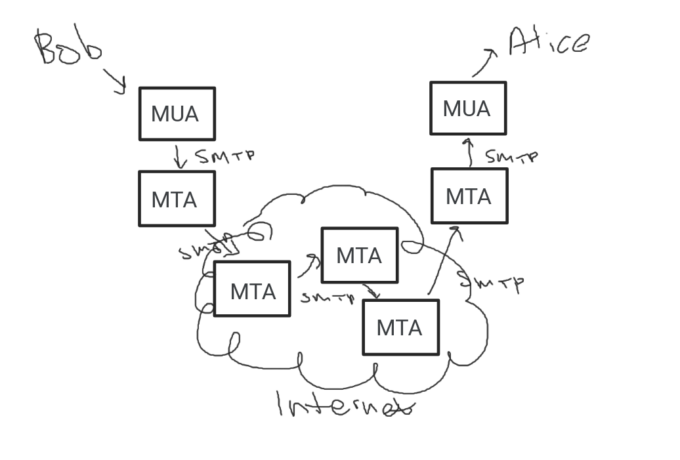
When Bob wants to send Alice an e-mail, he uses a Mail User Agent or MUA, such as Outlook or Gmail to write and send that message. The MUA will send that mail to the configured Mail Transfer Agent, or MTA. This MTA will then, through a series of other MTAs, find its way to Alice’s MUA.
SMTP is really just the language, or protocol that these MTAs and MUAs usually speak between one another.
#### What about websites?
Maybe Bob has a WordPress site, and Alice forgot her password, so she goes for that recovery e-mail, which we know happens through the wp\_mail() function. What happens then? Well, nothing special really, but this is where it often times gets messy.
Internally wp\_mail() is just a wrapper around an open source PHP library called [phpMailer](https://github.com/PHPMailer/PHPMailer). By default, this library uses PHP’s internal function called [mail()](https://www.php.net/manual/en/function.mail.php). And that, by default, will invoke whatever is in the [sendmail\_path](https://www.php.net/manual/en/mail.configuration.php#ini.sendmail-path) php.ini configuration directive, which defaults to the executable **/usr/sbin/sendmail**. And this is our default MTA.
[Sendmail](https://en.wikipedia.org/wiki/Sendmail) used to be the largest mail server software in use on the Internet, but today there are plenty of other options, including Postfix, Exim, Qmail and others, which happen to also have MTA executables compatible with Sendmail, which means they can read a message from stdin, and send it wherever it needs to go, based on the destination address. Postfix even ships with a /usr/sbin/sendmail executable, so it’s a full drop-in replacement for Sendmail.
Going back to wp\_mail(), what exactly does it do then? Nothing extra-ordinary: it creates an e-mail, which is just a string of headers and some content, and pipes it to an executable on the system. If you had to do this in an SSH shell, here’s what you would do:
```
$ echo "To:
[email protected]
From:
[email protected]
Subject: Hey
Guess you forgot your password, eh?" | /usr/sbin/sendmail
```
Yes. It’s that simple.
And it’s very efficient too. Your PHP script doesn’t need to connect to any servers, it doesn’t need to figure out where the mail is headed or how. It doesn’t even need to speak SMTP. It just needs to pipe a string into a binary. Your PHP script is the **MUA**., not the MTA.
#### So why is it broken?
Let’s go to some managed hosts and see what they have to say about e-mail not working:
Here’s Kinsta’s various [reasoning](https://kinsta.com/blog/wordpress-not-sending-email/):
* It is not a problem on the server, but rather email is set up incorrectly on the WordPress installation
* Some e-mail clients identify WordPress e-mails as spam, because they’re automated
* Your server isn’t configured to send them
Not a problem on the server, eh? When you run out of things to bash, why not bash WordPress. Also, e-mail clients identify WordPress e-mails as spam? This sounds ridiculous to me. Why would a spam filter classify an e-mail as spam if it contains password reset instructions, which is very likely exactly what the recipient was looking for? I surely hope most modern spam filters are smarter than that.
Now their last point, about the server being misconfigured, that sounds more like the truth.
WP Engine [claims](https://wpengine.com/support/using-3rd-party-email-provider-send-mail-wordpress/):
* Default e-mail functionality on WP Engine is limited
* We impose a hard limit on the amount of emails that can be sent in an hour
* For robust email functionality, monitoring and scalability, we highly suggest customers utilize a 3rd party email host
Okay, that sounds reasonable. They don’t want their IP addresses flagged for spam, so they filter things that don’t look like default WordPress e-mails (user registration, password reset, etc.) and for anything more than that, they want us to use a third-party service. Sounds fair, at least they’re not saying our WordPress install is broken.
Let’s see what SiteGround [has to say](https://www.siteground.com/kb/fix-wordpress-not-sending-emails-issue/):
* WordPress uses the PHP mail() function to send emails … Many email providers will mark messages sent this way as spam
* Misconfiguration between SMTP settings in Site Tools and your WordPress
* You should configure your WordPress to use SMTP instead of the PHP mail() function
Ugh. The mail providers I know usually rely on things like SPF records, DKIM, and also the e-mail contents. Not the name of the PHP function that was used to send the e-mail. That would be weird.
I looked at a few other hosts as well, and they mostly all tell the same story. For those that do support sending e-mail without any additional configuration, it is almost always limited to a couple hundred e-mails per hour, which I think is fair.
#### So is it really broken?
Not really I guess. Look, they can send transactional mail without any additional configuration. This means that they do have local MTAs responding to whatever is in sendmail\_path. They’re rate limiting and filtering, either directly in that binary, or at some other MTA, probably before the mail leaves their network.
This makes total sense.
What doesn’t make sense to me, however, is that with the vast majority of hosts, the recommended way of “solving” this problem, is with an **SMTP plugin for WordPress**, and they go through great lengths, to teach us how to install and configure all these different SMTP/Transactional mail plugins.
#### What SMTP plugins do to wp\_mail()
Honestly, there’s nothing wrong with using a plugin like that. It allows the user to specify SMTP settings and credentials of a third-party SMTP relay service, and causes wp\_mail() to use phpMailer’s SMTP capabilities, instead of using PHP’s internal mail().
Remember I said how sending a string to the sendmail binary is so clean and efficient. Compare that to sending something over [SMTP via PHP](https://github.com/PHPMailer/PHPMailer/blob/master/src/SMTP.php), which looks roughly like this:
* Create a PHP socket with fsockopen() or stream\_context\_create()
* Establish a connection to the third party relay’s SMTP server
* Secure that connection with TLS
* Authenticate with this server using your SMTP credentials
* Send the e-mail contents
* Wait for the SMTP server to acknowledge/accept the message for delivery
* Close the connection
If this third-party relay is an HTTP API service, then it’s probably slightly simpler than this, but still very complex compared to sending a string to a system executable. And imagine what happens if this SMTP/API service is offline or overloaded, or if the network conditions aren’t great.
Best case scenario, the plugin will detect that, and attempt to do all that work again later. Worst case, it will fail silently the message will never leave your PHP script.
In other words, with a plugin like that, your wp\_mail() function stops being just an MUA, and **becomes an MTA**.
#### Can WordPress be a reliable MTA?
No.
Just like WP Engine, Kinsta and SiteGround claim they’re great at web hosting, but want nothing to do with e-mail, your WordPress site is great at … being a site, but not a Mail Transfer Agent.
Sure, one could argue they can schedule e-mail delivery with the Action Scheduler library, and maintain a fully functional e-mail queue in the WordPress database, then use the WordPress cron to execute scheduled actions and attempt to deliver mail through SMTP or an API, and then defer to a different queue for retries later.
Yes, in theory that might work. But will it be great? I don’t think so.
Sendmail was written in the 1980s, Exim and Qmail were written in 1995, Postfix was released in 1998, and there are plenty of other options. These are widely adopted MTAs with decades worth of coding and testing in some of the largest and busiest networks in the world. Why reinvent the wheel in PHP and WordPress, instead of using something that’s proven to work so reliably over the decades.
Don’t let WordPress be your MTA.
#### Can WordPress be a performant MTA?
No.
I got myself a Mailgun account to run some simple mail performance tests. I provisioned a brand new vanilla WordPress install on DigitalOcean, and used Sail’s [mailgun.yaml blueprint](https://konstantin.blog/2021/mailgun-wordpress-sail-cli/) to quickly install the Postfix MTA, and configure it to relay mail to Mailgun’s SMTP servers.
I then wrote some sample code to send 20 e-mails to myself, nothing fancy:
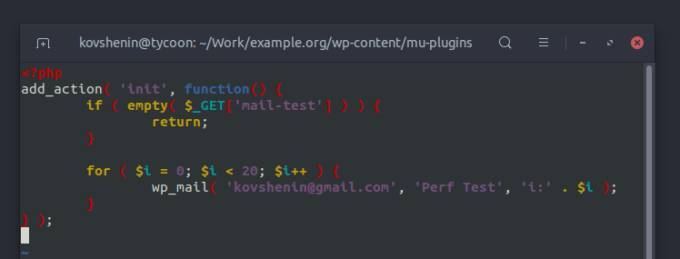
And I fired it. I measured the results with [Query Monitor](https://wordpress.org/plugins/query-monitor/) and [profiling in Sail](https://sailed.io/kb/profile/).
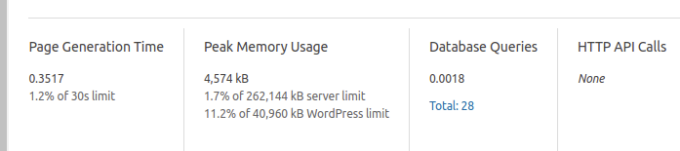Postfix results
I then tried a couple of SMTP plugins for WordPress, configured to the exact same Mailgun SMTP servers, and ran the exact same test:
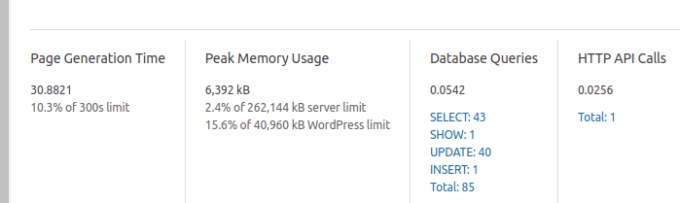SMTP plugin results
Ahem. **30 seconds**! Against 0.35. That’s like 90x slower. And this is only 20 e-mails.
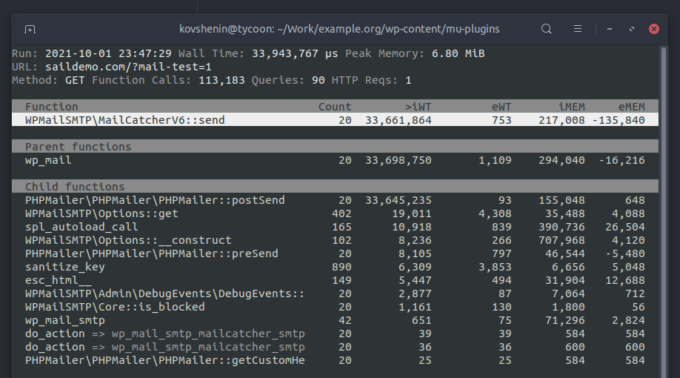
I ran the same request through an actual profiler to try and learn more about what’s happening, as expected 20 new instances of phpMailer, 20 new SMTP connections and so on and so forth:
Next, I tried some of the same SMTP plugins, but with a Mailgun configuration, which uses their HTTP API, instead of SMTP. The results were slightly better, as I expected:
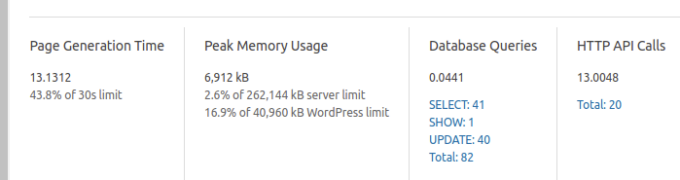Mailgun via HTTP API
Still, that’s **13 seconds**, against the original 0.35, so “only” about 40 times slower. How about a fancy chart to put that into perspective?
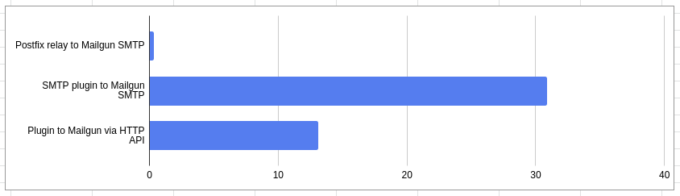
And again, this is just 20 e-mails. No wonder why everyone’s recommending not to use wp\_mail() for newsletters, or anything other than password reset communication. You just can’t afford to spend that amount of time in PHP, waiting for an e-mail to leave your script.
Don’t let WordPress be your MTA.
#### What’s the alternative?
There’s some good news, and there’s some bad news.
The good news is that if you happen to be a DIY-type of person, like to tinker with servers and wouldn’t mind getting your hands a little dirty with the command line, you can have Postfix (or any other great MTA) relay your mail to an external SMTP service.
Sail CLI allows you to [do this on DigitalOcean](https://konstantin.blog/2021/mailgun-wordpress-sail-cli/) with a couple of simple commands for Mailgun, or any other SMTP service through [the Postfix blueprint](https://sailed.io/kb/postfix/). If you’d like to do it from scratch, perhaps on a different cloud provider, DigitalOcean has [a great guide](https://www.digitalocean.com/community/tutorials/how-to-set-up-a-mail-relay-with-postfix-and-mailgun-on-ubuntu-16-04) on setting that up in Ubuntu Linux.
The bad news is that if you’re on a managed WordPress host, you’re probably out of luck, and will have to continue using an SMTP plugin for all your outgoing wp\_mail() needs. If you do use one, and it happens to support your mail service provider via an HTTP API, chances are that’s going to be more efficient than actual SMTP.
#### There’s hope for a better wp\_mail()
Sendmail is not all that complicated. It’s not rocket science. Nor is it string theory, although it does parse some strings from stdin. And hey, we already know that most WordPress hosts have MTAs up and running, so one piece of the puzzle is already solved.
The missing piece is the ability to configure an SMTP relay in your hosting control panel. Four input fields – SMTP host, SMTP port, SMTP username and SMTP password. Here, I’ll provide a free design for you, so you don’t have to spend $30k and eighteen months on your first iteration:
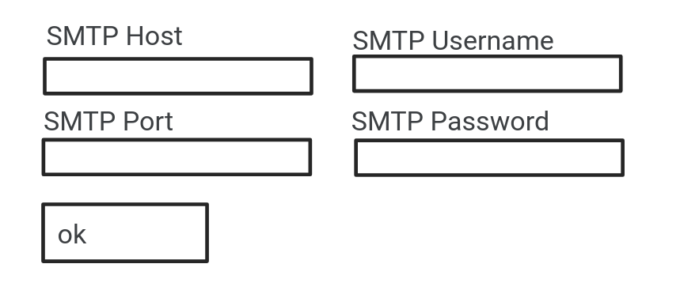
Bake these values into a Postfix (or whatever MTA software you’re comfortable with) SMTP relay configuration, add per-user authentication if you’ve got a shared environment, might need to add some isolation in sendmail for PHP, to make sure users are who they say they are, and you’re golden.
**Let your MTA be the MTA, so that WordPress can be WordPress.**
P.S. If you work at a hosting company that’s already doing this, please let me know so I can recommend you folks like crazy., Wp_mail() Is NOT Broken, About, 01hmhtb26xxfxd0sar8fagh7k7.