YouTube Video mDikN0bxcpY
## Metadata
- Author: [[YouTube]]
- Full Title: YouTube Video mDikN0bxcpY
- Category: #articles
- Document Tags: [[drupal]] [[recipe]]
- Summary: YouTube Video mDikN0bxcpY
- URL: https://www.youtube.com/watch?v=mDikN0bxcpY
to our talk this afternoon about recipes. Really focusing on some recipes that can also be really helpful for managing dates and times in Drupal. So for anybody who doesn't know me, my name is Martin Anderson Clutz. I am the principal solutions engineer at Aqua. I am also on a podcast called Talking Drupal. And last year I served as a star shop track lead for the events recipe uh which is now part of Drupal CMS. And if anybody wants to reach out to me directly, you can find me as man clue on
all of the Drupal and social platforms. So managing dates and times really across a variety of solutions is notoriously fraught with challenges especially once you start dealing with you know time zones, recurring events, um time um daylight savings times, a variety of different issues like that. And famously, lots of technical solutions aim to be helpful but actually end up being less than helpful in a lot
of cases. But fortunately, in Drupal, we have this system called recipes. And there are a number of different ways that recipes can make your life easier as a site builder, particularly for managing dates and times, which we'll go through today. So, we're going to start by talking about why we need this thing called recipes. Then we're going to get into a live demo and actually see applying some recipes and and the capabilities that that can give us. We're going to dive into what goes into a recipe as well as
how you apply them. Then we're going to talk about some of the the newer pieces in the recipe ecosystem as well as ending off with a focus specifically on recipes that can help us with dates and times. So why do we need this thing called recipes? Historically, we've had distributions and install profiles and on um you know the Drupal community which have been helpful in terms of allowing you to start with a more robust
um point in terms of capability for your your website, but they've famously had a variety of different issues. So, you know, they could um have challenges around keeping them up to date. And then if the maintainer of the distribution doesn't keep it up to date, then as the site owner, you may have issues being able to do things like apply security updates to your site or its modules, which obviously is is a challenge.
Obviously with distributions and install profiles, you're meant to apply them at a site level and so you can't sort of they're not composable. You can't sort of mix and match functionality. You can't say I want some of the capabilities of the Commerce Kickstart distribution and some of the Red Hen Razor. You have to sort of pick one or the other. And then that's even more challenging because sometimes they were kind of hard to find. So you might only hear about these after you had already started building your site from scratch and then it's kind of too late. they would have to start over again using
that distribution. And so to solve those challenges, we've come up with this idea of recipes. Kind of a lightweight way to add specific capabilities to your website. They don't contain any code, so they can install modules and configure them for you, but not contain any code of their own. They're meant to be composable, so you can sort of mix and match different recipes together. Uh from a terminology standpoint, we'd like to say that recipes are applied to Drupal sites. They're not installed because again,
they don't have any code. They're meant to be an easy way to share best of breed uh capabilities. And most importantly, they don't lock you into a specific approach. So you can apply a recipe to your site and then rip out whatever parts of it don't sort of suit your own uh particular use case. Uh apply other recipes, you know, those kinds of things as well. So, I think recipes are really important because they allow us to address a long-standing problem with Drupal,
especially for newcomers, which is we have this amazing ecosystem of modules. So, thousands of different modules that you can use for free to extend the capabilities of your site. But for a lot of people new to Drupal, that can be bewildering. you don't really know for specific challenges that you might be running into which of the many modules that can address a particular problem is the the best one to use. How do you set it up? Those kinds of things. And so the advantage of recipes is that for some of
these common needs, we can sort of agree on best of breed solutions and then as a site builder, that becomes something you can just sort of drop in pieces of the content architecture that you're you're trying to build out. Now uh earlier this year we had the first release of something called Drupal CMS. If you were in Gabbor's section earlier you probably um heard quite a bit about this but really the the focus of Drupal CMS is about providing a more compelling out of the box experience for
for um people just starting with Drupal. So instead of starting with Drupal core and then having to figure out which contrib modules you want to add on to sort of get some um common functionality, having Drupal CMS as a more robust starting point for Drupal really gives you a better sense of the power of what you can build with Drupal. So, Drupal CMS is a version of Drupal core that comes with a variety of contrib modules all preconfigured and
it's really a more opinionated version of Drupal in the sense of it's really designed to address a variety of very specific use cases. But for the sake of our talk, it's also important to note that Drupal CMS is really in many ways a collection of recipes as well. And so it is itself composable and it also means that you can sort of pick and choose. There may be parts of Drupal CMS that that are going to be useful for something that you're working on. You don't have to sort of adopt it full sale or not.
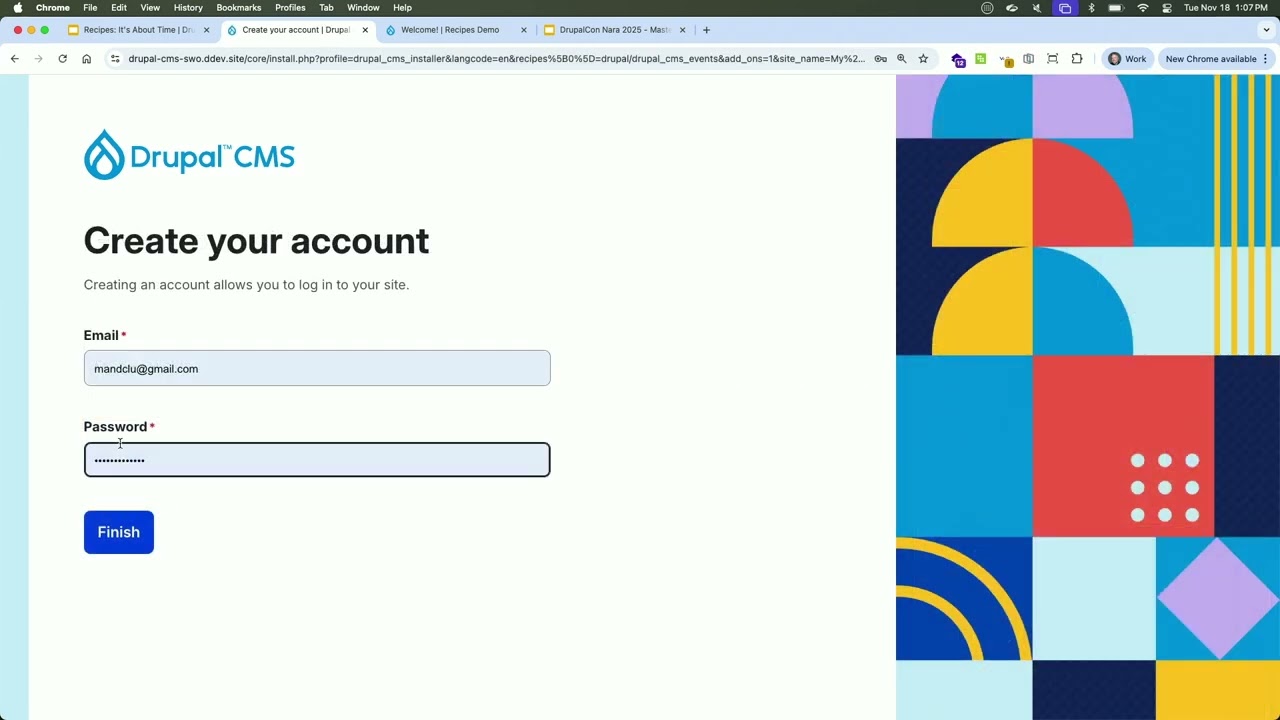
So with that, let's dive into a hands-on demo so you can sort of see some of the capabilities firsthand. So this is Drupal CMS one uh starting and you can see the first thing that it asks you to do is to identify what kinds of content that you want to be able to manage on your Drupal CMS site. And it's important to note that these are actually all recipes. So effectively it's presenting a UI whereas a site builder you can say this is the kind of content that I want but uh ultimately what it's doing to
address that is actually installing relevant recipes. So if we go ahead and we'll just use some default values and get it going. What you can see now is that it's actually going through the process of installing and configuring a variety of different modules behind the scenes. So in the audience, show of hands, who here has played around with Drupal CMS? Got a few hands. Anybody running it in production?
Oh, we got one. Here we go. Nice. All right. So the installer is just wrapping up here and then what that's going to do is actually take us to a dashboard which again is sort of a new thing in the Drupal sphere at least in terms of an out of the box experience. But notice now that we have this ability to go in and create an event. So we'll just create one here. We'll grab something from the media library. Notice that we have kind of an easy to use calendar widget to set the time and dates. So three. And notice that it
updates the end automatically. We can go in and provide a location. So we'll say that's going to be the US just because I have one saved. Give it a description. And let's just go ahead and publish that and save it. And what you're going to be able to see having just installed Drupal CMS uh with one click told that we wanted to manage
events. Now we have the ability to create those. Notice that it will do geolocation out of the box. Um but because of privacy some of the privacy features built into Drupal CMS you as a user you have to sort of click to say it's okay to expose my IP address to that third party. So that's a security feature not a bug. And then if you wanted to to add other of those um recipes to your site, you keep you have the option of doing those
not just when you're first installing the site, but also by going into the project browser, which is part of the extend menu. And then you have all of those same ones that we saw at the beginning, plus some others. So accessibility tools, AI assistant, uh SEO tools, and a variety of others. So lots and lots of capabilities that you sort of have out of the box. and and again it gives you that ability to sort of quickly build out a really robust set of features by leveraging the recipes that are built into Drupal CMS. But it's
also worth pointing out that you can pull any of these recipes into other projects that you might be working on um if you think that they would be beneficial. I thought it would also be interesting to see using recipes on more of a Drupal core site. So just standard Drupal 11. And so we've got our recipes demo site. Just to point out here, we've only got article and basic page. So again, the ones that ship with Drupal core. And what we're going to do is go on the command line and use Drush to run a
recipe. So you can see it's sort of following the same process as we saw with Google CMS. And then as a best practice, I always like to rebuild the cache after client recipe. And now if we refresh our page, you're going to see now we have an events area in here where we can go ahead and add an event. Now notice that the um inputs here are much simpler. So it's
less opinionated in terms of the assumptions that it makes about exactly what capabilities that you want. So got a test event. We have sort of the same widget. So we can set our event off into the future. And let's go ahead and just save that. And now maybe we've decided there are additional capabilities that we want for our event systems. So we can actually apply other recipes. So maybe we want to have recurring events.
Maybe we want to have an interactive calendar. Maybe we want to be able to associate locations like we did in Drupal CMS with our events. And maybe we want to be able to have users register directly on the site for different events. So we can say let's
also apply events registration. And then the last thing we're going to do is again rebuild our cache. And now if we go back to our site and refresh the page, you're going to see here we've got a new locations area. So we can add a location similar to what we did on the AC CMS site.
So go and add that again. Notice that it's doing the geoloccation out of the box. not something that we had to set up ourselves, provide any kind of an API key, any of those kinds of things. And now if we go back to our event, um, one thing I didn't point out earlier is it does do the add to calendar links out of the box as well. But if we go ahead and edit this, notice now we have the ability to make it a recurring event. So we can say let's have this recur and end after five times.
Uh, we can associate it. We could add a new location in line with inline entity form or we can just say go ahead and add the one that we just created. And notice now that we do have this ability to associate a registration type. So these are fieldable ways of collecting registration. So maybe you've got some events where you need to collect t-shirt sizes for people registering and then other ones where you want to collect food allergies with
registration types. You can set that up and make it really easy to allow your content creators to uh basically associate the correct kind of registration based on the in specific needs of your event. So now we've got a registration form. We've got the output formatted uh specifically to best handle recurring events. And if we go back out to our events display, now we also have a calendar display and we can drag and drop to reschedule between days or even if we go into the
day, reschedule the time of day or even the duration or we could even do things like drag and drop to make it an all day event. So it becomes a really easy and intuitive way for your content creators to be able to manage their events. And just to to point out here, it has saved that to the database through all of that. So, in just a couple of minutes, we've actually built out a pretty robust event system, uh, giving us a lot of different capabilities in terms of how we might need to manage that.
So, let's jump back into our slideshow and talk about what goes into a recipe. So, the heart of a recipe is really this recipe. File. In some ways, it's similar to the info.l demo file that you would find in like a module or a theme, but it has some of these new sections. So, recipes is where you can specify other recipes that you want to be applied when this recipe is applied to your site. Install is where you can specify modules
or themes that should be installed. But when it does that, it will only install the basic configuration for that module. So, if it provides other configuration entities, then those won't get imported. So when you think about as an example like the views module when you install the views module it gives you a whole bunch of default views uh if you had installed the views as uh through a recipe it wouldn't give you those all of those default views by default and so you can use the config import section of
the recipe to specify if there are some of those that that you want to be imported and then finally config actions is really a powerful and flexible way of altering the configuration of your site and we'll get a lot more into some of the config actions that are available and uh and why those are important. Now composer.json JSON is where you can specify what are all the dependencies for this particular recipe and make sure
that those will be available. And then optionally you can have uh directories for uh static configuration files that you want to be imported when the recipe is applied or content to have content automatically created again when you apply your particular recipe. But both of those are optional. So here's an example. This is actually a recipe that's available on frugal.org as a control project. So it has the recipe.l. It has the composer.json,
a variety of config YAML files, and then it has some taxonomy terms that'll be created automatically when you apply that recipe. Notice that those are grouped in a subdirectory whose name is identical to sort of the machine name of the kind of entity that should be created. So the composer.json is going to be pretty similar to other kinds of projects again modules or themes. The crucial difference here is having the
type of dup Drupal recipe. Um then you can list your requirements and then optionally you can say these are some things that we can suggest as other ways to extend the recipe. There is in the recipe.yaml sort of you know again name description optionally type again similar to things like modules or themes but now we have this recipes section where we can say in the process of applying this recipe these are some other recipes that should be applied
and then we can list in this case modules that we also want to have installed as part of applying this particular recipe. And then we can specify. So we could say for this particular module use a wild card to say import all of the configuration entities that it provides or for this other one we can say there are specific ones that we want to make sure will be available after this particular recipe is applied. And then config actions
um are sort of a new concept as part of the recipe system where you effectively can be very targeted in terms of how you want to update the site configuration. So it really has three parts. So first is the actual configuration entity ID in this case system theme. The next one is the action to take in terms of how you want to modify it. So in this case we're using simple config update. And then the last part is really the action arguments. So what are the actual values
that it's going to use um to manipulate the site configuration. So in this case we're saying uh make a config update on system theme to set the default value to emulsify which basically in plain English means set the default theme. So the one that anonymous users will see to be the emulsify theme. Now it's important to understand that uh with config actions there's there's fundamentally kind of two different groups of config actions. So there's a
set that are globally applicable. So you can use them for any manipulate any kind of configuration. So simple config update we just saw an example of that. Create if not exist is another one that you'll probably see quite a bit. And then set third party settings is another one that gets used a lot. There is a QR code in the top right. So, uh if you want to see kind of the full list, that's all in the documentation. But the other kind of big set of config
actions is really the ones that are specific to different kinds of config actions. So, let's say you want to manipulate the user roles that are on your Drupal site. You can use grant permissions to say, you know, add specific permissions to either one role or multiple roles. Or let's say if you're working with workflows, you can say to a specific workflow, add new note types or add specific taxonomy vocabularies. Again, there's a a much longer list that you can get to through
the QR code. I will also make all of these notes available later on. You can also use wild cards to to make some of the config actions apply more broadly. So as an example, you know, if you wanted to grant a specific permission, in this case, access content to all roles that are defined on a particular site, uh you can see that just adding the wild card will help you achieve that very easily. Or if we wanted to say we want to add this component of field tags on every uh view
display of every content type, you can see that by adding uh two wild cards to this particular config action. Again, we can achieve a really wide impact in terms of the number of displays that that's going to impact uh with just a a really small amount of YL code. Now, for me, the a really good example of the um the benefit of config actions, particularly over the older style of of just static YAML files, is the uh config
actions that are available to place blocks in a theme. Because previously if you wanted to place a block, you could do that with a static config configuration file, but you would have to specify exactly which theme it should go into, exactly which region it should go into, and a numerical weight in terms of where uh it that should land relative to any existing blocks in that region. So, but the challenge is then um if the
um the theme that you specify isn't even on the site, then then that won't work at all or um you know, you could run into a variety of different problems. The weight might not be um what you expect. So, you might say, I want something to appear at the top of the region and give it a weight of minus 10, but there might already be things in there that are minus15 or even minus 100. So having these config actions um is much more flexible because you can do
things like say I'm going to use the place block and default theme at which point the recipe runner is going to do the work of figuring out exactly what is the default theme and then that becomes the target. You can give it a an array of different um regions that you want it to use. So a key by what the expected theme name would be. So you could say if it's the Bootstrap theme then put it in the footer. If it's the gesso theme put in the page bottom and so on. And you can also have a default region as a
fallback to say if it's none of the ones that I expect then just throw it into in this case the content region. And then you can use first and last as the keywords for how to position it. And then the rescue runner will do the work of saying find what's the currently the topmost block let's say uh in the target region and then figure out what the weight needs to be so that it will appear either first or you know do the opposite for last. So again much much more flexible than sort of the older static approach.
Now you can also have recipes opt out of the strict comparisons with uh existing configuration just by adding in the strict false tag to say you know broadly if the config that's being imported matches an existing configuration entity then just skip over it or you can say maybe there are just specific ones that we want to make sure align with exactly how um you know we're expecting so I think typically in existing recipes you'll
probably see things like field storage. A lot of recipes will say keep that strict because we really want to make sure that that those match, but then be more flexible with some of the comparisons. Now, recipes also have a an API for defining config actions. So, essentially uh using PHP attributes to specify what's the ID you should use to sort of call the config action. Optionally, you can provide an array of entity types. So again, instead of having globally
applicable, you can say define only specific entities where a particular config action should be used. And then if you're potentially using it with multiple entity types, you might want to use a der to sort of differentiate how it should work for different kinds of entities as well. We know the search API was one of the first uh contrib modules to actually implement this API and so it's great to see that the contrib ecosystem is already starting to adopt and implement uh some of the new capabilities available for recipes as
well. So, some best practices if you're wanting to create your own recipes. There is this concept of item potency, which is a word that a couple years ago I had never heard of, but it's really just the idea that any recipe you should be able to apply to your site kind of again and again without having any kind of an error. So, it'll take a little getting used to in terms of how to set up the recipe. So uh in some cases it'll require using things uh like the config action create if not exists or turning
off the strict comparison uh for a lot of cases but you know it'll require some testing and as I say some getting used to as you start creating recipes. It's definitely a best practice to try and keep your recipes gran granular as much as possible. So in the same way that Drupal CMS is in some ways uh almost like a meta recipe or a site recipe uh but is composed of those smaller ones that we saw you could apply individually. Um we could also use the
example of the standard profile in Drupal has actually been converted to a recipe and so it's composed of a v variety of smaller recipes again to make them kind of more reusable and u things that you can use for kind of narrower use cases as well. But by all means, publish your recipes. They don't necessarily have to be on drupal.org, but if you do want to put them there, make them a general project. Um, but really anything that has sort of packages integration and as long as you define the the type in your composer.json as a Drupal recipe, then
um, any sites will be able to pull that in via composer. Now, we talked a little bit earlier about how a recipe can actually embed content. Effectively, what they've done is taken the import mechanism that's in the default content module that you may have used on some sites before and and actually put that into core. If you want to export content to have that imported as part of your recipe, um, today you would sort of use the default content
module as the way to export that, but there is an issue open around getting also that export part of default content within core as well. But once you have those YAML files, again, you just put those into the content directory within your recipe. Um, ideally keep those within a subdirectory that's key by the machine name of the kind of content that should be created and you're all set. When you apply your recipe, that content will be created automatically. So, here's an example of the locations
recipe. This was actually applied in our demo when we um added the events locations recipe. So it was uh it had a dependency on location. So this is actually something that would have run behind the scenes. So you can see here we've got our name, description, and type. We've got a variety of different modules that got enabled by this particular recipe. And then further down it actually specified a number of modules where it said, you know, just import any of the configuration entities
that those provide. And then uh further down still we've got a couple of config actions specifically related to the entity form display for node location. Uh basically saying you know pre if not exists trying to make it impotent and then setting the the components for that form and specifying the order in which those should appear. So if you want to apply recipes we've already seen a couple of different options. So certainly as part of installing Drupal CMS, you have the
ability to sort of uh pick which ones you want to have applied. Um there is also the project browser that we saw in Drupal CMS. Uh but project browser is something you can install on any Drupal site. And then on the command line uh we saw using the Drush command which is effectively a wrapper of the uh PHP script that is supplied by core as well. But I I find that one definitely by far the easiest to remember. Now, it's worth knowing the order in which the recipe
runner will execute um the available commands as part of the recipe. So, it's going to start by applying any other recipes that are in that recipe. Then, it's going to install the modules and themes that are specified. If it you have specified import specified configuration, that will be the next step. Then it will import any uh provided configuration in that config folder of your recipe. Then it will run any config actions at the bottom of your
recipe. And then the last step will be to import the content. So if you're running into some unexpected behavior, sometimes just remembering the order in which those things are going to happen uh can be helpful as well. All right, so let's talk about some things that are relatively new in the recipe ecosystem. There is this concept of unpacking. So originally there was a bit of a challenge around recipes because you could use composer to pull down a
recipe, apply it to your site. Now you would have all the configuration that depended on a set of dependencies that were brought in by composer. But if you actually composer removed the recipe, you would still have the configuration in your site but not any of the modules or other projects that you know it depended on and which could leave your site in kind of a broken state. So now in core by default there is a composer script that when you uh composer require a recipe will actually automatically
unpack the dependencies and put them into your site composer.json JSON so that when you apply the recipe, you can get rid of the recipe. It doesn't matter. It'll already have all of those dependencies in your site composer.json. We talked about how you can use wild cards to make the config actions more dynamic. And there are some new ways that those are being implemented so that permissions or or different things that require sort of, you know, tokens or other ways of, you know, using
uh some of the um the keywords, you know, it just allows it to be a little more flexible again so that you don't have to sort of manually repeat things. It can be more dynamic. Recipes now now also have the ability to prompt for user input. So as part of applying a recipe and ask the user. So in the example you see here, it's asking for an email address to which a feedback form will send, but uh there are recipes where
it'll ask for things like an API key or an access token. I think the AI one that's in Drupal CMS does that. And then at the bottom here, you can see an example of how you would use that token as part of a config action to to set where that rest or that value that was collected should be used. There is also now a growing ecosystem of modules that you can uh use to work with a recipe. So project browser we've already seen and talked a little bit about, but again you can use that with a
variety of sites, not just with Drupal CMS. There is a module called recipe tracker that will basically give you a log of what recipes were applied to a particular site um including when by whom and what version of that recipe was applied. You can do thing or there's a module that will allow you to have kind of a custom module within your recipe. I'm still a little bit dubious as to whether or not that's actually a good idea, but
um it's there. And so maybe if you've got a very specific use case, uh, you can try that out. There's a module called recipe secrets that allows you to have your config actions effectively pull values from a like av file. So if you uh apply the recipe, you know, within different environments instead of sort of um pulling it down, let's say in a local and then pushing those changes out, that's something that may be helpful. Again, best practices. There's probably some discussion there, but
there is a module called Ratatouille that you can use as sort of a a UI or wizard to help you actually generate the recipes themselves. So, if you're wanting to get started with uh recipes, but don't want to have to sort of manually uh collect together, you know, the the YAML things and and get them moved into the different directories, something like Ratatouille can be, you know, a more intuitive way to get started creating your recipes as well. Now uh translating recipes is uh
something that is really being actively worked on and as part of that whole initiative around making sure that Drupal CMS will work for multilingual use cases. Um Gabbor mentioned this in his session earlier but there was actually a really good deep dive on this in yesterday's session called global reach one platform the journey to implementing multilingual in Drupal CMS. So, if you haven't seen that session, I would definitely encourage you to watch the recording when that's available.
There is a recipes cookbook, which is effectively a wiki page, but a really useful resource. If you want to get started playing around with recipes, you can see all of the ones that are available. But again, because it's a wiki page, if you actually start creating your own recipes, by all means, go there and get those listed so that, you know, as a community, we can all start to sort of collaborate and share feedback. There is quite a bit of really good documentation for the recipe system, but today it all lives in GitLab, which is, you know, from a findability standpoint, not ideal. So, there is a recognition
that there's a set of work that needs to be done to get those moved into sort of the main drupal.org documentation. And if you're interested in helping with uh recipes, then that could be a great way to start contributing as well. All right, so let's dive into recipes that are really more specific to events. Um, really starting by talking about some of the ones that we saw in our demo. So the events recipe that we started with um creates your event content type. It creates a view with
displays for upcoming and past events. Terms of ongoing work. There is um you know probably going to need continued UX improvements as well as accessibility issues dealt with. And uh there is a core issue and really a patch that you should probably use if you want to use that uh particular recipe that fixes something around sort of navigation and tabs and some other things. The events location recipe that we saw
uh depends on the locations recipe as well which uses the address and geo field modules for handling it addresses as well as the nominated service for geocoding and then leaflet as a free and extensible mapping solution which I would say is highly recommended and then the actual events location recipe then really only creates the association uh aware reference field on the events content type.
Uh the events calendar that we saw uses a refreshed version of the full calendar module which uses the full calendar JavaScript library that gives um all of the sort of drag and drop editing that we saw. Also allows things like double click to create a new event within the calendar. Um and then there are plans some improvements around the performance particularly for large data sets of events with full calendar as well as the ability to have configurable tool tips
for events within the calendar as well for the registration recipe. It creates that Drupal based registration system that we saw uh using the entity registration module which has those sort of fieldable entity registration types. it um probably could use some ongoing improvements in terms of that sort of user flow of registering. So if you have some thoughts on that, would definitely love to hear that perspective from people who have real world use cases.
And then the events recurring recipe that we saw really only does four simple things. It's probably one of the smallest recipes that I've worked on. Um if you are a person who knows and has worked with Smart Date quite a bit in the past, it's only going to save you a couple of minutes. But again, spirit of recipes is to try and lay things that um common use cases easily address without having to have sort of that uh domain knowledge. So having that as a single step that somebody can apply to their site and have that capability available
uh I thought was worth the effort. So the last thing that I want to talk about is uh a more complex use case. So maybe you have a site for that needs to manage an event like this one. So a something like a Drupal camp where you've got user submitted sessions that you need to evaluate maybe assemble into a schedule list sponsors and so on. So there is this project called event platform that is specifically engineered for helping with that use case. It's um
a successor to the old COD or camp organizers distribution. um provides sort of a a centralized platform for being able to manage sessions, featured speakers, sponsors, um being able to have a workflow for accepting sessions, evaluating them. Um if you do things like reject or accept sessions, it'll automatically email the author to sort of let them know as well as doing things like having an ability
to like sessions to create a personalized schedule as well. So, there's a variety of features. There's been a lot going on this year uh including adding a custom theme specifically designed to work with the event platform. Um but probably in you know relevant to this particular session um there is now a built-in way to sort of pull in some Drupal CMS recipes to get some capabilities like SEO enhancements and and some of the other features that are more reusable and and
that's again part of the benefit of that composable approach that recipes gives Drupal CMS. Um, I won't go into too much detail because I would like to have a few minutes for questions, but there was actually an entire session devoted to event platform at Drupalcon Vienna. So, by all means, uh, you can use the the QR code or this graphic will be linked again in the notes at the very end. So, hopefully you can see between the capabilities in Drupal CMS, the events recipe ecosystem, as well as event
platform, some off-the-shelf ways that you can make it easy to manage dates and times in Drupal. Maybe one of these fits exactly with how what you need to do for your particular site, but if not, they can at least provide some reference in terms of what are some best practices that you might adopt in slightly different ways. Also, there is a datetime channel in Drupal Slack and so that can be a great place to post questions if again you have a more specialized use case. Um, so hopefully you can see that recipes really give you
that easy way to adopt and implement uh community provided best practices. is we've seen uh a few examples specifically for events, but again, if you go to that recipe cookbook, you can see all of the different recipes that are available to help you get started. And with that, I will open it up for questions. Yes, thank you very interesting question
about how to build the whole website using receip in version with profile. So with recipes we should install the pre Drupal website and then install recipes and how to automate this to achieve the same result as with profile. And one more it's about simply test. So simple test now doesn't support recipes. Do you have any ideas about how to leave test recipes and
provide some of them? All right. The so the testing part of your question I'm afraid I can't offer a lot of insight. What I would suggest is maybe talk to somebody like if you know Finn proxima I have. um he's done a lot of the development work on Drupal CMS and I'm sure they've got testing uh best practices that they've established as part of that. So they're probably um the best um people ask about the testing
specifically in terms of uh profiles. I what I would say is if again if you look at the standard profile in Drupal that has actually been committed or converted entirely into recipes and so you know you can look at that as sort of a reference in terms of exactly how you can achieve what you would have done previously using installed profiles but now entirely with recipes. Um, and then I think it's uh, canopies if
again it's listed in the recipes cookbook. Um, basically has their own set of sort of site recipes that that take that same approach of having some people call them like site recipes uh, in that idea of being similar to a site profile in the sense of sort of being um, you apply this one recipe and and basically that's the starting point for your site as opposed to having sort of run multiple ones. So, I think those are probably a couple of good models to to sort of start understanding exactly how people are using recipes as sort of the
the um you know profile replacement. Um or were you kind of getting more at like site templates? So it's mostly about uh installing the Drupal with recipe because now we should install Drupal as the first step and the second step to install recipe but people just want to install recipe with Drupal together as one. >> Yeah. So the the installer that we saw for Drupal CMS is something that is available as a separate project. So
let's say you were part of a higher ed institution where you wanted to provide a similar experience in terms of saying start with the installer and then pick which recipes you want to be installed. Um you can provide that same kind of an experience. >> So it's a separate uh composite model to that will do this right not simple way. >> Uh I think that's the simplest way that I know of. Yeah. Yeah. >> Okay. Thanks. Yeah. >> Welcome. Any other questions? Excellent.
Yeah. Cool. Um, two questions, but they're kind of the same. Um, I I saw on the configuration import actions that um you have like create if not exist. Uh, so I guess like if the uh configuration already exists, then it will not be tried again. Um so my question is like what if by happen stance you have you want to s two recipes but they both some configuration say some view shares the
same view with machine name um does that mean they're fundamentally incompatible um is like kind of my first question or um slash you should make it more unique machine name um and my second question although partially related is um is there has there been any thought on um Yeah, things like views where maybe instead of using machine name using like a view ID or something so that you would be very unlikely to have views that uh
would or other configuration that would uh conflict. Yeah. So uh yeah question is like press would they conflict and if they would conflict has there been any thought of like how to manage that? >> Yeah. So, uh, I'm going to start by answering your first question and if I forget the second one by the time I'm done the first and you can remind me. Um, so really I think what your question gets at is the um the strict comparison.
So by using as you say the like create if not exists between the two modules then if let's say both modules were using that same config action then there would be no problem um as long as there weren't sort of like cascading effects in terms of other configuration that had different expectations or assumptions about how those were uh should be configured. So again um for things like content type definitions then then using sort of a non-strict comparison usually
won't create a bunch of any sign significant problems. But let's say for field storage, if two different recipes are expecting um fields with the same machine name to be storing data in in two different ways, then effectively they're they should be incompatible, right? So um so I would say in that sense having them not compatible is actually the expected result because you know they're they're expecting to store different data in the same field which
you know Drupal won't do. Um okay so remember the the second question again. >> Yeah sure. The second question was like maybe some configuration uh like in the old days we had like node ids for content and I think triple was moving more towards like new ideas for content. So content on different ID um view ID. So my question is like um is it possible slash has it there been thought of creating configuration using view ids
like universally unique ids instead of just generic streams to make them less likely to conflict with each other >> future. So I would say for the content edies it really is using the UU ids but for the configuration um probably if if the if the configuration is similar enough that they would have the same machine name then there should be some thoughtful way to to resolve what what would be a conflict
anyway. So uh having things that effectively are creating the same configuration but using separate UU ids is actually probably going to give you more problems than resolve it. So it's better to say, you know, again, like make them either non-strict so that whichever one is installed first becomes the reference or if if that's a problem, then really you've got again two incompatible recipes and you know, you should be
aware of that, I guess. Uh yeah, I mean more like if you had say two alert views of two different paths, then maybe you want both to be active. But it seems like that's not possible because they both share the same alerts machine. Um, so if it's two different paths, then you could just have them as different views or you might be able to use something like config action to sort of like add a display to the existing view, something like that. So there's there's different ways you could get around that in terms of exactly, you
know, depending on the the use case. >> Okay. Thanks. So it's a bit a bit tricky, but yeah, yeah, yeah. Thanks. >> Yeah. All right, we're actually a couple minutes over. If there's one burning question left, I can maybe do that. But I don't see any hands, so I guess we're good. Thanks, everyone., YouTube Video mDikN0bxcpY, YouTube, 01kabwjcft4p8gj0prt0x8t8p9.